


OUTDOOR WIRELESS NETWORKING • TANZANIA
Ubiquiti Wave Pico (Wave-Pico): Compact 60 GHz Wireless Station
Build a planned high-speed outdoor link with a directional Wave station, integrated 5 GHz backup radio and UISP management. Check topology, distance, power and peer compatibility before ordering.
Quick product overview
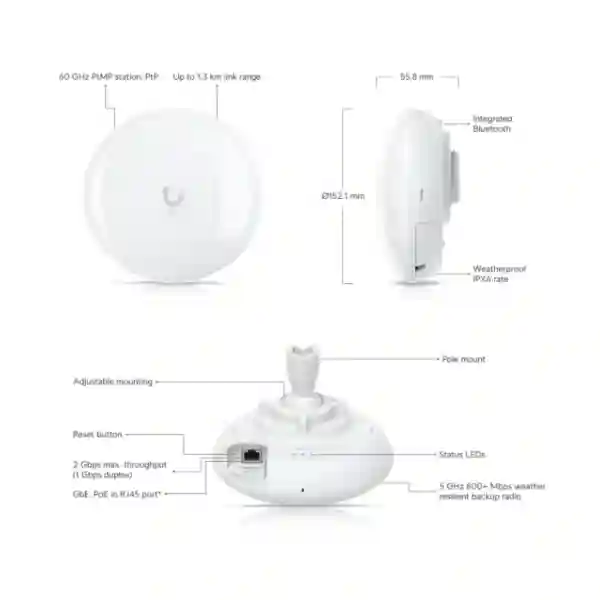
The Ubiquiti Wave Pico Wave-Pico is an outdoor wireless station for point-to-point links and point-to-multipoint subscriber connections. Ubiquiti specifies up to 2 Gbps aggregate throughput, with maximum published distances that depend on the link topology and peer device. Its single Gigabit Ethernet port, passive PoE powering and narrow directional antenna make it important to plan the complete deployment rather than treating any one number as a guaranteed service result.
| Manufacturer | Ubiquiti |
|---|---|
| Model identifier | Wave-Pico |
| Primary radio | 57–71 GHz worldwide specification |
| Throughput specification | 2 Gbps total |
| Maximum PtP distance | Up to 1.5 km |
| Maximum PtMP distance | Up to 1.3 km with Wave AP; up to 0.9 km with Wave AP Micro / Wave AP Gen2 |
| Antenna | 27.7 dBi primary; 6° beamwidth |
| Backup radio | 5 GHz Wi-Fi 6 (802.11ax) |
| Wired connection | 1 × GbE RJ45 |
| Power | Passive PoE; 10 W maximum |
| Included adapter | 48 V DC, 0.5 A Gigabit PoE |
| Dimensions | 152.1 mm diameter × 55.8 mm depth |
| Environmental rating | IPX6; -40 to 60°C specified operating temperature |
| Management | UISP |
What the Wave Pico is designed to do
The Ubiquiti Wave Pico (Wave-Pico) is a compact outdoor station for wireless links between network locations. It serves network operators, installers, and organisations that need to carry Ethernet traffic across a clear outdoor path without laying cable between every endpoint. A Wave Pico can serve as a point-to-multipoint station connected to a compatible Wave access point, or form a point-to-point link when correctly configured with compatible equipment. It is a directional network bridge, not a household Wi-Fi access point for laptops and phones. The difference matters: the device is intended to connect parts of a network, while separate indoor or outdoor access points can provide Wi-Fi service to end users downstream. Before purchasing, identify the two sites or the access-point sector, establish the required capacity, and confirm that a reliable line of sight can be maintained. A well-planned radio path and suitable power are more important than a headline distance rating.
Where this compact station fits
The Wave Pico is suited to outdoor installations where a discreet radio is valuable and high-capacity service is required. A wireless internet service provider could use it as customer-premises equipment at a subscriber property reached by a compatible Wave access point. An organisation could use a point-to-point arrangement to connect a security office, warehouse, outbuilding, or adjacent facility to its main network. Agricultural sites, workshops, campuses, and separated commercial premises may have similar needs. The appropriate configuration depends on topology, permitted radio channels, the path between locations, and the service being delivered. It does not replace an internet subscription, a routing and firewall policy, or the cabling and switching needed inside the destination building. Where the route crosses obstacles or lacks dependable mounting positions, fibre or a different wireless technology may be more suitable. Plan the entire end-to-end connection rather than treating the outdoor radio as a complete network by itself.
How 60 GHz wireless affects the design
The primary link operates in Ubiquiti’s 60 GHz Wave family, with a published worldwide radio frequency range of 57–71 GHz. Higher-frequency directional radio can support substantial capacity over appropriately engineered paths, but it demands careful attention to alignment and propagation conditions. Buildings, foliage, new construction, and moving obstructions can interrupt a path that looked clear during initial surveying. Heavy rain may reduce link margin, especially as distance increases. The published maximum range is therefore a planning reference, not a promise that every environment can deliver it. Determine path length and elevation, account for obstructions over the full radio path, and assess local weather exposure before choosing mounting points. An installer should use compatible tools to evaluate alignment and signal quality and should validate the deployed link under representative traffic. A shorter link with healthy signal margin often has more operational value than a longer link designed at the edge of its capabilities.
Understanding the published range figures
Ubiquiti lists up to 1.5 km for point-to-point deployment. For point-to-multipoint station use, the manufacturer lists up to 1.3 km with Wave AP and up to 0.9 km with Wave AP Micro or Wave AP Gen2. Those figures describe different peer-device configurations and must not be conflated. When comparing equipment, ask which access point will be used, how far away it will sit, and whether the expected route is clear and properly aligned. The number of subscriber sites, sector geometry, competing traffic, and local interference also affect network planning. Never purchase solely on the farthest advertised distance. A path survey, link-budget assessment, and capacity target help determine whether the intended connection is practical. If a site is beyond the relevant specified range or has unstable visibility, evaluate a more appropriate model or link architecture instead of assuming the Wave Pico can stretch indefinitely. Physical terrain and site access can dictate the safest solution as much as electronics.
Throughput versus usable network speed
The manufacturer’s total-throughput figure is 2 Gbps. This should be understood as a device-family aggregate specification rather than a guarantee of 2 Gbps through its wired Ethernet connector. The Wave Pico has one Gigabit Ethernet RJ45 port, which is an important consideration for practical payload capacity and service planning. Radio capacity, Ethernet interface capacity, protocol overhead, traffic direction, and actual link conditions are different measures; a quoted figure in one category cannot be treated as a guaranteed application speed. If a prospective customer needs a particular symmetric service rate, document the required upstream and downstream throughput and test it through the complete installed network. Router performance, local switching, the upstream connection, and congestion can become additional bottlenecks. The Wave Pico is attractive for compact directional installations, but very high single-port requirements should trigger an interface-level comparison with other equipment before purchasing.
Why the 5 GHz backup radio matters
Alongside the 60 GHz main radio, the Wave Pico includes a 5 GHz radio based on 802.11ax, also known as Wi-Fi 6. Its purpose is to provide an alternate radio path for an appropriately supported wireless link when primary-band conditions deteriorate. This is especially relevant to outdoor links exposed to changing conditions. However, a backup radio is not a promise of uninterrupted connectivity, fixed fallback throughput, or unchanged latency. Actual fallback behaviour depends on the topology, peer configuration, firmware, channel conditions, and installation. The backup band must be planned in its own right: available channels, other 5 GHz users, antenna alignment, and locally permitted frequencies all matter. When uptime is important, test the link’s transition and recovery behaviour as part of commissioning rather than relying on a feature label alone. Business-critical services may still require separate upstream redundancy or a second independent physical route.
Point-to-point and point-to-multipoint choices
In point-to-point operation, the goal is to join two defined network endpoints. The installation plan centres on the route between those sites, the radio at each end, and the desired Ethernet behaviour. In point-to-multipoint operation, a compatible Wave access point serves multiple stations, each of which needs appropriate geometry, signal level, and capacity allocation. Ubiquiti lists the Wave Pico as supporting PtP and PtMP station operating modes. It should not be assumed to function as a sector base station for multiple clients just because it supports the PtMP term. Buyers building a new multi-subscriber network should budget for a suitable access-point device and confirm compatibility with the exact models and software versions. For a single link, verify supported point-to-point configuration before installation. The correct topology avoids unnecessary hardware purchases and makes future expansion easier to plan.
Compatibility within the Wave ecosystem
Wave equipment is a family of related products, but devices are not interchangeable in every role. A Wave Pico is a station product; compatible Wave AP devices provide the point-to-multipoint infrastructure. Ubiquiti’s published ranges distinguish Wave AP from Wave AP Micro and Wave AP Gen2. This illustrates why an apparently minor model change can alter planning assumptions. A purchase review should record the model and firmware of both ends, the intended radio mode, and required management features. Do not assume that an unrelated UniFi access point or any 60 GHz product can establish a Wave link. Ubiquiti’s UISP ecosystem is distinct from the UniFi network-management environment, so administrators should plan appropriate tools and credentials. If the deployment already contains routers or switches from another manufacturer, confirm Ethernet interoperability, address assignment, VLAN requirements, and any routing decisions independently of the radio connection.
One Gigabit Ethernet interface
The unit provides one GbE RJ45 networking interface. That port is used to carry network traffic into the site and is also involved in receiving power through a compatible passive Power over Ethernet arrangement. A Gigabit interface can be convenient for connection to a local switch, firewall, camera network, or customer router, but the whole path should be checked for speed and stability. Use outdoor-appropriate cable construction, sensible routes, and correct protective measures where required by site conditions and applicable electrical practice. Test the cable before blaming wireless signal quality for packet loss or poor throughput. At the customer premises, decide whether traffic should be bridged into an existing network or routed into a separate subnet. That decision affects addressing, DHCP, access control, and troubleshooting. The Wave Pico does not eliminate the need for a properly planned local-area network downstream.
Power options and careful PoE selection
Ubiquiti specifies a maximum power consumption of 10 W and includes a 48 V DC, 0.5 A Gigabit PoE adapter in the published package specification. Its power method is passive PoE, with manufacturer-documented wiring and voltage options. Do not assume that an arbitrary standards-based PoE port, injector, or power supply is automatically appropriate. Before connecting power, verify the supported voltage, polarity, pin use, cable quality, and requirements of the exact source device. The manufacturer notes potential powering from suitable UISP network equipment, but this needs model-by-model verification. Installers should maintain safe grounding and surge-protection practices suited to the mounting location and cable route. For an important service, consider what happens during a local power failure, whether protected power is available, and whether the upstream radio infrastructure has comparable backup. A wireless link can only remain useful while all required endpoints are powered.
Outdoor enclosure and physical mounting
The Wave Pico measures approximately 152.1 mm in diameter and 55.8 mm in depth. Ubiquiti lists a weight of 347 g without the mount and 409 g with it. Its enclosure and mount use UV-stabilised polycarbonate, and the manufacturer specifies IPX6 weatherproofing. The mounting method is pole mounting for a supported pole diameter of 20 to 53.1 mm. These details make the device attractive where mounting space is limited, but its compactness should not be mistaken for freedom from structural considerations. Choose a rigid support that can sustain wind forces and retains alignment. Keep the radio clear of obstructions, maintain access for safe servicing, and route the cable to minimise water ingress and mechanical stress. Follow the installation guide for the exact mounting hardware and orientation. For exposed installations, review site-specific wind conditions, lightning risk, building access, and cable-entry protection before approval.
Directional antennas and alignment
Ubiquiti specifies 27.7 dBi of gain for the primary radio antenna, with a 3 dB beamwidth of 6 degrees in both azimuth and elevation. Such a focused pattern can be valuable for directing energy toward the peer device, but it also makes installation accuracy important. Small adjustments to a bracket or a pole may change received signal levels. Alignment should therefore be performed using actual link feedback rather than only visual pointing. Start with verified bearings and elevations, secure the mount progressively, and recheck results after tightening. Avoid placing the radio where future foliage growth, swinging cables, or nearby hardware may obstruct the path. The 5 GHz backup antenna has different characteristics, so successful alignment and operation of one band should not be taken as proof of optimal behaviour in the other. A commissioning record with signal and performance measurements supports later maintenance.
UISP management and monitoring
Wave Pico is designed to work with Ubiquiti UISP management tooling. The official technical specification lists UISP support along with discovery, traffic shaping with burst support, SNMP, ping watchdog, NTP client, and diagnostic utilities. It also lists antenna alignment, ping, site survey, speed test, traceroute, and cable testing. These capabilities can help an operator distinguish radio, cable, configuration, and upstream network problems. The published application requirements include UISP web version 2.4.61 and later and a stated UISP mobile iOS version requirement. Software requirements may evolve, so installation teams should check current compatibility before onboarding. Use named administrative accounts, controlled credentials, suitable network segmentation, and firmware maintenance policies. Monitoring is most effective when the installer records a healthy baseline after commissioning and then compares future deviations against that baseline. Visibility into a wireless link should complement, not replace, good network operations procedures.
Security and traffic handling
The manufacturer specifies WPA2-PSK using AES as the radio encryption method. This is a concrete feature, but it is only one part of a secure deployment. Use unique strong credentials, restrict management access, document who can change settings, and review firmware updates through an established maintenance process. Decide whether customer traffic requires isolation from other subscribers or from operational management networks. Sensitive business services may need additional network-layer protection and firewall rules independent of the wireless radio. The operating environment can also influence whether bridged traffic or routed traffic is preferable. An installer should ensure that DHCP, IP addressing, VLAN policies, and routing are explicitly designed instead of being left to accidental defaults. Where devices are installed at third-party premises, access rights, power responsibility, and maintenance procedures should be agreed in advance. Good security includes physical custody of the endpoint and a plan for replacing compromised credentials.
Practical scenarios for a Tanzania deployment
In Tanzania, the Wave Pico may be considered for network connectivity between nearby buildings, industrial structures, commercial premises, or outdoor subscriber locations where a clear radio path exists. These are illustrative use cases rather than statements about FourTeck installation coverage or product stock. A company linking an administrative building to a warehouse should first establish site visibility, available power, the traffic profile, and network security requirements. A service provider building a subscriber link needs to confirm compatible base-station equipment, capacity planning, and mounting rights. A facility connecting cameras at a remote building should consider video traffic peaks, device power demand, storage routes, and the reliability requirements of the surveillance system. Outdoor paths need attention to local weather and physical security, especially if the antennas are placed on rooftops or tall poles. The best purchase decision starts with an accurate drawing of the intended topology and a site-specific performance target.
Rain, obstacles and link availability
Outdoor radio performance cannot be evaluated from distance alone. At 60 GHz, precipitation and environmental effects can materially affect margin, and physical blockage can rapidly undermine a connection. If the radio will be used for an always-on service, planners should consider worst-case conditions, not only a clear-weather test. Examine rooftop equipment, moving vehicles, cranes, branches, and potential building changes along the path. The included 5 GHz backup radio is a useful capability, but it does not remove the need to plan the primary route carefully. The backup link may also face interference or other constraints. Document the acceptable downtime, expected traffic during degraded conditions, and escalation procedure if signal quality falls. If the service requires strong availability guarantees, consider diverse paths or alternative network media. The published maximum distances are useful comparisons, but an actual engineered link budget and field validation are more meaningful for service assurance.
Planning the site survey
Begin with the precise locations of all intended radios, their planned mounting heights, and the path between endpoints. Inspect the path for structures, trees, utility equipment, and future obstructions. Measure or estimate the link distance using trustworthy site data. Establish whether the installation is point-to-point or point-to-multipoint, since each has different peer-device requirements. Confirm that the mounting support fits the specified pole range and allows stable alignment. Identify a protected, maintainable cable route and a suitable passive PoE power source. Check how the radio connects to the customer’s existing router or switch and whether that equipment can provide the needed service. Investigate local frequency rules and any required authorisations before deployment; foreign certification marks do not by themselves establish regulatory permission in Tanzania. Record the proposed equipment list, interfaces, signal target, expected service level, and contingency approach. These preliminary steps prevent an otherwise avoidable return visit.
Installation and commissioning workflow
A structured installation starts before equipment is placed on the pole. Verify model numbers, cable requirements, approved power components, firmware compatibility, and the access method to the management interface. Complete any suitable bench configuration and ensure administrative credentials are controlled. At the site, mount the radio securely, route and protect the Ethernet cable, and connect power according to the manufacturer’s documented method. Establish the required radio link and make careful alignment adjustments while watching signal feedback. Configure bridge or router operation according to the network design, then verify addressing, traffic flow, and the ability to reach essential services. Test throughput and stability in both intended traffic directions, and where feasible test backup-radio behaviour. Save configuration information, mounting photographs, cable labels, and initial performance results. Commissioning should conclude with a clear handover: what was installed, how it is managed, and what steps to take if the link fails.
Maintenance and troubleshooting
A well-installed outdoor radio still benefits from periodic review. Check signal trends, unexpected link drops, Ethernet errors, power stability, and firmware status. If a link deteriorates, ask whether the issue began after weather changes, construction work, pole movement, or modifications to the upstream network. A reduction in 60 GHz performance and a transition onto the 5 GHz backup path should be investigated in context rather than treated as the same symptom. Confirm that the cable and injector are functioning correctly before replacing radio hardware. Inspect mounting integrity and external cable condition when it is safe to do so. Use management diagnostics to compare current conditions with installation records. If no baseline exists, establish one when the link is stable. Preventive attention to physical alignment and cable infrastructure often saves time on complex remote troubleshooting later.
What to compare before ordering
Compare the Wave Pico against the actual requirement rather than against a single headline throughput or range. Important questions include the required topology, peer-radio compatibility, wired port speed, operating distance, mounting constraints, local radio rules, and backup requirements. If the intended network requires a higher-capacity Ethernet port, review that limitation early. If a multi-subscriber sector is required, make sure the proposal includes the correct Wave access point rather than only station radios. If the path is obstructed or particularly exposed, a lower-frequency solution, alternate route, or fibre may be more appropriate. Determine whether an existing UISP environment is available or whether the operator needs a new management workflow. Clarify how many radios, injectors, cables, protective devices, and network switches are needed for the complete installation. A full bill of materials is more useful than an isolated radio price.
Budgeting beyond the radio
The price of a station is only one component of a wireless connectivity project. Budget for the relevant peer hardware, correct passive PoE supply, weather-suitable Ethernet cable, mounting hardware, supporting switches or routers, protective infrastructure, and skilled installation. A point-to-multipoint deployment may need a compatible sector access point and additional shared network capacity. Access to rooftops or poles can add operational complexity; plan permission, working-at-height safety, and future maintenance access. Power continuity can be especially important where services support business operations or security systems. Ask suppliers to separate equipment costs from installation, configuration, testing, and ongoing support. Do not infer Tanzania stock, shipping, import charges, warranty coverage, or a local selling price from a foreign product listing. These commercial details should be confirmed in a current, project-specific quotation.
Regulatory and site responsibilities
The published specification lists international certification marks, but these do not establish approval for every territory or every operating channel. Before deployment in Tanzania, confirm applicable wireless spectrum requirements and any equipment or service authorisation obligations through the relevant official channels. The allowed frequency configuration may depend on locality, device variant, regulatory settings, and intended use. A professional installer should also consider electrical safety, property permission, safe mounting access, and suitable protection of outdoor cable routes. For a service provider, commercial and network obligations may differ from those of a private organisation linking its own sites. Avoid assuming that a radio can be deployed on any rooftop simply because its hardware supports outdoor use. Where compliance questions are uncertain, obtain a qualified local assessment before committing to a design. A technically functional link is not necessarily a correctly authorised or responsibly installed link.
Choosing a network topology
Before settling on radios, draw the network as a set of defined endpoints and flows. In a private building-to-building link, identify where the router, firewall, switching, and user access points belong. In a service-provider network, identify the base station, subscribers, aggregation equipment, and management segment. Decide which endpoints receive IP addresses and whether customer traffic is carried transparently or routed. Establish which networks require isolation and whether there are upstream throughput limits. Check whether the network needs multicasting, VLAN handling, QoS, or other specialised traffic behaviour, and verify relevant features for the planned configuration. The Wave Pico can participate in an effective design, but a network drawing reveals tasks that a radio cannot solve alone. Documenting topology before purchasing also helps determine the correct number of units and the support skills required after deployment.
Who should consider an alternative
Wave Pico is not necessarily the right choice for every wireless requirement. A buyer expecting normal client Wi-Fi coverage for phones or office devices needs an access point designed for that function. A site without clear line of sight may need a different route or technology. A design demanding more than a Gigabit of traffic through a single wired port should evaluate equipment with appropriate interfaces. Very long routes or highly demanding availability targets require careful modelling rather than optimism about maximum advertised range. A network relying entirely on UniFi management should verify the separate UISP administration requirements. If the project lacks safe mounting positions or access to compatible power, infrastructure work may be needed first. These constraints are useful decision filters, not defects: choosing a radio for the job it was designed to do improves results and reduces unnecessary expense.
Request the right configuration
To obtain an accurate proposal for Ubiquiti Wave Pico in Tanzania, provide the number of sites, approximate distances, planned topology, intended peer devices, and the service capacity required. Explain whether the link supports ordinary internet access, business systems, cameras, or another application with particular latency and uptime needs. Include photos or drawings of proposed mounting locations when available and identify any known obstacles. State whether there is an existing UISP-managed network and what networking equipment will be connected behind each radio. Ask for confirmation of compatible models, power method, installation materials, and applicable radio requirements. Pricing, stock, delivery arrangements, and support terms should be verified through an actual quotation rather than assumed. The best next step is a configuration review that confirms the complete link design before an equipment order is finalised.
Frequently asked questions
Is Wave Pico an access point for ordinary Wi-Fi clients?
No. It is a directional outdoor network station designed for Wave links. Devices such as phones and laptops normally connect to a separate Wi-Fi access point behind the network connection.
Can it work point-to-point?
Ubiquiti’s specification lists PtP as an operating mode, alongside PtMP Station. Confirm the exact compatible peer configuration and firmware before planning the link.
Can one Wave Pico serve several subscribers?
Do not treat the Wave Pico as a multi-subscriber sector access point. For PtMP infrastructure, plan a compatible Wave AP device and deploy Wave Pico where appropriate as a station.
Does 2 Gbps mean 2 Gbps to my router?
No. The manufacturer lists 2 Gbps total throughput but the unit provides one Gigabit Ethernet RJ45 port. Usable service speeds depend on that interface and the complete link.
What range can I expect?
Published maximums are up to 1.5 km in PtP; 1.3 km with Wave AP in PtMP; and 0.9 km with Wave AP Micro or Wave AP Gen2. Actual performance depends on the engineered path.
Why does the product have a 5 GHz radio?
It provides a backup wireless path in supported configurations. Its presence should not be interpreted as guaranteed zero-interruption failover or as a general-purpose client Wi-Fi service.
Does it need line of sight?
A clear, stable path is a key planning requirement. Obstacles and weather can compromise high-frequency outdoor radio links. Conduct a site survey before buying.
Is it waterproof?
The manufacturer specifies IPX6 weatherproofing. Follow the installation guide and use appropriate outdoor cabling and mounting methods rather than assuming every exposure is harmless.
What powers the Wave Pico?
The manufacturer documents passive PoE and specifies an included 48 V DC, 0.5 A Gigabit PoE adapter. Check voltage and wiring compatibility before using an alternative source.
Does it work with UniFi Network management?
Wave Pico belongs to the UISP equipment family. Plan administration in UISP rather than assuming it is adopted like a UniFi access point.
Can it connect directly to a normal Ethernet switch?
Its RJ45 network interface carries Ethernet traffic, but the device also needs a compatible power arrangement. Confirm network design, port capability, and PoE details.
What antenna does it use?
The primary radio uses a 27.7 dBi antenna with a narrow published 6-degree 3 dB beamwidth. Precise mounting and alignment matter.
Is it suitable for a warehouse-to-office connection?
It may be appropriate when the sites are within a supported distance, have a clear path, and the wired interface and service capacity satisfy the requirement. A survey is recommended.
What happens in heavy rain?
Rain can reduce 60 GHz link margin. Backup-radio capability may help in a properly configured system, but critical sites still require availability planning and field validation.
Does international certification guarantee Tanzania approval?
No. Confirm applicable Tanzania spectrum and equipment requirements for the intended use. Do not equate foreign certifications with local permission.
Can I buy only one unit?
The required quantity depends on whether you already have a compatible peer radio or Wave AP infrastructure. A new link needs suitable equipment at every necessary endpoint.
Is a price or stock level confirmed?
No Tanzania-specific price, availability, delivery schedule, or warranty term is verified here. Request an up-to-date quotation for the exact proposed configuration.
Request a Wave Pico configuration review
Share your deployment distance, site layout, compatible peer equipment, desired capacity, and installation requirements. Request confirmation of Tanzania-specific pricing, supply, compliance considerations, and applicable support terms before placing an order.
Ask FourTeck Tanzania for a project-specific quotation.




Reviews
There are no reviews yet.