
Yealink CP925 Conference Phone Tanzania
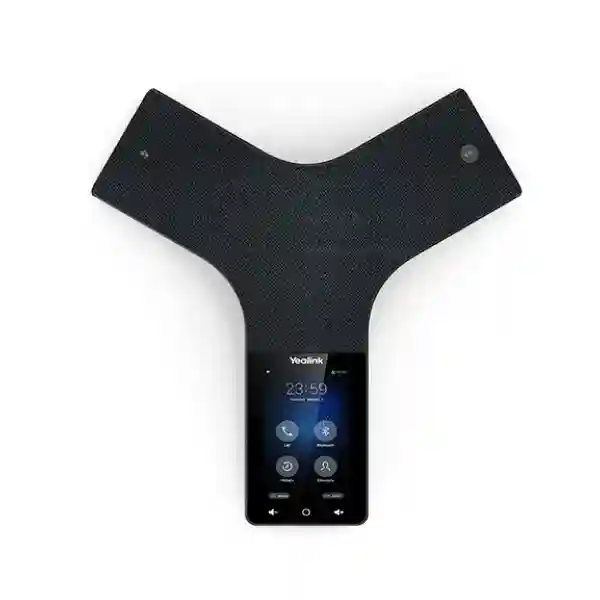
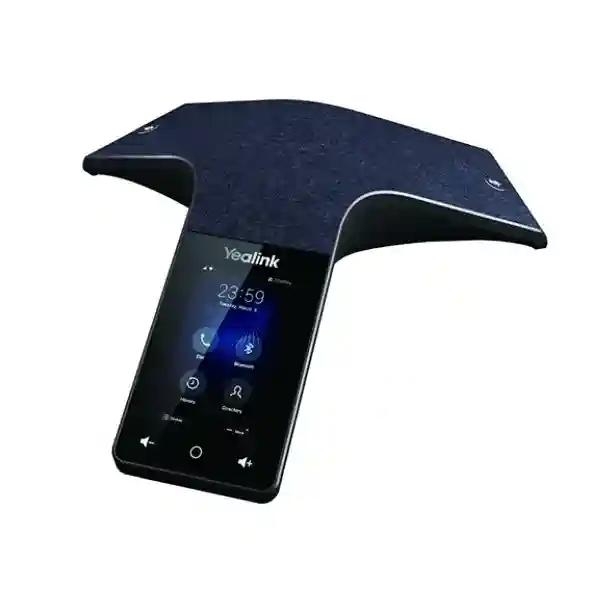
The Yealink CP925 Conference Phone is a touch-sensitive HD IP conference phone designed for small to medium meeting rooms. It combines a 4-inch 480 × 800 multi-touch display with full-duplex HD audio, Yealink Noise Proof Technology, Smart Noise Filtering, a six-microphone pickup array, a separate noise-cancellation microphone and a 20-foot (6-metre) 360-degree pickup range. For organizations planning meeting-room voice collaboration in Tanzania, the CP925 offers a focused conference-room endpoint that can connect through Ethernet with PoE, dual-band Wi-Fi, Bluetooth 4.2 and SIP-based voice infrastructure.
Clear room audio
Six microphones capture voices around the table while a seventh microphone array is dedicated to noise reduction. Full-duplex operation allows natural two-way conversation, and echo cancellation plus background-noise suppression are built into the audio design.
Flexible connectivity
The CP925 supports 10/100 Ethernet, IEEE 802.3af PoE, dual-band 2.4/5 GHz Wi‑Fi, Bluetooth 4.2 and USB 2.0 Type-C. This makes it suitable for wired meeting rooms as well as spaces where a wireless network or mobile-device pairing is useful.
Business SIP features
The phone supports one SIP account, five-way conferencing, call hold, mute, DND, transfer, forward, call waiting, voicemail-related functions, local and remote directories, SIP server redundancy and centralized provisioning methods.
What the Yealink CP925 solves
A meeting-room conference phone needs to solve three practical problems at the same time: everyone around the table must be heard, remote participants must sound intelligible, and users must be able to start or manage a call without turning every meeting into a support request. The CP925 addresses these requirements with a purpose-built tabletop design rather than relying on a laptop microphone or a small personal speakerphone.
The 6-metre omnidirectional pickup range is especially relevant to compact boardrooms, management rooms, branch-office meeting rooms and project rooms where participants sit around a central table. Yealink specifies six microphones for voice pickup and one microphone array for noise cancellation, helping the device capture speakers around the room while reducing distracting background sound. A 56 mm, 5 W loudspeaker and full-duplex speakerphone design support more natural discussions where both sides may speak without one direction being artificially muted.
For hybrid work, the CP925 can pair with a smartphone or PC over Bluetooth, while standard SIP operation lets it function as a dedicated IP conference endpoint. Buyers should still verify the intended PBX, SIP service, network design and meeting workflow before deployment. The CP925 is an audio conference phone rather than a complete video-room system, so organizations that need cameras, displays or native video meeting controls should plan those elements separately.
Verified Yealink CP925 features and specifications
| Meeting-room positioning | Small to medium conference rooms |
| Display | 4-inch, 480 × 800 capacitive multi-touch screen |
| Microphones | Six-microphone array for 360° voice pickup plus one noise-cancellation microphone array |
| Pickup range | 20 feet / 6 metres, 360 degrees |
| Audio | Optimal HD Audio, full duplex, Noise Proof Technology, Smart Noise Filtering, AEC and background-noise suppression |
| Conference calling | Up to five-way conference call |
| Network interface | 1 × RJ45 10/100M Ethernet |
| Power | IEEE 802.3af PoE, Class 3; Yealink external PoE adapter is optional |
| Wireless | Built-in 2.4/5 GHz 802.11a/b/g/n Wi‑Fi and Bluetooth 4.2 |
| USB | 1 × USB 2.0 Type-C device port |
| SIP | One SIP account; SIP v1 and v2; SIP server redundancy |
| Security | SRTP, TLS 1.3, HTTPS certificate management, AES256 configuration encryption, WPA2/WPA3 and secure boot |
| Dimensions | 285 × 289.5 × 59.1 mm |
Deployment, compatibility and buying guidance
Before ordering a CP925, identify the exact room size, table geometry, expected number of participants and current voice platform. The published 6-metre pickup figure is a useful specification, but acoustic performance in a real room also depends on reflective glass, hard floors, HVAC noise, ceiling height, speaker distance and where participants sit. A product that is technically within range can still produce a poor experience if the room itself creates echo or persistent noise.
The network should also be checked. A PoE-enabled switch can simplify installation by delivering power and data over one Ethernet cable. If Wi‑Fi will be used, confirm reliable dual-band coverage at the meeting table and ensure the wireless design can prioritize real-time voice traffic where needed. For wired installations, VLAN and QoS policies may help keep business voice traffic predictable. The CP925 supports common IP assignment, SIP, QoS, SRTP and TLS functions, making it suitable for structured business VoIP environments when the PBX or provider is compatible.
For customers using an existing IP PBX, the most important procurement information is the SIP platform, firmware policy, extension configuration, network addressing and security requirements. If the room also needs video, decide whether the CP925 will remain a standalone audio endpoint or work alongside a separate video conferencing solution. The device supports hybrid meeting scenarios through Bluetooth connection to a mobile phone or PC, which can be useful when users alternate between SIP calls and software-based collaboration.
For broader room planning, FourTeck Tanzania publishes guidance across business collaboration and IT infrastructure in Tanzania. Regional buyers can also explore the FourTeck Uganda technology portfolio, FourTeck Kenya business IT solutions, FourTeck Ghana product and infrastructure coverage, and the FourTeck UAE integrated IT and telecom portfolio when coordinating multi-country requirements.
Yealink CP925 Conference Phone Tanzania
For organizations searching for the Yealink CP925 Conference Phone in Tanzania, the purchasing decision usually begins with the meeting room rather than the specification sheet. A small management room, project meeting room, branch-office boardroom or shared collaboration space needs an audio endpoint that can hear participants across the table without requiring every attendee to join from a laptop. The CP925 is designed around that use case, with a stated 6-metre 360-degree microphone pickup radius, six microphones for voice capture and an additional microphone array dedicated to noise cancellation. This makes it relevant to businesses that want a permanent tabletop conference phone instead of a portable personal speakerphone.
Tanzanian buyers should assess the existing voice environment before procurement. If the business already uses a SIP-based PBX, the CP925 can be evaluated as a dedicated room extension. Confirm the PBX platform, SIP registration details, VLAN policy, QoS configuration and whether PoE is available at the meeting-room network point. Where PoE is not available, verify the required optional power accessory before finalizing the bill of materials. If Wi‑Fi will be used, survey the room for dependable 2.4 GHz or 5 GHz coverage and avoid treating wireless connectivity as a substitute for proper network design.
The CP925 can also support hybrid workflows where staff use software calling on a PC or mobile device and want the conference phone to provide room audio through Bluetooth. This can be valuable for mixed collaboration environments, but the exact meeting workflow should be documented during quotation. Buyers should specify room dimensions, approximate seating capacity, desired SIP platform, whether Bluetooth-based PC/mobile use is required and whether a video system is also planned. That information helps determine whether the CP925 is the right standalone choice or one component in a wider collaboration solution.
Yealink CP925 Conference Phone Dar es Salaam
In Dar es Salaam, conference-room technology is often required by headquarters, financial services teams, professional offices, hotels, logistics companies, project organizations and growing businesses coordinating staff across multiple locations. The Yealink CP925 fits rooms where voice clarity and simple call control matter more than complex installed audio. Its 4-inch touchscreen provides an accessible control surface, while full-duplex audio supports natural conversation during management reviews, supplier calls, recruitment interviews and branch coordination.
A Dar es Salaam deployment should consider network and room conditions together. If the office already has managed switching, a PoE port can reduce cabling clutter by powering the conference phone through Ethernet. Voice VLANs and QoS can be planned where the PBX and network support them. In offices with glass partitions, tiled surfaces or strong air-conditioning noise, the CP925’s noise-reduction technologies are useful, but room acoustics still matter. Positioning the device centrally on the table and keeping it away from direct airflow or mechanical noise sources can improve practical performance.
For quotation planning, buyers in Dar es Salaam should provide the room dimensions, network availability, PBX or SIP provider, number of rooms, required accessories and whether the phone must also pair with staff laptops or mobile devices. Multi-room deployments should be treated as a standardized endpoint project rather than a collection of unrelated purchases. Consistent firmware, provisioning, extension naming, VLAN settings and handover documentation can simplify support across meeting spaces.
Yealink CP925 Conference Phone Mwanza
Organizations in Mwanza may use a conference phone to connect branch teams, regional management, suppliers, operational sites and customers without requiring every meeting to use individual laptops. The Yealink CP925 is particularly relevant to small and medium meeting rooms because it combines dedicated SIP calling with a 360-degree microphone pattern and a compact tabletop form. Its six pickup microphones are intended to hear voices around the table, while a separate microphone array assists with noise cancellation.
For Mwanza offices, the practical design question is whether the room has dependable wired or wireless connectivity. A PoE switch is usually the cleanest option because one Ethernet link can carry network data and power. Where an existing structured network is not available at the table, built-in Wi‑Fi can offer another deployment path, but coverage, channel congestion and security policy should be checked first. The phone supports WPA2/WPA3 and enterprise-oriented security functions including TLS and SRTP, but network administrators still need to configure the surrounding infrastructure appropriately.
Procurement teams should also distinguish between audio conferencing and full video collaboration. The CP925 is not a camera system. If Mwanza users require Teams, Zoom or another video platform on a room display, the conference phone may be used only as part of the audio workflow, subject to compatibility and deployment design. A clear quotation should therefore state whether the requirement is SIP voice conferencing, Bluetooth room audio for a PC/mobile device, or a broader video-room project.
Yealink CP925 Conference Phone Arusha
Arusha businesses, hotels, tourism operators, NGOs, professional offices and regional project teams often need meeting rooms that can connect participants across cities and countries with minimal setup. The Yealink CP925 offers a dedicated conference-room voice endpoint with a familiar touchscreen interface, a five-way conference function and multiple connectivity methods. Its 6-metre 360-degree pickup specification means it is best considered for compact to medium spaces rather than large training halls or expansive boardrooms.
A strong Arusha deployment starts with room assessment. Long rectangular tables may place some participants farther from the center than the nominal pickup radius, while hard walls and glass can increase reverberation. If the intended seating layout falls beyond the practical coverage of a single tabletop unit, a larger-room audio design may be more appropriate. The CP925 should therefore be selected based on room dimensions and seating geometry rather than solely on the number of chairs.
For organizations with multiple Arusha properties or departments, centralized provisioning can be an important benefit. Yealink documents browser, phone, auto-provisioning and device-management options, along with FTP, TFTP, HTTP and HTTPS provisioning methods. IT teams can use supported management methods to standardize configuration, subject to their security policies and chosen management platform. A quotation request should specify the number of units, PBX environment, power method and rollout model so that accessories and deployment effort are not overlooked.
Yealink CP925 Conference Phone Dodoma
In Dodoma, organizations planning meeting-room communications may need a straightforward conference endpoint for administrative meetings, inter-office coordination, project discussions and supplier calls. The Yealink CP925 provides a dedicated business device that can remain assigned to a room, helping avoid the inconsistent audio that often results when different users rely on laptop speakers and microphones. The touchscreen interface, call controls and SIP functions can support a repeatable meeting process for shared spaces.
Network readiness should be confirmed during procurement. The CP925 has a 10/100 Ethernet interface and supports IEEE 802.3af PoE, which means a compatible PoE switch can simplify installation. It also supports dual-band Wi‑Fi, but a permanent meeting room may still benefit from wired connectivity when structured cabling is available. Voice traffic should be considered in the wider LAN design, including VLAN assignment, QoS, firewall traversal and SIP registration requirements.
For Dodoma buyers, a useful quote request includes the exact PBX or hosted SIP platform, meeting-room size, table shape, network type and whether Bluetooth pairing is part of the workflow. If the room uses a PC for web meetings, clarify whether the CP925 is expected to act as the audio device for that computer. If a camera and display are also required, those components should be designed as a complete collaboration solution rather than assumed to be included with the phone.
Yealink CP925 Conference Phone UAE
For UAE projects, the Yealink CP925 can be evaluated for meeting rooms in corporate offices, branch locations, hotels, professional services firms and project sites that need SIP audio conferencing. The core selection logic remains the same: use the device where a 6-metre 360-degree pickup envelope is appropriate and where a tabletop conference phone is preferred over an installed ceiling-microphone system. The 4-inch touchscreen and Bluetooth support make it flexible for rooms with mixed calling workflows.
UAE buyers frequently coordinate multiple offices, fit-out contractors and IT teams, so the bill of materials should identify every dependency. Confirm PoE availability, switching and VLAN standards, SIP server details, firmware policy, optional power accessories and whether an analogue PSTN integration through the Yealink CPN10 is needed. The CP925 supports local three-way PSTN conferencing through the CPN10, but this should be treated as a specific accessory-based requirement rather than assumed functionality in the base unit.
For multi-country procurement involving Tanzania and the UAE, consistent configuration can reduce support complexity. Establish a standard device profile, extension-naming method, security configuration and room documentation template. When comparing prices, buyers should compare equivalent bundles and support scopes rather than device-only figures because optional accessories, provisioning, installation and local tax or logistics terms may differ.
Yealink CP925 Conference Phone Uganda
Ugandan organizations considering the Yealink CP925 may be looking for a dedicated conference phone for head offices, branch meeting rooms, NGO operations, financial institutions, education management teams or service organizations. The unit’s main value lies in consolidating room audio into a purpose-built endpoint with six pickup microphones, one noise-cancellation microphone array, full-duplex speakerphone performance and Yealink audio processing.
For deployment across Uganda, buyers should document the SIP environment first. A CP925 is not simply a generic loudspeaker; it is a network endpoint that needs correct registration, addressing and policy settings. Where PoE is available, installation can be clean and centralized. Where Wi‑Fi is used, signal quality should be measured where the phone will sit. Business voice should also be considered in firewall and QoS policies so that call quality is not affected by competing network traffic.
If an organization operates offices in Uganda and Tanzania, standardization can simplify user training and remote support. The same model can be configured with site-specific SIP accounts while keeping a consistent interface and maintenance process. Procurement documentation should identify each site, room size, quantity, required provisioning and accessory needs rather than relying on a single generic quantity line.
Yealink CP925 Conference Phone Kampala
Kampala offices often require reliable conferencing for management, customer meetings, partner coordination and regional operations. The Yealink CP925 is suited to rooms that need a fixed SIP conference endpoint with enough microphone coverage for a central meeting table. The device supports one SIP account, five-way conferencing and a range of familiar call functions including hold, mute, DND, transfer, forward, call waiting and directory access.
A Kampala project should define whether users will place calls directly from the CP925 through an IP PBX or whether they will also use Bluetooth pairing with laptops and smartphones. Hybrid usage can be convenient, but IT teams should document the intended process so users know when to use the phone’s SIP account and when to select it as a Bluetooth audio device. Consistent user guidance reduces meeting delays.
For larger Kampala organizations, centralized management and provisioning may matter as much as the hardware. Yealink supports auto-provisioning and device-management methods that can simplify rollout across multiple rooms. Administrators should confirm compatibility with their chosen management environment and apply secure provisioning practices. Room labels, extension names, network port information and firmware records should be included in handover documentation.
Yealink CP925 Conference Phone Arua
For organizations in Arua, a conference phone can support communication between regional teams, headquarters, suppliers and partner organizations without requiring a dedicated video room. The Yealink CP925 offers a compact approach for voice-focused collaboration and can be integrated into a SIP telephony environment or paired over Bluetooth for selected hybrid meeting scenarios.
Network reliability is important in any regional deployment. Where a managed LAN is present, using PoE and a wired connection can keep the endpoint independent of local power adapters and reduce dependence on wireless conditions. If the installation must use Wi‑Fi, verify access-point coverage, security compatibility and network stability in the meeting room. The CP925 supports 2.4 GHz and 5 GHz Wi‑Fi, but strong design remains essential for real-time communication.
Buyers in Arua should also consider supportability. A repeatable configuration, documented SIP credentials process, standard firmware version and clear reset/recovery procedure can be more valuable over time than focusing only on the purchase price. For organizations with multiple remote sites, remote provisioning can reduce the need to configure every phone locally, provided the management method is securely designed.
Yealink CP925 Conference Phone Mbarara
Mbarara businesses and institutions can use the Yealink CP925 where a small or medium meeting room needs a permanent voice conference endpoint. Its 360-degree microphone design means participants can sit around the device rather than orienting themselves toward one directional microphone. The 6-metre published pickup range should be compared with the actual table dimensions and seating layout before purchase.
The CP925 also offers practical network flexibility. Ethernet with PoE is suitable for structured offices, while built-in Wi‑Fi can help in rooms where running another data cable is difficult. Bluetooth 4.2 allows compatible mobile devices or PCs to use the conference phone for room audio. Each option should be tested against organizational security policies, particularly where wireless pairing is used in shared spaces.
When preparing a Mbarara quotation, include whether the phone must register to an on-premises PBX, hosted SIP service or other voice platform. If the requirement includes call recording, directories, paging or other advanced telephony functions, confirm how those features are implemented by the PBX as well as what the endpoint itself supports. This prevents assumptions that every platform exposes the same features in the same way.
Yealink CP925 Conference Phone Gulu
In Gulu, the Yealink CP925 can support branch-office coordination, project meetings, administrative calls and remote collaboration where clear room audio is required. The device is intentionally positioned for small to medium conference rooms, so buyers should avoid assuming it will replace an installed audio system in a large hall. A central tabletop location is normally the most practical arrangement for its 360-degree pickup design.
The phone’s support for SIP, IPv4/IPv6, VLAN/QoS functions, SRTP and TLS makes it suitable for managed business networks when configured correctly. Security should be approached as an end-to-end responsibility: endpoint settings, PBX policy, credentials, network segmentation, firmware management and remote administration all contribute to the final risk profile.
For Gulu deployments connected to a larger Uganda-wide network, standard templates can simplify rollout. IT teams can predefine extension formats, device names, time settings, VLANs and provisioning servers, then adapt only the site-specific values. A well-documented standard helps remote support teams identify whether an issue is related to the phone, the network, the PBX or the upstream service.
Yealink CP925 Conference Phone Kenya
Kenyan organizations considering the Yealink CP925 may include corporate offices, distributed service businesses, education management teams, healthcare administrators and project firms that require dependable meeting-room voice. The CP925’s touchscreen, 360-degree microphone design and SIP capabilities make it a straightforward endpoint for conference rooms where users need to place and receive calls without building every meeting around a laptop.
In multi-site Kenyan deployments, network standardization becomes important. A consistent PoE switch policy, voice VLAN design and SIP provisioning process can reduce differences between branches. The CP925 supports centralized provisioning methods, which may help IT teams deploy multiple units more consistently. Before purchase, confirm compatibility with the intended PBX or hosted voice provider and document any required codecs, security settings or provisioning parameters.
If Kenya and Tanzania offices are being equipped under one project, keep product, accessory and configuration standards aligned where practical. That can simplify spare planning, staff familiarity and support procedures. However, telecom service and local deployment requirements may differ by country, so the SIP trunk, numbering and service-layer configuration should be validated separately for each site.
Yealink CP925 Conference Phone Kuwait
For Kuwait-based offices, the Yealink CP925 can serve as a dedicated conference-room SIP endpoint for executive rooms, branch offices, consulting teams and shared meeting spaces. Its compact tabletop design is useful when an installed DSP, ceiling microphone and speaker system would be excessive for the room. The key is matching the 6-metre 360-degree pickup capability to the real seating arrangement.
A Kuwait procurement project should distinguish hardware compatibility from service-provider compatibility. The CP925 supports standard SIP functionality, but the chosen PBX or SIP service determines extension features, dialing behavior and some call services. Buyers should provide the exact voice platform during quotation so registration, security and provisioning requirements can be considered from the beginning.
For offices using a mixture of SIP calling and PC-based meetings, Bluetooth can make the CP925 a flexible audio device. IT departments should decide whether pairing is permitted in shared rooms and establish a simple user procedure for connecting and disconnecting devices. Clear usage guidance is especially useful in high-turnover meeting spaces where visitors and different departments use the same equipment.
Yealink CP925 Conference Phone Ghana
Ghanaian businesses looking for the Yealink CP925 are often trying to improve the audio quality and consistency of shared meeting rooms. The device provides a dedicated room extension with touch controls, HD audio processing, full-duplex conversation and a multi-microphone pickup design. This can be preferable to relying on laptop microphones when several people need to participate from one room.
For Ghana deployments, buyers should check the local network environment, especially at branch offices. PoE can simplify power and cabling, while Wi‑Fi provides another connectivity option where appropriate. Voice quality depends on the entire communication path, so WAN stability, QoS, firewall policy, SIP provider performance and room acoustics should all be considered. The endpoint cannot compensate for severe packet loss or an unstable connection.
Organizations purchasing several units should plan naming, provisioning and documentation in advance. Assigning each phone to a clearly identified room, documenting its extension and network port, and keeping firmware records can make later troubleshooting significantly easier. When requesting a quotation, include room counts, SIP platform, power method and any mobile/PC Bluetooth requirement.
Yealink CP925 Conference Phone Nigeria
Nigeria-based enterprises with distributed offices can use a conference phone like the Yealink CP925 to standardize voice collaboration in small and medium meeting rooms. The device supports one SIP account, five-way conferencing, HD audio processing and a central 360-degree pickup design. It is especially relevant where users need a fixed room endpoint that is always available rather than assembling audio devices at the start of each meeting.
For Nigerian projects, power and network design should be evaluated together. PoE can allow the phone to draw power from a centrally backed-up network switch where the infrastructure is designed that way. This can be operationally useful, but backup duration and switch capacity are separate design questions. Wi‑Fi is available as an alternative network path, though wired Ethernet may provide greater predictability in permanent room installations.
Large organizations should also consider remote management. Consistent provisioning can reduce manual configuration across multiple sites, but the provisioning server and credentials must be secured. Define a standard firmware baseline, extension template, VLAN policy and support escalation path before a broad rollout. This approach makes it easier to distinguish device faults from PBX, LAN or WAN issues.
Yealink CP925 Conference Phone Seychelles
Businesses and hospitality organizations in Seychelles may need a compact conference endpoint for management rooms, operations meetings, supplier calls and regional coordination. The Yealink CP925 provides dedicated voice conferencing in a tabletop format and can suit meeting spaces where a large installed audio system would be unnecessary. Its 4-inch touchscreen and full-duplex operation are designed to keep day-to-day use simple.
Island deployments should pay attention to supportability and infrastructure dependencies. A PoE-enabled wired network can make the endpoint easy to power and manage, while Wi‑Fi gives flexibility in rooms without an Ethernet outlet at the table. If the device is being supplied as part of a broader project, include spare-cable planning, configuration records and remote-management procedures so basic issues can be diagnosed without unnecessary site visits.
Before purchasing for Seychelles, confirm the SIP platform and intended use of Bluetooth. If users need software-based video meetings, identify the room computer, camera, display and audio workflow separately. The CP925 can contribute room audio but should not be treated as a complete video conferencing system. A complete quotation should therefore capture both the conference phone and any surrounding collaboration equipment.
Use cases for the Yealink CP925
Management meetings
A dedicated room extension gives executives and managers a predictable way to join voice calls without passing a handset around or relying on laptop microphones.
Branch coordination
Organizations with multiple sites can assign a CP925 to each meeting room and standardize SIP settings, naming and user procedures.
Supplier and customer calls
The 360-degree microphone arrangement is useful when several local participants need to contribute to a call from around one table.
Hybrid PC/mobile audio
Bluetooth pairing can let a compatible laptop or smartphone use the CP925 as the room audio device when the workflow requires it.
Quotation checklist
To prepare an accurate Yealink CP925 quotation, provide as much of the following information as possible. This helps separate the core conference phone from network, PBX and room-design dependencies.
- Number of CP925 units or meeting rooms.
- Room dimensions, table shape and approximate seating capacity.
- Existing IP PBX, hosted SIP platform or voice provider.
- Whether PoE Ethernet is available at each room.
- Whether built-in Wi‑Fi will be used.
- Whether Bluetooth pairing to PCs or mobile phones is required.
- Any need for PSTN integration through the optional Yealink CPN10.
- Whether installation, provisioning, testing or documentation is required.
Frequently asked questions
Is the Yealink CP925 suitable for a medium meeting room?
Yealink positions the CP925 for small to medium conference rooms and specifies a 20-foot (6-metre), 360-degree microphone pickup range. Actual suitability depends on room dimensions, table layout, acoustics and background noise.
Does the CP925 support PoE?
Yes. It supports IEEE 802.3af PoE Class 3 through its 10/100 Ethernet port. Confirm that the switch or injector used for the installation provides compatible PoE.
Can the CP925 connect over Wi‑Fi?
Yes. The phone includes built-in dual-band 2.4 GHz / 5 GHz Wi‑Fi supporting 802.11a/b/g/n. Network quality and security policy should be verified before using Wi‑Fi for a permanent business voice endpoint.
Can I pair a laptop or smartphone using Bluetooth?
Yes. The CP925 has built-in Bluetooth 4.2 and Yealink documents hybrid UC meeting use with a mobile phone or PC. The exact application workflow should be tested with the intended device and software.
How many SIP accounts does the CP925 support?
The official Yealink specification lists one SIP account. Organizations using a PBX should confirm their desired extension and call-flow design before provisioning.
Does the CP925 support secure voice features?
Yealink lists SRTP for voice encryption, TLS 1.3, HTTPS certificate management, AES256 configuration-file encryption, WPA2/WPA3 and secure boot among the network and security capabilities. These features must still be configured appropriately in the complete voice environment.
Is the CP925 a video conferencing system?
No. It is an HD IP audio conference phone. If a meeting room requires cameras, displays, content sharing or native video-platform controls, those should be planned as separate or integrated components.
What information should I send for a Tanzania quotation?
Provide the required quantity, city, room dimensions, seating capacity, current PBX or SIP platform, network/PoE availability and whether installation, configuration or Bluetooth-based hybrid use is required. This allows the quotation to reflect the actual room and infrastructure rather than just the device.
Decision recap: is the Yealink CP925 right for your room?
Choose the CP925 when you need a dedicated audio conference phone for a small or medium room, want approximately 6 metres of 360-degree pickup coverage, require SIP calling and prefer the convenience of PoE, Wi‑Fi and Bluetooth in one device. It is particularly suitable where several local participants regularly join the same voice call from around a central table.
Consider a different or expanded solution when the room is substantially larger, when microphones must be distributed across a long table, when ceiling audio is preferred, or when native video-room functions are required. Good procurement begins by matching the product to the room, network and collaboration workflow rather than choosing solely from a feature list.
Consult FourTeck about the Yealink CP925
For a Tanzania-focused quotation, share the number of meeting rooms, room sizes, current SIP/PBX environment and required deployment scope. FourTeck can use that information to frame the CP925 requirement alongside the network, voice and collaboration infrastructure needed for a practical business installation.




Reviews
There are no reviews yet.