
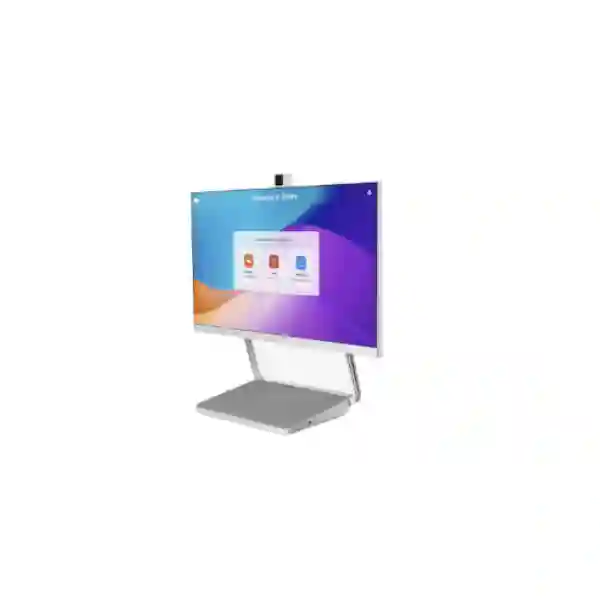
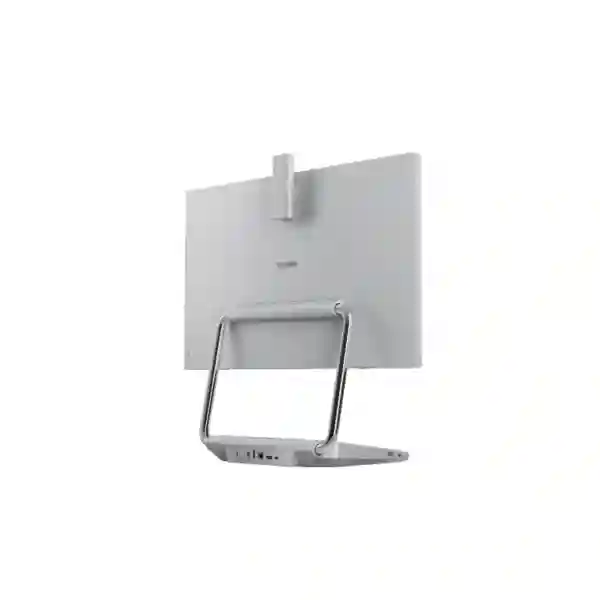
Yealink DeskVision A24 Zoom Rooms Display
The Yealink DeskVision A24 Zoom Rooms Display brings a dedicated Zoom collaboration experience directly to the desk. Designed for personal workspaces, private offices, focus areas and shared desks, it combines a 23.8-inch Full-HD touchscreen with a pop-up 4K camera, built-in microphones, integrated speakers, USB-C connectivity, USB docking, power delivery and Qi wireless charging. The result is a compact desktop system that can function as a dedicated Zoom touchscreen device and, when connected to a laptop, shift into a UC workstation role.
For organizations in Tanzania evaluating an executive video endpoint, a private-space Zoom device or a standardized collaboration screen for hybrid work, DeskVision A24 provides an alternative to assembling a separate monitor, webcam, microphone, speakerphone, dock and charger. FourTeck Tanzania can help buyers assess whether the device fits their room, desk, network, laptop and Zoom deployment requirements before quotation and rollout.
A desk-sized screen designed for face-to-face collaboration, touch interaction and everyday workstation use.
Integrated video hardware keeps the desk cleaner while supporting clear personal-space video collaboration.
Use DeskVision A24 as a dedicated Zoom touchscreen or connect a laptop by USB-C for monitor, BYOD and docking functions.
Built-in audio, USB expansion, laptop power delivery and Qi wireless charging reduce separate devices on the desktop.
What the Yealink DeskVision A24 solves
A hybrid-work desk often accumulates a monitor, external webcam, headset or speakerphone, docking station, laptop power adapter and phone charger. That arrangement can work, but it creates more cables, more peripherals and more points for users to configure incorrectly. DeskVision A24 addresses this by combining the main personal-video, touch-display, audio and docking functions in one device. The system is particularly relevant for users who spend a meaningful part of the day in Zoom meetings and need a consistent workspace instead of rebuilding their meeting setup each time they sit down.
As a dedicated Zoom space, DeskVision A24 can be used to start scheduled or ad-hoc Zoom meetings from the touchscreen. Yealink also positions the platform for kiosk and workspace-reservation scenarios, which can be useful in shared or flexible work environments. In UC workstation mode, a USB-C connection allows the unit to serve as a secondary monitor and BYOD meeting endpoint while also providing laptop power and access to extra USB connectivity. This dual-role design can help standardize executive desks, touchdown spaces and private meeting positions without treating video conferencing as an entirely separate room technology.
The device is not a substitute for a medium or large meeting-room system. Its strongest fit is at the individual desk, private office, phone room or small focus space where the user is close to the display and camera. For larger rooms, camera coverage, microphone pickup distance and participant count should be considered differently. FourTeck Tanzania’s business technology services page outlines how conferencing, networking and workplace systems can be planned as connected infrastructure rather than isolated products.
Verified features and practical buyer value
Zoom-certified private-space hardware
Zoom lists the Yealink DeskVision A24 as certified hardware for private spaces. This matters to organizations that want a purpose-built endpoint aligned to the Zoom Rooms ecosystem rather than a generic monitor-and-webcam combination.
Touch-first collaboration
The 23.8-inch Full-HD touchscreen brings meeting control, video and workspace interaction into one desktop surface. Touch interaction can be especially useful for personal meeting spaces where a keyboard and mouse should not be required for every meeting action.
Integrated camera and audio
The built-in pop-up 4K camera, microphone array and speakers provide the principal audio-video components needed for personal Zoom calls. Yealink also highlights full-duplex audio and intelligent noise cancellation for clearer two-way conversation.
USB-C workstation transformation
A connected laptop can use DeskVision A24 as a secondary monitor and BYOD conferencing endpoint. This creates a practical bridge between a dedicated Zoom experience and everyday PC-based work.
Docking and power delivery
USB docking and power delivery can reduce the number of separate adapters and docks required on the desk. Buyers should still confirm laptop USB-C capability and organizational device standards before rollout.
Qi wireless charging
The integrated Qi charging area adds a useful desk convenience for compatible mobile devices and supports the product’s goal of consolidating workstation functions.
Deployment and compatibility guidance
A successful DeskVision A24 deployment depends on more than the hardware. Before purchasing multiple units, confirm how users authenticate to Zoom, whether the intended workspace is personal or shared, how the devices will be connected to the network and what laptop models will use USB-C workstation mode. A pilot deployment is often valuable when an organization wants to standardize across several departments because it exposes practical issues such as desk depth, camera eye line, cable routing, USB-C compatibility, user sign-in behavior and wireless conditions.
Network quality matters because the device is ultimately a cloud collaboration endpoint. Reliable internet, appropriate Wi-Fi or wired network planning, sensible segmentation and good upstream capacity help the Zoom experience remain stable. The endpoint should also fit the organization’s broader security and lifecycle processes, including firmware management, physical access, user account policies and device inventory. If the same office contains room systems, IP phones, wireless access points and security devices, it is useful to consider how those systems share switching, internet and support resources.
FourTeck Tanzania’s integrated IT and collaboration overview explains how conferencing performance depends on the wider network and workspace environment. Buyers can also review the FourTeck Tanzania technology shop when comparing conferencing devices with related networking, display and endpoint requirements.
Who should consider DeskVision A24?
Executives and managers
A dedicated video desk can make frequent Zoom meetings faster to start while preserving a clean executive workstation. The integrated screen, camera, audio and USB-C functions are particularly relevant when the user alternates between laptop work and scheduled video calls.
Shared desks and hot-desking areas
Organizations moving toward flexible seating can use standardized collaboration displays to reduce the variety of peripherals employees encounter. Workspace reservation and kiosk-oriented workflows may also be relevant depending on the Zoom deployment model.
Focus rooms and private booths
A small room used by one person does not need the same camera and microphone architecture as a boardroom. DeskVision A24 can suit private spaces where one participant sits near the device and wants an immediate Zoom interface.
Yealink DeskVision A24 Zoom Rooms Display Tanzania
For organizations in Tanzania, the Yealink DeskVision A24 Zoom Rooms Display is best evaluated as a personal collaboration endpoint rather than simply as a computer monitor. It is suited to companies standardizing hybrid work for executives, management teams, customer-facing specialists and staff who spend substantial time in Zoom. The all-in-one design can be useful where desk space is valuable and IT teams want to reduce separate webcams, docking stations, speakers and chargers. Because the device can operate as a Zoom touchscreen and switch into UC workstation mode, it can support both dedicated meeting use and everyday laptop-based workflows from the same physical desk.
Tanzania buyers should begin with the intended user profile. A permanently assigned executive desk has different authentication and workspace requirements from a shared hot desk. A private focus room may need predictable sign-in and room-booking workflows, while a department rollout may prioritize repeatable cabling, standardized laptop connections and remote management. Confirm the organization’s Zoom licensing approach separately from the hardware purchase, and verify the network path that will carry conferencing traffic. Stable connectivity, suitable internet capacity and good local Wi-Fi or Ethernet design remain essential even when the endpoint itself is purpose-built.
When requesting a quotation, include the number of desks, intended Zoom workflow, laptop models, preferred network connection and whether the deployment will be personal, shared or mixed. It is also useful to indicate whether installation, user onboarding or broader meeting-room equipment is part of the requirement. FourTeck Tanzania’s solution-led technology approach can help frame DeskVision A24 as part of a wider workplace environment rather than an isolated purchase. This is especially relevant when collaboration endpoints depend on the same switching, Wi-Fi, firewall and internet infrastructure used by the rest of the organization.
Yealink DeskVision A24 Zoom Rooms Display Dar es Salaam
Dar es Salaam organizations evaluating DeskVision A24 are likely to include corporate headquarters, professional-services firms, financial teams, technology companies, hotels, logistics businesses and regional offices that coordinate frequently with remote colleagues. For these environments, the strongest value of the device is workflow consistency. A manager can use a dedicated Zoom interface for scheduled or ad-hoc meetings and then connect a laptop over USB-C when normal desktop work or a BYOD meeting is required. This can reduce reliance on separate conferencing peripherals and produce a cleaner desk standard across offices.
A Dar es Salaam rollout should still begin with a practical workspace assessment. Check desk depth, seating position, background lighting, acoustic conditions and where power and network connections are available. In open offices, the built-in audio may be appropriate for private rooms but a headset could remain preferable where nearby colleagues would otherwise hear meeting audio. In executive offices or enclosed focus spaces, the integrated microphone and speakers can provide a more natural personal-room experience. For shared desks, define how users sign in, reserve the workspace and sign out at the end of a session so privacy and account handling remain consistent.
Procurement teams should provide quantity, deployment locations, laptop types and desired Zoom workflow when requesting pricing. If the project includes meeting rooms as well as individual desks, treat the two use cases separately: DeskVision A24 addresses private-space collaboration, while larger rooms may need video bars, dedicated cameras, additional microphones or room controllers. A coordinated design can make user experience more consistent across desk and room environments without forcing one hardware style into every space.
Yealink DeskVision A24 Zoom Rooms Display Mwanza
In Mwanza, DeskVision A24 can serve organizations that need a dependable private collaboration station for managers, branch leaders, project coordinators and specialists who connect regularly with headquarters, customers or partners. A branch office may not require a full conference room for every call, yet staff still benefit from a standardized high-quality endpoint. The 23.8-inch Full-HD touch display, integrated 4K camera and built-in audio make the device suitable for one-to-one or personal-space video meetings where the user sits directly in front of the screen.
Branch deployments should pay particular attention to internet stability and supportability. The experience of a certified Zoom device still depends on the local connection, firewall path and network quality. Where multiple video users share the same office connection, capacity planning can help prevent meeting quality from degrading during busy periods. IT teams should also decide whether the device connects over wired Ethernet or business Wi-Fi according to the site design and available cabling. Keeping the workstation standard documented makes future replacement, troubleshooting and expansion easier.
For procurement, the key question is whether the organization wants a dedicated Zoom desk or simply a general-purpose display. DeskVision A24 makes more sense when its integrated meeting, camera, audio, docking and charging capabilities will be used regularly. If the requirement is only for a monitor, a conventional business display may be more economical. If the requirement is frequent collaboration from a personal or private location, consolidating devices can simplify the desk. Buyers should request a quotation with quantity, destination, expected user type and any installation or network assistance required.
Yealink DeskVision A24 Zoom Rooms Display Arusha
Arusha businesses, hospitality organizations, NGOs, educational institutions and regional teams can use DeskVision A24 where individuals need a professional Zoom endpoint without dedicating an entire conference room. The device is particularly well suited to offices where managers communicate frequently with international or distributed teams. A private office or small focus room can become a consistent Zoom space, while USB-C workstation mode lets the same display support normal laptop work when a meeting is not in progress.
In hospitality and guest-facing environments, shared-workspace scenarios may also be relevant, but the authentication model should be planned carefully. Organizations should define whether users will sign into a personal Zoom profile, use a room-style identity or operate through an approved shared workflow. Kiosk and workspace-reservation capabilities may be useful in modern flexible offices, though the configuration should reflect actual operational needs rather than enabling features without a clear process. Physical positioning also matters: the screen should be at a comfortable viewing height, and the pop-up camera should have a clear line of sight without strong backlighting.
Before purchase, IT teams should test representative laptops with the USB-C connection to confirm the expected display, charging and peripheral behavior. They should also determine how firmware, network access and endpoint support will be handled. A pilot unit can reveal whether the all-in-one design genuinely simplifies the workday for users. A good procurement decision should be based on workflow fit, not only feature count, especially where organizations are choosing between personal collaboration displays, standard monitors and larger room systems.
Yealink DeskVision A24 Zoom Rooms Display Dodoma
Dodoma organizations can consider Yealink DeskVision A24 for administrative offices, executive workspaces, project teams and private collaboration rooms that require frequent Zoom communication. The device’s integrated design is useful when a user needs reliable video meetings but desk clutter and peripheral management should be kept low. A single screen incorporates the touchscreen, camera, microphones, speakers, docking functions and wireless charging area, helping create a consistent collaboration station rather than a collection of unrelated accessories.
For structured office deployments, standardization is often the main benefit. If several departments use the same laptop family and Zoom workflow, DeskVision A24 can become part of a repeatable desk template. IT can document cable connections, sign-in steps, network settings and support procedures once and apply them to multiple locations. That approach is more manageable than supporting a different webcam, USB hub and audio device at every desk. However, organizations should still verify the intended USB-C laptop compatibility and understand which features depend on the connected computer versus the Zoom appliance mode.
A quotation request should state whether the devices are for assigned employees, shared desks or private rooms, because those contexts influence setup and user management. Buyers should also specify if their requirement includes Zoom licensing, broader network upgrades or integration with other collaboration spaces. DeskVision A24 is designed for the individual/private-space category, so a larger boardroom or training room should be evaluated with room-scale audio and video equipment instead. Matching each space to the right class of endpoint avoids overbuying for small areas and under-equipping larger ones.
Yealink DeskVision A24 Zoom Rooms Display UAE
For UAE-based regional offices connected to Tanzania operations, DeskVision A24 can create a consistent Zoom experience across executive desks, focus rooms and hot-desking areas. Multi-country organizations often benefit when endpoint standards are aligned across offices because employees encounter the same meeting controls and USB-C workflow wherever they work. The product’s dual role as a Zoom touchscreen and UC workstation can support hybrid teams that alternate between scheduled platform meetings and laptop-driven collaboration.
A UAE deployment may place particular emphasis on modern fit-outs, flexible workspaces and high-density corporate environments. In those settings, cable management and device consolidation are valuable design considerations. The integrated 4K camera, touch display, audio, USB expansion and wireless charging pad can reduce the number of separate devices visible on the desk. Organizations should nevertheless plan for privacy in open-plan offices; where conversations must remain private, an enclosed focus room or headset may be more appropriate than speaker audio.
For regional procurement, compare the total workstation requirement rather than only the display price. A conventional monitor may also need a webcam, microphone, speaker, dock, power adapter and charger to deliver a similar desktop experience. DeskVision A24 packages those functions into one collaboration endpoint, which may simplify support where users rely heavily on Zoom. FourTeck’s UAE technology solutions site can support related regional requirements, while Tanzanian deployments can be coordinated through the Tanzania-focused platform.
Yealink DeskVision A24 Zoom Rooms Display Uganda
Uganda organizations evaluating DeskVision A24 can use it for senior staff, branch managers, customer-facing specialists and private meeting positions where one person regularly joins Zoom calls. The display is not intended to replace a full meeting-room system for many participants; its strength is providing an integrated collaboration desk. This distinction is important during procurement because it helps buyers match the product to users who will actually benefit from the touchscreen, built-in 4K camera, microphone array, speakers and workstation connectivity.
For offices connecting Kampala or other Ugandan locations with teams in Tanzania, Kenya or international headquarters, a standard endpoint can reduce setup differences between branches. IT administrators should confirm internet performance, the preferred wired or wireless network method, device security policy and user sign-in process. If hot desking is involved, workspace-reservation and kiosk-style workflows may be useful, but the design should prioritize simple user turnover and privacy. Assigned desks may instead focus on persistent personalization and fast transitions between laptop tasks and Zoom meetings.
Organizations should request pricing with an accurate quantity and describe whether they need only hardware or broader planning around conferencing and network readiness. FourTeck’s Uganda IT solutions site provides a regional point of reference for communication and technology projects. Cross-border buyers can still maintain common device standards while adapting installation, connectivity and support procedures to each office environment.
Yealink DeskVision A24 Zoom Rooms Display Kampala
In Kampala, businesses with regional management teams, consulting staff, financial professionals and distributed project groups can benefit from a dedicated personal Zoom endpoint where conferencing is part of daily work. DeskVision A24 can be particularly attractive for executive offices and small privacy rooms because the user does not need to assemble a separate webcam, speakerphone and dock each time a meeting starts. The touchscreen interface supports direct meeting interaction, while the same unit can become a laptop workstation through USB-C.
Kampala deployments should consider office acoustics and network consistency. Even strong camera hardware cannot compensate for a noisy open-plan environment where confidential conversations are difficult. Likewise, cloud meetings can be affected by unstable internet, congested wireless networks or poorly configured firewalls. A practical pilot should therefore test the actual desk location and network path, not just the device in isolation. IT teams can then document the preferred connection method, user workflow and troubleshooting steps before a larger rollout.
Procurement teams should compare DeskVision A24 with both traditional desktop setups and room-scale collaboration products. It offers the most value when one person uses the device at close range and benefits from integrated Zoom, camera, audio, monitor and dock functions. Where several participants need to sit around a table, a video bar or room system may be a better category. Providing this context in a quotation request helps suppliers propose the right quantity and avoids using a personal-space device in a room it was not designed to cover.
Yealink DeskVision A24 Zoom Rooms Display Arua
For Arua offices and branch operations, DeskVision A24 can offer a compact way to give key staff a consistent video collaboration station without constructing a dedicated conference room. Branch managers, project coordinators and remote specialists often need clear face-to-face communication with headquarters while still using the same desk for ordinary laptop work. The ability to shift between Zoom touchscreen use and USB-C UC workstation mode fits that pattern well.
Connectivity planning should be a priority in branch environments. Before standardizing the device, confirm the reliability of the site’s internet connection and whether conferencing traffic competes with other bandwidth-intensive services. If Wi-Fi is used, coverage and capacity at the actual desk location should be verified. Wired connections can be considered where predictable performance and existing cabling make them practical. The device should also be included in the organization’s endpoint inventory and update process so support teams know its network identity, user assignment and physical location.
Arua buyers should also plan how equipment will be supported over its lifecycle. A single executive unit may be simple to manage, while a multi-branch rollout benefits from standard configuration and documented user instructions. Request quotations with destination, quantity, usage model and any installation needs. If users only need occasional video calls, a lower-complexity webcam-and-headset setup may suffice. If Zoom is central to daily work and a clean standardized desk is valuable, DeskVision A24 becomes a more compelling solution.
Yealink DeskVision A24 Zoom Rooms Display Mbarara
Mbarara organizations can use DeskVision A24 in management offices, private call rooms and shared work areas where users need frequent Zoom access without a full conference-room installation. Its integrated touch display and pop-up camera make it easy to understand as a personal collaboration appliance, while USB-C workstation mode allows the same hardware to support a user’s laptop and BYOD meeting needs. This can be useful for businesses that want a more uniform desk standard across departments or branches.
Workspace design should still account for ergonomics, lighting and audio privacy. Position the display so the camera is near natural eye level and avoid strong windows directly behind the user. In a shared office, consider whether speaker playback is appropriate; headphones may remain preferable for confidentiality even though the device has built-in speakers. The wireless charging area and USB docking functions can reduce accessory clutter, but users should receive simple guidance on where to connect laptops and how to switch between dedicated Zoom and workstation use.
For purchasing, define the business outcome first. If the goal is to equip a private room for one participant, DeskVision A24 is a strong category fit. If the goal is to cover six or eight participants around a table, choose a room system designed for wider camera framing and longer microphone pickup. This use-case discipline helps avoid disappointment and leads to better total cost control. Quantity, preferred deployment dates and existing collaboration standards should be included in the quotation request.
Yealink DeskVision A24 Zoom Rooms Display Gulu
In Gulu, DeskVision A24 can support managers, NGO teams, education administrators, project offices and private workspaces that rely on Zoom for coordination with remote stakeholders. The device is particularly appropriate where one user needs a professional video station but the site does not require a dedicated multi-person meeting room. Its integrated components reduce the number of separate peripherals that need to be sourced, connected and supported.
For remote or branch sites, simplicity has operational value. A standardized endpoint can reduce user confusion and make troubleshooting easier for central IT staff. However, central teams should still confirm network stability, firmware processes, account configuration and USB-C laptop compatibility before scaling. If several units are deployed, label each device, document the assigned location and record how it connects to the network. This creates a stronger support baseline than relying on ad-hoc desk setups assembled from different accessories.
Gulu buyers should assess whether the device will be permanently assigned or used as a shared resource. Assigned use favors personalization, while shared use requires a disciplined sign-in/sign-out process and may benefit from workspace reservation. In both cases, the physical room should offer sufficient privacy for speaker audio. A clear request for quotation should list quantity, workspace type, intended Zoom use, laptop standards and any need for installation or remote configuration guidance.
Yealink DeskVision A24 Zoom Rooms Display Kenya
Kenya organizations can consider DeskVision A24 for corporate offices, private executive spaces and flexible work areas where Zoom is used frequently. Nairobi-based regional headquarters in particular may need collaboration endpoints that connect teams across East Africa, and a standardized personal-space device can create consistency without requiring every employee to use a full meeting room. The combined touchscreen, 4K camera, microphones, speakers, docking and charging functions can simplify desk design when users rely heavily on video meetings.
A multi-office Kenyan deployment should distinguish between personal desks, hot desks and room environments. Personal desks can be configured around a known user and laptop, while shared spaces require a more deliberate identity and reservation process. For room environments with multiple participants, choose room-scale hardware instead of stretching the DeskVision concept beyond its intended use. This segmentation helps IT teams build a coherent collaboration portfolio where each space receives the correct endpoint class.
Cross-border procurement teams should also standardize what information is collected before rollout: laptop model, USB-C capabilities, network method, Zoom account workflow, desk dimensions and support ownership. FourTeck’s Kenya IT solutions site provides regional context for communication and infrastructure projects. Organizations operating in both Kenya and Tanzania can use a common hardware policy while adapting implementation to local site conditions.
Yealink DeskVision A24 Zoom Rooms Display Kuwait
Kuwait offices that are modernizing executive desks, private collaboration rooms or flexible work areas can use DeskVision A24 as a compact Zoom-centered workstation. The product is relevant where organizations want to reduce the number of discrete devices at each desk while still giving users a high-quality camera, integrated audio and a touch interface for meetings. USB-C workstation mode extends the value beyond conferencing by allowing a connected laptop to use the display and docking functions.
In modern office fit-outs, product selection should be coordinated with furniture, power, network outlets and cable routing. The visual simplicity of an all-in-one endpoint is most valuable when cables are also managed cleanly. IT teams should verify USB-C behavior with approved laptop models and ensure the Zoom deployment policy is defined before devices are assigned to users. For hot desks, user turnover and privacy deserve additional attention so one person’s session does not remain active for the next occupant.
Regional buyers can review FourTeck’s Kuwait IT solutions site for related collaboration, networking and cybersecurity requirements. A DeskVision quotation should specify whether the requirement is hardware-only or part of a broader workplace project. This distinction affects planning for network readiness, installation, user adoption and future support.
Yealink DeskVision A24 Zoom Rooms Display Ghana
Ghana-based businesses can deploy DeskVision A24 where individual users need frequent Zoom meetings from private offices or focused workspaces. The device can be especially useful for executives, finance teams, consultants and project leaders who need professional video calls without booking a larger conference room. By combining the display, camera, microphones, speakers, USB dock and charging features, it provides a defined collaboration workstation rather than a loosely assembled set of peripherals.
For organizations with multiple sites, the main procurement advantage may be standardization. IT can establish one connection method, one onboarding guide and one support procedure for the chosen user group. Network readiness should still be checked at every site because cloud meeting quality depends on the local connection. Where business Wi-Fi is heavily used, confirm coverage at the actual desk. Where wired networking is preferred, plan ports and cable routes during installation rather than after furniture is already in place.
FourTeck’s Ghana technology solutions site can support organizations reviewing broader infrastructure alongside collaboration hardware. Buyers should provide expected quantity, user roles, laptop models and whether spaces are assigned or shared. That information makes it easier to decide whether DeskVision A24 is the right endpoint or whether another Yealink room solution would better match the intended participant count and room layout.
Yealink DeskVision A24 Zoom Rooms Display Nigeria
Nigeria organizations with distributed teams can use DeskVision A24 to create a consistent personal Zoom environment for leaders, specialists and private collaboration rooms. In large enterprises where employees may work across multiple branches, reducing device variation can simplify training and support. The product’s all-in-one design is particularly relevant for users who frequently move between laptop work and video meetings and want a clean, predictable desktop.
Network planning is essential in high-activity offices because many simultaneous cloud meetings can place sustained demand on internet and wireless infrastructure. Before ordering a large quantity, organizations should pilot the device under realistic conditions and observe call quality during normal business hours. IT teams can also test USB-C workstation functions with corporate laptops, confirm device management responsibilities and define how users authenticate to Zoom. These checks reduce deployment friction and help identify whether any network or endpoint policy changes are needed.
FourTeck’s Nigeria IT services site provides regional context for wider technology projects. When requesting a DeskVision quotation, buyers should state the intended user group and workspace type. A personal collaboration display is a different solution category from a large boardroom system, and treating them separately leads to better camera framing, audio coverage and user experience.
Yealink DeskVision A24 Zoom Rooms Display Seychelles
Seychelles organizations in hospitality, professional services, government, tourism and distributed business operations can consider DeskVision A24 for managers and specialists who need reliable private Zoom collaboration. In offices where physical space is limited, combining a monitor, camera, microphone, speakers, dock and charging functions into one device can be attractive. The unit is most suitable for an individual user or private collaboration position rather than a meeting room with several participants seated at a distance.
Island and multi-location businesses should think carefully about support and standardization. A small number of well-documented endpoint models can be easier to maintain than a mixture of consumer webcams, docks and monitors. For each DeskVision unit, record the assigned site, user or room, network method and laptop compatibility. Ensure that firmware and Zoom configuration responsibilities are clear. If the device is deployed in a shared workspace, define a sign-out routine and privacy process so accounts and meeting information are not left accessible to the next user.
A procurement request should include destination, quantity, intended use, Zoom platform requirements and any need for installation guidance. Buyers should also determine whether the project includes broader network or power improvements. The device can simplify the desk, but it still depends on a healthy underlying environment. A strong rollout therefore combines appropriate endpoint selection with stable connectivity, sensible user policies and a support plan that reflects the realities of the site.
Buying checklist for Yealink DeskVision A24
Related Tanzania technology planning
DeskVision A24 works best when the surrounding workplace is ready for cloud collaboration. FourTeck Tanzania can help connect the endpoint decision with internet, Wi-Fi, switching, firewall and broader meeting-room requirements. The services portfolio covers collaboration and infrastructure planning, while the technology shop helps organizations review related business IT categories. For organizations still defining the project, the FourTeck Tanzania overview explains the integrated approach to technology sourcing and deployment.
Frequently asked questions
Is Yealink DeskVision A24 certified for Zoom?
Yes. Zoom lists Yealink DeskVision A24 among certified hardware for private spaces. Buyers should still confirm their Zoom software, licensing and account requirements for the intended deployment.
What size is the DeskVision A24 display?
Yealink specifies a 23.8-inch Full-HD screen. The device is designed as a desktop collaboration display rather than a room-scale presentation screen.
Does DeskVision A24 include a camera, microphone and speakers?
Yes. The all-in-one design includes a pop-up 4K camera, built-in microphones and speakers. Yealink also highlights full-duplex audio and intelligent noise cancellation.
Can it be used as a normal monitor for a laptop?
DeskVision A24 can switch to UC workstation mode through USB-C, allowing a connected laptop to use it as a secondary display and to access BYOD meeting, docking and power-delivery functions. Compatibility should be tested with the organization’s approved laptop models.
Is it suitable for a boardroom?
It is primarily a personal/private-space device. Boardrooms and larger meeting rooms typically need wider camera coverage, longer microphone pickup and room-scale audio, so a dedicated room solution is usually more appropriate.
Does it support wireless charging?
Yes. Yealink includes a Qi wireless charging pad as part of the integrated desktop design for compatible devices.
What should I include in a quote request?
Provide the model name, quantity, deployment location, whether desks are assigned or shared, your laptop models, preferred network connection, and whether you need installation or broader Zoom and network planning. This helps produce a more useful quotation.
Decision recap
Choose Yealink DeskVision A24 when the goal is to create a clean, standardized personal Zoom workspace with integrated video, audio, touch control, USB-C workstation features and desk utility. Consider a conventional monitor plus peripherals if Zoom use is occasional and cost minimization is the main priority. Choose a larger Yealink Zoom Rooms system when multiple participants need to be covered in a meeting room. The right decision depends on user count, space type, network quality and how often the workspace is used for video collaboration.
Consultation panel
For a more accurate recommendation, send FourTeck Tanzania the number of DeskVision A24 units you are considering, the cities or sites involved, the type of users, whether desks are personal or shared, and the laptop and Zoom environment already in use. If you are also upgrading Wi-Fi, switching, firewall capacity or meeting rooms, include those requirements in the same project brief so dependencies can be reviewed together.




Reviews
There are no reviews yet.