
Yealink EHS35 Headset Adapter Tanzania
The Yealink EHS35 Headset Adapter is designed for business users who need to connect a compatible Yealink wireless headset to a desk phone and keep call handling practical at the workstation. Yealink positions the EHS35 as the interface between its WH62 or WH63 wireless headset and supported desk phones. On Yealink T3X IP phones, the adapter can enable remote call control from the headset, including answering, rejecting, holding, muting and ending calls, switching between calls and changing volume. For organisations in Tanzania that use reception desks, customer-service positions, finance teams, sales desks, help desks or other call-intensive roles, the EHS35 can be a small but important part of a complete voice endpoint deployment.
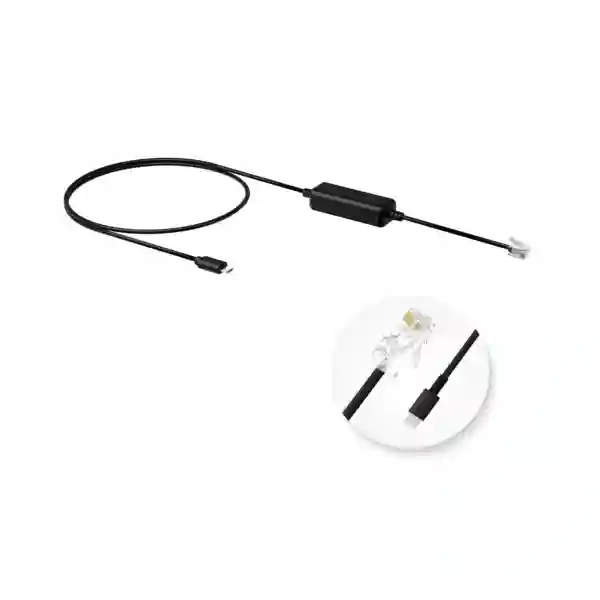
The EHS35 connects through an RJ9 (4P4C) headset interface and includes a Micro-USB connection for the compatible Yealink wireless headset. The accessory is intended for Yealink WH62/WH63 headset use, so purchasing decisions should start by confirming the exact headset generation, the phone model and the required call-control behaviour. Yealink also documents that EHS35 can provide audio with selected Yealink T4X/T5X and certain Avaya, Poly, Snom, Grandstream and Fanvil desk phones, but those third-party or non-T3X scenarios do not provide the same remote call-control function. That distinction matters when a buyer is planning front-desk mobility and expects the headset button to control the call.
FourTeck Tanzania can help buyers evaluate the EHS35 as part of a wider IP telephony requirement rather than treating the adapter as an isolated cable. Before quotation, useful details include the existing phone model, headset model, firmware level where known, number of users, current PBX platform and whether remote answer and hang-up are required from the headset. Buyers can also review the FourTeck Tanzania technology shop for broader business technology sourcing guidance and the FourTeck IP phone specialist site for related telephony context.
Core purpose
Connect a Yealink WH62 or WH63 wireless headset to compatible desk phones, with remote call control available on Yealink T3X phones.
Physical interfaces
Yealink specifies one RJ9 (4P4C) headset jack and one Micro-USB port for the compatible Yealink wireless headset connection.
Business fit
Useful where staff need a wireless headset at a fixed phone position and want simpler call handling in reception, support, sales or administrative workflows.
Verified Yealink EHS35 Features and Compatibility
Yealink describes the EHS35 as a plug-and-play wireless headset adapter for the WH62/WH63 family. On Yealink T3X desk phones, it can support remote call operations from the headset. The documented control set includes answering calls, rejecting calls, hanging up, switching between multiple calls, placing calls on hold, muting and adjusting volume. Incoming calls can be signalled in the headset earpiece. These functions are particularly relevant when a user is away from the handset but still within the operating range of the wireless headset.
Compatibility needs careful interpretation. Yealink states that the WH62 and WH63 are the headset models supported by EHS35. Its current product information also distinguishes between Yealink T3X use, where remote call control is supported, and selected Yealink T4X/T5X plus Avaya, Poly, Snom, Grandstream and Fanvil desk phones, where the EHS35 can provide audio without the same remote control feature. Buyers should therefore avoid choosing the adapter only because the connectors appear suitable. The desired operational behaviour, headset revision, phone family and firmware state all need to be checked together.
Yealink support guidance also notes firmware considerations for T3 series phones and advises updating phones to current supported firmware for EHS35 operation. In larger deployments, it is sensible to test one representative phone-and-headset pair before rolling out dozens of adapters. That pilot can confirm audio, headset mode, remote answer/end behaviour, provisioning settings and user workflow before procurement is finalised.
Why Businesses Use an Electronic Headset Adapter
A wireless headset can improve mobility, but the practical value depends on how well it integrates with the desk phone. Without the right electronic hook-switch or headset interface, a user may hear audio but still need to return to the desk to answer or end every call. The EHS35 is relevant because it bridges that control requirement for supported Yealink T3X phones and compatible WH62/WH63 headsets. In a reception area or call-handling team, a few seconds saved on every interaction can reduce interruptions and make it easier for staff to move between nearby tasks while remaining reachable.
The adapter is also useful when an organisation already owns T3X phones and wants to add compatible Yealink wireless headsets without replacing the phones merely to gain a different headset interface. That can support staged upgrades. For example, a company may standardise first on headsets for customer-facing roles, validate the user experience, and then expand to other teams where mobility has a clear benefit. The adapter should still be considered within the full voice environment because PBX provisioning, phone firmware, network quality and user settings can affect the final result.
For broader planning, FourTeck Tanzania’s technology services overview explains how IP telephony, switching, Wi-Fi, security and endpoint choices fit together. This is useful when the headset project is part of a new office, PBX migration or branch rollout rather than a single accessory purchase.
Buying and Deployment Checklist
Before ordering the Yealink EHS35, confirm the exact phone and headset combination. The most straightforward target scenario is a Yealink T3X phone paired with a Yealink WH62 or WH63 headset where the user requires remote call control. Record the phone model numbers, headset model, quantity and expected use case. If the deployment uses a different Yealink phone family or a third-party desk phone, clarify whether audio-only operation is acceptable because remote answer, hold, mute, end-call and related controls may not be available through the EHS35.
For managed business environments, include firmware review in the rollout plan. A pilot desk can be used to confirm headset mode, audio path, signalling and control before the accessory is deployed across many seats. If phones are centrally provisioned, document any required configuration so a factory reset or replacement does not remove the setting. Users should also be shown the difference between controlling calls from the headset and controlling them directly from the desk phone.
A quotation request should include quantity, phone models, headset models, required delivery destination, and whether the buyer also needs headsets, IP phones, PBX equipment or network support. This gives the supplier enough context to verify fit and avoid a quote that treats the adapter independently from the devices it must connect.
Yealink EHS35 Headset Adapter Tanzania
For organisations buying the Yealink EHS35 Headset Adapter in Tanzania, the first objective should be compatibility certainty. The adapter is small, but it sits between two user-facing devices: the desk phone and the wireless headset. A mismatch can leave the user with limited audio operation or no expected remote call control. Tanzania-based businesses should therefore identify their existing Yealink phone family and confirm whether the target headset is WH62 or WH63. If the environment uses T3X phones, the EHS35 is specifically positioned by Yealink to provide the control link that allows a compatible headset to manage key call actions without the user returning to the handset.
Tanzanian buyers commonly evaluate accessories as part of a broader office-communications project: new extensions, reception positions, customer-service desks, branch deployments or replacements for ageing wired headsets. In these projects, the adapter should be quoted alongside the actual headset, phone and PBX context. It is useful to state how many staff spend significant time on calls, whether they need to walk to nearby filing areas or counters, and whether the business wants consistent equipment across several sites. A standard combination of approved phone, headset and adapter can make user support easier than allowing every desk to adopt a different headset arrangement.
Network and power planning remain relevant even though the EHS35 itself is an accessory. The desk phone may rely on PoE switching, the PBX may be on premises or hosted, and voice quality can be affected by network conditions. If the purchase is tied to a wider upgrade, buyers should include current PBX details, phone quantities and network information in the request. FourTeck Tanzania can then discuss the adapter in the context of the complete telephony environment and provide a more useful quotation than a model-only enquiry.
Yealink EHS35 Headset Adapter Dar es Salaam
Businesses in Dar es Salaam often have roles where staff move between a reception counter, customer area, records space or nearby colleagues while still needing to remain available for telephone calls. The Yealink EHS35 can be relevant to this style of work when a compatible WH62 or WH63 wireless headset is paired with a Yealink T3X phone. Instead of treating the headset as a separate audio device, the adapter enables supported call-control functions at the headset, helping the user answer, reject, hold, mute or end calls and adjust volume without operating the phone for every action.
For a Dar es Salaam procurement team, the most important preparation is an equipment inventory. List each desk that needs a wireless headset, note the exact phone model, and identify any positions that require additional call-handling features such as multiple line appearances or receptionist workflows. The EHS35 does not add PBX features; it controls supported phone call actions. That distinction helps avoid unrealistic expectations. If the phone platform is being upgraded at the same time, the buyer should decide whether to retain the current T3X fleet, replace selected phones, or deploy wireless headset support only to roles that gain clear productivity from it.
Dar es Salaam organisations with multiple departments can also benefit from a pilot rollout. Testing a single EHS35, WH62/WH63 headset and representative phone can confirm firmware readiness, audio level, incoming-call notification and button behaviour before a larger order. Once verified, the combination can be documented as an approved endpoint bundle for reception, support or sales teams. Include the planned quantity and site details when requesting a quote so accessory quantities align with the number of actual headset-enabled desks.
Yealink EHS35 Headset Adapter Mwanza
In Mwanza, the Yealink EHS35 can support offices that want wireless-headset convenience while retaining compatible Yealink desk phones. The practical use case is straightforward: a staff member has a Yealink WH62 or WH63 headset, a supported phone at the desk, and a need to handle calls without repeatedly picking up the handset. For Yealink T3X phones, EHS35 supports remote call actions such as answer, reject, hold, mute, hang up, switch between calls and volume adjustment. This can be useful for branch administration, service counters, finance teams, transport offices, hotels, clinics and other environments where the user needs both call availability and limited movement around the work area.
A Mwanza buyer should confirm whether the existing environment is fully Yealink or mixed-vendor. In a mixed environment, the same adapter may not deliver identical behaviour across every phone. Yealink documents audio support for selected non-T3X desk phones while limiting remote control in those cases. Standardising only after a compatibility check prevents a common purchasing problem: buying the same accessory for every desk even though the phone families differ. A small compatibility matrix showing phone model, headset model, adapter requirement and expected control features can make a multi-department rollout much easier to manage.
For branch operations, documentation is also important. Record how the adapter is connected, which firmware was tested, and which settings are required on the desk phone. If a replacement phone is introduced later, the support team can reproduce the known working configuration. When requesting procurement support, include the number of active calling positions, the phone models and whether the project includes new headsets or only adapters for existing WH62/WH63 units.
Yealink EHS35 Headset Adapter Arusha
Arusha organisations that handle reservations, guest enquiries, travel coordination, administration or customer service can use wireless headsets to give staff more freedom around a desk-based role. Where the phone is a Yealink T3X and the headset is a compatible WH62 or WH63, the EHS35 is designed to connect those devices and support remote call control. That can reduce the need for a user to return to the phone simply to answer or end a call. It is a focused accessory rather than a general-purpose headset converter, so buyers should verify the exact equipment instead of assuming that any wireless headset will work.
For Arusha deployments, consider the user role before deciding quantity. Not every employee needs an electronic hook-switch adapter. Staff who take occasional calls at a desk may be comfortable with the handset or a wired headset, while reception, reservations, help-desk and coordination roles may benefit more from wireless mobility. This role-based approach can make the quotation more economical and easier to standardise. It also creates a simple support model: specific job profiles receive an approved phone, WH62/WH63 headset and EHS35 combination, while other users retain simpler endpoints.
If the business is opening or refreshing an office in Arusha, include telephony dependencies in the project scope. Confirm PBX or hosted voice compatibility, PoE requirements for the phones, switch capacity, VLAN and QoS policy where used, and the headset requirements for each user class. The EHS35 solves the connection between compatible headset and phone, but the wider voice system still determines call routing, extensions, queues and external connectivity. Treating these layers separately while validating how they work together leads to a cleaner rollout.
Yealink EHS35 Headset Adapter Dodoma
Dodoma offices in government, professional services, education, finance and administration may have fixed desk-phone positions that also require staff mobility around an office or service point. The Yealink EHS35 is designed for a defined headset ecosystem: Yealink WH62/WH63 wireless headsets and compatible desk phones. When combined with Yealink T3X phones, remote call control can be handled from the headset, giving the user the ability to answer, reject, hold, mute, end or switch calls and control volume. This makes the accessory particularly relevant to staff whose phone is a primary working tool rather than an occasional communication device.
Procurement teams in Dodoma should request exact model confirmation before placing a bulk order. A purchase description should not stop at “Yealink headset adapter.” It should state EHS35, the phone models in use, headset models, quantity and required functionality. This is especially important if older phones are mixed with newer units. Yealink’s compatibility guidance changes by phone family and firmware, and a compatible physical connection does not always mean that remote control will work. A short pre-deployment test is therefore valuable in organisations with standardisation or audit requirements.
For larger institutional deployments, keep a record of the tested configuration and include it in endpoint documentation. This can specify the approved phone, headset and adapter combination, expected control behaviour, cable placement and any firmware prerequisite. Such documentation improves support when users move desks or equipment is replaced. A quotation can then be based on actual validated seat counts rather than estimates, reducing both under-ordering and unused accessories.
Yealink EHS35 Headset Adapter UAE
For UAE businesses operating busy reception desks, contact centres, service teams and shared administrative environments, the Yealink EHS35 can provide a practical link between Yealink WH62/WH63 headsets and compatible desk phones. Its strongest use case is the Yealink T3X family, where the headset can control supported call functions through the adapter. This can help users handle calls while moving within the nearby workspace, reducing dependence on the handset and supporting more fluid desk operations. The adapter is compact, but the deployment decision should still be based on the complete endpoint combination.
UAE organisations often standardise communications hardware across multiple departments or offices, which makes compatibility governance important. The EHS35 should be assigned only to phone-and-headset combinations that have been validated. If the estate includes T4X, T5X or third-party desk phones, buyers should note that Yealink documents audio operation without the same remote control feature in those scenarios. A matrix of endpoint types can therefore prevent the procurement team from assuming uniform behaviour across a mixed phone fleet. Firmware and provisioning should also be checked as part of deployment testing.
When the EHS35 is part of a broader UAE telephony refresh, plan around user roles and call volume. Receptionists, call handlers and supervisors may need wireless headsets first, while standard office users may not. Grouping users by requirement helps control accessory cost and makes support more consistent. For a quotation, provide model numbers and quantities rather than only a generic request for headset adapters.
Yealink EHS35 Headset Adapter Uganda
Ugandan businesses considering the Yealink EHS35 should first identify whether their current calling environment matches the adapter’s intended use. Yealink specifies WH62/WH63 wireless headsets and supports remote call control on the T3X phone family. This combination can be useful for staff who need to answer customer or internal calls while moving around a nearby office, counter or service area. The user can manage supported call actions from the headset instead of repeatedly returning to the desk phone, which can be valuable for reception, sales, logistics coordination and customer-support positions.
For multi-site Ugandan organisations, the key procurement question is whether the same phone fleet exists at every branch. If one location uses T3X phones and another uses a different Yealink generation or third-party phones, the EHS35 may not behave identically. Yealink distinguishes between remote-control operation on T3X and audio-only use on several other supported desk-phone families. A central IT team should therefore test and document each approved combination rather than deploy from a single assumption. This is particularly useful when branches depend on remote support and do not have local telephony specialists on site.
The adapter can also fit into a phased headset strategy. Begin with roles that have the strongest need for wireless call handling, validate the user experience, then extend the standard where the productivity benefit is clear. The quantity request should include spares only according to the organisation’s actual support policy, not an assumed percentage. Phone, headset and EHS35 inventories should remain linked so future replacements preserve compatibility.
Yealink EHS35 Headset Adapter Kampala
Kampala offices with high call volumes can benefit from separating the user from the physical handset while preserving call control. The Yealink EHS35 is designed to make that possible for compatible WH62/WH63 wireless headsets, particularly when connected to Yealink T3X phones. With the supported combination, users can handle answer, reject, hold, mute, end-call, call switching and volume functions from the headset. This can support customer-care teams, booking desks, receptionists, account teams and other roles where staff regularly move a short distance from the phone during a conversation.
A Kampala deployment should be designed around the endpoint rather than the accessory alone. Start with the phone inventory and determine which seats are T3X. Next, identify which users already have WH62/WH63 headsets and which require new headset purchases. Finally, decide which users truly need remote call control. This sequence prevents unnecessary adapters being purchased for desks that use incompatible headsets or do not require wireless control. In managed environments, the IT team should also verify that the phone firmware and configuration are suitable before mass deployment.
For organisations with shared desks, consider how headsets are assigned. Personal headsets may be preferable for hygiene and user comfort, while the phone and adapter remain at the workstation. Clear labelling can help staff connect the correct headset base and reduce support incidents. When asking for pricing, include whether the requirement is for EHS35 units only or a complete bundle of headsets, phones and telephony accessories.
Yealink EHS35 Headset Adapter Arua
For businesses and institutions in Arua, a wireless headset can be especially useful where one employee handles calls while also dealing with nearby paperwork, customers, colleagues or operational tasks. The Yealink EHS35 provides the connection layer for supported Yealink WH62/WH63 headsets and compatible desk phones. On Yealink T3X phones, the adapter enables remote control functions from the headset, helping users stay reachable without physically operating the handset for every call action. The benefit is practical workflow flexibility rather than a change to the PBX itself.
Arua buyers should confirm that the phone has the required headset interface and belongs to the supported family before ordering. If the organisation has a mix of older and newer phones, each model should be listed separately. The EHS35 can transmit audio in some non-T3X scenarios, but Yealink does not provide the same remote control function for those cases. This means that a buyer expecting headset answer and hang-up functionality should not treat audio compatibility as complete compatibility. A test unit can help establish exactly what users will experience.
For remote branch support, simple documentation makes a big difference. Photograph or diagram the correct connection, note the tested phone firmware, and record the approved headset model. If a future support ticket reports that remote answer is not working, technicians can compare the workstation with the known configuration before replacing hardware. The quotation request should therefore include both product quantity and basic endpoint information so the final recommendation is based on the actual environment.
Yealink EHS35 Headset Adapter Mbarara
Mbarara organisations looking to improve desk-phone mobility can use the Yealink EHS35 when the endpoint combination is appropriate. Its intended headset pairing is the Yealink WH62 or WH63, and Yealink T3X phones support the remote-control functions that make an electronic headset adapter valuable. Instead of lifting the handset, a user can control supported actions from the headset, which suits service desks, offices, clinics, education administration and commercial teams that spend substantial time communicating by telephone.
The purchasing process should avoid generic accessory descriptions. Record the exact phone model for every target desk. If some users have T3X phones and others have different models, separate the quantities. Confirm the headset model and generation, because EHS35 is not a universal adapter for every Yealink headset. This product-level discipline helps procurement avoid returning accessories or creating inconsistent user experiences. It also allows the technical team to plan any firmware update or provisioning action needed before the headsets are issued.
For a new Mbarara office, headset planning can be integrated with the voice design. Determine extension counts, reception needs, hunt groups or queues, user roles, PBX platform and phone models first. Then assign WH62/WH63 headsets and EHS35 units only to roles that need wireless mobility. This keeps the design cost-aware and ensures each accessory has a clear business purpose. Request the quote with quantities and intended pairings so compatibility questions can be resolved before purchasing.
Yealink EHS35 Headset Adapter Gulu
The Yealink EHS35 can support Gulu businesses that want a cleaner wireless headset workflow at compatible desk-phone positions. Yealink’s documented use centres on WH62/WH63 headsets, with T3X phones providing remote call-control capability through the adapter. That gives users the ability to handle common call actions while wearing the wireless headset, which can be useful where staff alternate between the desk, nearby counters, printers, records or colleague interactions during the working day.
Gulu buyers should pay particular attention to the difference between “audio works” and “full call control works.” In selected non-T3X environments, EHS35 may provide audio but not the remote control behaviour a user expects. If the project goal is simply to hear and speak through the headset, that may still be acceptable, but if the user must answer calls from the headset button the phone family needs to be verified. Define the requirement in operational terms before selecting the accessory.
For organisations that support equipment centrally from another city, a standard build can reduce troubleshooting. Choose an approved phone model, headset model and EHS35 combination, test firmware and provisioning, and document the setup. Then order the accessory by validated seat count. This approach is more dependable than purchasing adapters first and checking compatibility after deployment. Include site quantity, user roles and existing equipment in the enquiry so the supplier can review the requirement as a complete endpoint package.
Yealink EHS35 Headset Adapter Kenya
Kenyan organisations deploying Yealink T3X desk phones can use the EHS35 to connect compatible WH62/WH63 wireless headsets and provide remote call-control functionality. This is relevant in business environments where users need to move within a nearby workspace without missing incoming calls or repeatedly returning to the phone. The supported functions include call answer and rejection, hold, mute, hang-up, switching between calls and volume adjustment. These capabilities are especially valuable for reception, customer-support, sales and coordination teams where telephone responsiveness is part of daily service quality.
For a Kenyan multi-branch deployment, create an endpoint standard before procurement. Identify the preferred T3X model, approved WH62/WH63 headset and EHS35 adapter, then test the full combination with the PBX and provisioning environment. Where branches contain different phone models, do not assume that every site will deliver the same headset controls. Yealink’s own documentation separates T3X remote-control support from audio-only use on several other desk-phone families. Standardisation should therefore be based on tested behaviour rather than connector type alone.
A complete quote request should also state whether phones and headsets are already owned. If all three components are being purchased together, compatibility can be reviewed as one bundle. If EHS35 is being added to existing equipment, provide current model numbers and firmware details where available. This reduces uncertainty and allows the procurement conversation to focus on a known technical target instead of generic accessory availability.
Yealink EHS35 Headset Adapter Kuwait
Businesses in Kuwait that rely on desk telephony for customer service, sales, administration or reception can use the Yealink EHS35 as part of a compatible wireless-headset setup. When paired with a Yealink WH62 or WH63 and a Yealink T3X phone, the adapter supports remote call handling from the headset. This can help an employee remain available while moving between a desk and nearby work areas, and it can reduce repetitive handset use for staff who manage a high number of calls each day.
Kuwait deployments often include formal equipment standards, so the adapter should be recorded as part of the approved endpoint configuration rather than as an interchangeable cable. State the phone model, headset model and expected control functions. Where T4X, T5X or selected third-party desk phones are used, recognise that Yealink documents EHS35 audio operation without the full remote-control set. This detail should be communicated to users before rollout so they understand whether the headset button can answer and end calls or whether control must remain on the phone.
For organisations purchasing larger quantities, test one or two representative desks first. Confirm incoming-call signalling, microphone and speaker audio, remote buttons, hold/mute behaviour and volume control. Record the firmware level and any provisioning steps. Once the combination is validated, the procurement team can scale the exact same configuration more confidently. Include the complete seat count and any spare policy in the quote request so quantities are transparent.
Yealink EHS35 Headset Adapter Ghana
Ghanaian businesses can use the Yealink EHS35 where a compatible Yealink wireless headset needs to work with a supported desk phone. The core combination is WH62/WH63 plus Yealink T3X, giving the user remote control of common call functions through the headset. This can support call-focused teams in finance, hospitality, services, logistics, education, healthcare administration and general office operations. The adapter’s value is most visible when the user needs to step away from the phone but remain able to respond to incoming calls quickly.
For Ghana deployments, the purchasing checklist should start with compatibility rather than price. Confirm each phone model and separate T3X desks from other phones. Confirm that the headsets are WH62 or WH63 rather than another Yealink generation. Then identify whether full remote call control is required. A mixed phone estate may need more than one accessory strategy, because EHS35 can provide audio in some other desk-phone combinations without giving the same remote-control capability. This is why a small technical review before ordering can save time after delivery.
Where the EHS35 will be used across several sites, the IT team should keep a simple endpoint register. Record each adapter against the phone and headset it serves, and note the working firmware/configuration. This improves asset tracking and helps future support staff determine whether a reported problem is caused by the headset, phone, adapter or provisioning. A quotation request that includes this endpoint information is more actionable than a request containing only the model name.
Yealink EHS35 Headset Adapter Nigeria
Nigeria’s large offices, support centres, sales operations and distributed business teams often depend on reliable call handling. The Yealink EHS35 can serve as the headset interface where compatible WH62/WH63 wireless headsets are used with supported desk phones. On Yealink T3X models, remote call control allows users to answer, reject, hold, mute, end and switch calls as well as adjust volume from the headset. For high-call-volume roles, this can improve day-to-day ergonomics and give users greater freedom to move within their immediate workspace.
A Nigerian enterprise with many desks should treat headset integration as an endpoint-management project. First classify the phones by model. Then identify users who require wireless headsets and determine whether the WH62/WH63 family is the approved standard. Finally, assign EHS35 only where the phone-headset combination supports the expected workflow. This avoids buying electronic adapters for users who have incompatible headsets or who do not need remote call control. It also simplifies help-desk scripts because technicians know which combination should be installed at each approved seat.
In environments with central provisioning, make sure required phone settings survive reboots, replacements and factory resets. Testing should include incoming-call indication, headset audio, microphone quality and each remote-control function. If the organisation uses multiple PBX platforms, repeat validation on each platform before mass rollout. A detailed quotation request should state quantities by site and model so procurement, deployment and asset records remain aligned.
Yealink EHS35 Headset Adapter Seychelles
Businesses in Seychelles, particularly hospitality, tourism, administration and service environments, may have telephone roles where staff need to move around a reception or office area while staying reachable. The Yealink EHS35 can support that workflow when paired with the WH62/WH63 wireless headset and a compatible desk phone. With Yealink T3X phones, remote call control from the headset can reduce the need to return to the physical handset for common actions such as answering, rejecting, holding, muting or ending calls.
Because island procurement can make replacement logistics more deliberate, compatibility checking before purchase is especially important. Buyers should record the exact phone model and headset model, confirm required functionality and test the combination before standardising. Ordering the correct part once is more efficient than discovering after deployment that the headset provides audio but not the call-control behaviour users expected. Yealink’s documentation clearly differentiates T3X remote-control use from audio-only use with certain other desk phones, so that distinction should be part of the purchase decision.
For hotels or multi-property groups, a standard endpoint bundle can simplify support. Reception or reservations staff can receive the same approved phone, headset and EHS35 setup, while less call-intensive roles use simpler equipment. Keep a small installation guide with cable placement, tested firmware and user instructions. When requesting a quote, specify whether units are for new workstations, replacements or expansion so quantities and compatibility can be reviewed in the correct operational context.
Compatibility and Integration Guidance
The safest way to plan an EHS35 deployment is to think in complete endpoint combinations. The phone provides the call-control platform, the headset provides wireless audio and user controls, and the EHS35 provides the interface between them. For Yealink T3X and WH62/WH63 combinations, the intended remote-control workflow is available. For some other compatible desk phones, the EHS35 can be used for audio while call control remains on the phone. This distinction should appear in procurement documentation so users do not receive an accessory that technically passes audio but fails the business requirement.
Firmware is part of compatibility. Yealink support guidance for EHS35 and T3 series phones includes specific firmware considerations and configuration instructions for older software or hardware revisions. In practical terms, organisations should update phones according to their supported change process, test a representative unit, and document the working state. Avoid applying untested mass changes to production call environments. If central provisioning is used, configuration should be managed in the PBX or provisioning platform rather than relying only on a manual setting at each phone.
If your requirement extends beyond the adapter, the FourTeck Tanzania overview explains the wider approach to integrated voice, networking and business technology. This context is useful when an EHS35 request is part of an IP PBX replacement, office rollout or multi-site standardisation project.
Who Should Consider the Yealink EHS35?
The EHS35 is most appropriate for users who already have, or plan to deploy, the supported Yealink headset and a compatible desk phone. Receptionists are a common fit because they may need to greet visitors, retrieve documents or coordinate with nearby colleagues while monitoring incoming calls. Customer-service and support personnel can benefit because they often spend long periods wearing a headset and may prefer not to operate the handset repeatedly. Sales and account-management staff can also value wireless movement during calls, especially where they need to consult nearby files, screens or colleagues.
The adapter is less compelling where users take only occasional calls, where the desk phone is not compatible, or where the headset family is not WH62/WH63. It may also be unnecessary on phones that already provide the required direct headset interface for the selected headset. Buying decisions should therefore be role-based and equipment-based. A universal “one adapter per phone” policy can waste budget if many users do not need wireless remote control.
For procurement, group users into profiles such as reception, high-call-volume staff, general office and occasional phone users. Assign headset and adapter bundles only where the profile supports the cost and workflow. This creates a predictable standard and makes it easier to maintain spares, train staff and troubleshoot issues.
Frequently Asked Questions
What headsets work with the Yealink EHS35?
Yealink specifies the WH62 and WH63 wireless headsets for the EHS35. Buyers should confirm the exact headset generation before ordering because other Yealink headset families may require different accessories or connection methods.
Does EHS35 provide remote call control on Yealink T3X phones?
Yes. Yealink documents remote control on T3X phones for functions including answer, reject, hold, mute, hang up, switching between calls and volume adjustment when used with the supported headset configuration.
Can the EHS35 work with other desk-phone brands?
Yealink lists selected Avaya, Poly, Snom, Grandstream and Fanvil desk phones for audio operation with EHS35, but remote control is not provided in those scenarios. Exact model compatibility should be verified before purchase.
What connectors does the EHS35 use?
Yealink specifies one RJ9 (4P4C) headset jack and one Micro-USB port for the compatible Yealink wireless headset connection.
What should I send for an EHS35 quotation?
Send the quantity, phone model numbers, headset model numbers, site or city, and whether you need EHS35 only or a complete headset/phone package. If remote call control is essential, state that clearly so compatibility can be checked against the intended workflow.
Quotation Checklist
For a useful quotation, provide: EHS35 quantity; exact Yealink or third-party phone model; WH62 or WH63 headset model; whether headsets are already owned; required remote-control functions; PBX or hosted voice platform if relevant; deployment city; number of sites; and whether the request includes phones, PoE switching, IP PBX hardware, configuration or support. This information helps distinguish a straightforward accessory requirement from a broader voice-system project.
If you are not sure which details matter, send photos of the phone model label or the model information from the phone menu together with the headset model. FourTeck can then use the information to discuss compatibility and the appropriate next step. The FourTeck Tanzania contact page provides the enquiry route for product guidance and quotation requests.
Decision Recap
Choose the Yealink EHS35 when you need a supported interface between a Yealink WH62/WH63 wireless headset and a compatible desk phone, especially a Yealink T3X model where remote call control is required. Confirm the exact phone and headset before ordering, validate firmware and configuration, and test a representative seat before large deployment. Do not assume that audio compatibility on another phone family means the same remote call-control features will be available.
For Tanzania and regional business deployments, the strongest purchasing approach is to define the user role, confirm the endpoint combination, document the working configuration and then scale the validated setup. This turns a small accessory purchase into a predictable part of the organisation’s telephony standard.
Consult FourTeck Tanzania
If you need the Yealink EHS35 Headset Adapter for an existing phone estate or a new voice deployment, share your phone models, headset models and quantities. FourTeck Tanzania can discuss the requirement in the context of user roles, telephony compatibility and wider office communications. This is particularly useful when the project includes multiple branches or when the same headset standard must be reproduced across reception, sales and support teams.
A clear compatibility check before procurement reduces uncertainty and helps ensure that the purchased adapter delivers the expected call-control behaviour rather than audio-only operation.




Reviews
There are no reviews yet.