
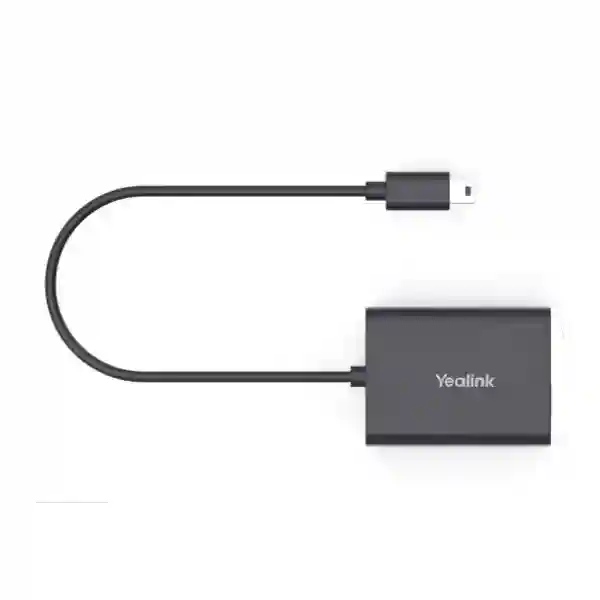
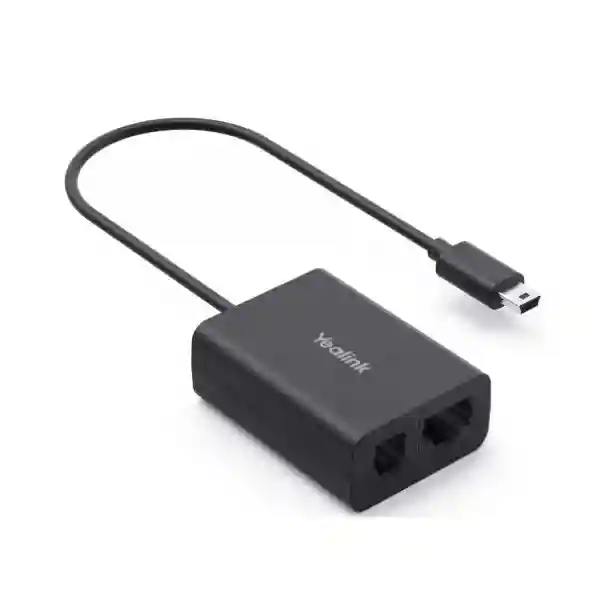
Yealink EHS62 Headset Adapter
The Yealink EHS62 is a wireless-headset adapter designed to create a technical interface between selected Yealink DECT headsets and compatible business desk phones. Yealink documents compatibility with WH64, WH63 E2 and WH68 headsets and with supported desk phones from Yealink, Cisco, Avaya, Poly, Grandstream, Mitel and Unify. For teams that need to answer or end calls from the headset instead of repeatedly returning to the phone, the EHS62 can make daily call handling more efficient while keeping the existing desk-phone workflow.
Who is it for?
Reception desks, call-handling teams, contact centres, finance desks, healthcare administration, education offices and other users who move around while remaining responsible for incoming calls.
What does it do?
It links a compatible Yealink wireless headset to a supported desk phone so call-control functions can be handled from the headset. Actual setup depends on the phone brand and model.
What should buyers verify?
Confirm the exact headset model, phone model, firmware, EHS setting requirements and included cable path before purchase. Brand-level compatibility alone is not enough for a final deployment decision.
Yealink EHS62 overview and verified capabilities
Yealink positions the EHS62 as an adapter for its current compatible DECT headset families. The manufacturer lists WH64, WH63 E2 and WH68 as supported wireless headsets. The adapter is intended to work with compatible desk phones across Yealink T2X and T4XG families and selected models from Cisco, Avaya, Poly, Grandstream, Mitel and Unify. Once correctly connected and configured, incoming calls can be presented to the wireless headset and users can remotely answer calls, hang up and adjust volume. This is particularly useful when employees must leave the immediate desk area while still being reachable.
The important buying point is that the EHS62 should not be treated as a universal cable for every headset or every phone. Yealink separately offers other EHS accessories for different headset generations and use cases. A correct quotation should therefore begin with the exact phone and headset model numbers. In multi-vendor offices, this check helps prevent purchasing the right adapter family with the wrong cable or phone configuration. For procurement assistance, Fourteck Tanzania’s business technology shop provides a broader context for sourcing communications hardware, while the services page explains the wider integration and support approach.
Key features that matter in daily use
Answer and end supported calls from the wireless headset, reducing the need to touch the desk phone for routine call handling.
The adapter is designed so incoming calls can be transmitted to the compatible Yealink wireless headset for practical mobility around the workspace.
The included cable set is intended for supported phones from Yealink, Cisco, Avaya, Poly, Grandstream, Mitel and Unify, subject to model compatibility.
The EHS62 is especially relevant where users spend significant time on calls, including front desks, customer service, finance, healthcare, education and corporate operations.
Compatibility and included connection cables
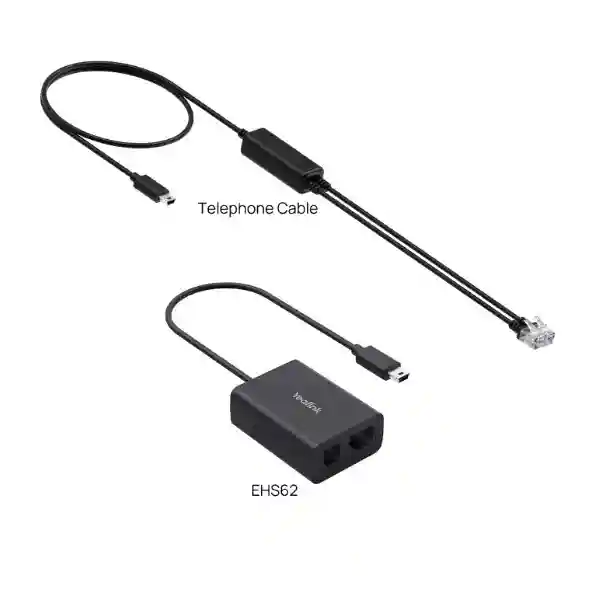
Yealink’s current EHS62 datasheet identifies the WH64, WH63 E2 and WH68 as compatible wireless headsets. The supplied package includes the EHS62 itself, a user guide, and cable options intended for Mitel and Unify phones, Avaya and Grandstream phones, Yealink desk phones, Cisco IP phones and Poly IP phones. Yealink also documents that certain phone brands require configuration before the adapter operates correctly. For example, Mitel and Avaya phones may require EHS-related settings to be enabled, while Grandstream configuration can require server-side or phone-profile changes. Yealink phones in the documented connection path are described as plug-and-play, while Poly phones may require hookswitch configuration.
| Item | Purpose |
|---|---|
| EHS62 | Electronic headset interface between compatible Yealink DECT headsets and supported desk phones. |
| Cable A | Connection path for supported Mitel and Unify phones. |
| Cable B | Connection path for supported Avaya and Grandstream phones. |
| Cable C | Connection path for supported Yealink desk phones. |
| Cable D | Connection path for supported Cisco IP phones. |
| Cable E | Connection path for supported Poly IP phones. |
Before ordering: compatibility is the first question
A procurement request should include the exact Yealink headset model, exact desk-phone model, firmware or platform details where known, quantity, user role and whether remote answer/end control is required. This matters because an EHS adapter sits between two devices and depends on both sides being supported. If you are planning a broader voice deployment, review Fourteck Tanzania’s integrated IT and telecom overview, the Fourteck Tanzania company page, and the verified contact page for requirement-based guidance.
Yealink EHS62 Headset Adapter Tanzania
For organisations in Tanzania, the Yealink EHS62 Headset Adapter is best viewed as a small but important part of a complete business-calling workflow. It is relevant when an employee uses a compatible Yealink WH64, WH63 E2 or WH68 wireless headset and needs call-control integration with a supported desk phone. Typical users include receptionists, sales desks, service coordinators, customer-support staff and managers who are frequently on voice calls but may need to move away from the physical phone. The adapter can reduce the friction of returning to the desk simply to answer or terminate a call, helping the wireless headset perform as an operational tool rather than only an audio device.
For Tanzania procurement, compatibility verification should come before price comparison. Buyers should supply the exact desk-phone model and headset model instead of requesting only an “EHS cable.” Yealink lists several EHS products for different headset generations, and the EHS62 is specifically associated with the WH63 E2, WH64 and WH68 families in current documentation. The desk-phone side also matters: supported brands include Yealink, Cisco, Avaya, Poly, Grandstream, Mitel and Unify, but individual models and settings need confirmation. This is especially important for businesses that have inherited a mixed estate of phones from previous projects or branch expansions.
When requesting a Tanzania quotation, include quantity, phone models, headset models, whether the users need remote answer/end, and whether the adapter will be deployed at a reception, call centre, office desk or shared workspace. If the EHS62 is part of a wider VoIP refresh, it is also useful to review switch PoE capacity, voice VLAN configuration, PBX compatibility, provisioning and headset policy at the same time. Fourteck Tanzania can use this information to frame a more accurate requirement discussion without assuming stock, price or delivery conditions. For cross-border projects, the wider Fourteck Africa technology network can also provide context for multi-country communication requirements.
Yealink EHS62 Headset Adapter Dar es Salaam
Businesses in Dar es Salaam often have dense office environments, reception areas, customer-service counters and sales operations where staff need reliable call handling without remaining seated at one handset. In those environments, the Yealink EHS62 can be useful when compatible Yealink DECT headsets are already selected and the connected desk phones fall within Yealink’s supported ecosystem. A receptionist who moves between a front desk, printer, filing area and visitor point, for example, may benefit from answering and ending calls from the headset. The same logic can apply to service desks, dispatch teams and back-office users who need mobility during conversations.
A Dar es Salaam buyer should not assume that every phone from a supported brand uses the same setup. Yealink’s guidance shows that some phones require EHS or headset-signalling settings before the adapter can deliver remote control. Grandstream, Avaya, Mitel and Poly environments can therefore require configuration steps beyond physically connecting the cable. For a new office rollout, it is sensible to test one complete phone-headset-adapter combination before approving a large quantity. That pilot can confirm ringing behaviour, call answer/end, volume control, firmware and the physical cable route at the desk.
Procurement teams in Dar es Salaam can make quotation preparation more efficient by documenting each user type. A front-desk operator may have different needs from an executive assistant, a general office employee or a contact-centre agent. If several phone brands are in use, separate the requirement by phone model so cable and configuration expectations are clear. The EHS62 does not replace a PBX, phone or headset; it connects compatible elements so the headset can control supported call functions. When the wider project involves IP phones, SIP extensions or branch communications, the specialist Fourteck IP phone resource provides additional purchasing context for business voice endpoints.
Yealink EHS62 Headset Adapter Mwanza
For organisations in Mwanza, the Yealink EHS62 can support business users whose work combines phone conversations with movement around an office, service counter or administrative area. The value is straightforward: when a compatible Yealink wireless headset and supported desk phone are correctly connected through the adapter, the user can handle key call actions from the headset rather than treating the wireless device as audio-only. That can be useful for reception, reservations, sales, support, internal coordination and other roles where missing an incoming call has an operational cost.
The strongest purchasing process begins with a compatibility matrix. Record the precise desk-phone model, headset model and quantity at each location. Yealink’s current information names WH64, WH63 E2 and WH68 on the headset side and includes compatible models from Yealink, Cisco, Avaya, Poly, Grandstream, Mitel and Unify on the phone side. Because phone settings differ by manufacturer, buyers should also identify who will perform configuration and testing. A cable that is physically connected but not supported by the phone’s headset settings can create an avoidable installation issue.
For Mwanza branch deployments, consistency can be as important as the adapter itself. If headquarters and branch offices use the same phone, headset and EHS combination, IT teams can standardise setup instructions, spare accessories and troubleshooting. Where models differ, document the variation rather than forcing one assumption across every site. A good request for quotation should ask for the EHS62 by exact model name and include the associated headsets and phones. It should also state whether the requirement is a replacement accessory or part of a new telephony deployment. This allows product selection to be discussed alongside the larger communications environment, including IP PBX, network readiness and endpoint provisioning.
Yealink EHS62 Headset Adapter Arusha
In Arusha, businesses in hospitality, travel, professional services, administration and customer-facing operations may have staff who spend much of the day switching between calls and in-person tasks. The Yealink EHS62 is relevant when those users rely on compatible Yealink DECT headsets and supported desk phones. Remote call control can make a wireless headset more practical because the user can answer or end supported calls without reaching for the desk phone. That is particularly useful where the phone remains at a fixed station but the employee regularly steps several metres away within the normal headset working environment.
A common purchasing mistake is to select accessories only by brand. The EHS62 should instead be matched by exact equipment combination. Yealink’s documentation identifies WH64, WH63 E2 and WH68 as compatible headset families and lists supported phone environments across Yealink T2X/T4XG and selected Cisco, Avaya, Poly, Grandstream, Mitel and Unify models. Some phones need configuration before EHS control works, while documented Yealink phone connections can be plug-and-play. This difference is why an IT administrator or integrator should validate the intended pairing before ordering in volume.
For an Arusha procurement team, the quotation checklist should include quantity, desk-phone models, headset models, current firmware where relevant, expected call-control functions and whether users are being migrated from another headset platform. If the deployment serves a hotel front desk, reservations team, clinic reception or busy corporate office, identify the operational workflow as well. The goal is not merely to connect two pieces of hardware, but to make sure incoming-call handling remains predictable during busy periods. Where an organisation operates multiple branches, standardising on verified combinations can reduce training and support effort and create a clearer accessory-spares strategy.
Yealink EHS62 Headset Adapter Dodoma
For offices in Dodoma, the Yealink EHS62 can be considered for call-intensive users in government-facing administration, professional services, education, corporate support and other environments where people need to stay reachable while moving around the immediate workplace. The adapter’s role is narrow but useful: it creates the connection needed for supported call control between a compatible Yealink wireless headset and a compatible desk phone. When correctly deployed, the user can answer calls, end calls and adjust volume from the headset, improving mobility without replacing the desk-phone system.
Planning should begin by confirming that the existing headset belongs to the supported generation. Current Yealink documentation lists WH64, WH63 E2 and WH68 for EHS62. If a customer has an older WH62 or WH63, a different accessory may be appropriate, so the exact model suffix matters. On the desk-phone side, compatibility depends on vendor and model, and configuration can vary. An administrator should therefore validate the intended combination using Yealink’s compatibility information and ensure that the phone firmware and headset environment are ready before deployment.
For a Dodoma site with many users, a small pilot is a sensible procurement step. Test one unit against the actual phone, headset and PBX environment, confirm remote answer/end behaviour, then document the connection and settings. This reduces uncertainty when rolling the same combination to multiple desks. A formal quotation request should state whether the EHS62 is needed for new headsets, replacement accessories or standardisation across departments. It should also identify related requirements such as IP phones, PBX configuration, voice VLANs or user training. This wider context helps avoid treating the adapter as an isolated purchase when the real business objective is dependable, mobile call handling.
Yealink EHS62 Headset Adapter UAE
UAE businesses frequently operate busy reception desks, contact centres, service teams and multi-branch communication environments. The Yealink EHS62 is a relevant accessory where compatible Yealink WH64, WH63 E2 or WH68 DECT headsets need call-control integration with supported desk phones. It can help users answer or end calls from the headset and manage volume while away from the physical handset, creating a more practical experience for staff who handle frequent calls and move between nearby work points.
In a UAE procurement environment, multi-vendor compatibility can be especially important because offices may contain Yealink, Cisco, Avaya, Poly, Grandstream, Mitel or Unify desk phones. The brand name alone does not confirm a match. Procurement and IT teams should provide exact phone model numbers, headset models and quantities, then verify whether phone configuration is required. Yealink’s documentation indicates different setup paths for different manufacturers, including EHS or headset-signalling settings on some phones. A controlled pilot before bulk deployment can confirm remote call control, ring alert behaviour and the physical cable arrangement at each desk.
For organisations operating between Tanzania and the UAE, standardising supported headset and phone combinations can simplify support and purchasing. Keep a documented bill of materials that identifies the EHS62, the correct connection cable, headset model and phone model as one validated set. Buyers can also review Fourteck UAE IT and telecom solutions for broader communications requirements. Availability, pricing and delivery should be confirmed at quotation time rather than assumed, particularly for multi-country projects where procurement conditions can differ by market.
Yealink EHS62 Headset Adapter Uganda
In Uganda, the Yealink EHS62 can support offices that want wireless-headset mobility without losing practical control of incoming desk-phone calls. For users equipped with compatible Yealink WH64, WH63 E2 or WH68 headsets, the adapter provides the interface to supported desk phones so answer, hang-up and volume functions can be handled from the headset. This is useful for customer service, front desks, sales teams and administrative staff who need to move within a work area while remaining responsible for calls.
A sound Uganda purchasing decision starts with model verification. Companies may have several generations of Yealink headsets or a mixed set of phone brands across departments. The EHS62 should be specified only for combinations supported by Yealink. Cisco, Avaya, Poly, Grandstream, Mitel, Unify and certain Yealink desk phones appear in the manufacturer’s compatibility guidance, but the required connection and settings differ. IT teams should identify the exact models, check firmware and EHS configuration requirements, and avoid treating the adapter as universal.
For multi-site operations, document a standard workstation profile that includes the phone, headset, EHS adapter and any power or network dependencies. This makes expansion and troubleshooting easier when new users are added. A quotation request should also state whether the business is extending an existing PBX, replacing headsets or creating a new call-handling area. Fourteck’s Uganda IT solutions site covers IP PBX, VoIP and related business communication requirements, which can be useful when the EHS62 forms part of a larger endpoint refresh rather than a stand-alone accessory purchase.
Yealink EHS62 Headset Adapter Kampala
Kampala organisations with busy office communications can use the Yealink EHS62 as part of a carefully matched headset and desk-phone setup. Typical users are people who must stay reachable while moving around a front office, customer-support area, sales floor or administrative workspace. When paired with a supported Yealink WH64, WH63 E2 or WH68 headset and a compatible phone, the adapter enables the headset to participate directly in call control rather than functioning only as an audio path.
For Kampala procurement teams, the key question is not simply whether the phone carries a familiar brand. The exact model, firmware and configured headset mode determine whether the integration will behave as expected. Yealink documents support across selected phones from Yealink, Cisco, Avaya, Poly, Grandstream, Mitel and Unify, with different setup instructions by manufacturer. Some environments may need an EHS setting enabled before the adapter is connected. This should be included in installation planning so a hardware delivery does not arrive without the required configuration work.
If a company is equipping many desks, test the first complete workstation and capture the approved settings. Record which cable is used, how the phone is configured and how users answer and end calls. This simple documentation can make subsequent rollout more consistent. Request quotations with exact quantities and model numbers, and state whether accessories are for replacements, new users or a standardisation programme. Businesses operating both Kampala and other East African locations can benefit from maintaining one supported endpoint standard where practical, because the same configuration knowledge can then be reused by IT teams and procurement staff across branches.
Yealink EHS62 Headset Adapter Arua
For businesses and institutions in Arua, a wireless headset can be valuable when employees need to handle calls while moving between nearby work tasks. The Yealink EHS62 extends that workflow for supported equipment by connecting compatible Yealink WH64, WH63 E2 or WH68 headsets to compatible desk phones. Remote answer and end functions can reduce missed-call risk for users who are not always directly beside the phone, while volume control from the headset keeps common actions within easy reach.
Because Arua sites may rely on equipment purchased at different times, compatibility checking is particularly important. An office might have newer headsets with older phones, or different phone vendors across departments. The EHS62 is not a universal bridge for any combination. Yealink identifies supported families and provides vendor-specific connection guidance. Before ordering, collect the phone model printed on the device, the exact headset model, the number of users and any known firmware or PBX details. If possible, validate one combination before buying larger quantities.
Deployment planning should also consider supportability. Keep the unused cables from the package organised and labelled, document the active cable, and note any EHS-related phone settings changed during installation. That information becomes useful if a phone is replaced later. For remote or branch sites, a standardised build reduces the number of spare accessories and troubleshooting scenarios an IT team must manage. When requesting a quote for Arua, clearly state the desired call-control functions and whether the purchase forms part of a wider IP-phone or PBX upgrade. This provides better context for selecting the right accessory rather than comparing only unit price.
Yealink EHS62 Headset Adapter Mbarara
Mbarara organisations planning more flexible desk-phone use can consider the Yealink EHS62 for staff who use compatible Yealink DECT headsets and supported business phones. The adapter’s practical function is to make remote call control available through the headset, so a user can handle supported incoming calls without reaching for the handset. This can be useful in reception areas, customer-care offices, administrative departments, clinics, education environments and commercial teams where employees frequently move around their immediate workspace.
The purchasing process should start by identifying the headset generation. Yealink currently lists WH64, WH63 E2 and WH68 for EHS62. Older headset families may use different adapters, so “Yealink wireless headset” is not a sufficient specification. The phone model must also be checked. Supported brands include Yealink, Cisco, Avaya, Poly, Grandstream, Mitel and Unify, but connection cables and setup vary. Procurement staff should therefore request compatibility confirmation against the exact phone rather than relying on a generic brand statement.
For Mbarara branches, consider how replacement and support will work after installation. Keep an asset note for each workstation that records phone model, headset model and adapter. If phones are upgraded later, re-check compatibility instead of assuming the same accessory remains appropriate. In a larger voice project, the EHS62 should be planned alongside headset selection, desk-phone features, PBX provisioning and network readiness. A well-defined quotation request can include user roles, quantity and the reason remote call control is needed, allowing the supplier to distinguish between a simple accessory requirement and a broader communication-system project.
Yealink EHS62 Headset Adapter Gulu
For Gulu offices, the Yealink EHS62 can add practical control to a supported wireless-headset setup without changing the fundamental desk-phone workflow. Users with compatible Yealink WH64, WH63 E2 or WH68 headsets can use the adapter with supported phones to answer or end calls and adjust volume from the headset. This can be useful where one person covers both phone duties and nearby administrative tasks, or where a service team needs to stay mobile within an office while maintaining call responsiveness.
The most important technical check is the exact device pairing. Yealink’s documentation includes selected phones from Yealink, Cisco, Avaya, Poly, Grandstream, Mitel and Unify, but setup instructions are not identical. Some phones need headset or electronic-hookswitch settings enabled. A good implementation therefore combines hardware compatibility with configuration verification. If the site has mixed phones, create separate profiles rather than assuming one setup guide applies to every desk.
From a procurement perspective, the adapter should be ordered as part of a complete user requirement. State which staff need mobility, how many headsets are involved and what desk phones they use. For a branch rollout, it can be cost-effective operationally to standardise on one approved combination even when several technically compatible choices exist, because training, spares and troubleshooting become simpler. Keep the package cables and documentation available after installation, and record any phone settings changed. This preparation is especially useful when technical support must be provided remotely. For larger communication projects, include PBX, IP-phone and network considerations in the same planning conversation so the headset accessory supports a stable end-to-end calling experience.
Yealink EHS62 Headset Adapter Kenya
Kenyan businesses that rely on desk phones and wireless headsets can use the Yealink EHS62 where the equipment combination is supported by the manufacturer. The adapter is designed for compatible Yealink WH64, WH63 E2 and WH68 DECT headsets and selected desk phones, giving users remote call-control functions such as answer, hang-up and volume adjustment. This can improve the practical value of wireless headsets for receptionists, customer-care agents, sales teams and managers who need to move within a workspace while staying connected to calls.
Before ordering for Nairobi, Mombasa or another Kenyan location, document the exact desk-phone model rather than only the vendor. Yealink lists support across selected models from Cisco, Avaya, Poly, Grandstream, Mitel, Unify and Yealink, and different vendors can require different EHS settings. A pilot is advisable for larger orders: connect one complete workstation, confirm ring notification and remote control, verify firmware, and then use that validated configuration as the rollout standard. This approach is more reliable than purchasing accessories based only on connector appearance.
Companies operating between Tanzania and Kenya can also simplify support by maintaining a shared endpoint standard where business requirements allow. The same documented phone, headset and EHS combination can reduce training differences and spare-parts complexity across branches. When requesting pricing, include quantity, models and project purpose, but treat current stock, delivery and commercial terms as quotation-time details. The Fourteck Kenya IT solutions site covers business VoIP, IP PBX and unified communications, making it a useful related resource when the EHS62 is part of a wider regional voice deployment.
Yealink EHS62 Headset Adapter Kuwait
For Kuwait offices with call-intensive roles, the Yealink EHS62 can be specified when users have compatible Yealink DECT headsets and supported desk phones. Its role is to connect the headset system to the phone’s call-control interface, allowing supported remote actions from the headset. That can be especially useful at reception, service counters, help desks, sales teams and operations offices where employees need freedom to move within the immediate work area without losing responsibility for incoming calls.
The procurement decision should remain model-specific. Yealink currently lists WH64, WH63 E2 and WH68 as compatible headsets for EHS62. On the desk-phone side, compatible models may come from Yealink, Cisco, Avaya, Poly, Grandstream, Mitel and Unify. Some phones need EHS or headset signalling enabled, so a physical connection alone may not complete deployment. Kuwait buyers should provide precise model numbers and, for larger sites, test one unit before authorising a bulk accessory purchase.
For organisations with several departments, classify users by workflow. A reception user may need constant call notification and quick answer/end access, while a manager may value mobility but handle fewer calls. This helps determine which desks genuinely need EHS capability. Include the adapter in the overall endpoint bill of materials, and document which cable and phone settings are used. When the project spans multiple countries, use a consistent configuration record so local teams can support the same design. Pricing, delivery and warranty conditions should be confirmed with the supplier at quotation time, and no assumption should be made that availability in one market automatically applies in another.
Yealink EHS62 Headset Adapter Ghana
In Ghana, the Yealink EHS62 is relevant for businesses that want selected Yealink wireless headsets to control calls on compatible desk phones. For call-intensive users, the ability to answer and end calls from the headset can improve mobility around a work area and reduce reliance on the handset. The adapter is associated with Yealink WH64, WH63 E2 and WH68 headsets in current vendor information and supports compatible phones across several enterprise telephony brands.
Procurement teams should verify the actual desk-phone models used in Accra or branch locations. Yealink’s support includes compatible Yealink, Cisco, Avaya, Poly, Grandstream, Mitel and Unify devices, but manufacturer settings vary. Some require electronic-hookswitch features or specific headset signalling to be enabled. Before a large deployment, it is sensible to validate one complete phone, headset and EHS62 combination, then document the successful configuration so that additional desks can be implemented consistently.
A request for quotation should include quantities, headset models, phone models, user roles and whether the EHS62 is for new deployments or replacements. If a Ghana branch is part of a larger regional business, standardised endpoint combinations can simplify remote support and inventory planning. Store spare cables carefully because the package contains multiple connection options for different phone families. The adapter itself should be treated as one part of a voice solution that can also involve PBX configuration, provisioning, network quality and user training. Current commercial terms, stock and delivery should be confirmed when the quotation is prepared rather than inferred from another region or from third-party online pricing.
Yealink EHS62 Headset Adapter Nigeria
Nigerian organisations with high call volumes can consider the Yealink EHS62 when compatible Yealink wireless headsets need call-control integration with supported desk phones. Contact centres, front offices, customer-service teams, financial operations and sales desks are examples of environments where a user may benefit from answering or ending calls at the headset while moving within the workplace. The EHS62 does not provide the wireless audio link by itself; it complements the compatible Yealink DECT headset system by adding the desk-phone control interface.
Model validation is essential for procurement. Yealink identifies WH64, WH63 E2 and WH68 as compatible headset families for the EHS62. The phone side can include compatible Yealink, Cisco, Avaya, Poly, Grandstream, Mitel and Unify models, but installation instructions depend on the manufacturer. For example, certain phones require EHS or headset signalling to be enabled before call control functions work. A business with several phone types should therefore build a short compatibility table before purchasing accessories in bulk.
For large offices in Lagos, Abuja or other Nigerian business centres, pilot testing can reduce deployment risk. Confirm firmware, physical cabling, ring behaviour, answer/end control and volume operation at one workstation, then capture the settings as an internal standard. A well-prepared quotation request should state quantity, precise phone and headset models, and whether the project is new installation, expansion or replacement. For regional companies, consistent accessory standards can reduce spare-parts variety and simplify IT support. Commercial details such as availability, price and delivery should be confirmed at the point of quotation, particularly when the project involves cross-border sourcing or phased rollout.
Yealink EHS62 Headset Adapter Seychelles
For businesses in Seychelles, particularly hospitality, travel, administration and professional-service environments, a wireless headset can help staff remain responsive while performing tasks away from a fixed phone. The Yealink EHS62 supports that workflow when it is paired with compatible Yealink WH64, WH63 E2 or WH68 headsets and a supported desk phone. Remote answer, hang-up and volume functions can reduce the need for a receptionist or service employee to remain physically beside the phone throughout a shift.
Because island procurement often places extra emphasis on getting the correct accessory the first time, compatibility checking should be rigorous. Buyers should send the exact phone model, headset model and quantity before ordering. Yealink’s documentation covers compatible phones from its own T2X/T4XG families and selected devices from Cisco, Avaya, Poly, Grandstream, Mitel and Unify. Some phone vendors require EHS-related configuration, and a large shipment should not be based solely on brand-level compatibility. If the deployment is sizeable, validate a sample combination in the actual environment first.
Keep the installation record with the phone system documentation, including the cable used, relevant settings and headset model. This can make future replacement easier when staff or equipment changes. For hotels and service businesses, define which positions genuinely need mobility and remote answer/end so accessories are allocated where they deliver operational value. If a Seychelles business also operates in Tanzania, Kenya, Uganda or the UAE, a standard phone-headset-adapter profile can reduce training and support differences across locations. Stock, shipping, warranty and final commercial conditions should always be confirmed in the quotation rather than assumed.
Buying guidance: when the EHS62 is the right accessory
Choose the EHS62 when the user has a supported Yealink headset generation, a supported desk phone and a genuine need for call control from the headset. Do not choose it merely because the phone has a headset port. Yealink’s adapter portfolio includes different models for different headset generations, and phone compatibility should be checked against the exact model. For users who remain seated and do not need remote answer/end, a simpler connection path may be sufficient depending on the headset and phone. For mobile users responsible for frequent calls, EHS integration can be more valuable.
For larger rollouts, standardise the endpoint bundle. A procurement line should ideally identify the phone, headset, EHS62 and any power or network accessories as one validated workstation profile. This makes quotations easier to compare because suppliers are pricing the same complete requirement. It also prevents a common issue in voice projects where phones and headsets arrive but the essential adapter or cable was omitted from the bill of materials.
Frequently asked questions
Which Yealink headsets work with the EHS62?
Yealink’s current EHS62 documentation lists WH64, WH63 E2 and WH68 as compatible wireless headsets. Check the exact model and current compatibility guidance before ordering.
Does the EHS62 work with Cisco, Avaya, Poly and Grandstream phones?
Yealink lists compatibility with selected Cisco, Avaya, Poly, Grandstream, Mitel, Unify and Yealink desk phones. Compatibility is model-specific, and some phones require configuration.
What functions can be controlled from the headset?
For supported combinations, Yealink documents remote answering, hanging up and volume adjustment, with incoming calls transmitted to the wireless headset.
Is the Yealink EHS62 plug-and-play?
The adapter is designed for simple installation, but the full setup is not identical across phone brands. Yealink phones in the documented path can be plug-and-play, while other vendors may require EHS or headset signalling settings.
What comes in the EHS62 package?
Yealink documents the EHS62, cable sets for supported Mitel/Unify, Avaya/Grandstream, Yealink, Cisco and Poly phone connections, plus a user guide.
How should I request a quotation in Tanzania?
Provide the quantity, exact headset model, exact phone model, user role and whether remote call control is required. This allows compatibility to be checked before commercial terms are confirmed.
Quotation checklist
Share the EHS62 quantity, WH64/WH63 E2/WH68 model details, exact desk-phone model, PBX or platform where relevant, firmware information if known, user location, required call-control behaviour and whether the request is new deployment or replacement.
Decision recap
The EHS62 is a focused accessory for compatible Yealink DECT headsets and supported desk phones. Its value is highest where users need headset-based answer/end control and mobility. Compatibility confirmation should precede bulk purchasing.
Need help validating your phone and headset combination?
Send Fourteck Tanzania the exact phone model, headset model and required quantity. The requirement can then be reviewed in the context of your IP telephony environment before a quotation is prepared. This is also a useful point to discuss related desk phones, PBX requirements, network readiness and user roles rather than treating the adapter as an isolated purchase.




Reviews
There are no reviews yet.