
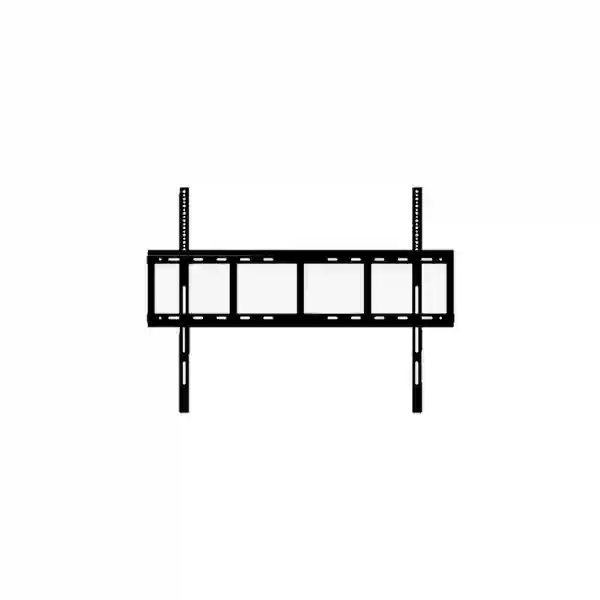
Yealink MeetingBoard mounting accessory for professional collaboration rooms
Yealink MB-WallMount-860 Tanzania
The Yealink MB-WallMount-860 is a dedicated wall-mounting solution for selected Yealink MeetingBoard systems. Yealink positions the accessory as a purpose-built VESA mounting kit for MeetingBoard 75 Pro and MeetingBoard 86 Pro, with an emphasis on safety, stability and straightforward installation. For organisations in Tanzania that want a fixed, clean and professional MeetingBoard deployment, the mount provides an appropriate manufacturer-designed option rather than relying on a generic bracket whose dimensions or mounting geometry may not have been validated for the display.
FourTeck Tanzania can help procurement teams, IT managers, AV integrators and facilities teams evaluate the MB-WallMount-860 as part of a complete meeting-room requirement. The practical discussion should include the exact MeetingBoard model, wall construction, mounting height, cable routes, power position, user viewing angle and any room-furniture constraints. For a broader collaboration-room design, review our Tanzania technology services and video-conferencing planning, which explains how room geometry, audio, network quality and user workflow influence the finished installation.
What is the Yealink MB-WallMount-860?
The MB-WallMount-860 is not a video-conferencing appliance, display or electronic controller. It is the physical mounting hardware that allows compatible Yealink MeetingBoard systems to be fixed to a suitable wall. This distinction matters during procurement because meeting-room projects frequently fail on small accessories rather than on the main conferencing platform. A room may have the correct MeetingBoard model, network connection and furniture plan but still experience installation delays if the mounting hardware, fasteners, cable access or wall preparation have not been checked in advance.
Yealink publishes the MB-WallMount-860 as part of its MeetingBoard mounting accessory range. The manufacturer lists a bracket dimension of 1050 mm × 23 mm × 265 mm and a carton measurement of 1125 mm × 370 mm × 105 mm. Yealink’s support information also separates bracket and strip elements in physical specifications, which is useful when an installer is planning clearance and handling. The accessory is therefore best treated as a defined component in the room bill of materials rather than as a generic afterthought.
Compatibility is the first purchasing checkpoint. Yealink’s current compatibility information identifies MB-WallMount-860 as compatible with MeetingBoard 75 Pro and MeetingBoard 86 Pro, and it also appears in Yealink’s broader MeetingBoard compatibility tables for selected models. Because Yealink continues to maintain product families, buyers should always state the exact MeetingBoard model and, when possible, provide the model label or existing installation details before a quotation is finalised.
Verified MB-WallMount-860 product facts
Why a purpose-built wall mount matters
Correct mechanical fit
Large interactive collaboration displays place meaningful mechanical load on the mounting structure. A manufacturer-designed mount reduces uncertainty around the interface between the display and mounting hardware. The wall itself must still be assessed separately, because bracket compatibility does not guarantee that every partition, block wall or surface is suitable for the same fixing method.
Cleaner meeting-room planning
A fixed wall installation can create a more organised room layout by keeping the collaboration system aligned with the display wall and reducing the footprint of floor-standing structures. This can be useful in executive rooms, conference rooms, training spaces and offices where circulation space and presentation aesthetics matter.
Better installation preparation
Knowing the exact mount model early allows facilities and AV teams to plan wall reinforcement, cable containment, power outlets and installation height before the MeetingBoard arrives on site. This reduces the risk that power or data outlets end up in a position that interferes with the mount or leaves visible cabling.
Compatibility and installation guidance
A successful MB-WallMount-860 deployment begins with three separate compatibility checks: device compatibility, wall suitability and room suitability. Device compatibility confirms that the exact Yealink MeetingBoard is supported by the mount. Wall suitability covers the substrate, structural capacity, fasteners and mounting method. Room suitability covers placement, sight lines, camera height, accessibility and cable paths. Treating those checks separately prevents a common mistake: assuming that because the mount fits the display, every wall is automatically suitable.
Before drilling, installers should establish the final display centreline and the expected eye line of seated participants. The MeetingBoard camera, display and touch surface should be positioned for the way the room is actually used. An executive boardroom may prioritise eye contact and a formal table layout, while a training room may prioritise visibility from more distant seats. Cable routes should be planned so power and data can reach the unit without being trapped behind structural parts of the mount.
If the project is part of a wider conferencing upgrade, the wall mount should be coordinated with room networking, Wi-Fi, acoustic requirements and any adjacent display or presentation equipment. FourTeck’s Tanzania business technology shop guidance highlights why compatibility, infrastructure and lifecycle checks should be completed before an order is confirmed. For related regional procurement, customers can also review FourTeck Kenya, FourTeck Uganda and FourTeck UAE when standardising collaboration rooms across multiple countries.
Yealink MB-WallMount-860 Tanzania
For organisations buying the Yealink MB-WallMount-860 in Tanzania, the most useful procurement approach is to treat the mount as one component in the complete MeetingBoard installation. Tanzania projects vary widely: a corporate head office in Dar es Salaam, a government or administrative facility in Dodoma, a tourism organisation in Arusha, an education site, a healthcare facility, or a multi-branch company may all use the same core MeetingBoard platform in very different rooms. The wall mount itself has a defined mechanical purpose, but the quality of the finished result depends on how well the room has been prepared around it. Buyers should therefore state the exact MeetingBoard model, quantity, wall type and desired mounting location when requesting a quotation.
The MB-WallMount-860 is particularly relevant when a permanent collaboration-room layout is preferred. Wall mounting can help maintain a consistent camera and display position from meeting to meeting, which is useful where users expect a predictable room experience. It can also reduce floor clutter compared with mobile stands. However, permanence means planning matters more: the mounting height, power outlet and cable pathways should be decided before installation rather than adjusted casually afterwards. If a room is likely to be reconfigured frequently, buyers should compare wall mounting with Yealink floor-stand options instead of assuming a fixed wall installation is always best.
For Tanzania procurement, it is also sensible to confirm the scope of supply. A quotation for a wall mount should make clear whether it covers the MB-WallMount-860 hardware only or includes the MeetingBoard, delivery, installation labour, wall-specific anchors, cable work, room preparation or other accessories. The correct fastening method depends on the wall construction and should be determined by a competent installer. FourTeck can discuss the mounting accessory as part of a meeting-room requirement without inventing site conditions that have not been inspected.
Organisations standardising meeting rooms across several Tanzanian sites can benefit from documenting mounting height, power/data positions and room naming conventions. This turns the accessory purchase into a repeatable deployment standard rather than a one-off installation. A standard can still allow site-specific variation where wall structure or furniture differs. For procurement teams, the most useful request includes the exact MeetingBoard model, number of rooms, room dimensions, wall photos or drawings where available, and whether the project requires mounting only or complete collaboration-room integration.
Yealink MB-WallMount-860 Dar es Salaam
Dar es Salaam organisations often operate high-use meeting environments where collaboration rooms support management meetings, customer presentations, regional calls, project coordination and hybrid work. For a Yealink MeetingBoard 75 Pro or 86 Pro deployment, MB-WallMount-860 can be the right mounting choice when the room is intended to remain in a stable configuration. A fixed installation supports a disciplined room layout: display position, camera line, furniture and cable routes are established once and then kept consistent for users.
Before purchasing in Dar es Salaam, facilities teams should verify the construction of the intended wall. Office fit-outs can include masonry, concrete, reinforced surfaces, gypsum partitions and decorative wall systems. The mount may be compatible with the MeetingBoard, but the fixing method must be appropriate to the actual substrate. In a leased office, the customer may also need building or landlord approval before drilling or reinforcement. These are site issues rather than product specifications, and they should be resolved before installation day.
Cable management deserves equal attention. A large MeetingBoard needs access to power and network connectivity, and the room may also include presentation sources or other AV devices. If conduits, trunking or recessed outlets are being installed, their position should be coordinated with the mount and display so connectors remain accessible. Planning this early produces a cleaner finish and avoids visible cables crossing a finished wall. For rooms used for customer meetings, this visual detail can be important because the collaboration wall often becomes the focal point of the space.
When asking FourTeck Tanzania for a Dar es Salaam quotation, include the MeetingBoard model, quantity, room address or project area, wall type if known, room dimensions and whether installation is required. If the meeting room is being designed from the beginning, include seating layout and preferred display wall. This helps distinguish a straightforward mount supply request from a full room implementation that may involve cable pathways, network checks, power coordination and commissioning. The verified Tanzania contact page can be used to begin that discussion.
Yealink MB-WallMount-860 Mwanza
Businesses and institutions planning a MeetingBoard installation in Mwanza can use the MB-WallMount-860 to create a fixed collaboration point in boardrooms, management rooms, education spaces and remote coordination areas. A fixed mounting strategy is especially useful where the room has a defined purpose and the screen should remain in the same position for both local presentation and video meetings. It also removes the need to allocate floor area to a mobile stand, which may help in rooms where circulation around tables is limited.
For Mwanza procurement, a complete request should identify whether the MeetingBoard is already owned or being purchased with the mount. This changes the project sequence. If the board already exists, the model label should be checked to confirm compatibility. If the entire system is being sourced, the mounting method can be selected during solution design. Buyers should not rely only on screen size because similarly sized products can have different mounting requirements. Exact model confirmation is the safest approach.
Room preparation can be completed before equipment delivery when accurate mounting information is available. Facilities teams can mark the display wall, identify cable paths and verify that the wall can support the equipment using a suitable fixing system. If a surface requires reinforcement, it is more efficient to address that before the room is finished and painted. Power and network outlets should also be positioned so they remain serviceable after installation. Good service access matters because a visually clean room should not make future maintenance unnecessarily difficult.
For organisations with Mwanza branches and headquarters elsewhere, consistent room standards can simplify user training and support. The same mounting philosophy, naming convention and room layout can be repeated where appropriate, while still adapting fasteners and cable routes to each building. Procurement documents should define what is included: mount hardware, MeetingBoard, site survey, installation, cable work, testing and any civil works should be separated clearly. This gives finance, IT and facilities teams a common view of the scope and reduces misunderstandings when the equipment reaches site.
Yealink MB-WallMount-860 Arusha
Arusha has a diverse mix of corporate, tourism, education, non-governmental and professional organisations that may depend on hybrid meetings with participants in other cities or countries. In a dedicated meeting room, the Yealink MB-WallMount-860 provides a manufacturer-defined mounting route for compatible MeetingBoard 75 Pro and 86 Pro systems. The value is not merely that the screen is attached to a wall; it is that the room can be designed around a known, repeatable display position.
For meeting rooms used by visiting teams or external partners, usability is important. A fixed display position can make the room easier to understand because participants know where to face, where shared content will appear and where the camera is located. The mount itself does not control camera framing or audio, but its placement affects those experiences. The board should therefore be installed at a height and position that fit the seating arrangement rather than at an arbitrary construction reference line.
Arusha projects should also consider whether walls include decorative finishes, timber panels, stone cladding or lightweight partitions. Such finishes may hide the true structural substrate. An installer needs to determine what is behind the visible surface and choose fixings accordingly. Decorative cladding should not be treated automatically as the load-bearing structure. Where the wall is being newly constructed, the AV and building teams can coordinate reinforcement and cable pathways before closing the surface, producing a cleaner installation and reducing later rework.
When requesting an MB-WallMount-860 quote for Arusha, supply photographs or drawings if possible, along with room dimensions and the exact MeetingBoard model. Mention whether the system is intended for Microsoft Teams, Zoom or another collaboration workflow because this may influence the wider room design even though it does not change the mechanical purpose of the mount. Procurement teams should separately verify equipment supply, installation, travel or site-service scope instead of assuming every quote includes the same services. Clear scope is especially valuable for projects being coordinated remotely from another office.
Yealink MB-WallMount-860 Dodoma
Dodoma offices, public-sector facilities, educational institutions and multi-site organisations may use MeetingBoard systems for internal coordination, remote meetings and digital collaboration. Where a permanent wall-mounted arrangement is preferred, the Yealink MB-WallMount-860 is a relevant accessory for supported MeetingBoard systems. Because large collaboration boards become part of the room architecture, procurement should combine IT, facilities and user-experience requirements rather than treating the bracket as an isolated hardware line.
The first planning question is the final room layout. A board mounted too high can be uncomfortable for touch interaction, while one positioned without regard to seating can create poor sight lines. A very low installation may also be unsuitable depending on the room furniture and participant positions. The correct location should balance standing interaction with seated viewing and camera alignment. The MeetingBoard installation guidance and actual room measurements should therefore be reviewed together before wall preparation begins.
Facilities teams in Dodoma should verify wall construction, power and network before scheduling installation. If the site is being refurbished, this work can be incorporated into the refurbishment plan. If the room is already finished, cable routes may need surface containment or carefully planned access. Network connectivity should be tested from the intended device position rather than assumed based on general office coverage. A wired network connection is often preferred for fixed room systems when available, though the exact deployment depends on the MeetingBoard configuration and customer environment.
Quotation requests should identify whether the customer needs only MB-WallMount-860 hardware or a complete room package. A complete package may require the compatible MeetingBoard, mounting, cable management, networking checks and commissioning. If the customer has several Dodoma rooms, provide the quantity and indicate whether the rooms are identical. Repeated room designs can make planning more efficient, but each wall still requires an appropriate structural assessment. FourTeck Tanzania can use these details to frame the requirement accurately instead of making unsupported assumptions about site readiness.
Yealink MB-WallMount-860 UAE
For organisations coordinating Yealink MeetingBoard deployments between Tanzania and the UAE, the MB-WallMount-860 can support a consistent physical standard for compatible 75-inch and 86-inch MeetingBoard Pro installations. Multi-country companies frequently benefit from repeatable room templates: the same display location philosophy, collaboration workflow, room naming and documentation format can reduce variation for employees who move between offices. The mounting hardware can form part of that standard, provided each local room and wall is assessed independently.
UAE office environments often include high-specification fit-outs, glass partitions, decorative panels and integrated AV walls. These architectural features make early coordination important. A mount cannot be fixed safely to a decorative surface simply because the visual wall appears solid. The actual structural support must be identified. If a meeting room is still in the fit-out stage, the best time to coordinate mounting reinforcement and concealed cable paths is before the final wall finish is closed.
Procurement teams should also compare the benefits of fixed wall mounting with floor-based alternatives. Wall mounting is attractive for permanent executive and meeting spaces where floor clearance and a clean finish are priorities. A mobile or lift stand may be more appropriate if the same MeetingBoard must move between rooms, accommodate different interaction heights or be used in flexible training spaces. The choice should be based on operational use, not just appearance.
For UAE projects linked to Tanzania deployments, standard documentation is particularly useful. Record the exact MeetingBoard model, mount model, installation height, cable layout and site-specific fixing method. This allows support teams to understand what is installed without relying on memory. Regional enquiries can be coordinated through the appropriate FourTeck site, while the Tanzania product request should remain focused on the local project scope. Cross-border standardisation should improve consistency but should never replace local structural and installation checks.
Yealink MB-WallMount-860 Uganda
Ugandan organisations planning fixed Yealink MeetingBoard installations can use the MB-WallMount-860 where it is confirmed compatible with the selected MeetingBoard model. For regional businesses with operations in both Uganda and Tanzania, using a defined accessory list helps procurement teams avoid different brackets being sourced independently for similar rooms. A standard bill of materials can reduce confusion, but it should always preserve exact model matching and site-specific installation requirements.
The primary decision is whether wall mounting matches the room’s operating style. If the board will stay in one boardroom or collaboration area, fixed mounting can create a stable layout and protect valuable floor space. If the board needs to move between training sessions, classrooms or temporary project rooms, a mobile solution may offer more flexibility. Buyers should describe the intended room use before ordering so the mounting strategy supports the workflow instead of constraining it.
Installation planning should cover the wall structure, access for maintenance, network and power routes. It is useful to decide where cables will emerge before the mount is fixed. Poorly placed outlets can force visible extension leads or require the board to be removed for simple service access. If a room is under construction or renovation, providing the mount dimensions and expected MeetingBoard position to the contractor early can improve the finished result.
For organisations with multiple Ugandan branches, document each site rather than assuming all buildings use the same wall type. A reinforced masonry wall and a lightweight partition may require very different preparation. The official compatibility of the mount with the board does not define the correct wall anchor. When requesting a quote, include quantity, exact MeetingBoard model, installation city, room count and whether installation or site survey is needed. This creates a clearer procurement basis and makes it easier to compare complete project costs rather than only the accessory price.
Yealink MB-WallMount-860 Kampala
Kampala businesses deploying collaboration rooms may prefer a fixed MeetingBoard installation in executive rooms, project rooms, client presentation areas and larger meeting spaces. MB-WallMount-860 is designed for compatible Yealink MeetingBoard systems and can be included in a planned AV bill of materials when the device will remain in one location. This is particularly useful for companies trying to give users the same room experience across headquarters and branch facilities.
A Kampala installation should begin with wall and layout assessment. The visual centre of a room is not always the best technical location. A wall may contain services, decorative finishes or structural elements that affect drilling. Seating position and table length may also require the display to be shifted so remote participants see the room naturally. The mount provides the physical interface, but room ergonomics determine where that interface should be placed.
Power and data are best treated as part of the mounting project. If outlets are positioned too far from the board, the finished room may depend on visible cables that undermine the intended professional appearance. If outlets are hidden directly behind inaccessible parts of the installation, service work becomes more difficult. The installer should plan a practical balance between concealment and accessibility. For new fit-outs, this can be coordinated before final decoration; for existing rooms, surface cable management may be more realistic.
Procurement teams comparing quotations should ask whether wall preparation and fixings are included or excluded. The MB-WallMount-860 accessory is a defined Yealink product, while anchors and installation materials may depend on the site. A clear quote should distinguish product supply from labour and building works. If several rooms are involved, provide a room schedule with the intended MeetingBoard model for each location. That simple document can prevent incompatible accessories or wrong quantities from being ordered during a larger rollout.
Yealink MB-WallMount-860 Arua
Arua organisations considering a permanent MeetingBoard installation should focus on both product compatibility and practical site preparation. The MB-WallMount-860 is intended for specific Yealink MeetingBoard systems and should be ordered by exact model relationship rather than by a generic description such as large-screen wall bracket. This is especially important when equipment is being procured centrally and shipped to a site where local teams may not have been involved in the original product selection.
A good deployment brief for Arua can be concise but should include the essentials: exact MeetingBoard model, quantity, wall type if known, room dimensions, photographs of the proposed wall and the desired location of the display. If power and network outlets already exist, their position should be visible in the photographs or marked on a drawing. This allows obvious conflicts to be identified before installation. It does not replace an on-site structural decision, but it improves planning.
Where technical support or installer travel is a consideration, preparation becomes even more valuable. Having the wall ready, cable routes defined and the mounting accessory confirmed can reduce unnecessary repeat visits. Organisations should avoid drilling or fixing the bracket based on assumptions if they have not confirmed the final board height and mounting geometry. Once a large display is installed, correcting a poor location may require new holes, cable changes and cosmetic repair.
For branch standardisation, Arua rooms can follow the same documentation template used elsewhere while allowing local differences in construction. The objective is repeatable outcomes, not identical fastening methods. Procurement should separately track the Yealink mount, any board system, installation materials, labour and other room components. This gives stakeholders a transparent view of what the accessory costs versus what the complete deployment costs, which is more useful for budgeting and future replication.
Yealink MB-WallMount-860 Mbarara
Mbarara businesses, education institutions and regional offices may use Yealink MeetingBoard systems to connect local teams with headquarters, partners and remote participants. When a meeting room is intended as a permanent collaboration space, the MB-WallMount-860 gives project teams a defined manufacturer accessory for the physical installation of compatible models. Fixed wall mounting can also make it easier to maintain a tidy room because the display position does not change and floor-standing hardware is eliminated.
The installation should be planned around people as well as hardware. Touch-enabled collaboration boards are used at close range, so the mounting height should support interaction without compromising seated viewing. The table shape, front-row distance and camera field of view all influence the preferred position. A facilities team that decides mount height solely from an architectural drawing may miss these usability factors. Collaboration and room design teams should therefore review the position together.
Mbarara sites with existing finished rooms should examine power and network routing carefully. If there is no outlet near the intended installation point, the project may need additional electrical work or cable containment. These tasks should be identified before the board arrives. Where a wall is lightweight, structural reinforcement may be needed. The correct decision depends on the building and should be made by a qualified person familiar with the actual wall construction and equipment load.
When requesting pricing, buyers should specify whether they need the wall mount only, a MeetingBoard plus mount, or complete room installation. They should also ask that model numbers and quantities appear clearly on the quotation. For organisations planning future expansion to additional rooms, keeping the original room drawings and installation notes can save time later. A documented Mbarara deployment can then serve as a practical reference for other sites without assuming that every building has the same physical conditions.
Yealink MB-WallMount-860 Gulu
Gulu meeting-room projects can benefit from defining the mounting strategy at the same time as the MeetingBoard itself. The MB-WallMount-860 is suitable when a compatible Yealink MeetingBoard is intended to remain in a dedicated space and a clean fixed installation is preferred. This can suit management rooms, remote-learning spaces, project coordination rooms and branch offices that use video collaboration as a regular part of operations.
Planning should start with exact model verification. A procurement request that simply says “wall mount for Yealink 86-inch board” may not be precise enough because product generations and mounting options can differ. The safer request includes “MB-WallMount-860” and the exact MeetingBoard model. This allows the supplier and customer to confirm the relationship before shipment and reduces the chance that a generic or incompatible mounting part is ordered.
At the room level, verify the intended wall, cable route and display position. If internet or local network service enters the room on another wall, the network path to the MeetingBoard should be included in the plan. If power availability is limited, outlet work may be required. A fixed installation should avoid temporary cabling across floors or furniture. In rooms where users present from laptops, also decide how content-sharing workflows will operate so the physical room supports the technology rather than creating new cable clutter.
For Gulu procurement, a quotation can be made more useful by listing accessory supply, main system supply, installation and optional services separately. This helps the customer understand the impact of each component. If installation is not part of the quote, the customer should ensure the local installer has the relevant Yealink documentation and understands the wall construction. Proper preparation protects both the equipment and the quality of the meeting-room experience.
Yealink MB-WallMount-860 Kenya
Kenyan organisations with cross-border operations can use a consistent MeetingBoard mounting strategy to standardise collaboration rooms across Nairobi, regional branches and neighbouring markets. The Yealink MB-WallMount-860 is a useful component of such a standard when the selected MeetingBoard is compatible and the room requires a fixed wall installation. Standardisation can simplify purchasing because product names, model numbers and accessory relationships are defined in advance.
A standard should not eliminate local design decisions. Different offices may use concrete walls, masonry, partition systems or decorative AV walls. Each location needs its own fixing method and structural assessment. The repeatable elements can be the preferred MeetingBoard model, mount model, approximate display height, cable documentation and user workflow. The site-specific elements are wall preparation, anchors, cable pathway and final location adjustments.
For organisations comparing fixed and mobile installations, consider whether the room will remain dedicated to meetings. A fixed wall mount can create a polished, permanent collaboration zone and preserve floor space. A mobile stand can be better where the board is shared between spaces, used for workshops or repositioned frequently. The cost comparison should include all required hardware and installation work rather than only the mount or stand price.
Kenya procurement teams supporting Tanzania branches should keep model information consistent in their asset records. The MB-WallMount-860 should be associated with the specific MeetingBoard installation rather than recorded simply as “AV bracket.” This makes future service and replacement decisions easier. When requesting a multi-country quotation, give quantities by country and site, identify whether installation is required in each location and note any project deadlines. This creates a clearer regional bill of materials and reduces ambiguity between central procurement and local implementation teams.
Yealink MB-WallMount-860 Kuwait
Kuwait meeting-room fit-outs often combine interior design, AV systems, structured cabling and collaboration technology within a coordinated project. In this environment, the MB-WallMount-860 should be specified early when a compatible Yealink MeetingBoard is being wall mounted. Early specification allows the fit-out contractor to understand where reinforcement, cable access and electrical points may be required before the wall finish is completed.
The mount is a mechanical accessory, but it directly affects the visual result of the room. A well-planned fixed installation can keep the collaboration wall clean and reduce visible support structures. Poor planning can do the opposite, leaving cables exposed or forcing last-minute surface work. AV drawings should therefore show the approximate board envelope, mount position and service access. If decorative wall panels are used, the fixing design needs to reach an appropriate load-bearing structure rather than depend solely on finish materials.
For procurement, buyers should confirm whether the exact Yealink wall-mount part is included with any MeetingBoard package or ordered separately for the selected model. Accessory bundling can vary by system, generation and market, so the safest practice is to verify the line items on the quotation rather than assume. The same applies to installation fasteners: site-specific anchors may not be represented by the mount product name alone.
Organisations linking Kuwait and Tanzania offices can create a shared room-deployment template that records equipment models and cable standards while preserving local construction requirements. This improves maintenance because support teams can quickly identify the mount and board combination. If a later room change requires moving the board, the original mounting and wall records can also help facilities teams estimate the work involved instead of treating the installation as undocumented building hardware.
Yealink MB-WallMount-860 Ghana
Ghanaian organisations planning modern collaboration rooms can specify the Yealink MB-WallMount-860 when deploying compatible MeetingBoard systems in a fixed location. For regional companies, a consistent mounting accessory is useful because it reduces variation in the approved bill of materials. The main benefit is control: procurement knows the intended product, installers know the target hardware and support teams can identify the installed accessory later.
A fixed wall installation is most appropriate where the room purpose is stable. Boardrooms, executive meeting rooms and dedicated hybrid meeting spaces typically benefit from a consistent display and camera position. Training and flexible learning areas may benefit more from movable solutions. This distinction should be decided before purchasing because changing from wall mount to mobile stand later can affect room layout, cable routing and budget.
For Ghana projects, the physical wall needs the same attention as the electronic system. The building team should confirm that the proposed surface can support the installation with appropriate fixings. Wall finishes and cable routes should be coordinated so the hardware is structurally sound and visually clean. If multiple rooms are being built, using one documented mounting height and cable pattern can make the rollout more consistent, provided the same room and furniture assumptions apply.
When requesting a quote, buyers should provide the model, quantity and expected installation scope. If the board has already been purchased, include its exact model designation so compatibility can be reconfirmed. If the project includes new room technology, specify the conferencing platform, seating capacity and any requirement for additional audio or network work. This helps suppliers distinguish between a simple accessory transaction and a larger collaboration-room project, producing a more meaningful commercial proposal.
Yealink MB-WallMount-860 Nigeria
Nigerian enterprises often manage collaboration rooms across headquarters, branch offices and regional facilities. A defined accessory such as the MB-WallMount-860 can support standardisation when compatible Yealink MeetingBoard systems are used throughout the organisation. Standardisation is valuable not just for purchasing but also for documentation, spares planning and user familiarity. The same room design principles can be repeated while installation methods are adapted to each site’s construction.
Fixed wall mounting works well where a board is expected to remain in a dedicated room. It can also help protect the system from casual movement that changes camera framing or creates cable stress. At the same time, fixed placement reduces flexibility. Teams that frequently reorganise training rooms or move equipment between floors should evaluate mobile alternatives before committing to a wall installation. The room workflow should decide the mounting method.
For Nigerian projects, power resilience and network architecture may be part of the broader room discussion even though they are not functions of the mount. Collaboration systems depend on stable power and connectivity. If UPS protection or network switching is being planned, those components should be coordinated with the room installation. Wall power outlets and data ports should be accessible and properly positioned so the board can be serviced without unnecessary removal.
Procurement should identify all project responsibilities. The accessory supplier may not be responsible for civil works, wall reinforcement or electrical changes unless those tasks are included explicitly. A detailed request can list the required mount, compatible MeetingBoard, site city, room count and installation expectation. For multi-site deployments, a survey template can capture wall type, outlet location, room dimensions and photos from each branch. This makes project planning more systematic and reduces the chance of discovering basic physical constraints after equipment has already been shipped.
Yealink MB-WallMount-860 Seychelles
Seychelles organisations in hospitality, professional services, government and other sectors may use high-quality collaboration rooms to connect island-based teams with regional offices and international partners. A fixed Yealink MeetingBoard installation can provide a dependable visual anchor in a meeting space, and MB-WallMount-860 is the relevant manufacturer accessory for supported MeetingBoard systems. The key is to integrate the mount into the room plan rather than treat it as a last-minute bracket purchase.
Building finishes can vary significantly, especially in hospitality and premium office environments. Decorative timber, stone, panelling or lightweight partition surfaces may sit in front of the actual structural wall. The installation team must identify what will carry the load and select appropriate fixings. Where renovation work is planned, reinforcement can often be added before decorative finishes are completed, producing a cleaner result and avoiding later disruption.
Logistics also make careful model confirmation worthwhile. Shipping an incorrect or incompatible accessory to an island location creates avoidable delay and cost. Procurement should record the exact Yealink MeetingBoard model and the MB-WallMount-860 part reference in the order. The quotation should also clarify what is included in the package and whether installation materials are supplied separately according to the wall type.
For organisations that operate both Seychelles and Tanzania locations, a shared collaboration-room standard can simplify support. The technology list and user workflow can remain consistent, while physical construction details remain site specific. Keep photographs, drawings and completion notes after installation. These records help future maintenance teams understand how cables were routed and how the board was mounted without opening finished walls unnecessarily. Such documentation is a small investment that can protect a premium room fit-out over its lifecycle.
Buying and quotation checklist
A useful quotation request for the Yealink MB-WallMount-860 should include enough information to confirm both product fit and project scope. Use the following checklist when preparing an enquiry:
✓ MB-WallMount-860 requested by model name
✓ Installation city and number of rooms
✓ Wall type if known
✓ Room dimensions and seating layout
✓ Photographs or drawings where available
✓ Power and network outlet locations
✓ Cable containment or concealed-cabling expectations
✓ Fit-out or refurbishment timeline
✓ Need for MeetingBoard system, audio or network components
✓ Site access and facilities coordination requirements
Frequently asked questions
What is Yealink MB-WallMount-860 used for?
It is a dedicated wall-mounting accessory for compatible Yealink MeetingBoard systems. Yealink identifies it for MeetingBoard 75 Pro and MeetingBoard 86 Pro deployments, with compatibility information also published in Yealink support resources.
What is the Yealink part number?
Yealink publishes part number 3311074 for MB-WallMount-860.
Does MB-WallMount-860 fit MeetingBoard 75 Pro?
Yes, Yealink’s compatibility information lists MB-WallMount-860 as an optional mounting accessory for MeetingBoard 75 Pro. Buyers should still confirm the exact product model before ordering.
Does it fit MeetingBoard 86 Pro?
Yes, Yealink lists it as an optional compatible wall mount for MeetingBoard 86 Pro.
Can I install it on any wall?
No wall should be assumed suitable without assessment. The mount may match the MeetingBoard mechanically, but the wall substrate, structural capacity, fixing method and local building conditions must be evaluated independently by a competent installer.
Should I choose wall mount or floor stand?
Choose based on how the room operates. Fixed wall mounting suits permanent meeting spaces where a clean, stable layout is desired. A floor or mobile stand may be better where the MeetingBoard needs to move, support changing room layouts or accommodate flexible training use.
Decision recap
Choose the Yealink MB-WallMount-860 when you have a compatible MeetingBoard and want a permanent wall-based installation. Confirm the exact MeetingBoard model first, then validate the room wall, display position, cable routes and installation scope. Do not treat a compatible mount as proof that every wall or fixing method is safe. If the room needs frequent reconfiguration, compare wall mounting with mobile or lift stand options before purchasing.
For Tanzania buyers, the most efficient quotation request states the product model, quantity, city, MeetingBoard model and whether supply only or installation is required. This allows the commercial discussion to focus on the actual requirement rather than assumptions. If the project includes wider IT or room technology, FourTeck can also discuss displays, conferencing, networking and supporting infrastructure as connected requirements.
Consult FourTeck Tanzania about your MeetingBoard installation
Send the exact Yealink MeetingBoard model, the number of rooms and a short description of the intended wall installation. For more accurate planning, include room dimensions and photographs of the mounting area. FourTeck can then discuss the MB-WallMount-860 requirement in the context of the complete collaboration room and clarify which parts of the project are product supply, installation or wider room infrastructure.




Reviews
There are no reviews yet.