
Yealink MCore-OPS-G2 Tanzania
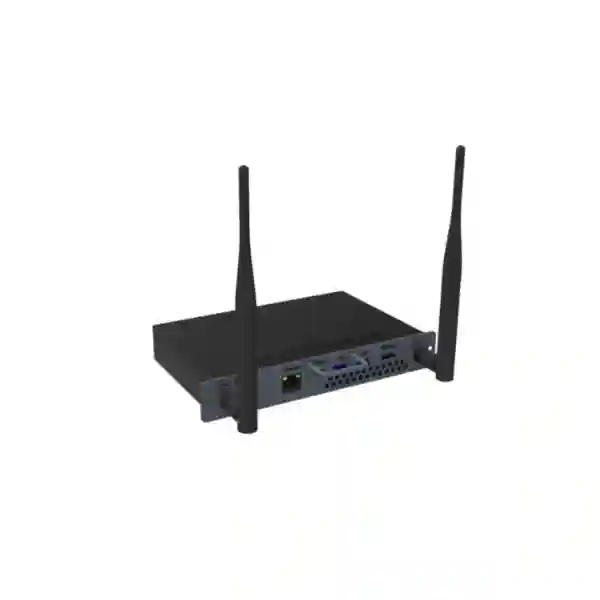
Bring Windows-based computing into compatible Yealink MeetingBoard environments with a purpose-built second-generation OPS module. The Yealink MCore-OPS-G2 combines Intel Core Ultra 5 processing, DDR5 memory, SSD storage, modern wireless networking, wired LAN, HDMI ingest and enterprise security functions in an embedded form factor designed for meeting rooms, collaboration spaces, training areas and executive presentation environments.
What the Yealink MCore-OPS-G2 is designed to solve
Modern meeting rooms increasingly need more than a display and camera. Teams may need to open large presentations, run Windows applications, share 4K content, connect peripherals, join collaborative workflows and switch between meeting and presentation tasks without adding a separate desktop PC on the table. Yealink designed the MCore-OPS-G2 as a modular computing platform for its MeetingBoard family so organizations can add Windows computing capability directly into a compatible collaboration display environment while keeping the room visually cleaner and easier to manage.
The MCore-OPS-G2 is not the same product as the MCore-OPS-G2T. The G2 model is supplied with Windows 11 IoT Enterprise, while the G2T variant adds the Microsoft Teams Rooms application and Yealink RoomConnect and is the variant identified by Yealink as Microsoft Teams certified. Buyers who specifically require a certified Microsoft Teams Rooms configuration should therefore validate the required model, MeetingBoard combination and licensing before ordering. For organizations that want the second-generation Windows OPS module itself, the MCore-OPS-G2 provides a strong hardware foundation for compatible Yealink MeetingBoard deployments.
Verified Yealink MCore-OPS-G2 specifications
| Processor | Intel Core Ultra 5 125H |
| Memory | 16GB DDR5 (2 × 8GB) |
| Storage | 256GB SSD |
| Operating system | Windows 11 IoT Enterprise x64 |
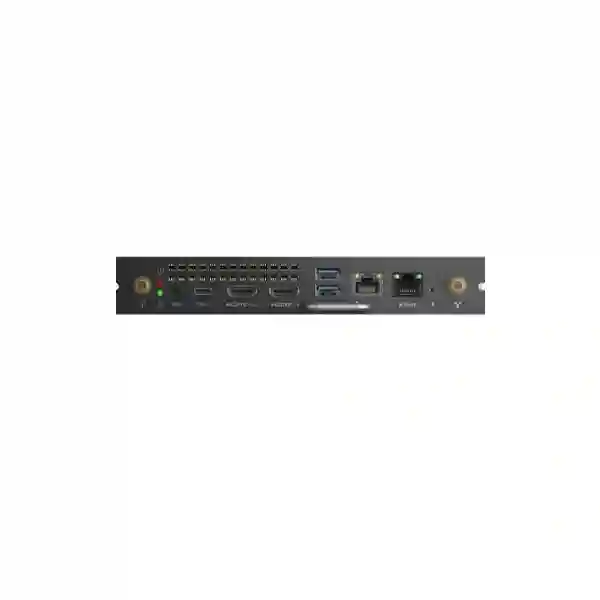
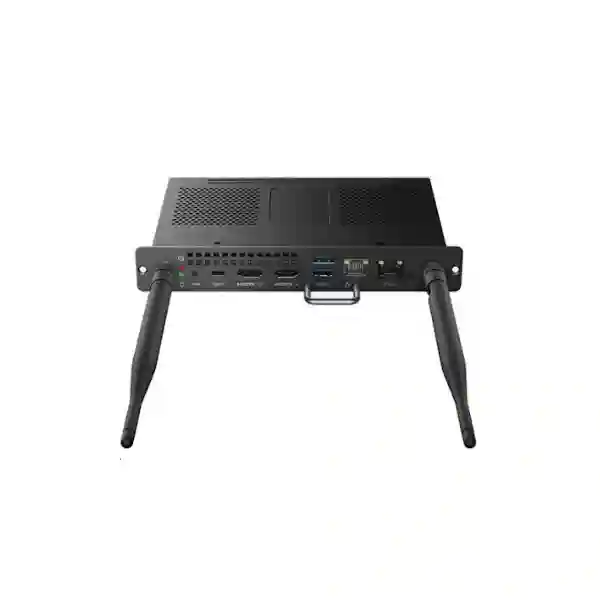
| Display / AV | 1 × HDMI input, 1 × HDMI output; 4K content sharing supported via HDMI-IN |
| USB | 2 × USB 3.0 Type-A, 1 × USB 3.0 Type-C without DisplayPort Alt Mode |
| Network | 1 × LAN RJ-45, Wi-Fi 6 IEEE 802.11a/b/g/n/ac/ax, Bluetooth 5.2 |
| Room interface | 1 × MTouch port (RJ-45) |
| Security / BIOS | TPM 2.0, UEFI Secure Boot, Kernel DMA support, CEC, custom boot logo support |
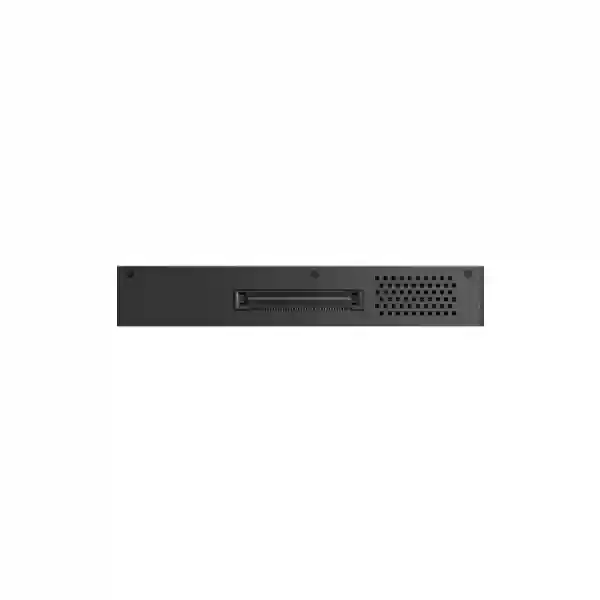
| Dimensions / weight | 180 × 119 × 30mm; 0.7kg |
| Environment | Operating temperature -10°C to 50°C; operating humidity 10–90% |
Key benefits for collaboration rooms
Embedded Windows compute
Integrating compute into a compatible MeetingBoard environment can reduce the need for a separate room PC, extra shelf space and additional visible cabling. This helps AV and IT teams plan cleaner installations in executive rooms, classrooms and collaboration areas.
Faster platform
The second-generation module uses an Intel Core Ultra 5 125H platform with 16GB DDR5 and 256GB SSD storage, giving users more practical headroom for Windows applications, presentations, browser-based workflows and local content.
4K HDMI ingest
HDMI-IN supports high-resolution content sharing from a connected source. For rooms where presenters routinely bring laptops or other presentation devices, this provides a direct pathway for sharing visual content through the MeetingBoard environment.
Enterprise security foundation
TPM 2.0, UEFI Secure Boot and Kernel DMA support give IT teams useful security capabilities for managed Windows deployments. Actual security posture still depends on configuration, patching, endpoint policies and organizational controls.
Compatibility and model-selection guidance
Yealink’s current compatibility list identifies MCore-OPS-G2 support with MeetingBoard, MeetingBoard Pro and MeetingBoard C, while its compatibility with certain MTouch Plus combinations differs from the G2T variant. This distinction matters during procurement because an OPS module should be selected as part of a verified room architecture rather than as a standalone PC purchase. Check the exact MeetingBoard generation, touch-console requirement, meeting platform, Windows-management model and peripheral plan before finalizing the bill of materials.
The G2T model should not be treated as simply another name for the G2. The suffix identifies a different software preload and certification position. If your organization is designing a native Microsoft Teams Rooms environment, confirm whether MCore-OPS-G2T is the required choice. If you are procuring MCore-OPS-G2 for general Windows computing within a supported Yealink MeetingBoard deployment, confirm the applications, room controls, network access and presentation workflow that will be used in production.
Yealink MCore-OPS-G2 Tanzania
Organizations searching for Yealink MCore-OPS-G2 in Tanzania are typically planning a meeting-room refresh, a new collaboration space or a standardized interactive-display deployment. The most useful buying process starts by confirming what the room must do. A boardroom may prioritize executive presentations, 4K laptop content sharing and clean integration. A university or training facility may need Windows applications, browser access, document viewing and flexible presentation inputs. A corporate project room may need a shared collaboration display that can support recurring workshops without a separate desktop computer occupying the room.
For Tanzania deployments, buyers should validate the exact Yealink MeetingBoard model first and then confirm MCore-OPS-G2 compatibility. The module’s Intel Core Ultra 5 125H processor, 16GB DDR5 and 256GB SSD make it suited to modern Windows workloads, but capacity should still be judged against the applications to be installed. Organizations using large engineering applications, unusually heavy local datasets or specialized software should review application requirements rather than assuming any room PC will be sufficient. The available HDMI input, HDMI output, USB interfaces, Ethernet, Wi-Fi 6 and Bluetooth 5.2 provide useful connection options, while room design should determine which links are wired for maximum predictability.
Procurement teams should also distinguish between the MCore-OPS-G2 and MCore-OPS-G2T. If Microsoft Teams Rooms certification is a mandatory part of the project, the G2T variant is the relevant certified model identified by Yealink. The G2 model itself ships with Windows 11 IoT Enterprise and can be appropriate for supported MeetingBoard deployments where a Windows compute module is required. A quotation request should therefore state the MeetingBoard model, room size, required collaboration platform, touch-console needs, connectivity requirements and whether the customer expects a complete installed room or only the OPS module.
FourTeck can use those details to structure a clearer product conversation without making assumptions about stock, licensing or site conditions. Buyers can also explore the broader FourTeck Tanzania technology portfolio when the project extends beyond the OPS module into networking, security, voice or meeting-room infrastructure. For projects requiring regional coordination, the wider FourTeck Africa technology coverage provides an additional reference point for multi-country procurement discussions.
Yealink MCore-OPS-G2 Dar es Salaam
Dar es Salaam organizations evaluating Yealink MCore-OPS-G2 often have a practical requirement: create professional collaboration rooms that are simple for users and manageable for IT. In headquarters, professional-services offices, financial organizations, logistics firms, education facilities and customer-facing meeting environments, room technology works best when the compute, display, camera, control interface and network are treated as one system. The MCore-OPS-G2 supports that approach by embedding Windows compute into compatible Yealink MeetingBoard systems instead of relying on a loosely placed room PC.
Before ordering for a Dar es Salaam office, document the existing display or MeetingBoard model, the intended room workflow and the presentation sources users will bring. HDMI-IN is useful when presenters need to connect a laptop for high-resolution content sharing, while wired LAN can be preferred where predictable network performance is important. Wi-Fi 6 and Bluetooth 5.2 offer additional wireless flexibility, but corporate security policies may determine whether wireless connections are enabled. USB ports can support approved accessories, while compatibility should be verified rather than assumed for specialized peripherals.
IT administrators should include endpoint management in the design. Windows 11 IoT Enterprise provides the operating environment, while TPM 2.0, UEFI Secure Boot and Kernel DMA support contribute to the security foundation. Those hardware and firmware features do not replace operating-system patching, endpoint protection, identity controls or network segmentation. A managed meeting-room device should have an owner, an update process and a clear policy for application installation so the collaboration space remains reliable after commissioning.
When requesting a Yealink MCore-OPS-G2 quotation for Dar es Salaam, include whether the deployment is one room or a repeatable standard across multiple rooms, the MeetingBoard size/model, required applications, preferred network method and any installation constraints. This helps avoid a quote that covers only the compute module while missing room-level requirements. Customers building broader communication environments can also review FourTeck IP phone and unified communications solutions when meeting-room collaboration must align with desk communication and enterprise voice.
Yealink MCore-OPS-G2 Mwanza
For Mwanza businesses and institutions, a collaboration-room upgrade is usually most successful when reliability and operational simplicity are prioritized ahead of novelty. The Yealink MCore-OPS-G2 can form the Windows computing layer within a compatible MeetingBoard setup, allowing a room to support presentations, document work, browser-based collaboration and other approved Windows applications without the clutter of an external desktop computer. Its embedded form factor is particularly useful when wall space, cabinet space and cable routing need to remain organized.
A Mwanza deployment plan should begin with power, network and room-use assumptions. The module supports both wired LAN and Wi-Fi 6, but a fixed room often benefits from wired connectivity where network infrastructure is available. The 256GB SSD is suitable for the operating environment and normal room applications, although customers storing large local media libraries should consider how files will be managed and whether cloud or network storage is more appropriate. The 16GB DDR5 memory and Intel Core Ultra 5 125H processor provide a substantial step up from earlier-generation OPS computing.
Meeting-room planners should also think about the presenter journey. If users routinely arrive with laptops, HDMI-IN gives the room a straightforward physical content path. If peripherals are required, the two USB Type-A ports and one USB Type-C port can support compatible devices, but the Type-C interface does not provide DisplayPort Alt Mode according to Yealink’s specification. That detail matters when buyers are comparing the module with generic mini PCs and assuming that every USB-C connector can carry video.
For procurement, specify the number of rooms, MeetingBoard models and whether the project includes installation, room accessories or network work. Avoid basing the order solely on the module name because MCore-OPS-G2 and MCore-OPS-G2T have different software and certification positioning. If the broader project involves connecting Tanzanian sites with other East African offices, FourTeck Uganda can be relevant for technology discussions involving Uganda-based locations while FourTeck Tanzania remains the reference for the Tanzanian requirement.
Yealink MCore-OPS-G2 Arusha
Arusha has a wide mix of hospitality, conference, tourism, development, education and corporate environments where meeting spaces can serve many types of users. A room may host an internal management meeting in the morning, an external presentation later in the day and a training workshop in the afternoon. In that context, the Yealink MCore-OPS-G2 can be valuable because it gives a compatible MeetingBoard a dedicated Windows computing platform rather than forcing every session to depend on a visitor’s laptop.
The Intel Core Ultra 5 125H, 16GB DDR5 memory and 256GB SSD provide a capable base for common productivity and collaboration workloads. HDMI-IN is useful for visiting presenters who want a direct content-sharing connection, while CEC support can help simplify display wake behavior in supported setups. For rooms used by many people, that reduction in manual switching can improve the practical user experience. IT teams should still validate the total room behavior with the exact MeetingBoard and control devices because room automation depends on the complete system.
In hospitality or externally used spaces, device governance deserves special attention. Decide whether users may install applications, whether browser sessions should be reset, which accounts can sign in, how Windows updates are scheduled and how local files are removed. TPM 2.0 and Secure Boot are useful platform-security features, but policy and administration determine whether the room remains controlled over time. Organizations should also plan physical access to the module, antennas, cabling and service points so routine support does not require dismantling an entire installation.
Arusha buyers requesting a quotation can improve accuracy by stating room dimensions, current MeetingBoard equipment, preferred meeting platforms, presentation inputs and any installation deadlines. No stock or delivery assumption should be made until confirmed for the specific order. Where a company is also coordinating collaboration infrastructure in Kenya, the FourTeck Kenya technology site is a useful regional reference for Kenyan requirements that sit alongside the Tanzania project.
Yealink MCore-OPS-G2 Dodoma
Dodoma organizations planning boardrooms, administration rooms, training environments and collaborative workspaces can use the Yealink MCore-OPS-G2 to add a dedicated Windows computing layer to compatible MeetingBoard systems. The key procurement benefit is not simply processor speed; it is the ability to design a room around a known embedded compute platform rather than rely on whichever laptop happens to be present. This can create a more consistent room standard for organizations that need repeatable user experiences.
Standardization is especially important when several rooms are involved. A project team should document which MeetingBoard models are being used, which Windows applications are approved, how users authenticate, whether HDMI presentation input is required and whether network access will be wired or wireless. The MCore-OPS-G2 includes LAN, Wi-Fi 6 and Bluetooth 5.2, but an enterprise deployment may intentionally use only a subset of those interfaces to align with security policy. The same principle applies to USB devices: peripherals should be validated against the room’s intended function and support model.
The module’s TPM 2.0, UEFI Secure Boot and Kernel DMA capabilities can support an enterprise security strategy, but administrators should plan patching and endpoint controls from the start. Meeting-room PCs can become overlooked endpoints if ownership is unclear. Assigning responsibility for operating-system updates, application maintenance, account control and incident response helps protect both reliability and security. The hardware’s -10°C to 50°C published operating-temperature range provides useful environmental tolerance, although the MeetingBoard and other room components must each remain within their own specifications.
A good Dodoma quotation request should list room count, MeetingBoard model, required Windows applications, collaboration platform, network design and installation scope. If a Microsoft Teams Rooms certified configuration is mandatory, specify this explicitly because Yealink identifies the MCore-OPS-G2T—not the G2—as the Teams-certified variant. Clear model selection at the quoting stage prevents avoidable rework after equipment arrives.
Yealink MCore-OPS-G2 UAE
Organizations with operations spanning Tanzania and the UAE often want one collaboration-room standard that can be documented and repeated across sites. The Yealink MCore-OPS-G2 can support that strategy where compatible MeetingBoard systems are part of the standard. Its embedded Windows platform reduces dependence on separate room PCs and gives IT teams a defined compute specification to include in design documents, asset registers and support procedures.
For UAE-linked projects, consistency should not mean assuming every room has identical requirements. Executive rooms may emphasize presentation quality and clean installation, training rooms may need richer Windows application access, and project rooms may prioritize persistent shared workspaces. The Intel Core Ultra 5 125H, 16GB DDR5 and 256GB SSD form the core platform, while HDMI-IN, HDMI-OUT, USB, LAN, Wi-Fi 6 and Bluetooth provide the interfaces around which the room can be planned. Each site should validate MeetingBoard compatibility and its local network/security policies.
Cross-border procurement should also clarify whether the same software image and management policies will be applied in both countries. Windows 11 IoT Enterprise, TPM 2.0 and UEFI Secure Boot can fit into centralized endpoint-management practices, but account, update and application-control decisions remain the customer’s responsibility. If Microsoft Teams Rooms certification is required in a standardized global room design, verify whether the G2T variant is the correct procurement choice rather than substituting the G2.
For UAE technology requirements connected to a Tanzania rollout, customers can reference FourTeck UAE for the UAE side of a regional technology discussion. Keeping country-specific quotations separate while maintaining one technical room standard can help procurement teams compare like-for-like configurations without confusing local commercial terms, taxes, availability or installation scope.
Yealink MCore-OPS-G2 Uganda
Uganda-based organizations or Tanzanian businesses with Ugandan branches may consider Yealink MCore-OPS-G2 when standardizing collaboration rooms around compatible MeetingBoard platforms. The embedded OPS approach can make room layouts more disciplined by removing the need for an external Windows computer and giving users a more consistent interface. For IT teams, the known specification also simplifies documentation compared with unmanaged laptops or assorted mini PCs added over time.
The important first step is to define the room workflow. If the room is primarily for content presentation, HDMI input and local Windows applications may be central. If it is intended for video meetings, verify the complete MeetingBoard and conferencing-platform architecture, including whether the project requires the Teams-certified G2T variant. If users need peripheral devices, check compatibility and USB requirements. The MCore-OPS-G2 has two USB 3.0 Type-A ports and one USB 3.0 Type-C port without DisplayPort Alt Mode, which should be understood during accessory planning.
Network design can use the module’s Ethernet or Wi-Fi 6 capability, but many fixed enterprise rooms benefit from wired connectivity because it is predictable and easier to segment. Bluetooth 5.2 can support compatible wireless accessories where policy allows. For organizations operating multiple sites, define a consistent VLAN, DNS, identity and update policy for collaboration-room endpoints rather than treating each room as a one-off consumer installation.
A Uganda procurement request should state exact room quantities, MeetingBoard models, software expectations, installation scope and whether support coordination is required across borders. The FourTeck Uganda site is the appropriate regional reference for Uganda technology requirements, while this Tanzania page focuses on the Tanzanian procurement context.
Yealink MCore-OPS-G2 Kampala
Kampala businesses looking at modern boardrooms and hybrid-work spaces often need a room computer that users can understand quickly and administrators can manage consistently. Yealink MCore-OPS-G2 addresses the compute side of compatible MeetingBoard designs with Windows 11 IoT Enterprise, a current Intel Core Ultra 5 platform and a practical mix of wired and wireless interfaces. The result can be a cleaner room architecture than adding a separate PC, monitor connection and peripheral hub after the collaboration display has already been installed.
For larger Kampala offices, repeatability is valuable. IT teams can document a standard room profile that includes the MeetingBoard model, OPS module, network port, presentation input, approved applications and support procedure. The 16GB DDR5 memory and 256GB SSD are suitable for common room-computing tasks, but specialized applications should be evaluated individually. Users who frequently present from laptops can make use of HDMI-IN, while CEC support can reduce some manual display-control steps in supported configurations.
Security planning should be explicit. TPM 2.0 and UEFI Secure Boot are valuable platform capabilities, but they need to sit within a wider endpoint-management strategy. Decide who has administrative rights, when updates are applied, whether removable storage is permitted and how local data is handled between meetings. Conference rooms are shared environments, so privacy controls and session cleanup can be as important as processor performance.
For Kampala, the purchasing team should ask for the complete room bill of materials rather than only the OPS module if the project includes a new MeetingBoard, controls, camera or installation. If the organization requires a certified Microsoft Teams Rooms deployment, flag that requirement at the start because the MCore-OPS-G2T is the Teams-certified variant listed by Yealink. This prevents the room from being designed around the wrong product suffix.
Yealink MCore-OPS-G2 Arua
Arua deployments may have different priorities from a large head-office boardroom. Training centers, regional offices, institutional meeting spaces and project sites often value straightforward operation, predictable support and efficient use of limited room space. The Yealink MCore-OPS-G2 can help by placing the Windows computing function inside a compatible MeetingBoard setup, avoiding the need to find a secure location for a separate PC and reducing loose cabling around the room.
Network availability and supportability should be part of the design. The module offers both Ethernet and Wi-Fi 6, giving planners flexibility, but the preferred choice depends on the local network. Where structured cabling is available, a wired connection can provide a consistent path and simplify troubleshooting. Where wireless connectivity is used, signal quality, access-point capacity and enterprise authentication should be confirmed before the room is commissioned. Bluetooth support can be useful for compatible accessories but should follow policy.
From a user standpoint, the key is making the room intuitive. HDMI-IN allows an external source to share content, while the embedded Windows environment can host approved productivity or collaboration applications. Administrators should keep the application set controlled and avoid turning a shared room system into a general-purpose workstation with unmanaged software. The module’s 256GB SSD provides local capacity, but shared documents may be better kept in governed network or cloud storage depending on organizational policy.
Arua buyers should provide the exact MeetingBoard model, expected applications and desired conferencing workflow when requesting a quote. Confirm whether the purchase is a hardware-only requirement or part of a complete installation. This helps clarify accessories, cables, room controls and support expectations before purchase and reduces the risk of discovering a compatibility gap during deployment.
Yealink MCore-OPS-G2 Mbarara
Mbarara organizations planning digital meeting spaces can use the Yealink MCore-OPS-G2 as the Windows compute component of a compatible MeetingBoard environment. The product is particularly relevant where a room needs to run approved Windows applications locally while keeping the installation compact. Instead of placing a separate computer below the screen or on a conference table, the OPS architecture is intended to integrate directly into the supported Yealink collaboration platform.
When comparing options, buyers should focus on workflow fit rather than only CPU specifications. The Intel Core Ultra 5 125H, 16GB DDR5 and 256GB SSD provide a strong base, but the practical value comes from how the room is used. HDMI input supports laptop or source-device content sharing; HDMI output provides a display path; LAN and Wi-Fi 6 support network connectivity; and the USB ports support compatible room peripherals. Because the Type-C port does not provide DP Alt Mode, video-over-USB-C assumptions should be checked carefully.
For multi-room projects, standardize installation details such as cable paths, network configuration, naming conventions, Windows policies and remote-support procedures. Shared rooms should also have a defined data-handling policy so files, browser sessions and cached credentials do not remain accessible to the next user. Security features including TPM 2.0 and Secure Boot assist the platform but do not automatically configure these operational controls.
Mbarara quotation requests should include room quantity, MeetingBoard models, required meeting platforms and any peripherals. Customers should also specify whether the environment must be Microsoft Teams Rooms certified. If certification is required, confirm the MCore-OPS-G2T option rather than assuming the standard G2 carries the same certification. Accurate model selection is more important than ordering quickly and correcting the room later.
Yealink MCore-OPS-G2 Gulu
For Gulu meeting rooms, training spaces and institutional environments, the Yealink MCore-OPS-G2 offers a way to combine compatible MeetingBoard hardware with an integrated Windows computing experience. This can be helpful when rooms are shared by users with different laptops or when a facility wants a consistent local computer for presentations and collaboration. The embedded design also reduces the number of independent devices that need power, mounting space and physical security.
A successful Gulu deployment should be planned around the available network and the people who will support the room. Ethernet is available for fixed connections, while Wi-Fi 6 provides a wireless option. Before selecting wireless, confirm signal coverage and enterprise authentication in the actual room. If remote support is expected, document device names, network addresses, update schedules and administrative ownership. A standard configuration makes it easier for support teams to diagnose issues without being physically present.
Users benefit most when the room has a simple operating procedure. HDMI-IN can provide a direct path for a presenter’s laptop, while local Windows applications can support sessions that do not require an external computer. CEC support may help coordinate display wake behavior, and the OPS form factor keeps the compute hardware integrated. Administrators should resist installing unnecessary software because shared meeting-room systems are generally more reliable when their purpose is narrowly defined.
When seeking pricing for Gulu, describe the complete requirement rather than requesting only a model number. Include the MeetingBoard type, number of rooms, collaboration platform, installation requirements and network constraints. This allows a supplier to identify potential compatibility or accessory questions before equipment is committed. For multi-country organizations, maintaining the same technical standard while obtaining country-specific commercial proposals can simplify long-term support.
Yealink MCore-OPS-G2 Kenya
Kenya-based branches of Tanzanian organizations may want the same Yealink room architecture used across borders. The MCore-OPS-G2 can support that objective where compatible MeetingBoard models are deployed. A common hardware standard gives IT teams consistent processor, memory, storage and interface capabilities and makes it easier to produce one room-build document, one endpoint-management approach and a repeatable support checklist.
However, standardization should still respect local room needs. A Nairobi boardroom may have different user density, peripheral requirements and network design from a smaller branch office. Confirm the MeetingBoard model and the intended Windows applications in every case. The module’s 16GB DDR5 and 256GB SSD are well suited to common productivity workloads, while its HDMI input is useful for guest presentations. Wired LAN can be the default for fixed installations, with Wi-Fi 6 available where architecture or policy requires wireless connectivity.
Cross-border IT teams should pay close attention to identity and patch management. Windows 11 IoT Enterprise can be governed as part of an organization’s endpoint strategy, while TPM 2.0 and Secure Boot help form the hardware security baseline. Local administrators should know who owns updates, what software is permitted and how room data is cleared. These operational controls are critical because meeting spaces are shared by many employees and visitors.
For Kenya procurement tied to a Tanzania deployment, the FourTeck Kenya site is the relevant regional reference. Request separate commercial confirmation for each country rather than assuming the same availability, tax or delivery terms. The technical bill of materials can be standardized while commercial details remain specific to each market.
Yealink MCore-OPS-G2 Kuwait
Kuwait organizations connected to East African operations may use Yealink collaboration products as part of a shared corporate meeting-room standard. The MCore-OPS-G2 provides a defined Windows compute module for compatible MeetingBoard deployments, making it easier to document and replicate the compute portion of a room. Rather than deploying different small PCs in each country, organizations can standardize on a supported embedded module where the same MeetingBoard architecture is adopted.
Room planners should still confirm local application and integration requirements. The module includes Intel Core Ultra 5 125H processing, 16GB DDR5, 256GB SSD, HDMI input/output, USB, LAN, Wi-Fi 6 and Bluetooth 5.2. Those interfaces cover many common collaboration needs, but they should be mapped against the room design. If two displays, specialized control systems or unusual AV peripherals are required, check the complete Yealink architecture and interface requirements before purchase.
Security and management should be consistent across countries wherever possible. TPM 2.0, UEFI Secure Boot and Kernel DMA support provide useful platform capabilities, while organizational controls determine patching, account management and application security. Cross-border support teams benefit from a shared naming convention, asset inventory and remote-support process so a room in Kuwait can be supported using the same operational model as a room in Tanzania.
Commercial terms should always be confirmed locally. Availability, shipping, taxes and installation scope can vary by country and should not be inferred from another market’s quote. A multinational request should separate each site while keeping the technical specification aligned. That makes procurement comparison easier and avoids accidental assumptions about local stock or service coverage.
Yealink MCore-OPS-G2 Ghana
Ghana organizations that need an embedded Windows computer for compatible Yealink MeetingBoard systems can evaluate the MCore-OPS-G2 as part of a complete collaboration-room design. The product is most useful when the goal is to create a repeatable room experience: users enter, use an integrated Windows environment or connect a presentation source, and work without locating a separate PC or rearranging cables on the table.
The hardware platform provides Intel Core Ultra 5 125H processing, 16GB DDR5 and 256GB SSD storage. This combination gives room users practical performance for common productivity and presentation work. HDMI-IN supports 4K content sharing, while CEC can simplify supported display-control behavior. Ethernet, Wi-Fi 6 and Bluetooth 5.2 provide network and accessory flexibility. For fixed enterprise rooms, connectivity should be selected deliberately rather than enabling every interface by default.
Procurement teams should verify the exact MeetingBoard compatibility and the intended conferencing platform. A request that says only “MCore OPS Gen 2” may be ambiguous because Yealink lists both MCore-OPS-G2 and MCore-OPS-G2T. The G2T includes Microsoft Teams Rooms software and is identified as the Teams-certified variant. The G2 provides the Windows 11 IoT Enterprise platform without those Teams-specific preload claims. Matching the suffix to the project is essential.
For Ghana-linked technology requirements, customers can refer to FourTeck Ghana while maintaining the Tanzania site as the purchasing reference for Tanzanian projects. Multi-country organizations should request site-specific quotations with the same technical room template, helping IT teams preserve consistency without assuming identical commercial conditions.
Yealink MCore-OPS-G2 Nigeria
Nigeria deployments can range from a single executive boardroom to large estates of meeting spaces across several offices. In either case, the Yealink MCore-OPS-G2 can provide a standardized Windows computing module for compatible MeetingBoard environments. A defined module is useful for IT governance because it gives the organization a consistent hardware specification, predictable interface set and repeatable installation approach.
For large rollouts, create a room standard before ordering. Document the MeetingBoard model, OPS model, network connection, local applications, presentation workflow, user-access policy and support ownership. The MCore-OPS-G2’s 16GB DDR5 and 256GB SSD are suitable for common meeting-room computing, while HDMI input enables connected-source content sharing. If a use case requires specialized software, test it against the Intel Core Ultra 5 125H platform and Windows 11 IoT Enterprise environment.
Security is especially important at scale. Shared room endpoints should be patched, monitored and managed just like other organizational devices. TPM 2.0 and Secure Boot provide platform capabilities, while account controls, network segmentation and endpoint security remain operational decisions. If Wi-Fi 6 or Bluetooth is unnecessary for a fixed room, policy can determine whether those interfaces are used. Standardized configuration reduces the chance that rooms drift into inconsistent states over time.
Nigeria customers should obtain local commercial confirmation for each project. Stock, pricing, taxes, shipping and installation availability can change and should not be inferred from another country. The FourTeck Nigeria site is a relevant regional reference when Nigerian requirements form part of a wider Tanzania-led technology standard.
Yealink MCore-OPS-G2 Seychelles
Seychelles organizations may have smaller numbers of meeting rooms but still require professional, maintainable collaboration systems. In island environments where IT resources may be centralized, reducing unnecessary room components can be valuable. The Yealink MCore-OPS-G2 integrates Windows compute into compatible MeetingBoard systems, helping minimize the number of separately mounted devices and giving support teams a standardized platform to document.
Planning should place extra emphasis on lifecycle and support. Confirm the MeetingBoard model, software requirements and peripherals before procurement so the correct module arrives as part of a complete room design. The module’s Intel Core Ultra 5 125H, 16GB DDR5 and 256GB SSD provide a modern foundation, while Ethernet and Wi-Fi 6 offer connectivity options. Where remote support is important, a stable wired network and clear endpoint-management process can reduce troubleshooting complexity.
Presentation flexibility is also useful in shared conference facilities. HDMI-IN allows an external laptop or source device to share high-resolution content, while the local Windows environment can run approved applications. CEC can simplify supported display wake functions. Administrators should define how guest use is handled and ensure that local files, accounts and browser sessions do not remain available after meetings, particularly in rooms serving many departments or external visitors.
For Seychelles procurement, a detailed quotation request is important because shipping and project logistics should be confirmed for the specific order. Include room count, exact MeetingBoard equipment, required software platform, accessories and installation expectations. Do not assume local stock or delivery time until a supplier confirms it. If the project is part of a wider regional standard, keep the technical specification consistent while allowing each country’s commercial and logistics plan to be handled separately.
Deployment and installation checklist
Before procurement
Confirm the exact MeetingBoard model; identify whether MCore-OPS-G2 or MCore-OPS-G2T is required; list room applications; verify touch-controller requirements; document network method; identify guest-presentation inputs; and record any security or endpoint-management standards that must be met.
During deployment
Fit the module according to Yealink instructions, connect antennas and required interfaces, configure Windows according to organizational policy, test HDMI ingest, verify network access, check attached peripherals, apply approved updates and document the final room configuration for support.
After commissioning
Assign a technical owner, schedule patching, monitor endpoint health, control application installation, review shared-user data handling, keep room instructions simple and record any configuration changes. A meeting room should be treated as a managed endpoint rather than forgotten after installation.
Quotation checklist for Yealink MCore-OPS-G2
For a useful quotation, provide the following details where available:
✓ Exact MeetingBoard model and screen size
✓ Number of rooms and modules required
✓ MCore-OPS-G2 versus Teams-certified MCore-OPS-G2T requirement
✓ Collaboration platform and Windows applications
✓ HDMI presentation requirement
✓ Touch controller and peripheral requirements
✓ Wired or wireless network preference
✓ Installation or configuration scope
✓ Target project location and procurement timeline
✓ Any corporate security, imaging or endpoint-management requirements
Frequently asked questions
What is Yealink MCore-OPS-G2?
It is a second-generation modular Windows compute solution designed for compatible Yealink MeetingBoard systems. It uses an Intel Core Ultra 5 125H processor with 16GB DDR5 memory and a 256GB SSD and provides HDMI, USB, Ethernet, Wi-Fi 6 and Bluetooth interfaces.
Is MCore-OPS-G2 Microsoft Teams certified?
Yealink identifies the model with the “T” suffix, MCore-OPS-G2T, as the Microsoft Teams-certified variant. Buyers requiring a certified Microsoft Teams Rooms configuration should confirm the G2T model and the complete supported room architecture.
Which MeetingBoard models support MCore-OPS-G2?
Yealink’s current compatibility list shows MCore-OPS-G2 compatibility with MeetingBoard, MeetingBoard Pro and MeetingBoard C. Exact controller and room combinations should still be verified against the current Yealink compatibility documentation before purchase.
Does the USB-C port support DisplayPort video output?
No. Yealink specifies the USB 3.0 Type-C port on MCore-OPS-G2 as operating without DisplayPort Alt Mode. Use the published HDMI interfaces for supported video connections and verify the complete room design.
Can it connect by Wi-Fi?
Yes. The module supports Wi-Fi 6 using IEEE 802.11a/b/g/n/ac/ax and also provides a wired LAN port. Organizations should choose the connection method that best fits their room architecture and security policy.
What comes in the package?
Yealink lists the MCore-OPS-G2 module, two antennas, two screws, one screwdriver and a Quick Start Guide in the package.
Decision recap
Choose Yealink MCore-OPS-G2 when you need a current-generation Windows compute module for a compatible Yealink MeetingBoard environment and the project benefits from embedded installation, Intel Core Ultra 5 performance, 16GB DDR5, 256GB SSD, HDMI ingest, modern networking and enterprise-oriented platform security features. Verify the precise MeetingBoard combination and do not substitute the G2 for the G2T when Microsoft Teams Rooms certification is a mandatory requirement.
For quotation planning, identify the room model, quantity, applications, presentation requirements, network design, controller needs and installation scope. Commercial details such as price, stock, delivery and service coverage should be confirmed for the actual Tanzania order rather than assumed from another market.
Consult FourTeck Tanzania about your MeetingBoard compute requirement
Share your MeetingBoard model, room count, preferred collaboration workflow and whether you require the standard MCore-OPS-G2 or the Teams-certified G2T variant. A precise requirement helps produce a more useful quotation and reduces the risk of compatibility surprises.




Reviews
There are no reviews yet.