
Yealink MCoreKit-C5-ZR Zoom Rooms Base Kit
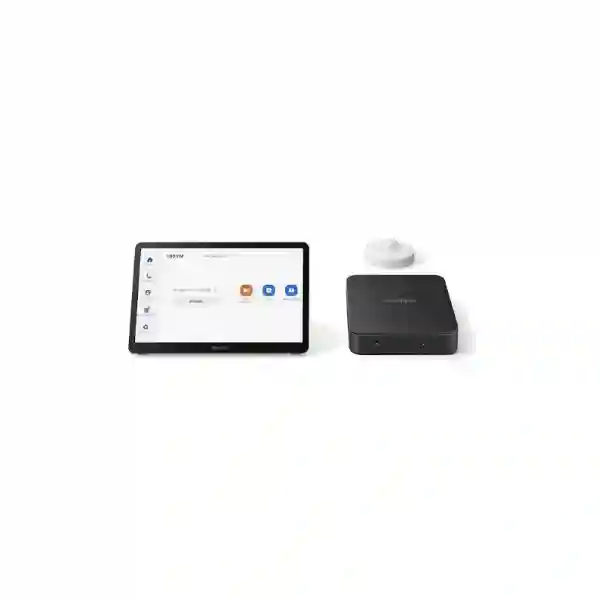
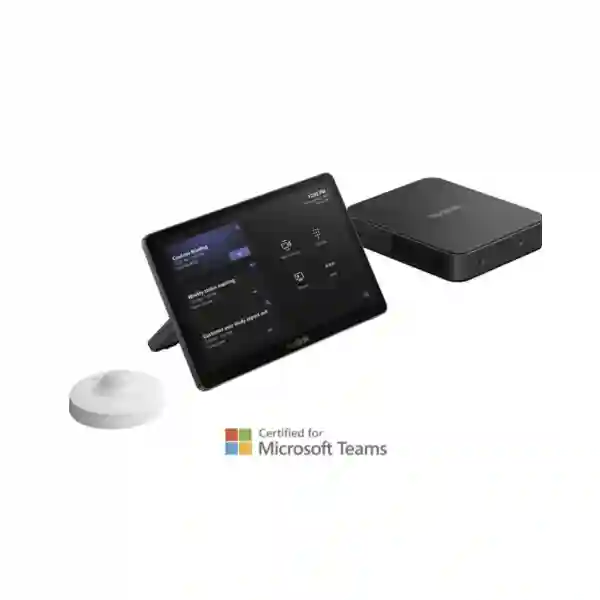
The Yealink MCoreKit-C5-ZR is a modular Zoom Rooms foundation for organizations that want a professional room experience without locking every meeting space into the same camera and audio configuration. The base kit brings together the MCore Pro mini-PC, the 11.6-inch MTouch Plus touch console and the Yealink RoomSensor. From there, buyers can select a suitable Yealink camera and audio solution according to room size, seating layout, acoustics and meeting expectations.
For Tanzanian businesses, this approach is useful when one organization has several room types. A small collaboration room may need an all-in-one USB video bar, while a boardroom may need a PTZ camera, separate microphones and installed speakers. FourTeck can help scope the room, confirm compatible accessories, plan displays and network readiness, and prepare a quotation around the actual deployment instead of treating the base kit as a complete room by itself.
What is included?
MCore Pro mini-PC: 11th Gen Intel Core i5 platform, 8 GB memory, 128 GB SSD, three HDMI outputs with CEC support, built-in EDID, Bluetooth, Wi-Fi and USB connectivity.
MTouch Plus: 11.6-inch IPS touch console with 1920 × 1080 resolution and flexible table or wall deployment options.
RoomSensor: room sensing for occupancy, temperature, humidity and light, supporting smarter meeting-space operations.
Why choose a base-kit architecture?
A base kit is valuable when room requirements differ. Instead of paying for an all-in-one configuration that may be unsuitable for a larger or more complex room, the MCoreKit-C5-ZR lets the compute and control layer remain consistent while camera and audio components are selected separately. Yealink identifies compatible video options including the UVC34 and UVC40 all-in-one USB bars, UVC84 USB PTZ camera and UVC86 dual-eye intelligent tracking camera. Audio choices can include wired, wireless or ceiling microphone options combined with suitable loudspeakers. The exact combination should be chosen only after checking room dimensions, participant positions and installation constraints.
This modularity also supports standardization across multiple sites. IT teams can maintain a familiar Zoom Rooms control experience and MCore/MTouch architecture while adapting peripheral choices to executive rooms, training rooms, boardrooms and collaboration spaces. Before purchase, confirm the intended Zoom Rooms licensing, display count, cable routes, power, network access, camera field of view, microphone pickup strategy and any requirement for wired or wireless content sharing.
Three-display support
The MCore Pro provides three HDMI outputs with CEC support, giving integrators flexibility for multi-display Zoom Rooms where the selected room design and software configuration support that arrangement.
Large touch control
MTouch Plus uses an 11.6-inch 1080p display for meeting control, content functions and room interaction, with desktop and wall-mounting options that fit different furniture layouts.
Room awareness
RoomSensor can detect occupancy, temperature, humidity and light. These signals help organizations treat the conferencing room as a managed workplace resource rather than only a collection of AV devices.
Flexible peripherals
The camera and microphone strategy can be matched to each room. This helps avoid using a camera with the wrong field of view or microphones that cannot cover the intended seating area.
Technical planning checklist
Record room dimensions, table shape, seat count, camera distance and display wall location before selecting the video endpoint.
Consider pickup distance, ceiling height, reflective surfaces, HVAC noise and the location of loudspeakers before choosing table, wireless or ceiling microphones.
Provide reliable wired connectivity where appropriate, sufficient internet bandwidth, appropriate firewall rules, DNS and time services, and stable power for room components.
Plan screen size, mounting, HDMI paths, controller cabling, cable concealment and service access. Multi-screen rooms should be designed deliberately rather than added later.
Related FourTeck resources
For broader collaboration planning, review FourTeck Tanzania business technology solutions, where video conferencing, networking, displays and supporting infrastructure are considered as one environment. Product and solution browsing is available through the FourTeck Tanzania shop. Regional projects can also reference the FourTeck Uganda technology portfolio, FourTeck Kenya solutions and FourTeck Africa regional coverage when procurement or deployment spans more than one market.
Yealink MCoreKit-C5-ZR Zoom Rooms Base Kit Tanzania
Organizations searching for the Yealink MCoreKit-C5-ZR in Tanzania are often planning more than a simple hardware purchase. A Zoom Room depends on the relationship between compute, touch control, camera, microphones, loudspeakers, displays, network connectivity and the room itself. The MCoreKit-C5-ZR supplies the core compute and control foundation, which means the most important buying step is to define what the meeting room must accomplish. A compact executive room may prioritize clean installation and a wide-angle all-in-one camera. A larger boardroom may need optical zoom, intelligent tracking, distributed microphones and more than one display. A training room may need content visibility from the back of the room and a microphone strategy that covers many participants without forcing people to move closer to the table.
For Tanzania deployments, network and power planning deserve equal attention. Cloud collaboration can be affected by unstable internet, congested Wi-Fi, poorly routed cabling or devices powered from unprotected outlets. A planned installation should identify where the MCore Pro will sit, how the MTouch Plus will connect, how HDMI and USB paths are routed, whether the display wall has suitable power, and whether a wired LAN connection is available. If the room has glass walls, high ceilings or hard reflective finishes, audio selection should be based on acoustics rather than appearance. Camera choice should consider seating depth, presentation areas and whether speaker tracking or presenter tracking is required.
When requesting a quotation in Tanzania, provide the exact model, room dimensions, estimated seating count, number of displays, preferred camera style, content-sharing needs and any existing microphones, speakers or AV infrastructure that should be retained. Also state whether the room is new or being upgraded from an older conferencing setup. This helps avoid quoting a base kit without the peripherals needed to make it operational. FourTeck can use those details to help align the MCoreKit-C5-ZR with compatible room equipment, installation requirements and a practical bill of materials. Pricing, availability, licensing and delivery should be confirmed at the time of enquiry rather than assumed from overseas listings.
Yealink MCoreKit-C5-ZR Zoom Rooms Base Kit Dar es Salaam
Businesses in Dar es Salaam frequently use meeting rooms for customer calls, regional management sessions, supplier discussions, interviews and hybrid collaboration with teams outside Tanzania. In these environments, a dedicated Zoom Room can reduce the friction of connecting laptops, selecting the correct microphone and configuring a camera before every meeting. The Yealink MCoreKit-C5-ZR provides a consistent room-control platform using MCore Pro and MTouch Plus while leaving the camera and audio design open. That flexibility is useful in Dar es Salaam offices where room sizes can vary widely between compact meeting spaces, executive boardrooms, training areas and multipurpose conference rooms.
A practical Dar es Salaam deployment should begin with the room rather than the product catalogue. Measure the distance from the display wall to the farthest participant and identify whether people sit mainly around a table or move within the room during presentations. Check whether sunlight from windows creates strong backlighting and whether air-conditioning noise or hard surfaces affect speech clarity. The MTouch Plus can be placed on a table or installed in another supported mounting arrangement, but cable routing should be planned so the controller is easy to reach without leaving loose cables across walkways. For larger rooms, determine whether a PTZ or intelligent-tracking camera gives better framing than a fixed all-in-one bar.
Procurement teams in Dar es Salaam should also specify the display count, expected Zoom Rooms licensing approach, required installation services, network connection and any need for wireless presentation. If an existing room already has professional microphones or installed speakers, confirm whether the proposed design can integrate them instead of replacing working infrastructure unnecessarily. For new rooms, request a complete bill of materials covering the MCoreKit-C5-ZR, chosen camera, microphones, audio output, displays, mounts, cabling and power protection. This produces a more meaningful quotation and reduces the risk of discovering missing components during installation. Availability and commercial terms should always be confirmed for the current project date.
Yealink MCoreKit-C5-ZR Zoom Rooms Base Kit Mwanza
For organizations in Mwanza, the Yealink MCoreKit-C5-ZR can serve as the core of a dedicated Zoom Room where reliable hybrid meetings are important to operations. Companies coordinating with headquarters, suppliers, project teams or customers can benefit from a permanent room system that is simpler for staff to operate than an improvised laptop-and-webcam arrangement. Because the MCoreKit-C5-ZR is a base kit, it is especially suitable when the organization wants to choose camera and audio components according to the room instead of accepting a fixed peripheral bundle. This makes it possible to use a compact video bar in one room and a more capable PTZ or tracking camera in another while preserving a consistent compute and control layer.
Mwanza buyers should treat connectivity as part of the room design. Video meetings rely on stable internet and predictable local networking, so the room should have a clear network path, suitable switching and sensible bandwidth planning. If the room depends entirely on congested office Wi-Fi, meeting quality can vary even when the conferencing hardware is well specified. Power stability, cable protection and ventilation around the MCore Pro should also be considered. Where a room is used for long management sessions or training, microphone pickup across the entire seating area can be more important than adding advanced camera features. Testing speech from every seat is a useful commissioning step.
A Mwanza quotation request should therefore include room size, seat count, display arrangement, camera expectations, microphone preference and whether users need wired or wireless content sharing. Mention any existing television, commercial display, sound system or network equipment that should remain in service. If the project covers several rooms, list each room separately rather than requesting a single generic kit quantity, because the correct camera and audio design may differ even when every room uses the same MCoreKit-C5-ZR base. This approach improves budget accuracy and makes installation planning clearer for the customer, integrator and IT team.
Yealink MCoreKit-C5-ZR Zoom Rooms Base Kit Arusha
Arusha businesses, hospitality groups, NGOs, education organizations and project teams may need conferencing rooms that connect local staff with regional or international participants. The Yealink MCoreKit-C5-ZR offers a useful base for this kind of environment because the core Zoom Rooms platform is separated from the camera and audio choices. This can be particularly valuable in facilities where one room is a compact management space while another is used for briefings, training or partner meetings. Instead of forcing both rooms into the same peripheral design, the MCore Pro, MTouch Plus and RoomSensor can form the common foundation while the remaining AV equipment is selected according to each space.
In Arusha, meeting-room planning should account for actual operating conditions. Rooms with large windows may need careful camera placement to avoid difficult backlight. High ceilings and hard finishes can produce echo that requires a more deliberate microphone and loudspeaker strategy. Spaces that are rearranged often may benefit from flexible microphone options, while formal boardrooms may be better served by installed ceiling or table audio. The MCore Pro supports multiple HDMI outputs, which gives designers options for rooms using more than one display, but display count should be based on viewing distance and meeting workflow rather than added simply because ports are available.
When purchasing the MCoreKit-C5-ZR for Arusha, define whether the project includes supply only, installation, cable routing, display mounting, commissioning and user handover. Confirm Zoom Rooms account and licensing responsibilities, because hardware alone does not replace the software subscription requirements of the conferencing platform. For organizations with existing AV infrastructure, provide model details and connection types so compatibility can be reviewed before the quotation is finalized. A structured scope reduces surprises, protects the implementation budget and helps the completed room deliver a predictable experience for staff who may not be AV specialists.
Yealink MCoreKit-C5-ZR Zoom Rooms Base Kit Dodoma
Organizations in Dodoma looking for the Yealink MCoreKit-C5-ZR are typically seeking a permanent, business-grade Zoom Rooms platform for structured collaboration. Government-related offices, professional organizations, project teams, educational institutions and commercial businesses can all have meeting spaces where repeated setup delays are disruptive. A room system with a dedicated touch controller gives users a familiar place to start and manage meetings. The MCoreKit-C5-ZR provides that core while allowing the video and audio components to be chosen separately, which is important when a small office meeting room and a larger conference space have very different coverage requirements.
For a Dodoma project, begin by documenting the room dimensions and the seating pattern. Camera field of view should cover participants naturally without making distant faces too small, while microphone pickup should remain intelligible at the farthest seat. If the room is also used for presentations, consider how local content will be shared and whether participants need to see both remote people and presentation material at the same time. The MCore Pro supports three HDMI outputs, providing flexibility for multi-display designs, and the MTouch Plus gives users an 11.6-inch touch interface for room control. RoomSensor adds occupancy and environmental sensing capabilities that may support broader workplace-management objectives.
A complete Dodoma quotation should identify not only the base kit but also the intended camera, audio equipment, display hardware, mounts, cables, network requirements and installation responsibilities. Buyers should avoid assuming that a base kit includes every item shown in a complete room-system photograph. Where the room already contains a display or installed audio system, provide those model details so reuse can be evaluated. It is also useful to state whether the meeting space will be supported centrally by an IT team or operated independently by local staff, because documentation, remote management and user training expectations may differ. Confirm current pricing and availability when the project is ready to proceed.
Yealink MCoreKit-C5-ZR Zoom Rooms Base Kit UAE
In the UAE, organizations often deploy standardized meeting-room platforms across headquarters, branch offices, customer centers and project sites. The Yealink MCoreKit-C5-ZR fits procurement strategies that prefer a common Zoom Rooms compute and controller platform while allowing each room to use the right camera and audio configuration. This is useful for businesses that have huddle rooms, medium conference rooms and executive boardrooms under one technology standard. The MCore Pro provides the computing foundation, the MTouch Plus handles room interaction and the RoomSensor adds occupancy and environmental sensing, while the video and audio design can be selected to suit room geometry and user expectations.
UAE deployments frequently place strong emphasis on clean finishes, concealed cabling and integration with commercial displays, furniture and professional AV systems. For that reason, installation planning should be completed before equipment arrives on site. Confirm where the mini-PC will be mounted, how the controller cable will be routed, whether the displays support the desired control behaviour and what camera position provides an appropriate eye line. In larger rooms, professional microphone arrays or ceiling audio may provide better coverage than a single tabletop device. Existing DSP or audio infrastructure should be documented carefully if it is expected to remain part of the room solution.
Procurement teams should request a room-by-room bill of materials and avoid relying on a single generic price for the MCoreKit-C5-ZR when the real project includes cameras, microphones, displays, mounts, cables and installation. They should also confirm Zoom Rooms licensing and any required content-sharing accessories. Organizations operating across the UAE and East Africa can benefit from maintaining a common room-control standard while varying only the peripherals necessary for each space. That approach can simplify training and support, provided the configuration of every room is documented and the chosen accessories are verified for compatibility before purchase.
Yealink MCoreKit-C5-ZR Zoom Rooms Base Kit Uganda
Organizations in Uganda may choose the Yealink MCoreKit-C5-ZR when they want a dedicated Zoom Rooms experience that can be adapted to different room types. Rather than buying a fixed camera-and-speaker bundle for every space, the base-kit model allows a common MCore Pro and MTouch Plus platform to be paired with suitable video and audio equipment. This can support businesses with a mix of management rooms, training spaces and larger conference rooms where camera reach and microphone coverage differ significantly. The RoomSensor adds occupancy and environmental sensing that can complement organizations interested in better utilization of shared meeting spaces.
Uganda deployments should account for the quality of the local network path, power resilience and the room’s physical layout. A conferencing room can only perform consistently when the internet connection, internal switching and cabling are dependable. Where sites experience brief power interruptions, consider suitable UPS protection for the room system, displays and relevant network devices. For camera selection, decide whether users simply need a wide room view or whether speaker tracking, presenter tracking or optical zoom is important. For audio, check whether participants remain around a table or move during workshops, because this affects microphone placement and the value of ceiling or wireless options.
When preparing an Uganda quotation, state the number of rooms and describe each room separately. Include dimensions, seating, display count, existing equipment, desired camera behaviour, content-sharing preference and installation scope. If the project is part of a multi-country rollout, standardization can be useful, but local room conditions should still be respected. A single model list copied across every site can create poor results if the rooms are not physically similar. Confirm current stock, lead time, commercial terms and Zoom Rooms licensing requirements at the time of purchase rather than assuming that conditions from another country apply automatically.
Yealink MCoreKit-C5-ZR Zoom Rooms Base Kit Kampala
Kampala companies often need meeting rooms that support communication with branches, regional partners, customers and remote staff. The Yealink MCoreKit-C5-ZR can provide the central Zoom Rooms compute and control layer for such spaces while leaving camera and audio choices open. This makes it appropriate for organizations that want a polished user experience but have rooms of different sizes. A compact room can use a camera with a broad field of view, while a deeper boardroom may need a PTZ or intelligent-tracking camera so participants remain visible without manual adjustment. The base-kit approach makes those choices part of the room design instead of forcing them into a preselected bundle.
For Kampala offices, deployment planning should examine internet quality, network congestion and cable routing before installation. If the room shares bandwidth with heavy cloud backups, guest Wi-Fi or other high-traffic services, the conferencing experience may be inconsistent even though the endpoint itself is capable. A wired connection for the room system, appropriate network management and clear firewall policies can make support easier. The MTouch Plus should be positioned where users can reach it naturally, and the mini-PC should remain accessible for maintenance while being concealed enough to keep the room tidy. Display size should be chosen using viewing distance, not simply by selecting the largest available screen.
A well-prepared Kampala purchase request includes the exact MCoreKit-C5-ZR model, room dimensions, participant capacity, display count, preferred camera type, audio requirements and whether the project includes installation. Organizations upgrading an existing room should list current microphones, speakers, screens and cable infrastructure so potential reuse can be assessed. If wireless presentation is expected, specify it in the scope rather than assuming it is automatically included. The result should be a complete room bill of materials that can be commissioned and tested as one system, with users able to join and manage Zoom meetings without repeated technical intervention.
Yealink MCoreKit-C5-ZR Zoom Rooms Base Kit Arua
For organizations in Arua, a dedicated Zoom Room can improve the consistency of communication with teams, headquarters, NGOs, suppliers or partners located elsewhere. The Yealink MCoreKit-C5-ZR offers a modular way to build that room because it provides the central MCore Pro compute platform, MTouch Plus controller and RoomSensor while allowing camera and audio equipment to be selected independently. This helps avoid over-specifying a smaller room or under-specifying a larger space. The organization can focus on the communication need first and then choose peripherals that match the distance between participants, camera and displays.
Arua deployments should pay close attention to infrastructure readiness. Stable internet, reliable switching, suitable cabling and protected power are critical for cloud video collaboration. If the network connection is limited, it is worth assessing bandwidth usage across the site and identifying whether large transfers or wireless congestion coincide with meeting times. The room itself also matters. Hard walls can increase echo, fans or air-conditioning can create background noise, and a camera installed too high or far from the display can make eye contact feel unnatural. These practical details influence meeting quality as much as the specifications of the base kit.
Before ordering the MCoreKit-C5-ZR for Arua, document the room dimensions, seating arrangement, display plan, content-sharing expectation and preferred microphone approach. If remote IT support is important, include management and documentation requirements in the scope. For multi-site organizations, create a standard room template but allow controlled variations for camera and audio equipment where room conditions differ. This maintains operational consistency without ignoring local realities. Current price, availability, delivery terms and Zoom Rooms licensing should be confirmed when the procurement request is issued, and a complete quotation should identify all accessories required for an operational system.
Yealink MCoreKit-C5-ZR Zoom Rooms Base Kit Mbarara
Mbarara organizations that conduct frequent remote meetings can use the Yealink MCoreKit-C5-ZR as the core of a more structured collaboration room. The system is particularly relevant when the business wants a dedicated Zoom Rooms setup rather than asking staff to bring a laptop and connect multiple peripherals before every call. MCore Pro handles the room compute role, MTouch Plus gives users a dedicated control surface, and RoomSensor adds occupancy and environmental sensing. Because the camera and audio equipment are selected separately, the solution can be adapted to a small executive meeting room, a team collaboration space or a larger room with participants seated farther from the display.
For Mbarara projects, the room assessment should consider more than seat count. Table shape influences microphone placement, viewing distance affects display size, and the depth of the room affects camera selection. A wide-angle camera may cover a shallow room well but produce small faces in a deep space. A PTZ camera may give better reach, while intelligent tracking can help when speakers move. Audio decisions should account for background noise and acoustic reflection. In a room with high ceilings or hard surfaces, adding more microphones is not always enough; placement and acoustic behaviour need to be considered together.
Buyers should request a complete Mbarara bill of materials that distinguishes the base kit from the remaining room components. Confirm whether displays, wall mounts, camera mounts, microphones, speakers, cabling, power protection and installation are included. State whether the room needs wireless content sharing or only wired presentation. If existing equipment will be reused, provide model numbers and photographs where possible. This gives the integrator enough information to verify connections and reduce unnecessary replacement. Commercial availability, lead time and licensing should be checked for the live project rather than taken from an old quotation or online listing.
Yealink MCoreKit-C5-ZR Zoom Rooms Base Kit Gulu
In Gulu, the Yealink MCoreKit-C5-ZR can support organizations that need dependable Zoom-based collaboration with remote offices, partners, program teams or customers. A permanent room system reduces reliance on individual user laptops and makes the meeting workflow more predictable. The MCoreKit-C5-ZR is intentionally modular: it includes the room compute, touch console and sensor foundation while allowing video and audio to be designed around the actual space. This matters when meeting rooms range from compact offices to larger training or briefing areas where a single camera and microphone format cannot provide equally good results.
Gulu deployments should be planned with attention to resilience. Conferencing depends on the wider site infrastructure, so stable internet service, network switching, power protection and cable management should all be reviewed. Where internet capacity is shared with many users, traffic patterns may need to be considered so important meetings are not competing with avoidable background transfers. Camera placement should keep the lens near the display sightline when possible, helping remote participants feel that people in the room are looking toward them. The touch console should be positioned where meeting hosts can operate it comfortably without obstructing the table or creating cable hazards.
For a Gulu quotation, include the room dimensions, number of participants, number and size of displays, desired camera functions, microphone coverage and content-sharing method. If the site already has a UPS, switch, display or sound system, describe it so the project scope can identify what can be reused safely. Organizations rolling out several locations should keep a record of configuration, cable routes and accessory models for every room. Standard documentation can reduce support time later, especially when local staff need assistance from a central IT team. Confirm current commercial terms and Zoom Rooms licensing before purchase.
Yealink MCoreKit-C5-ZR Zoom Rooms Base Kit Kenya
Kenyan organizations evaluating the Yealink MCoreKit-C5-ZR may be looking for a standard Zoom Rooms platform that can be deployed across different office types without forcing identical camera and microphone bundles everywhere. The MCore Pro, MTouch Plus and RoomSensor provide the common core. Video and audio can then be adapted to each room. This is useful for headquarters with multiple room sizes, branch-office rollouts, shared service organizations and companies that collaborate regularly with teams across East Africa. Standardizing the core platform can simplify user familiarity while preserving the freedom to design each meeting space properly.
In Kenya, room design should include network and AV planning from the beginning. A Zoom Room used for frequent customer or executive meetings should have a dependable network path, appropriate internet capacity and managed power. Larger rooms may benefit from separate camera, microphone and speaker components, while smaller rooms may prioritize a simpler all-in-one video endpoint. Where multiple displays are required, the MCore Pro’s HDMI outputs give flexibility, but screen placement should support the meeting workflow. One screen may show remote participants while another presents shared content, for example, but the exact layout should be tested against room width and viewing angles.
A Kenya procurement request should state whether the quote is for equipment only or a completed room deployment. List the base kit, expected camera, audio design, displays, content-sharing requirements, mounts, cables and commissioning. If the organization plans several rooms, include a room schedule with dimensions and capacities rather than sending only a total quantity. This makes it possible to identify which rooms can share a standard design and which need a different camera or microphone approach. For regional businesses operating in both Kenya and Tanzania, keeping a common Zoom Rooms architecture can support easier training and documentation, while local quotations should still confirm availability and commercial terms separately.
Yealink MCoreKit-C5-ZR Zoom Rooms Base Kit Kuwait
Businesses in Kuwait can use the Yealink MCoreKit-C5-ZR as the foundation for professionally installed Zoom Rooms in executive offices, boardrooms, project rooms and training spaces. Its modular structure is useful where organizations want a standardized controller and compute experience but different video and audio designs for different rooms. The MCore Pro offers the processing platform and multiple display outputs, the MTouch Plus provides an 11.6-inch touch interface and the RoomSensor can contribute occupancy and environmental sensing. Camera and microphone choices remain part of the project design, allowing the final room to reflect actual seating and acoustics.
Kuwait installations often place importance on tidy integration with furniture, wall finishes and commercial displays. The equipment plan should therefore identify concealed cable paths, service access, mounting positions and ventilation before the room is completed. In larger boardrooms, a camera with optical zoom or intelligent tracking may be more suitable than a simple fixed wide-angle unit. Audio may require ceiling microphones, distributed speakers or integration with existing professional AV equipment. If existing DSP, amplifiers or room-control systems are expected to remain, compatibility should be reviewed with exact model information rather than assumed.
When requesting a Kuwait quotation, specify room dimensions, table layout, seat count, display count, camera expectations, content-sharing method and any existing AV equipment. Confirm whether installation, programming, testing and user handover are included. For companies with offices across the Gulf and Africa, the MCoreKit-C5-ZR can help establish a common Zoom Rooms experience, but each site should still receive a room-level design. A consistent user interface does not require identical microphones or cameras in every space. Current pricing, stock status, licensing and warranty terms should be confirmed through the live sales process.
Yealink MCoreKit-C5-ZR Zoom Rooms Base Kit Ghana
Organizations in Ghana that depend on Zoom for hybrid meetings can consider the Yealink MCoreKit-C5-ZR when they want a permanent room solution with flexibility around cameras and audio. The bundle provides MCore Pro, MTouch Plus and RoomSensor as the room foundation. This gives IT teams a consistent compute and touch-control layer while allowing each room to use peripherals that fit its size and use case. A smaller management room may prioritize simplicity, while a larger conference room may require a camera with greater reach, more advanced tracking and microphones positioned to cover a wider seating area.
For Ghana projects, reliable connectivity and power should be considered part of the conferencing solution. A room system cannot compensate for a heavily congested LAN or unstable internet connection. The deployment plan should identify the network port, switching path, firewall requirements and available bandwidth, then check how the room behaves during typical business hours. Power protection can help protect the room compute, displays and network equipment from short interruptions. Physical planning is equally important: camera height affects eye line, display size affects readability, and hard room surfaces influence echo and microphone performance.
A Ghana quotation should identify whether the MCoreKit-C5-ZR is being purchased as a standalone base or as part of a complete Zoom Room. For a complete room, include the chosen camera, microphones, speaker solution, display hardware, mounts, cables, content-sharing accessories and installation services. If several sites are involved, provide a room schedule so each location is designed according to its actual dimensions. This approach supports more accurate budgeting and reduces the chance that accessories are discovered only after delivery. Zoom Rooms licensing, current availability and commercial conditions should be verified when the order is being prepared.
Yealink MCoreKit-C5-ZR Zoom Rooms Base Kit Nigeria
Nigerian businesses with distributed teams, regional operations or frequent customer meetings can use the Yealink MCoreKit-C5-ZR as the central platform for a dedicated Zoom Room. The advantage of the base-kit format is that the compute and user-control components are consistent while camera and audio devices remain selectable. This is important for organizations with diverse facilities: an executive room in a head office may need a different microphone and camera design from a training room or branch meeting space. The MCore Pro, MTouch Plus and RoomSensor provide the common foundation on which those room-specific choices can be built.
Nigeria deployments should give strong attention to network capacity and power resilience. Conferencing quality depends on sustained connectivity, not only on headline internet speed. Review the office LAN, contention, routing and wireless usage, and provide a stable wired path where practical. Appropriate UPS protection can reduce disruptions from short power events. In larger rooms, consider a PTZ or tracking camera if participants sit far from the screen. For audio, microphone coverage should be tested from all seating positions, and loudspeaker placement should avoid creating echo or making remote voices difficult to understand.
Procurement teams should request a detailed Nigeria bill of materials showing the MCoreKit-C5-ZR separately from all room peripherals. State the intended display count, content-sharing method, mounting needs, installation scope and any existing AV assets. Multi-site rollouts benefit from a standard design framework, but it is still necessary to record variations in room size, lighting and acoustics. Documentation should identify accessory models, cable routes and settings so central IT teams can support rooms consistently. Commercial pricing, availability, licensing and project lead times should be confirmed for the current requirement rather than inferred from listings in other markets.
Yealink MCoreKit-C5-ZR Zoom Rooms Base Kit Seychelles
For organizations in Seychelles, a reliable meeting room can be especially valuable when teams, suppliers, clients or management are located across different islands or countries. The Yealink MCoreKit-C5-ZR creates a dedicated Zoom Rooms foundation using MCore Pro, MTouch Plus and RoomSensor, while giving the buyer freedom to select video and audio equipment that fits the room. Hotels, corporate offices, professional services firms and project teams can therefore design compact meeting rooms differently from larger boardrooms without changing the underlying room-control experience.
A Seychelles deployment should pay attention to practical installation and support considerations. If a site is remote from the main support team, clear documentation, tidy cabling and standardized components can reduce future troubleshooting. The room should have stable internet connectivity, a dependable local network connection and sensible power protection. Camera selection should match the distance between the camera and participants, while microphone design should account for room acoustics and seating. In spaces with glass, tile or other reflective surfaces, speech clarity may benefit from careful microphone placement and acoustic treatment rather than simply increasing speaker volume.
When requesting a Seychelles quotation, include the room dimensions, seating, display count, desired camera behaviour and content-sharing needs. Clarify whether installation, commissioning and user orientation are required. If the project involves shipment to an island location, logistics and lead times should be confirmed explicitly at the quotation stage rather than assumed. For organizations operating several properties or offices, the MCoreKit-C5-ZR can support a standardized Zoom Rooms platform, while room-specific peripherals can be selected where necessary. This balances operational consistency with the physical reality of each meeting space.
Compatibility, integration and buying guidance
The MCoreKit-C5-ZR should be treated as the control-and-compute base of a Zoom Room, not as every component required for a finished conference room. Yealink lists camera options including UVC34, UVC40, UVC84 and UVC86, and audio can be designed with compatible wired, wireless or ceiling microphones plus suitable speaker solutions. The right combination depends on room width, depth, table shape, number of participants and whether users remain seated or present from different parts of the room. Always verify the exact accessory compatibility and current product status before finalizing the bill of materials.
Existing professional AV equipment may sometimes be integrated rather than replaced, but this requires interface and control verification. Do not assume that any USB camera, DSP, microphone or display will behave correctly simply because it has a familiar connector. Confirm supported signal formats, USB paths, audio routing, EDID behaviour, CEC requirements and how Zoom Rooms will recognize the devices. In rooms using multiple screens, define the intended content layout before installation so cable routing and mount positions are correct from the beginning.
Licensing is a separate procurement consideration. The room hardware supports the Zoom Rooms use case, but organizations should confirm their Zoom licensing and account configuration directly for the deployment. Buyers should also clarify installation scope, warranty terms, availability and after-sales responsibilities in the quotation. This is especially important for multi-country projects where commercial terms may differ by market.
Frequently asked questions
Is the Yealink MCoreKit-C5-ZR a complete Zoom Room?
It is a Zoom Rooms base kit that includes the MCore Pro mini-PC, MTouch Plus touch console and RoomSensor. A complete room normally also requires an appropriate camera, audio equipment, display or displays, cabling and the necessary Zoom Rooms licensing. The exact peripherals should be chosen for the room.
Which Yealink cameras can be used with the MCoreKit-C5-ZR?
Yealink presents the UVC34 and UVC40 all-in-one USB video bars, UVC84 USB PTZ camera and UVC86 dual-eye intelligent tracking camera as video options for the MCoreKit-C5-ZR solution. Final selection should be based on room dimensions, seating and desired camera behaviour.
Does MCore Pro support multiple displays?
The MCore Pro is specified with three HDMI video outputs with CEC support. The practical display layout should still be designed around the intended Zoom Rooms workflow, screen sizes, room dimensions and supported configuration.
What does the RoomSensor monitor?
Yealink lists occupancy, temperature, humidity and light detection for RoomSensor. This can add useful room-awareness data in addition to the conferencing functions delivered by the MCore and MTouch components.
What information should I send for a quotation?
Send the product model, quantity, room dimensions, seat count, display count, preferred camera type, microphone requirements, content-sharing expectations, existing AV equipment and whether installation is required. This information supports a much more accurate room-level quotation.
Quotation checklist
Include room dimensions, table layout, participant count, number of displays, camera expectations, microphone style, loudspeaker requirements, wired or wireless sharing, existing equipment, network availability, installation scope, quantity and destination. For multiple rooms, provide a separate line for each room type.
Decision recap
Choose the MCoreKit-C5-ZR when you want a dedicated Zoom Rooms core that can be paired with different Yealink video and audio options for different room sizes. It is best suited to projects where room design, integration and future standardization matter more than buying a fixed all-in-one bundle.
Consult FourTeck about your Zoom Room
Share your room dimensions, seating plan, preferred Zoom workflow and any existing displays or audio equipment. FourTeck can help turn the Yealink MCoreKit-C5-ZR from a base hardware purchase into a practical meeting-room bill of materials, including compatible camera and audio choices, network considerations, mounting, cabling and installation scope. Commercial availability and final configuration should be confirmed for each live project.




Reviews
There are no reviews yet.