
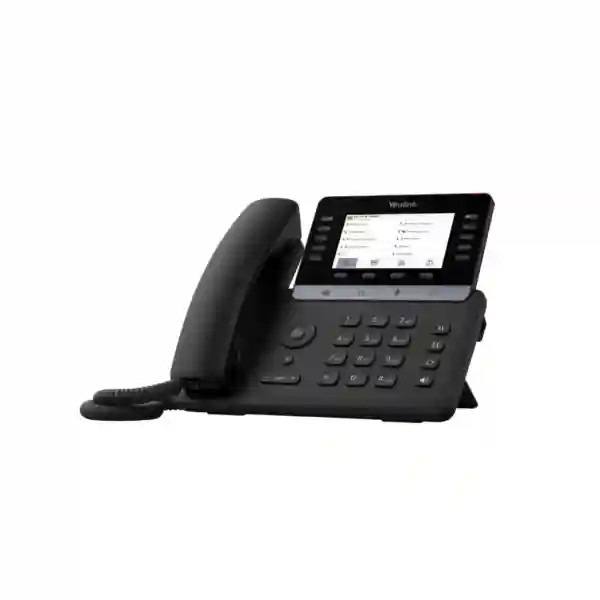
Yealink MP55 E2 Teams Phone
The Yealink MP55 E2 Teams Phone is a purpose-built Microsoft Teams desk phone for organisations that want a familiar handset experience, fast physical call controls and modern cloud-managed collaboration in one endpoint. Yealink positions the MP55 E2 for demanding shared and high-call-volume environments such as front desks, call centres, educational common areas and other vertical-industry scenarios. The platform is built on Microsoft Device Ecosystem Platform (MDEP) and Android 15, giving IT teams a current software foundation while keeping daily calling simple for users who prefer dedicated keys instead of navigating a touchscreen for every action.
For Tanzania deployments, the buying decision should include more than the handset quantity. A successful Teams phone project also depends on the correct Microsoft licence, stable internet access to Microsoft cloud services, PoE or another supported power method, wired or wireless network readiness, headset requirements and a management process for updates and device monitoring. FourTeck Tanzania can help buyers structure these questions before ordering so that the phone, Teams environment and local network are aligned.
Microsoft Teams ready
Certified for Microsoft Teams and equipped with a dedicated Teams button, the MP55 E2 gives users a desk-phone interface designed around Teams calling workflows.
Clear business audio
Yealink HD audio, a full-duplex speakerphone and AI noise cancellation support intelligible conversations in busy working environments.
Flexible connectivity
Dual Gigabit Ethernet, PoE, dual-band Wi‑Fi 6, Bluetooth 5.0 and USB Type-A connectivity give IT teams several practical deployment options.
Central management
The phone supports Microsoft and Yealink device-management platforms, helping administrators standardise deployments and maintain larger fleets.
What the Yealink MP55 E2 Teams Phone is designed to solve
Many organisations have moved collaboration into Microsoft Teams but still need dependable desk phones in roles where a physical handset remains the fastest and most natural way to work. Reception staff may handle a large number of incoming calls, contact-centre agents may need quick access to transfer or hold controls, common areas may need a dedicated calling point, and operational teams may not want to rely on a laptop or mobile application for every conversation. The MP55 E2 addresses that requirement by keeping important call actions on physical keys while presenting Teams as the core communications platform.
The 4.3-inch 480 × 272 colour display is non-touch, which is a deliberate part of the product design. Navigation and call handling are performed through physical controls, including line keys and dedicated function keys. For users who spend much of the day answering, holding, transferring, redialling or placing calls on speakerphone, this tactile workflow can be easier to learn and more repeatable than a fully touch-driven endpoint. The magnetic handset also gives the device a practical desk-phone feel.
The MP55 E2 is not only a user endpoint. It is also part of a managed enterprise environment. Microsoft Teams Admin Center and Yealink management tools can be used to administer supported devices, while wired and wireless connectivity provides deployment flexibility. Buyers should therefore think about the phone as part of a complete voice service that includes identity, licensing, internet connectivity, network quality, power, endpoint policy and support.
Verified Yealink MP55 E2 Teams features
The MP55 E2 runs Android 15 and is built on Microsoft Device Ecosystem Platform, providing the software and security foundation used by the current Teams phone generation.
The colour display has a 480 × 272 resolution. Users work through the screen with physical navigation and call-control keys rather than a touchscreen interface.
Yealink combines HD voice processing with AI-based noise suppression to reduce distracting background sound and help speech remain understandable.
Integrated dual-band 2.4 GHz/5 GHz Wi‑Fi 6 and Bluetooth 5.0 allow wireless connectivity and supported Bluetooth accessory use where appropriate.
Two Gigabit Ethernet ports support wired deployment, while Power over Ethernet can simplify desks by carrying network access and electrical power through the network connection.
A USB Type-A port supports USB headsets, supplementing other headset connectivity choices for users who spend extended periods on calls.
Physical keys help speed common actions such as Hold, Transfer, Redial and Speakerphone operation, with a dedicated Microsoft Teams button for the platform workflow.
The MP55 E2 supports Yealink Teams hybrid-mode capabilities, giving organisations additional deployment flexibility where the supported environment requires it.
Technical specification snapshot
| Platform | Android 15; Microsoft Device Ecosystem Platform (MDEP) |
| Display | 4.3-inch, 480 × 272 colour, non-touch |
| Audio | Yealink HD voice, AI noise cancellation, full-duplex speakerphone with acoustic echo cancellation |
| Wireless | Dual-band 2.4 GHz/5 GHz Wi‑Fi 6; Bluetooth 5.0 |
| Network | Dual-port Gigabit Ethernet; Power over Ethernet support |
| USB | USB Type-A with USB headset support |
| Management | Microsoft and Yealink device-management platforms |
| Primary use profiles | Front desks, call centres, common areas and other business environments with frequent call handling |
Microsoft Teams licensing and deployment guidance
A Teams desk phone is only one component of a working Microsoft calling solution. Before procurement, confirm how each phone will be assigned and which Microsoft licence covers the required user or common-area scenario. Microsoft licensing changes over time and different organisations may use different Microsoft 365 or Teams Phone combinations, so the correct licence should be validated against the current tenant and intended features rather than assumed from the handset model alone.
For common-area deployments, administrators should confirm the account model, calling requirements and any feature restrictions relevant to that role. Yealink documentation specifically distinguishes common-area use from meeting-account behaviour, so organisations should not assume that every Teams phone role exposes the same functions. Reception and high-call-volume users should also test the expected call flows, transfer behaviour, queues and policies before a mass rollout.
Network preparation is equally important. Wired Ethernet with PoE is often the cleanest office deployment because it can provide stable connectivity and power through the same cabling, but integrated Wi‑Fi 6 provides another option where the network design supports it. Voice performance depends on the end-to-end path, including internet stability, switching, VLANs, DNS, firewall policy and wireless conditions. For related infrastructure planning, visit the FourTeck Tanzania integrated IT solutions overview and the FourTeck Tanzania technology shop, which explain how IP phones, PoE switching, Wi‑Fi and security fit into a coordinated business network.
Who should consider the MP55 E2?
The strongest fit is an organisation already standardising on Microsoft Teams that still needs fixed desk endpoints for roles where a handset remains operationally useful. Front desks and receptions can benefit from fast physical call controls. Call-handling teams can use dedicated keys rather than repeatedly navigating on-screen menus. Common areas can provide a controlled calling point without relying on an employee laptop. Education, healthcare, hospitality, corporate offices, government environments, contact centres and multi-branch organisations can all have roles where a dedicated Teams phone is more practical than an app-only strategy.
The MP55 E2 is less about executive touchscreen presentation and more about reliable call handling, modern security foundations and manageable deployment. Buyers comparing Yealink Teams phones should therefore begin with the user role: number of calls, need for physical keys, wireless requirements, headset type, desk location, display preference and whether the endpoint must be centrally managed. A higher-specification phone is not automatically a better choice if the user simply needs fast voice handling; similarly, a simpler endpoint may not suit a reception function with demanding call workflows.
Related FourTeck Tanzania resources
Business technology shop
Use the shop as a starting point for IP phones, PoE switching, conferencing hardware and supporting network equipment that may be needed around a Teams phone deployment.
Integrated IT services
For projects that include endpoint rollout, switching, Wi‑Fi, cabling or broader collaboration requirements, the services page provides the wider deployment context.
About FourTeck Tanzania
Review FourTeck Tanzania’s broader approach to business IT, telecom, security and infrastructure before combining multiple technology requirements in one project.
Quotation and product guidance
Use the contact page to share quantity, deployment country, Teams environment, headset requirements and target rollout scope for a more useful quotation discussion.
Yealink MP55 E2 Teams Phone Tanzania
Businesses searching for the Yealink MP55 E2 Teams Phone in Tanzania are typically looking for a dedicated Microsoft Teams calling endpoint that can be deployed at reception desks, shared work areas, customer-contact positions, administrative offices and other fixed locations. The MP55 E2 is particularly relevant where users need the convenience of Microsoft Teams but do not want the desk-phone experience replaced completely by a PC headset or mobile application. Its physical Hold, Transfer, Redial and Speakerphone controls, dedicated Teams key and line-key layout are useful in roles that depend on repeated call handling throughout the working day.
For a Tanzania procurement project, confirm whether the phones will be used by named employees, front-desk staff, contact-centre users or as common-area endpoints. That decision affects account planning, Microsoft licensing, sign-in policy and support procedures. It is also useful to confirm whether wired Ethernet will be available at each desk and whether the access switch provides sufficient PoE capacity. The MP55 E2 supports dual Gigabit Ethernet with PoE, which can simplify installations where structured cabling and managed switches are already in place. Integrated Wi‑Fi 6 can be helpful in suitable wireless environments, but business voice should still be assessed for coverage, congestion and reliability rather than assuming Wi‑Fi alone guarantees call quality.
Tanzania buyers should also decide how users will hear and speak. Some roles will use the magnetic handset, some will rely on full-duplex speakerphone, and high-call-volume staff may prefer a USB or Bluetooth headset. The phone supports USB Type-A headset connectivity and Bluetooth 5.0, so the chosen headset strategy can be aligned with user role. AI noise cancellation can improve intelligibility in busy spaces, but good desk placement and acoustic conditions still matter.
When requesting a quotation in Tanzania, provide the quantity, intended user profiles, Microsoft tenant situation, preferred network connection, available PoE, headset requirements and whether installation or configuration assistance is expected. This allows the quotation to address practical dependencies rather than listing handsets alone. FourTeck Tanzania can also help coordinate the surrounding network, cabling and collaboration requirements where the phones are part of a broader office upgrade.
Yealink MP55 E2 Teams Phone Dar es Salaam
In Dar es Salaam, the Yealink MP55 E2 Teams Phone is a practical option for corporate offices, service desks, logistics companies, hospitality operations, professional firms, educational organisations and multi-branch businesses that use Microsoft Teams as a communications platform. The city’s concentration of headquarters and customer-facing operations means many deployments combine traditional receptionist behaviour with cloud collaboration. A user may answer an external call on the desk phone, transfer it internally, consult colleagues through Teams and continue working on a PC without requiring the desk handset to become a separate communications island.
Planning should begin with the call workflow. A front desk that receives sustained inbound traffic has different needs from an office where the phone is used occasionally. For reception and call-handling roles, the MP55 E2’s physical feature keys can reduce the number of screen interactions required for everyday actions. The 4.3-inch colour screen provides call information while the non-touch design keeps interaction focused on the navigation and line controls. Organisations should test representative call flows, including transfer, hold, voicemail and queue behaviour, before deploying a large number of devices.
Dar es Salaam sites also need network readiness. Voice quality depends on the office LAN and internet connection as much as on the endpoint itself. If the phone is connected through Ethernet, confirm cabling condition, switch-port configuration, VLAN policy, PoE budget and internet resiliency. If Wi‑Fi 6 is used, validate actual signal strength and contention at the desk rather than relying only on a coverage map. Where business continuity is important, consider UPS protection for the switch and internet equipment, because a PoE phone remains dependent on the upstream network and power chain.
For procurement, share whether the Dar es Salaam project is a new Teams Phone rollout, replacement of existing SIP phones, branch standardisation or an expansion of an established Microsoft environment. Include the handset quantity, user roles, headset preference, any wall-mount requirement and deployment timetable. This makes it easier to prepare an accurate scope and to identify supporting items before installation begins.
Yealink MP55 E2 Teams Phone Mwanza
Organisations evaluating the Yealink MP55 E2 Teams Phone in Mwanza may include regional offices, educational institutions, healthcare operations, distributors, hospitality businesses and service organisations that need a fixed Teams calling point while keeping communications centrally managed. The phone’s combination of wired Gigabit Ethernet, PoE, Wi‑Fi 6 and Bluetooth gives administrators flexibility when adapting to different office layouts, but deployment choices should still be standardised wherever possible so that troubleshooting remains predictable across all desks.
A useful Mwanza deployment plan starts by grouping users into profiles. Reception and service desks may need more active use of line and feature keys, general office workers may use the phone mainly for scheduled calls and incoming communication, and common areas may use a dedicated account with restricted functionality. Microsoft licensing and policy assignment should follow those roles. Before ordering, confirm that the required Teams calling service and account configuration are already planned; the presence of a Teams-certified handset does not by itself provide telephone numbers, calling plans or tenant configuration.
The local network should also be reviewed. The MP55 E2’s dual Gigabit Ethernet ports can integrate cleanly into an office desk environment, including designs where a PC shares the desk’s network path through the phone. PoE can reduce power-adapter clutter, but the switch must have enough PoE capacity for the full phone count. Where Wi‑Fi is preferred, assess the number of simultaneous voice devices, access-point placement and other wireless traffic. For cloud voice, DNS, firewall policy and stable internet connectivity are essential to the overall user experience.
When requesting a Mwanza quotation, specify quantity, location count, whether each site has managed switching, the intended Microsoft Teams user type and whether headsets are required. If several branches are involved, consider standardising naming conventions, firmware policy, switch configuration and documentation. That approach can make remote support easier and gives the organisation a repeatable model for future expansion elsewhere in Tanzania.
Yealink MP55 E2 Teams Phone Arusha
For Arusha businesses, the Yealink MP55 E2 Teams Phone can support fixed voice positions in tourism companies, hotels, corporate offices, NGOs, education, professional services and operations that communicate frequently with colleagues and customers outside the city. Microsoft Teams is often used for messaging and meetings, but front desks and administrative teams may still work faster with a dedicated handset. The MP55 E2 gives those users the physical call controls of a desk phone while keeping the endpoint inside the Teams ecosystem.
Hospitality and customer-facing deployments should map the phone to the actual workflow. A reception user may need rapid answer, hold and transfer actions throughout the day, while a back-office user may place fewer calls but value Bluetooth or USB headset connectivity. The MP55 E2 supports both Bluetooth 5.0 and USB Type-A headset options, in addition to its handset and speakerphone. AI noise cancellation can help in active work areas, although a headset may still be preferable for sustained calling or spaces with significant ambient noise.
Arusha sites should also check the communications infrastructure before the handsets arrive. Confirm internet reliability, switching, PoE, desk cabling and Wi‑Fi coverage if wireless deployment is planned. Where several phones share the same switch, total PoE budget matters just as much as the number of available ports. If the organisation uses VLANs, Quality of Service or specific firewall rules for voice and collaboration traffic, the phone rollout should be incorporated into that design rather than connected ad hoc.
A strong quotation request includes the number of phones, expected calling role, Microsoft tenant and licensing status, preferred power method, network type and accessory needs. For hospitality or multi-site organisations, it can also be useful to specify whether the same endpoint standard will be repeated at other properties or branches. Standardisation simplifies user training, spare planning, device management and future expansion.
Yealink MP55 E2 Teams Phone Dodoma
The Yealink MP55 E2 Teams Phone can be relevant in Dodoma for government-facing organisations, administrative offices, education, professional services, corporate branches and institutions that want a dedicated Microsoft Teams calling endpoint for desks and shared spaces. Its design is especially useful where staff need dependable physical controls for common call actions rather than relying entirely on a computer softphone. The handset, speakerphone, navigation keys and dedicated Teams control give users a familiar interface while central IT retains a cloud-managed collaboration platform.
For institutional deployments, governance and standardisation are important. Administrators should define who receives which device, how accounts are provisioned, what policies are assigned, how firmware and Teams application updates are handled and how failed or replaced units are documented. The MP55 E2 supports Microsoft and Yealink management platforms, making it suitable for environments that need a repeatable management process across multiple endpoints. A pilot group can be valuable before organisation-wide rollout because it reveals practical issues with licensing, sign-in, call routing and network access.
Infrastructure planning should include power and connectivity. PoE can simplify installation, but switch capacity and UPS protection should be assessed if voice availability is important during short power interruptions. Wired Ethernet generally provides a predictable desk connection, while the integrated Wi‑Fi 6 capability may help in layouts where cabling is constrained. Wireless should be validated for signal quality and capacity in the exact work areas where phones will be placed.
When buying for Dodoma, avoid treating the quotation as a simple handset count. Include user roles, Teams Phone readiness, external calling requirements, headset types, network topology, PoE availability and whether configuration or deployment assistance is needed. A complete bill of requirements reduces delays and makes it easier to compare proposals on the same technical assumptions rather than only on unit price.
Yealink MP55 E2 Teams Phone UAE
Businesses sourcing the Yealink MP55 E2 Teams Phone for the UAE may be standardising Microsoft Teams calling across offices, service desks and regional headquarters. The device is suited to environments where users want dedicated physical call controls and a fixed desk endpoint but the organisation’s communications strategy is built around Microsoft Teams. Reception areas, customer-support teams, call-handling positions and common spaces are natural use cases because the MP55 E2 combines a non-touch display with tactile keys for frequent operations.
UAE deployments often sit inside larger regional IT standards, so procurement teams should confirm whether the same phone model will also be used in Tanzania, Uganda, Kenya or other branches. Standardising an endpoint can simplify training and lifecycle management, but only if Microsoft licensing, network policy and calling services are correctly designed for each country. External PSTN connectivity, emergency-calling requirements and number provisioning are service-layer matters that should be validated independently from the handset hardware.
The MP55 E2 provides dual Gigabit Ethernet with PoE, Wi‑Fi 6, Bluetooth 5.0 and USB headset support, allowing UAE offices to choose connectivity according to workspace design. In high-density offices, wireless voice should be planned with the same discipline as other real-time applications. For wired desks, confirm switch PoE budgets and network segmentation. For call-intensive users, select headsets according to comfort, acoustic conditions and shift length rather than assuming one accessory suits every role.
For UAE-specific IT and telecom requirements, organisations can also review FourTeck UAE IT and telecom solutions. A useful quotation should state device quantity, office locations, expected user roles, Teams licensing status, desired accessories and whether the project requires configuration, staging or broader network work. This helps align the endpoint order with the operational environment.
Yealink MP55 E2 Teams Phone Uganda
For organisations in Uganda, the Yealink MP55 E2 Teams Phone offers a way to extend Microsoft Teams calling to fixed desks and shared operational positions. It can suit corporate branches, customer-service desks, education, healthcare, hospitality and other organisations that need a physical handset while maintaining a Microsoft-centric collaboration environment. The key advantage is not simply that the phone can make Teams calls, but that it gives users dedicated hardware for daily voice work with physical line and function controls.
Multi-site Uganda deployments should define a standard architecture before purchasing. Decide whether endpoints will primarily use Ethernet or Wi‑Fi, how PoE will be delivered, whether voice traffic needs a dedicated VLAN and how internet failover is handled at critical sites. The MP55 E2’s integrated Wi‑Fi 6 provides flexibility, but organisations should prefer whichever connection method is most reliable at the actual desk. Central management can help IT teams maintain device policy across branches, especially when the same model is deployed in several cities.
Licensing and account assignment deserve the same attention as hardware. A phone used by a named employee may need a different Microsoft configuration from a common-area phone. Administrators should verify the current Microsoft Teams Phone service, user licensing and calling method for the tenant. This is especially important when a project is replacing a traditional PBX, because a cloud endpoint does not automatically reproduce every legacy call-flow feature without configuration.
For complementary regional support information, review FourTeck Uganda communication and IT solutions. When requesting a quotation, provide the number of endpoints per site, user roles, network readiness, PoE availability, preferred headsets and any requirement to coordinate the phones with broader IP PBX, networking or branch communications projects.
Yealink MP55 E2 Teams Phone Kampala
Kampala organisations considering the Yealink MP55 E2 Teams Phone often need a dependable endpoint for reception, service desks, corporate offices, administrative teams and shared communication points. In these roles, fast call handling can matter more than a large touchscreen. The MP55 E2 uses a 4.3-inch non-touch colour screen together with physical controls, allowing staff to work through common actions such as hold, transfer, redial and speakerphone operation with dedicated keys.
For a Kampala office, map the phones to user profiles before finalising quantity. Receptionists and high-call-volume users may need headsets and should test the call workflow carefully. General users may primarily use the handset, while shared spaces may require common-area account policies. Bluetooth 5.0 and USB Type-A headset support provide accessory flexibility, but headset model selection should be confirmed for compatibility, wearing style and user preference. AI noise cancellation helps reduce background distraction, though noisy open offices may still benefit from well-selected headsets and sensible seating.
The network should be treated as part of the voice system. Dual Gigabit Ethernet and PoE support make the phone straightforward to integrate with managed office switching. Check switch-port availability, total PoE budget and any voice VLAN or QoS design. If using Wi‑Fi 6, verify signal and capacity around the actual desk positions. If voice is operationally critical, review internet resilience and UPS coverage for switches, routers and other network components.
A procurement request for Kampala should therefore include more than a model number. State the phone quantity, number of sites, Microsoft tenant and licensing status, intended call-handling roles, headset requirements and whether deployment services are expected. Clear requirements make it easier to distinguish the endpoint cost from licences, network upgrades, configuration and other project components.
Yealink MP55 E2 Teams Phone Arua
The Yealink MP55 E2 Teams Phone can be considered for Arua offices and institutions that want cloud-connected Microsoft Teams calling while retaining a familiar desk-phone form factor. A dedicated handset can be useful in branch administration, reception, education, healthcare and service environments where staff need a fixed communication point throughout the day. The MP55 E2 combines that physical workflow with Android 15, MDEP, Teams integration and centralized device-management options.
In branch environments, connectivity planning becomes especially important. The phone supports Ethernet and Wi‑Fi 6, but the best choice depends on local network conditions. Wired deployment through PoE can reduce desk power requirements and provide predictable connectivity when structured cabling is available. Wireless deployment may simplify some layouts, but voice quality should be tested during busy periods when other clients are also using the access points. Teams calling also relies on stable internet access, so branch connectivity and any resilience measures should be reviewed as part of the project.
Arua buyers should also consider remote support. If IT administrators are located elsewhere, consistent device naming, standardized network settings and central management can reduce the effort required to maintain phones at the branch. Document which account is assigned to each endpoint, the switch port or wireless network used, the headset type and the Microsoft policy associated with the device. This information is valuable when troubleshooting or replacing equipment.
For procurement, provide the branch size, number of call-handling positions, available PoE, internet arrangement, user account type and any requirement for shared phones. If the project is part of a larger Uganda rollout, aligning the Arua configuration with Kampala, Gulu and Mbarara can create a repeatable model. Consistency in hardware and management reduces variation while still allowing each site to have the quantity and connectivity appropriate to its environment.
Yealink MP55 E2 Teams Phone Mbarara
In Mbarara, organisations can use the Yealink MP55 E2 Teams Phone to give reception desks, branch offices, customer-support teams and other fixed positions a dedicated Microsoft Teams voice endpoint. The device is best evaluated in the context of user behaviour. Staff who frequently answer and transfer calls can benefit from tactile keys, while occasional users may simply value a dependable handset connected to the same Teams environment they already use on computers and mobile devices.
A site survey or network review is useful before a larger installation. Confirm whether desks have suitable Ethernet cabling, whether switches support the required PoE capacity and whether the internet connection is stable enough for cloud voice. If the project will use Wi‑Fi 6, measure coverage and client density in the intended work areas. Do not assume that a strong Wi‑Fi icon alone means the network is suitable for real-time voice; interference, congestion and roaming behaviour can affect calls.
Headset planning is another important consideration for Mbarara customer-service environments. The MP55 E2 supports Bluetooth 5.0 and USB Type-A headsets, giving organisations several ways to equip users who need hands-free calling. Select headset types based on call duration, background noise, comfort and whether staff share workstations. The handset and full-duplex speakerphone remain useful for general office calling and ad hoc conversations.
A complete quotation should state the required device quantity, Teams licensing situation, account type, headset needs, network method and any installation scope. If the Mbarara office is part of a wider Uganda network, standardizing firmware policy, device naming, Microsoft configuration and documentation can simplify support. This approach lets the organisation use the same operational model across branches while adapting the number of devices and infrastructure to each location.
Yealink MP55 E2 Teams Phone Gulu
The Yealink MP55 E2 Teams Phone offers Gulu organisations a fixed Teams endpoint for business calling where a physical handset and fast call controls remain important. It can support branch administration, education, healthcare, service desks, hospitality and other workplaces that want to connect local staff into a wider Microsoft Teams communications strategy. Because the device is designed for practical call handling, it is well suited to users who repeatedly answer, hold, transfer and redirect conversations during the day.
Gulu deployment planning should cover user identity and network design together. Decide whether phones belong to individual users or shared common areas, then validate the current Microsoft licensing and policies for that role. Next, decide whether Ethernet with PoE or Wi‑Fi 6 is the preferred connection. Wired PoE can be straightforward when structured cabling is already available; wireless can help where cabling is limited, but it should be tested under realistic load. Internet stability remains central because the Teams service is cloud connected.
For larger deployments, central management and documentation become valuable. The MP55 E2 supports Microsoft and Yealink management tools that can help administrators monitor and maintain endpoint fleets. A standard build should document firmware expectations, sign-in method, account policy, network configuration, headset type and any local support instructions. Remote teams can then troubleshoot more quickly because each phone follows the same baseline.
When asking for a Gulu quotation, provide the handset count, intended role of each phone, network availability, PoE capability, headset requirements and whether the devices are part of a wider branch standard. This allows procurement to capture the real deployment cost instead of focusing only on the endpoint itself. If the organisation also has sites in Kampala, Arua or Mbarara, consistent hardware and configuration can make expansion and support easier.
Yealink MP55 E2 Teams Phone Kenya
The Yealink MP55 E2 Teams Phone can serve Kenyan organisations that are moving business calling into Microsoft Teams while keeping fixed desk endpoints for reception, customer service, shared offices and other operational roles. Its Android 15/MDEP foundation, physical call keys, HD audio and multiple connectivity options make it a practical choice where manageability and familiar user interaction are more important than a premium touchscreen interface.
For multi-office Kenyan deployments, the first design question is whether the MP55 E2 will be a standard endpoint across all sites or reserved for particular user profiles. Receptionists and service teams may benefit most from physical keys and headset options, while other staff could use different devices. A role-based standard avoids overspecifying every desk and makes it easier to create consistent support documentation. Microsoft user licences, Teams Phone configuration and external calling arrangements should be validated separately from the handset purchase.
Network readiness should include PoE switching, VLAN design, internet resiliency and wireless assessment where Wi‑Fi 6 will be used. The phone’s dual Gigabit Ethernet ports can fit well in desk environments, while Bluetooth 5.0 and USB support provide headset flexibility. For contact-heavy positions, a headset chosen for comfort and acoustic conditions can improve the working experience more than simply increasing endpoint specification.
Organisations with projects in Kenya can also review FourTeck Kenya IT, VoIP and collaboration solutions. A useful quote request should include quantity, site list, Teams tenant status, network method, PoE availability, headset requirement and implementation scope. If the same phone is being deployed in Tanzania or Uganda, standardising the baseline configuration can make cross-border support and procurement more coherent.
Yealink MP55 E2 Teams Phone Kuwait
For Kuwait businesses, the Yealink MP55 E2 Teams Phone is suitable for organisations using Microsoft Teams as a core communications platform but retaining dedicated desk phones in reception, support, administrative and common-area roles. The device focuses on efficient call handling with physical line and feature keys rather than a touch-first interface. This can be attractive in environments where staff manage calls continuously and need a predictable button-based workflow.
Before procurement, Kuwait IT teams should map each endpoint to its intended Microsoft account and calling policy. A Teams-certified phone still depends on the tenant’s licensing, number assignment and PSTN connectivity strategy. Organisations transitioning from a traditional PBX should document existing call flows such as hunt groups, reception routing, after-hours handling and transfer behaviour, then confirm how those workflows will be implemented in Teams. A pilot with representative users can identify policy or usability issues before a wider rollout.
The MP55 E2 supports PoE over dual Gigabit Ethernet, integrated dual-band Wi‑Fi 6, Bluetooth 5.0 and USB Type-A headsets. These options allow deployment across different workspace types, but consistency is useful where possible. Wired PoE often simplifies fixed desk deployments, while wireless can support locations without convenient data cabling. Headset selection should be based on role, comfort and noise levels, especially for customer-service teams.
For quotation planning, specify the number of endpoints, Teams account types, expected external calling configuration, network method, headset needs and any wall-mount or staging requirements. If Kuwait is part of a regional standard, document a baseline configuration that can also be applied in UAE, Tanzania, Kenya and Uganda while allowing local telecom and licensing differences to be handled separately.
Yealink MP55 E2 Teams Phone Ghana
The Yealink MP55 E2 Teams Phone is relevant for Ghana organisations that want a dedicated Microsoft Teams voice device at reception desks, service counters, offices and shared communication points. Physical Hold, Transfer, Redial and Speakerphone controls can make routine call handling more direct, while Android 15 and MDEP provide the modern platform underneath the device. The phone also supports Wi‑Fi 6, Bluetooth 5.0, USB headsets and dual Gigabit Ethernet with PoE.
A Ghana deployment should be designed around user roles rather than purchasing the same endpoint blindly for every employee. High-call-volume users may gain the most from dedicated keys and a professional headset, while occasional callers may have simpler requirements. Common-area positions need appropriate Microsoft account and policy configuration. Organisations should verify current Teams Phone licensing and external calling arrangements before finalising a bill of materials so that hardware and service layers are aligned.
Network preparation should include internet stability, managed switching, PoE capacity, VLANs and wireless coverage where applicable. The MP55 E2 can connect through Ethernet or Wi‑Fi, but the preferred method should be chosen according to the reliability of the specific site. A PoE switch can simplify power at the desk, although the total switch power budget must be sized for the number of connected devices. Voice-critical locations may also need UPS protection for network equipment and internet termination devices.
For Ghana-focused technology requirements, see FourTeck Ghana business IT solutions. A quotation request should include phone count, intended users, Teams environment, headset preference, network connection, PoE readiness and implementation expectations. This gives procurement teams a clearer view of the full deployment rather than only the handset price.
Yealink MP55 E2 Teams Phone Nigeria
Nigerian organisations using Microsoft Teams can deploy the Yealink MP55 E2 Teams Phone where a dedicated desk endpoint improves daily call handling. Reception teams, customer-service groups, branch administrators and common areas are strong examples because these roles often benefit from a physical handset and quick-access keys. The MP55 E2 combines this traditional interaction model with cloud-managed Teams functionality, Android 15, MDEP and modern wired and wireless connectivity.
For larger Nigerian deployments, standardisation is especially valuable. Define a small number of user profiles, decide which roles receive the MP55 E2, select approved headsets and document the Teams account and policy assigned to each profile. This simplifies procurement and reduces support variation across offices. A pilot deployment can test login, calls, transfers, voicemail, queues and any organisation-specific workflows before devices are distributed at scale.
The network path should also be part of the procurement checklist. Dual Gigabit Ethernet with PoE supports structured office deployment, while Wi‑Fi 6 provides flexibility for suitable locations. Bluetooth 5.0 and USB Type-A enable supported headset options. Organisations should verify switch PoE budgets, internet reliability and firewall access to required Microsoft services. If cloud voice must remain available during short power problems, UPS protection for switches and internet equipment may be relevant to the broader design.
For Nigeria-related IT requirements, buyers can review FourTeck Nigeria IT services. When asking for a quote, include endpoint quantity by site, Microsoft licensing status, calling role, preferred connection method, accessory needs and implementation scope. This helps identify whether additional network equipment, configuration or project services should be included with the phones.
Yealink MP55 E2 Teams Phone Seychelles
The Yealink MP55 E2 Teams Phone can fit Seychelles organisations that need dedicated Teams calling at front desks, hospitality receptions, administrative offices, service areas and shared workspaces. Tourism and hospitality operations in particular may still rely heavily on a physical handset for fast call handling even while internal collaboration moves to Microsoft Teams. The MP55 E2 provides familiar desk-phone behaviour while allowing the endpoint to remain part of the Microsoft-managed collaboration environment.
For island and hospitality deployments, endpoint planning should include network and support considerations. Ethernet with PoE can offer a simple fixed connection where structured cabling is available, while integrated Wi‑Fi 6 may provide flexibility in appropriate areas. Wireless voice should still be tested for signal quality, capacity and interference. Because cloud calling depends on internet access, organisations should review the resilience of the connectivity path and the power protection of switches, routers and other critical infrastructure.
User-role planning is equally important. Reception staff may need the MP55 E2’s dedicated physical controls and a comfortable headset, while back-office users may rely more on the handset. Bluetooth 5.0 and USB headset support make it possible to tailor accessories to different jobs. For shared phones, administrators need to confirm the appropriate Microsoft common-area configuration and policies rather than applying a standard named-user setup without review.
A Seychelles quotation should identify property or office locations, phone quantity, Microsoft tenant status, intended user profile, preferred network connection, PoE availability and accessory requirements. If the organisation operates across several islands or countries, a standard endpoint build can simplify remote support. The same device baseline can be documented once, while site-specific internet, switching and licensing conditions are handled separately.
Cross-regional procurement and standardisation
The MP55 E2 becomes especially useful when a business wants the same Teams desk-phone experience across several countries. A standard endpoint can reduce training variation, simplify spare holding and give central IT a more consistent device fleet. The hardware standard should be accompanied by a configuration standard covering naming, Microsoft account type, Teams policies, firmware management, network settings, headset models and support documentation. Local telecom services and licensing differences can then be addressed separately without changing the desk experience unnecessarily.
FourTeck’s regional network can support research and coordination across multiple markets. In addition to the Tanzania site, organisations can review FourTeck Africa technology solutions, FourTeck specialist IP phone resources, as well as the Uganda, Kenya, Ghana, Nigeria and UAE sites linked in the regional sections above. These sites can help buyers connect endpoint requirements with broader IP telephony, network and infrastructure planning.
The practical goal is not to force every office into an identical network. Instead, standardise what benefits from consistency and document where local variation is necessary. For example, every branch may use the MP55 E2 for reception, but one office may use PoE Ethernet while another uses Wi‑Fi because of building constraints. The user experience can remain consistent even when the supporting infrastructure differs, provided those differences are known and managed.
Buying checklist for Yealink MP55 E2 Teams Phone projects
Identify reception, contact centre, named user, administrative desk or common-area scenarios before choosing quantities.
Confirm the current Teams Phone service, account type, phone number and external-calling method for each intended use case.
Validate switch ports, total PoE budget, cabling and any VLAN or QoS policy required by the organisation.
If Wi‑Fi 6 will be used, test coverage, interference and real-time performance at the intended phone locations.
Choose USB or Bluetooth headsets according to compatibility, comfort, noise conditions and duration of daily use.
Define how phones will be named, enrolled, updated, monitored and replaced using Microsoft or Yealink management tools.
Frequently asked questions
Is the Yealink MP55 E2 touchscreen?
No. The MP55 E2 uses a 4.3-inch 480 × 272 colour non-touch display. Navigation and call handling are designed around physical keys, including dedicated controls for common actions.
Does the MP55 E2 support Microsoft Teams?
Yes. It is a Microsoft Teams-certified phone designed specifically for Teams calling and includes a dedicated Teams button. The organisation still needs the appropriate Microsoft tenant configuration, licensing and external calling service.
Does the Yealink MP55 E2 have Wi‑Fi?
Yes. It includes dual-band 2.4 GHz/5 GHz Wi‑Fi 6. For business voice, Wi‑Fi coverage and capacity should be assessed at the actual phone location before relying on wireless as the primary connection.
Does the MP55 E2 support Bluetooth and USB headsets?
The phone includes Bluetooth 5.0 and a USB Type-A port that supports USB headsets. Headset compatibility should be confirmed against the specific accessory selected for the project.
Can the Yealink MP55 E2 use Power over Ethernet?
Yes. The MP55 E2 supports PoE over its wired network connection. Make sure the access switch provides enough total PoE power for the complete deployment.
What type of users is the MP55 E2 suited to?
Yealink positions it for vertical-industry scenarios such as front desks, call centres and common areas. It can also suit general business positions where users prefer a fixed Teams handset with physical call controls.
Can the MP55 E2 be centrally managed?
Yes. Yealink lists support for Microsoft and Yealink device-management platforms, which can help IT teams with fleet administration, updates and monitoring.
What information should I provide for a quotation?
Provide the required quantity, country and city, intended user roles, Microsoft Teams Phone status, wired or wireless preference, PoE availability, headset requirements and whether configuration, installation or other network work is needed.
Decision recap
Choose the Yealink MP55 E2 Teams Phone when the organisation wants a current Microsoft Teams desk phone with physical call controls, a non-touch colour display, HD voice, AI noise cancellation, Wi‑Fi 6, Bluetooth 5.0, USB headset support, dual Gigabit Ethernet and PoE. It is especially well matched to reception, call-handling and common-area scenarios where a dedicated handset can be more efficient than relying exclusively on software clients.
Before ordering, verify Microsoft licensing, user roles, external calling, PoE, internet stability, network configuration and headset compatibility. A properly scoped Teams phone project combines the right endpoint with the right account, network and management process. That is the difference between simply purchasing phones and deploying a maintainable communications solution.
Plan your Yealink MP55 E2 Teams Phone deployment
For a focused quotation, prepare the phone quantity, deployment locations, Microsoft Teams environment, user roles, headset preferences, available PoE, network connection method and any implementation requirements. FourTeck Tanzania can use those details to frame the product request around the real deployment rather than a handset-only bill of materials.




Reviews
There are no reviews yet.