
Microsoft Teams Rooms on Windows • Small-to-medium meeting rooms • Tanzania procurement guidance
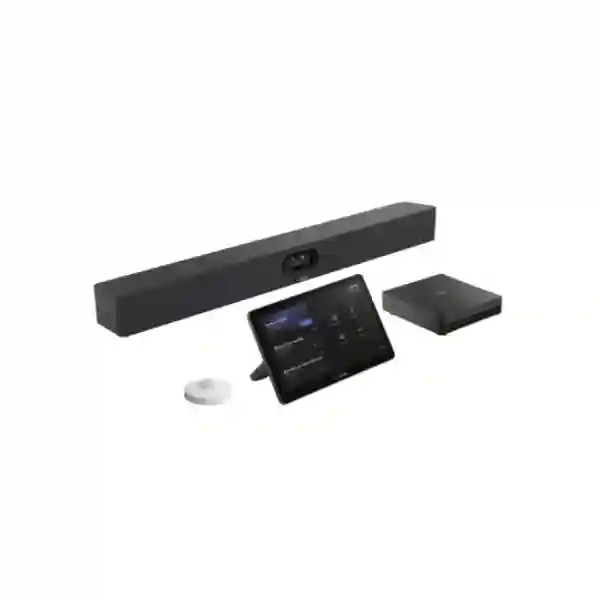
Yealink MVC S40 Teams Rooms System
The Yealink MVC S40 is a purpose-built Microsoft Teams Rooms system for organizations that want a consistent, dedicated meeting-room experience rather than relying on a user laptop for every call. The solution centers on Yealink SmartVision 40, a dual-camera all-in-one audio-video device with two 48MP cameras, a 120-degree diagonal field of view, an 8-MEMS microphone array, a rated 6-metre voice pickup range and integrated stereo speakers. Depending on the selected MVC S40 generation and bundle code, the room system is paired with Yealink room compute and a touch console. Current MVC S40-C5U configurations use MCore 4 and MTouch Plus, while earlier C4 bundles commonly use MCore Pro and MTouch E2. FourTeck Tanzania can help procurement teams confirm the exact bundle before quotation so the camera, compute, controller, mounting, display, cabling and Teams licensing requirements are aligned.
SmartVision 40 uses a dual-eye camera system designed to maintain a wide room view while supporting intelligent participant framing.
A wide diagonal field of view helps cover participants seated across compact and medium collaboration spaces without a manually operated PTZ camera.
An 8-MEMS microphone array, 6-metre pickup specification, full-duplex audio and stereo speakers simplify many standard meeting-room layouts.
Dedicated Windows-based Teams Rooms computing and touch control provide a room-first experience for scheduled and ad-hoc Microsoft Teams meetings.
What the Yealink MVC S40 solves
Meeting rooms often fail because users have to assemble the experience each time: connect a laptop, choose the right camera, select the correct microphone, find the display cable, launch the meeting application and troubleshoot audio before anyone can begin. A dedicated Microsoft Teams Room changes that operating model. The MVC S40 is intended to make the room itself the meeting endpoint. That matters for organizations with repeated executive meetings, project reviews, customer calls, training sessions, remote branch discussions and hybrid teamwork where the room must be ready for different employees throughout the day.
SmartVision 40 integrates camera, microphones and speakers in one front-of-room unit. Yealink lists IntelliFocus, Multi-stream IntelliFrame and Video Fence among the intelligent video capabilities associated with the platform, with feature availability depending on firmware, Teams support and configuration. Video Fence is particularly relevant where a meeting room sits near a corridor or open workspace because the feature is intended to help define the active meeting area. AI-enhanced noise cancellation and reverberation suppression are designed to make voice more usable in real business environments, though good room acoustics still matter.
For a procurement team, the main value is not a single camera specification. It is the combination of dedicated compute, touch control, room audio-video and Teams integration. Buyers should still verify the exact package. Yealink has released multiple MVC S40 bundle generations, so a quotation should identify the bundle code, included compute unit, touch panel, operating system generation, mounting hardware and any optional accessories rather than relying only on the MVC S40 family name.
Verified feature overview
| Area | Verified capability | Buyer implication |
|---|---|---|
| Camera | SmartVision 40, dual 48MP cameras, 120° DFOV | Suitable for wide coverage in many small-to-medium room layouts. |
| Audio | 8 MEMS microphones, 6 m pickup, stereo speakers, AI noise cancellation | Integrated audio can reduce peripheral count for standard layouts; unusual rooms should be assessed. |
| Privacy | Automatic/electric lens privacy cover | Provides a visible physical privacy behavior when the camera is not intended to be active. |
| Expansion | Support for up to two compatible expansion microphones | Longer tables or challenging pickup zones can be addressed after compatibility confirmation. |
| Current compute | MCore 4 with Intel Core Ultra 5, 16GB DDR5, 256GB SSD in current C5U package | Confirm C5U versus earlier C4 bundle at quotation stage. |
| Touch console | MTouch Plus in current C5U package; earlier bundles may use MTouch E2 | Controller type affects mounting, cabling and content-sharing workflow. |
Room planning and deployment guidance
A strong MVC S40 deployment begins with the room, not the product box. Measure the room dimensions, note the table length and seating count, identify where participants sit relative to the display wall, and decide whether one or two displays are required. The display is not supplied as part of the standard room bundle and should provide suitable HDMI connectivity and resolution. Camera height and viewing angle influence whether remote participants feel they are making eye contact with people in the room. Very high wall mounting can create an overhead perspective, while a camera mounted too low may be blocked by laptops or table objects.
The room network should be stable, wired where practical and prepared for Microsoft Teams traffic. Power protection, cable paths and network ports should be planned before installation. In current Yealink guidance, CAT5e or higher cabling is used for relevant Ethernet connections, and specific accessories can require PoE or PoE+. Organizations with VLAN separation, firewall policies or proxy controls should confirm how the room system reaches Microsoft cloud services. The goal is to avoid a situation where the equipment is mounted correctly but cannot sign in, update or maintain reliable meetings because of network policy.
Licensing is equally important. Microsoft Teams Rooms licensing is not automatically created by purchasing room hardware. The organization should confirm the appropriate Microsoft licensing and room resource account as part of deployment planning. If the business wants users to join meetings from platforms outside the primary Teams environment, cross-platform behavior and any Direct Guest Join requirements should be validated against the current Microsoft service capability. If frequent BYOD use is essential, specify the intended workflow and compatible Yealink accessories before purchase rather than assuming every package contains the same presentation hardware.
Related FourTeck Tanzania resources
A Teams Room depends on more than the camera. Review FourTeck Tanzania integrated IT solutions when the meeting room is part of a larger office project. The FourTeck Tanzania services page is relevant where installation, configuration or multi-system coordination is required. Buyers can also use the FourTeck Tanzania shop to review published product categories, while the FourTeck Tanzania company page provides broader business context. For a room-specific quotation, the verified FourTeck Tanzania contact page is the correct starting point.
Regional buyers can also review Yealink MVC S Series for Africa, FourTeck Uganda, FourTeck Kenya, FourTeck Ghana and FourTeck Nigeria for geographically relevant procurement discussions.
Yealink MVC S40 Teams Rooms System Tanzania
Organizations evaluating the Yealink MVC S40 Teams Rooms System in Tanzania are usually trying to standardize hybrid meetings without creating unnecessary room complexity. The first requirement is to establish the room profile: dimensions, seating count, display wall, table orientation, typical number of in-room participants, and whether most meetings are Microsoft Teams calls. The MVC S40 is designed for small-to-medium rooms, and Yealink positions the platform as an integrated Windows-based Teams Room rather than a generic USB camera. That difference is important for corporate offices, financial teams, professional-services firms, NGOs, universities, government departments and other organizations that schedule rooms centrally and expect employees to join meetings from a touch console.
For Tanzania procurement, request an exact bundle code. Earlier MVC S40 packages and the current C5U generation differ in compute and touch-controller components. A written quotation should therefore list the SmartVision 40, the room compute, touch console, mounting accessories, required cabling, any expansion microphones, optional wireless presentation accessories and whether displays are included. Microsoft Teams Rooms licensing should be treated separately from the physical hardware unless the quotation explicitly includes it. This prevents a common project problem where the room arrives but cannot be commissioned because the resource account, licensing or display requirements were not included in the procurement plan.
Tanzania deployments should also consider internet quality, power continuity and the physical room. The MVC S40 can deliver strong integrated audio, but glass-heavy rooms, hard floors and bare walls can create reverberation that no microphone algorithm can completely remove. A simple acoustic assessment, sensible speaker volume, adequate lighting and a stable wired network can improve the final experience more than selecting accessories without a room plan. For organizations with several offices, document a repeatable standard for display size, camera height, network VLAN, naming convention, Teams room account, support ownership and spare accessories. This makes expansion into additional meeting rooms easier and reduces support variation across sites.
Yealink MVC S40 Teams Rooms System Dar es Salaam
Dar es Salaam buyers often need meeting rooms that connect headquarters, branch locations, regional partners and international teams. For an MVC S40 project, the best starting point is not simply asking for a price; it is defining how the room will be used. A six-seat management room with one wall display has different needs from a twelve-seat training room with a long table and two displays. SmartVision 40 offers wide 120-degree coverage and integrated microphones, but table length, seating distance, room reflections and background activity determine whether the standard audio-video configuration is sufficient or whether compatible expansion audio should be considered.
Businesses in Dar es Salaam should include infrastructure items in the same scope. Confirm a wired network point at the room compute position, reliable internet service, suitable firewall access to Microsoft services, protected power for the compute and displays, and a practical cable path between the front-of-room equipment and touch console. Where the room is part of an office fit-out, coordinate mounting and data outlets before furniture is finalized. This reduces visible cabling and avoids drilling or surface trunking after the room is already furnished.
Procurement teams comparing quotations should check whether every seller is quoting the same MVC S40 generation. A cheaper quote may refer to an older bundle, omit the display, exclude mounting hardware, leave out presentation accessories, or assume that Microsoft Teams Rooms licensing already exists. Ask for the complete model or part code, included components and exclusions. For support planning, also define who will administer the Teams resource account, perform firmware updates, manage Windows/Teams settings, and handle first-line user support. The most successful conference-room projects combine the correct equipment with operational ownership so that the room stays usable after handover.
Yealink MVC S40 Teams Rooms System Mwanza
For Mwanza organizations, the MVC S40 can be a practical choice where management teams, project offices, education providers, healthcare administrators or regional businesses depend on frequent Microsoft Teams meetings. A dedicated room system reduces the need for every meeting organizer to bring a laptop and reconfigure room peripherals. Users can work from a consistent touch interface while the room remains connected to the organization’s Teams environment. This is particularly helpful where different departments share one meeting room and the business wants a predictable experience across scheduled calls.
Before purchase, evaluate whether the room is genuinely within the small-to-medium category. Count seats, measure the furthest participant from the SmartVision 40, and consider whether people regularly stand at a presentation wall. Yealink rates the built-in voice pickup at 6 metres, but real-world results are influenced by noise, air-conditioning, reflective surfaces and participant orientation. If the room is long or acoustically challenging, compatible expansion microphones may be more useful than trying to increase microphone gain. Likewise, lighting should be considered because backlighting from large windows can affect how participants appear to remote attendees.
A Mwanza quotation should separate mandatory and optional items. Mandatory elements include the MVC S40 bundle, suitable display connectivity, network access, the appropriate Microsoft Teams Rooms license and any required installation hardware. Optional items may include additional microphones, wireless presentation accessories, extra touch interfaces where supported, enhanced mounting or room-control integration. Ask the supplier to document the configuration so future support teams know which bundle generation, cables and firmware family are installed. For multi-site businesses, that documentation becomes a useful template for future rooms in Dar es Salaam, Arusha, Dodoma or other locations.
Yealink MVC S40 Teams Rooms System Arusha
Arusha organizations often combine local operations with national or international collaboration, making dependable meeting-room technology important for executive discussions, tourism and hospitality management, NGOs, professional services, education and project coordination. The MVC S40 is best considered when Microsoft Teams is already the organization’s primary meeting platform and the objective is to create a room that behaves as a managed Teams endpoint. This can simplify adoption because users see a familiar Teams interface rather than learning an independent conferencing platform.
Room design remains central. SmartVision 40 combines video and audio in one device, reducing the number of separate components at the front of the room. Its dual 48MP imaging system and wide field of view are intended to cover participants without constant camera operation, while IntelliFocus and related Teams intelligence can improve how speakers are presented remotely. However, furniture placement can make or break that advantage. If participants sit outside the camera’s practical view, or if the display wall forces an awkward side angle, the installation should be adjusted before final mounting.
For Arusha procurement, provide room dimensions, seating plan, preferred display count, existing network details and whether guests need to present from their own laptops. This enables a quote to distinguish between the base Teams Room and optional content-sharing or BYOD accessories. If the room is used for confidential meetings, confirm privacy expectations, administrative access and account governance as part of the project. SmartVision 40 includes a physical privacy shutter mechanism, but privacy also depends on Teams account permissions, room booking practices and organizational policy. A complete project should therefore address both hardware and operational controls.
Yealink MVC S40 Teams Rooms System Dodoma
Dodoma meeting-room projects can involve government administration, education, professional services, national associations and private enterprises that coordinate with teams across Tanzania. A dedicated Microsoft Teams Room can help reduce delays at the start of meetings because the room has its own compute, controller, camera and audio path. The Yealink MVC S40 is positioned for small-to-medium rooms and is therefore most appropriate when the seating layout and room depth align with SmartVision 40’s integrated coverage rather than requiring a large-room multi-camera architecture.
The procurement process should begin with the exact Microsoft collaboration requirement. If Teams is the standard platform, confirm the resource account and Teams Rooms license early. If the organization regularly receives invitations from other meeting platforms, define those scenarios and validate the supported guest-join process. If users need to connect a laptop for presentations, specify whether wired or wireless content sharing is preferred. These workflow questions are often more important to daily satisfaction than headline camera resolution because they affect every meeting.
Infrastructure planning in Dodoma should include stable internet, appropriate LAN access and power protection. Dedicated room systems should not depend on an unreliable desktop extension lead or an unplanned Wi-Fi connection when wired connectivity is available. Position the room compute and cabling where they remain serviceable after installation. Label cables and network ports, record the room account, and keep the product bundle details in the IT asset register. A professional handover should include a simple user guide for joining meetings, sharing content, adjusting basic audio and reporting faults, so the room is usable by nontechnical staff without repeated support calls.
Yealink MVC S40 Teams Rooms System UAE
UAE buyers evaluating the MVC S40 often compare a dedicated Windows-based Teams Room with Android video bars, modular AV systems and laptop-based BYOD rooms. The MVC S40 is strongest where the business has standardized on Microsoft Teams and wants a managed room experience with a dedicated Windows compute platform, touch controller and SmartVision 40 audio-video bar. Current C5U bundles use MCore 4 with Intel Core Ultra 5 processing, 16GB DDR5 memory and 256GB SSD storage, while older market inventory may still include C4 packages. The exact generation should always be stated in the quotation.
For offices in Dubai, Abu Dhabi and other emirates, room fit-out coordination is especially important in glass-partitioned spaces and premium boardroom environments. Hard finishes can create echo, while bright exterior windows can create backlighting. The system’s noise and reverberation processing helps, but acoustic treatment, suitable camera positioning and controlled lighting remain part of good AV design. In larger project rollouts, use standardized mounting heights, display specifications, VLANs, cable schedules and room-account naming. Standardization reduces deployment time and gives IT teams a repeatable support model.
Commercial buyers should compare total solution scope rather than a single AED figure. Check the MVC S40 package code, display inclusion, installation, mounting, wireless sharing, optional microphones, licensing and support terms. If equipment is intended for export to Africa, confirm region-appropriate power accessories, shipping documentation and final destination requirements in writing. FourTeck’s broader UAE presence at FourTeck UAE can support regionally coordinated enquiries, while Tanzania-specific projects should still be documented against the final Tanzanian site and room requirements.
Yealink MVC S40 Teams Rooms System Uganda
Uganda buyers can use the MVC S40 to standardize Microsoft Teams Rooms in corporate meeting spaces, branch offices, education environments and project organizations. The practical question is whether the room should operate independently of individual laptops. Where many employees share the room, dedicated Teams Rooms hardware can reduce variation because meetings are joined from the same controller and use the same audio-video chain each time. That makes training simpler and can improve supportability.
Before ordering, define the seating count and distance to the camera. SmartVision 40 has integrated microphones and speakers, with a published 6-metre voice pickup range and support for compatible microphone expansion. That provides flexibility, but a long boardroom table may still require different design choices from a compact meeting space. Measure first and use the dimensions to decide whether the S40 remains the right model. If a larger room needs distributed audio, multiple cameras or advanced AV routing, a higher MVC model or modular design may be more appropriate.
Uganda procurement teams should also confirm licensing, network and accessories. The display is a separate requirement in standard packages. Wired internet connectivity, suitable firewall policy and Teams account preparation should be completed before commissioning. If the room will frequently host external visitors, define the presentation and guest-meeting workflow. For regional purchasing or multi-country projects, FourTeck Uganda can be referenced alongside the Tanzania project requirements so model codes and room standards remain consistent across offices.
Yealink MVC S40 Teams Rooms System Kampala
Kampala businesses looking for a Yealink MVC S40 often need a reliable room for daily Microsoft Teams calls rather than an occasional portable conferencing setup. In that context, dedicated Teams Rooms hardware can improve operational consistency. Staff can enter a booked room, use the room console and rely on the installed SmartVision 40 instead of finding cables and changing laptop audio settings. This is valuable for management meetings, customer presentations, recruitment interviews, remote training and cross-border collaboration.
The room itself should be assessed before quotation. Identify seating positions, display size, wall type, cable routes and ambient noise. An integrated video bar simplifies the front wall, but it still needs a sensible mounting position. The camera should be near the visual line of the display so remote participants experience more natural eye contact. Audio pickup should be checked with people sitting at the furthest seats, especially if the room has loud air-conditioning or reflective surfaces. Compatible expansion microphones are an option when the standard pickup zone is not enough.
Kampala quotations should clearly separate included hardware from project services. Ask whether installation, configuration, Teams sign-in, testing, user orientation and documentation are part of the price. Verify the exact MVC S40 bundle generation because MCore and touch-controller specifications differ between revisions. If the organization has multiple Kampala offices or plans future rooms elsewhere in Uganda, create one room standard with approved display models, cable lengths, network settings and accessories. That approach is more scalable than designing each meeting room from zero.
Yealink MVC S40 Teams Rooms System Arua
Arua organizations may use Teams Rooms to connect regional operations with headquarters, partners, donors, customers or technical teams elsewhere. The MVC S40 can provide a standardized room endpoint when meetings are frequent enough that a shared laptop setup becomes inconvenient. Its integrated SmartVision 40 reduces peripheral complexity, while the dedicated room compute and touch controller keep the meeting workflow tied to the room account rather than to one employee’s device.
Connectivity resilience should be part of the design. Video collaboration depends on stable internet, so the procurement discussion should include the available connection, LAN design and any business continuity measures relevant to the site. This does not mean the Teams Room itself provides redundant internet; rather, the organization should plan the upstream network appropriately. If multiple business systems share the same connection, network administrators may also consider traffic management and monitoring so conferencing performance problems can be identified instead of being blamed on the camera or microphone.
For an Arua quote, provide the number of seats, room dimensions, display requirement, preferred content-sharing method and whether the room is new or an upgrade. In an upgrade, note existing screens, HDMI cabling, mounts and network outlets to determine what can be reused. Ask for a documented component list and identify exclusions such as Teams licensing or displays. This makes it easier to compare offers on a like-for-like basis and prevents a low initial hardware quote from becoming more expensive after missing items are discovered during installation.
Yealink MVC S40 Teams Rooms System Mbarara
For Mbarara businesses and institutions, a Microsoft Teams Room can be useful when remote collaboration is part of everyday operations. The MVC S40 combines the core elements needed for a room-based Teams experience: dedicated compute, touch control and the SmartVision 40 integrated camera and audio system. This reduces the number of separate devices users need to operate and creates a more predictable starting point for meetings.
A good Mbarara deployment should be sized by room geometry. Wide coverage does not automatically mean every large room is suitable. The 120-degree field of view helps with participants seated relatively close to the front of the room, while the 6-metre audio pickup specification gives a reference point for standard layouts. Long narrow rooms, high ceilings or noisy spaces may need additional audio planning. If the farthest seats fall outside the practical pickup area, consider compatible expansion microphones or a different room design rather than relying on software gain.
Operational planning matters after installation. Assign responsibility for the room resource account, Teams Rooms updates, device monitoring and user support. Keep installation documentation and bundle part numbers in the asset record. If staff frequently present local content, train them on the selected sharing method so meetings do not stall while users experiment with inputs. For businesses that expect to add more rooms, standardizing the same controller position, display setup and user instructions across sites can reduce training requirements and make support more consistent.
Yealink MVC S40 Teams Rooms System Gulu
Gulu buyers considering the MVC S40 should focus on business workflow as much as technical specification. If the room is booked through Microsoft 365 and most meetings use Teams, a native Teams Room can provide a cleaner experience than asking every presenter to connect a laptop. The installed system can remain signed into the room resource account, while users join scheduled meetings from the touch interface. That consistency can be valuable for executive rooms, project coordination spaces, classrooms and shared administrative meeting areas.
When planning the physical room, check camera line of sight and participant spacing. A wide-angle camera mounted at one end of a short table can capture everyone effectively, but poor mounting can still create blocked faces or excessive ceiling in the frame. The SmartVision 40’s intelligent framing capabilities are designed to improve participant presentation, but they work best when the physical camera position is sensible. Lighting should illuminate faces from the front or side rather than placing bright windows directly behind participants.
For Gulu procurement, ask for a pre-installation checklist. This should cover network, display, power, mounting surface, cable route, Microsoft licensing and the exact MVC S40 bundle. If the room will use optional expansion microphones or wireless content sharing, include those part numbers explicitly. During handover, test real meetings rather than only checking that devices power on. Verify far-end audio, microphone pickup from every seat, content sharing, camera framing and room-account scheduling. A simple acceptance test creates a clear baseline for future support.
Yealink MVC S40 Teams Rooms System Kenya
Kenya has an active market for Microsoft Teams Rooms, and buyers often compare Yealink MVC systems by room size. The MVC S40 is positioned below larger modular boardroom systems and is intended for small-to-medium spaces where a SmartVision 40 all-in-one front-of-room unit can cover video and audio without separate PTZ cameras and DSP systems. This can simplify deployment for offices that want a professional room but do not need a large-room AV architecture.
A Kenya quotation should identify whether the package is the current C5U generation or an earlier C4 bundle. Current C5U material lists MCore 4 and MTouch Plus, while older packages use different room compute and controller combinations. Procurement teams comparing online listings should therefore avoid assuming that every product titled “MVC S40” is technically identical. Request the exact part number, package contents, operating system, controller and accessories. Also confirm whether quoted pricing includes VAT, installation, mounting, delivery, displays or licensing where applicable.
For Nairobi and other Kenyan locations, room network quality and cable planning are essential. Put the room on a managed business network, provide stable internet and coordinate firewall access with Microsoft 365 requirements. If the organization operates in both Kenya and Tanzania, use a common room template so users encounter the same touch workflow and display arrangement. The FourTeck Kenya site can support Kenya-focused requirements while Tanzania projects remain anchored to the Tanzania configuration and contact process.
Yealink MVC S40 Teams Rooms System Kuwait
Kuwait organizations using Microsoft 365 can consider the MVC S40 when they need a dedicated small-to-medium Teams meeting room with consistent controls and integrated audio-video. The system’s value is strongest in shared rooms where many users need the same simple join process. Rather than relying on whichever laptop enters the room, the room has its own compute and Teams identity, which can make scheduling and daily operation more predictable.
Room fit-out quality matters in executive offices and formal boardrooms. SmartVision 40’s wide-angle camera can reduce the need for moving camera parts, but it should be mounted near the primary display at an appropriate height. Hard walls and large tables may create acoustic reflections; where necessary, consider room treatment or expansion audio after assessing the actual space. The built-in microphone array and stereo speakers can serve many normal layouts, but the correct design should be based on measured room dimensions rather than assuming one specification fits every room.
Kuwait procurement teams should ask for exact model generation, included accessories, warranty terms, lead-time status and project exclusions in writing rather than inferring them from a generic web page. Teams Rooms licensing should be confirmed with the organization’s Microsoft administrator. If the room is part of a regional standard covering Kuwait, UAE and African branches, document the common user workflow while allowing local differences in displays, electrical accessories and installation practices. Regional FourTeck information is available through FourTeck Kuwait for local procurement discussions.
Yealink MVC S40 Teams Rooms System Ghana
Ghanaian organizations can use the MVC S40 for dedicated Teams collaboration in management rooms, project offices, education spaces and professional meeting areas. The system is particularly relevant where Microsoft Teams is already part of daily work and the business wants users to enter a room and join without reconfiguring a laptop. SmartVision 40 provides the room’s integrated camera and audio endpoint, while dedicated compute and touch control support the native Teams Rooms workflow.
Accra and regional projects should be planned around real room geometry. Check seating count, table depth, camera-to-participant distance, ceiling height, ambient noise and window placement. The camera’s wide field of view can cover participants close to the display wall, but extremely long rooms may be better served by another model or a modular camera system. Similarly, the built-in audio specification is a useful baseline, not a substitute for acoustic assessment. Compatible microphone expansion is available when additional pickup is required.
For procurement, include a bill of materials in the request for quotation. Ask for the MVC S40 bundle code, included compute and controller, display requirements, mounting, network cabling, optional sharing accessories, licensing assumptions and installation scope. If several branches will be equipped, request consistent documentation and acceptance testing. This allows IT teams to compare room performance and manage future support more efficiently. Buyers in Ghana can also reference FourTeck Ghana for Ghana-focused coordination while maintaining the same technical standards across a wider regional deployment.
Yealink MVC S40 Teams Rooms System Nigeria
Nigeria buyers evaluating Microsoft Teams Rooms often need meeting technology that can be standardized across headquarters, branches and project offices. The MVC S40 can support that strategy for small-to-medium spaces because the room has a consistent Yealink audio-video endpoint, dedicated Windows-based Teams compute and touch control. The approach can reduce dependence on individual user devices and create a repeatable experience for executive meetings, client calls, training and hybrid collaboration.
For Lagos, Abuja and other business locations, network and power design should be considered part of the solution. Video meetings are sensitive to packet loss, congestion and unstable connectivity, so use managed networking and appropriate internet planning. Power protection for the room compute, display and network equipment can also help avoid abrupt interruption during short electrical events. Where a site has generator or UPS infrastructure, verify that the meeting-room circuit and network rack are covered rather than assuming they are.
Nigeria procurement teams should be precise when comparing offers. The MVC S40 family has different bundle generations, and online listings can mix older and newer configurations. Request an exact part number and component list. Also define whether the project includes displays, mounts, cabling, installation, room-account configuration and Microsoft licensing. If multiple rooms are being rolled out, conduct one pilot room first, document settings and user feedback, then repeat the approved design. Regional buyers can consult FourTeck Nigeria for Nigeria-focused enquiries and use the same documented specification across cross-border projects.
Yealink MVC S40 Teams Rooms System Seychelles
Seychelles organizations in hospitality, professional services, administration, education and regional business can use dedicated Teams Rooms to connect island operations with international teams and partners. The MVC S40 is appropriate where the meeting space is small to medium and Microsoft Teams is the preferred collaboration platform. Its integrated SmartVision 40 combines wide-angle video with room microphones and speakers, reducing the number of separate devices needed at the front of the room.
For island procurement, configuration accuracy can be especially important because missing accessories can delay deployment. The request for quotation should list the exact MVC S40 bundle generation, mounting hardware, display requirement, network cable, presentation method and any expansion microphones. Confirm what is supplied locally and what is being imported, and keep manufacturer part numbers on the purchase order. Microsoft Teams Rooms licensing and room-resource account preparation should be completed in parallel with hardware procurement so the system can be commissioned promptly after installation.
The physical environment should also be reviewed. Hospitality meeting rooms may have movable furniture, glass walls or flexible seating, so test the camera framing and microphone pickup with the actual room arrangement. If tables are frequently rearranged, establish a preferred meeting layout and mark cable or controller positions so staff can restore the room consistently. Where support is remote, clear documentation becomes even more important: keep network settings, device serials, room account ownership and installation diagrams available to the IT team. That documentation makes troubleshooting faster and helps the organization plan future rooms using the same standard.
Compatibility, licensing and accessory decisions
The MVC S40 is a Microsoft Teams Rooms on Windows system, so its primary design objective is native Teams collaboration. Buyers should not treat it as a generic conferencing bar where every platform behaves identically. If the organization is standardized on Zoom Rooms instead, request a Yealink solution specifically intended for Zoom. If Teams is the main platform but users occasionally receive invitations from other services, review Microsoft’s current guest-join capabilities and the organization’s security policy before promising cross-platform behavior to end users.
SmartVision 40 supports specific Yealink expansion options, but compatibility is model- and firmware-dependent. Yealink’s published compatibility information includes support for selected expansion microphones and accessories while other older audio devices are not compatible. For this reason, do not add legacy microphones from another Yealink room without checking the current support matrix. The same principle applies to wireless content sharing and BYOD accessories. Specify the workflow first, then select the supported accessory rather than buying accessories based only on connector type.
Licensing should be budgeted separately unless the seller clearly states otherwise. The room needs a Microsoft Teams Rooms resource account and an appropriate Teams Rooms license. Organizations should involve their Microsoft 365 administrator early so room naming, calendar booking, security policies and license assignment are ready before installation. If enterprise conditional-access policies are strict, validate the Teams Rooms sign-in requirements with the Microsoft administrator before the installation date.
Quotation checklist for Yealink MVC S40
Provide room length and width, seating capacity, table shape, display wall, typical meeting size, existing screen count and any floor plan or room photo that helps explain the layout.
Ask for the full MVC S40 part number, SmartVision 40, compute generation, touch controller, mounts, cables and optional accessories. Confirm whether displays are excluded or included.
State that Microsoft Teams Rooms is required, identify who manages Microsoft 365, and confirm whether the room license and resource account already exist.
Describe whether users need wired presentation, wireless sharing, frequent BYOD use or guest meetings from other platforms so the correct accessories can be selected.
Confirm wired network availability, internet stability, firewall ownership, power outlets, UPS requirements, cable routes and mounting surface before installation.
Clarify installation, configuration, testing, user orientation, documentation, firmware responsibility and post-installation support instead of treating them as implied.
Frequently asked questions
Is the Yealink MVC S40 designed for Microsoft Teams Rooms?
Yes. The MVC S40 is a Microsoft Teams Rooms on Windows solution. It is designed around dedicated room compute, a Yealink touch controller and SmartVision 40 audio-video hardware. The exact compute and controller differ by bundle generation.
What room size is the MVC S40 for?
Yealink positions the MVC S40 for small-to-medium meeting rooms. Final suitability should be checked against room dimensions, seating layout, camera distance, acoustic conditions and required microphone coverage.
What camera is included?
The MVC S40 uses Yealink SmartVision 40, an all-in-one audio-video device with two 48MP cameras and a 120-degree diagonal field of view. It supports intelligent Teams-oriented framing features including IntelliFocus and Video Fence.
How far can the built-in microphones pick up voices?
Yealink specifies a 6-metre voice pickup range for SmartVision 40. Actual room performance depends on participant position, background noise, reverberation and room furnishings, so larger or difficult spaces should be assessed rather than sized from one number alone.
Can I add microphones?
SmartVision 40 supports selected compatible Yealink expansion microphones, with support for up to two in documented configurations. Confirm the exact microphone model and firmware compatibility before ordering.
Does the MVC S40 include the room display?
The standard Yealink room bundle does not assume a business display is included. The final quotation should state clearly whether one or more displays, wall mounts and HDMI cables are part of the supplied project.
Does the hardware purchase include Microsoft Teams Rooms licensing?
Do not assume so. Microsoft Teams Rooms licensing is normally a separate Microsoft 365 requirement unless a quotation explicitly says it is included. The organization should prepare the room resource account and license before commissioning.
What is the difference between MVC S40 C4 and C5U bundles?
They represent different hardware generations. Current C5U material lists MCore 4 and MTouch Plus, while earlier C4 bundles commonly use MCore Pro and MTouch E2. Always use the exact part number when comparing quotations.
Can the MVC S40 be used for BYOD meetings?
Yealink offers accessory workflows that can extend room use, but BYOD behavior depends on the exact package and accessories. If BYOD is essential, state that requirement in the quotation and have the supplier specify the supported accessory and connection method.
What should I send FourTeck Tanzania for a quote?
Send the product name, room dimensions, seat count, number of displays, preferred presentation method, quantity of rooms, site location, Microsoft Teams licensing status, existing network information and any installation or support requirements.
Decision recap
Choose the Yealink MVC S40 when the organization wants a dedicated Microsoft Teams Rooms on Windows experience for a small-to-medium meeting room, prefers an integrated front-of-room camera and audio device, and values a standardized touch-controlled workflow. Its SmartVision 40 platform combines dual 48MP cameras, wide 120-degree coverage, integrated microphone and speaker hardware, intelligent framing functions and a physical privacy mechanism. The current generation adds newer MCore 4 compute and MTouch Plus control, but older MVC S40 bundles remain visible in the market, so exact part-number verification is essential.
Do not choose solely from the product name. Validate room dimensions, acoustics, display needs, network, Microsoft licensing, content-sharing workflow and support model. If the room is substantially larger, unusually shaped or requires distributed AV, a higher-capacity MVC model or modular design may be more appropriate. A well-planned room is one where the hardware, Microsoft account, network and user workflow all agree.
Plan your MVC S40 room with FourTeck Tanzania
For a useful quotation, share the room dimensions, number of seats, quantity of rooms, Microsoft Teams requirement, display count, preferred sharing method, installation location and any existing conferencing equipment. FourTeck can use that information to confirm whether the MVC S40 fits the room, identify the correct bundle generation and prepare a clearer bill of materials without assuming stock, price, licensing or accessories that have not been verified.




Reviews
There are no reviews yet.