
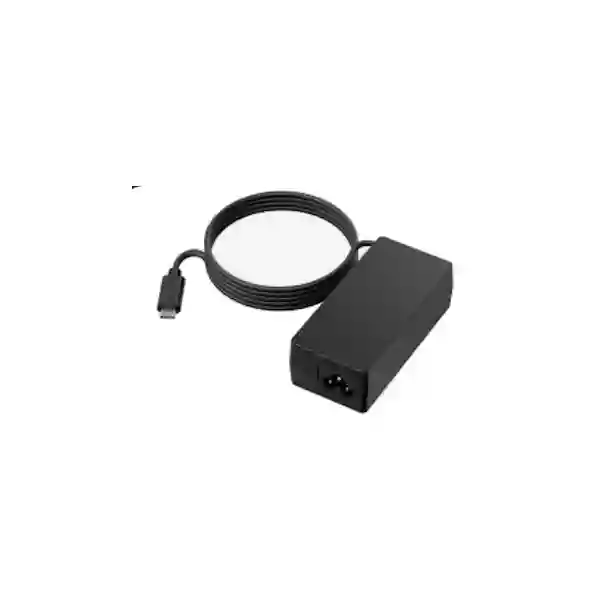
Yealink PSU-PD65W-USBC Adapter Tanzania
The Yealink PSU-PD65W-USBC Adapter is a purpose-built 65W Power Delivery accessory for supported Yealink collaboration environments. Yealink identifies the current accessory as PSU-PD65W-USBC/USBC(1.5M), supplied with a 1.5 metre USB-C cable and intended for MTouch Plus and BYOD-BOX use. For Tanzanian organisations deploying or maintaining meeting-room technology, the value of the accessory is straightforward: it provides the specified power path for supported equipment without introducing an unverified third-party power supply into a room system that depends on stable USB-C power.
Verified power class
Yealink lists this accessory as a 65W PD adapter. Use that verified rating when checking a replacement, spare, or meeting-room bill of materials.
Included cable
The official description includes a 1.5 m USB-C cable, helping installers maintain the specified connection arrangement around a room controller or BYOD interface.
Supported ecosystem
Yealink specifically associates the adapter with MTouch Plus and BYOD-BOX scenarios, making compatibility checking an important part of procurement.
Current accessory reference
Yealink’s current eligible-accessory list identifies PSU-PD65W-USBC/USBC(1.5M) under part number 330000033001.
What the Yealink PSU-PD65W-USBC Adapter solves
Power accessories can look interchangeable, but meeting-room systems are assembled from devices with defined power, cabling and interface expectations. In a professional Yealink room, a replacement adapter should not be selected only because the connector appears to fit. The relevant questions are whether the power class is correct, whether USB-C Power Delivery is required, whether the cable length supports the physical layout, and whether the accessory is intended for the device in the room. The PSU-PD65W-USBC accessory addresses those questions for the supported Yealink equipment identified by the manufacturer.
For project teams, this makes the adapter useful in several procurement situations: completing a new room kit, replacing a missing power accessory, holding a controlled spare for a standardised meeting-room fleet, or restoring a room after equipment has been moved between sites. It also helps procurement teams describe the requirement precisely. Rather than requesting a generic USB-C charger, the buyer can specify the Yealink model family, 65W PD requirement, 1.5 m USB-C cable and intended supported equipment. That level of detail reduces the chance of receiving an unsuitable substitute.
Verified product details
| Official accessory name | PSU-PD65W-USBC/USBC(1.5M) |
| Accessory type | USB-C Power Delivery power adapter |
| Power | 65W PD |
| Cable | 1.5 m USB-C cable |
| Named Yealink use | MTouch Plus and BYOD-BOX |
| Yealink part number | 330000033001 |
The details above are intentionally limited to information verified from Yealink’s current public product and accessory references. They do not imply compatibility with every USB-C device, every Yealink product, or every meeting-room configuration. Buyers should confirm the exact endpoint and room design before purchasing a replacement power supply.
Compatibility first: avoid selecting by connector shape alone
USB-C describes a connector family, not a guarantee that any adapter can safely or correctly replace another. A project buyer should confirm the target Yealink device, the required PD profile, cable requirements and the installation arrangement. If the room includes MTouch Plus or BYOD-BOX, provide those exact model names in the quotation request. If the adapter is intended for a different Yealink endpoint, confirm that use before ordering rather than assuming that a 65W label is enough. This is especially important where a meeting room is business-critical and downtime creates a visible operational problem.
Why organisations keep a dedicated Yealink room-system power accessory
Predictable room recovery
Meeting-room failures attract immediate attention because they affect scheduled calls, customer meetings and executive sessions. Keeping the correct accessory reference in asset records makes it faster to identify what must be replaced if a power supply is lost or damaged.
Cleaner standardisation
When several rooms use a common Yealink architecture, procurement can standardise spare accessories alongside controllers, cables and mounting hardware. This is easier to support than maintaining an undocumented collection of generic chargers.
Better installation records
Listing the exact adapter in the room bill of materials helps installers, support teams and future auditors understand how the room was designed. It also helps distinguish the meeting-room PSU from unrelated USB-C laptop adapters kept nearby.
Related FourTeck Tanzania solutions
The PSU is only one part of a collaboration environment. FourTeck Tanzania’s business technology overview explains how conferencing, networks, displays, voice and supporting infrastructure fit together. For room projects, the technology services page provides context for integrated planning, while the Tanzania technology shop is relevant when sourcing additional business equipment. Organisations planning a larger requirement can use the About FourTeck Tanzania page to understand the broader solution approach and the contact and quotation page to submit the exact model, quantity and destination.
For regional requirements, buyers can also review the wider FourTeck network through FourTeck global solutions, FourTeck UAE, FourTeck Kenya, FourTeck Uganda and FourTeck Africa. These links are useful for organisations coordinating similar collaboration accessories across more than one market.
Yealink PSU-PD65W-USBC Adapter Tanzania
In Tanzania, the Yealink PSU-PD65W-USBC Adapter is best approached as a defined collaboration accessory rather than a generic charger purchase. Businesses that operate Microsoft Teams or other video collaboration rooms often standardise complete room configurations so that support teams can troubleshoot quickly and replace components without changing the intended design. When MTouch Plus or BYOD-BOX is part of the room architecture, the official 65W PD adapter reference provides a clear procurement target. A buyer can specify the Yealink accessory name, 1.5 m USB-C cable and destination site, then ask for a quotation that preserves the original room configuration.
Tanzanian deployments can range from a single executive meeting room to larger fleets across offices, educational campuses, hotels, public-sector facilities and multi-site businesses. In each case, power accessories are easy to overlook during project handover. A practical asset register should therefore record the adapter model beside the room controller or BYOD device it supports. If the organisation is building several similar rooms, it may also be useful to identify a small controlled spare pool so that a missing or damaged PSU does not require an emergency search for an equivalent.
For quotation preparation, include the quantity, target Yealink device, whether the adapter is for a new deployment or replacement, and the city where it will be used. If the requirement is part of a complete room refresh, also mention displays, cameras, microphones, touch controllers, room PCs, cabling and mounting needs. That broader information helps avoid buying a correct power accessory for a room whose other components still require planning.
Yealink PSU-PD65W-USBC Adapter Dar es Salaam
Dar es Salaam organisations frequently operate meeting spaces that support sales teams, head offices, professional services, logistics operations, hospitality, finance and regional management. In these environments, a room controller that cannot power correctly can disrupt meetings out of proportion to the cost or size of the missing accessory. The Yealink PSU-PD65W-USBC Adapter gives procurement teams a precise replacement reference where supported MTouch Plus or BYOD-BOX equipment is already in use.
For an existing room, start by documenting what is currently installed. Confirm the Yealink controller or BYOD component, inspect the cable path and note whether the original adapter has been lost, physically damaged or moved. Do not substitute a random laptop charger simply because USB-C fits. The safest procurement workflow is to identify the room equipment, match the official accessory reference and preserve the installation arrangement. In centrally managed offices, label both the PSU and cable with the room name so that they are less likely to migrate between desks and meeting spaces.
A Dar es Salaam quotation request should state the exact accessory, quantity and supported Yealink device. If the request is urgent because a production meeting room is offline, explain the operational impact and whether a temporary room is available. For new projects, include room count and standardisation plans so that the power accessory is included in the room bill of materials from the beginning rather than treated as an afterthought.
Yealink PSU-PD65W-USBC Adapter Mwanza
For organisations in Mwanza, the Yealink PSU-PD65W-USBC Adapter can support a structured approach to meeting-room maintenance where MTouch Plus or BYOD-BOX is deployed. Businesses operating across Lake Zone sites may rely on conferencing to reduce travel between branches, warehouses, project locations and management offices. In that context, keeping the room hardware aligned with the manufacturer’s intended accessory set helps the collaboration environment remain supportable.
When replacing a power adapter at a Mwanza site, the remote support team should capture the device model and room layout before procurement. A simple photo of the installed controller, cable route and adapter label can help technical staff confirm the requirement. The official reference—65W PD with a 1.5 m USB-C cable—should then be included in purchasing documentation. Where several branches use the same design, record which rooms have the same controller and maintain a common spare strategy rather than buying unrelated USB-C power supplies locally whenever a fault occurs.
If the Mwanza requirement is part of a larger video meeting project, include network quality, display size, preferred meeting platform, camera requirements and audio expectations in the enquiry. The adapter itself does not solve network congestion, acoustic problems or room-control design issues, but including it within the complete scope ensures the final room has every required accessory and avoids delays at commissioning.
Yealink PSU-PD65W-USBC Adapter Arusha
Arusha has a diverse mix of hospitality, tourism, professional services, education, NGOs and regional offices that may use video conferencing for international coordination. In a room used for scheduled guest, partner or executive calls, small accessory failures can become highly visible. The Yealink PSU-PD65W-USBC Adapter provides a defined 65W PD option for supported Yealink MTouch Plus and BYOD-BOX environments, helping organisations replace the correct part rather than improvise with unverified power hardware.
Meeting-room teams in Arusha should treat the PSU as part of the installed system inventory. Record the adapter reference during handover, label the cable, and store any spare in an IT-controlled location instead of a general stationery or charger cabinet. This reduces accidental reassignment of the adapter to laptops or other USB-C devices. If a room is moved or refurbished, verify that the power supply and 1.5 m USB-C cable move with the supported equipment and are not left behind in furniture or floor boxes.
For a quotation, specify whether the accessory is required for one room or a standardised set of rooms. If there are multiple Yealink devices, list their exact models rather than assuming one adapter will serve every endpoint. FourTeck can then discuss the accessory in the context of the room’s displays, conferencing platform, cabling and related collaboration hardware.
Yealink PSU-PD65W-USBC Adapter Dodoma
In Dodoma, government offices, professional organisations, education providers and commercial teams may use conferencing rooms to coordinate across Tanzania and with international stakeholders. A stable room depends not only on cameras and displays but also on less visible components such as power adapters and cables. Where a Yealink MTouch Plus or BYOD-BOX deployment calls for this accessory, the PSU-PD65W-USBC reference helps buyers identify the intended 65W PD power solution.
Procurement documentation should be specific enough that a buyer, installer and support engineer all understand the same requirement. Include the Yealink accessory name, 65W PD description, 1.5 m USB-C cable and the equipment it will support. If the adapter is replacing a failed unit, provide the room name and device model. If it is for a new project, include it in the bill of materials and handover checklist so that the room is commissioned with every necessary component.
For multi-room facilities in Dodoma, standardisation can reduce support effort. A common room design makes it easier to train users, keep spares and troubleshoot. The PSU is one small piece of that approach. When combined with documented controllers, room PCs, cameras, microphones, displays and network settings, it contributes to a meeting environment that can be supported methodically rather than through ad-hoc replacements.
Yealink PSU-PD65W-USBC Adapter UAE
Organisations operating between Tanzania and the UAE often try to standardise collaboration rooms across regional offices. The Yealink PSU-PD65W-USBC Adapter can be included in that standard where MTouch Plus or BYOD-BOX is part of the approved room design. Using one documented accessory reference across sites simplifies procurement conversations, asset records and spare planning. The verified product description identifies a 65W PD adapter with a 1.5 m USB-C cable.
Regional standardisation should still respect the exact equipment installed at each site. A room in Dubai, Abu Dhabi or another UAE location may use a different generation of controller from a Tanzanian room, so compatibility should be checked against the actual model rather than assumed from the brand alone. Keep the accessory reference in the room bill of materials and confirm whether a replacement is needed because of loss, damage, relocation or a planned expansion.
For cross-border procurement, provide the destination, quantity and project context. If the same organisation needs accessories in Tanzania and the UAE, separate quantities by country and list the target devices for each location. That makes it easier to maintain a consistent standard without creating ambiguity about which room equipment the adapters are intended to support.
Yealink PSU-PD65W-USBC Adapter Uganda
For Ugandan organisations maintaining Yealink meeting rooms, the PSU-PD65W-USBC Adapter is relevant when the installed design includes supported MTouch Plus or BYOD-BOX equipment. The adapter’s verified 65W PD specification and 1.5 m USB-C cable make it a clear item to include in replacement requests, project bills of materials and controlled spare inventories.
A regional IT team supporting both Uganda and Tanzania can benefit from consistent records. Document the controller model, room name, adapter reference and cable length at commissioning. If a fault occurs later, the support desk can identify the required accessory without relying on memory or asking a branch team to buy any charger that appears similar. This is particularly useful for organisations with several offices and limited on-site technical staff.
When requesting a Uganda quotation, include the target Yealink product, quantity and whether the accessories are for replacement stock or new rooms. If the requirement forms part of a complete conferencing deployment, add room size, participant count, display needs, preferred platform and network context. The power adapter should be treated as one component of a complete, documented collaboration solution.
Yealink PSU-PD65W-USBC Adapter Kampala
Kampala-based headquarters, financial institutions, professional firms, NGOs and regional businesses may operate multiple meeting spaces with high daily utilisation. In these environments, room downtime is costly because users quickly lose confidence in technology that fails at the start of a call. Keeping the exact Yealink PSU-PD65W-USBC accessory reference in the support inventory helps teams replace the correct 65W PD adapter for supported MTouch Plus and BYOD-BOX installations.
A disciplined support process starts with identification. Before ordering, verify the room controller and note whether the original USB-C cable is still present. Where the cable has also been lost or damaged, the official accessory description’s 1.5 m USB-C cable is relevant to the replacement scope. Avoid combining unverified adapters and cables simply because they connect physically; the objective is to restore the intended room configuration.
For larger Kampala offices, consider storing one or more correctly identified spares depending on room count and operational importance. Keep them labelled and separated from general laptop charging equipment. When standardising rooms across branches, include accessory references in handover documents so that support teams in different cities follow the same replacement procedure.
Yealink PSU-PD65W-USBC Adapter Arua
In Arua, organisations using video collaboration to connect with national headquarters, partners or regional operations can reduce avoidable downtime by documenting small but essential accessories. The Yealink PSU-PD65W-USBC Adapter is a 65W PD accessory with a 1.5 m USB-C cable for supported Yealink room equipment, including MTouch Plus and BYOD-BOX scenarios identified by the manufacturer.
For sites with limited technical staff, precise purchasing information matters. A request that says only “USB-C charger” can lead to unsuitable substitutions and additional troubleshooting. A better request lists the exact Yealink accessory, target device, quantity and room or site name. If the branch is supported remotely, include a photo of the existing controller and adapter label where practical so that the central IT team can confirm the requirement before procurement.
Arua buyers planning a complete room should also consider the network, display, camera, microphone and user-control requirements. The adapter is necessary only within the correct system context. Including all components in one room bill of materials helps installers commission the space without discovering at the final stage that a power accessory, cable or mount is missing.
Yealink PSU-PD65W-USBC Adapter Mbarara
Mbarara businesses, healthcare organisations, education providers and regional offices may depend on conferencing for coordination with Kampala and international teams. If supported Yealink MTouch Plus or BYOD-BOX equipment is already part of the room, the PSU-PD65W-USBC Adapter gives procurement a clearly defined 65W PD replacement or spare option.
The most useful preparation is to create a simple room asset sheet. Record the controller, camera, audio device, display, room PC, mounts, key cables and the power adapter reference. When a room is upgraded or moved, check every item against the sheet. This prevents power supplies from being left behind, mixed with laptop chargers or moved to another department. The 1.5 m USB-C cable included in the accessory reference should also be tracked as part of the room configuration.
When requesting supply for Mbarara, state whether the need is an immediate replacement, a planned spare or a component for a new deployment. For replacement orders, identify the supported Yealink device. For new deployments, provide broader room details so the adapter is quoted as part of a complete solution rather than in isolation.
Yealink PSU-PD65W-USBC Adapter Gulu
For Gulu offices and institutions, dependable video collaboration can support remote management, training, partner engagement and access to specialists without requiring frequent travel. Small accessories matter in that workflow. The Yealink PSU-PD65W-USBC Adapter is intended as a 65W Power Delivery accessory with a 1.5 m USB-C cable for supported room-system equipment such as MTouch Plus and BYOD-BOX.
A branch support process should avoid improvised replacements. If a room stops working because the PSU is missing or damaged, first verify the controller model and inspect the existing cable. Use the exact accessory reference in the purchase request, and keep any replacement labelled with the room name once installed. This creates a repeatable maintenance process and prevents future confusion between meeting-room and personal-device chargers.
For projects covering Gulu plus other Ugandan branches, consider standardising room designs and spare policies. Central procurement can then hold a known list of compatible accessories and distribute them when needed. This approach improves support consistency and makes future refresh projects easier to scope because the existing environment is already documented.
Yealink PSU-PD65W-USBC Adapter Kenya
Kenyan organisations with offices in Nairobi, Mombasa or other locations may use Yealink collaboration systems as part of regional meeting standards. Where MTouch Plus or BYOD-BOX is deployed, the PSU-PD65W-USBC Adapter gives buyers a defined accessory reference for 65W PD power and a 1.5 m USB-C cable. This is particularly useful for companies coordinating room designs across Kenya, Tanzania and Uganda.
Cross-country IT teams should keep model-level records because similar-looking Yealink room systems can use different accessories. Do not assume that a power supply from one room generation should be moved to another. Confirm the target device, preserve the original cable arrangement and list the exact accessory in purchasing documentation. If the PSU is being ordered as a spare, label it for the supported equipment rather than storing it in a general pool of USB-C chargers.
For a Kenya quotation, include quantities by site and identify whether the requirement is tied to new room deployment, replacement or spare strategy. If several regions use the same collaboration standard, a consolidated bill of materials can help the organisation manage accessories, cables and room hardware consistently while still validating compatibility at each location.
Yealink PSU-PD65W-USBC Adapter Kuwait
For organisations in Kuwait using Yealink meeting-room technology, the PSU-PD65W-USBC Adapter may be required where supported MTouch Plus or BYOD-BOX equipment forms part of the room design. Its verified 65W PD rating and included 1.5 m USB-C cable make it a specific accessory to reference in procurement and support records.
Regional companies with sites in Kuwait and East Africa often want similar room experiences across offices. Standardisation can improve user familiarity and support, but it should be based on exact model compatibility. Document each room’s controller and accessory set, then confirm whether the same PSU reference applies before consolidating purchasing. This prevents an apparently convenient regional bulk order from creating mismatched stock.
If the adapter is being sourced for a Kuwait deployment, provide the exact target device and quantity. If it is one line item in a complete collaboration project, include displays, cameras, room compute, audio, mounting and cabling needs so that the accessory is evaluated within the complete solution. The objective is a commissioned room with the correct power path, not simply an isolated PSU purchase.
Yealink PSU-PD65W-USBC Adapter Ghana
Ghanaian businesses and institutions using supported Yealink meeting-room systems can use the PSU-PD65W-USBC accessory reference to make replacement purchasing more precise. Yealink describes the unit as a 65W PD adapter with a 1.5 m USB-C cable for MTouch Plus and BYOD-BOX scenarios. That manufacturer-level identification is more useful than requesting a generic USB-C charger.
In multi-site environments, room-system accessories should be part of the asset inventory. Record the PSU alongside the controller, cable kit and other room components, and label spares with the supported device family. When support is coordinated from another country, exact naming reduces communication delays because the local team and central procurement team are referring to the same accessory.
For Ghana procurement, specify whether the unit is for a new deployment, replacement or spare. Include the exact Yealink endpoint to be powered, and avoid assuming universal USB-C compatibility. If the project includes several meeting rooms, provide room quantities and standardisation goals so that accessories can be planned together with the rest of the conferencing solution.
Yealink PSU-PD65W-USBC Adapter Nigeria
In Nigeria, large enterprises, financial services, technology firms, professional organisations and distributed branch networks can have substantial reliance on video collaboration. For rooms using supported Yealink MTouch Plus or BYOD-BOX equipment, the PSU-PD65W-USBC Adapter gives the support team a defined 65W PD accessory with a 1.5 m USB-C cable to reference when planning replacements or spares.
Where room fleets are large, accessory governance matters. Power supplies often disappear during office moves, room refurbishments or troubleshooting because they are mistaken for general-purpose chargers. Labelling the adapter with the room or device family, recording the part in the asset database and maintaining controlled spare stock can reduce that problem. When a fault is reported, first determine whether the issue is actually power-related before replacing multiple room components unnecessarily.
For Nigerian sites, especially organisations operating across Lagos, Abuja and other cities, central procurement should request the exact Yealink accessory and list quantities by destination. If the same company runs rooms in Tanzania or other African markets, compatibility can be checked against each room model before consolidating orders. The result is a more disciplined regional support strategy and less reliance on ad-hoc substitutes.
Yealink PSU-PD65W-USBC Adapter Seychelles
For organisations in Seychelles, reliable video collaboration can be important for connecting island operations with partners, headquarters, suppliers and remote specialists. If a meeting room uses supported Yealink MTouch Plus or BYOD-BOX equipment, the PSU-PD65W-USBC Adapter offers a clearly identified 65W PD accessory with a 1.5 m USB-C cable.
Because replacement logistics can be more involved for island locations, maintaining accurate accessory records is particularly valuable. During commissioning, document the PSU model and keep any spare with the IT team rather than in a general charging cabinet. If a replacement is required, provide the exact Yealink device model and accessory reference in the request so that compatibility can be checked before shipment or procurement decisions are made.
For new Seychelles room projects, include the PSU within the full bill of materials alongside controllers, cameras, microphones, displays, mounts, room compute and network requirements. A complete parts list reduces the risk that a small missing accessory delays the handover of an otherwise finished meeting space. It also makes future support easier because the intended configuration is documented from day one.
Buying and quotation checklist
Frequently asked questions
What is the Yealink PSU-PD65W-USBC Adapter?
It is a Yealink 65W Power Delivery adapter accessory. Yealink’s current product listing names PSU-PD65W-USBC/USBC(1.5M) and describes it as a 65W PD adapter with a 1.5 m USB-C cable for MTouch Plus and BYOD-BOX.
Does it include a USB-C cable?
Yes. The official Yealink accessory description specifies a 1.5 m USB-C cable. Confirm the package contents on the final quotation if your procurement process requires an itemised confirmation.
Can I use it with any USB-C device?
Do not assume universal compatibility. USB-C connector shape alone is not enough to confirm that an adapter is appropriate. Use the accessory with supported Yealink equipment and verify the target device before ordering.
Which Yealink products are specifically named for this adapter?
Yealink’s public accessory listing specifically mentions MTouch Plus and BYOD-BOX. If your target device is different, request compatibility confirmation for that exact model.
What part number does Yealink list?
Yealink’s current eligible-SKU reference lists PSU-PD65W-USBC/USBC(1.5M) with part number 330000033001.
What information should I send for a quotation?
Send the exact accessory name, quantity, destination, target Yealink device and whether the requirement is for a new room, replacement or spare. For broader projects, add room count, meeting platform, display, camera, audio, mounting and network requirements.
Decision recap
Choose the Yealink PSU-PD65W-USBC Adapter when your supported Yealink deployment calls for this specific 65W PD accessory and 1.5 m USB-C cable. The clearest fit is the MTouch Plus and BYOD-BOX context explicitly identified by Yealink. For replacement purchases, verify the installed device before ordering. For new room projects, include the adapter in the bill of materials and handover record so the complete system remains documented.
The important purchasing principle is precision: exact model, exact target device, exact quantity and exact destination. This prevents a common meeting-room support problem in which a generic power accessory is assumed to be equivalent because the connector looks the same.
Consult FourTeck Tanzania
If you need the Yealink PSU-PD65W-USBC Adapter for a room controller, BYOD setup, spare inventory or larger conferencing rollout, share the exact target device, room count, quantity and destination with FourTeck Tanzania. For a complete meeting-room requirement, include cameras, displays, microphones, room control, cabling and network context so the accessory can be considered as part of the whole deployment rather than as an isolated line item.




Reviews
There are no reviews yet.