
YEALINK • ZOOM ROOMS • DIGITAL SIGNAGE • WIRELESS PRESENTATION
Yealink RoomCast for Zoom Rooms
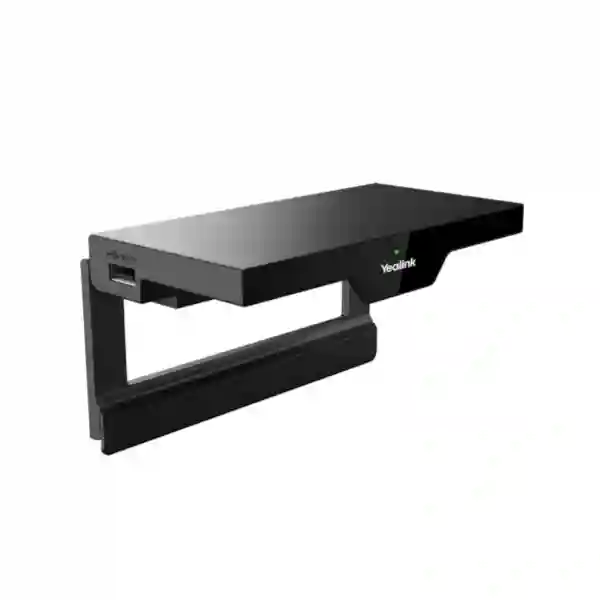
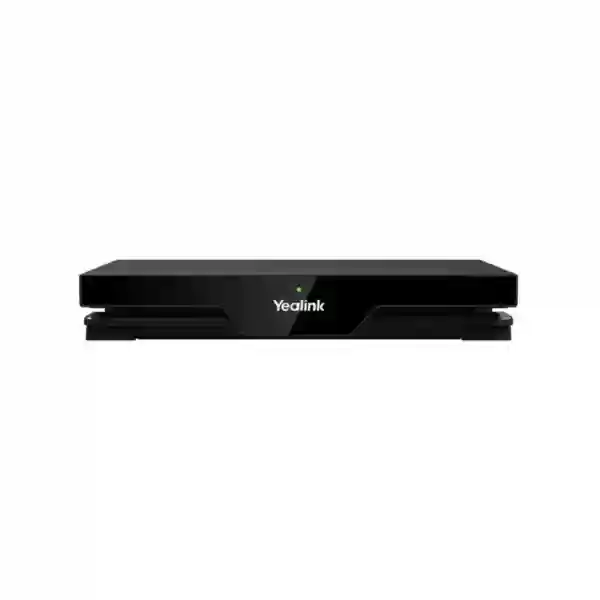
Yealink RoomCast for Zoom Rooms is a compact collaboration appliance for organisations that want Zoom Digital Signage and straightforward wireless content sharing on a room display without turning every presentation into a cable-search exercise. Yealink positions the device as a Digital Signage and Wireless Presentation System, with support for 4K/60FPS video output, AirPlay, Zoom Direct Sharing, Zoom Sharing Key, Yealink Wireless Presentation Pod workflows, four-source casting, Power over Ethernet and remote device management.
For Tanzania deployments, the main buying question is not simply whether RoomCast can display content. Procurement teams should also check the target display, HDMI path, Ethernet and PoE availability, Wi-Fi design, Zoom Rooms licensing or account requirements, user sharing methods, security policy and how administrators intend to manage the device after rollout. FourTeck can help translate those room-level requirements into a clearer quotation and deployment plan.
4K Zoom Digital Signage
Use a connected display for Zoom-managed digital signage content, including images, video and web content, when the room is not being used for a meeting or when a signage-only deployment is required.
Wireless Sharing
Support user-friendly presentation methods including AirPlay, Zoom Direct Sharing, Zoom Sharing Key and Yealink presentation accessories, reducing dependence on a dedicated table cable for every presenter.
PoE Deployment
A Gigabit Ethernet interface with PoE support can simplify placement near a display when the network switch and cabling are prepared for the power requirement.
What Yealink RoomCast for Zoom Rooms is designed to solve
Meeting-room technology often becomes harder to use when the room contains too many unrelated components. A laptop may need one adapter for HDMI, another for USB, a special cable for an unusual connector and manual switching on the display. RoomCast addresses a narrower but important part of that experience: getting content onto the room screen and using the display as a managed Zoom signage endpoint. That makes it relevant to collaboration rooms, reception displays, training areas, internal communications screens and shared spaces where users need a predictable way to present.
Yealink states that RoomCast for Zoom Rooms supports 4K/60FPS resolution and built-in 802.11ac 2×2 MIMO Wi-Fi with STA, AP and P2P modes. Its compact form factor is intended for placement on or near a TV or desktop, while PoE can combine network connectivity and power over a compatible Ethernet link. The platform can also be managed through Yealink device-management tools and Zoom Device Management, which is particularly useful when a business has more than one room and wants a consistent administration model.
Security should be reviewed as part of deployment rather than treated as a checkbox. Yealink documentation identifies LAN-contained casting, WPA2-PSK protection and AES-based protection for content, while Zoom-related signalling and media use the security mechanisms of the Zoom platform. The practical configuration still depends on the customer network: VLAN design, administrator access, firmware policy, Wi-Fi settings, physical security and the way guest presenters are allowed to share should be documented before rollout.
Verified Yealink RoomCast for Zoom Rooms specifications
| Product type | Digital Signage & Wireless Presentation System for Zoom Rooms |
| Maximum video resolution | Up to 4K/60FPS |
| Wireless | 802.11ac 2×2 MIMO Wi-Fi; STA/AP/P2P modes referenced by Yealink |
| Sharing methods | Yealink Wireless Presentation Pod, AirPlay, Zoom Direct Sharing and Zoom Sharing Key |
| Simultaneous sources | Up to four sources on screen |
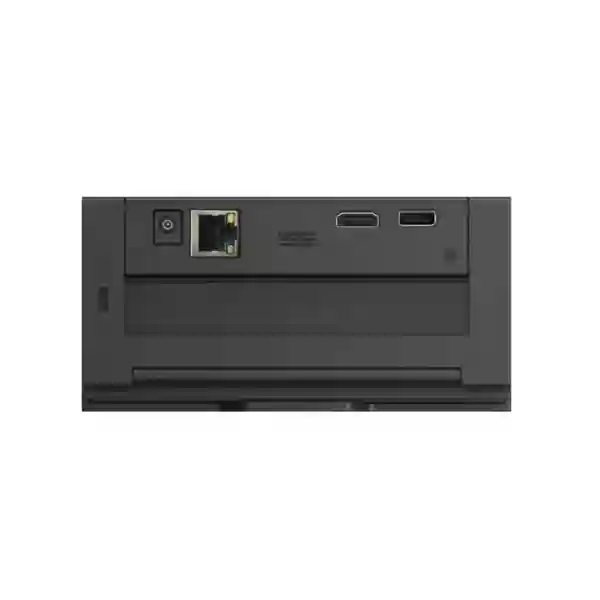
| Network interface | Gigabit Ethernet with PoE support |
| Display connection | 1 × HDMI-out |
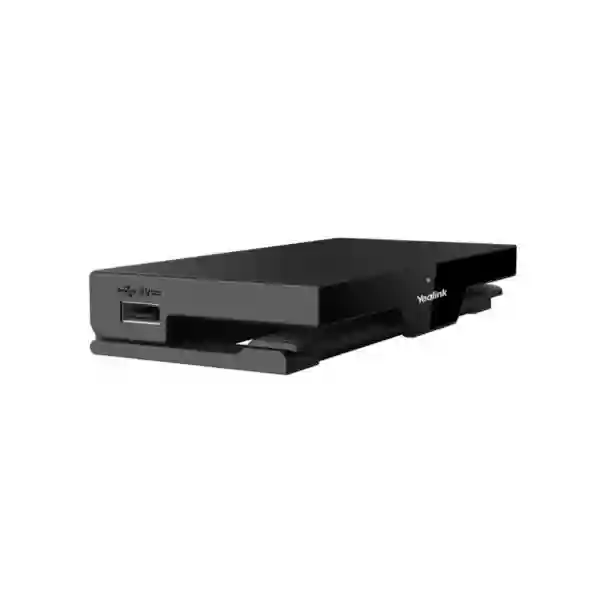
| USB | 2 × USB Type-A |
| Power | IEEE 802.3af PoE or 12V power adapter |
| Management | Yealink management platforms and Zoom Device Management |
| Physical security | Kensington Security Slot |
Specifications should be reconfirmed against the current Yealink documentation and the exact supplied package before ordering, especially for accessories, power components, firmware-dependent functions and regional package contents.
Deployment and buying guidance
The cleanest RoomCast deployment starts with the display and network rather than the appliance itself. Confirm the screen has the required HDMI input and that the cable route is short, protected and serviceable. If PoE is preferred, confirm that the selected Ethernet switch port provides the required standard and that the cable path is tested. If the room uses Wi-Fi sharing heavily, review radio coverage and congestion around meeting spaces; presentation traffic should not be expected to compensate for a poorly designed wireless environment.
Administrators should also decide which presentation methods are approved. A corporate Mac user may prefer AirPlay, while managed Zoom users may use Zoom Direct Sharing or a Sharing Key. A Yealink Wireless Presentation Pod can give users a more appliance-like workflow where supported. The best approach is often to standardise one primary method and document alternatives, reducing confusion for staff and visitors.
For a broader room design, review FourTeck Tanzania’s integrated business technology overview, business technology shop guidance and technology services catalogue. These pages help place RoomCast within the wider requirements for displays, switching, Wi-Fi, conferencing and lifecycle support instead of treating it as an isolated purchase.
Yealink RoomCast for Zoom Rooms Tanzania
For organisations in Tanzania, Yealink RoomCast for Zoom Rooms is relevant when the objective is to modernise content sharing and digital signage without building a complex AV control environment. Corporate offices can use it in small and medium meeting rooms where staff regularly move between laptops and need a repeatable way to put content on a shared display. Training rooms can benefit from quick presenter switching, while reception areas, internal communications points and staff spaces can use Zoom Digital Signage to display approved visual content when the screen is not occupied by a meeting.
A Tanzania quotation should begin with the number of rooms or displays, the display size and input availability, whether Ethernet exists behind each screen, the PoE capability of the switch, the preferred Zoom account structure and the way staff will share content. Where buildings have mixed network infrastructure, one room may be ready for a one-cable PoE deployment while another requires power and data work. Recording these differences before purchasing reduces surprise installation costs and makes the eventual rollout easier to support.
RoomCast is not a substitute for the camera, microphones and speakers required for a complete video-conferencing room. Its strength is the signage and presentation layer. Businesses planning a complete Zoom Room should therefore decide whether they need only a signage/presentation endpoint or a full room system with video and audio. Display position, camera eye line, microphone coverage, acoustic conditions and internet performance remain separate design considerations.
For multi-site Tanzanian organisations, remote administration can be especially valuable. Standardising naming, firmware policy, network segmentation and room ownership can reduce support variation between branches. Procurement teams should request a clear bill of materials that separates the RoomCast unit from any required PoE injector or switch capacity, HDMI cabling, mounts, display hardware, presentation accessories and Zoom-related subscriptions. That creates a more useful comparison than looking at the appliance price alone.
Yealink RoomCast for Zoom Rooms Dar es Salaam
Dar es Salaam businesses frequently operate mixed meeting environments: executive rooms, sales meeting spaces, customer presentation areas, project rooms and reception displays. RoomCast can fit this pattern where a screen needs to serve two purposes—presentation during collaboration sessions and managed digital signage outside those sessions. The value is strongest when IT wants one defined sharing workflow instead of multiple adapters and unmanaged streaming devices connected to each display.
For offices with several floors or departments, the network design should be reviewed before deployment. A PoE-capable switch can simplify cabling, but the port standard, available power budget, VLAN policy and uplink design still matter. If users will rely on wireless sharing, meeting-room Wi-Fi should be checked during busy periods rather than only when the room is empty. Dense office environments can expose interference or roaming behaviour that is not obvious in a basic signal-strength test.
Procurement teams in Dar es Salaam should define whether visitors are expected to present. Guest presentation requirements affect instructions, network access policy and the preferred sharing method. A controlled workflow might emphasise Zoom Sharing Key or a dedicated Yealink presentation accessory, while organisations with many Apple devices may value AirPlay. The aim is not to enable every possible method indiscriminately but to choose a small number that support the organisation’s security and support model.
When requesting a quotation, include room count, display model or at least display input details, switch model, available PoE, Zoom environment, main presenter device types and whether installation is required. This information allows the proposal to distinguish a simple appliance purchase from a room-readiness project that may also need structured cabling, switching, display mounting or Wi-Fi improvements. FourTeck’s contact process can then focus on compatibility and the complete deployment scope.
Yealink RoomCast for Zoom Rooms Mwanza
In Mwanza, RoomCast can be considered by offices, education providers, hospitality operations, healthcare administration, project teams and regional branches that need a practical shared-screen experience. The combination of Zoom Digital Signage and wireless presentation is useful when a display must communicate information outside meetings but quickly switch into a collaboration role when staff need to present. This avoids dedicating separate screens to signage and presentations where the usage pattern allows one display to perform both jobs.
Branch deployments should pay attention to supportability. A technically successful installation in one room is less valuable if every branch ends up with different cables, network settings and user instructions. A standard RoomCast template can define device naming, Ethernet and VLAN policy, preferred content-sharing method, administrator ownership, firmware handling and escalation steps. Remote management through the supported Yealink or Zoom tools can then complement, rather than replace, this standardisation.
Power and network resilience may also influence design decisions. PoE can reduce the number of local power adapters behind a display, but it shifts dependence to the access switch and its power source. Organisations using UPS-backed network equipment may find this beneficial because the presentation endpoint can remain powered with the switch during short interruptions, subject to the rest of the room equipment. Where PoE is unavailable, the 12V power option identified by Yealink can be evaluated.
Buyers should avoid assuming that RoomCast by itself creates a full Zoom video room. If the requirement includes remote participant video and audio, specify the intended camera, microphones, speakers or separate Zoom Rooms system. If the requirement is only signage and wireless presentation, state that clearly. A focused scope helps prevent overbuying and makes it easier to confirm whether the room’s display, network and account configuration are already suitable.
Yealink RoomCast for Zoom Rooms Arusha
Arusha organisations may use collaboration spaces for internal meetings, international calls, tourism and hospitality management, training, project coordination and customer presentations. In these situations, RoomCast is most useful when presenters change frequently and the room display should not be locked to one laptop or a permanent cable. Wireless sharing can shorten setup time, while Zoom Digital Signage gives the same screen a useful role between meetings.
The room layout should guide installation. Mounting the appliance close to the display can keep HDMI runs short and reduce visible cabling. If Ethernet reaches the display location and the switch supports compatible PoE, network and power can be simplified. Where wall construction or renovation limits new cable routes, planners should assess the available pathways before confirming a mounting method. Good installation is as much about access for future maintenance as it is about hiding equipment on day one.
Organisations that host external guests should prepare a simple presentation guide. Staff should know how to start AirPlay or Zoom-based sharing, when a PIN or room code is used, and what to do if a visitor cannot join the expected workflow. This is especially important in hospitality and customer-facing environments where delays are visible. A laminated room instruction or centrally maintained quick-start guide can be more valuable than enabling additional features that users do not understand.
For an Arusha quote, include whether the room already has a commercial display or TV, whether the screen is wall mounted, the Ethernet availability, the network switch details, any existing Zoom Room account, the number of regular presenters and whether the room also needs video conferencing audio and camera equipment. These inputs help establish whether RoomCast is the main requirement or one component within a broader collaboration-room upgrade.
Yealink RoomCast for Zoom Rooms Dodoma
For Dodoma offices, institutions and project environments, RoomCast can support meeting rooms where the priority is controlled digital signage and flexible content sharing. Teams that regularly present reports, dashboards, training materials or project updates can benefit from a shared-screen workflow that does not require every user to connect the same physical cable. At the same time, administrators can use the Zoom signage capability to keep the display useful when no presentation is active.
Government-facing, institutional and regulated environments may place particular emphasis on network policy. In those cases, the device should be introduced through the normal change-control process: identify the Ethernet segment, review wireless settings, assign administration responsibility, document the HDMI destination and confirm the allowed sharing methods. The fact that Yealink describes local-area-network handling and encryption features does not remove the need for organisation-specific access controls and secure configuration.
Standardisation is important when an organisation expects future expansion. A pilot room can be used to validate display compatibility, user instructions, Zoom administration, firmware management and network behaviour before purchasing for multiple rooms. Feedback from real users can reveal simple issues such as unclear room naming or confusion between sharing methods. Correcting these details during the pilot can make the broader rollout smoother than deploying every room at once.
A procurement request should specify quantity, required deployment date, room types, existing displays, network readiness and whether installation or configuration support is expected. Avoid requesting only “RoomCast price” if the actual project includes switches, cabling, display mounts or full Zoom Rooms equipment. A complete requirement gives the supplier enough information to prepare a quotation that procurement can evaluate on scope as well as unit cost.
Yealink RoomCast for Zoom Rooms UAE
UAE organisations often have dense office networks, multiple meeting rooms and users who expect collaboration spaces to operate with minimal setup. RoomCast can serve as a focused signage and wireless-presentation appliance in this environment, especially where Zoom is already a standard collaboration platform. Multi-room deployments can use consistent naming, management and user instructions while allowing each display to show centrally controlled signage content outside active presentation use.
The UAE buying process may involve AV consultants, IT teams, facilities staff and procurement, so responsibilities should be defined early. IT can validate the network and security design, AV teams can confirm HDMI routing and display mounting, facilities can check power and physical access, while procurement ensures the quoted package includes required accessories. When these roles are coordinated, the appliance becomes easier to deploy at scale because dependencies are identified before installation crews arrive onsite.
For wider regional requirements, the FourTeck UAE technology portal can provide a regional point of reference for related IT, collaboration and infrastructure discussions. Customers comparing UAE and Tanzania deployments should still confirm country-specific supply, licensing, power accessories and installation scope rather than assuming one bill of materials applies unchanged to every location.
The most useful quotation request includes number of sites, number of screens, desired sharing methods, Zoom administration model, PoE availability, display information and any requirement for on-site installation. For offices with many rooms, ask how device naming, firmware, monitoring and spare units will be handled over the lifecycle. This turns RoomCast from a one-time hardware purchase into a manageable collaboration endpoint strategy.
Yealink RoomCast for Zoom Rooms Uganda
Uganda businesses considering RoomCast are typically looking for a cleaner presentation workflow, a Zoom-managed signage endpoint or both. The device is suitable for rooms where people need to share laptop or mobile content to a large screen without making the room dependent on a single presenter cable. It can also support signage use cases in offices, training facilities and shared operational areas where the screen should display approved content between meetings.
The network should be treated as part of the room system. A Gigabit Ethernet link and PoE can make installation neat, but only if the switching environment is ready. Where the device sits on a separate collaboration VLAN, administrators should validate required cloud communication and management access. Where Wi-Fi sharing is enabled, coverage, client compatibility and security settings should be checked with the actual presenter devices used by the organisation.
Customers coordinating projects across East Africa can also review FourTeck Uganda for regional technology context. A cross-border project benefits from a common room standard but should still allow for different local networks, displays and site conditions. The objective is consistency in user experience and administration, not blindly identical installation details.
When requesting an Uganda quotation, state whether RoomCast will be used mainly for Zoom Digital Signage, mainly for presentation or in a mixed role. Include expected room count, display details, switch and PoE readiness, Zoom account information and preferred sharing methods. If the project also needs camera and audio hardware, describe the room size and seating arrangement so the broader conferencing design can be scoped separately.
Yealink RoomCast for Zoom Rooms Kampala
Kampala offices frequently combine headquarters functions, customer meetings, training and regional coordination, creating demand for meeting rooms that are easy for different teams to use. RoomCast can reduce dependence on desk-side adapters by providing supported wireless-sharing methods while the connected display can be used for Zoom-managed signage. This dual role can be attractive where screen real estate is valuable and the business wants a consistent experience across several rooms.
For headquarters deployments, plan management before hardware arrives. Decide who owns the Zoom configuration, who administers Yealink devices, how firmware is approved, how rooms are named and what the support desk should check first when a user reports a sharing problem. Many meeting-room support calls are caused by uncertainty rather than hardware failure. Clear ownership and standard room instructions can therefore deliver as much operational value as the appliance itself.
Network teams should confirm that the display location has suitable Ethernet and power arrangements. If PoE is used, the switch port should have enough budget and remain available in the selected VLAN. If the room has separate corporate and guest wireless networks, test how approved sharing workflows behave for both employee and visitor scenarios. A guest should not need unnecessary access to the internal network simply to present, so the chosen workflow should align with the security design.
A Kampala purchase request is stronger when it includes room-by-room readiness details rather than only a quantity. Note which rooms already have displays, which have PoE, which need new cabling and which also require cameras or microphones. This lets procurement separate the RoomCast hardware cost from enabling infrastructure and gives project managers a clearer implementation schedule.
Yealink RoomCast for Zoom Rooms Arua
In Arua, RoomCast can be useful for branch offices, education environments, NGOs, project teams and organisations that need a reliable way to share content on a meeting-room display while also making use of digital signage. The compact appliance approach is particularly attractive where local teams want a simple user experience but central IT still needs visibility into how collaboration endpoints are configured and maintained.
Branch sites should evaluate connectivity realistically. RoomCast’s local presentation functions and the Zoom cloud environment have different dependencies, so the site should be assessed for Ethernet quality, PoE, Wi-Fi coverage and internet stability. If signage content is centrally managed, administrators should also consider what happens during internet interruptions and ensure expectations are clear. Good branch design avoids assuming that a device specification alone guarantees the same user experience at every location.
A smaller site may not have dedicated AV support, making documentation important. Installers should record the device location, switch port, display input, power method, administrator ownership and basic troubleshooting steps. Users should have a concise guide for the approved sharing method. This approach reduces dependence on tribal knowledge and makes remote support more effective when a local employee reports an issue.
For quotation planning, provide the expected room use, number of presenters, current display, network switch information and whether the organisation already uses Zoom Rooms. If the branch is part of a larger multi-site programme, also state the standard used at other locations. This helps determine whether the Arua room should copy an established template or whether infrastructure differences require an adapted deployment.
Yealink RoomCast for Zoom Rooms Mbarara
Mbarara organisations can use RoomCast in meeting rooms, training spaces and shared information areas where presentations and digital signage overlap. A single display may show internal notices or scheduled content through Zoom Digital Signage, then become a collaboration screen when a staff member needs to present. This can reduce the number of dedicated signage players and presentation adapters required, provided the Zoom workflow matches the organisation’s requirements.
The installation should be planned around maintainability. Hiding the appliance behind a wall-mounted display may create a clean appearance, but service access should remain possible. HDMI cables, Ethernet connectors and power arrangements should not be placed under excessive strain. If a security slot is used, it should be positioned so technicians can still remove the unit when maintenance is needed. Small physical details can determine whether future support takes minutes or requires dismantling the display installation.
Users also need clarity on what RoomCast does not provide. It is not itself a complete camera-and-audio conferencing system. If the room needs remote meetings, the quotation may require separate Zoom Rooms hardware, camera, microphone and speaker components. If the requirement is presentation and signage only, keeping the scope focused can avoid unnecessary cost. Defining the room’s primary workflow is the quickest way to decide which components belong in the project.
For Mbarara procurement, describe the current room technology and the intended final experience. Note whether users bring Windows laptops, Macs or mobile devices, whether visitors regularly present and whether a wired fallback is required. These details allow the sharing method and user instructions to be chosen deliberately instead of relying on trial and error after installation.
Yealink RoomCast for Zoom Rooms Gulu
For Gulu deployments, RoomCast is best evaluated as a controlled collaboration endpoint rather than a generic wireless dongle. It combines a Zoom-specific digital-signage role with presentation capabilities that can support multiple user device types. This makes it appropriate for organisations that want a standard room experience and central management rather than a collection of consumer casting devices purchased independently for each display.
A site survey does not need to be complicated, but it should confirm the essentials: display inputs, mounting, HDMI distance, Ethernet availability, switch PoE capability, Wi-Fi signal, internet connectivity and access to the Zoom administration environment. If one of these dependencies is missing, it is better to identify it before purchasing. For example, PoE is convenient only where the network switch and cable path can support it; otherwise the alternative power method should be included in the design.
Operational continuity improves when a branch has documented spares and escalation procedures. Organisations with several RoomCast units can decide whether to keep a spare appliance, cable or power accessory at a regional hub. Device configurations should be recorded so replacement does not require reconstructing the setup from memory. Remote management can help diagnose endpoints, but basic physical troubleshooting—display input, Ethernet link, HDMI connection and power—should still be included in the support procedure.
A Gulu quotation should therefore separate hardware, room-readiness work and optional support. Procurement can then compare offers more accurately. Ask suppliers to identify included accessories, installation scope, configuration assumptions and any subscriptions required for the intended Zoom functionality. Clear scope protects both the buyer and installer from disputes caused by an incomplete unit-only price.
Yealink RoomCast for Zoom Rooms Kenya
Kenya businesses with Zoom-centric collaboration strategies can use RoomCast as a standard presentation and digital-signage endpoint across meeting rooms and shared displays. Nairobi headquarters, branch offices, training centres and customer-facing facilities may all have different room sizes, but the content-sharing layer can still be standardised. The device’s compact design, 4K/60FPS support, PoE and remote management make it suitable for repeatable deployments where administrators value consistency.
Cross-site projects should distinguish between a standard design and a standard outcome. The desired outcome might be identical—easy sharing, managed signage and remote administration—but some sites may use PoE while others use the supplied power method, some displays may be wall-mounted while others sit on furniture, and some networks may require different VLAN configurations. Treating these differences explicitly is more reliable than forcing every site into the same physical bill of materials.
For Kenyan customers, FourTeck Kenya can provide regional context for related technology projects. Organisations coordinating Kenya and Tanzania rooms can use one requirements template covering room dimensions, screen type, network port, PoE, Zoom account, sharing methods and support ownership. This makes quotations easier to compare and highlights where site-specific work is necessary.
Before purchase, confirm whether RoomCast is being used as a signage-only endpoint, a presentation system or part of a larger Zoom Room. That classification determines what else belongs in the quote. Full video collaboration may require camera, microphones, speakers and room control components, while signage/presentation projects may need only the display, network path and suitable mounting. Scope clarity is the fastest route to an accurate Kenya quotation.
Yealink RoomCast for Zoom Rooms Kuwait
Kuwait organisations evaluating RoomCast often need a professional alternative to ad-hoc screen mirroring in boardrooms, management offices, training areas and shared workplace displays. The appliance provides a defined Zoom-oriented platform that can combine digital signage with supported wireless presentation methods. In a corporate environment, that consistency can reduce the number of unmanaged adapters and consumer casting products attached to meeting-room displays.
High-quality deployments start with physical planning. Large commercial displays may have recessed connection panels or limited clearance behind wall mounts, so the RoomCast position, HDMI connector and Ethernet cable should be considered before installation. PoE can simplify the power arrangement, but the switch configuration and cabling route must be confirmed. Where meeting rooms are professionally fitted, coordination with the AV contractor avoids clashes with mounts, cable trays and control equipment.
Network security teams should decide how the appliance is segmented and how administrators access management platforms. Visitor presentation is another policy question: the business should choose an approved guest-sharing method and ensure instructions are easy to follow. A secure design is one where the allowed workflow is also convenient enough that users do not bypass it with personal adapters or unapproved devices.
For Kuwait quotations, include the target screen size and model, the number of rooms, network and PoE information, expected presenter devices, Zoom account status and whether installation must integrate with an existing AV system. For multi-room projects, request a consistent labelling and management plan. This helps lifecycle support teams identify each RoomCast endpoint and reduces confusion when rooms are renamed or moved.
Yealink RoomCast for Zoom Rooms Ghana
Ghana organisations can consider RoomCast when they need professional wireless presentation plus centrally controlled Zoom Digital Signage. Corporate offices, education providers, project teams, financial services environments and shared workspaces may all benefit from a screen that can switch between information display and active presentation. The appliance is especially useful where IT wants to standardise the room experience across multiple departments or branches.
The business case should include support effort, not just the hardware price. A consistent endpoint can reduce time spent finding adapters, changing display inputs and troubleshooting incompatible personal casting devices. However, that benefit depends on configuration discipline. Administrators should define the default display input, room name, sharing methods, network settings and support contact. Users should receive short instructions that match the approved workflow.
Network readiness remains essential. Where PoE is used, check switch power budgets and UPS design. Where Wi-Fi is important to the sharing experience, assess meeting-room coverage and client density. Digital signage also depends on the broader Zoom environment, so account and content-management responsibilities should be defined. A marketing team may create signage content while IT owns the endpoint and network; agreeing on these roles prevents operational gaps.
When requesting a Ghana quote, specify whether you need supply only, remote configuration guidance or complete installation. Include room count, display status, cabling readiness and the type of users who will present. If the project covers several cities or branches, identify the rollout sequence and whether a pilot is preferred. A pilot can validate the user experience and configuration template before wider procurement.
Yealink RoomCast for Zoom Rooms Nigeria
Nigeria enterprises often operate across multiple offices and need meeting-room technology that can be deployed consistently without becoming difficult to administer. RoomCast can fit into this strategy as a Zoom-focused signage and presentation endpoint. It can help standardise how staff send content to a room display while providing IT with supported management options instead of relying on individually purchased consumer casting devices.
For large organisations, the first step should be a room inventory. Record display model, mounting position, available HDMI ports, Ethernet, PoE switch capability, Wi-Fi coverage and current collaboration platform. This simple inventory reveals which rooms are immediately ready and which require enabling work. It also prevents procurement from buying the same accessory set for every location when the infrastructure differs.
Power resilience can be considered as part of the site design. A PoE-powered endpoint may benefit from central UPS protection on the network switch, but the display itself still needs its own power strategy. Therefore, a resilient RoomCast design should look at the whole room rather than only the appliance. Cable quality, surge protection, network availability and display power can all affect the user experience.
Nigeria buyers should request clear quotation boundaries: appliance quantity, accessories, configuration, installation, cabling, mounts, switching changes and Zoom licensing responsibilities. If a complete conferencing solution is required, add room size, seating count and preferred camera/audio experience. This allows the supplier to design the broader room correctly rather than assuming RoomCast includes video capture or microphone functions that belong to other components.
Yealink RoomCast for Zoom Rooms Seychelles
Seychelles businesses in hospitality, professional services, government, education and distributed operations may use RoomCast where a polished presentation experience is important but meeting spaces should remain simple. A screen in a boardroom or training room can provide Zoom Digital Signage between sessions and then become a wireless presentation target when the meeting begins. This is useful when spaces serve multiple functions throughout the day.
Remote administration can reduce the need for routine on-site intervention, but the room should still be installed for local serviceability. Keep the appliance accessible, label the Ethernet and HDMI connections and document the display input. Where equipment must be concealed for aesthetic reasons, choose a mounting method that can be opened without damaging the wall finish or disturbing the display. Hospitality and executive spaces often benefit from this balance between clean appearance and practical maintenance.
For island or distributed-site operations, spare strategy matters. A standard RoomCast configuration, spare cable set and documented setup procedure can shorten recovery if a unit needs replacement. Remote device management can support diagnosis and configuration control, while local staff can perform basic checks. The result is a support model that does not depend on specialised AV knowledge at every site.
A Seychelles quotation should include the number of screens, shipping destination, existing display and network details, installation expectations and any broader conferencing requirement. Buyers should confirm what is included in the package and avoid assuming accessories or local services that are not explicitly quoted. Where rooms also need cameras and microphones, a separate room design should be prepared so display, audio, video and content sharing work as one coordinated system.
Compatibility and integration checklist
Display
Confirm an available HDMI input, supported resolution, mounting access, input-control method and a practical cable route between RoomCast and the screen.
Network & PoE
Confirm Gigabit Ethernet availability, IEEE 802.3af PoE capability if used, VLAN policy, internet reachability and remote-management requirements.
Zoom environment
Confirm the required Zoom account, room or signage configuration, administrator access and any subscription responsibilities before rollout.
Presenter devices
Identify Windows, macOS, iOS or other presenter-device needs and standardise the preferred RoomCast sharing workflow for employees and visitors.
How to decide whether RoomCast is the right product
Choose RoomCast for Zoom Rooms when the main requirement is a Zoom-oriented digital-signage appliance with enterprise wireless presentation on a connected display. It is particularly suitable when the business already uses Zoom, wants remote management and needs a cleaner way to share content than loose adapters. It also makes sense when a screen should provide useful signage outside presentation sessions.
Consider a different or broader solution when the requirement is primarily video capture, microphone pickup, loudspeaker coverage or full room control. Those functions belong to a complete conferencing system. Likewise, if the organisation does not use Zoom and mainly needs platform-neutral casting, compare RoomCast for Zoom Rooms with alternative Yealink presentation products and other wireless presentation platforms based on the required protocols, management features and security model.
The decision should therefore be based on workflow: who presents, from which devices, to which screens, under which security policy, and what should the display do when nobody is presenting? When these questions are answered, product selection becomes much easier than comparing feature lists in isolation.
Frequently asked questions
Does Yealink RoomCast for Zoom Rooms support 4K?
Yes. Yealink specifies support for up to 4K/60FPS video resolution. Actual display output also depends on the connected display, HDMI path, content source and system configuration.
Can RoomCast use Power over Ethernet?
Yes. Yealink lists a Gigabit Ethernet port with IEEE 802.3af PoE support. Confirm that your switch port and cabling meet the required standard before relying on PoE for installation.
How many screens can be shared at the same time?
Yealink documentation identifies support for four-screen casting, allowing up to four content sources to be shown simultaneously on the connected display.
Which wireless sharing methods are supported?
For the Zoom Rooms edition, Yealink lists Yealink Wireless Presentation Pod, AirPlay, Zoom Direct Sharing and Zoom Sharing Key. Feature behaviour may depend on firmware and the Zoom environment, so confirm current compatibility before deployment.
Is RoomCast a complete Zoom video-conferencing system?
No. RoomCast for Zoom Rooms is positioned as a digital-signage and wireless-presentation system. A complete video room may also require cameras, microphones, speakers and additional Zoom Rooms components depending on the room design.
Can IT manage RoomCast remotely?
Yes. Yealink identifies remote management through its device-management platforms and Zoom Device Management. The exact administration workflow should be tested against the organisation’s current platform and firmware.
What information should I provide for a quotation?
Provide quantity, location, room type, display model, Ethernet and PoE availability, Zoom account status, preferred sharing methods, presenter device types and whether you need supply only or installation and configuration.
Quotation checklist
For a useful Yealink RoomCast for Zoom Rooms quotation, prepare the following information:
- Number of RoomCast units and deployment locations.
- Display brand/model, HDMI availability and mounting arrangement.
- Ethernet availability and PoE switch model or PoE requirement.
- Zoom account and digital-signage requirements.
- Preferred sharing methods and typical presenter devices.
- Whether visitors need to present without joining the internal corporate network.
- Whether the project also requires cameras, microphones, speakers or a full Zoom Room.
- Installation, configuration, documentation and support expectations.
Decision recap
Yealink RoomCast for Zoom Rooms is a strong fit for organisations that want to combine Zoom Digital Signage with enterprise wireless presentation on a 4K-capable room display. Its value comes from the complete workflow: supported sharing methods, PoE deployment, remote device management and the ability to use one screen for both communication and presentation. The hardware should nevertheless be purchased only after checking the display, network, Zoom environment and room use case.
If your objective is a full video-conferencing room, RoomCast may be one component rather than the whole solution. If your objective is signage and content sharing, it can be the primary endpoint. FourTeck can review the use case and help identify the supporting items that should appear in the quotation.
Plan the RoomCast deployment before you order
Share your room count, display details, Zoom requirements and network readiness. A clearer project brief helps determine whether you need only the RoomCast appliance or a complete package including PoE, switching, cabling, display work and broader Zoom Rooms equipment.




Reviews
There are no reviews yet.