
Business IP Telephony for Tanzania
Yealink SIP-T53 Tanzania
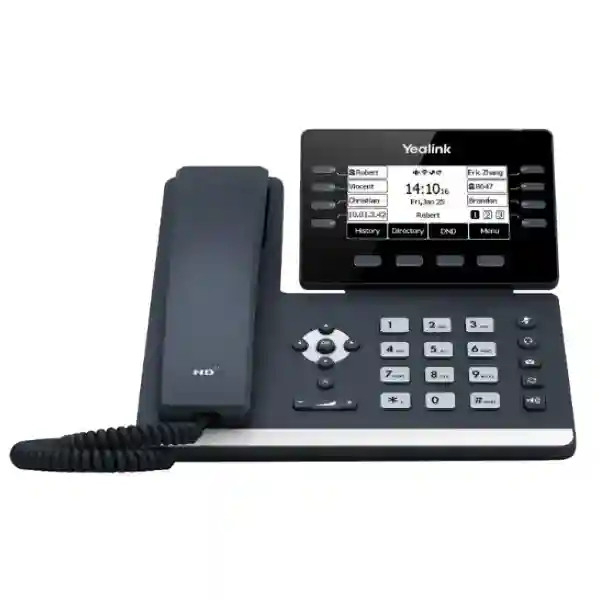
The Yealink SIP-T53 is a feature-rich SIP business phone for organizations that want dependable desktop calling, a practical adjustable display, Gigabit networking, Power over Ethernet and room to expand with headsets, wireless dongles and sidecar modules. It supports up to 12 VoIP accounts and is designed for common office workspaces as well as users who handle multiple calls, extensions or monitored lines.
Choose the SIP-T53 when you need a wired Gigabit SIP desk phone with PoE, a 3.7-inch adjustable screen, 12 VoIP accounts and USB-based expansion. Wi-Fi and Bluetooth are available through supported Yealink USB dongles rather than being built in.
Suitable for multi-line users, departments and shared telephony environments.
Dual-port Gigabit Ethernet with IEEE 802.3af PoE supports tidy desk deployments.
USB 2.0 supports compatible headsets, recording, wireless dongles and EXP50 modules.
HD handset and speakerphone features support clearer everyday business conversations.
Yealink SIP-T53 Overview
The SIP-T53 sits in Yealink’s T5 business phone family and is positioned as an accessible desktop model for professional users. Its 3.7-inch 360×160-pixel backlit graphical LCD can be adjusted to improve viewing angle, an important practical detail for desks with different seating positions, lighting conditions or monitor heights. Eight line keys with LEDs can be assigned across a three-page view for up to 21 programmable functions, while dedicated mute, headset, message, redial and speakerphone keys keep frequent call controls easy to reach.
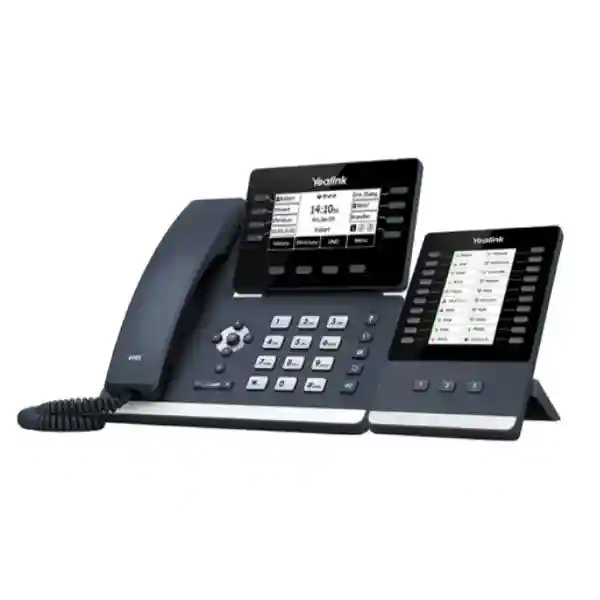
For network connectivity, the phone provides two Gigabit Ethernet ports and supports Power over Ethernet to reduce the need for a separate power supply when a compatible PoE switch is available. The built-in USB 2.0 port increases deployment flexibility. Organizations can use supported Yealink accessories for USB call recording, compatible wired or wireless USB headsets, Bluetooth connectivity through the BT40 dongle, Wi-Fi through WF40/WF50 dongles, or up to three EXP50 expansion modules. This distinction matters when comparing the SIP-T53 with the SIP-T53W: wireless networking is not built into the SIP-T53 itself.
The phone supports common SIP telephony functions including call hold, transfer, forwarding, waiting, voicemail, hot desking, call park, call pickup, speed dial, 5-way conferencing and centrally managed provisioning. For organizations standardizing many endpoints, automatic provisioning through supported methods can reduce repetitive manual setup. The endpoint also supports voice-network practices such as VLAN tagging, QoS and secure transport features that should be coordinated with the PBX, firewall, switches and network design.
Verified Yealink SIP-T53 Specifications
| Display | 3.7-inch 360×160-pixel graphical LCD with backlight; adjustable screen |
| SIP capacity | Up to 12 VoIP accounts |
| Ethernet | Dual-port Gigabit Ethernet |
| Power | IEEE 802.3af PoE, class 2; optional external adapter |
| USB | 1× USB 2.0 for supported headsets, recording, BT40, WF40/WF50 and EXP50 |
| Audio | HD voice, HAC handset, full-duplex speakerphone with AEC, Smart Noise Filtering and supported wideband/narrowband codecs |
| Keys | 8 line keys with LEDs, programmable across three pages for up to 21 functions, plus feature and navigation keys |
| Expansion | Up to three Yealink EXP50 expansion modules |
| Provisioning | Browser, phone and auto-provisioning methods including FTP/TFTP/HTTP/HTTPS and PnP |
| Security/network | SRTP, TLS 1.3, HTTPS certificate management, 802.1X, IPv6, VLAN/QoS and additional supported network/security functions |
Who Should Consider the SIP-T53?
The SIP-T53 is strongest where a business wants a conventional desktop phone but does not want to sacrifice multi-line capacity or network performance. General office users can benefit from the straightforward screen and physical keys, while supervisors, administrators and front-desk staff can use programmable line keys, BLF-style features and optional expansion modules to monitor more extensions. Organizations that already provide PoE at the access switch can simplify desk cabling, and IT teams that manage many endpoints can plan centralized templates and provisioning.
Before ordering, confirm the SIP platform, number of extensions, line-key needs, headset requirements, power method and whether wireless connectivity is genuinely necessary. If built-in Wi-Fi and Bluetooth are mandatory, compare the SIP-T53W rather than assuming the SIP-T53 includes those radios. For broader voice design, FourTeck Tanzania also discusses IP PBX, IP phone, switching and infrastructure planning, helping buyers consider the phone together with the voice-ready LAN rather than as an isolated device.
Deployment and Integration Guidance
A reliable SIP-T53 deployment begins with the voice platform and the network. Confirm that the PBX or hosted SIP service supports the features required by each user, then decide how extensions, voicemail, caller ID, transfer behavior, busy-lamp keys and call routing should operate. On the LAN, place voice endpoints on an appropriate VLAN where the design calls for segmentation, configure QoS consistently through the switching and routing path, and validate DHCP options or provisioning methods before mass rollout.
PoE simplifies installation, but the switch must have enough PoE budget for the total endpoint count. If computers connect through the phone’s second Gigabit port, confirm the intended data and voice VLAN behavior and check that cabling is suitable for Gigabit Ethernet. For distributed offices, secure WAN connectivity, firewall policy and SIP handling need to be tested rather than assumed. The broader FourTeck technology network covers IT, networking and communication requirements that often sit around a voice deployment.
Headsets and expansion accessories should be specified per user role. A call-heavy receptionist may need a compatible headset and one or more EXP50 modules, while a manager may only need a standard handset plus an optional wireless accessory. Record these requirements during quotation so the phone, accessories, PoE switching and PBX configuration are aligned from the start.
Yealink SIP-T53 Tanzania
Businesses evaluating the Yealink SIP-T53 in Tanzania are typically looking for more than a handset. They need a desk endpoint that can register reliably to the chosen PBX, fit a structured IP telephony design and remain manageable as the number of users grows. The SIP-T53 is relevant to corporate offices, professional services, education, hospitality administration, logistics, healthcare administration, financial services and multi-branch organizations that still depend on dependable desktop voice. Its 12 VoIP accounts offer useful flexibility for users who handle multiple identities, departments or shared lines, while the adjustable display and physical keys keep the experience familiar for staff moving from older digital or analog systems.
For a Tanzania deployment, the purchase discussion should include the IP PBX or hosted SIP platform, extension plan, SIP trunk arrangement, PoE availability, switch capacity, VLAN design and internet path for any cloud-hosted voice service. These factors influence call quality and manageability more than the endpoint alone. Where existing LAN switches do not provide PoE, buyers should decide whether to add a compatible PoE access layer or use optional local power adapters. A planned PoE approach is generally cleaner for larger rollouts because power can be centralized and phones can be supported by UPS-backed switching.
Procurement teams should also distinguish the SIP-T53 from similarly named Yealink models. The SIP-T53 supports Wi-Fi and Bluetooth through compatible USB dongles; those capabilities are not built in. That distinction can affect total cost and accessory planning. Headset users should identify whether they need USB, RJ9 or other supported accessories. Reception teams may benefit from EXP50 expansion modules, while ordinary office desks may not need any expansion at all.
When requesting a Tanzania quotation, provide the required quantity, PBX brand or service, existing switch model if known, whether PoE is available, preferred headset type and any requirement for extension monitoring or call recording. This helps produce a more complete solution proposal rather than a device-only quote. For regional IT projects that extend beyond Tanzania, buyers can also review FourTeck Africa technology coverage for broader infrastructure planning.
Yealink SIP-T53 Dar es Salaam
For organizations in Dar es Salaam, the Yealink SIP-T53 can fit offices where reception, finance, sales, logistics, customer service and management teams need consistent desk calling across a shared IP PBX environment. The city contains a wide mix of office types, from compact professional firms to larger multi-floor workplaces and distributed operations linked to warehouses or service locations. In each case, the endpoint choice should follow user roles. A standard employee may need one or two extensions and simple transfer functions, while a receptionist or executive assistant may require monitored lines, speed dial, call pickup and optional expansion modules.
Network readiness is central to deployment. If the office uses managed switches, allocate the voice VLAN and QoS policy deliberately, document the switch ports and verify PoE budget. If desk computers pass through the phone, test both voice and data connectivity under normal traffic conditions. A Gigabit uplink through the SIP-T53 helps avoid making the phone an unnecessary bottleneck at desks that depend on wired data. Where the PBX is hosted outside the premises, evaluate internet stability and firewall rules, then confirm that failover arrangements match the importance of business calling.
Dar es Salaam buyers should also decide whether cabling or wireless connectivity is the better operational choice. A wired Ethernet connection with PoE is usually the simplest business design when structured cabling exists. If a particular desk cannot be cabled and Wi-Fi is essential, specify the supported Wi-Fi dongle or compare a model with integrated Wi-Fi. The same applies to Bluetooth: the SIP-T53 uses a supported USB dongle rather than built-in Bluetooth.
For quotations, state the site type, floor count where relevant, phone quantity, switch and PBX details, extension features, headset needs and whether configuration or deployment assistance is required. This information helps align the SIP-T53 with the wider voice network and avoids purchasing phones before confirming the infrastructure that will power, provision and register them.
Yealink SIP-T53 Mwanza
In Mwanza, the Yealink SIP-T53 is relevant for organizations modernizing traditional office telephony or adding endpoints to an existing SIP system. Businesses with administration, procurement, sales, customer-facing desks and branch coordination can use the phone’s multiple SIP accounts and programmable keys to organize daily call handling without moving immediately to a touchscreen endpoint. The adjustable screen is practical for shared desks and different viewing angles, while the physical feature keys reduce the learning curve for staff accustomed to conventional business phones.
A good Mwanza deployment plan should begin with extension requirements and network topology. Count users, identify which staff need direct numbers, decide where voicemail and ring groups are required, and document how incoming calls should move between reception, departments and after-hours destinations. Once the call flow is clear, the phone configuration can be standardized. Auto-provisioning can be particularly useful when several SIP-T53 units are being installed because it reduces manual repetition and improves consistency between handsets.
Infrastructure checks should cover PoE capacity, structured cabling, switch configuration, DHCP, voice VLANs and QoS. If the organization is connecting multiple sites, WAN design becomes part of voice quality. A phone with strong specifications cannot compensate for unstable routing, packet loss or poorly configured prioritization. Security also matters: use supported encrypted signaling and media options when the selected SIP platform supports them, protect management interfaces and keep endpoint credentials controlled.
For procurement, separate must-have features from optional accessories. Some Mwanza users may need only the phone and PoE; others may require USB headsets, Wi-Fi or Bluetooth dongles, or EXP50 expansion modules. Providing these details in the request for quotation makes it easier to price the actual working setup instead of underestimating accessory and infrastructure needs.
Yealink SIP-T53 Arusha
Organizations searching for the Yealink SIP-T53 in Arusha may include professional offices, tourism and hospitality administration, NGOs, education providers, healthcare administration and businesses coordinating with teams across Tanzania or internationally. The phone is useful where staff need a reliable desktop extension with clear voice, multiple SIP identities and standard business functions such as transfer, hold, forwarding, conference calling and voicemail access. Its design remains intentionally practical: a monochrome-style graphical business display, physical keys and expandable functionality rather than a large touch interface.
For hospitality and service-focused environments, call handling should be mapped before phones are allocated. Reception may need more monitored keys and expansion, while back-office finance or procurement staff may need fewer lines but higher privacy. Management users may prefer headsets for longer calls. If several departments share one PBX, naming conventions, extension ranges and button templates should be standardized so users receive a predictable interface.
Arusha deployment planning should also account for the physical network. Verify that each desk has an Ethernet path or define where supported wireless accessories will be used. If PoE switching is available, calculate the total power budget rather than checking only one port. If a branch relies on internet connectivity to reach a hosted PBX, assess link resilience and consider how calls should behave during an outage. For critical desks, it can be worth planning backup connectivity at the network level instead of expecting the phone to solve WAN availability.
When preparing a quote request, include whether phones are for a new system, an expansion or a replacement project. Name the existing PBX where possible and list any required headsets or sidecars. These details allow the SIP-T53 to be evaluated as part of the overall communication system rather than simply as a unit price.
Yealink SIP-T53 Dodoma
For businesses and institutions in Dodoma, the Yealink SIP-T53 offers a structured path to desktop VoIP where a dependable wired endpoint is preferred. It can support administrative offices, departmental teams, reception points, project offices and professional services that need standard SIP features without the cost or complexity of a high-end video or touchscreen phone. Twelve VoIP accounts give administrators flexibility for users who require multiple registrations or line appearances, and the programmable key layout can be adapted to extension monitoring or frequently used functions.
New deployments should avoid treating the phone list as the whole telephony bill of materials. The complete design may also require a PBX or hosted service, SIP trunking, PoE switches, structured cabling, UPS capacity, router or firewall configuration, headsets and configuration services. For an expansion, check that the existing PBX has enough user capacity and licenses where the platform uses licensed extensions. For a replacement project, document existing numbers, call routes, voicemail behavior and department requirements before changing endpoints.
The SIP-T53 supports centralized provisioning approaches that can make multi-phone rollouts easier. IT teams should define a base configuration, then apply user-specific extensions and keys. Network settings such as VLAN tagging, QoS, time servers and security policies can be standardized as part of that template. This reduces configuration drift and makes troubleshooting easier after deployment. Firmware management should also be handled systematically rather than phone by phone.
Dodoma procurement requests are more useful when they state quantity, target deployment date, PBX details, PoE status, headset requirements and whether installation or remote configuration is expected. Buyers should also state whether Wi-Fi or Bluetooth is required because the SIP-T53 depends on supported USB accessories for those features. Clear requirements make model selection and quotation more accurate.
Yealink SIP-T53 UAE
In the UAE, the Yealink SIP-T53 is relevant for offices that want standardized SIP desk phones across reception, administration, operations and management users. Organizations comparing multiple T5-series models should pay close attention to the wireless distinction: the SIP-T53 is designed around wired Gigabit Ethernet and PoE, with optional Wi-Fi and Bluetooth delivered through supported USB dongles. That makes it a logical fit for structured offices where managed switching and cabling already exist, while the T53W may be preferable when integrated wireless features are a mandatory buying criterion.
Deployment teams should confirm interoperability with the selected PBX or cloud telephony service and decide how extension templates, BLF keys, voicemail, call transfer and conferencing will be provisioned. Multi-site UAE businesses may use centralized PBX services for several offices; in that case, WAN design, firewall policy, latency and redundancy become essential parts of the voice project. For larger fleets, use auto-provisioning and consistent firmware policies so endpoints are not configured individually unless required.
Procurement should also include compatible power and accessories. If PoE is available, separate adapters may not be required. For reception or call-control roles, EXP50 modules can increase the number of visible programmable keys. Headset users should identify their preferred interface and usage pattern. Wireless headsets, USB recording and supported speakerphone accessories may change the USB requirements at a particular desk, so accessory combinations should be checked during design.
For broader UAE communication and IT sourcing context, organizations can explore FourTeck UAE. A complete quote request should specify phone quantity, PBX platform, office locations, PoE availability and required accessories so the endpoint choice can be evaluated alongside the network and voice system.
Yealink SIP-T53 Uganda
Ugandan organizations considering the Yealink SIP-T53 can use it as a standardized business endpoint for headquarters, branches and departmental offices where SIP calling remains an important day-to-day channel. The phone’s 12 VoIP accounts, programmable line keys, HD voice and Gigabit connectivity provide a useful balance between basic desk phones and more expensive executive devices. It is especially appropriate when an organization already has Ethernet cabling and can deliver PoE from managed switches.
For multi-branch deployments, consistency is more important than simply buying the same handset. Define extension numbering, naming standards, provisioning servers, VLAN settings, time configuration and security policies centrally. Where branches register to a hosted or central PBX, measure the quality of the WAN or internet path and understand how phones should recover after connectivity interruptions. QoS should be applied end to end where possible, and firewall rules should be documented so voice traffic is not dependent on accidental behavior.
User-role planning can reduce unnecessary accessories. Most desks may need only the phone, PoE and an extension. Reception users may need expansion modules; supervisors may benefit from BLF keys; staff who spend long periods on calls may need compatible headsets. Wi-Fi and Bluetooth should be added only where there is a clear operational requirement because the SIP-T53 uses optional USB dongles for those functions.
For regional procurement and support conversations in Uganda, the FourTeck Uganda site can be used alongside Tanzania project planning. A good request for quotation should identify the PBX platform, site count, phone quantity, PoE switch environment, accessories and whether configuration templates or installation assistance are required.
Yealink SIP-T53 Kampala
For offices in Kampala, the Yealink SIP-T53 can serve as a practical desktop standard where staff need reliable SIP calling, multiple line appearances and straightforward physical controls. Corporate headquarters, professional firms, education administrators, service companies and call-handling teams can allocate the same phone differently according to role. Eight line keys with multi-page programming provide flexibility without forcing every user into a large-screen interface, and optional EXP50 modules can extend key capacity for reception or executive-assistant positions.
The strongest implementations begin with a call-flow worksheet. Define who answers the main number, which departments use queues or ring groups, where unanswered calls go and how voicemail is handled. Once the workflow is documented, administrators can program keys and templates around real requirements rather than generic defaults. For larger offices, auto-provisioning reduces setup time and makes it easier to restore or replace an endpoint with consistent settings.
Kampala networks should be checked for PoE capacity, switch port availability, VLAN design, QoS and internet resilience. If a cloud PBX is used, the internet connection becomes part of the voice service, so packet loss and failover planning matter. If the phone passes a PC connection through its second Gigabit port, verify that both voice and data policies are correct. Security should include strong extension credentials and the encrypted signaling or media options supported by the PBX.
Procurement teams should specify whether they require wireless accessories, because the SIP-T53 does not include built-in Wi-Fi or Bluetooth. They should also distinguish optional power adapters from PoE-powered installations. Stating those decisions before ordering avoids unexpected accessory requirements during rollout and makes quotation comparisons more meaningful.
Yealink SIP-T53 Arua
Arua organizations planning IP telephony can use the Yealink SIP-T53 where a wired, manageable desk phone is appropriate for administrative and customer-facing staff. The model’s Gigabit Ethernet ports allow the phone to sit inline with a wired workstation, while PoE can simplify desk power when a compatible switch is available. This is useful for offices that want to modernize calling without adding separate power bricks to every desk or limiting computer connectivity.
For smaller sites, the main design questions are often straightforward: how many extensions are needed, where the PBX is located, how incoming calls are routed and whether the LAN can prioritize voice traffic. For branches connected to a central system, the WAN link deserves special attention. Test registration stability and call quality under normal business traffic. If connectivity is variable, discuss redundancy at the router or internet level instead of assuming endpoint features can overcome network outages.
The SIP-T53 supports a broad set of business calling functions, but feature availability can depend on the PBX. Before promising a workflow to users, confirm that the platform supports the desired BLF, call pickup, forwarding, conferencing, recording or hot-desking behavior. This prevents a common procurement problem where endpoint specifications are read in isolation from the call server.
For an Arua quotation, provide quantity, user roles, PBX information, PoE status and any headset requirements. If wireless connectivity is necessary at specific desks, identify those desks and specify compatible USB Wi-Fi or Bluetooth accessories. A smaller site can often achieve a cleaner, easier-to-support result by keeping most endpoints wired and using wireless only where cabling is genuinely impractical.
Yealink SIP-T53 Mbarara
Businesses in Mbarara that are replacing legacy phones or expanding an IP PBX can consider the Yealink SIP-T53 as a standard endpoint for employees who need dependable call handling without advanced video features. Its adjustable screen can make daily use more comfortable across different desk layouts, and the physical feature keys keep functions such as mute, speakerphone and redial immediately accessible. The phone can register up to 12 VoIP accounts, which gives system administrators room to configure multiple identities or line appearances where the PBX design requires them.
A structured rollout should group users by need. General staff may receive a standard template, supervisors can have BLF and pickup keys, and reception users may need EXP50 sidecars. This tiered approach avoids giving every employee the same accessories and keeps the deployment aligned with actual work. Headset choice should also follow call volume; staff who make occasional calls may prefer the handset, while customer-service roles can benefit from compatible headsets.
The network remains part of the solution. Confirm PoE budgets, cabling quality and switch configuration before installing many phones. Segmenting voice traffic and applying QoS can help maintain predictable service, particularly when the same network carries large file transfers, cloud applications, cameras or guest traffic. If a cloud PBX is used, test internet failover and make sure firewall changes are documented rather than performed ad hoc.
When requesting pricing for Mbarara, specify whether the project is supply-only or includes configuration and deployment. Provide the expected number of phones, existing PBX brand, switch models where known and accessory requirements. This allows the proposal to account for practical dependencies such as PoE, provisioning and headset compatibility instead of focusing only on the phone unit.
Yealink SIP-T53 Gulu
For Gulu offices, the Yealink SIP-T53 can support a move toward centrally managed SIP telephony with familiar desk-phone ergonomics. It suits administrative teams, project offices, education environments, professional services and organizations that want extensions to work consistently across departments. Because it combines dual-port Gigabit Ethernet with PoE support, it can be integrated into a managed LAN without adding a separate network drop for a connected desktop computer in common desk layouts.
Planning should start with the communication workflow. Map the main number, internal extensions, department ring groups, after-hours handling, voicemail and emergency contact requirements. Then map users to phone features. A receptionist may need monitored lines and an EXP50, while a project manager may value a headset and fewer keys. This approach reduces overspecification and makes training easier because each user sees the functions relevant to their role.
For network design, check PoE headroom across the intended switches rather than only confirming that PoE is supported. Use appropriate VLAN and QoS policies where the infrastructure allows them, and keep switch port documentation current. If the PBX is in another location or hosted in the cloud, monitor WAN performance and define a recovery process for outages. Where continuity is business-critical, redundancy should be considered at the network and service level.
Gulu procurement requests should state whether Wi-Fi or Bluetooth is required, because those functions use compatible USB dongles on the SIP-T53. Also note any USB recording or headset requirements that may compete for the USB port. Clear accessory planning matters when several optional functions are expected at the same desk. A complete bill of materials can then include only the accessories that the actual users need.
Yealink SIP-T53 Kenya
Kenyan businesses comparing Yealink desk phones can position the SIP-T53 as a wired professional endpoint that offers substantial SIP capacity without moving to a larger color touchscreen platform. Its 3.7-inch adjustable LCD, 12 VoIP accounts, Gigabit Ethernet and PoE support make it suitable for mainstream office deployments. It can also scale toward heavier call-handling roles through programmable keys and EXP50 expansion modules, allowing one model family to cover several user profiles.
Before procurement, compare the SIP-T53 with the T53W on the specific requirement that often causes confusion: built-in wireless. The SIP-T53 uses supported external USB dongles for Wi-Fi and Bluetooth. Buyers who require those technologies at many desks should price the accessories and compare the total cost with a model that includes wireless functions. Where office cabling and PoE are already established, the standard SIP-T53 can remain the simpler choice.
Kenya deployments should integrate the endpoint with the PBX, switching, firewall and internet design. Confirm whether the telephony platform is on-premises or hosted, identify required user licenses, define extension templates and test SIP behavior through security devices. For organizations with multiple branches, standard provisioning and documented VLAN/QoS settings can make support easier and reduce differences between sites.
Organizations coordinating East African purchases can review FourTeck Kenya for the Kenyan market while keeping model and configuration standards aligned with Tanzania and Uganda projects. A quotation request should include quantity, PBX platform, site count, PoE status, headset needs and any requirement for deployment or configuration support.
Yealink SIP-T53 Kuwait
In Kuwait, the Yealink SIP-T53 can be evaluated for offices that prefer a physical-key SIP phone with enterprise-style provisioning and Gigabit network connectivity. It is suitable for employee desks, administration areas, reception support and managers who need reliable voice functions without a high-end touchscreen endpoint. Its multiple SIP accounts and programmable line keys provide flexibility for organizations running shared lines, multiple departments or centralized PBX services.
The model is particularly straightforward in structured offices where PoE switches are already installed. One Ethernet connection can deliver network and power to the phone, while a second Gigabit port can connect a workstation. Network administrators should still validate VLAN tagging, QoS policy, DHCP behavior and switch-port configuration. For cloud-hosted voice services, internet resilience and firewall design should be assessed as part of the voice project, not after phones have been deployed.
Kuwait buyers should consider accessory requirements per user. The SIP-T53 supports compatible USB headsets, USB recording and Yealink wireless dongles, but those functions should be specified rather than assumed. Reception users may need EXP50 expansion modules for additional programmable keys. If several USB-related features are required simultaneously, check supported accessory combinations and deployment guidance before finalizing the bill of materials.
A strong quotation request states the quantity, extension types, PBX platform, PoE availability, headset or sidecar requirements and whether installation is part of the project. This makes it easier to compare a complete working configuration instead of comparing bare phone prices that may exclude power or user accessories. For cross-border projects, align firmware, templates and naming standards so endpoints can be administered consistently.
Yealink SIP-T53 Ghana
Ghanaian organizations adopting SIP telephony can use the Yealink SIP-T53 as a practical business desk phone where managed Ethernet and PoE form the foundation of the deployment. The model supports up to 12 VoIP accounts and provides a user-adjustable 3.7-inch display, allowing it to serve ordinary staff as well as users with more complex line requirements. The same endpoint can be configured differently by department, making standardization easier than maintaining many unrelated handset types.
For new systems, start with the PBX design and user count. Decide which users need direct extensions, queues, ring groups, voicemail, call recording or monitored keys. Then check the LAN: PoE budget, port capacity, structured cabling, voice VLANs and QoS should all be reviewed. If the PBX is hosted, consider internet failover and security. Endpoint features work best when the underlying network provides predictable latency and packet delivery.
Wireless requirements should be identified early. The SIP-T53 can add Wi-Fi and Bluetooth through supported Yealink USB dongles, but they are not integrated into the base model. For desks that already have Ethernet, a wired PoE connection often keeps deployment simpler. For staff who need hands-free operation, specify a compatible headset rather than selecting accessories after the phones arrive.
Ghana procurement teams should request a quote that separates phones, optional accessories, PBX licensing where applicable, switches or power requirements, configuration and installation. This improves budget clarity and supports phased rollouts. For regional organizations operating across West and East Africa, keep extension naming, provisioning templates and security standards consistent so users and support teams encounter the same behavior in each site.
Yealink SIP-T53 Nigeria
For Nigerian offices, the Yealink SIP-T53 can provide a standardized SIP endpoint for teams that need physical line keys, multiple registrations and centralized administration. It is suited to corporate departments, professional services, branch offices, reception support and other environments where desk calling remains important. The phone’s Gigabit ports allow a workstation to share the desk network path, while PoE support can help reduce individual power adapters when the access switches are designed for voice endpoints.
At larger sites, inventory and configuration discipline are essential. Create a standard phone template covering time settings, provisioning, VLAN behavior, security and common keys, then layer user-specific extension data on top. This makes replacement and troubleshooting more predictable. For busy roles, optional EXP50 modules can add substantially more programmable keys, while ordinary staff can use the base phone without unnecessary expansion.
Network teams should evaluate the end-to-end path between each SIP-T53 and the call server. Managed switching, QoS, stable routing and suitable firewall configuration all contribute to call quality. If the PBX is reached through the public internet, measure link performance and plan for failure scenarios. Security policies should protect management interfaces and credentials, and the encrypted transport options supported by both endpoint and PBX should be enabled where appropriate.
For Nigerian procurement, be explicit about quantity, PBX platform, PoE availability, headset needs, wireless requirements and installation scope. The SIP-T53’s Wi-Fi and Bluetooth capabilities depend on compatible USB accessories, so buyers should not treat them as built-in features. A detailed request produces a more accurate total-cost view and reduces the risk of discovering missing accessories during rollout.
Yealink SIP-T53 Seychelles
Organizations in Seychelles can consider the Yealink SIP-T53 for offices, hospitality administration, service businesses and distributed teams that want a dependable SIP desk phone connected to an on-premises or hosted PBX. The model offers enough line capacity for complex extension arrangements while retaining a familiar physical-key interface. For businesses standardizing telephony across multiple locations, this can simplify user training and IT support compared with mixing many handset families.
Island and multi-site operations should pay close attention to connectivity between the endpoint and the voice platform. If the PBX is hosted remotely, internet performance becomes a critical part of call quality. Use suitable QoS, monitor packet loss and latency, and define what should happen if the primary connection fails. Where offices use a local PBX, confirm SIP trunk resilience and power protection for the network equipment that keeps extensions available.
The SIP-T53 is designed around wired Gigabit Ethernet and PoE, which can be an advantage in managed office networks. Wireless connectivity is optional through supported USB dongles, so businesses should identify the desks that genuinely require Wi-Fi or Bluetooth. Headset needs also vary: front-office or reservation staff may benefit from hands-free accessories, while back-office users may prefer the standard handset. Optional expansion modules can support roles that monitor many extensions.
For a Seychelles quotation, include the number of phones, user roles, PBX platform, network switch details, PoE status, internet topology and required accessories. If the project spans more than one site, provide quantities per location and any differences in network infrastructure. This allows the phone deployment to be designed as part of a resilient communication environment rather than as a simple shipment of endpoints.
Buying Checklist for Yealink SIP-T53
Name the PBX or hosted SIP service and confirm the features required by users.
Confirm PoE switch capacity or include optional adapters where PoE is unavailable.
Specify compatible USB dongles if Wi-Fi or Bluetooth is required.
List headset users and any reception positions that require EXP50 modules.
Check VLAN, QoS, DHCP, firewall, cabling and WAN performance before rollout.
Use repeatable templates for larger deployments instead of configuring every phone independently.
Frequently Asked Questions
Does the Yealink SIP-T53 have built-in Wi-Fi?
No. The SIP-T53 supports Wi-Fi through compatible Yealink USB Wi-Fi dongles such as WF40/WF50. Buyers who need integrated wireless connectivity should compare other variants such as the T53W.
Does the SIP-T53 support Bluetooth?
Bluetooth functionality is available through the supported Yealink BT40 USB dongle; it is not built into the base SIP-T53.
How many SIP accounts does the SIP-T53 support?
The phone supports up to 12 VoIP accounts. Actual line behavior and advanced call features still depend on the PBX or SIP service configuration.
Can the SIP-T53 be powered by PoE?
Yes. It supports IEEE 802.3af Power over Ethernet, class 2. The switch must provide sufficient PoE budget for the number of phones being deployed.
Can I connect expansion modules?
Yes. The SIP-T53 supports up to three Yealink EXP50 expansion modules, useful for reception, attendant and heavy extension-monitoring roles.
What should I provide for a quotation?
Provide quantity, deployment location, PBX or hosted SIP platform, PoE availability, headset requirements, wireless accessory needs, expansion-module requirements and whether configuration or installation is expected.
Decision Recap
Choose the Yealink SIP-T53 when your priority is a professional wired SIP desk phone with an adjustable display, up to 12 VoIP accounts, Gigabit networking, PoE and flexible USB expansion. It is a practical fit for general staff and can stretch into busier roles through programmable keys and EXP50 modules. It is not the right assumption for buyers who expect built-in Wi-Fi or Bluetooth; those functions require supported USB accessories on this model.
For the best outcome, purchase the endpoint as part of a voice design that also considers the PBX, SIP service, switching, power, network segmentation, QoS, internet resilience and user accessories. That system-level approach is what turns a capable phone into a dependable business communication tool.
Request a Yealink SIP-T53 Consultation
Send your required quantity, target location, PBX details and accessory needs. FourTeck can use those details to structure a quotation around the phone, PoE requirements, user roles and deployment scope. No stock, delivery time or local service coverage is assumed until confirmed for the specific request.
For broader IP telephony planning, include your current extension count, expected growth, existing switches, SIP trunk or hosted service and any receptionist or call-center style requirements. This creates a better starting point for selecting the correct endpoint configuration and related infrastructure.




Reviews
There are no reviews yet.