
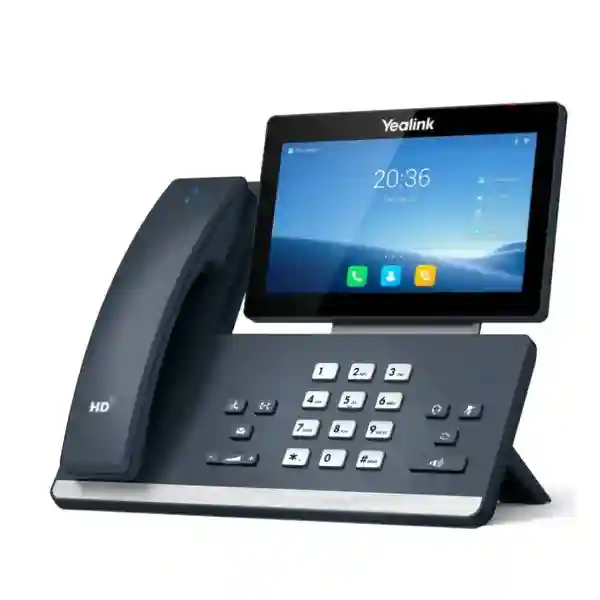
Yealink SIP-T58W Pro
The Yealink SIP-T58W Pro is designed for professionals who need more than a conventional desk telephone. It combines a 7-inch adjustable 1024 × 600 capacitive touchscreen, Android 9.0, HD audio, built-in dual-band 2.4 GHz/5 GHz Wi-Fi, Bluetooth 4.2, dual-port Gigabit Ethernet with Power over Ethernet, two USB 2.0 ports and support for up to 16 SIP accounts. The Pro model also supports the Yealink BTH58 Bluetooth handset, giving users the ability to continue a call away from the desk within the supported wireless range.
For Tanzania businesses, the important buying question is not only whether the phone has premium features, but whether it fits the existing SIP platform, VLAN design, PoE capacity, wireless policy, headset requirements, provisioning workflow and user role. FourTeck can help translate those details into a practical bill of materials and deployment plan.
Touchscreen
SIP accounts
Wi-Fi
PoE
What is the Yealink SIP-T58W Pro?
The SIP-T58W Pro is a smart business phone in Yealink’s T5 family. Its Android 9.0 interface and large touch display make everyday call handling, contact access and supported application workflows easier to navigate than on a traditional key-driven endpoint. Yealink specifies a 7-inch 1024 × 600 capacitive adjustable touch screen and support for up to 16 SIP accounts, so the model can suit executive desks, reception and supervisory positions, branch managers and other users who manage several call identities or require a richer visual interface.
The “Pro” designation is important when comparing T58W variants. Yealink documents support for the BTH58 Bluetooth wireless handset on the SIP-T58W Pro. The handset is intended to let a user continue a desk-phone call while moving around the immediate office environment. Yealink states up to 17 hours of talk time, up to 46 hours of standby time and a wireless range of up to 10 metres under its stated conditions. These figures are manufacturer specifications rather than guaranteed real-world results, since radio conditions and usage can vary.
Video capability should also be ordered carefully. Yealink lists 720p30 HD video with the CAM50, but the camera is associated with the camera-equipped or optional-camera configuration rather than something buyers should assume is bundled with every SIP-T58W Pro package. A quotation should therefore identify whether the requirement is the SIP-T58W Pro itself, a CAM50-equipped configuration, or another variant, along with any power adapter, headset, expansion module or other accessory needed for the project.
HD business audio
Yealink specifies Optimal HD Audio and Noise Proof technology, supported by wideband codecs including G.722 and Opus. The value is clearest for users who spend much of the day on customer, supplier or internal calls and need a consistent desk endpoint.
Flexible connectivity
Built-in Wi-Fi and Bluetooth can reduce dependency on additional adapters, while dual-port Gigabit Ethernet supports a conventional wired desk deployment. PoE can simplify power at the workstation when the connected network switch provides the required standard and power budget.
Expandable desk role
Two USB 2.0 ports support compatible USB applications and accessories, and Yealink specifies support for up to three EXP50 expansion modules. That makes the model worth considering for reception, dispatch, assistants or managers who need more visible programmable keys.
Optional visual calling
With the appropriate CAM50 configuration, the platform supports 720p30 video. Buyers should verify the exact bundle and platform expectations before ordering rather than treating video capability as evidence that every package ships with a camera.
Technical specifications that matter when planning a deployment
| Operating system | Android 9.0 |
| Display | 7-inch 1024 × 600 capacitive adjustable touchscreen |
| Accounts | Up to 16 SIP accounts |
| Networking | Dual-port Gigabit Ethernet; PoE supported |
| Wireless | Built-in Bluetooth 4.2; dual-band 2.4G/5G Wi-Fi |
| USB | 2 × USB 2.0 |
| Audio conferencing | Up to 10 parties according to Yealink’s published product information |
| Video | 720p30 with CAM50; verify camera configuration in quotation |
| Expansion | Up to 3 Yealink EXP50 expansion modules |
| Mounting | Wall mountable |
Compatibility, provisioning and network readiness
A SIP phone should be purchased as part of a voice system rather than as an isolated desktop device. Before deployment, confirm that the intended PBX or hosted voice service supports the SIP functions, codecs, security settings, provisioning method and feature behavior required by the organisation. Features such as busy-lamp monitoring, call pickup, call recording, directories, voicemail indication, hot desking and programmable keys can depend on both the endpoint and the PBX configuration. A technically compatible SIP registration does not automatically guarantee identical behavior for every advanced feature.
Network preparation is equally important. A wired deployment can use the SIP-T58W Pro’s Gigabit interfaces and PoE, but the switch must have adequate PoE capacity. Voice VLANs, Quality of Service, DHCP options and firewall policies should be planned consistently. Where Wi-Fi is used, assess signal quality, roaming behavior, wireless security and congestion at the actual desk locations. Bluetooth usage should be reviewed alongside any headset policy and nearby radio environment.
For organisations deploying multiple units, centralized provisioning and documented templates can reduce manual work and configuration drift. Define extension naming, time settings, firmware policy, line assignments, button layouts and user profiles before mass rollout. This is also the stage to decide whether the BTH58 mobility feature, USB headset, CAM50 video option or EXP50 expansion module is justified for each role rather than purchasing the same accessory bundle for every desk.
Buyer answer: who should consider the SIP-T58W Pro?
The SIP-T58W Pro is most compelling for users who will benefit from its touch interface, multi-account capacity, wireless handset option and richer connectivity. Executive users, front-office teams, branch managers, supervisors, dispatch roles and customer-facing staff can be stronger candidates than a basic desk user who only needs one or two lines. For cost control, organisations can mix endpoint classes: premium T58W Pro units where the additional functions improve work, and simpler SIP models where a large display, wireless handset or video option would not be used.
Yealink SIP-T58W Pro Tanzania
Businesses evaluating the Yealink SIP-T58W Pro in Tanzania usually have two linked objectives: they want a high-capability IP phone for specific users, and they want the phone to fit cleanly into an existing or planned voice environment. The model’s combination of a 7-inch touchscreen, up to 16 SIP accounts, integrated Wi-Fi and Bluetooth, Gigabit Ethernet, PoE and BTH58 handset support makes it suitable for organisations that need a more interactive endpoint than a basic SIP phone. The strongest use cases are typically executive desks, reception and administration positions, branch managers, customer-service supervisors and users who benefit from moving a short distance from the desk during a call.
For procurement in Tanzania, start by identifying the IP PBX or hosted SIP service, number of extensions, user roles and existing switch infrastructure. If PoE will be used, verify switch capacity and resilience. If the organisation intends to run voice over Wi-Fi for particular desks, confirm coverage and wireless policy before treating Wi-Fi as a substitute for cabling. For offices with power interruptions, consider whether the switching, router, firewall and PBX path are protected by suitable UPS capacity; a PoE phone remains dependent on the upstream network and power chain.
The purchase request should state whether a camera is required, because the SIP-T58W Pro’s published video capability relies on the CAM50 configuration. It should also specify whether BTH58, a USB or Bluetooth headset, wall-mounting hardware, EXP50 modules or an external power adapter are needed. This level of detail helps the quotation reflect the real installation rather than only the phone model.
FourTeck Tanzania can place the phone within a broader telephony project that considers extension planning, call flows, network segmentation, switching and deployment documentation. Buyers can review the FourTeck Tanzania technology shop for procurement guidance and the business technology services page when the requirement includes configuration, network preparation or wider IT integration.
Yealink SIP-T58W Pro Dar es Salaam
In Dar es Salaam, the SIP-T58W Pro can be particularly relevant to corporate offices, regional headquarters, professional services firms, hospitality operations, logistics businesses and customer-facing teams that require a premium desk endpoint. A dense office environment often has a mixture of executive users, reception staff, finance and operations teams, making role-based phone selection more economical than deploying the same model everywhere. The T58W Pro can be reserved for positions that use multiple accounts, need a large touch interface, benefit from BTH58 wireless handset mobility or require expansion modules for higher call visibility.
A Dar es Salaam deployment should begin with the voice architecture. Confirm the PBX platform, SIP trunk or hosted voice service, extension plan, incoming-number routing and after-hours flow. Then validate the LAN. If the phone is powered over Ethernet, check the switch PoE budget and whether critical switching equipment is protected by backup power. Voice VLANs and Quality of Service can help separate and prioritize traffic, but configuration should match the actual network design. For offices that already carry CCTV, Wi-Fi, servers and business data on the same switching infrastructure, capacity and segmentation deserve extra attention.
Where users expect wireless freedom inside an office, the BTH58 handset can be a practical feature for stepping to a nearby cabinet, speaking with a colleague or moving around a personal workspace without ending the call. Its specified range should not be interpreted as building-wide mobility. If staff need campus or floor-wide roaming, a DECT or mobile softphone architecture may be more appropriate and should be assessed separately.
Quotation preparation for Dar es Salaam should therefore include quantity, exact model variant, camera requirement, power method, PBX information, desired line keys, headset needs and any installation or configuration scope. FourTeck’s Tanzania contact page provides the verified route for requesting a tailored quotation without assuming stock, lead time or delivery conditions before they are confirmed.
Yealink SIP-T58W Pro Mwanza
For organisations in Mwanza, the SIP-T58W Pro can support branch management, hospitality administration, professional offices, healthcare administration, education leadership and operational teams that need a capable SIP endpoint with strong desk usability. The large adjustable touchscreen can simplify interaction with contacts and multiple line identities, while the integrated Wi-Fi and Bluetooth options provide deployment flexibility. However, procurement should still begin with the communication requirement rather than the feature list. Define which employees truly need the premium interface and which users can operate efficiently with a simpler phone.
Branch environments often make network reliability and supportability especially important. A phone may register correctly on installation day but still deliver a poor experience if the WAN is unstable, QoS is inconsistent, DNS is unreliable, or power to the switching and router layer is interrupted. Before installing multiple SIP-T58W Pro units, document the data path from handset to switch, router or firewall, PBX or cloud service, and SIP provider. Where a central PBX serves Mwanza from another city or country, latency, routing, VPN design and failover strategy should be reviewed.
The model’s two Gigabit Ethernet ports can help fit a phone into a desk network where a computer also requires wired access, subject to the organisation’s network policy and VLAN design. Built-in dual-band Wi-Fi can be useful where structured cabling is difficult, but a voice endpoint should not be placed on congested or weak wireless coverage simply because the device has Wi-Fi capability. Test the actual desk location before deciding on wireless deployment at scale.
For a Mwanza quotation, specify the number of phones, expected SIP accounts, PBX platform, whether PoE is available, whether BTH58 mobility is required and whether CAM50 video is part of the project. This helps align hardware, accessories and configuration work from the beginning and avoids last-minute additions after equipment arrives.
Yealink SIP-T58W Pro Arusha
Arusha organisations often combine office administration with tourism, hospitality, logistics, education, NGO, conference and professional-service workflows. In these environments, the Yealink SIP-T58W Pro can be a strong fit for reception, reservations, management and coordination roles that handle multiple conversations and need a clearer visual interface. Up to 16 SIP accounts can accommodate complex line structures where the underlying PBX supports them, while optional expansion through EXP50 modules can help high-call-volume positions monitor more destinations and programmable functions.
The purchasing decision should separate desk-phone capability from system capability. The phone can provide advanced keys, audio functions and SIP registration, but features such as queues, IVR, call recording, call reports, call-center logic and branch routing normally depend on the PBX or hosted service. An Arusha business replacing an older analogue or proprietary phone system should therefore plan extension migration, numbering, trunking, call flows and user training in parallel with endpoint selection.
For hospitality and reception settings, the BTH58 wireless handset may improve short-range movement around the immediate desk area, while a suitable headset can support hands-free work. The CAM50 option may be useful where desk-based visual communication is genuinely required, but buyers should confirm interoperability and the exact video workflow before paying for camera hardware. Video inside a SIP endpoint is not automatically equivalent to a modern meeting-room collaboration platform.
Before requesting an Arusha quote, record the number of premium users, quantity of standard users, PoE availability, switch ports, voice VLAN design, PBX type, headset needs and any requirement for wall mounting or expansion modules. A clear scope allows the T58W Pro to be evaluated as part of a manageable voice system rather than simply as a premium-looking desktop device.
Yealink SIP-T58W Pro Dodoma
In Dodoma, the Yealink SIP-T58W Pro can serve management, administrative, reception and coordination functions where users need richer call handling than a basic phone provides. Public-sector contractors, professional firms, education organisations, associations and multi-department offices may value the combination of a touch interface, multiple SIP identities and flexible wired or wireless connectivity. The best deployment still begins with a user-role map: identify who needs multiple lines, who spends significant time on calls, who needs short-range handset mobility and who would make practical use of an EXP50 expansion module.
Procurement teams should confirm compatibility with the intended IP PBX or hosted SIP platform before ordering. A vendor datasheet can show SIP accounts and codecs, but project success depends on provisioning, extension templates, call routing, security, firmware policy and network design. If the system will be centrally managed, confirm how configuration files, firmware updates and credentials are distributed. If each phone is configured manually, factor in the operational cost of supporting changes later.
Dodoma sites should also evaluate power continuity for the entire voice chain. PoE can remove the need for a local adapter at each desk, but the switch, router, firewall and PBX or internet connection still need to remain available. Where business continuity matters, size UPS protection around the network infrastructure rather than only the phone. For cloud-hosted voice, internet resilience may be as important as the handset itself.
A well-prepared quotation request should state quantity, exact T58W Pro variant, camera requirement, BTH58 and headset needs, network type, PoE availability, PBX or SIP service, installation scope and target user roles. FourTeck’s Tanzania company overview explains the broader integrated approach used when voice, networking, security and business infrastructure must be considered together.
Yealink SIP-T58W Pro UAE
For UAE organisations, the SIP-T58W Pro fits executive offices, reception desks, branch managers and teams that want a premium SIP endpoint within a larger IP telephony environment. The phone’s Gigabit Ethernet, PoE, dual-band Wi-Fi and Bluetooth options can suit modern office networks, while the Android-based touch interface gives users a more visual experience than a conventional key-driven desk phone. The BTH58 wireless handset is the distinctive Pro feature for users who want to move around the immediate office while remaining on the call.
UAE procurement commonly involves multi-site standardisation, so the project should specify whether the same endpoint profile will be used in Dubai, Abu Dhabi, Sharjah or other branch locations. Standard templates for SIP credentials, programmable keys, VLANs, time settings, firmware and directories make support easier across sites. If a business operates both in the UAE and East Africa, matching endpoint policies can simplify training and remote administration, even when carrier services and local network conditions differ.
The phone should also be matched to the PBX and user role. Not every employee needs a 7-inch touch screen or 16 SIP accounts. A role-based device matrix can reserve T58W Pro units for users who need visibility, wireless handset flexibility or camera capability, while standard SIP phones cover ordinary desks. This reduces unnecessary capital cost and keeps the supported device fleet manageable.
For UAE-related projects, buyers can reference FourTeck UAE IT and telecom solutions when regional project coordination is needed. The exact supply scope, warranty, accessories, delivery and configuration should always be confirmed in a current quotation rather than inferred from another market or from third-party listings.
Yealink SIP-T58W Pro Uganda
Uganda businesses evaluating the Yealink SIP-T58W Pro may be upgrading an existing PBX, extending a branch network or standardising endpoints across several sites. The phone is most useful where staff need an advanced desk interface, several SIP identities, Bluetooth or Wi-Fi connectivity, PoE and the short-range mobility of the BTH58 handset. Executive, reception, operations and administrative users are common profiles to assess first, while simpler roles can often be served by lower-complexity SIP endpoints.
A Uganda deployment should document how the handset will reach the voice service. For an on-premises PBX, confirm VLANs, switch configuration, SIP registration, extension plans and remote-branch routing. For a cloud PBX, pay closer attention to internet resilience, firewall rules, DNS and latency. If branches are connected through VPNs, verify that the design supports voice quality and does not create avoidable routing or NAT issues. The endpoint cannot compensate for unstable upstream connectivity.
When ordering the T58W Pro, clarify whether CAM50 video is needed. Camera capability is valuable only if the organisation has a supported business use case and the destination platform can make practical use of video. Similarly, the BTH58 handset is intended for local office mobility rather than long-range cordless coverage. Sites that need broader roaming should evaluate a DECT architecture separately.
FourTeck’s Uganda business communication and IT site provides regional context for IP PBX, VoIP and networking requirements. A cross-border organisation can use a common T58W Pro configuration policy while still adapting SIP trunks, numbering, internet and support arrangements to each country.
Yealink SIP-T58W Pro Kampala
Kampala offices can use the SIP-T58W Pro as a premium endpoint for reception, management, sales leadership, operations and support supervisors. In a busy office, the combination of a large touchscreen and multiple SIP accounts can make line handling easier, while up to three EXP50 modules provide an expansion path for users who need more visible programmable keys. This can be useful at a reception or coordination desk, but the exact number of monitored lines and button behavior should be tested with the chosen PBX.
For wired deployment, PoE can simplify desk installation and centralise power through the switch. That advantage is strongest when the switch and network core are protected by appropriate UPS capacity. Where a desk is difficult to cable, dual-band Wi-Fi provides another option, but Wi-Fi voice should be designed deliberately. Check access-point coverage, signal strength, interference, authentication method and congestion during busy periods before choosing wireless for critical calling.
Kampala buyers should also decide whether the BTH58 wireless handset or a headset is the better mobility tool for each role. A manager who walks around a personal office may appreciate the BTH58. A support agent who remains at a workstation may prefer a compatible USB or Bluetooth headset. A receptionist handling many monitored extensions may place higher value on EXP50 modules. Matching accessories to roles prevents overbuying.
A request for quotation should therefore include extension count, phone quantities by user type, PBX platform, switch and PoE details, Wi-Fi use, accessory preferences and any installation or provisioning work. That makes it possible to assess the SIP-T58W Pro as part of a complete Kampala voice design instead of pricing the handset in isolation.
Yealink SIP-T58W Pro Arua
In Arua, the Yealink SIP-T58W Pro can be considered for branch offices, administrative teams, NGOs, education, healthcare administration and other organisations that need dependable SIP calling with a richer interface for selected staff. Because the endpoint supports wired Gigabit networking as well as built-in dual-band Wi-Fi, it offers flexibility when branches contain a mix of structured cabling and wireless coverage. The preferred approach for critical voice remains the one that produces the most stable, supportable connection at the actual site.
For branch deployments, central management and fault isolation matter. Document the extension, MAC address, desk location, network port, VLAN, switch, PBX profile and user assigned to each phone. If the branch connects to a PBX in Kampala or another country, note the WAN route and fallback procedure. This makes troubleshooting more systematic when a user reports one-way audio, registration loss, delayed dialing or intermittent quality.
The T58W Pro’s BTH58 handset can add short-range flexibility for managers who move around a nearby workspace. Its camera option should be evaluated against bandwidth, platform compatibility and actual work practice. If the real requirement is scheduled multi-person video meetings, a dedicated meeting-room or desktop collaboration solution may be a better fit than relying on an IP phone camera. The goal is to select technology around the communication pattern, not around a feature that may remain unused.
Arua procurement should include the phone model, quantity, power method, camera or non-camera requirement, BTH58 and headset needs, PBX platform and network constraints in one scope. For remote or distributed branches, keeping one standardized endpoint profile can reduce training and simplify support while allowing site-specific adjustments for connectivity and power.
Yealink SIP-T58W Pro Mbarara
Mbarara organisations choosing the SIP-T58W Pro should think about call roles before device quantity. A high-feature phone creates the most value at desks where users regularly manage several lines, need a large touch interface, use Bluetooth accessories or benefit from leaving the desk briefly with the BTH58 handset. Managers, receptionists, coordinators and department heads are natural candidates. Standard office users may not need the same feature set, so a mixed Yealink endpoint design can often be more economical.
The technical deployment should define how the phone obtains power, network access and configuration. PoE reduces desktop adapters when supported by the switch. Voice VLAN settings can separate voice traffic, while Quality of Service can help protect real-time traffic when the LAN or internet link is busy. Central provisioning is preferable for multiple phones because it gives administrators a repeatable way to apply settings and firmware policies. Exact procedures depend on the PBX and management environment.
Businesses with branch-to-branch calling should confirm numbering and routing design as well as endpoint capability. The T58W Pro can register multiple SIP accounts, but using many accounts only makes sense if it simplifies the workflow. In some deployments, a well-designed PBX with one primary extension and appropriate call groups is easier for users than loading every available account slot.
Before purchasing for Mbarara, prepare a concise requirements sheet: user count, premium-user count, existing PBX, SIP provider, switch type, PoE availability, Wi-Fi expectations, camera requirement, headset preference, required programmable keys and branch connectivity. This helps ensure the final quotation reflects an installable solution, including accessories and configuration tasks that can otherwise be missed when buying only by model number.
Yealink SIP-T58W Pro Gulu
For Gulu businesses and institutions, the SIP-T58W Pro offers a way to give selected staff a high-capability SIP endpoint without turning the entire phone estate into a premium deployment. The 7-inch touchscreen, multiple SIP accounts, built-in Wi-Fi and Bluetooth, Gigabit ports and BTH58 support are most useful where the employee’s communication workload justifies them. A branch leader, receptionist or operations coordinator may gain more from these features than a low-call-volume desk user.
Gulu sites should examine the full dependency chain for business voice. If the phone uses PoE, the switch must have adequate power. If the PBX is cloud-hosted, the internet link must be stable enough for voice. If the system is centralized in another office, the WAN or VPN path must be engineered accordingly. If Wi-Fi is used, access-point coverage and interference should be tested where the handset will sit. These infrastructure checks often have more influence on call experience than moving from one premium phone model to another.
For resilience, document what happens when internet or central services are unavailable. Some organisations may need secondary connectivity, local survivability options or alternative mobile calling procedures; those decisions belong to the overall voice architecture rather than the SIP-T58W Pro itself. Buyers should avoid assuming any endpoint guarantees continuity when upstream services are down.
The final Gulu bill of materials should distinguish the base phone, BTH58 handset expectations, CAM50 camera requirement, power accessories, headset and any EXP50 modules. It should also state whether installation includes SIP registration, firmware standardization, user labels, button programming, VLAN configuration, call testing and handover documentation. This makes the purchase easier to verify and support after deployment.
Yealink SIP-T58W Pro Kenya
In Kenya, the Yealink SIP-T58W Pro can be positioned as an advanced business phone for organisations running SIP-based telephony in corporate offices, professional services, hospitality, healthcare administration, education, logistics and distributed branch environments. The phone offers up to 16 SIP accounts, a 7-inch touch display, integrated wireless connectivity and PoE-capable Gigabit Ethernet. These features make it suitable for user roles that need a richer communications interface, but a procurement plan should still distinguish premium users from ordinary extension users.
Kenyan businesses with multiple branches can benefit from standardized device profiles. A common Yealink template can define line keys, directories, time zone, firmware, VLAN behavior and security settings, while branch-specific details handle local extensions and trunks. Central provisioning can make moves, adds and changes more predictable. If the voice platform is hosted, test each branch’s internet path and backup connectivity. If the PBX is on premises, ensure remote sites have a dependable route to it.
The BTH58 handset can support short-range movement around a desk or office, whereas employees who require wide-area mobility may be better served by DECT or mobile softphone solutions. CAM50 should be specified only where desk video calling is part of the intended workflow and the video platform supports it. This distinction is important because a “video-capable” phone does not replace a full room system for group meetings.
For regional projects, the FourTeck Kenya IT and VoIP site is a relevant point of reference for Kenyan business communication requirements. Cross-border procurement teams can standardize the T58W Pro model where appropriate while separately validating service-provider, support, warranty and delivery arrangements for each market.
Yealink SIP-T58W Pro Kuwait
Kuwait organisations looking at the Yealink SIP-T58W Pro are typically comparing premium SIP endpoints for executive offices, reception, coordination teams and other users with heavier call requirements. The touch-driven Android interface, 16-account capacity, Gigabit Ethernet, PoE, Bluetooth and Wi-Fi make it well suited to modern business networks. The BTH58 handset adds short-range cordless convenience, while optional CAM50 capability can support desk video where the use case is appropriate.
A good Kuwait deployment specification should align endpoint features with the PBX. Confirm SIP registration, feature-key behavior, provisioning, directory integration, codecs, security settings and any call-recording or contact-center functions required by the business. Some advanced features are platform-dependent, so a proof-of-concept with the intended PBX can be valuable before a large rollout. This is especially useful when migrating from a proprietary phone system to standards-based SIP.
Infrastructure planning should cover PoE switch capacity, VLANs, QoS, firewall behavior and UPS-backed network equipment. For Wi-Fi deployment, validate enterprise wireless policy and real signal conditions. For expansion modules, confirm desk space and the number of monitored keys the user really needs. For camera use, define the destination video workflow rather than assuming the presence of a camera will improve every desk interaction.
The FourTeck Kuwait technology site can support region-specific IT and voice discussions. For an organisation operating in both Kuwait and Tanzania, the same T58W Pro endpoint standard can reduce user-training complexity, while local carrier, network and procurement arrangements are handled separately.
Yealink SIP-T58W Pro Ghana
Ghanaian businesses can consider the SIP-T58W Pro for executives, reception teams, branch managers and call-intensive users who need more visual control than a basic SIP phone offers. The model’s 7-inch touchscreen and support for up to 16 accounts make it flexible for complex calling environments, while BTH58 support gives selected users short-range handset mobility. Integrated Bluetooth and dual-band Wi-Fi broaden accessory and network options, although wired PoE remains attractive when a reliable managed switch is available.
For procurement, start with the PBX and call flows. List the required extensions, incoming numbers, queues, ring groups, voicemail, after-hours logic and branch connections. Then decide which users need the T58W Pro feature set. This sequence avoids purchasing high-end endpoints before the organisation has defined how calls will actually be handled. If EXP50 modules are required, map the busy-lamp fields or speed-dial positions in advance so the configuration can be standardized.
A Ghana deployment should also review network and internet conditions at every office. Cloud SIP services depend on resilient connectivity, while centralized on-premises systems depend on branch WAN design. Where PoE is used, UPS protection for switches and routers can make voice availability more resilient during short power interruptions. Where Wi-Fi is used, coverage and interference need testing at the desk rather than relying solely on an access-point specification.
The FourTeck Ghana business IT and telephony site provides a regional path for broader communication projects. Buyers should request an exact quotation covering the required T58W Pro configuration, accessories, deployment scope and support rather than assuming third-party marketplace bundles contain the same components.
Yealink SIP-T58W Pro Nigeria
For Nigerian organisations, the Yealink SIP-T58W Pro is best evaluated as part of an enterprise or mid-market voice design rather than as a standalone consumer phone. Its capabilities are aimed at business users who need multiple SIP identities, an interactive touchscreen, flexible headset and network connectivity, and optionally short-range mobility through the BTH58 handset. The model can suit corporate offices, professional services, hospitality management, logistics coordination, finance administration and reception environments where users handle a significant volume of calls.
A multi-site Nigerian deployment should define whether the PBX is centralized, cloud hosted or distributed. Centralized systems require careful WAN and failover planning; cloud services require stable internet, appropriate firewall behavior and reliable DNS; local PBX platforms require lifecycle management and backup. In every case, standard endpoint templates can simplify onboarding and support. The T58W Pro’s capacity for many SIP accounts should be used only where it improves the user workflow rather than filling every available line position by default.
Power design deserves explicit attention. PoE is convenient because power can be centralized in the switch, but the switch, router and PBX or internet edge must also remain available. For branches where continuity is important, the voice project should include UPS sizing and procedures for connectivity failures. These are system-level decisions that no desk phone can solve alone.
When requesting a Nigeria quotation, specify the exact T58W Pro version, camera requirement, handset and headset preference, power method, expansion-module need, PBX platform and deployment quantities. Avoid relying on international marketplace listings as proof of local stock, warranty or package contents. A formal project quotation should spell out each item and service included before procurement approval.
Yealink SIP-T58W Pro Seychelles
In Seychelles, the SIP-T58W Pro can be relevant to hospitality management, corporate administration, financial and professional offices, government-related operations and other organisations that require a sophisticated desk endpoint. Its touch interface is useful for users who prefer visual navigation, while integrated Wi-Fi and Bluetooth offer flexibility where office layouts or accessory requirements vary. The BTH58 handset can support short-range movement around a reception or management workspace without immediately handing the call to another device.
Island and multi-site operations should pay particular attention to supportability and spares strategy. Before standardizing the T58W Pro, define how firmware and configurations will be managed, who can replace or reprovision a failed unit, and which accessories are essential enough to keep as spares. A documented configuration template is often more valuable than configuring each phone independently because it allows a replacement endpoint to be prepared consistently.
For cloud telephony, the internet path and failover options should be assessed at each property or office. For on-premises PBX deployments, consider the resilience of local switching, UPS and trunk connectivity. The built-in Wi-Fi feature can be useful in difficult-to-cable areas, but critical voice should be tested under realistic load. If the site already has dense guest Wi-Fi, separating business voice and ensuring adequate radio capacity can be important.
A Seychelles request for quotation should include quantity by user type, PBX or hosted service, PoE and Wi-Fi details, BTH58 needs, camera requirement, headsets, expansion modules and expected configuration services. This produces a clearer total project scope and helps procurement compare offers on the same assumptions rather than comparing only the headline price of the phone.
Related FourTeck Tanzania resources
For broader planning, the FourTeck Tanzania home page outlines integrated business technology areas including IP phones, IP PBX, networking, Wi-Fi and security. This is relevant when a phone rollout depends on switching, power, firewall and cabling decisions.
The FourTeck Tanzania shop provides buying guidance across IP phones, IP PBX and supporting infrastructure, helping procurement teams frame compatibility, capacity and lifecycle questions before requesting equipment.
The FourTeck Tanzania services page is relevant when the project includes configuration, integration or broader infrastructure work rather than equipment-only supply.
The About FourTeck Tanzania page provides context on the company’s wider IT, telecom and infrastructure approach.
For the commercial next step, use the verified FourTeck Tanzania contact page to send quantity, PBX, accessory and deployment information for quotation review.
Frequently asked questions
Does the Yealink SIP-T58W Pro include a camera?
Do not assume that every SIP-T58W Pro package includes a camera. Yealink documents 720p30 video with the CAM50 and also publishes camera-specific variants. A quotation should explicitly state whether the CAM50 or a camera-equipped configuration is included.
How many SIP accounts does the SIP-T58W Pro support?
Yealink specifies support for up to 16 SIP accounts. The practical number a user should have depends on the PBX design and workflow; more accounts are not automatically better.
Does the SIP-T58W Pro support PoE?
Yes. Yealink specifies dual-port Gigabit Ethernet with PoE support. Confirm that the connected switch provides compatible PoE and has sufficient power budget for all powered devices.
Can the phone use Wi-Fi?
Yes. The model has built-in dual-band 2.4 GHz and 5 GHz Wi-Fi. For business voice, assess coverage, congestion and security at the actual location before choosing Wi-Fi over a wired connection.
What is special about the Pro version?
A key distinction is support for the Yealink BTH58 Bluetooth wireless handset, intended to provide short-range mobility during calls. Buyers should compare the exact T58W family variant and included accessories rather than relying only on the product name.
Can FourTeck help with PBX and network integration?
FourTeck Tanzania’s published service portfolio includes IP PBX, IP phones, switching, Wi-Fi and integrated IT infrastructure. The exact configuration and support scope for a T58W Pro project should be defined in the quotation.
Quotation checklist
Send the information that affects the real bill of materials and deployment effort:
✓ PBX or hosted SIP platform
✓ Number of SIP identities per user
✓ PoE switch availability
✓ Wired or Wi-Fi preference
✓ BTH58 handset requirement
✓ CAM50 / camera requirement
✓ Headset requirement
✓ EXP50 expansion modules
✓ Configuration, installation and testing scope
Decision recap
Choose the SIP-T58W Pro when a user can benefit from a large touchscreen, multiple SIP accounts, premium audio, built-in Wi-Fi/Bluetooth, short-range wireless handset mobility and the option to extend the desk with video or programmable keys.
Choose a simpler endpoint when those capabilities will not materially improve the user’s job. The most efficient voice system often combines multiple phone classes under one consistent PBX, VLAN, provisioning and support policy.
Consult FourTeck Tanzania before finalising the model mix
A strong IP-phone project aligns handset capability with the PBX, user roles, switching, PoE, network quality and support process. Share your current system and required quantities so the quotation can distinguish base phones, camera requirements, wireless handset needs, headsets, expansion modules and deployment services.
For wider regional requirements, FourTeck resources for UAE, Kenya, Uganda, Ghana and Kuwait can support consistent multi-country procurement conversations while local service conditions are verified separately.




Reviews
There are no reviews yet.