
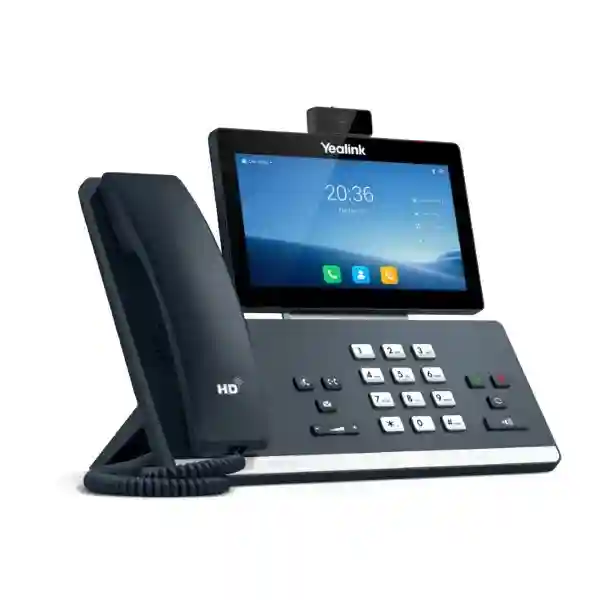
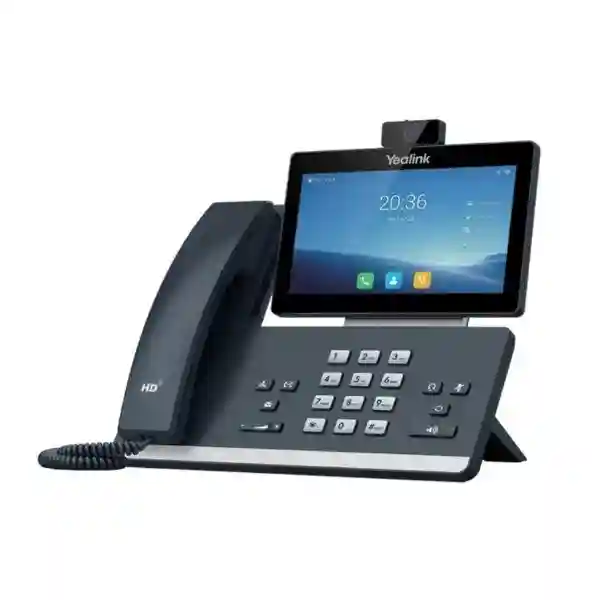
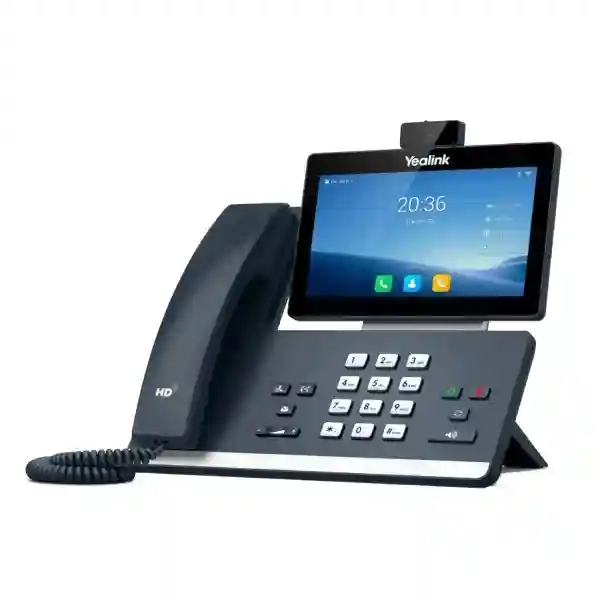
Yealink SIP-T58W Pro with Camera Tanzania
The Yealink SIP-T58W Pro with Camera is an executive-class smart business phone designed for organizations that want a richer desk communication experience without abandoning the familiar workflow of a professional SIP handset. Its combination of a 7-inch adjustable capacitive touchscreen, Android 9.0 interface, CAM50 camera, Yealink BTH58 Bluetooth handset support, built-in dual-band Wi-Fi, Bluetooth 4.2, dual Gigabit Ethernet and Power over Ethernet makes it a versatile endpoint for modern IP telephony projects. For Tanzanian businesses planning new PBX deployments, executive-office upgrades, branch standardization or mixed voice-and-video communication, this model provides a practical bridge between a traditional desk phone and a more collaborative desktop communication device.
What the Yealink SIP-T58W Pro with Camera is designed to solve
Many businesses reach a point where entry-level IP phones no longer match the way senior staff, reception teams and customer-facing departments work. Users may need to manage several SIP identities, handle frequent transfers, monitor colleagues, participate in video conversations, connect headsets, move away from the desk while remaining on a call, or interact with video door entry systems. The SIP-T58W Pro with Camera addresses those requirements in one desktop platform. Yealink positions it as an elite desktop collaboration device, and the official specification confirms support for up to 16 SIP accounts, up to three-party video conferencing, up to ten-party mixed video and audio conferencing with up to two video calls, and expansion through as many as three EXP50 modules.
The key purchasing question is therefore not simply whether the phone has more features than a basic SIP endpoint. Buyers should consider whether those features map to actual user roles. An executive who frequently moves around a private office can benefit from the BTH58 Bluetooth handset. A receptionist can value expansion modules for monitored extensions. A manager working with remote branches can use the integrated camera for direct visual communication. Security or facilities staff may value the supported door-phone functions such as preview, one-button open and monitoring when integrated with compatible systems. Selecting the model for the right users can improve adoption while avoiding unnecessary cost at desks that only need basic calling.
Android smart interface
Android 9.0 provides a modern application-oriented environment and a touch workflow that can be more intuitive for users moving beyond keypad-only phones.
HD voice and video
Yealink Optimal HD audio, Noise Proof Technology and the CAM50 camera support clearer desk communication for voice calls and 720p30 video sessions.
Wireless freedom
The Pro configuration supports the BTH58 Bluetooth handset, allowing users to continue a call while moving within the supported office range rather than remaining tethered to the base.
Business network readiness
Dual-port Gigabit Ethernet, PoE, Wi-Fi and centralized device-management options give IT teams several ways to fit the phone into managed voice and data environments.
Verified technical highlights
| Operating system | Android 9.0 |
| Display | 7-inch, 1024 × 600 adjustable capacitive touchscreen |
| Video | 720p30 HD video with CAM50 |
| Wireless | Built-in Bluetooth 4.2 and dual-band 2.4 GHz / 5 GHz Wi-Fi |
| SIP capacity | Up to 16 SIP accounts |
| Network | Dual-port Gigabit Ethernet with PoE support |
| USB | 2 × USB 2.0 ports for compatible headset, media and storage applications |
| Expansion | Supports up to 3 Yealink EXP50 expansion modules |
| Mounting | Desk or wall-mountable configuration |
Deployment, compatibility and buying guidance
A successful deployment begins with the voice platform rather than the handset alone. Confirm that the intended PBX, hosted SIP service or unified communications environment supports the required registration, codecs, provisioning and calling features. If the project uses PoE, verify that switch capacity and power budgets are sufficient for the number of endpoints. Where Wi-Fi will be used, test coverage at the actual desks and avoid treating wireless connectivity as a substitute for proper network design. Voice VLANs, Quality of Service and suitable firewall policy can all influence call consistency, especially at sites where voice shares infrastructure with video, cloud applications and general internet traffic.
The SIP-T58W Pro with Camera can also be considered alongside broader business communications infrastructure. The FourTeck Tanzania technology portfolio covers IP telephony, collaboration, networking, security and supporting infrastructure, which is useful when the phone is part of a larger office project rather than a standalone purchase. For regional deployments, organizations with East African sites can also review FourTeck Kenya and FourTeck Uganda for related country-specific technology planning. Multi-country buyers can use the FourTeck Africa site as a broader reference point for regional IT and communications requirements.
Before requesting a quotation, state the quantity, PBX or SIP platform, whether PoE switching is available, whether the phone will use Ethernet or Wi-Fi, the number of extensions or SIP identities needed, whether EXP50 expansion modules are required, and whether video or door-phone integration is part of the use case. This information helps distinguish a straightforward supply request from a project that needs configuration, provisioning, network changes or integration work.
Yealink SIP-T58W Pro with Camera Tanzania
For organizations in Tanzania, the Yealink SIP-T58W Pro with Camera is most relevant where desk communication must support more than basic inbound and outbound calling. Corporate headquarters, professional-service offices, hotels, hospitals, education organizations, financial teams, project offices and customer-service environments may all have users who need multiple SIP accounts, faster access to contacts and call controls, executive video communication or monitored extensions. The model’s 7-inch touchscreen can help reduce menu friction for frequent users, while the BTH58 handset capability is useful for managers who regularly move between a desk, filing area and nearby colleagues while remaining on the same conversation.
Tanzanian procurement teams should evaluate the phone as part of the complete voice path. A high-specification endpoint cannot compensate for an unstable LAN, an underpowered PoE switch, poor internet quality or an incorrectly configured SIP trunk. For new deployments, begin with user counts, extension plans, call flow, reception requirements, departmental queues and branch connectivity. Then assess whether the SIP-T58W Pro with Camera should be deployed to every user or reserved for executives, receptionists and collaboration-heavy staff while other roles use simpler models. This mixed-endpoint strategy can keep the overall solution practical without denying advanced features to users who benefit from them.
It is also important to confirm the exact bundle supplied because the product family includes closely related T58W variants. The “Pro with Camera” naming is significant: the Pro version is associated with the BTH58 Bluetooth handset, and the camera-enabled version uses the CAM50 for desk video. A quotation should therefore repeat the complete model name, quantity and any required accessories. Where the deployment connects to an existing IP PBX, provide the PBX make and version so compatibility and provisioning expectations can be reviewed before rollout. For businesses expanding across multiple Tanzanian sites, standard device templates, extension naming and VLAN policy can make later support considerably easier.
Yealink SIP-T58W Pro with Camera Dar es Salaam
In Dar es Salaam, many buyers considering the Yealink SIP-T58W Pro with Camera are likely to be planning executive-office, headquarters, hospitality, financial, logistics or customer-facing communication environments where call handling is intensive and the desk phone is used throughout the day. The touchscreen interface can be particularly useful for users who routinely navigate directories, call history, multiple lines and conferencing functions. The camera adds a visual communication option for direct business calls or internal collaboration, while the Bluetooth handset capability can support executives who need to move within an office without immediately ending or transferring a conversation.
For a Dar es Salaam deployment, network readiness deserves careful attention. Large offices often run voice, laptops, Wi-Fi, CCTV and cloud applications across the same switching environment. The SIP-T58W Pro with Camera supports Gigabit Ethernet and PoE, but the upstream design should still account for VLAN separation, switch power budgets, internet resilience and Quality of Service. Organizations using centralized PBX systems or cloud SIP services should test the configuration with representative call patterns before mass rollout. This is especially useful when users require features such as multiple SIP identities, transfer, busy-lamp monitoring, conferencing or extension-module integration.
Procurement teams can improve quotation accuracy by specifying whether the phones are for a new office, replacement of legacy handsets, a PBX migration or an expansion. Include expected quantities, desk locations, cabling status, available PoE ports, SIP platform and any requirement for CAM50 video, BTH58 mobility, USB headsets or EXP50 modules. If a reception area handles many extensions, an expansion module may be more relevant there than at standard user desks. If the requirement is executive collaboration, prioritize the camera, touchscreen and handset mobility. Matching the device configuration to the role produces a more coherent Dar es Salaam deployment than buying one feature set for every employee without assessing need.
Yealink SIP-T58W Pro with Camera Mwanza
Businesses in Mwanza evaluating the Yealink SIP-T58W Pro with Camera may be looking for a premium endpoint for branch leadership, administrative teams, healthcare offices, education management, distribution operations or commercial organizations that need reliable communication with contacts in other Tanzanian cities. The phone’s multi-account SIP capability can be useful where one user handles more than one business identity or where branches are tied into a centralized voice platform. The 7-inch touchscreen provides a more visual control surface than conventional keypad-centric phones, making it easier for frequent users to work with contacts, call lists and feature menus.
For Mwanza sites connected to a central PBX elsewhere, wide-area connectivity becomes a key part of the design. The handset may be feature-rich, but call quality still depends on routing, latency, packet loss, bandwidth, firewall policy and SIP configuration. If the site uses VPN connectivity back to a central office, the voice design should be tested under realistic traffic conditions. If it connects directly to a hosted SIP provider, make sure the firewall and NAT behavior are understood. Where electricity and network continuity are important operational concerns, include the PoE switch, UPS and internet path in the communication plan rather than focusing only on the endpoint.
A sensible procurement approach is to identify which users genuinely need the Pro with Camera feature set. Senior managers, branch directors and users involved in regular remote collaboration may benefit from the camera and wireless handset. Staff who only need standard extension calling can often be served by simpler phones within the same overall system. This role-based selection can reduce project cost while keeping advanced functions where they add business value. For quotation preparation, list extension quantities, preferred connection method, current PBX, required accessories and whether remote provisioning is expected. A structured device list also helps when the Mwanza deployment needs to remain consistent with Dar es Salaam or other branch standards.
Yealink SIP-T58W Pro with Camera Arusha
In Arusha, the Yealink SIP-T58W Pro with Camera can fit organizations that combine local operations with frequent communication to national and international partners. Hospitality groups, tour operators, professional offices, regional organizations, training centers and multi-branch businesses may value a desk endpoint that supports standard SIP telephony while also providing video, touchscreen control and a Bluetooth handset option. The ability to register multiple SIP accounts can be useful where users work across several lines or departments, provided the PBX and service configuration are designed to support those workflows cleanly.
Hospitality and customer-service environments should pay particular attention to call flow rather than simply the phone model. Reception, reservations, administration and management often have different needs. A front desk may prioritize monitored extensions and fast transfers, making EXP50 expansion support relevant. A manager may prioritize wireless handset freedom and video. Administrative users may need access to several accounts or directories. Mapping those roles in advance helps determine where SIP-T58W Pro with Camera units add value and where other endpoints can be used. It also informs how many PoE ports, switch uplinks and network segments should be allocated.
For an Arusha quotation, provide details of the existing voice platform, whether the building has structured cabling, whether Wi-Fi connectivity is intended, and whether the phones will share network infrastructure with guest Wi-Fi, CCTV or property-management systems. Voice traffic should be protected from avoidable congestion through suitable LAN design and QoS. If video calls are expected, internet capacity and stability become even more important. Buyers replacing analog systems should also account for PBX migration, number routing, training and endpoint provisioning. The most effective deployment is one where the phone’s capabilities are matched with a planned network and a clear operational workflow rather than treated as an isolated purchase.
Yealink SIP-T58W Pro with Camera Dodoma
Organizations in Dodoma considering the Yealink SIP-T58W Pro with Camera may include administrative offices, institutions, professional firms, project teams and businesses that require dependable desk communication with colleagues across Tanzania. The phone is well suited to users who handle frequent calls, manage more than one SIP account or need a premium interface for daily communication. The integrated video capability can support direct visual conversations from the desk, while the BTH58 Bluetooth handset arrangement provides additional mobility for users who do not want to remain physically attached to the base throughout long calls.
A Dodoma deployment should be planned with the same discipline as any business-critical communications project. Begin by deciding whether the phone will register directly to a cloud SIP platform, a local IP PBX or a central system in another city. Confirm how extensions are numbered, how inbound calls are routed, which users need voicemail, transfer, conferencing and multiple line appearances, and whether reception requires expansion modules. Then check network conditions: Ethernet cabling, PoE availability, VLAN policy, firewall rules, internet resilience and UPS protection. These dependencies determine whether the advanced endpoint can perform consistently.
For public-facing or multi-department organizations, standardization can simplify support. Naming conventions, configuration templates, firmware policy and documented port assignments help technicians understand how each device is intended to work. The SIP-T58W Pro with Camera supports centralized device-management options, which can be valuable when a deployment grows beyond a small number of phones. Buyers should still verify the exact management method used in their environment and avoid assuming that every third-party application or PBX feature will behave identically. A detailed request for quotation should include the exact model name, quantity, current PBX or intended service, accessories, installation scope and any requirement for configuration or user handover.
Yealink SIP-T58W Pro with Camera UAE
For UAE-based offices and regional companies standardizing communications across the Middle East and Africa, the Yealink SIP-T58W Pro with Camera can serve as an executive or high-feature SIP endpoint within a broader unified communications design. The combination of touchscreen control, CAM50 video, BTH58 handset support, Gigabit networking and PoE makes the phone appropriate for senior users who expect a modern desktop experience. Multi-account support can also help environments where one handset is associated with several lines, business identities or service roles, subject to the way the PBX or hosted platform is configured.
UAE projects often involve office moves, fit-outs, multi-floor headquarters or links to overseas branches. In those cases, endpoint selection should happen alongside structured cabling, switching, Wi-Fi, firewall and PBX planning. The phone’s PoE capability can reduce desk power complexity when suitable switches are available, while dual Gigabit Ethernet can help maintain wired connectivity in locations where the phone and workstation share the desk network path. However, switch power budgets, VLAN tagging, QoS and security policy still need to be engineered for the number of users and traffic profile.
When purchasing for a UAE office that must remain consistent with Tanzania, Uganda, Kenya or other branches, document a standard endpoint matrix. Define which roles receive the SIP-T58W Pro with Camera, which accessories are standard, how accounts are provisioned and what settings are centrally controlled. This prevents regional sites from drifting into incompatible configurations. Procurement requests should also distinguish between hardware supply and a complete voice project that may include PBX configuration, SIP trunk coordination, number plans, migration, training and post-deployment support. Clear scope definitions make cross-border purchasing and deployment decisions easier to evaluate.
Yealink SIP-T58W Pro with Camera Uganda
In Uganda, the Yealink SIP-T58W Pro with Camera is relevant to organizations that need a premium desk phone for executives, reception teams, managers and employees who combine conventional SIP calling with frequent collaboration. The 7-inch adjustable touchscreen gives users a large visual interface, while the built-in Wi-Fi and Bluetooth capabilities provide more deployment flexibility than a strictly wired phone. The BTH58 handset support is particularly useful for private offices where a user may need to walk to nearby cabinets, colleagues or documents without abandoning an active call.
For nationwide or branch-based Ugandan deployments, organizations should first decide whether call control is centralized or local. A centralized PBX can simplify administration but places greater importance on WAN connectivity between sites. A cloud SIP service can reduce local equipment but still depends on internet quality and firewall behavior. In either case, the phone’s capabilities should be validated against the chosen platform. Multi-account registration, conferencing, provisioning and any planned door-phone integration should be tested with the actual environment rather than assumed from generic SIP compatibility.
Buyers can also separate endpoint choice from accessory choice. Not every SIP-T58W Pro with Camera user requires an EXP50 module, USB headset or wall mount. Receptionists may benefit from expansion keys; executives may prioritize the Bluetooth handset and camera; other staff may use the phone primarily for high-quality voice. Capturing these role differences in the bill of materials avoids over-ordering accessories. For businesses with operations in both Uganda and Tanzania, using consistent device names, firmware policy and configuration templates can improve maintainability. Quotations should identify the number of phones, accessory requirements, PBX platform, connectivity method, provisioning scope and whether installation or user training is required.
Yealink SIP-T58W Pro with Camera Kampala
Kampala offices often combine dense user environments, reception activity, customer communication and connectivity to multiple branches. The Yealink SIP-T58W Pro with Camera can be deployed selectively for executives, team leaders and front-desk users who need more capability than a standard desk phone. Its touchscreen provides quick access to communication functions, while support for up to 16 SIP accounts can accommodate users who manage multiple lines or identities. The camera can add direct video calling from the desk, and the BTH58 handset offers mobility within the immediate office area.
In larger Kampala sites, the network design deserves as much attention as the phone count. Voice VLANs, PoE switch capacity, structured cabling, uplink bandwidth and internet resilience should be assessed before installation. If the office already supports CCTV, Wi-Fi access points and cloud workloads, the additional voice and video traffic should be accounted for. The phone supports dual Gigabit Ethernet, which can help in wired desk environments, but that does not remove the need for careful switch and QoS configuration. For Wi-Fi use, verify coverage and capacity at each intended desk rather than relying on a general building-wide signal assumption.
Kampala procurement teams should also consider user support after deployment. A feature-rich device is most effective when users understand transfer, hold, conferencing, directories and wireless handset behavior. Administrators should maintain configuration backups, document extension ownership and record which users have cameras or expansion modules. Where hundreds of endpoints are involved, centralized management and standardized templates become more important. When requesting pricing, state whether the requirement is hardware-only, configured endpoints, an IP PBX solution or a full office communications deployment. That distinction helps suppliers align the quotation with the actual project scope and reduces ambiguity about what is included.
Yealink SIP-T58W Pro with Camera Arua
For organizations in Arua, the Yealink SIP-T58W Pro with Camera may be most useful as a premium endpoint for branch management, administration, NGOs, professional services or operations teams that depend on regular communication with Kampala and other locations. The model’s multi-account capability can support users who handle more than one line or department, while the touchscreen simplifies interaction with richer call features. Its camera and wireless handset options can be valuable for managers who require a more flexible communication experience than a fixed basic SIP phone provides.
Branch communication quality depends heavily on the WAN path. If the Arua office connects to a PBX in Kampala or another central site, test voice traffic across the actual link and plan for packet loss, latency, VPN overhead and internet interruptions. A high-end phone cannot eliminate problems created by unstable connectivity. Where practical, apply QoS to voice traffic and keep the network documented. Power protection should also be considered because PoE phones depend on the switch and its power source; a properly sized UPS can help keep critical communication equipment operating through short interruptions.
Arua buyers can reduce deployment complexity by defining a branch standard. Specify which extension ranges belong to the site, which users receive the SIP-T58W Pro with Camera, whether cameras are enabled by policy, and whether the BTH58 handset is part of the standard kit. If the site uses reception monitoring, determine whether EXP50 modules are needed and how many keys must be displayed. For quotations, provide the current PBX platform and version, quantity of phones, connection preference, network readiness and installation scope. This allows the project to be assessed as a communication system rather than merely a box purchase and makes future expansion easier to plan.
Yealink SIP-T58W Pro with Camera Mbarara
Mbarara businesses, healthcare organizations, education institutions and regional offices can consider the Yealink SIP-T58W Pro with Camera where managers and service teams need an advanced SIP endpoint with both voice and visual collaboration capability. The phone combines a large adjustable touchscreen with camera support and a Bluetooth handset option, helping users move beyond the limitations of basic fixed desk phones. Up to 16 SIP accounts can support complex line requirements, though actual account use should always be aligned with the PBX and the employee’s operational role.
For sites that coordinate frequently with Kampala, Tanzania or other regional offices, video and voice performance should be tested across the real network. Organizations should review broadband capacity, firewall rules, SIP traversal, VPN architecture and congestion during busy periods. If the same links carry backups, surveillance video or large cloud transfers, QoS and traffic planning can protect call quality. On the LAN, PoE simplifies endpoint power, but switch capacity and UPS protection remain part of the design. Wireless operation can be convenient, but wired Ethernet may still be preferred for desks where maximum predictability is required.
The purchase decision should also consider lifecycle administration. Device inventory, extension assignments, firmware versions, user names and accessory allocations should be recorded. If the organization later adds more branches, a standardized configuration can reduce commissioning time and support inconsistency. For front desks, EXP50 compatibility may support larger monitored-extension layouts; for executives, the camera and BTH58 handset may be the more important features. A complete quotation request should therefore list user roles rather than only device quantity. That extra context helps determine whether every requested unit needs the same accessories and whether configuration, installation and training should be included.
Yealink SIP-T58W Pro with Camera Gulu
In Gulu, the Yealink SIP-T58W Pro with Camera can support branch managers, administrative teams and organizations that rely on structured communication with offices in other cities or countries. The handset is especially relevant when users spend a large portion of the day handling calls and need a more capable user interface. The touchscreen, camera and Bluetooth handset support create a desktop experience that can cover voice calls, selected video interactions and greater freedom of movement. Multiple SIP accounts also make the model suitable for users who need access to more than one identity or service line.
Where a Gulu site operates as part of a larger organization, centralized provisioning and consistent network policy can simplify support. IT teams should document how phones receive configuration, which VLAN carries voice, what QoS settings are applied and how remote troubleshooting is performed. If phones register through a VPN or over the public internet, firewall and NAT behavior must be tested carefully. Video calls increase bandwidth requirements compared with ordinary voice, so they should be included in capacity planning rather than treated as an occasional exception.
Procurement should distinguish between availability of the physical phone and readiness of the communication platform. Before ordering large quantities, validate the SIP-T58W Pro with Camera on the intended PBX or hosted service and confirm the required feature set. Identify whether users need headsets, EXP50 modules, wall mounting or only the standard desk arrangement. For organizations expanding from Kampala or operating across borders, keeping a common phone family can simplify user familiarity, but the local network at each site must still be assessed independently. A well-prepared request should include quantity, PBX details, network topology, accessory list and configuration expectations so the resulting solution matches the operational environment.
Yealink SIP-T58W Pro with Camera Kenya
Kenyan organizations evaluating the Yealink SIP-T58W Pro with Camera often have established VoIP environments and may be replacing earlier-generation desk phones, extending branch systems or standardizing executive endpoints. The model’s 7-inch screen, CAM50 camera, BTH58 handset support and multi-account capacity make it suitable for decision-makers and users with complex call handling. The availability of dual Gigabit Ethernet and PoE also fits conventional enterprise desk deployment where the phone participates in a managed wired network and may share the desk path with a workstation.
For Nairobi headquarters and nationwide branch deployments alike, compatibility testing is critical. SIP is a widely used standard, but platform-specific features, provisioning methods and application behavior can vary. Test registration, transfer, voicemail access, directory behavior, conferencing and any required busy-lamp functions with the actual PBX. If EXP50 modules are planned, confirm how monitored extensions will be laid out. If video is important, confirm that the intended calling workflow supports it end to end rather than assuming the camera alone guarantees interoperable video communication.
Cross-border organizations operating in Kenya and Tanzania can benefit from a shared endpoint strategy, but they should still account for separate telecom services, local connectivity and site infrastructure. Maintain a common naming convention and provisioning baseline, then adapt trunk, number and routing settings to each market. Procurement requests should include quantities by location, intended user roles and accessory needs. This makes it easier to distinguish executive phones from receptionist configurations and standard-user devices. Organizations should also decide whether they need supply only or a broader engagement covering PBX configuration, VLANs, PoE switching, installation, testing and training.
Yealink SIP-T58W Pro with Camera Kuwait
In Kuwait, the Yealink SIP-T58W Pro with Camera can be considered for executive offices, professional services, customer-care departments and organizations that want a premium SIP desk endpoint with integrated visual communication. The touchscreen is useful for frequent users who interact with directories, multiple lines and call controls throughout the day. The CAM50 supports 720p30 HD video, while the Pro configuration’s BTH58 handset support allows users greater freedom around a private office or nearby workspace. Dual-band Wi-Fi and Bluetooth add connectivity options beyond the traditional wired desk setup.
Businesses in Kuwait that maintain branches or partners across Africa can also use the device as part of a standardized cross-regional telephony plan. A shared handset model can simplify training and administration, but network and SIP service differences between countries still need to be accounted for. Define central standards for firmware, security, extension naming and user roles, while allowing local settings for SIP trunks, dial plans and emergency calling requirements. Where headquarters connects to remote sites over VPN, voice and video traffic should be tested for latency and congestion.
A quotation request should clearly state whether the requirement is for individual phones or a managed communications deployment. If phones are being added to an existing PBX, include its make, model or software version and the number of available licenses if relevant to that platform. If the project is new, provide expected user count, line capacity, receptionist requirements, call recording needs and branch connectivity. Also indicate whether PoE switching is already installed. This level of detail allows the SIP-T58W Pro with Camera to be evaluated in context and avoids purchasing advanced endpoints without the infrastructure needed to use them effectively.
Yealink SIP-T58W Pro with Camera Ghana
Ghanaian businesses considering the Yealink SIP-T58W Pro with Camera may be looking for a high-feature phone for executives, reception teams and users who frequently communicate across branches. The touchscreen, camera and Bluetooth handset support make it a strong candidate for roles that combine standard telephone duties with richer collaboration. Up to 16 SIP accounts provide flexibility for users who manage multiple identities or shared lines, provided the chosen PBX supports the desired behavior. PoE and Gigabit Ethernet also make the device suitable for managed office networks.
For Accra headquarters or multi-site deployments, start with the voice architecture. Decide whether call control is hosted, on-premises or centralized in another country. Review internet resilience, SIP trunk design, VLAN configuration and switch power capacity. Video communication places additional demand on the network, so organizations intending to use the CAM50 regularly should consider bandwidth and traffic prioritization. If Wi-Fi operation is planned, verify coverage and roaming behavior at the actual endpoint locations and avoid assuming a general office WLAN is automatically suitable for critical voice.
Procurement teams can improve value by matching the device to the job role. A senior manager who values mobility and video may justify the Pro with Camera. A receptionist may need the same base phone plus one or more EXP50 modules. Standard office staff may require simpler endpoints. Capturing those distinctions allows the bill of materials to reflect real working patterns. For regional organizations with Tanzania and Ghana operations, a consistent Yealink endpoint strategy can simplify user training and configuration templates. Still, local number plans, SIP providers and support procedures should be documented separately for each country before deployment.
Yealink SIP-T58W Pro with Camera Nigeria
In Nigeria, the Yealink SIP-T58W Pro with Camera can suit corporate offices, financial and professional-service firms, technology companies, logistics operations and multi-branch organizations where selected users require a premium desktop phone. The 7-inch display gives a larger interaction surface for users who work with frequent calls, directories and line functions. The camera adds video capability, while the BTH58 Bluetooth handset arrangement can improve freedom of movement for senior staff. The phone’s multi-account capacity is useful where a single user operates several SIP identities, extensions or departmental lines.
Large Nigerian deployments should be designed around scalability. Hundreds of phones require repeatable provisioning, documented extension mapping, firmware policy and a clear process for replacement devices. The network should provide appropriate PoE capacity, VLAN separation and QoS, and internet paths should be evaluated for hosted or branch-to-headquarters SIP traffic. Where dual internet connections are used for resilience, test how active calls behave during failover and confirm whether the PBX, firewall and endpoints recover as expected. The endpoint itself is only one part of that continuity design.
Buyers should also define which advanced functions are needed before setting a company-wide standard. Video may be important for executives but unnecessary at most desks. Expansion modules may be critical for receptionists but irrelevant to managers. Wireless handset use may be valuable in private offices but unsuitable in some shared environments. By allocating features according to user role, organizations can create a mixed phone estate that is easier to justify financially. A complete quotation request should list quantities by role, PBX platform, accessory requirements, expected installation scope and whether the project includes network configuration or only endpoint supply.
Yealink SIP-T58W Pro with Camera Seychelles
For organizations in Seychelles, the Yealink SIP-T58W Pro with Camera can be a useful premium endpoint in hospitality, corporate administration, financial services, professional offices and organizations that depend on international communication. The visual touchscreen interface supports frequent business users, while the CAM50 provides desk video for selected calls. The Bluetooth handset capability can be particularly convenient in executive offices where users need to move within the room while remaining connected. Multiple SIP account support can also help businesses operating several numbers or service identities from one desk.
Island deployments often place additional emphasis on reliable remote support and well-documented configurations. Businesses should record extension assignments, SIP account details, network ports, VLANs, firmware versions and accessory allocations. If a replacement device is needed later, that documentation helps restore service more quickly. Internet-dependent voice services should also be evaluated for bandwidth, latency and resilience. If video will be used regularly, include that traffic when assessing capacity rather than sizing only for voice calls. PoE switching and UPS protection can help simplify and stabilize the endpoint environment.
Hospitality operators should separate guest-facing, front-desk and management requirements. Reception may need monitored extensions and therefore benefit from EXP50 support, while management users may value the camera and BTH58 handset. Other areas may require different phone types entirely. This role-based approach avoids forcing one model into every location. For procurement, specify whether the request is for supply to one property, a group of sites or a regional standard that must match systems in Tanzania or elsewhere. Include PBX details, user quantities, accessories, installation expectations and network readiness so the quotation reflects the whole communication requirement.
How to choose the right Yealink T58W configuration
The T58W family contains closely related variants, so buyers should pay attention to the complete product name rather than assuming every T58W bundle is identical. The SIP-T58W Pro with Camera is the configuration intended here. Official Yealink material identifies the Pro with Camera model with the BTH58 Bluetooth handset and the CAM50 camera. If wireless handset use or desk video is essential, ensure those elements are explicitly listed in the quotation and packing expectations. If they are not required, another T58W family configuration may meet the use case at a different cost point.
When comparing alternatives, use a role-based checklist: number of SIP accounts, need for video, requirement for cordless handset mobility, number of monitored extensions, preferred wired or wireless network connection, USB headset use, PoE availability, wall-mount needs and PBX provisioning method. These criteria are more useful than choosing solely by screen size or product tier because they connect the device specification to actual business operations.
Quotation checklist
To receive a more accurate proposal, prepare the following information before requesting pricing:
Frequently asked questions
Does the Yealink SIP-T58W Pro with Camera support Wi-Fi?
Yes. Yealink specifies built-in dual-band 2.4 GHz and 5 GHz Wi-Fi. For business voice use, the wireless network should still be assessed for coverage, congestion and stability at the actual desk location.
How many SIP accounts are supported?
The official specification lists support for up to 16 SIP accounts. Actual line behavior and advanced features depend on the PBX or hosted SIP platform used.
Does it support Power over Ethernet?
Yes. The phone has dual-port Gigabit Ethernet and supports PoE. Confirm that the network switch has sufficient PoE capacity for the full deployment.
What camera is used with this model?
The camera-enabled model uses Yealink CAM50. Official information specifies 720p30 HD video and identifies the CAM50 as part of the camera version’s configuration.
Can it be used by receptionists?
It can be suitable for reception use, particularly because it supports multiple SIP accounts and up to three EXP50 expansion modules. The correct choice depends on how many extensions, line keys and call-handling functions the reception desk must monitor.
Is the SIP-T58W Pro with Camera suitable for executives?
Yes. Its large touchscreen, video capability, multi-account support and BTH58 Bluetooth handset support make it especially relevant to executives and professionals who use the desk phone heavily. The final decision should still be based on PBX compatibility and the user’s actual workflow.
Decision recap
Choose the Yealink SIP-T58W Pro with Camera when the user needs a premium SIP desktop experience with a 7-inch touchscreen, HD video, BTH58 wireless handset capability, built-in Wi-Fi and Bluetooth, PoE networking and support for a large number of SIP accounts. It is particularly well suited to executives, managers, reception positions and collaboration-heavy roles. For large deployments, confirm the PBX, provisioning method, network readiness and accessory requirements before finalizing quantities.
Consult FourTeck Tanzania about your IP phone requirement
Share your quantity, location, PBX platform, network details and required accessories to discuss a suitable Yealink SIP-T58W Pro with Camera deployment. For a new VoIP project, include expected user count, call flow, reception requirements, branch connectivity and whether you need supply only or assistance with configuration and installation. For an existing PBX, include its make and version so the endpoint requirement can be evaluated in the correct technical context.




Reviews
There are no reviews yet.