
Yealink UVC30 Content Camera Tanzania
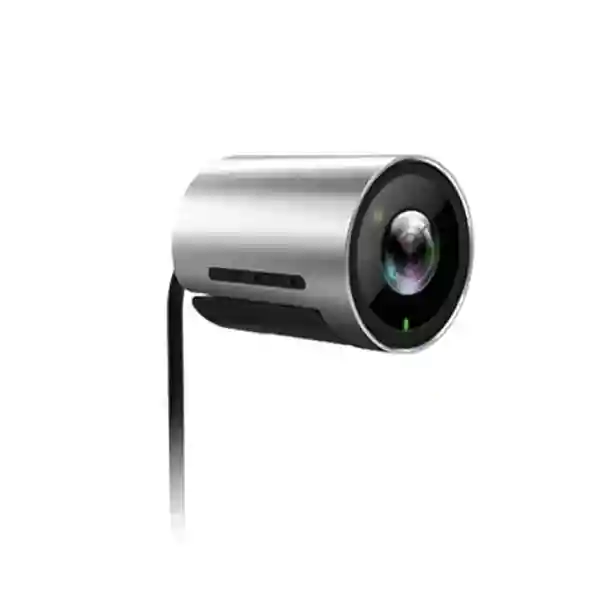
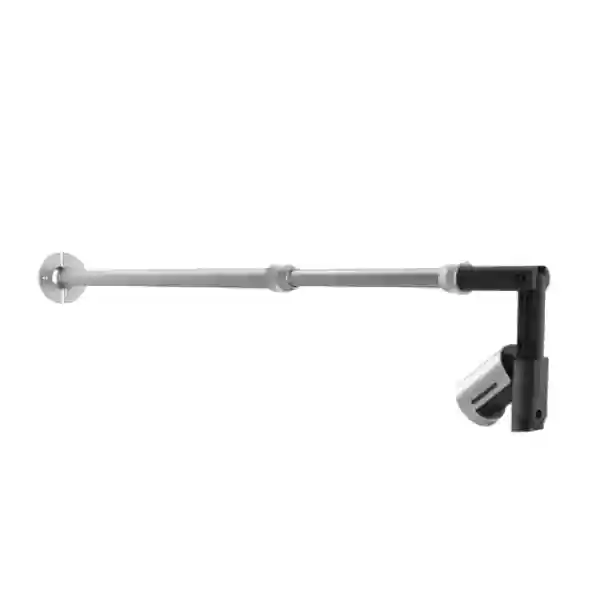
The Yealink UVC30 Content Camera is designed for organisations that want to bring a familiar physical whiteboard into a Microsoft Teams Rooms meeting without asking presenters to change how they brainstorm, teach or explain. Yealink positions the kit for Microsoft Teams Rooms on Windows, combining the UVC30 Room camera with a length-adjustable wall-mounting bracket so the camera can be positioned above a traditional whiteboard and used as a dedicated content source. The official specification lists a 4K content camera, a 120-degree diagonal field of view and applicability to whiteboards approximately 6 to 9 feet wide. This makes the product especially relevant to boardrooms, training rooms, classrooms, project rooms and collaboration spaces where marker-board work remains part of everyday meetings.
For buyers in Tanzania, the important purchasing question is not simply whether a camera can produce a sharp image. A content-camera deployment must also match the room layout, whiteboard size, Microsoft Teams Rooms configuration, cable route, mounting surface, display arrangement and the workflow of presenters. Fourteck Tanzania can help procurement and IT teams review those practical dependencies before quotation. Start with the Fourteck Tanzania technology shop for purchasing context, review the integrated IT and collaboration services for deployment planning, or use the Tanzania contact page to request a quotation.
4K whiteboard capture
The kit uses the UVC30 Room camera as a 4K content camera, giving Teams Rooms a high-resolution source for capturing marker-board writing and diagrams.
120° diagonal view
The official kit specification states a 120-degree diagonal field of view, useful when the mounting position must cover a broad whiteboard area from above.
Adjustable wall bracket
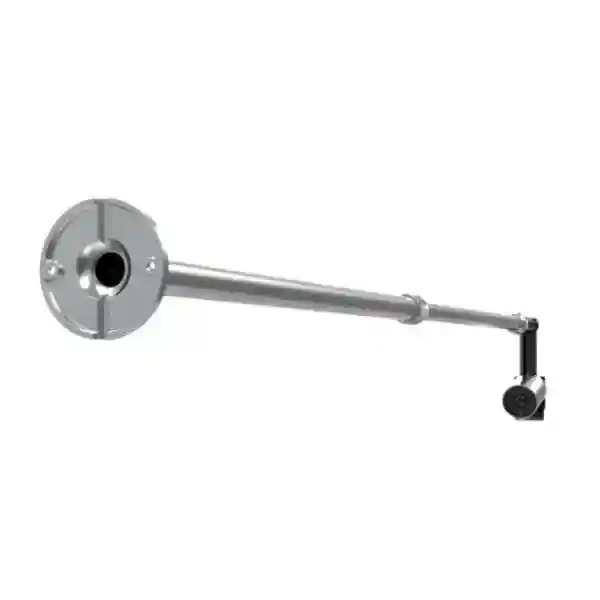
A length-adjustable wall-mount bracket is included so installers can adapt the camera position to whiteboards within the supported 6–9 ft width range.
What the Yealink UVC30 Content Camera solves
Hybrid meetings often create a gap between people standing at a physical whiteboard and colleagues joining remotely. A room camera may show the presenter and the room, but it may not give remote participants a clean, dedicated view of handwritten content. The UVC30 Content Camera is intended to close that gap by turning the existing board into a Teams Rooms content source. In the supported Microsoft Teams Rooms on Windows workflow, the UVC30 can be configured as the content camera so users can switch to the board feed when they need to share drawings, notes, calculations, process maps or workshop outputs.
The product should therefore be evaluated as part of a complete meeting-room design. The whiteboard must be within the supported size range, the bracket needs a suitable wall or mounting surface, the camera and Teams Rooms compute need a practical cable path, and the front-of-room display should be positioned so that local participants can still collaborate comfortably. Audio remains a separate design requirement, which is why buyers can also review Fourteck Tanzania guidance on video and audio conferencing solutions and the broader service catalogue.
Verified technical highlights
| Product role | Content/whiteboard camera kit for Microsoft Teams Rooms on Windows |
| Camera | Yealink UVC30 Room camera |
| Content resolution | 4K |
| Diagonal field of view | 120° |
| Whiteboard applicability | 6–9 ft width |
| Included mounting | Length-adjustable wall bracket plus necessary screws/accessories |
| General UVC30 Room characteristics | 4K30 video output, 3x digital zoom, EPTZ and wide dynamic range are listed for the UVC30 Room platform; some normal camera functions are not available when configured specifically as a Teams content camera. |
A useful deployment distinction is that Yealink documentation notes the UVC30 Room can be used as a normal meeting-room camera or as a content camera. When configured for content-camera duty, functions such as PTZ control, presets, people counting and auto-framing are not used in the same way as normal room-camera operation. Buyers should therefore decide whether the device is being purchased primarily for whiteboard capture or for general participant video, because the operational role affects configuration and expectations.
Compatibility, room planning and procurement guidance
The UVC30 Content Camera is most appropriate where the organisation already uses, or is deploying, a Microsoft Teams Rooms on Windows environment and wants to preserve an existing physical whiteboard workflow. Procurement teams should confirm the exact Teams Rooms platform, available USB connectivity, mounting height, board width and cable routing before ordering. If the meeting room is being built from the ground up, camera placement should be coordinated with the front display, table, microphones, room controller and lighting rather than installed as an isolated accessory. Strong backlighting, reflective boards and poor marker contrast can reduce legibility even when the camera itself is capable of high resolution.
For broader meeting-room projects, the UVC30 can sit alongside displays, audio devices and the Teams Rooms compute as one element of the collaboration system. Fourteck Tanzania describes meeting-room projects in terms of room size, seating layout, acoustics, camera framing, microphone pickup, display visibility and network quality. That design approach is relevant here because a content camera delivers the most value when the entire room is easy to operate. Procurement teams may also review the Fourteck Tanzania company overview to understand the integrated project approach.
Regional availability, planning and buying guidance
Yealink UVC30 Content Camera Tanzania
Organisations searching for the Yealink UVC30 Content Camera in Tanzania are often trying to solve a practical hybrid-collaboration problem: the meeting room has a physical whiteboard that people use naturally, but remote participants cannot follow the writing clearly. The UVC30 kit is relevant when a Microsoft Teams Rooms on Windows environment is already central to the room strategy and the organisation wants to add a dedicated 4K whiteboard view. In Tanzania, suitable use cases can include executive boardrooms, project offices, universities, training centres, consulting rooms and operations teams that routinely sketch processes or annotate diagrams during meetings. Before requesting a quotation, confirm the whiteboard width, mounting surface, approximate camera-to-board geometry and whether the room already has a Yealink MVC or another supported Microsoft Teams Rooms on Windows configuration.
The 6–9 ft whiteboard guidance is particularly important because the adjustable bracket is designed around that practical range rather than arbitrary room sizes. A quotation request should therefore include board dimensions, room photographs or drawings when available, the existing Teams Rooms hardware, display quantity and any cabling constraints. The camera is only one part of the experience: remote participants also need clear audio, while local users need a screen placement that does not force them to turn away from the board. Network stability matters because Teams meetings depend on consistent internet performance even though the content camera itself is locally connected. Buyers planning a full collaboration refresh can use the Fourteck Tanzania shop to frame associated equipment requirements and the services page for installation and integration planning. For purchasing, share the exact model name, quantity, city, Teams Rooms setup and desired deployment timing rather than asking only for a generic webcam price. That creates a quotation that reflects the actual room rather than a disconnected device.
Yealink UVC30 Content Camera Dar es Salaam
For businesses in Dar es Salaam, the UVC30 Content Camera is a useful option for headquarters meeting rooms, professional-services firms, financial teams, logistics companies and regional offices that collaborate frequently through Microsoft Teams while still relying on physical whiteboards. A Dar es Salaam deployment should begin with room-use analysis rather than the camera specification alone. Determine whether the whiteboard is used by one presenter at a time, by workshop groups, or as a persistent planning surface throughout the day. The camera’s 120-degree diagonal field of view helps cover the board, but installation position and board width still determine whether writing remains comfortably inside the captured frame.
Corporate meeting rooms in Dar es Salaam may also have glass partitions, bright windows, large front displays and existing AV furniture. Those factors should be reviewed because lighting and mounting geometry influence capture quality. If the board is opposite a strong window, room lighting adjustments or blinds may improve readability. If the Teams Rooms compute is located inside a rack or behind a display, the USB cable path and any approved extension method should be planned before the wall bracket is fixed. A procurement request should list the board width, the exact Teams Rooms model, room photos, display arrangement and whether the UVC30 is intended only for content or might be used as a normal room camera at other times.
Where a company is standardising several rooms across Dar es Salaam, consistent mounting height, naming, cabling and Teams settings can reduce support effort. The goal is for users to enter, start the Teams meeting and switch to whiteboard sharing without reconfiguring devices. For broader meeting-room infrastructure, Fourteck Tanzania’s home page collaboration portfolio explains how video, audio, networking and displays fit together, while the contact page can be used to request a Dar es Salaam quotation based on the actual room requirements.
Yealink UVC30 Content Camera Mwanza
In Mwanza, organisations considering the Yealink UVC30 Content Camera may include branch offices, education providers, engineering teams, NGOs, healthcare administrators and businesses that need reliable collaboration with colleagues in other Tanzanian cities or outside the country. The product is particularly useful when teams already use a physical board for planning or teaching and want remote participants to see that content as a dedicated Teams Rooms source. Rather than replacing the board with a digital display, the UVC30 approach allows an organisation to retain a familiar marker-board workflow while adding remote visibility.
Room planning should focus on practical constraints. Confirm whether the board is between 6 and 9 feet wide, whether there is a suitable wall area above it for the adjustable bracket, and whether the cable can be routed neatly back to the Teams Rooms system. If a room is used for training, make sure the camera view is not blocked by ceiling fixtures or signage. If the room doubles as a normal boardroom, ensure the UVC30 installation does not interfere with the primary participant camera. Audio pickup also needs separate attention; a whiteboard camera does not replace a microphone system. In a larger room, remote participants may see the board clearly but still struggle if the presenter’s voice is distant, so microphone coverage and acoustics should be part of the quotation.
For multi-site organisations with Mwanza offices and other branches, the UVC30 can be standardised with a documented mounting and configuration template. That makes future rooms easier to support because the role of each device and cable is clear. Include the exact whiteboard dimensions, room photos, Teams Rooms platform, display type and quantity in your request. This reduces uncertainty and helps procurement compare complete deployment scope rather than only unit price. Buyers can also review Fourteck Tanzania’s integration services for a wider view of room, network and lifecycle considerations.
Yealink UVC30 Content Camera Arusha
Arusha organisations often work with distributed teams, international partners, training programmes, hospitality groups and project-based operations, all of which can make clear hybrid collaboration valuable. The Yealink UVC30 Content Camera can fit a meeting-room design where a physical whiteboard remains important for planning sessions, workshops and briefings. Its purpose is not to act as a generic webcam; it is to give Microsoft Teams Rooms on Windows a dedicated whiteboard capture source. The official kit combines the UVC30 Room camera, 4K content capture, a 120-degree diagonal field of view and a length-adjustable bracket intended for 6–9 ft boards.
For an Arusha deployment, inspect the board wall before equipment is ordered. The mounting surface must be appropriate for the bracket and screws, and the board should have enough clearance above it for the camera position. Lighting can be critical in training spaces where bright daylight may strike the board. Matte board surfaces, strong marker contrast and controlled glare help the high-resolution camera deliver a more useful image. The Teams Rooms compute should also have a planned connection path to the camera; visible loose cables across a training room are both untidy and difficult to maintain.
Procurement teams should ask whether the room needs only whiteboard capture or a complete collaboration refresh. A full design may include the primary meeting camera, microphones, speakers, controller, displays, network connectivity and the content camera. If international participants join frequently, stable internet and disciplined room operation can matter as much as the camera specification. For organisations with sites elsewhere in East Africa, the broader Fourteck Africa technology network may also be relevant to standardisation discussions, while Tanzania-specific enquiries should still use the verified local contact page.
Yealink UVC30 Content Camera Dodoma
In Dodoma, the Yealink UVC30 Content Camera may suit government-related offices, professional organisations, education environments, associations and corporate branches that need to share physical whiteboard work through Microsoft Teams Rooms. Teams often reach for a board when explaining a process, policy, project plan or training subject because writing by hand remains fast and natural. A dedicated content camera helps extend that familiar workflow to people joining remotely without requiring every presenter to learn a separate digital whiteboarding process.
A correct Dodoma deployment starts with the supported use case and room dimensions. The UVC30 Content Camera kit is intended for Microsoft Teams Rooms on Windows and supports whiteboards around 6–9 ft wide. The adjustable wall bracket provides positioning flexibility, but the installer still needs adequate clearance above the board and a stable wall surface. The camera should capture the whole writing area without unnecessary ceiling or wall space. The Teams Rooms settings must identify the UVC30 as the content camera, and organisations should understand that the camera’s normal room-camera features are not all used when it is operating in this content role.
For procurement, provide a simple room data sheet: board width and height, mounting-wall material, distance to the Teams Rooms compute, existing primary camera and audio system, display layout, quantity of rooms and desired installation scope. That information is more useful than a price-only request because it reveals whether accessories, cable routing or room adjustments are required. If the organisation expects to roll out the same solution in several Dodoma offices, documenting the mounting position, cable labels and Teams configuration will make support more consistent. Fourteck Tanzania’s about page describes the broader integrated-technology approach that can be applied to these meeting-room deployments.
Yealink UVC30 Content Camera UAE
UAE organisations searching for the Yealink UVC30 Content Camera are commonly looking for a practical way to extend physical whiteboard collaboration into Microsoft Teams Rooms. The kit makes sense in corporate offices, project rooms, training spaces and regional headquarters where Teams is already part of daily work but presenters still prefer a marker board for fast ideation. The UVC30 Room camera provides a 4K content source with a 120-degree diagonal field of view, while the adjustable bracket is designed for traditional whiteboards roughly 6–9 ft wide.
Because many UAE offices have purpose-built meeting spaces, glass walls and tightly integrated AV furniture, installation planning deserves attention. Confirm that the board location has a suitable mounting surface, that the camera can be positioned without interfering with ceiling services, and that cable routing to the Teams Rooms compute remains accessible for maintenance. Rooms with strong sunlight or reflective glass should be tested for glare. If a company uses a standard room template across Dubai, Abu Dhabi or other emirates, the same UVC30 layout can be documented as part of a repeatable Microsoft Teams Rooms design, provided each room’s board dimensions and geometry are suitable.
A quotation should identify whether the UVC30 is an add-on to an existing Teams Room or part of a new room build, since the supporting hardware and labour differ. For UAE-specific integrated IT, telecom and meeting-room requirements, buyers can review Fourteck UAE. Multi-country organisations that want the same collaboration standard in Tanzania and the UAE can use the same procurement checklist—room dimensions, whiteboard size, Teams Rooms platform, audio design, displays, cabling and support responsibility—while still validating each local installation independently.
Yealink UVC30 Content Camera Uganda
The Yealink UVC30 Content Camera can be useful for Uganda-based organisations that conduct cross-office meetings, training sessions, planning workshops or customer discussions through Microsoft Teams. Instead of replacing a physical whiteboard, the kit captures the board as meeting content so remote participants can follow handwritten information. The product is therefore best considered by organisations already committed to Microsoft Teams Rooms on Windows or actively planning that platform. Official Yealink specifications for the content-camera kit identify 4K content capture, a 120-degree diagonal field of view and an adjustable wall bracket suitable for 6–9 ft boards.
Uganda deployments should be scoped with room conditions in mind. A large board does not automatically mean the camera can cover it from any position; board width and mounting geometry still matter. Cable routing is another practical concern because the camera must connect to the Teams Rooms system, and long or improvised USB paths can complicate reliability. If the meeting room experiences variable lighting, check the board under normal daytime and evening conditions. Marker contrast, reflections and shadows affect what remote attendees actually see.
For organisations with several branches, a repeatable checklist can help: verify the board dimensions, mounting surface, Teams Rooms hardware, primary meeting camera, microphone coverage, display location and network readiness. The content camera should be treated as one part of the room, not the entire collaboration system. Buyers can review Fourteck Uganda for country-specific technology context, while Tanzania-linked regional projects can be coordinated with the Fourteck Tanzania contact route. Procurement teams should request exact scope—including quantity, installation, configuration and testing—so competing quotations can be compared on equivalent assumptions.
Yealink UVC30 Content Camera Kampala
Kampala businesses, universities, NGOs, professional firms and regional offices may use Microsoft Teams as a primary collaboration platform while still depending on physical whiteboards for workshops and planning. The Yealink UVC30 Content Camera is relevant in that scenario because it gives a Teams Rooms on Windows system a dedicated view of the board. Rather than pointing the main participant camera toward the whiteboard and losing the normal meeting view, the content camera can be installed above the board and selected when whiteboard material needs to be shared.
In a Kampala office, room survey information can prevent avoidable installation changes. Measure the board width, identify the wall construction, note any air-conditioning units or lighting directly above the board and determine the cable distance to the Teams Rooms compute. The adjustable bracket provides flexibility for supported 6–9 ft boards, but it should not be assumed that every board location is suitable without checking. If the room has a front display on the adjacent wall, users should be able to see remote participants while still working at the board; furniture and display angles therefore form part of the user experience.
When requesting a quotation, distinguish between product-only supply and a commissioned room. A commissioned scope may include mounting, cable management, Teams Rooms configuration, content-camera selection, test calls and user handover. Audio is another independent requirement: the presenter may stand away from the table, so the microphone design should still provide adequate pickup near the whiteboard. Organisations with multiple Kampala rooms can benefit from standardising installation photos, labels and configuration notes. For regional technology planning, the Fourteck Uganda site provides a local starting point for networking, telecom and collaboration requirements.
Yealink UVC30 Content Camera Arua
For organisations in Arua, a whiteboard camera can be particularly valuable when local teams need to collaborate frequently with colleagues, donors, partners or management located elsewhere. The Yealink UVC30 Content Camera preserves the simplicity of a physical board while making that board accessible within a Microsoft Teams Rooms on Windows meeting. It is intended as a focused content-capture accessory rather than a replacement for the primary participant camera or audio system. The official kit supports 4K board capture and a broad 120-degree diagonal view, with an adjustable bracket intended for 6–9 ft whiteboards.
Arua buyers should pay attention to installation practicality and maintainability. Measure the whiteboard precisely and confirm the wall can accept the supplied mounting arrangement. Plan the cable route before installation; a neat protected path reduces the chance of accidental disconnection and makes troubleshooting easier. If the room is used for training, consider where instructors naturally stand and whether lighting produces strong shadows or glare across the board. Remote participants benefit most when writing is large, high contrast and consistently within the captured area.
Connectivity is also part of the meeting outcome even though the camera itself is a local USB device. Stable Teams calls depend on internet quality, so organisations should separate camera-related troubleshooting from network-related symptoms. A frozen remote view may not indicate a camera fault. Procurement teams can improve support by documenting the Teams Rooms compute, primary camera, audio devices, network connection and the UVC30’s dedicated content role. If the organisation is comparing alternatives, ask whether it truly needs a physical-whiteboard workflow or whether a digital interactive board would better suit the use case. The UVC30 is strongest when teams want to keep the existing board and add remote visibility with minimal behavioural change.
Yealink UVC30 Content Camera Mbarara
Mbarara organisations evaluating the Yealink UVC30 Content Camera should start by defining the meeting problem. If teams already use Microsoft Teams Rooms on Windows and regularly turn to a physical whiteboard during planning, teaching, clinical administration, project reviews or branch coordination, the content camera can make those board sessions easier for remote attendees to follow. The kit uses the UVC30 Room camera as a dedicated whiteboard source and includes a length-adjustable wall bracket. Official applicability is for whiteboards roughly 6–9 ft wide, with 4K content capture and a 120-degree diagonal field of view.
For a successful Mbarara installation, verify physical conditions before ordering. Measure the board and available wall height, check for obstructions above the board and make sure the Teams Rooms compute can be reached with a planned cable route. Consider room lighting at the actual times meetings are held. A camera can capture a high-resolution image but cannot remove every reflection from a glossy board or compensate for unreadably faint markers. Staff should also understand the difference between the primary room camera and the content camera so that meeting operation remains simple.
Procurement documents should state whether the requirement is product supply only, mounting, configuration, testing or a complete meeting-room upgrade. If installation is included, specify the wall material and whether cable containment is required. If several rooms are involved, provide an inventory of existing Teams Rooms systems and whiteboard sizes so the solution can be checked room by room. This is especially useful when one standard is intended across multiple Ugandan branches. Country-specific ICT and collaboration enquiries can be supported through Fourteck Uganda, while cross-border planning can reference the wider Fourteck network.
Yealink UVC30 Content Camera Gulu
In Gulu, the Yealink UVC30 Content Camera can support organisations that run remote training, programme coordination, project design or branch management through Microsoft Teams. Physical whiteboards remain useful because presenters can write and sketch without navigating software menus, and the UVC30 kit is intended to make that familiar surface visible to remote participants. The product is specifically positioned for Microsoft Teams Rooms on Windows, which means buyers should confirm their room platform before purchase rather than assuming the kit is a universal whiteboard camera for every conferencing application.
The physical design is straightforward but still deserves careful measurement. Yealink specifies support for 6–9 ft whiteboards, and the adjustable wall bracket is intended to help position the camera for different board sizes within that range. Check the available space above the board, structural suitability of the wall and the distance to the Teams Rooms compute. The 120-degree diagonal field of view supports broad coverage, but the final angle should be validated during commissioning. Room lighting, board cleanliness and marker quality affect the practical experience just as much as resolution.
For Gulu deployments where technical support may need to be handled remotely or by a central IT team, documentation is valuable. Label the camera connection, record the mounting position, note the Teams content-camera setting and keep a simple test procedure. If users report that the board feed is unavailable, support teams can check physical connection and Teams configuration before replacing hardware. A quotation should also clarify whether any cable extensions, installation materials or room adjustments are included. By separating product capability from site requirements, buyers can avoid treating every meeting problem as a camera problem and can build a more supportable collaboration environment.
Yealink UVC30 Content Camera Kenya
Kenya-based businesses, universities, training organisations and regional offices may find the Yealink UVC30 Content Camera useful when Microsoft Teams Rooms is established and physical whiteboards remain central to meetings. The product gives the room a dedicated board-capture function without forcing teams to move immediately to an interactive digital display. The UVC30 Room camera supplies a 4K image with a 120-degree diagonal field of view, and the kit includes an adjustable wall bracket designed for 6–9 ft whiteboards. This combination makes it suitable for structured collaboration spaces where the board is permanently mounted and regularly used.
Kenyan procurement teams should determine whether they are adding the content camera to an existing room or specifying a complete Microsoft Teams Rooms deployment. An add-on project may need only the kit, mounting work and configuration, while a new room could also require a primary participant camera, microphone system, speakers, display, controller, Teams Rooms compute and network preparation. Board position should be checked against windows and lighting to reduce glare. Cable routing should be planned so the content camera remains serviceable rather than permanently concealed behind finished walls without access.
For organisations operating in Nairobi, Mombasa or other locations and also maintaining offices in Tanzania or Uganda, a common room standard can reduce support complexity. Standardise whiteboard size where practical, document bracket placement, use consistent device naming and record the Teams Rooms settings. At the same time, each room should still be checked because wall construction and furniture differ. Buyers can review Fourteck Kenya for country-specific technology context. The strongest quotation request includes room photos, dimensions, exact Teams platform and desired installation scope rather than only the product name.
Yealink UVC30 Content Camera Kuwait
Kuwait organisations using Microsoft Teams Rooms may select the Yealink UVC30 Content Camera when teams want to continue using conventional whiteboards during hybrid meetings. The kit is designed to capture the board as meeting content, giving remote participants a clearer view than they would normally receive from a primary room camera pointed across the table. Official Yealink information identifies a 4K content camera, 120-degree diagonal field of view, adjustable wall bracket and support for 6–9 ft whiteboards. Those figures should guide room qualification before purchasing.
Meeting spaces in Kuwait may be highly finished, with concealed cabling, decorative wall panels and integrated AV furniture. That makes early coordination important. Before the bracket is mounted, confirm the wall construction, exact board dimensions, height above the board and cable path to the Microsoft Teams Rooms compute. If the room has strong artificial lighting or reflective surfaces, a commissioning test should check that writing remains readable from the remote participant’s perspective. Content-camera image quality is only one part of the result; presenters also need microphone coverage when standing away from the meeting table.
A good procurement scope separates the content camera from the complete room system. Specify whether the quote should include product supply, wall mounting, cabling, Teams configuration, test calls and user training. If the organisation has multiple meeting rooms, create a room schedule listing board width, platform, primary camera and audio arrangement. This allows consistent comparison and helps identify rooms where the UVC30 is not physically suitable. Buyers seeking regional technology support can use Fourteck Kuwait as a country-specific entry point while maintaining the same technical checklist used for other regional branches.
Yealink UVC30 Content Camera Ghana
For organisations in Ghana, the Yealink UVC30 Content Camera can add practical whiteboard collaboration to a Microsoft Teams Rooms on Windows environment. Teams that hold planning sessions, training, technical reviews or executive workshops often prefer the speed of writing on a physical board. The UVC30 kit allows that board to become a dedicated content source during a Teams meeting. Yealink specifies 4K content capture, a 120-degree diagonal field of view and an adjustable wall bracket suitable for boards in the 6–9 ft range.
Before ordering for an Accra office or another Ghana location, measure the board and assess the installation wall. Confirm that the camera can be placed above the board without interference from lighting, air-conditioning outlets or ceiling treatments. Plan the cable route to the Teams Rooms compute and decide who will be responsible for configuring the device as the content camera. The UVC30 should not be evaluated as a replacement for room audio or for the primary participant camera. Instead, it is an additional collaboration source whose value depends on the overall Teams Rooms design.
Multi-room buyers should create a standard commissioning test: verify the whole board is visible, confirm remote participants can read typical marker sizes, test switching to content-camera mode, check that the room’s primary video remains available as designed and record the final configuration. This turns a one-off accessory installation into a repeatable operational standard. A quotation request should list quantity, board dimensions, installation locations and whether configuration is required. Buyers can review Fourteck Ghana for local technology context, while organisations coordinating Ghana and Tanzania projects can keep product standards aligned across both markets without making unsupported assumptions about stock or delivery.
Yealink UVC30 Content Camera Nigeria
Nigeria organisations that depend on Microsoft Teams for hybrid work can use the Yealink UVC30 Content Camera to bring physical whiteboard sessions into remote meetings. The device is particularly relevant to consulting teams, training centres, project offices, engineering groups and corporate meeting rooms where complex ideas are often easier to draw than to describe verbally. The kit combines the UVC30 Room camera with a length-adjustable wall bracket, providing 4K content capture and a 120-degree diagonal field of view for supported 6–9 ft whiteboards.
For a Nigerian deployment, room qualification should include more than simply checking that a whiteboard exists. Measure the board, confirm wall strength and available mounting height, inspect lighting and determine how the camera cable will reach the Teams Rooms compute. If the room already has a primary camera, microphone array or video bar, the UVC30 should be added without disrupting those existing functions. During commissioning, the administrator should confirm the UVC30 is selected as the Teams content camera and test the board view from a remote participant account rather than relying only on a local preview.
In organisations with multiple offices, such as Lagos, Abuja or other business locations, deployment consistency can save support time. Standard naming and documentation help IT teams know which USB device is the board camera, where it is mounted and how it should appear in Teams Rooms. Procurement should ask suppliers to state exactly what is included: kit, wall installation, cable containment, configuration, testing and any additional room hardware. For Nigeria-focused ICT enquiries, Fourteck Nigeria provides a regional contact point. Cross-border customers can then align the same room-design principles with Tanzania projects while handling each site’s logistics separately.
Yealink UVC30 Content Camera Seychelles
Seychelles organisations such as hospitality groups, professional offices, education providers and distributed corporate teams may use Microsoft Teams to collaborate with regional or international colleagues. The Yealink UVC30 Content Camera can be useful when a meeting room already has a traditional whiteboard that participants prefer to use for planning, training or problem solving. Instead of trying to point the primary meeting camera at the board, the UVC30 can act as a dedicated Teams Rooms content source, using 4K capture and a 120-degree diagonal field of view from an adjustable wall-mounted position.
Because island deployments can make return visits and replacement logistics more consequential, planning the room carefully before equipment is ordered is worthwhile. Confirm the exact whiteboard width, wall type, mounting clearance, Teams Rooms platform and cable routing. Check whether all necessary mounting accessories are included in the proposed scope and whether the installer will test the board feed with a remote participant. If the room is in a bright hospitality or resort environment, glare and daylight should be assessed at the times the space is normally used. A high-resolution camera cannot compensate for a board that is unreadable because of reflections or very pale markers.
For organisations operating multiple properties or offices, document one approved room standard but validate each site individually. The UVC30 may be an excellent fit for a medium board in one room and inappropriate for a much larger or unusually positioned board elsewhere. Consider the complete collaboration environment, including audio pickup when presenters stand at the board, display visibility, internet stability and staff familiarity with Teams Rooms controls. Regional buyers can refer to Fourteck Africa for broader multi-country technology discussions while using the Tanzania site for Tanzania-specific procurement.
Related Fourteck Tanzania resources
Technology shop
Use the Fourteck Tanzania Shop to frame the UVC30 purchase alongside displays, conferencing equipment and other business technology categories.
Integration services
The Fourteck Tanzania Services page explains how video conferencing, audio, networking and infrastructure are considered as connected systems.
Company approach
Review About Fourteck Tanzania for the broader project and lifecycle approach behind product selection and deployment.
Integrated portfolio
The Fourteck Tanzania home page connects collaboration systems with networking, security, displays and other workplace infrastructure.
Quotation route
Use the verified Fourteck Tanzania contact page to share whiteboard dimensions, quantity, city and Microsoft Teams Rooms details for a quotation.
Only these five distinct, clearly relevant Tanzania-domain destinations were verified during this run, so additional internal URLs have not been invented simply to reach a numerical linking target.
Quotation checklist
To receive a useful Yealink UVC30 Content Camera quotation, provide the exact product name, required quantity, delivery city, whiteboard width and height, wall material, Microsoft Teams Rooms system model, primary meeting camera, audio system, display arrangement and whether you need product-only supply or installation and configuration. Add room photographs or a floor plan if available. If several rooms are involved, list each room separately because the board width and mounting conditions may differ. Also state whether cable containment, testing, user handover or integration with an existing Yealink MVC system is part of the desired scope. This prevents a quote from appearing cheaper simply because important installation dependencies are excluded.
Frequently asked questions
What is the Yealink UVC30 Content Camera used for?
It is used as a whiteboard/content camera in Microsoft Teams Rooms on Windows so a traditional physical whiteboard can be captured and shared with remote meeting participants.
Does the UVC30 Content Camera support 4K?
Yes. Yealink lists the kit as a 4K content-camera solution using the UVC30 Room camera.
What whiteboard sizes are supported?
Yealink specifies applicability to whiteboards approximately 6 to 9 feet wide. Actual room geometry and mounting position should still be checked before purchase.
Can the UVC30 be used as a normal meeting camera too?
The UVC30 Room platform can serve as a meeting-room camera, but when configured specifically as a content camera, Yealink documentation notes that normal functions such as PTZ control, presets, people counting and auto-framing are not available in the same way. Define the intended role before commissioning.
Does the kit include a mounting bracket?
Yes. The official kit includes a length-adjustable wall mount bracket, necessary accessories including screws and a quick-start guide together with the UVC30 Room camera.
What information should I send for a Tanzania quotation?
Send the quantity, city, whiteboard size, Teams Rooms system model, room photos if available and whether installation, cable routing, configuration and testing are required.
Decision recap and consultation
Choose the Yealink UVC30 Content Camera when the requirement is specifically to capture an existing physical whiteboard inside a Microsoft Teams Rooms on Windows environment. The strongest fit is a permanent meeting or training room with a 6–9 ft board, suitable wall mounting, a planned connection to the Teams Rooms compute and users who already rely on marker-board collaboration. Do not select it only because it is a 4K camera; its value comes from the dedicated content-camera workflow. Before ordering, verify room geometry, Teams compatibility, cable routing, audio coverage and the desired installation scope.
For multi-country projects, Fourteck’s regional sites—including UAE, Kenya, Uganda, Kuwait, Ghana, Nigeria and Africa—can support wider regional planning context. Tanzania enquiries should use the local contact route below.




Reviews
There are no reviews yet.