
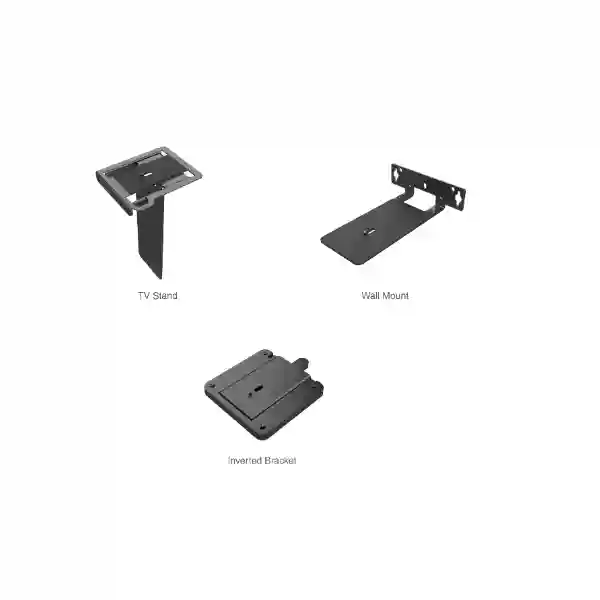
Yealink UVC8X Mount Kit Tanzania
The Yealink UVC8X Mount Kit is a purpose-built mounting accessory for supported Yealink PTZ conferencing cameras, with official Yealink compatibility information listing it for the UVC84 and UVC86 family. For organizations designing or refreshing meeting rooms, this kit provides a cleaner procurement path than trying to improvise generic camera mounting hardware. The central buying question is not simply whether a bracket can physically hold a camera, but whether the mounting approach aligns with the camera model, room geometry, display location, viewing angle, cable path and long-term maintenance plan. FourTeck Tanzania can help customers translate those practical details into a more precise quotation request.
What is the Yealink UVC8X Mount Kit?
Yealink identifies the UVC8X Mount Kit as a room-mount accessory for its UVC84 and UVC86 PTZ cameras. Yealink’s current mounting compatibility guidance also associates the UVC8X Mount Kit with ceiling-mount deployment for those camera models. That makes the accessory relevant to organizations that need a planned camera location rather than a temporary desktop arrangement. In a real meeting room, mounting affects framing, line of sight, cable routing, service access and how consistently users experience the room. A suitable mounting plan should therefore be chosen together with the camera position, screen arrangement, conference table dimensions and the direction from which participants are expected to face the camera.
For procurement teams, the UVC8X Mount Kit is best considered as part of the complete room bill of materials. Confirm the exact Yealink camera model, the proposed mounting position, the surface or structure that will carry the mount, access above or behind the display where relevant, cable reach and whether the room must support future reconfiguration. This reduces the risk of ordering a camera first and discovering later that the intended mounting position requires a different accessory or installation approach.
Verified compatibility
Official Yealink material lists the UVC8X Mount Kit for the UVC84 and UVC86 camera families. Buyers should still verify the exact room-system combination before purchase.
Room planning first
Camera mounting should be coordinated with display height, table orientation, participant sight lines, cable pathways and maintenance access instead of being treated as an isolated hardware choice.
Procurement clarity
A quotation request is stronger when it includes the camera model, room dimensions, intended mount position, display arrangement and project location, helping reduce back-and-forth during selection.
Compatibility and deployment guidance
| Planning item | Guidance |
|---|---|
| Supported camera family | Yealink UVC84 and UVC86 are listed by Yealink for UVC8X Mount Kit compatibility. |
| Mounting use | Yealink compatibility documentation associates the kit with ceiling-mount deployment for UVC84 and UVC86; verify final orientation against current vendor guidance and the exact room design. |
| Room checks | Confirm camera sight line, display position, cable path, structural fixing surface, service clearance and desired participant framing before installation. |
| Quotation data | Share camera model, quantity, room count, mounting position and deployment location so compatibility questions can be addressed before procurement. |
Why mounting matters in a professional video-conferencing room
Camera quality can be undermined by poor placement. A PTZ camera mounted too high, too far to one side or behind an obstructed sight line can produce an unnatural view of participants even when the camera itself is correctly configured. A well-planned mount gives the installer a stable reference point from which to align the camera with the table, displays and seating area. It can also help keep the room visually tidy by reducing improvised supports and by enabling cleaner cable routes. For boardrooms, classrooms, training rooms, executive rooms and hybrid collaboration spaces, these details influence both appearance and daily usability.
The UVC8X Mount Kit should therefore be evaluated alongside the wider collaboration environment. Network capacity, USB or video pathways, room compute, microphones, speakers, touch controls and displays all need to work together. FourTeck Tanzania’s broader technology portfolio can help customers connect the mount decision with the complete room requirement. Explore FourTeck Tanzania technology solutions for collaboration, networking and related infrastructure planning, or review FourTeck Africa IT solutions when a project spans multiple African markets.
Buying checklist for the Yealink UVC8X Mount Kit
Before requesting a quotation, confirm the exact camera model and whether the room is using a Yealink UVC84 or UVC86. Then record the number of meeting rooms, the intended camera location, ceiling or wall construction where relevant, display size and placement, approximate cable pathway and any restrictions created by lighting fixtures, air-conditioning diffusers, projector positions or decorative ceilings. Include photographs or drawings when they are available because a simple room image often answers placement questions that are difficult to describe in text.
For multi-room rollouts, standardization is especially important. If ten rooms use the same camera but have different ceiling heights or screen layouts, one accessory decision may not suit every room. Group rooms by layout, identify exceptions and confirm each configuration before placing a consolidated order. This approach helps procurement teams avoid over-ordering accessories and gives installers clearer deployment instructions.
Yealink UVC8X Mount Kit Tanzania
Organizations searching for the Yealink UVC8X Mount Kit in Tanzania are usually planning a professional meeting-room deployment rather than purchasing a standalone cosmetic accessory. The most useful starting point is to confirm the camera model, because Yealink’s published compatibility information identifies the UVC8X Mount Kit for the UVC84 and UVC86. Once the model is confirmed, the next step is to look at the room itself: where participants sit, where displays are installed, whether the ceiling structure permits the proposed fixing approach, how cables will be routed and whether maintenance teams can safely access the camera after installation. These practical checks are important for conference rooms in corporate offices, education facilities, government environments, hospitality properties, training centres and other collaborative workplaces across Tanzania.
Tanzania buyers may also be comparing a mount-only requirement with a broader video-conferencing refresh. In that case, the quotation should separate reusable equipment from new components. An existing UVC84 or UVC86 may only need a revised mounting position, while another room may need a complete camera, audio, display and connectivity package. Treating each room according to its actual requirement can make budgeting clearer and reduce unnecessary replacement. Procurement teams should document the number of rooms, existing camera models, proposed mount locations and whether installation is part of the request.
For businesses with more than one site in Tanzania, consistent room standards can simplify support. A common camera position, familiar cable routing and repeatable documentation help internal IT teams understand how rooms are constructed. However, standardization should not override physical reality; a boardroom in Dar es Salaam may have a different ceiling system from a training room in Arusha or a branch office in Mwanza. FourTeck Tanzania can use the project information supplied through its enquiry process to support product selection and quotation preparation. Customers can review the Tanzania IT, telecom and collaboration portfolio when the mount requirement is part of a wider room or infrastructure project.
Yealink UVC8X Mount Kit Dar es Salaam
In Dar es Salaam, the Yealink UVC8X Mount Kit is relevant to organizations fitting out boardrooms, executive meeting rooms, project offices, training suites and hybrid collaboration spaces that use supported Yealink UVC84 or UVC86 cameras. Dense commercial offices often place multiple technologies around the same display wall: televisions, room-compute devices, microphones, speakers, wireless presentation equipment and network outlets. Camera mounting needs to be coordinated with all of them. A mount position that looks convenient on an architectural drawing may conflict with a display edge, ceiling feature or cable route once the room is complete. Early coordination therefore makes the final installation cleaner and easier to service.
For renovation projects, the room may already contain a video-conferencing camera, but the business wants improved framing or a more permanent installation. In that situation, record the existing camera model and photograph the current setup before ordering accessories. The UVC8X Mount Kit should not be assumed compatible with every Yealink camera simply because the brand matches. Yealink’s own compatibility guidance is the correct reference point, and the UVC84/UVC86 association should be confirmed for the exact deployment. If a room contains a different camera, the correct mounting accessory may be different.
Dar es Salaam procurement teams can make quotation requests more actionable by including room count, camera quantity, preferred mounting area and whether installation planning is required. Multi-floor offices should identify whether every room follows the same layout or whether corner rooms, divisible conference spaces and executive rooms need separate treatment. This is especially useful when ordering in phases because the first deployment can become the reference design for later rooms. The objective is not merely to secure the camera to a surface; it is to create a reliable visual position that supports natural participant framing, safe cable management and straightforward maintenance over the room’s operating life.
Yealink UVC8X Mount Kit Mwanza
Businesses and institutions in Mwanza considering the Yealink UVC8X Mount Kit may be upgrading a single meeting room or creating consistent collaboration spaces across branches. The purchase decision should begin with the camera, not the bracket. Yealink lists the UVC8X Mount Kit for UVC84 and UVC86 camera deployments, so confirming the precise camera model is the most important first step. After compatibility is established, review the proposed camera position in relation to the main display, participant seating and room depth. PTZ cameras are designed to frame people across a meeting space, and a mounting point that is centred, stable and free from obstructions gives the room designer a better foundation for configuration.
Mwanza projects may involve offices, campuses, healthcare administration areas, hospitality meeting spaces or training environments where the room structure differs substantially from a conventional boardroom. Some rooms have high ceilings, some use suspended ceilings, while others place screens on freestanding furniture. Procurement should therefore avoid assuming that one physical installation method fits every site. Share ceiling type, room dimensions and photographs with the quotation request where practical. This enables compatibility and installation questions to be considered before equipment arrives at the site.
For organizations operating between Mwanza and other Tanzanian cities, standardized documentation can reduce support complexity even when the exact mounting location changes. Use a consistent naming convention for rooms, record the installed camera model and accessory, note cable routes and retain photographs of completed installations. These simple steps make future moves, replacements and troubleshooting easier. A mount kit is a small part of the overall conferencing environment, but it has a direct relationship with camera stability, alignment and service access. Buyers should therefore include it in room design discussions rather than leaving it as a last-minute installer decision.
Yealink UVC8X Mount Kit Arusha
Arusha organizations use video collaboration for internal operations, partner meetings, training, tourism and hospitality management, education and regional coordination. Where a supported Yealink UVC84 or UVC86 camera is part of the room design, the Yealink UVC8X Mount Kit can be considered as the corresponding mounting accessory. The planning process should establish the preferred camera viewpoint before installation begins. Rooms with long conference tables may need the camera aligned precisely with the room centre, while classroom-style spaces may prioritize a broader view of presenters and attendees. The mount should support the intended camera position without creating conflicts with lighting, projection equipment or acoustic ceiling components.
A useful procurement brief for an Arusha project includes the camera model, number of rooms, ceiling height, display location and whether the space is newly constructed or already in use. New fit-outs provide an opportunity to coordinate power and data cabling before walls and ceilings are closed. Existing rooms may require a more careful route that minimizes disruption and keeps the installation visually acceptable. In both situations, confirming the mounting accessory at the design stage can prevent the camera from being temporarily placed on furniture while a permanent solution is sourced later.
For properties with guest-facing or executive areas, appearance can be as important as functionality. A planned mounting location helps keep tables clear and makes the conferencing system feel integrated into the room rather than added afterward. For internal IT teams, fixed placement also provides a known reference when troubleshooting framing or camera orientation. When requesting a quote, explain how the room will be used and whether the deployment is part of a larger collaboration upgrade. That context helps distinguish a simple accessory order from a project requiring cameras, displays, networking, audio or configuration services.
Yealink UVC8X Mount Kit Dodoma
In Dodoma, customers evaluating the Yealink UVC8X Mount Kit may include public institutions, corporate offices, professional services firms, education providers and organizations that need dependable hybrid meeting spaces. The accessory should be specified against the exact Yealink camera model. Current Yealink mounting information lists the UVC8X Mount Kit with the UVC84 and UVC86, which provides the starting point for a compatibility check. Beyond model matching, the room designer should determine whether the proposed camera location offers a balanced view of participants and whether installers can route cables safely without creating visible clutter or difficult service conditions.
Government and institutional environments often use procurement documents that separate equipment, accessories and installation. In these cases, the mount kit should be described clearly enough that bidders are not substituting generic hardware without understanding the intended room design. State the camera model and required mounting approach, then ask suppliers to confirm compatibility. If several rooms are included, list them individually because room dimensions and ceiling construction may vary even within the same building. This avoids treating a multi-room project as though every space were identical.
Dodoma buyers should also consider how the meeting room will be maintained after handover. A camera location must allow authorized staff to access the equipment when inspection, cleaning, cable checks or configuration work is required. Mounting hardware should therefore be integrated into the operational plan rather than selected purely for appearance. Where the UVC8X Mount Kit is part of a broader collaboration purchase, include details of the displays, room-control devices, microphones, speakers and network environment in the enquiry. A complete picture allows the accessory requirement to be evaluated in the context of the full meeting-room system.
Yealink UVC8X Mount Kit UAE
UAE businesses frequently standardize meeting-room technology across headquarters, branch offices and customer-facing spaces. For Yealink UVC84 and UVC86 camera deployments, the Yealink UVC8X Mount Kit is a relevant accessory to include in the room bill of materials. Standardization is valuable because it creates repeatable installation practices and simplifies documentation, but the physical design of each room still needs review. Display walls, ceiling finishes, room depth and furniture layouts can differ across sites, so the camera’s final position should be validated before the accessory order is finalized.
For new office fit-outs in the UAE, mount planning can be coordinated with contractors before ceilings and wall finishes are completed. This gives the project team an opportunity to reserve the correct cable route and avoid clashes with lighting, sprinklers or decorative features. In occupied offices, the challenge is often minimizing disruption and keeping the finished result tidy. Supplying photographs and reflected ceiling plans with the quotation request can help stakeholders agree on a practical camera location before installers arrive.
Organizations that operate in both Tanzania and the Gulf may want a common conferencing standard so users encounter a familiar room experience across offices. The hardware set can be standardized while installation drawings remain site-specific. FourTeck customers with UAE requirements can also review FourTeck UAE IT and collaboration solutions for regional project context. When preparing a UVC8X Mount Kit enquiry, include the camera model, room quantity, required delivery market and any installation constraints. This makes it easier to distinguish straightforward accessory procurement from a broader design-and-deployment requirement.
Yealink UVC8X Mount Kit Uganda
Uganda organizations planning Yealink meeting spaces can use the UVC8X Mount Kit when the project is based on compatible UVC84 or UVC86 cameras. The most effective purchasing process begins with a room inventory. Note which rooms already have cameras, which require new cameras, and whether the intended camera position is above a display, on another structural surface or associated with a ceiling-mounted arrangement. Yealink’s documentation should remain the reference for model compatibility, while the room survey determines whether the physical mounting plan is practical.
For organizations with offices in more than one Ugandan city, collaboration rooms may vary from compact management spaces to large training rooms. The UVC8X Mount Kit should not be ordered purely by site count. Instead, classify rooms by layout and camera requirement, then determine the required quantity. This prevents accessories from being assigned to rooms where another camera or mounting approach is more appropriate. It also supports clearer budgeting because accessory quantities are tied to verified room designs rather than assumptions.
A well-prepared procurement request can include room photographs, the Yealink camera model, screen layout, room dimensions and an indication of whether installation assistance is required. If the project includes network upgrades, audio devices or room-control equipment, mention those components as well so the mount is treated within the complete collaboration design. Customers with broader requirements can explore FourTeck Uganda business communication and IT solutions. The practical goal is a mounting choice that supports reliable framing, neat installation and manageable service access throughout the life of the meeting room.
Yealink UVC8X Mount Kit Kampala
Kampala businesses deploying hybrid meeting rooms often need to coordinate conferencing equipment with busy office fit-outs, shared boardrooms and multi-purpose spaces. Where the selected camera is a Yealink UVC84 or UVC86, the Yealink UVC8X Mount Kit can form part of the physical deployment plan. The camera position should be chosen with participant eye line and display location in mind. Mounting too far above the screen can create an elevated perspective, while an off-centre position may make participants appear to look away from remote attendees. Room design should therefore balance practical mounting constraints with the desired visual experience.
In shared conference facilities, cable security and service access are also important. A fixed camera position can reduce accidental movement compared with temporary placement, but maintenance teams still need a safe way to inspect and reconnect the camera if necessary. Ask the installer to document cable paths and provide a record of the installed accessory and camera model. This information becomes useful when the room is refurbished or when equipment is moved between sites.
Kampala procurement teams should request compatibility confirmation rather than substituting an unverified generic mount simply because it appears physically similar. Video-conferencing cameras are precision devices whose orientation and support matter. For a multi-room project, include a schedule showing room name, camera model, display configuration and proposed mount location. This gives suppliers and installers a shared reference and reduces ambiguity. If the project is part of a wider office technology upgrade, the mount can be coordinated with switching, Wi-Fi, structured cabling and power protection so the entire meeting environment is planned as one system rather than a collection of unrelated devices.
Yealink UVC8X Mount Kit Arua
Arua organizations using video collaboration for management meetings, education, healthcare administration, NGO coordination or distributed project work may need a permanent camera mounting solution when deploying Yealink UVC84 or UVC86 systems. The UVC8X Mount Kit is relevant because Yealink lists it for those camera models. Before ordering, confirm how the room is arranged and whether the planned position gives the camera an unobstructed field toward the participant area. Furniture may change over time, so it is useful to consider whether the chosen location remains suitable when a room is rearranged for training or larger meetings.
In regional sites, procurement efficiency often depends on getting the bill of materials correct before shipment. A missing mounting accessory can delay room completion even when the camera and display are already available. Conversely, ordering accessories without confirming camera compatibility can create unused stock. The most practical approach is to pair each camera in the equipment schedule with its intended mounting method and room location. This makes the accessory requirement explicit and easy to audit.
For Arua projects, include site contact information, room count, camera model and basic installation conditions in the quotation request. Where internet connectivity or local IT resources are limited, good installation documentation becomes even more valuable because remote support teams need to understand how the room was assembled. Record the camera position, cable path and accessory used after installation. A small amount of documentation can shorten future troubleshooting and prevent uncertainty when equipment is relocated. The UVC8X Mount Kit should therefore be viewed as one element in a disciplined room-deployment process rather than as a standalone bracket purchase.
Yealink UVC8X Mount Kit Mbarara
Mbarara enterprises and institutions considering Yealink video-conferencing equipment can include the UVC8X Mount Kit when their design uses a compatible UVC84 or UVC86 camera. The physical position of a PTZ camera affects how well remote participants can see the room and how naturally local participants engage with the display. A central mounting point close to the primary display is often desirable, but the final decision should reflect the room layout and Yealink deployment guidance. Structural considerations are equally important: the surface must be appropriate for the planned fixing method, and the installer should have a clear route for data and power connections.
For organizations modernizing older meeting rooms, the project may involve replacing a previous camera that sat on a shelf or display. In that situation, the UVC8X Mount Kit can be evaluated as part of a move toward a more permanent room configuration. Measure existing furniture and screen heights, document the desired camera viewpoint and identify any ceiling restrictions before procurement. If the room will later receive a larger display or different table arrangement, note that possibility so the mount position does not unnecessarily constrain future changes.
When multiple Mbarara rooms are involved, build a simple room matrix rather than relying on a single generic description. List each room, camera model, display size, participant capacity and mounting location. This helps procurement teams align quantities with actual need and gives installers a clearer scope. If the meeting rooms are connected to a larger network refresh, coordinate conferencing traffic, switching, Wi-Fi and cabling requirements at the same time. The UVC8X Mount Kit is physically small, but treating it as part of the full room design supports a cleaner deployment and reduces the chance of last-minute installation compromises.
Yealink UVC8X Mount Kit Gulu
Gulu customers seeking the Yealink UVC8X Mount Kit should first establish whether their conferencing camera is a Yealink UVC84 or UVC86, since these are the models identified in Yealink’s mount compatibility information. Once that is confirmed, the buying decision becomes a room-design exercise. The camera needs a stable position with a useful view of participants, appropriate separation from obstructions and a practical cable route. A permanent mount can help preserve alignment between meetings, particularly in shared spaces where equipment might otherwise be moved.
Education and training environments may use the same room in different layouts throughout the week. In such cases, consider the largest and most common seating configuration rather than positioning the camera only for one table arrangement. Administrative offices may have smaller rooms but tighter wall and ceiling constraints. For either situation, photographs and measurements can help identify potential conflicts before installation. If the room uses suspended ceilings, decorative panels or other non-structural materials, the installer should evaluate how the mounting load will be supported instead of assuming the visible ceiling surface is suitable.
Gulu procurement teams can improve quotation accuracy by specifying quantity, exact camera model, room type and desired mounting area. If the organization is rolling out multiple sites, ask that each room be matched to its accessory requirement rather than purchasing one standardized quantity without validation. After deployment, keep the accessory and camera details in the IT asset record. This supports future moves and simplifies discussions with support providers. The best outcome is not merely receiving the correct kit; it is having a documented, maintainable meeting-room installation that continues to work when staff changes or the room is serviced later.
Yealink UVC8X Mount Kit Kenya
Kenyan organizations planning Yealink conference rooms can evaluate the UVC8X Mount Kit for UVC84 and UVC86 camera installations. In offices where collaboration rooms are deployed across Nairobi and other locations, repeatable standards can simplify training and support. The mount should be specified together with the camera and room layout so installers know the intended viewpoint and cable route before arriving on site. A standard bill of materials is useful, but each room still needs a physical check because ceiling heights, display walls and furniture arrangements can differ even within one building.
For procurement teams, accessory planning is often where avoidable delays occur. Main devices receive attention first, while brackets, cables and fixing requirements are addressed late in the project. Including the UVC8X Mount Kit in the initial room schedule helps reduce that risk. Mark each room by camera model and mounting method, then confirm quantities before purchase. If a project includes both UVC84 and UVC86 cameras, keep the equipment schedule precise so accessories are assigned to the correct room and future support records remain clear.
Kenya customers with wider collaboration requirements can review FourTeck Kenya video conferencing and business IT solutions. When requesting a quote, provide details about the room use, display arrangement, number of cameras and whether the requirement is accessory-only or part of a full conferencing system. This context helps suppliers avoid treating the mount as an isolated commodity. A successful installation should leave the camera securely positioned, visually aligned with the room, accessible for service and integrated into a documented technology environment that can be supported over time.
Yealink UVC8X Mount Kit Kuwait
Kuwait enterprises specifying Yealink UVC84 or UVC86 cameras for executive rooms, conference facilities or training spaces can include the Yealink UVC8X Mount Kit as part of the installation package. The accessory decision should follow a room survey that establishes the intended camera viewpoint and available fixing surface. In premium meeting rooms, design teams often need conferencing hardware to blend into architectural finishes. Coordinating the mount early gives contractors time to plan openings, cable routes and service access without resorting to visible post-installation modifications.
Where a project is delivered through a main contractor or systems integrator, the scope should state clearly who is responsible for mounting hardware, structural fixing, cabling and final camera alignment. Ambiguity between trades can lead to a room being technically complete but missing the small components needed for commissioning. By listing the UVC8X Mount Kit alongside the associated UVC84 or UVC86 in the equipment schedule, procurement teams create a traceable relationship between the camera and its deployment accessory.
For organizations comparing quotations, ask suppliers to confirm exact model compatibility rather than evaluating proposals only on accessory price. Also confirm whether the quotation is for hardware alone or includes installation-related services. If multiple room types are present, separate them into categories such as boardroom, huddle room, training room and divisible conference area. This produces a more useful design conversation and helps ensure the mount position suits each use case. The objective is a stable, maintainable camera installation that supports consistent room operation, not simply the lowest-cost way to attach a camera to a surface.
Yealink UVC8X Mount Kit Ghana
Ghana businesses and institutions deploying Yealink collaboration systems can consider the UVC8X Mount Kit where the selected camera is a supported UVC84 or UVC86. The practical value of a dedicated mount becomes clear when meeting rooms are used daily by different teams. A fixed camera location helps preserve the intended visual composition and reduces the chance that users reposition equipment between calls. It also gives IT support staff a known reference point when investigating framing or connectivity issues.
For projects in Accra or other Ghanaian locations, the room survey should document display location, table shape, room depth and ceiling or wall construction. If cameras are being fitted as part of a new office build, share the mounting requirement with architects and contractors early enough to coordinate cable containment. In an existing office, identify the least disruptive route that still keeps cables protected and maintainable. Avoid choosing a position solely because it is easy to reach during installation; the camera viewpoint should serve the meeting experience first.
Regional organizations that operate across West Africa can use a common Yealink room standard while maintaining site-specific installation drawings. The equipment list might remain consistent, but structural details and cable paths should be documented separately for each location. Procurement teams should provide the exact camera model and quantities when requesting the UVC8X Mount Kit, and they should state whether the requirement includes installation or only supply. This makes comparison between quotations clearer and helps prevent scope gaps. For a mount accessory, disciplined planning is more valuable than excessive specification claims: compatibility, position, structural suitability and service access are the core decisions that determine whether the finished room works well.
Yealink UVC8X Mount Kit Nigeria
Nigeria has a wide range of corporate, education, finance, professional-services and public-sector environments where video conferencing supports distributed teams. For rooms using Yealink UVC84 or UVC86 cameras, the Yealink UVC8X Mount Kit can be included in the deployment plan. Large offices may standardize cameras across many meeting rooms, while smaller sites may need only one or two accessories. In either case, quantities should be based on a verified room schedule so the mount is matched to the correct camera and installation position.
The room survey should consider display placement, participant orientation, cable distance and maintenance access. In spaces with decorative ceilings or complex audiovisual installations, coordinate the camera mount with the other ceiling services before fixing locations are finalized. In older rooms, check whether existing cable routes can be reused safely or whether new containment is needed. These details can affect installation effort even though they do not change the mount kit itself.
For multi-site organizations, create a standard room template that records camera model, mount type, network connection, display size and support contact. That documentation helps teams compare sites and diagnose differences later. If the Nigeria requirement forms part of a regional technology programme, use the accessory schedule to keep camera deployments consistent without forcing identical physical positions in every building. Buyers should ask for confirmation that the proposed kit is appropriate for the exact Yealink camera model and should avoid assumptions based only on appearance. A dedicated accessory is most useful when it is selected within a complete and documented room design.
Yealink UVC8X Mount Kit Seychelles
Seychelles organizations in hospitality, government, professional services and corporate operations may rely on video conferencing to connect island-based teams with regional offices and international partners. Where the room uses a Yealink UVC84 or UVC86 camera, the Yealink UVC8X Mount Kit is a relevant accessory for planned deployment. Meeting spaces in hotels and executive facilities may place a strong emphasis on aesthetics, so the camera position and cable route should be agreed before installation to avoid visible improvisation around displays or ceilings.
Island procurement can make completeness of the bill of materials especially important. If a missing accessory requires a separate shipment, the project may experience avoidable delay and additional coordination. Pairing each camera with its required mounting hardware during procurement reduces that risk. At the same time, buyers should not over-order by assuming every room uses the same camera or mounting method. A room-by-room schedule remains the safest basis for quantity planning.
For Seychelles deployments, provide the supplier with room dimensions, camera model, display arrangement and desired mounting area. If the meeting room is part of a resort or public-facing property, include any restrictions on drilling, visible cabling or access times. If the project is for an administrative office, maintenance access and straightforward support may take priority. In both cases, the goal is to create a stable camera location that looks appropriate, supports useful participant framing and can be serviced without excessive disruption. The UVC8X Mount Kit should be selected as part of this broader practical plan rather than treated as a generic bracket.
Related regional FourTeck resources
Organizations operating across several markets can coordinate the Yealink accessory requirement with their wider IT and collaboration strategy. In addition to FourTeck Tanzania, customers can review the regional capabilities of FourTeck Uganda for business communication projects, FourTeck Kenya for video conferencing and infrastructure requirements, FourTeck Africa for broader regional technology planning, and FourTeck UAE for Gulf-market IT and collaboration projects. These links are useful when a single organization is trying to align meeting-room standards across countries while still allowing each site to account for local building conditions.
The most efficient approach is to define a common technology standard and then create a local installation schedule for every site. The standard can identify approved cameras and accessories, while the local schedule records room dimensions, display placement, mounting surface, cable path and any installation restrictions. This combination provides consistency without forcing a one-size-fits-all installation.
Quotation checklist
For a useful quotation, include: the exact Yealink camera model; required quantity; number of rooms; preferred mounting position; room dimensions where available; display location; ceiling or wall construction; project city and country; whether the requirement is supply-only or includes installation planning; and any related conferencing equipment being purchased at the same time. For multi-site projects, attach a room schedule instead of combining all quantities into a single line.
Avoid requesting an accessory by visual description alone. The phrase “camera ceiling bracket” can refer to many different products and does not establish compatibility. Using the exact product name, Yealink UVC8X Mount Kit, together with the UVC84 or UVC86 camera model helps keep the procurement discussion precise.
Frequently asked questions
Which Yealink cameras are compatible with the UVC8X Mount Kit?
Yealink’s current accessory and mounting compatibility information lists the UVC8X Mount Kit for the UVC84 and UVC86 camera families. Always verify the exact model and current vendor guidance before ordering for a specific room.
Can I use the UVC8X Mount Kit for any Yealink camera?
No assumption should be made that a mount fits every Yealink camera. Compatibility is model-specific. Confirm the camera model against Yealink’s published mount compatibility information before purchase.
What information should I send for a quotation?
Send the camera model, quantity, room count, city or country, preferred mounting location and whether you need supply only or broader deployment guidance. Room photographs or drawings can be useful for installation planning.
Why should mounting be planned before the camera is installed?
The mount location affects camera viewpoint, participant framing, cable routing, maintenance access and the visual finish of the meeting room. Early planning reduces the likelihood of relocating the camera after commissioning.
Is the UVC8X Mount Kit enough to complete a conference room?
No. It is a mounting accessory. A complete room may also require a compatible camera, display, audio, room compute, control, network connectivity, cabling and installation work depending on the chosen conferencing platform and room design.
Decision recap
Choose the Yealink UVC8X Mount Kit when your deployment uses a compatible Yealink UVC84 or UVC86 and the room design calls for the corresponding mounting approach. Confirm the exact camera model first, then validate the intended camera position, structural fixing surface, cable route and service access. For multi-room or multi-country rollouts, maintain a room schedule so accessory quantities are based on verified layouts instead of assumptions.
If your project involves a complete meeting-room refresh rather than an accessory-only purchase, describe the displays, audio devices, conferencing platform, network environment and room sizes in the enquiry. This gives the sales and technical team enough context to discuss the mount as part of a coordinated collaboration solution.
Talk to FourTeck Tanzania about your Yealink room deployment
For Yealink UVC8X Mount Kit quotation requests, include the UVC84 or UVC86 camera model, quantity, room location and preferred mounting position. FourTeck Tanzania’s contact page is the verified place to begin a product-selection, compatibility or quotation discussion. Supplying accurate room information at the start helps the team understand whether you need a straightforward accessory quote or a wider meeting-room solution.




Reviews
There are no reviews yet.