
Yealink meeting-room accessory • Tanzania
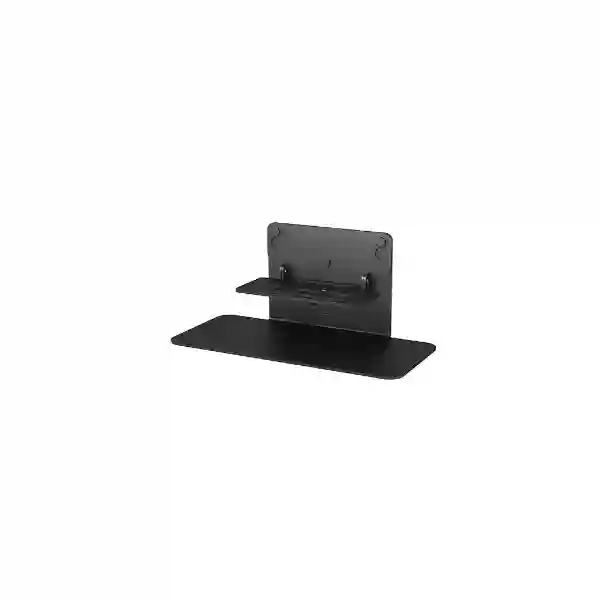
Yealink VB-Tablemount-01
The Yealink VB-Tablemount-01 is an optional table mount kit for Yealink MeetingBar A40 and SmartVision 40. It gives organisations a practical way to place a compatible all-in-one video bar securely on a meeting-room table or suitable furniture when a wall-mounted or display-mounted arrangement is not the preferred deployment. For offices, boardrooms, training spaces, project rooms and flexible collaboration areas, the mount helps teams plan a cleaner tabletop installation while keeping the video device positioned where room users can see and interact with it naturally.
What is the Yealink VB-Tablemount-01?
Yealink describes the VB-Tablemount-01 as an optional table mount kit designed for the MeetingBar A40 and SmartVision 40. Its purpose is straightforward: create a secure and stable table-mounted installation for a compatible Yealink video collaboration device. Yealink highlights easy deployment and a simple design, making the accessory relevant to meeting-room projects where the customer wants the video bar located on furniture rather than fixed to a wall or attached to a display structure.
That distinction matters during room planning. A video bar is only one part of the meeting experience; its physical position influences camera perspective, microphone relationship to participants, room aesthetics, cable routing and day-to-day usability. A tabletop arrangement can be useful in rooms where wall work is restricted, where the display installation should remain untouched, where a room may be reconfigured later, or where project teams want a straightforward mounting method that is easy to understand. The VB-Tablemount-01 therefore serves as a deployment accessory rather than an independent conferencing system.
Before ordering, buyers should confirm the exact Yealink endpoint in the room. Yealink’s current product and compatibility information identifies MeetingBar A40 and SmartVision 40 as supported products for this mount. FourTeck can help procurement teams review the device model, room arrangement, mounting preference, required quantities and the rest of the conferencing stack before a quotation is prepared.
Easy deployment
The mount is intended to simplify tabletop placement of a compatible Yealink video bar. This can reduce the need to design around a permanent wall position when the room and furniture arrangement make a table-based deployment more practical.
Simple room integration
A tabletop mounting approach can fit meeting spaces that prioritize flexible furniture, clean sight lines and easier future changes. The mount should still be planned together with cable management and the location of displays, power and network connectivity.
Compatibility first
VB-Tablemount-01 is not a universal mount for every Yealink product. Confirming the exact endpoint model is the first procurement step, especially when organisations operate a mix of older and newer room systems.
Verified compatibility and buying guidance
Yealink’s current room-system accessory information lists VB-Tablemount-01 as a table mount kit for MeetingBar A40 and SmartVision 40. Yealink’s mount compatibility information also identifies the corresponding tabletop mounting option as optional for these devices. This page therefore keeps its compatibility claims focused on those models rather than extending them to unrelated Yealink conferencing products.
Planning a tabletop video-bar deployment
The mount itself is only one decision in a meeting-room deployment. Buyers should consider where participants sit, where the display is positioned, whether the video bar’s camera view is obstructed by monitors or furniture, how cables will be routed, and whether the table remains fixed or is frequently moved. A well-planned tabletop installation should avoid placing equipment where notebooks, water bottles or room controls repeatedly block the camera path. It should also keep cabling controlled so that users can enter a room and start a meeting without disturbing the physical setup.
For procurement teams, a useful quotation request includes the exact Yealink video bar model, the number of rooms, quantity of mounts, display configuration, table style and any related accessories already available on site. When a wider upgrade is involved, it can also be useful to describe the meeting platform, network environment, room size and whether the project includes new displays, microphones, touch controllers or other collaboration components. FourTeck Tanzania’s technology enquiry page is the most direct place to share these details for product selection and quotation planning.
Organisations planning a wider collaboration environment can also review FourTeck Tanzania’s integrated IT, telecom and video-conferencing overview, which connects meeting-room requirements with networking, internet, security and other workplace infrastructure. For regional projects, FourTeck Kenya includes business video-conferencing solutions, while FourTeck Uganda covers unified communication and business connectivity planning. Customers with Gulf-region requirements can use FourTeck Kuwait for regional collaboration and IT procurement discussions.
Yealink VB-Tablemount-01 Tanzania
For organisations searching for Yealink VB-Tablemount-01 Tanzania, the central purchasing question is usually not simply whether a table mount exists, but whether it is the correct mounting accessory for the exact conferencing device and room layout. Yealink positions the VB-Tablemount-01 for MeetingBar A40 and SmartVision 40, so Tanzanian buyers should begin by checking the model label, project bill of materials or existing room-system documentation. This is particularly important for multi-room deployments where different meeting spaces may use different Yealink generations or mounting methods.
A tabletop installation can suit Tanzanian offices that want a straightforward room arrangement without adding wall-mounted hardware around the display. It may also be useful during office fit-outs where room furniture and display positions have already been finalized, leaving the video bar to be placed on an AV credenza, meeting table or other appropriate surface. The physical placement should still be reviewed carefully. Camera height and angle affect how remote participants see the room, and cable routing affects both appearance and long-term reliability. The aim is to keep the video bar secure, visible and logically positioned without creating a tangle of cables or a device that is routinely shifted by users.
For corporate headquarters, branch offices, schools, professional services firms, healthcare administration, NGOs and project teams in Tanzania, the mount can form part of a broader collaboration-room procurement package. Buyers may be sourcing a new MeetingBar A40 or SmartVision 40 environment, standardising room accessories across several locations, or replacing an unsuitable mounting method in an existing room. In each case, quotation preparation becomes easier when the request includes quantity, device model, room type and preferred installation approach.
FourTeck Tanzania can assist with product selection and commercial enquiry handling without assuming stock, delivery date or local availability before verification. Share the exact Yealink model, required number of VB-Tablemount-01 units and whether the project involves new or existing room systems. If the project also includes switches, wireless infrastructure, firewalls, displays or other IT components, describing those requirements together can help the project team consider the meeting room as one connected business environment rather than a standalone accessory purchase.
Yealink VB-Tablemount-01 Dar es Salaam
Businesses looking for Yealink VB-Tablemount-01 Dar es Salaam often operate meeting rooms in corporate offices, commercial buildings, hotels, professional services environments or regional headquarters where video collaboration must look clean and remain simple for users. In these spaces, a tabletop mount can be considered when the room design does not favor drilling, permanent wall mounting or a display-mounted bracket. The mount gives MeetingBar A40 and SmartVision 40 users an officially identified tabletop placement option, but it should be selected only after compatibility is confirmed.
Dar es Salaam deployments can vary from compact executive rooms to larger collaboration areas supporting hybrid teams. The placement decision should reflect the room itself. A video bar positioned too low may create an unhelpful camera perspective, while a unit placed behind large table monitors, signage or other room equipment can have its field of view disrupted. Teams should also consider how people move around the room and whether the furniture is likely to be rearranged frequently. A secure table mount helps establish a defined equipment position, but good room planning is still necessary for the best user experience.
Procurement managers can reduce ambiguity by sharing a simple room checklist with the quotation request: exact Yealink endpoint, quantity of rooms, display count, preferred position of the bar, expected participant seating and whether cable routing is already available. This is more useful than requesting “a Yealink stand” without the model because several Yealink room products use different mounting kits. It also helps avoid ordering an accessory based solely on appearance or a reseller listing.
When the Dar es Salaam project is part of a broader workplace technology upgrade, include the related needs in the same discussion. Video conferencing depends on reliable network connectivity, appropriate internet performance and clean integration with room displays and user devices. FourTeck Tanzania’s contact process supports product selection, compatibility and quotation requests, so organisations can present the complete requirement and receive guidance based on the actual environment rather than an unsupported assumption about stock or one-size-fits-all room design.
Yealink VB-Tablemount-01 Mwanza
For Yealink VB-Tablemount-01 Mwanza enquiries, the accessory is relevant to organisations that want to deploy or reorganise a compatible Yealink video bar on meeting-room furniture. MeetingBar A40 and SmartVision 40 are the key compatibility references. Buyers should not assume that the same bracket works across every Yealink video endpoint, especially where an organisation has accumulated equipment over several years. Confirming the device model before procurement is the simplest way to reduce the risk of a mismatch.
Mwanza businesses and institutions may use hybrid meetings to coordinate with branches, suppliers, project partners, headquarters teams or remote specialists. In such environments, the physical setup of the room matters because technical problems are not always caused by software or bandwidth. A poorly positioned camera, unstable device placement or messy cable run can make an otherwise capable collaboration platform frustrating to use. A purpose-designed tabletop mount supports a more intentional installation by giving the compatible video bar a defined position on an appropriate surface.
The room owner should decide whether a tabletop arrangement is desirable over the long term. If the meeting table is moved daily, if users frequently place equipment in front of the video bar, or if the chosen furniture does not provide safe cable routing, another mounting approach may deserve consideration. On the other hand, a fixed room with a suitable credenza or stable table can benefit from the simplicity of an accessible mount. The decision should balance aesthetics, camera line of sight, service access and user behavior.
A useful Mwanza quotation request states whether the project is for a new room, a migration from another mounting method or an accessory replacement. Include the exact device model, the number of rooms and any requirements for displays, network switching, wireless connectivity or power protection. This makes it easier to treat the mount as part of the complete meeting-room design. FourTeck Tanzania can then review the commercial request and compatibility context without making unverified promises about local stock, delivery timing or installation coverage.
Yealink VB-Tablemount-01 Arusha
Yealink VB-Tablemount-01 Arusha searches can come from conference venues, safari and hospitality businesses, NGOs, professional organisations, educational institutions and corporate offices that need dependable collaboration rooms. For these buyers, the key point is that VB-Tablemount-01 is a mounting accessory rather than a conferencing device by itself. It is intended for compatible Yealink MeetingBar A40 and SmartVision 40 deployments, providing an optional way to install the video bar on a table or suitable furniture.
Arusha meeting environments often need to accommodate guests, visiting teams and remote participants without requiring users to understand the technical details of the AV system. A well-organised tabletop deployment can help by keeping the video bar in a predictable position and reducing the temptation to move it between meetings. The accessory does not eliminate the need for room planning, however. The device should have a clear view of participants, reasonable proximity to the display and carefully routed cables that do not create trip hazards or interfere with regular table use.
For venues or organisations with multiple rooms, standardisation is especially useful. A procurement team can identify which rooms use MeetingBar A40 or SmartVision 40, determine whether tabletop mounting is appropriate in each space, and then order accessories against that verified equipment list. This is more reliable than choosing one mount for an entire estate without checking endpoint compatibility. It also gives facilities and IT teams a consistent reference when maintaining or reconfiguring rooms later.
When requesting an Arusha quotation, include the number of mounts, compatible device model, room function and whether the deployment is part of a larger Yealink purchase. If the project includes connectivity or infrastructure changes, describe those requirements too. Video collaboration quality depends on more than the mount: network stability, internet service, display choice and the meeting platform all influence the user experience. FourTeck Tanzania can use this information to guide product selection and quotation preparation while keeping the scope tied to verified needs.
Yealink VB-Tablemount-01 Dodoma
For customers researching Yealink VB-Tablemount-01 Dodoma, the most useful starting point is a compatibility check against the room device. Yealink identifies the accessory for MeetingBar A40 and SmartVision 40, and that verified relationship should guide purchasing. Government offices, administrative organisations, NGOs, education projects and private businesses in Dodoma may use video collaboration to connect dispersed teams, coordinate suppliers or conduct hybrid sessions. A stable physical setup contributes to that experience by keeping the camera and audio device consistently positioned.
Tabletop mounting can be attractive where rooms are already furnished, where wall alterations are undesirable or where teams want the video bar accessible for servicing. It can also support a tidy installation when the table or credenza has a planned cable route. The buyer should assess whether the selected surface is stable, whether the device can maintain a clear view of seated participants, and whether displays or laptops will obstruct the camera. The mount is not a substitute for these room-design decisions; it is a component that supports them.
Dodoma procurement teams should avoid relying on unverified marketplace specifications, especially if a listing uses a slightly different product naming convention. The official Yealink naming is VB-Tablemount-01, and the current manufacturer information centres compatibility on MeetingBar A40 and SmartVision 40. If an organisation has a different Yealink model, it should pause and confirm the correct mounting kit rather than assuming interchangeability.
For a clearer quotation, provide the endpoint model, quantity, site count and a short note describing the room setup. Mention whether the video bar is being purchased together with the mount or whether the mount is for an existing system. If there are related requirements for switches, wireless access points, firewalls, displays or structured cabling, include them in the same project brief. FourTeck Tanzania can then evaluate the technology requirement in context and help the buyer plan a coherent collaboration environment.
Yealink VB-Tablemount-01 UAE
Organisations searching for Yealink VB-Tablemount-01 UAE may be building meeting rooms in Dubai, Abu Dhabi, Sharjah or other Emirates while maintaining common collaboration standards across offices. The accessory is relevant when MeetingBar A40 or SmartVision 40 needs to be positioned on a table rather than mounted to a wall or display. In multi-country procurement, model consistency matters because a project team may be sourcing conferencing hardware from different regional suppliers. Recording the exact manufacturer accessory name in the bill of materials helps maintain a common reference.
UAE office fit-outs often involve coordination between interior contractors, AV integrators, IT teams and facilities managers. Tabletop mounting can simplify one part of the physical deployment, but the room should still be planned as a system. Display height, camera sight lines, touch controls, power, network outlets and furniture layout all affect how naturally the room works. The VB-Tablemount-01 supports secure placement of the compatible video bar, while the wider design should ensure the device does not sit behind décor, monitors or movable items that compromise the meeting experience.
For procurement teams comparing accessories, the strongest approach is to rely on manufacturer compatibility information rather than general reseller claims. Yealink states that VB-Tablemount-01 is designed for MeetingBar A40 and SmartVision 40. If a UAE project includes another video bar, ask for the correct mount specifically for that model. This avoids the cost and delay of purchasing an accessory that looks similar but does not belong to the intended endpoint.
Regional buyers can also use FourTeck UAE when the project is centred in the Emirates, while Tanzania-based organisations coordinating UAE branches can keep the hardware list aligned with their broader collaboration policy. A useful request includes quantities, exact video-bar model, room count and any related infrastructure requirements. Commercial availability, lead time and installation scope should be confirmed during quotation rather than assumed from a product page.
Yealink VB-Tablemount-01 Uganda
For Yealink VB-Tablemount-01 Uganda requirements, the accessory fits organisations deploying compatible Yealink room systems and seeking a tabletop installation method. MeetingBar A40 and SmartVision 40 are the verified compatibility targets in Yealink’s current information. This makes model checking especially important for organisations that operate multiple branches or inherited conferencing equipment, because a room estate may contain several Yealink platforms with different mounting options.
Ugandan businesses can use tabletop placement where wall mounting is inconvenient, where rooms may be reconfigured, or where the video bar needs to sit on AV furniture close to the display. Good physical placement helps users experience the room as a predictable collaboration space rather than a collection of loose devices. The camera should have a clear view, the equipment should not block participant sight lines, and cables should be planned so that they are not regularly unplugged or stretched when the table is used.
When a company is standardising several meeting rooms, document each room’s endpoint, display, controller and mount. This simple inventory makes future support easier and helps procurement avoid incompatible substitutions. The VB-Tablemount-01 should be requested by its exact Yealink name and paired with the supported device model. If the room uses another Yealink endpoint, check the applicable mounting accessory before purchasing.
For regional collaboration projects, FourTeck Uganda provides a relevant pathway for communication and IT solution discussions. Tanzania-based buyers managing Ugandan offices can also include the mount in a cross-border standardisation plan, provided compatibility is confirmed in every room. Quantity, location, device model and wider infrastructure needs should be included in the commercial enquiry so that the quotation reflects the real deployment rather than a generic accessory request.
Yealink VB-Tablemount-01 Kampala
Kampala organisations searching for Yealink VB-Tablemount-01 may be upgrading executive rooms, customer meeting spaces, training areas or branch collaboration facilities. The product is an optional table mount kit for MeetingBar A40 and SmartVision 40, so the purchase should be tied to one of those compatible devices rather than treated as a universal Yealink accessory. This is a practical but important distinction when several meeting-room products are being sourced together.
A tabletop installation can support a clean Kampala office deployment when the video bar needs to sit below or near a room display without permanent wall work. It can also help teams establish a consistent position for the device in rooms where the furniture remains fixed. The surface must be appropriate for the equipment, and the camera should not be hidden by desktop monitors, decorative objects or temporary meeting materials. Cable routing should be considered during the same planning exercise so that a visually simple mount does not end up surrounded by unmanaged wiring.
IT managers can improve long-term maintainability by documenting the mounting method as part of the room standard. A useful room record might identify the video bar, display, touch controller, network connection and physical mount. This means that when a room is moved, expanded or serviced, the support team knows which accessory belongs to the endpoint. Such documentation is especially valuable for companies with multiple Kampala sites or a mix of local and international offices.
A commercial request should state whether the VB-Tablemount-01 is needed for existing MeetingBar A40 or SmartVision 40 devices, or whether it is part of a new room-system procurement. Add the number of rooms and any related communication or network requirements. FourTeck can then assess the accessory within the wider project, while price, stock and delivery remain items to be confirmed in the formal quotation rather than assumed from general web listings.
Yealink VB-Tablemount-01 Arua
For Yealink VB-Tablemount-01 Arua enquiries, buyers may be supporting branch offices, institutions, NGOs, service organisations or project sites that rely on remote meetings to reduce travel and keep teams connected. The table mount can be a small but useful part of that room standard, particularly where MeetingBar A40 or SmartVision 40 is the chosen video device and a wall-based installation is not desired.
In distributed organisations, consistency often matters more than elaborate room design. If every branch uses a known equipment list and a predictable mounting approach, support becomes easier because central IT teams know what to expect when users report a problem. The VB-Tablemount-01 can therefore be specified as part of the room bill of materials for compatible devices. It should not, however, be assumed to fit another Yealink model just because the physical appearance seems similar.
Arua rooms may have practical constraints such as limited AV furniture, multipurpose spaces or layouts that change between meetings and training sessions. Before choosing tabletop mounting, confirm that the selected surface can keep the video bar secure and that the camera will remain unobstructed. If a table is frequently moved, facilities teams should also consider how cables are protected and whether the mounting approach remains sensible for everyday use. The objective is stable equipment placement without creating new maintenance issues.
For quotation planning, provide the exact Yealink endpoint, quantity and room context. If the organisation coordinates procurement from Kampala, Tanzania or another regional office, include site details so the bill of materials remains clear. The accessory itself does not require a complex specification, but accurate model matching is essential. FourTeck can help buyers review compatibility and the wider communication environment before a commercial offer is finalised.
Yealink VB-Tablemount-01 Mbarara
Yealink VB-Tablemount-01 Mbarara searches typically point to a practical deployment need: placing a compatible Yealink video bar securely on meeting-room furniture. The official compatibility focus is MeetingBar A40 and SmartVision 40. Procurement staff should verify the endpoint before ordering, especially when the room equipment was purchased previously or when the exact product name is not immediately visible in internal records.
For businesses, educational facilities, healthcare administration or regional offices in Mbarara, video conferencing may connect teams with Kampala, neighbouring countries or global partners. A reliable meeting experience depends on room setup as much as on the collaboration platform. A table-mounted video bar should remain at a sensible height, face participants clearly and avoid obstructions. Users should not need to reposition it for every call, and the cables should be arranged so that routine table use does not disturb the system.
The VB-Tablemount-01 can be useful in rooms where a permanent wall installation is inconvenient or where the organisation wants the video bar accessible. This accessibility can be beneficial during room changes, but it also means facilities teams should define where the device belongs so it does not migrate around the room. A labelled or documented room standard can help prevent accidental changes that reduce camera performance.
When asking for a quote, state whether the mount is for a new or existing MeetingBar A40 or SmartVision 40, the number of units required and any associated room-system needs. If network upgrades, switches, Wi-Fi or display changes are planned at the same time, mention them. This gives the supplier a clearer view of the total project and helps the organisation avoid fragmented procurement where each room component is selected independently.
Yealink VB-Tablemount-01 Gulu
For Yealink VB-Tablemount-01 Gulu requirements, the accessory provides an optional table mounting approach for MeetingBar A40 and SmartVision 40. Organisations should treat that model relationship as a procurement checkpoint. If the existing conferencing device is unknown, verify it before purchasing the mount. This simple step prevents confusion between Yealink’s different mounting accessories and helps keep the room bill of materials accurate.
Gulu organisations using hybrid meetings may be connecting project teams, regional branches, international partners or remote specialists. A room that works reliably needs stable network connectivity and an understandable physical layout. A secure tabletop mount helps make the video bar’s position predictable, but users should still have a clear view of the display and the camera should be free from obstructions. The room owner should also decide how cables will be routed and protected, particularly if furniture is moved or the space serves multiple purposes.
For a branch rollout, IT teams can create a repeatable checklist: confirm room endpoint, confirm mount, confirm display, confirm network connection, test meeting platform and record the final arrangement. This disciplined approach improves consistency without requiring every room to be identical. Where MeetingBar A40 or SmartVision 40 is deployed, VB-Tablemount-01 can be included as the specified tabletop mounting accessory if the furniture layout makes sense.
Procurement requests from Gulu should include quantity, endpoint model and whether the accessory is needed immediately for existing rooms or as part of a future deployment. Do not rely on assumptions about availability or transit time; those items should be confirmed during quotation. For multi-country organisations, maintaining the exact model name in purchase documents helps teams in Uganda, Tanzania and other locations speak the same technical language when ordering or supporting the room.
Yealink VB-Tablemount-01 Kenya
For Yealink VB-Tablemount-01 Kenya projects, the accessory can support tabletop deployments of MeetingBar A40 and SmartVision 40 in boardrooms, huddle rooms, training spaces and customer meeting areas. Kenyan organisations often standardise collaboration rooms across Nairobi and regional offices, and mounting accessories should be part of that standard rather than an afterthought. Recording the exact mount in the bill of materials helps installers and support teams understand how each room was intended to be set up.
A tabletop mount is appropriate when the physical room design supports it. The video bar needs a clear camera path, stable support and sensible cable routing. A visually attractive meeting space can still produce a poor user experience if the camera is placed behind a monitor or if users regularly move the device to make room for documents and laptops. Facilities and IT teams should therefore agree on the equipment position before installation and ensure the furniture layout reinforces that decision.
Businesses comparing mounting options should remember that VB-Tablemount-01 is model-specific. Yealink identifies MeetingBar A40 and SmartVision 40 for this accessory. Other Yealink products may use different table, wall or TV mounting solutions. Matching the accessory to the endpoint is more reliable than choosing by product photograph or reseller description alone.
For Kenya-specific project discussions, FourTeck Kenya’s video conferencing and unified communication coverage is relevant to organisations planning complete rooms rather than a single bracket purchase. Tanzania-based regional teams can also use a shared specification across both markets, provided every room’s endpoint is verified. Include quantity, room count, device model and associated infrastructure needs in the enquiry to support accurate quotation preparation.
Yealink VB-Tablemount-01 Kuwait
Yealink VB-Tablemount-01 Kuwait buyers may be fitting collaboration rooms in offices, retail headquarters, engineering companies, professional firms or multi-site enterprises. The accessory is intended to place MeetingBar A40 and SmartVision 40 securely on a table, giving customers an alternative to wall or display mounting when the room design supports a tabletop arrangement.
In Kuwait office projects, meeting-room hardware is often coordinated with interior fit-out work, structured cabling, displays and network services. A mount may appear to be a small procurement item, but choosing it early helps the project team reserve the right furniture position and cable path. If the video bar is added late, the room can end up with obstructed sight lines or exposed cables that undermine an otherwise polished installation. A tabletop plan should therefore be reviewed together with the display height and participant seating.
The correct Yealink model should always be confirmed. VB-Tablemount-01 belongs with MeetingBar A40 and SmartVision 40 according to the manufacturer’s current information. Buyers using a different Yealink video device should identify the appropriate mounting kit rather than assuming a common mechanical standard. This is particularly relevant for organisations upgrading only some rooms while keeping older systems in others.
Kuwait customers can explore FourTeck Kuwait for regional business IT and communication requirements. For cross-border groups, the same internal room standard can be coordinated with Tanzania or other countries, but commercial availability and delivery should be confirmed separately for each project. A clear request includes the exact mount name, supported endpoint, quantity and any related meeting-room hardware that needs to be sourced together.
Yealink VB-Tablemount-01 Ghana
For Yealink VB-Tablemount-01 Ghana enquiries, the accessory can support organisations that need a stable tabletop installation for a MeetingBar A40 or SmartVision 40. It is particularly relevant when a room already has suitable furniture and the project team wants the video bar positioned without committing to a permanent wall mount. The deployment should still be planned carefully so that camera view, display relationship and cable routing remain practical for everyday use.
Ghanaian businesses with several offices can benefit from documenting meeting-room components as a standard package. The mount should be listed alongside the endpoint and other room accessories so that replacements and future expansions are straightforward. This is useful when procurement is handled centrally but installation occurs at different sites, because installers can work from a verified list rather than interpret generic descriptions such as “table stand for Yealink.”
Compatibility should be based on the manufacturer’s current information. Yealink identifies VB-Tablemount-01 for MeetingBar A40 and SmartVision 40. If the room uses another device, request the correct mounting option before ordering. The mount does not add conferencing software, licensing or network capability; its role is physical installation. Customers should therefore consider the rest of the collaboration system separately, including network performance, meeting platform configuration and display requirements.
For Ghana technology projects, FourTeck Ghana covers business communication and broader IT infrastructure planning. Regional organisations that also operate in Tanzania can use a common room-design framework while validating local commercial conditions for each country. A quotation request should state quantity, compatible device model, site requirements and whether the mount is part of a new system or an existing-room adjustment.
Yealink VB-Tablemount-01 Nigeria
Yealink VB-Tablemount-01 Nigeria searches often come from organisations planning conference rooms across large, distributed operations. A consistent physical room setup helps employees move between offices without relearning how the equipment is arranged. Where MeetingBar A40 or SmartVision 40 is the chosen endpoint, the VB-Tablemount-01 provides a manufacturer-identified tabletop mounting option that can be included in the room standard.
The value of a tabletop mount depends on the physical environment. In a fixed boardroom with a stable table or AV cabinet, the arrangement can be straightforward and clean. In a multipurpose room where furniture is moved daily, project teams should think carefully about cable strain, device movement and whether the camera position will remain consistent. The aim is not only to install the equipment on day one but to create a room that continues to work predictably after months of everyday use.
Nigeria procurement teams managing many sites should verify the endpoint model at each location. A room inventory can prevent assumptions when some offices have newer Yealink systems and others retain legacy hardware. VB-Tablemount-01 should be associated with MeetingBar A40 and SmartVision 40; alternative Yealink devices should use their applicable mounting solutions. This model-based approach makes future replacements and support more controlled.
Regional commercial enquiries can reference FourTeck Nigeria for IT project discussions, while Tanzania-centred organisations can coordinate the product specification from their wider regional procurement process. Quantity, required sites, room type and related IT infrastructure should be included in the request. Pricing, availability and delivery schedules should be treated as quotation items rather than fixed claims on a general information page.
Yealink VB-Tablemount-01 Seychelles
For Yealink VB-Tablemount-01 Seychelles requirements, the accessory can be useful for hotels, tourism operators, professional services teams, government departments and other organisations that need well-organised video collaboration spaces. The product’s role is specific: it provides optional tabletop mounting for MeetingBar A40 and SmartVision 40. Buyers should verify that exact endpoint before ordering so that room installation is based on confirmed compatibility rather than assumption.
In island environments where procurement can require careful planning, getting the bill of materials right before shipment is especially important. A small accessory mismatch can delay the completion of an otherwise ready meeting room. Listing the exact Yealink model and mount in the quotation request reduces that risk. It also allows project teams to plan furniture, cable routes and installation sequence before equipment arrives.
A tabletop arrangement should be selected because it suits the room, not only because it appears easy to deploy. The video bar should have an unobstructed view, the surface should be stable and the cables should be protected from routine movement. In hospitality and customer-facing spaces, visual neatness is also important. A purpose-designed mount can contribute to a cleaner appearance when it is integrated with thoughtful cable management and a sensible display layout.
Seychelles organisations coordinating procurement through Tanzania, UAE or another regional hub should maintain the exact product naming across purchase documents. Include quantity, device model, room count and whether the mount is for a new or existing system. If the project also includes networking, displays or other collaboration equipment, provide those details at the same time. This supports a more complete quotation and helps avoid fragmented purchasing decisions that overlook dependencies between the room components.
How to choose the right Yealink mounting approach
Start with the endpoint model, then look at the room. If the device is MeetingBar A40 or SmartVision 40 and the room design calls for tabletop placement, VB-Tablemount-01 is the relevant Yealink accessory to evaluate. If the device is different, do not force the same mount into the design; Yealink publishes other mounting options for other products. Next, assess the surface, camera line of sight, display position and cable path. Finally, decide whether the room’s daily use supports a fixed tabletop location. This sequence keeps the decision grounded in compatibility and practical deployment rather than price alone.
For multi-room projects, create a room schedule before ordering. List each room name, endpoint, mount, display, controller and any additional audio hardware. This simple document improves procurement accuracy and gives support teams a durable record of how the rooms were intended to operate. It is particularly helpful when a business is deploying collaboration technology across Tanzania and other markets at the same time.
Common use cases
Executive meeting rooms
Use a defined tabletop position when the room furniture and display arrangement support a clean, accessible video-bar installation.
Flexible collaboration rooms
Choose tabletop mounting where wall changes are undesirable and the room needs a straightforward physical arrangement that can be understood by facilities teams.
Multi-site standardisation
Include the mount in a verified room bill of materials so branches using MeetingBar A40 or SmartVision 40 follow a consistent deployment standard.
Quotation checklist for Yealink VB-Tablemount-01
- Confirm whether the endpoint is Yealink MeetingBar A40 or SmartVision 40.
- State the number of mounts required and the number of meeting rooms.
- Mention whether the mount is for an existing room system or a new deployment.
- Describe the preferred physical placement: table, credenza or other appropriate furniture.
- Include related requirements such as video bars, displays, controllers, networking or wireless infrastructure.
- Provide the deployment city or country for each site in a regional project.
- Ask the sales team to confirm current price, availability, lead time and commercial terms.
Frequently asked questions
What is Yealink VB-Tablemount-01?
It is an optional table mount kit designed for Yealink MeetingBar A40 and SmartVision 40, giving these compatible devices a secure tabletop deployment option.
Is VB-Tablemount-01 compatible with MeetingBar A40?
Yes. Yealink lists VB-Tablemount-01 as an optional table mounting accessory for MeetingBar A40.
Is it compatible with SmartVision 40?
Yes. Yealink identifies SmartVision 40 as a supported product for this tabletop mount.
Can I use the mount with any Yealink MeetingBar?
Do not assume universal compatibility. Yealink uses different mounting solutions across its room-system portfolio. Confirm the exact endpoint and the applicable mount before purchase.
Does the mount include conferencing electronics?
No. VB-Tablemount-01 is a physical mounting accessory. The compatible video endpoint is a separate product.
How should I request a Tanzania quotation?
Provide the exact Yealink endpoint, required quantity, deployment city, number of rooms and any related collaboration or network requirements through FourTeck Tanzania’s contact page.
Decision recap
Choose Yealink VB-Tablemount-01 when your confirmed endpoint is MeetingBar A40 or SmartVision 40 and a tabletop installation fits the room design. Confirm the surface, camera line of sight, cable path and everyday room usage before finalising the mount. For multi-site projects, record the mount in the room bill of materials so procurement and support teams can maintain a consistent standard. Do not treat the accessory as universal across the Yealink portfolio, and do not rely on unverified claims about stock, price or delivery until a current quotation is issued.
Talk to FourTeck about your meeting-room requirement
Share the Yealink model, quantity, room type, deployment location and related video-conferencing requirements. FourTeck Tanzania can help you review compatibility and prepare a commercial discussion around the complete requirement, from the mounting accessory to the wider communication and network environment.




Reviews
There are no reviews yet.