

Rugged cordless voice for mobile teams
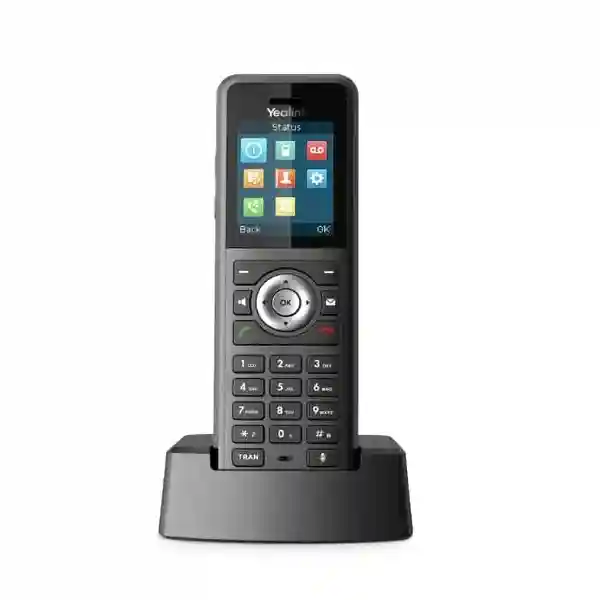
Yealink W59R Pro DECT Handset
The Yealink W59R Pro is built for businesses that need staff to stay reachable while moving through demanding work areas. Official Yealink information identifies the W59R Pro as a ruggedized IP67 DECT handset with a 2.4-inch 240×320 TFT display, Bluetooth 5.2, vibration alarm, HD voice, Flexible Noise Reduction, full-duplex speakerphone and occupational alarm functions. It works with the Yealink W70B single-cell platform and W75, W80 and W90 multi-cell systems, giving organisations a path from compact cordless deployments to wider roaming environments. For buyers in Tanzania, the most important decision is not simply whether the handset has strong specifications; it is whether the DECT architecture, PBX, coverage design, user roles, charging locations and safety workflow are planned together.
What the Yealink W59R Pro is designed to solve
A normal office handset is designed around a desk or a comparatively controlled indoor space. The Yealink W59R Pro addresses a different operating problem: people who still need business-grade voice communication while moving through areas where dust, moisture, knocks, loud machinery, gloves, frequent cleaning or physical work can make conventional cordless devices less practical. Yealink specifies IP67 protection, resistance to drops of up to two metres, an antibacterial design, scratch resistance and resistance to disinfectant cleaning. These characteristics make the device particularly relevant to warehouses, manufacturing areas, maintenance teams, logistics operations, hospitality back-of-house teams, utilities, site supervisors and other mobile roles.
The handset also adds functions that matter in operational environments rather than only in executive offices. Vibration alerts can supplement audible ringing where ambient noise is high. Bluetooth 5.2 enables compatible wireless headsets. A dedicated alarm key and automatic alarm modes—including no-movement, man-down and running alarms—can be configured as part of a wider workplace communication process. These features should be treated as communications and alerting tools, not as a substitute for a certified occupational safety system or site emergency procedure. The most useful deployment is one in which the handset, DECT coverage, PBX call routing and escalation contacts are planned around real user movement.
Rugged mobility
IP67 protection, drop resistance and a rubberized physical design make the W59R Pro suitable for roles where a standard office cordless handset may be exposed to harsher handling or environmental conditions.
Clearer voice
HD voice, FNR and full-duplex speakerphone functions are intended to improve intelligibility and natural conversation where background activity can interfere with calls.
Worker alert functions
Push-button, no-movement, man-down and running alarm modes provide additional ways to generate alerts when appropriately configured with the surrounding communications system.
Scalable DECT
Compatibility with W70B and W75/W80/W90 platforms lets buyers match the handset to smaller single-cell sites or larger multi-cell environments requiring roaming and handover.
Verified Yealink W59R Pro specifications
| Area | Verified detail |
|---|---|
| Display | 2.4-inch 240×320 TFT colour display with keypad backlight and intuitive icon/soft-key interface. |
| Protection | IP67 ruggedized design, specified for drops up to 2 metres and water immersion up to 1 metre for up to 30 minutes under stated conditions. |
| Wireless accessory support | Built-in Bluetooth 5.2 for compatible Bluetooth headsets; Yealink also positions the model for DECT headset use. |
| Audio | HD audio, Flexible Noise Reduction, full-duplex speakerphone and Hearing Aid Compatibility. |
| Alarm functions | Push-button, no-movement, man-down and running alarm functions, plus vibration alert. |
| Battery | Up to 28 hours of talk time and up to 320 hours of standby time in ideal conditions according to Yealink datasheet information. |
| DECT range | Up to 50 metres indoors and up to 300 metres outdoors in ideal conditions; actual coverage depends on site construction, interference and base placement. |
| Base compatibility | Yealink W70B single-cell and W75/W80/W90 multi-cell systems for supported roaming and handover scenarios. |
| Calling | Up to two simultaneous calls per handset, three-way conference, hold, transfer, forwarding, waiting, DND, redial, speed dial and voicemail functions. |
| Directory and history | Base-stored phonebook support plus remote, LDAP and XML phonebook options; call history includes placed, missed and received entries. |
Published battery and range figures are ideal-condition values. Coverage surveys, building materials, radio planning, user density and call concurrency should be considered for business deployments.
Compatibility, DECT architecture and PBX planning
The W59R Pro is a handset, not a complete phone system by itself. Buyers should plan it together with a compatible Yealink DECT base architecture and the SIP or IP PBX environment that will carry calls. For a compact office, workshop or isolated department, the W70B single-cell platform can be relevant when one cell provides the required coverage and capacity. For larger floors, warehouses, multi-zone industrial premises or campuses, W75, W80 or W90 multi-cell systems are intended to provide a more scalable architecture with roaming and handover. The correct option depends on coverage area, wall construction, rack and network locations, expected simultaneous calls, handset quantity and the movement paths of users.
Do not assume that published maximum range equals practical coverage. Reinforced concrete, metal racking, machinery, cold-room panels, lift shafts, dense walls and neighbouring radio systems can change the effective DECT environment. A good quotation therefore starts with a floor plan or site description rather than a handset count alone. Identify where staff begin and end calls, whether they move between buildings or floors, where base units can be connected to the LAN and powered, and whether voice traffic needs VLAN or QoS treatment. The base system, not the handset, interfaces with the IP network and SIP service, so PBX registration, codec policy, DNS, NTP, security and firewall configuration also matter.
Yealink states that its DECT technology is not compatible with third-party DECT base stations or handsets. That makes ecosystem confirmation especially important when replacing an existing cordless system. A buyer with another brand of DECT base should not assume the W59R Pro can simply register to it. Conversely, companies already standardized on compatible Yealink DECT infrastructure can evaluate W59R Pro units for rugged user roles while retaining other supported handset types for office users. For mixed telephony projects, FourTeck Tanzania also publishes information on the Grandstream DP752 DECT base station, useful as a comparison point when the requirement is to assess alternative cordless SIP ecosystems rather than mix incompatible handset families.
Who should consider the W59R Pro?
The strongest fit is a mobile employee who needs voice access while working away from a desk and whose environment justifies ruggedization or alarm functionality. Warehouse supervisors may move through aisles and loading zones. Factory technicians may need hands-free headset use around machinery. Maintenance staff can benefit from a belt-carried handset and vibration alert while moving between plant areas. Hotels can use rugged handsets for engineering, security or facilities roles rather than guest rooms. Construction management teams may value dust and drop resistance. Clinics, laboratories or food-related environments may also evaluate the device where regular cleaning is important, subject to the organisation’s own hygiene procedures and chemical compatibility requirements.
The W59R Pro may be excessive for users who spend almost all day at a fixed desk, where a standard SIP desk phone can provide more keys, a larger display and simpler desktop interaction. FourTeck Tanzania’s Grandstream GRP2634 business IP phone illustrates that fixed-desk alternative for users who prioritize programmable keys and line handling. For broader voice architecture, the Grandstream UCM6308A IP PBX page highlights the server-side planning issues—extensions, queues, trunks and endpoint integration—that should also be considered when a DECT fleet is part of a larger telephony project.
Yealink W59R Pro DECT Handset Tanzania
Businesses searching for the Yealink W59R Pro DECT Handset in Tanzania are usually solving a mobility problem rather than simply replacing a telephone. A warehouse may need supervisors to receive calls while walking between receiving, storage and dispatch. A factory may need maintenance personnel to remain reachable around production zones. A hotel or large property may want engineering and security staff to carry a handset instead of relying on fixed extensions. In each case, the W59R Pro’s value depends on matching its rugged physical design to a correctly engineered Yealink DECT system. Tanzania projects should therefore begin with the number of users, the site layout, existing PBX platform, network topology and areas where uninterrupted roaming matters.
The published IP67 protection level and two-metre drop resistance make the handset relevant to tougher environments, while Bluetooth 5.2 and vibration alerts support staff who need flexible ways to notice and answer calls. Yet procurement should go beyond headline specifications. Confirm whether users need headsets, how many charging points are required, whether handsets are shared by shifts, how devices will be labeled, which alarms will be enabled, and what number each alarm should call. If the project uses the W70B single-cell platform, verify that one cell can cover the work area. If the workforce moves across a larger building or campus, consider a supported W75, W80 or W90 multi-cell architecture and plan base positioning carefully.
Tanzania buyers should also check the wider voice network. SIP trunks, PBX licensing, extension numbering, ring groups, call queues, emergency calling rules, network switching and power protection may affect the project even though they are not handset features. For organisations migrating from analog phones, the Grandstream HT801 ATA page provides useful context about bridging legacy analog endpoints, while the Dinstar VoIP solutions page shows gateway options used where analog, cellular or digital telephony must interconnect with SIP systems. These links are not substitutes for the W59R Pro; they help procurement teams understand the surrounding voice architecture that can exist at mixed-technology sites.
For a useful quotation in Tanzania, provide the W59R Pro quantity, current phone-system make and model, SIP provider if known, floor plans or approximate dimensions, number of floors, construction materials, expected simultaneous calls, critical roaming paths and any alarm workflow. FourTeck Tanzania’s verified technology quotation contact page accepts product selection and project enquiries. This gives the discussion enough context to separate a simple handset supply request from a project requiring DECT design, PBX integration, network preparation or deployment support.
Yealink W59R Pro DECT Handset Dar es Salaam
Dar es Salaam organisations evaluating the Yealink W59R Pro often operate across busy offices, warehouses, distribution facilities, hospitality properties, service centres and industrial premises where staff cannot remain at fixed desks. In these environments, cordless voice should be treated as an operational layer. Begin by mapping the points where calls originate, the routes employees walk and the zones where dropped calls would create a business problem. A logistics operation may need coverage from goods receiving through warehouse aisles to dispatch. A hotel engineering team may require communication between plant rooms, service corridors and back-of-house areas. A manufacturing site may need separate DECT cells around production structures that attenuate radio signals.
The W59R Pro is useful here because ruggedization, vibration alerts and headset support are aligned with mobile work. IP67 protection helps against dust and water exposure within the published rating, while the handset’s rubberized build is intended to withstand demanding handling. Bluetooth 5.2 allows cable-free headset use where the selected headset and workplace policy permit it. Alarm functions can add a useful communications layer for lone or mobile workers, but they need deliberate configuration: decide which alarms are enabled, what action triggers them, who receives them and what happens when an alert is missed. Those decisions belong in an operating procedure rather than being left at factory defaults.
Dar es Salaam sites frequently contain mixed building types—open offices, concrete stairwells, workshops, metal shelving, yards and multi-floor structures—so the ideal-condition DECT range should not be used as a design guarantee. Base-station surveys and staged testing are particularly valuable where radio paths change between indoor and outdoor zones. Network teams should also reserve suitable switch ports, IP addresses and VLAN policy for the DECT infrastructure. If phones, access points and cameras share PoE switching, power budgeting and network segmentation should be reviewed together. The Grandstream GWN7672 Wi-Fi 7 access point page is a useful reminder that voice endpoints sit on top of broader LAN and wireless planning, even though DECT itself is a separate radio technology.
When requesting a W59R Pro quotation for Dar es Salaam, distinguish between handset-only procurement and a complete solution. For handset-only expansion, confirm the existing Yealink base model and firmware environment. For a new deployment, provide a floor plan, user count, mobility routes, expected concurrency, PBX details, SIP trunk information and any requirement for call recording, queues or emergency numbers. That makes it possible to assess whether W70B is enough or whether W75/W80/W90 multi-cell planning is more appropriate.
Yealink W59R Pro DECT Handset Mwanza
For Mwanza businesses, the Yealink W59R Pro can be considered where operational teams move through warehouses, workshops, healthcare back-of-house areas, hospitality properties, education facilities or service sites and still need a reliable business extension. The procurement question should focus on workflow: who carries the handset, for how many hours, which areas must stay covered, whether users answer calls while wearing protective equipment, and whether the phone is shared between shifts. A rugged handset is most valuable when the physical design solves a genuine operational issue rather than simply adding specifications that users never need.
Mwanza deployments should pay close attention to charging and shift handover. Yealink publishes up to 28 hours of talk time and up to 320 hours of standby under ideal conditions, but real use depends on call volume, Bluetooth use, radio conditions, battery age and operating practices. Sites with long shifts may want a clearly assigned charging location and spare-device policy so handsets do not disappear into drawers or remain uncharged. Device naming and extension labels also matter in shared fleets. A simple inventory mapping handset, extension, department and charging cradle can make support much easier.
Coverage should be validated against the actual building. The published range of up to 50 metres indoors and 300 metres outdoors is not a promise for every Mwanza property. Concrete walls, stacked goods, metal structures, refrigerated rooms, electrical equipment and outdoor-to-indoor transitions can all change radio performance. If staff walk across several zones while speaking, a Yealink multi-cell platform is normally the architectural direction to evaluate because seamless handover becomes more important than raw distance from one base. The design should also consider LAN resiliency, switch placement, UPS protection and the PBX connection behind the DECT system.
A strong Mwanza quotation request therefore includes quantities plus operational details. State whether the project is a new phone system, a replacement for another DECT platform or an expansion of existing Yealink infrastructure. Include current base models, PBX or hosted-SIP platform, building dimensions, floors, likely radio obstacles, concurrent call estimates and user roles. If desk phones are also required for supervisors or reception positions, the Grandstream GRP2603 essential IP phone page provides an example of a fixed endpoint that can be evaluated alongside cordless mobility as part of a complete voice design.
Yealink W59R Pro DECT Handset Arusha
Arusha buyers may consider the Yealink W59R Pro for hospitality operations, lodges, warehouses, facilities teams, tourism-related service sites, schools, healthcare environments and other businesses where employees move between rooms, service areas or outdoor-adjacent spaces. The handset’s rugged construction can be useful for engineering, maintenance, housekeeping supervision or security roles that place more physical demands on a phone than a reception desk would. Procurement should nevertheless be role-specific: not every extension needs a rugged handset, so a mixed endpoint strategy can control cost while assigning W59R Pro units to the users who gain clear operational benefit.
For hospitality and property environments, consider whether users need to move between guest-facing and back-of-house areas while maintaining a call. Multi-cell DECT can be valuable where a property spans multiple buildings or floors, but base positioning must be planned from a site layout rather than estimated from straight-line distances. Thick masonry, utility rooms, service elevators and outdoor transitions can affect coverage. A staged deployment can test key routes before every base location is finalized. If the property also has guest-room or corridor telephones, the Grandstream GHP630W hotel IP phone page shows how fixed hospitality endpoints can form a separate user category from rugged staff mobility.
The W59R Pro’s alarm capabilities deserve careful planning in Arusha facilities where staff may work alone in plant rooms, storage areas or less trafficked zones. An alarm feature becomes useful only when the receiving workflow is clear. Identify which team or extension should receive an emergency call, how escalation should work and whether the PBX can route calls appropriately after hours. Test the procedure during deployment. These alarms are communications features and should complement, not replace, formal safety controls, radio systems or emergency procedures required by the organisation.
For quotation preparation, Arusha businesses should provide handset count, department breakdown, existing Yealink base stations if any, PBX details, floor plans, likely roaming routes, call concurrency and headset requirements. Add information about power resilience and network switching where bases will be installed. The result should be a bill of materials that reflects the complete system—handsets, compatible base architecture, any required network changes, charging arrangements and configuration scope—rather than assuming the handset alone solves coverage.
Yealink W59R Pro DECT Handset Dodoma
In Dodoma, the Yealink W59R Pro can serve organisations that require staff mobility across administrative buildings, institutional campuses, storage facilities, hotels, service operations and technical environments. A practical starting point is to divide users into fixed and mobile roles. Receptionists, finance teams and desk-based managers may prefer a conventional SIP phone, while maintenance personnel, security supervisors, warehouse staff or facilities coordinators may benefit from a rugged cordless extension. This role-based approach helps avoid over-specifying every user while still giving the most mobile staff a device designed for harder conditions.
The 2.4-inch colour display and physical keys can be advantageous for users who need straightforward operation without relying on a touchscreen. Keypad backlighting, vibration alert and Bluetooth headset support improve flexibility across different work settings. Where a site has noisy areas, HD voice and Flexible Noise Reduction are intended to improve call clarity, but acoustics and headset selection still matter. Test the actual user environment when voice quality is operationally critical, particularly where machinery, vehicle movement or strong background conversations are common.
Dodoma projects that cover multiple buildings or floors should be treated as radio-design exercises. A W70B single-cell system can suit a smaller zone, but larger roaming requirements may justify W75, W80 or W90 architecture. The objective is not to install the fewest possible bases; it is to provide stable coverage and handover where users genuinely move. Network readiness is equally important. Each base or manager must be connected correctly to the IP network and PBX, with suitable addressing, DNS/NTP, VLAN and security policy. UPS planning can keep voice infrastructure available during short power events, subject to the resilience design of the wider network and PBX.
When comparing suppliers for the Yealink W59R Pro in Dodoma, ask for confirmation of the exact Pro model, compatible base platform, included package items and the proposed deployment scope. Do not rely on listings for the older W59R, which has different published hardware details. A professional quotation should clearly separate handsets, bases, PBX or SIP services, installation, configuration and any network equipment so the buyer can understand what is included and what remains an existing-site dependency.
Yealink W59R Pro DECT Handset UAE
UAE buyers commonly evaluate rugged DECT for warehouses, logistics centres, hospitality back-of-house teams, factories, large retail operations and facilities management. The Yealink W59R Pro is relevant where users need a business extension while walking through areas that can be dusty, noisy or physically demanding. Its IP67 rating, two-metre drop specification, Bluetooth 5.2, vibration alert and occupational alarm functions align with those roles. However, a successful UAE deployment still depends on the DECT system around the handset, especially in metal-intensive warehouses or multi-storey properties where radio planning can be more complex than a simple office.
The procurement team should classify sites by size and mobility pattern. A small workshop may require a single W70B cell. A distribution centre or hotel with multiple zones may require W75, W80 or W90 multi-cell planning. If users carry calls between indoor storage, loading bays and exterior areas, survey those transition points because building envelopes can sharply change signal behavior. If alarm features are required, document the receiving extension, escalation process and operating hours. In security-sensitive environments, network and PBX administrators should also define SIP credentials, remote administration controls and update procedures.
For companies with operations across Dubai, Abu Dhabi, Sharjah or other Emirates, standardizing handset models can simplify training and spares, but only if each site receives its own coverage design. Do not reuse a base-station count from one building merely because another has similar floor area. Materials, ceiling height, racking and user movement may differ. Headset requirements should also be role-tested, especially in environments where PPE, hearing protection or safety policies affect what users can wear.
FourTeck’s broader UAE IT, telecom and infrastructure site provides context for IP PBX, networking and telephony projects that can surround a DECT deployment. For a W59R Pro request, provide exact handset quantity, base architecture if already installed, PBX type, site plans, concurrent call expectations and whether configuration or deployment support is needed. This keeps the quotation focused on the actual system rather than an isolated endpoint price.
Yealink W59R Pro DECT Handset Uganda
Uganda organisations can evaluate the Yealink W59R Pro when warehouses, manufacturing areas, hotels, health facilities, campuses or service teams require cordless SIP extensions designed for harder working conditions. The product is particularly useful where a handset may be carried all day, exposed to dust or moisture within its rating, or used around active operations where vibration alerts are helpful. The selection should begin with a communication workflow: who needs mobility, where users travel during calls, which departments need ruggedized devices and whether any alarm features are operationally required.
A common design mistake is to buy handsets first and determine coverage later. For Uganda projects, identify the compatible Yealink DECT platform before confirming quantities. W70B is the single-cell option listed in Yealink’s compatibility information, while W75, W80 and W90 serve multi-cell scenarios. Large buildings may need more than one cell even if the published outdoor range appears generous. Dense walls, metal shelving, equipment rooms and long corridors affect propagation. Coverage validation is especially important if users must keep calls active while crossing different zones.
PBX integration should be documented at the same time. Confirm SIP accounts, extension plan, voicemail, call groups, transfer behavior and emergency routes. If handsets are shared by rotating staff, decide whether extensions represent devices, roles or named users. Establish charging responsibility and a process for replacing damaged batteries or accessories. Firmware and provisioning should be handled through the supported Yealink infrastructure rather than unmanaged local changes that create inconsistencies across devices.
FourTeck’s Uganda technology solutions site can be used for regional procurement and project context. A useful W59R Pro enquiry should include city and site, number of handsets, existing Yealink equipment if any, PBX or hosted voice platform, floor plans, required roaming areas, simultaneous-call estimate and preferred headset or alarm use. That information helps determine whether the requirement is simple expansion, a new DECT build or part of a broader IP telephony refresh.
Yealink W59R Pro DECT Handset Kampala
Kampala businesses often need voice systems that span offices, storage areas, hospitality floors, workshops and service environments. The W59R Pro suits mobile roles where employees cannot stay beside desk phones and where a more rugged cordless device is justified. Rather than specifying the handset by title alone, map it to departments: facilities, warehouse supervision, maintenance, security coordination or operations can be stronger candidates than fixed administrative roles. This produces a more efficient endpoint mix and makes training easier because each group receives a device appropriate to its workflow.
For multi-floor Kampala buildings, stairwells, lift cores and reinforced walls should be part of DECT coverage planning. Published ideal-condition figures are useful for orientation but not a replacement for design. If a caller must walk from a ground-floor loading point to upper-floor offices without dropping the call, multi-cell handover becomes a key requirement. W75, W80 and W90 compatibility gives the W59R Pro a path into Yealink’s larger DECT systems. Network ports, switching, IP addressing and PBX connectivity should be reserved before installation so radio hardware is not added to an unprepared LAN.
The alarm button and automatic alarm modes can support operational procedures for certain roles. Kampala businesses should configure them only after defining recipients and escalation. For example, an alert could call a security desk or duty supervisor, but the PBX must route that call predictably and the receiving team must know how to respond. Test scenarios should form part of acceptance for projects where alarms are part of the requirement. The handset should not be marketed internally as a complete safety system; it is a communications tool that can support a wider process.
Commercially, request a quote that separates hardware from service scope. List W59R Pro quantities, compatible bases, any required DECT managers, configuration work, PBX integration and network changes. Include whether the site already has Yealink endpoints or another DECT brand, because Yealink states its DECT handsets are not compatible with third-party DECT bases. This simple check prevents procurement of a handset that cannot register to the existing system.
Yealink W59R Pro DECT Handset Arua
Arua buyers looking at the Yealink W59R Pro may be supporting warehouses, healthcare operations, educational campuses, hospitality sites, utilities or field-oriented teams that need reliable internal calling without being tied to a desk. The rugged design can help where phones are carried through active work areas, but the first planning task remains coverage. Identify the areas in which staff must make and receive calls, the zones where they move while speaking, and where the network can support base stations. This creates a practical deployment map rather than relying on theoretical distance alone.
Power continuity can be particularly important for business voice. A charged W59R Pro does not keep calling if the DECT bases, network switches, PBX or internet-based SIP service are unavailable. A complete Arua design should therefore identify which network components need UPS support and how long the business expects communication to continue during a power interruption. The same principle applies to connectivity: if the PBX is cloud-hosted, WAN resilience may matter; if the PBX is on-premises, local switching and server power become central dependencies.
For mobile staff, the 2.4-inch physical-key interface may be easier to operate than a touchscreen in some work roles. Bluetooth 5.2 can support headset use, while vibration alerts can improve call awareness. Alarm functions should be configured role by role rather than universally. A warehouse supervisor may need a manual emergency button, while another user may not. No-movement or man-down alarms should be tested carefully to reduce false alerts and ensure the receiving team understands the response procedure.
When requesting W59R Pro pricing for Arua, provide the exact model name to avoid substitution with the earlier W59R. Include how many users need rugged handsets, whether a Yealink W70B/W75/W80/W90 system is already present, the PBX platform, site size, floors, expected concurrent calls and charging requirements. If deployment will be phased, identify the first coverage zone and expected future expansion so the DECT platform is not undersized at the start.
Yealink W59R Pro DECT Handset Mbarara
Mbarara organisations can use the Yealink W59R Pro as part of a business telephony design where staff move between rooms, storage zones, technical areas and customer-facing spaces. The handset is best viewed as a specialized mobile endpoint. IP67 protection, drop resistance, vibration alerts and alarm functions make it more suitable for demanding roles than a basic cordless phone, while HD audio and FNR help address noisy surroundings. Those strengths become valuable when matched to users whose daily tasks actually expose the device to these conditions.
A deployment plan should define extension behavior as carefully as radio coverage. Decide whether each worker receives a personal extension or whether a handset belongs to a role such as duty engineer, store supervisor or security patrol. Shared-role extensions can simplify shift handover, while named-user extensions can make direct calling more personal. The PBX should support the chosen workflow with ring groups, voicemail and forwarding rules. Call-history and directory settings should also match privacy and operational needs.
The W59R Pro can be paired with W70B for single-cell requirements and with W75/W80/W90 for multi-cell environments. Mbarara sites with separate buildings should determine whether DECT coverage is expected between them or only inside each structure. Outdoor range figures may appear sufficient on paper, but walls, terrain, metal structures and base placement still affect real performance. It may be better to design discrete coverage zones connected through the same PBX than to force one radio plan across unsuitable obstacles.
For procurement, ask the supplier to identify what is included with the handset package and what infrastructure is additional. The official package lists the W59R Pro handset with belt clip, charging cradle, rechargeable battery, decorative cover, quick-start guide and power adapter. Base stations are a separate system component. Confirm local power-plug requirements, extension provisioning, base quantities, installation work and warranty terms in the actual quotation rather than assuming them from online listings.
Yealink W59R Pro DECT Handset Gulu
For Gulu businesses and institutions, the W59R Pro can support mobile communication in facilities where workers move beyond the reach of desk phones. Suitable use cases may include hospitality operations, storage facilities, clinics, campuses, workshops, maintenance teams and site supervision. The key advantage is not simply cordless calling; it is the combination of DECT mobility with a rugged shell, physical keys, vibration alert, Bluetooth 5.2 and alarm functions. These features can reduce the compromises that mobile operational staff face when carrying a conventional office handset into a tougher workplace.
Before ordering, determine the desired service area. A sketch showing rooms, corridors, outdoor transitions and likely obstacles is often more useful than a general building description. Identify where network connections are available for bases and whether those positions also make sense for radio coverage. In a multi-cell design, overlapping coverage and handover paths matter, so base placement should be engineered rather than evenly spaced for appearance. If future expansion is expected, reserve network and power capacity so additional cells can be introduced without redesigning the whole LAN.
User training should be included in acceptance where alarm features are enabled. Staff need to know what the side keys do, how to trigger a manual alarm, how automatic alarms behave, how to lock the keypad and how to manage Bluetooth headsets. Supervisors need to understand how emergency calls are routed and documented. A short operational handover can prevent false activations and reduce support tickets. For shared devices, establish cleaning, charging and physical inspection routines between shifts.
A Gulu quotation request should specify whether the buyer wants handsets only or a complete Yealink DECT solution. State exact quantities, current phone system, required coverage, expected concurrency, number of floors, user departments and any special workflow such as lone-worker alerts. This level of detail helps the supplier determine compatibility and avoids comparing quotes that include different assumptions about bases, PBX work, installation and accessories.
Yealink W59R Pro DECT Handset Kenya
Kenyan organisations evaluating the W59R Pro may include logistics operators, manufacturers, hotels, hospitals, campuses, warehouses and facilities-management teams that need dependable internal voice while staff are on the move. A rugged DECT handset is particularly relevant where employees work around dust, moisture, frequent cleaning, physical handling or noise. The W59R Pro’s IP67 rating, two-metre drop specification, vibration alert, Bluetooth 5.2 and Flexible Noise Reduction address these conditions more directly than a basic office cordless phone.
For Nairobi and other large-site deployments, coverage and call capacity should be designed independently. A building can have enough radio coverage yet still be undersized for the number of simultaneous calls, or have adequate call capacity while leaving dead zones. Start with user count, call concurrency and movement paths, then select the appropriate W70B, W75, W80 or W90 architecture. Metal racking, reinforced structures and multiple floors justify site-specific testing. Where voice is business-critical, document acceptance routes so project sign-off includes walking calls through the intended roaming areas.
Kenya procurement teams should also consider lifecycle and fleet administration. Standardize firmware policy, device naming, extension assignments and charging procedures. Keep a small number of spare units only if the organisation’s own operating model justifies it; availability and stock should be confirmed in the quotation rather than assumed. If Bluetooth headsets are planned, test the selected headset with the user’s PPE and work process. If alarms are planned, test the full path through the PBX to the receiving party.
For regional project context, visit the FourTeck Kenya IT and VoIP solutions site. A useful W59R Pro request should state quantities, location, existing base system, PBX type, required coverage, simultaneous calls, alarm requirements and whether installation or configuration is included. These details allow a like-for-like comparison between offers and reduce the risk of treating the handset price as the complete project cost.
Yealink W59R Pro DECT Handset Kuwait
Kuwait businesses can evaluate the Yealink W59R Pro for warehouses, retail back rooms, facilities operations, hotels, workshops and other sites where staff need a rugged cordless business extension. The handset’s IP67 rating and physical protection are relevant to dusty or demanding indoor environments, while vibration alert and Bluetooth 5.2 can support users who move continuously. For any project that includes outdoor-adjacent areas or temperature extremes, verify the official operating range and the actual environment; the datasheet specifies operating temperatures from 0 to 40°C, so site conditions outside that range require a different equipment decision rather than an assumption.
This operating-temperature point is especially important in Kuwait because some outdoor locations can become hotter than the published handset range. A W59R Pro may still be excellent for conditioned warehouses, indoor industrial areas and hospitality facilities, but it should not be positioned as an unrestricted outdoor phone in extreme heat. Procurement teams should separate dust/water ingress protection from temperature suitability because they are different specifications. The same disciplined reading should be applied to range: ideal-condition DECT distances are not a guarantee through dense concrete or metal structures.
For multi-zone sites, the W75/W80/W90 multi-cell options are the relevant Yealink architecture to assess for roaming and handover. Base positions should follow a radio plan and available LAN infrastructure. PBX and SIP settings should be documented so extensions, queues, transfers and emergency calling behave consistently across both cordless and desk phones. If the site operates 24 hours, charging routines and spare-device procedures should be designed around shift patterns rather than relying only on published maximum battery values.
The FourTeck Kuwait technology solutions site provides regional context for telephony and infrastructure enquiries. When requesting a W59R Pro quotation, include whether the handset will be used indoors or outdoors, ambient conditions, quantity, base architecture, PBX platform, roaming zones and headset or alarm requirements. This keeps the proposal aligned with environmental suitability and the complete voice solution.
Yealink W59R Pro DECT Handset Ghana
Ghana organisations in logistics, manufacturing, hospitality, healthcare, education and facilities management may consider the W59R Pro when mobile staff need a business extension that can tolerate more demanding treatment than a typical office handset. The model combines DECT mobility with IP67 ruggedization, Bluetooth 5.2, vibration alerts and work-safety alarm functions. That combination is most useful when employees are moving through operational areas and cannot depend on desk phones or personal mobile devices for every internal call.
A Ghana deployment should begin by deciding how DECT integrates with the existing communications platform. If the organisation already has a Yealink W70B, W75, W80 or W90 environment, confirm firmware and supported handset registration. If another DECT brand is installed, do not assume compatibility; Yealink explicitly states that its DECT devices are not compatible with third-party DECT bases or handsets. A replacement project may therefore involve both handsets and base infrastructure. If the business is moving from analog or proprietary PBX systems to SIP, extension planning and gateway requirements may also be part of the migration.
Coverage planning should reflect real materials and working zones. Warehouses with tall metal shelving can create radio shadows, while concrete campuses may need cells positioned around corridors or stairwells. Outdoor yards may have long line-of-sight paths but difficult indoor transitions. Define acceptable coverage through walk-testing or a formal survey, and document any areas intentionally outside scope. This makes future troubleshooting more objective because there is a clear design target.
For regional procurement, the FourTeck Ghana IT products and solutions site can provide a starting point for project enquiries. Include handset count, current telephony platform, site plans, number of floors, user roles, concurrent calls, alarm expectations and whether base stations or installation are required. Ask the quotation to state the exact model and included components so the W59R Pro is not confused with the previous-generation W59R.
Yealink W59R Pro DECT Handset Nigeria
Nigeria’s large commercial and industrial environments can create a strong use case for rugged cordless voice. Warehouses, factories, hotels, healthcare facilities, education campuses and logistics sites may have mobile personnel who need to receive internal and external calls without returning to a fixed desk. The Yealink W59R Pro addresses that requirement with IP67 protection, physical-key operation, a 2.4-inch colour display, Bluetooth 5.2, vibration alert, HD audio and configurable alarm functions. The handset is therefore best evaluated as part of an operational communications system rather than as a consumer cordless phone.
For Nigerian multi-site organisations, standardisation can reduce support complexity, but each location still needs its own radio plan. A Lagos warehouse and an Abuja office may use the same W59R Pro handset while requiring very different numbers of bases. W70B can fit smaller single-cell requirements, whereas W75/W80/W90 systems address multi-cell roaming. Coverage, call concurrency and redundancy should be assessed separately. If the PBX is centralized across branches, WAN quality and survivability should also be considered so local cordless coverage does not mask a wider network dependency.
Power design is another practical factor. The handset’s rechargeable battery supports mobile use, but bases, PoE/network switches, routers and PBX components still require power. For sites where outages can interrupt operations, define which parts of the voice path should be protected by UPS or backup power. If SIP trunks depend on internet connectivity, consider how the business wants incoming and outgoing calls handled during WAN failures. These are architecture questions outside the W59R Pro itself, yet they determine the reliability users experience.
The FourTeck Nigeria IT services site provides regional context for wider telephony and infrastructure projects. A good W59R Pro RFQ should contain model, quantity, existing base stations, PBX, site size, floor count, roaming routes, expected simultaneous calls and any headset or alarm requirements. If multiple branches are included, provide the quantities and layouts per site rather than one combined total so the design can be scoped correctly.
Yealink W59R Pro DECT Handset Seychelles
Seychelles businesses, particularly hospitality, resorts, facilities operations, logistics and service sites, may consider the Yealink W59R Pro for staff who move between guest areas, back-of-house rooms, maintenance zones and operational facilities. Ruggedisation is useful where devices are carried throughout a shift and may encounter moisture, dust or accidental drops. The handset’s IP67 rating, physical keys, vibration alert and Bluetooth 5.2 make it a practical candidate for engineering, security, housekeeping supervision and other mobile roles, provided environmental and network requirements are checked against the official specifications.
Resort and multi-building environments need careful DECT planning because open outdoor space and dense building construction can coexist on the same property. Published outdoor range can be attractive, but line-of-sight performance does not guarantee reliable handover through walls or between buildings. Map the staff routes that matter: engineering workshops to plant rooms, reception to service corridors, stores to loading areas, or security patrol paths. Then position compatible W75/W80/W90 cells so coverage overlaps appropriately. Smaller standalone zones may use W70B where one cell is sufficient.
Humidity and cleaning practices should be considered operationally even with IP67 protection. Staff should follow manufacturer guidance for charging and maintenance, inspect damaged housings and keep charging contacts in good condition. If the handset is shared between shifts, define cleaning responsibility and avoid unsupported chemicals. For alarm functions, specify who receives alerts during day and night shifts and verify that the PBX routes calls correctly. The feature is only as effective as the response process behind it.
Seychelles procurement may also involve regional logistics, so quotations should clearly identify model, package contents, quantities, lead-time assumptions, freight or taxes where applicable and warranty terms rather than relying on generic online pricing. Technical scope should list bases, any DECT manager components, network configuration and PBX integration separately. This allows the buyer to compare complete offers and understand whether installation, remote configuration or only hardware supply is being proposed.
Related Tanzania FourTeck voice and network resources
A rugged DECT handset usually sits inside a larger communications and network design. These verified Tanzania FourTeck pages provide useful adjacent context when planning a complete requirement.
Grandstream DP752 DECT Base
Useful for buyers comparing a different DECT ecosystem and understanding how handset/base compatibility influences cordless voice architecture.
Grandstream UCM6308A IP PBX
Shows the PBX-side planning behind extensions, queues, trunks, call handling and multi-endpoint business telephony deployments.
Grandstream GRP2634 IP Phone
A fixed-desk endpoint reference for organisations combining mobile DECT users with reception, management or customer-service desk phones.
Grandstream GRP2603 IP Phone
Useful when a deployment needs cost-conscious desk phones alongside specialized rugged cordless devices for mobile staff.
Grandstream HT801 ATA
Relevant to migration projects retaining selected analog endpoints while the wider communications environment moves toward SIP.
Dinstar VoIP Solutions
Provides context for analog, cellular and digital gateway integration when a DECT project connects to mixed telephony infrastructure.
Grandstream GHP630W Hotel Phone
A hospitality-specific fixed endpoint reference for projects where guest-room phones and rugged staff communications need separate device strategies.
Buying guidance: handset, base system and project scope
When comparing W59R Pro quotations, first confirm that every offer refers to the same Pro generation. The older W59R has different published hardware specifications, including display, Bluetooth and drop characteristics. A quote should name “W59R Pro” clearly and identify the base system separately. Second, confirm the number of handsets and charging cradles, whether accessories such as headsets or spare belt clips are required and whether the deployment needs W70B, W75, W80 or W90 components. Third, separate hardware supply from professional services such as site survey, installation, PBX integration, provisioning, testing and user handover.
Next, evaluate the total system rather than the endpoint price. A lower handset price is not an advantage if the chosen architecture cannot provide coverage or if additional bases, switches, cabling and PBX licenses were omitted. Request a simple bill of materials showing each hardware line and quantity. Ask the supplier to state assumptions about existing infrastructure. If the quotation depends on an existing PoE switch, PBX license or SIP trunk, that should be visible. This makes commercial comparison fair and reduces project changes after purchase.
Finally, plan acceptance criteria. For a single-cell site, that may mean clear calls throughout the defined work area. For a multi-cell site, test active calls along the required roaming routes. Verify transfer, hold, voicemail, directory and emergency calling behavior. Test any enabled alarms and Bluetooth headsets. Confirm that handsets can be charged where shifts actually begin and end. A short acceptance checklist turns a product purchase into an operationally usable communications solution.
Regional FourTeck network for multi-country projects
Organisations standardising telephony across several markets may need separate local planning while retaining common endpoint standards. Regional FourTeck sites can support country-specific project conversations: FourTeck UAE for UAE requirements, FourTeck Kenya for Kenya, FourTeck Uganda for Uganda, FourTeck Kuwait for Kuwait, FourTeck Ghana for Ghana and FourTeck Nigeria for Nigeria. Using the same handset family across countries can simplify documentation and user familiarity, but every site should still receive its own compatibility, radio coverage, PBX and environmental review.
Quotation checklist for Yealink W59R Pro
Yealink W59R Pro FAQs
Is the Yealink W59R Pro waterproof?
Yealink specifies an IP67 protection rating. Its datasheet describes protection against dust and immersion in water up to one metre for up to 30 minutes under specified conditions. This does not mean unlimited underwater use or resistance to every chemical, temperature or pressure condition.
What is the difference between W59R and W59R Pro?
The W59R Pro is a newer distinct model with published features including a 2.4-inch 240×320 display, Bluetooth 5.2, two-metre drop resistance and compatibility with W70B plus W75/W80/W90 systems. Buyers should use the Pro datasheet when ordering the Pro model rather than mixing specifications from the older W59R.
Does the W59R Pro work without a base station?
No. It is a DECT handset that requires a compatible Yealink DECT system. Yealink lists W70B single-cell and W75/W80/W90 multi-cell compatibility. The base infrastructure connects the handset environment to the IP network and SIP/PBX system.
Can W59R Pro register to a third-party DECT base?
Yealink states that its DECT technology is not compatible with third-party DECT devices. If you already have another brand of DECT base, plan the project as a compatibility or migration exercise rather than assuming direct registration.
How far does the Yealink W59R Pro work from the base?
Yealink publishes up to 50 metres indoors and up to 300 metres outdoors in ideal conditions. Real range depends on walls, metal, equipment, interference and base position. Large or complex sites should be designed and tested rather than priced from the maximum range figure alone.
Does the W59R Pro support Bluetooth headsets?
Yes. Yealink lists built-in Bluetooth 5.2 and positions the handset for Bluetooth headset use. Compatibility and user suitability should be tested with the exact headset, especially where employees wear protective equipment.
What safety alarms does it include?
Yealink lists push-button, no-movement, man-down and running alarm functions. These can support workplace communication procedures when configured correctly, but they should not be treated as a replacement for certified safety systems or the organisation’s emergency processes.
How long does the battery last?
The W59R Pro datasheet lists up to 28 hours of talk time and up to 320 hours of standby in ideal conditions. Real battery life varies with call activity, radio conditions, Bluetooth use, battery age and operating practices.
What should I include when asking for a Tanzania quotation?
Provide the exact W59R Pro quantity, site location, current PBX, existing Yealink DECT bases if any, building layout, number of floors, user roles, required roaming areas, simultaneous-call estimate, headset requirements and any alarm workflow. This helps distinguish handset supply from a complete DECT and PBX deployment.
Decision recap
Choose the Yealink W59R Pro when the user needs business-grade cordless voice plus ruggedization, headset flexibility, vibration alert and configurable alarm functions. Choose the base architecture according to site scale: W70B for appropriate single-cell requirements and W75/W80/W90 when the deployment needs supported multi-cell roaming and handover. Validate radio coverage against the building, not only against ideal-range specifications. Confirm PBX, SIP, switching and power dependencies before ordering. Finally, make sure the quotation states the exact Pro model and clearly separates handset hardware from DECT infrastructure and deployment services.
For Tanzania projects, FourTeck can use your handset quantity, layout, existing PBX and mobility requirements to structure a more meaningful discussion. The goal is to avoid two common mistakes: buying a rugged handset that cannot register to the existing base, or buying compatible handsets without enough DECT coverage for the areas where staff actually work.
Plan your W59R Pro deployment with FourTeck Tanzania
Send the exact quantity you need together with your site location, existing phone system and a simple floor plan or description of the areas where users need cordless coverage. If you already have Yealink DECT bases, include their model numbers. If this is a new system, include the number of mobile users and simultaneous calls so the discussion can cover the appropriate W70B or multi-cell architecture, PBX integration and deployment scope.




Reviews
There are no reviews yet.