
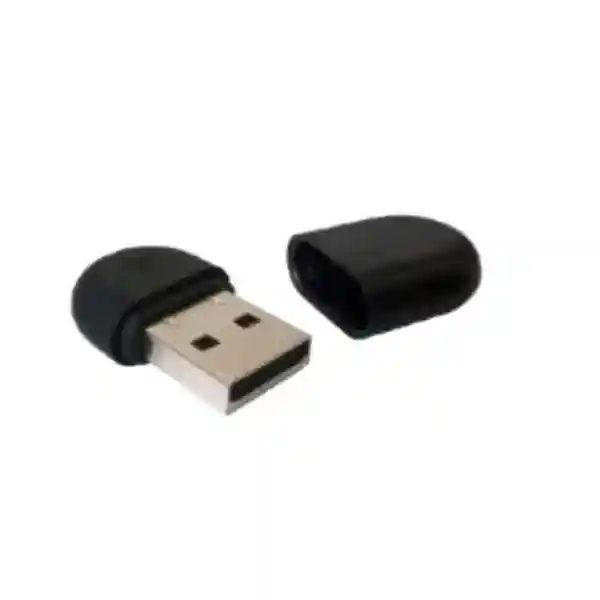
Yealink WF40 Wi-Fi USB Dongle Tanzania
The Yealink WF40 gives supported Yealink SIP desk phones a practical way to connect to a 2.4 GHz wireless LAN when a wired Ethernet drop is unavailable, inconvenient, or undesirable. The compact USB 2.0 adapter supports IEEE 802.11b/g/n networking at transmission rates up to 150 Mbps and is designed as a straightforward plug-and-play accessory for specified Yealink phone families. For Tanzanian offices, branches, reception desks, temporary work areas, training spaces and relocatable desks, the WF40 can simplify endpoint placement while keeping the phone integrated with the organization’s existing IP telephony environment.
Before purchasing, verify the exact phone model, firmware requirement, USB availability and wireless-network policy. The WF40 is not a general-purpose PC Wi-Fi adapter.
IEEE 802.11b/g/n on the 2.4 GHz band.
Up to 150 Mbps according to Yealink specifications.
USB 2.0, designed for supported Yealink IP phones.
WEP plus WPA-PSK and WPA2-PSK support as documented by Yealink.
What the Yealink WF40 solves
A desk phone is normally installed close to an Ethernet outlet because it needs network access to register with an IP PBX or hosted SIP service. In offices where furniture moves frequently, where an additional cable run is difficult, or where a temporary phone needs to be placed away from the wired network, that dependency can make installation awkward. The WF40 provides a wireless alternative for compatible Yealink endpoints by allowing the phone to join an available 2.4 GHz Wi-Fi network.
That flexibility should not be confused with a recommendation to place every voice endpoint on Wi-Fi. Voice still depends on stable latency, low packet loss, adequate signal strength and correct network configuration. A carefully planned wired connection remains valuable where it is practical. The WF40 is best viewed as an endpoint-placement tool for supported phones and appropriate wireless environments. FourTeck can help assess the phone model, access-point coverage, VLAN design, PBX compatibility and power arrangement before a rollout.
Verified Yealink WF40 specifications
| Network standard | IEEE 802.11b/g/n |
| Transmission rate | 150 Mbps |
| Frequency range | 2.4 GHz |
| Wireless security | 64/128/152-bit WEP, WPA-PSK, WPA2-PSK |
| Interface | USB 2.0 |
| Dimensions | 26.9 mm × 18 mm × 8 mm |
| Working temperature | 0°C to +40°C according to the current Yealink WF40 datasheet page |
| Storage temperature | -40°C to +85°C |
Specification note: reseller pages sometimes repeat older or inconsistent temperature figures. The values above follow Yealink’s current WF40 datasheet page. Always use the latest Yealink documentation when validating a deployment.
Compatible Yealink phones and firmware checks
Yealink currently lists the WF40 for SIP-T27G, T29G, T46G, T48G, T41S, T42S, T46S, T48S, T42U, T43U, T44U, T46U, T48U, T52S, T54S and T53. Yealink also publishes firmware prerequisites for several earlier models: the T48G requires version 35.80.0.95 or later, T29G/T46G/T46S/T48S require version 81 or later, and T27G/T41S/T42S require x.81.0.110 or later. Exact firmware naming varies by phone family, so procurement teams should record the installed phone models before ordering multiple adapters.
Compatibility is the most important purchasing check because a USB connector alone does not guarantee support. The WF40 is purpose-built for specified Yealink phones, not for arbitrary laptops, desktops, PBX appliances or other phone brands. Buyers upgrading a mixed estate should therefore separate phones that support the WF40 from phones with built-in Wi-Fi, models requiring a different wireless accessory, and units that should remain wired.
Yealink WF40 Tanzania
Organizations searching for the Yealink WF40 in Tanzania are usually trying to solve a practical installation constraint rather than replace their whole communications platform. A business may already have compatible Yealink SIP phones but need to place one at a reception counter, executive desk, meeting area, temporary project office or renovated workspace where running a fresh Ethernet cable would disrupt the room. The WF40 can provide a cleaner alternative when the local 2.4 GHz wireless network is strong, properly secured and stable enough for voice. Because the device supports 802.11b/g/n rather than newer 5 GHz-only operation, a pre-purchase wireless check is especially important in offices where access points are configured with separate bands, band-steering policies or legacy-client restrictions.
For Tanzania procurement, start with the existing Yealink model list and quantity. Record each phone’s firmware, determine whether the USB port is free, check how the phone is powered, and identify the SSID that the phones will use. If voice traffic will share Wi-Fi with laptops and mobile devices, review signal levels, channel utilization and Quality of Service rather than assuming that a visible Wi-Fi icon means adequate call quality. A branch with a small number of users may need only a straightforward configuration, while a larger office can benefit from a dedicated voice VLAN, controlled SSID design and centralized documentation.
FourTeck Tanzania can position the WF40 within a broader voice-ready network plan that includes IP phones, Wi-Fi and business networking in Tanzania. Buyers can also review the FourTeck Tanzania shop for related technology categories. A quotation request should specify the exact Yealink phone models, total WF40 quantity, PBX or hosted platform, site type and whether installation or network review is required. This prevents ordering an accessory that cannot be used with the installed endpoints.
Yealink WF40 Dar es Salaam
In Dar es Salaam, offices often combine fixed desks, reception areas, meeting spaces and expanding departments within buildings where structured cabling may already be committed to existing layouts. A Yealink WF40 can be useful when a supported desk phone needs to move without immediately extending the horizontal cabling system. Examples include a receptionist relocated during refurbishment, a temporary customer-service station, an executive office that has changed layout, or a demonstration phone used during a deployment. The accessory keeps the phone on the organization’s IP network through 2.4 GHz Wi-Fi, but the quality of the result depends on the wireless environment more than on the nominal 150 Mbps data rate.
Voice uses relatively little bandwidth, yet it is sensitive to interference, roaming behavior, packet loss and delay. Dense commercial areas can have many neighboring Wi-Fi networks, so channel planning matters. Before a larger WF40 rollout, test the target phone in the actual desk location during busy periods. Confirm that WPA2-PSK or the organization’s supported security method can be used, verify the phone firmware and confirm that the access point still provides reliable 2.4 GHz coverage. If the office has recently moved to a 5 GHz-focused design, the WF40 may not be the correct accessory.
Dar es Salaam businesses planning new voice systems should also consider the surrounding infrastructure: PBX routing, SIP trunking, PoE for wired phones, UPS support, switching and wireless segmentation. FourTeck’s Tanzania technology services provide a useful starting point for integrated planning. When requesting a quote, include the number of phones, make and model, firmware status, expected desk locations and wireless network details. That information helps determine whether WF40 adapters, wired Ethernet, phones with built-in wireless capability, or a mixture of approaches gives the most maintainable result.
Yealink WF40 Mwanza
For Mwanza organizations, the WF40 can support flexible placement of compatible Yealink phones in offices where an existing wireless network reaches areas that are not conveniently served by spare data outlets. This can be relevant for professional offices, hospitality administration, schools, clinics, warehouses and growing branch operations. The strongest use case is not simply “removing a cable”; it is making a supported phone usable in a location where additional Ethernet work would be disproportionate to the requirement. The adapter’s compact form and USB 2.0 interface keep the hardware footprint small, while its 2.4 GHz 802.11b/g/n radio provides broad compatibility with many business access points.
A Mwanza deployment should still be approached as a voice-network change. Check that the desired location has a stable signal, that the access point is not overloaded, and that the phone can reach its SIP server or PBX across the intended VLAN and firewall policy. If the phone is used for reception, emergency contact, customer service or another operationally important role, a wired path may remain preferable because it removes radio interference from the call path. The WF40 can be particularly effective for lower-risk extensions, temporary moves or locations with proven Wi-Fi coverage.
For procurement, avoid ordering purely from the Yealink brand name. Match every adapter to an explicitly supported model such as the T42U, T43U, T44U, T46U, T48U or other models listed by Yealink. Record firmware versions for older T4G and T4S devices. Ask for a quotation that separates hardware supply, configuration assistance and any network work. Where branch connectivity, switches and wireless access points also need attention, an integrated review through FourTeck Africa technology solutions can help regional teams standardize how voice endpoints are connected across multiple sites.
Yealink WF40 Arusha
Arusha businesses often need communications equipment that can adapt to changing room use, guest-facing spaces, tour and travel operations, administrative offices, hospitality facilities and project environments. The Yealink WF40 can add useful flexibility where a compatible SIP phone needs reliable access to an existing 2.4 GHz wireless network but an Ethernet outlet is not present at the final desk position. Because the dongle is small and powered through USB, there is no separate wireless bridge to mount or manage. The phone remains the user interface for selecting an SSID and entering credentials, subject to the menus and firmware available on the supported model.
The purchasing decision should account for how critical the extension is. A phone serving a front desk or reservation function may warrant a wired network connection when possible. A phone in a temporary back-office location may be an excellent candidate for WF40 use. Assess 2.4 GHz congestion, building materials, the distance to the access point and the number of active clients. Wireless voice benefits from consistent coverage, not peak throughput. The published 150 Mbps figure is a radio transmission capability; it should not be interpreted as a guaranteed application rate or call-quality metric.
Arusha buyers should also check whether newer Yealink phones in the planned system already include Wi-Fi or require another accessory, because mixed generations can have different wireless options. A practical quote therefore lists phone models and quantities rather than simply asking for “Yealink Wi-Fi dongles.” For broader infrastructure planning, the Tanzania site explains how FourTeck approaches integrated IT, telecom and networking projects. This helps place the accessory decision within the PBX, switching, power and wireless design that ultimately determines user experience.
Yealink WF40 Dodoma
In Dodoma, organizations expanding office capacity may encounter rooms where voice extensions are required before structured cabling changes can be completed. The Yealink WF40 can provide a controlled wireless option for supported Yealink SIP phones when the Wi-Fi network already covers the target area. This can be useful in administrative offices, professional services, education, healthcare support areas and project sites. The adapter supports WPA-PSK and WPA2-PSK as well as legacy WEP options documented by Yealink; modern deployments should use the strongest security configuration supported by the organization’s policy and phone environment rather than relying on older encryption merely because it appears on the specification sheet.
Before deploying several units in Dodoma, test registration, inbound and outbound calling, call hold, transfers and any PBX-specific features across the wireless network. A phone that can join the SSID may still experience quality problems if the WAN link, PBX path or radio environment is unstable. Keep the 2.4 GHz requirement in mind during network upgrades: some organizations reduce legacy-band capacity as they move laptops and mobile clients to 5 GHz or newer wireless standards. A WF40 rollout should therefore be aligned with the WLAN design rather than treated as an isolated accessory purchase.
For a clean quotation, provide the Yealink model, current firmware, quantity, power method and expected deployment location. Also state whether the phones register to an on-premises PBX, hosted service or remote branch system. The FourTeck Tanzania contact page is the verified route for discussing procurement requirements. If the business is standardizing multiple locations, request a repeatable configuration approach so SSID selection, security settings, device naming and documentation remain consistent across branches.
Yealink WF40 UAE
UAE buyers commonly encounter the WF40 when adapting existing Yealink T-series desk phones to office layouts where a network cable is inconvenient. The device is especially relevant for supported phones that do not include built-in Wi-Fi but remain suitable for the user’s call-handling requirements. It joins 2.4 GHz 802.11b/g/n wireless networks and provides a published transmission rate of 150 Mbps. That makes it suitable as a voice-endpoint connectivity accessory, but it should not be compared with modern dual-band laptop adapters because it serves a different purpose and is tied to specific Yealink phones.
In UAE offices with dense wireless deployments, verify that the 2.4 GHz band remains enabled and usable. Enterprise WLANs may prioritize 5 GHz, use authentication methods beyond the accessory’s documented WPA/WPA2-PSK capability, or enforce device policies that require network-team approval. Confirm these points before bulk purchase. For older supported phones, check the Yealink firmware prerequisites. For critical reception and contact-center positions, also compare the reliability of wireless access with a conventional wired connection. The WF40 is valuable where flexibility is the priority, but voice quality should remain the deciding factor.
Regional procurement teams can use FourTeck UAE when a project spans UAE offices as well as Tanzania. Keeping a consistent device list, firmware baseline and network policy across countries reduces support complexity. A quote request should include the phone estate, office locations, PBX platform and required quantities. If some endpoints are due for replacement, compare the total cost of adding adapters to older phones with the operational benefit of newer models that may provide integrated wireless features. That lifecycle view prevents spending on accessories that will be retired soon after deployment.
Yealink WF40 Uganda
Ugandan organizations with compatible Yealink desk phones can use the WF40 to connect selected endpoints to a 2.4 GHz wireless LAN. The accessory can be useful for branches where desks move, rented offices where new cable work is restricted, or temporary work areas that already have dependable Wi-Fi coverage. Because it is a Yealink-specific phone accessory, the first step is always model validation. Yealink lists a defined group of T-series phones and firmware conditions, and those should be checked against the installed fleet before quantities are confirmed.
A good Uganda deployment combines the accessory with practical wireless engineering. Signal strength should be tested at the actual phone location, not only near the access point. The voice VLAN or PBX path must be reachable from the wireless network. WPA2-PSK credentials need to be managed carefully, and changes to the SSID or passphrase should be documented because they can disconnect phones across the site. Where the office internet connection is variable, distinguish local WLAN performance from WAN performance: the WF40 can provide a strong local radio link while an external SIP service still experiences issues because of the internet path.
For cross-border organizations, FourTeck Uganda provides a regional point of reference for related business technology requirements. Standardizing the phone model, firmware, PBX template and Wi-Fi approach between Uganda and Tanzania can simplify support. When requesting WF40 pricing, include whether the requirement is hardware-only or includes assistance with installation and configuration. Do not assume availability, warranty terms or delivery dates until they are confirmed in the specific quotation.
Yealink WF40 Kampala
Kampala offices often operate in multi-tenant buildings, serviced spaces and expanding commercial premises where network cabling and furniture layouts can change independently. A supported Yealink phone fitted with the WF40 can follow the user to a desk that has suitable power and 2.4 GHz Wi-Fi without requiring an immediate Ethernet extension. This makes the accessory useful for moves, additions and changes, pilot deployments and temporary call-handling positions. Its value is highest when the organization already trusts the wireless network for business traffic and has enough visibility to troubleshoot radio problems.
Before choosing wireless for an important extension, evaluate the local interference level, distance to the access point, walls and partitions, and the amount of traffic sharing the same channel. The WF40 supports up to 150 Mbps, but VoIP quality is influenced by consistency rather than headline rate. A few seconds of packet loss or severe contention can be more disruptive to a call than a generally modest bandwidth figure. Where reception or executive users need uninterrupted service, wired Ethernet may still be the preferred architecture even if the dongle is technically compatible.
Kampala procurement teams should request compatibility confirmation against every Yealink model and avoid mixing assumptions from similar-looking devices. The WF40 is 2.4 GHz only and should not be ordered for an environment that exposes only 5 GHz SSIDs. If a site has several generations of Yealink phones, classify them by wireless option before buying. This creates a clearer bill of materials, reduces returns and makes the installation process predictable.
Yealink WF40 Arua
For businesses and institutions in Arua, the Yealink WF40 can be a practical accessory when a supported IP phone needs to operate in an area with reliable Wi-Fi but no nearby network port. Small branches and project offices often value solutions that can be deployed with minimal changes to the building, particularly when the workspace is leased or frequently reorganized. The dongle’s USB 2.0 form factor keeps installation simple, but the phone still requires power and access to the correct SIP or PBX resources through the wireless network.
The most important pre-deployment task is to verify the whole path, not just the adapter. Confirm the phone model and firmware, check the 2.4 GHz SSID, verify wireless security compatibility, and make a test call long enough to expose intermittent issues. If the service is hosted outside the site, also observe the internet connection during normal business load. If the PBX is local, verify routing and VLAN policies from the wireless network. These checks are especially useful for branch environments where remote troubleshooting can take longer than a short on-site validation before the equipment is rolled out.
When ordering for Arua, provide the intended use of each phone rather than only the quantity. A temporary extension, manager’s office and public reception have different risk levels and may justify different connectivity choices. Keeping one or two critical phones wired while using WF40 adapters for flexible positions can provide a balanced design. Procurement should also confirm current stock, commercial terms and support scope in the quotation rather than relying on marketplace listings from other countries.
Yealink WF40 Mbarara
Mbarara organizations planning small-office or branch telephony can use the WF40 to reduce dependence on a network outlet at every compatible Yealink phone position. This is particularly useful where the data network is wireless-first but voice endpoints still need the familiar ergonomics of a desk phone. The adapter connects the supported phone to a 2.4 GHz WLAN using IEEE 802.11b/g/n. Because it is intended for selected Yealink devices, it should be procured as part of the endpoint configuration rather than treated as a universal Wi-Fi accessory.
For reliable service, check that the wireless network extends into the exact desk area. A simple signal bar can be helpful, but a test call under normal business load is more meaningful. Review whether the organization uses a guest SSID, staff SSID or dedicated device network; phones should normally be placed on a network that can reach the PBX while being isolated according to the security design. If shared credentials are used, establish a process for updating phones when the password changes. This avoids unexpected outages after routine Wi-Fi maintenance.
A quotation for Mbarara should identify compatible phone models, quantities, required configuration support and any need for wireless or PBX troubleshooting. Organizations that expect future growth should also consider whether new Yealink endpoints with integrated wireless capabilities would reduce accessory management over the long term. The WF40 is highly useful for extending the life and placement flexibility of compatible existing phones, but lifecycle planning ensures that the purchase aligns with the next phase of the voice platform.
Yealink WF40 Gulu
In Gulu, the WF40 can support compatible Yealink desk phones where organizations prefer to avoid a new cable run for a small number of extensions. The adapter is particularly relevant to branch offices, education facilities, NGO or project workspaces and other environments where rooms are repurposed over time. A phone can join an existing 2.4 GHz Wi-Fi network, allowing the physical desk position to change while the SIP account and familiar Yealink handset remain in use.
Wireless convenience should be paired with resilience planning. If a phone is essential to front-line operations, assess whether the site’s access points and power system provide comparable reliability to the wired LAN. The phone still needs power even when Ethernet is removed, so confirm the appropriate adapter and backup strategy. In a site that previously relied on PoE, moving to Wi-Fi may change the power arrangement. This is an important practical detail that can be overlooked when an accessory is ordered solely to eliminate the Ethernet cable.
Buyers should check the Yealink support list, confirm firmware requirements, and document the chosen SSID and security method. For deployments across several Ugandan cities, use the same checklist so each branch is assessed consistently. A repeatable process covering model validation, Wi-Fi testing, phone registration, test calls and handover notes is more valuable than treating each unit as an isolated plug-in accessory. It also helps support teams understand whether a future call-quality complaint originates from the phone, radio network, PBX or internet connection.
Yealink WF40 Kenya
Kenya has a broad market for Yealink telephony, and the WF40 is commonly considered by businesses that want wireless connectivity for compatible desk phones without replacing the endpoints. The adapter’s 2.4 GHz 802.11b/g/n capability and up-to-150-Mbps transmission rate are well suited to its intended purpose, but the purchase decision should focus first on supported phone models. Several Kenyan reseller pages list the WF40, yet vendor documentation remains the correct authority for compatibility and firmware requirements.
For a Nairobi office, branch in another county, or regional company standardizing phones across East Africa, create an endpoint register before ordering. Identify Yealink model, extension, firmware, physical location and whether the phone has a free USB port. Then assess wireless conditions. A 2.4 GHz network can provide useful reach, but it can also be busy in dense office areas. Placing several voice devices on the same channel should be tested under load, especially if the access point also serves laptops, handheld devices or IoT equipment.
Regional procurement can be coordinated through FourTeck Kenya for related business technology requirements. Companies operating in Kenya and Tanzania can standardize phone configuration, firmware policies, PBX templates and documentation while still adapting the network design to each site. When asking for a quote, state whether the WF40 is for existing phones, a new Yealink rollout or a small number of problem locations. This context makes it easier to recommend the correct accessory approach and avoid purchasing wireless adapters where a newer endpoint or straightforward cable extension would be more economical.
Yealink WF40 Kuwait
Kuwait buyers may encounter the Yealink WF40 through international online sellers, but business procurement should begin with compatibility and supportability rather than marketplace availability. The WF40 is designed for specific Yealink T-series IP phones and operates on 2.4 GHz Wi-Fi. It is not a dual-band adapter, it does not turn unrelated USB devices into wireless endpoints, and it should not be selected only because the USB connector fits. Verify the phone model against Yealink’s current list and confirm any firmware prerequisite before ordering.
In modern Kuwait offices, Wi-Fi infrastructure may be optimized for 5 GHz or newer standards. Network teams should confirm that an appropriate 2.4 GHz SSID remains available and that WPA/WPA2-PSK operation aligns with security policy. Where enterprise authentication is mandatory, validate compatibility before committing to the accessory. Also consider voice criticality. A wireless link can solve placement problems, but a dedicated wired connection may be preferable for reception desks, trading floors, emergency lines or other positions where uninterrupted calling is more important than furniture flexibility.
Cross-regional buyers should request commercial terms that clearly state quantity, exact model, support scope and delivery arrangements instead of assuming conditions from third-party listings. If the same organization also operates in Tanzania, maintaining one approved Yealink model and firmware matrix can simplify procurement and support. The WF40 is a focused accessory; used in the right environment it extends placement flexibility, while used without compatibility checks it can create avoidable returns and configuration work.
Yealink WF40 Ghana
Ghanaian businesses using compatible Yealink SIP phones can consider the WF40 when they need to place a phone where wired Ethernet is impractical. The accessory connects the phone to 2.4 GHz Wi-Fi and can reduce cabling work for selected positions. This can be helpful in professional offices, small branches, hospitality administration, education and temporary project environments. The key is to use the WF40 as part of a planned endpoint design rather than as a universal replacement for Ethernet.
Check the wireless network at the target desk and verify that voice traffic can reach the PBX or cloud calling service. A signal may be strong but still suffer from channel congestion, internet instability or firewall policy problems. Test representative calls during working hours, not only after installation when the network is quiet. If the organization uses a central IT team, document the SSID, phone MAC address, extension and firmware so remote support staff can identify the endpoint later. The adapter’s small size makes it easy to deploy, but the operational documentation should be as deliberate as for any other network device.
For multi-country operations, procurement should use the same compatibility checklist across Ghana, Tanzania and other sites. Confirm current price, warranty and availability directly in the quotation, as these commercial details can change. If an office is already refreshing its phones, compare the WF40 solution with newer endpoints that provide native wireless capability. If the existing compatible Yealink phones still meet user needs, the WF40 can be an efficient way to add placement flexibility without replacing the full desk-phone estate.
Yealink WF40 Nigeria
Nigeria has an active market for Yealink telephony accessories, and the WF40 is offered by multiple resellers. Business buyers should nevertheless rely on Yealink’s own support list and technical specifications when deciding whether the adapter suits an installed phone. The WF40 provides 2.4 GHz 802.11b/g/n connectivity for supported Yealink SIP phones and is rated for transmission up to 150 Mbps. It can be useful in Lagos, Abuja and other business locations where a desk phone needs to move beyond an available Ethernet outlet.
A large office should evaluate RF conditions before converting many phones to wireless. Dense 2.4 GHz environments can experience interference from neighboring networks and other devices. Voice is sensitive to brief interruptions, so conduct a pilot with a few phones and monitor call behavior before scaling. Ensure that the wireless network’s security configuration matches the WF40 capabilities and that the PBX, DNS, DHCP, routing and firewall rules operate correctly from the selected SSID. If phones previously used PoE, plan how each wireless phone will be powered and protected from power interruptions.
For procurement, request the exact Yealink part and avoid substituting generic USB Wi-Fi devices. Include phone model, firmware, quantity, site count and whether configuration support is needed. Regional organizations that operate in Nigeria and Tanzania can benefit from a common endpoint standard while using site-specific network settings. This keeps firmware management, user training and spares easier to control. The objective is a predictable communications platform, not merely the fastest way to connect a phone without a cable.
Yealink WF40 Seychelles
Seychelles businesses in hospitality, professional services, administration and distributed operations may value the WF40 when compatible Yealink phones need flexible placement without an additional data cable. Guest-facing facilities often change desk layouts or create temporary service positions, and a wireless phone connection can reduce installation disruption. The WF40 operates on 2.4 GHz Wi-Fi, so the first technical check is whether the target area has stable coverage on that band rather than only modern 5 GHz service.
For hotels and other hospitality environments, keep business voice endpoints logically separate from guest Wi-Fi wherever the network design permits. A phone should connect to an appropriate staff or device network that can reach the PBX and receive consistent service. Do not use public guest networks for enterprise phone connectivity simply because they are convenient. Check security, DHCP behavior, firewall rules and upstream internet stability. If the PBX is cloud-hosted, call quality depends on the internet path as well as the local radio connection.
Seychelles procurement should include spare planning because accessories may not always be immediately available locally. That does not mean stock or delivery should be assumed; obtain current confirmation in the quotation. Before ordering spares, ensure the organization expects to keep the compatible Yealink phone models in service for an appropriate period. Where a broader handset refresh is already planned, the business may prefer phones with integrated wireless support. The WF40 is most economical when it solves a real placement problem for compatible phones that continue to meet operational requirements.
Deployment and configuration guidance
Yealink’s user guidance describes a straightforward workflow: insert the WF40 into the supported phone’s USB port, enable Wi-Fi, scan for an available wireless network, select the SSID and enter the required password when the network is secured. Menu names vary by phone model and firmware, so use the relevant phone guide during deployment. When several phones are involved, create a change plan rather than configuring them ad hoc. Record the old connection method, intended SSID, test extension and rollback approach before moving each phone.
Wireless voice troubleshooting should separate radio issues from telephony issues. If the phone cannot see the SSID, inspect band configuration and access-point coverage. If it connects to Wi-Fi but cannot register, investigate DHCP, DNS, routing, PBX address and firewall policy. If it registers but call quality is poor, examine signal stability, congestion, packet loss and WAN performance. This layered method is faster than repeatedly rebooting the phone or replacing the dongle without identifying where the fault occurs.
A final acceptance test should cover inbound and outbound calls, transfer, hold, voicemail access where used, DTMF interaction with IVR systems and any organization-specific functions. For remote branches, capture screenshots or configuration notes that allow the central IT team to understand the wireless setup later. The accessory may be small, but a repeatable deployment process protects service quality.
Buying guidance: when to choose the WF40
Good fit
Choose the WF40 when the phone model is officially supported, 2.4 GHz Wi-Fi is available, the desk needs flexibility, wireless security is compatible and the extension does not require a wired connection for organizational policy or maximum resilience.
Check alternatives
Consider another approach when the phone is unsupported, only 5 GHz Wi-Fi is available, enterprise authentication cannot be accommodated, the USB port is required for another accessory, or the position is critical enough that wired Ethernet provides a more appropriate service level.
Related FourTeck resources
The WF40 works at the edge of a larger communications system. For Tanzania projects, review the FourTeck Tanzania integrated technology portfolio, the Tanzania technology shop, and the services overview when the requirement includes PBX, switching, Wi-Fi, cabling or support rather than the dongle alone. The about page explains the broader IT, telecom and security approach.
For regional teams, FourTeck UAE, FourTeck Kenya, FourTeck Uganda and FourTeck Africa can support consistent planning across multiple markets. These links are included for related regional technology context; product availability and commercial conditions should always be confirmed for the specific country and quotation.
Frequently asked questions
Is the Yealink WF40 a universal USB Wi-Fi adapter?
No. Yealink publishes a specific compatibility list for supported SIP phones. The WF40 should not be treated as a general-purpose adapter for computers, other phone brands or arbitrary USB devices.
Does the WF40 support 5 GHz Wi-Fi?
No. Yealink specifies a 2.4 GHz frequency range with IEEE 802.11b/g/n. If the intended SSID is available only on 5 GHz, the WF40 is not the right connectivity option.
What speed does the WF40 support?
Yealink specifies a transmission rate of up to 150 Mbps. This is more than sufficient for normal VoIP bandwidth requirements, but call quality depends on wireless stability, packet loss, latency and the wider network path.
Which Yealink phones support WF40?
Yealink lists SIP-T27G, T29G, T46G, T48G, T41S, T42S, T46S, T48S, T42U, T43U, T44U, T46U, T48U, T52S, T54S and T53. Some older models require minimum firmware versions, so confirm the exact phone before purchase.
Can WF40 replace Ethernet for every desk phone?
It can provide wireless connectivity for compatible phones, but a wired connection can still be preferable for critical extensions or locations with congested Wi-Fi. Use the WF40 where its flexibility solves a genuine cabling or placement requirement.
What should I provide for a quotation?
Provide the Yealink phone model, quantity, firmware if known, deployment city, PBX or hosted platform, and whether you require hardware only or assistance with configuration, Wi-Fi or wider IP telephony infrastructure.
Quotation checklist
To obtain an accurate Yealink WF40 quotation, prepare the following information:
Decision recap
The Yealink WF40 is a focused accessory for organizations that already use compatible Yealink SIP phones and need a practical 2.4 GHz wireless connection. Its strengths are compact size, USB 2.0 installation, 802.11b/g/n support and a published transmission rate of 150 Mbps. The main buying checks are equally clear: exact phone compatibility, firmware, 2.4 GHz coverage, wireless security, power arrangement and the importance of the extension. When those factors align, the WF40 can make phone placement far more flexible without forcing a handset replacement or new data cable for every location.
Plan the WF40 as part of the voice network
For a single adapter, compatibility may be the only major question. For a multi-phone deployment, the surrounding network matters just as much: access-point coverage, SSID design, PBX routing, firmware standardization, power and support documentation. FourTeck can review these dependencies so the accessory is selected for the right phones and used in locations where wireless voice is operationally appropriate.




Reviews
There are no reviews yet.