
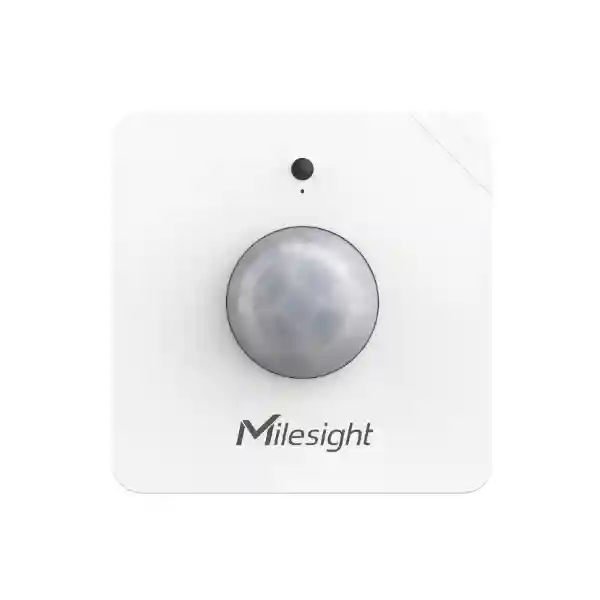
Yeastar Desk Occupancy Sensor
The Yeastar Desk Occupancy Sensor is a smart workplace device for organizations that want desk-booking data to reflect what is actually happening at each workstation. In Yeastar Workplace, the supported device is the Milesight Occupancy Sensor WS202, a LoRa PIR sensor that can detect real-time desk occupancy, synchronize that status to the Yeastar Workplace portal and help automatically release a flexible desk when it remains unoccupied according to the configured auto-release policy. For businesses introducing hot desking, desk hoteling or hybrid-office scheduling, that closes an important gap between a reservation record and physical desk usage.
For procurement teams in Tanzania, the key buying question is not simply whether the sensor can detect presence. A successful deployment also depends on Yeastar Workplace licensing, desk resources configured in the platform, a suitable LoRaWAN gateway or compatible Yeastar Room Display for data transport, correct sensor placement and a rollout plan that maps each physical sensor to the intended desk. FourTeck can help buyers frame those dependencies before purchase so the sensor is specified as part of a working workplace-management solution rather than treated as a standalone gadget.
Occupancy data can be synchronized into Yeastar Workplace so users and administrators can see whether desk resources are in use.
Flexible desks that remain vacant can be released automatically according to the timeout strategy configured in Yeastar Workplace.
The supported WS202 works through a LoRaWAN gateway or a compatible Yeastar Room Display acting as the associated gateway.
Yeastar guidance places the sensor beneath the desk, approximately 10–30 cm from the edge and aligned around the desk center line.
What the Yeastar Desk Occupancy Sensor solves
Desk booking becomes less reliable when an organization only knows what employees reserved. A desk may be booked but never used, a person may leave earlier than expected, or teams may reserve more space than they finally need. The occupancy sensor adds physical-use information to the desk-booking process. That makes the workplace map more informative and gives administrators better evidence when reviewing desk utilization, seating patterns and capacity planning.
The sensor is especially relevant for flexible desks because Yeastar Workplace can use detected vacancy as a trigger for auto-release. That can return an unused desk to the available pool instead of leaving it blocked by an abandoned reservation. The practical benefit is not simply automation; it is reducing the mismatch between booked capacity and real capacity during a busy office day.
The device should be considered together with the broader Yeastar Workplace desk-booking environment. Yeastar documents the Desk Occupancy Sensor as part of its smart-device ecosystem and currently lists sensor capabilities under the Workplace Pro plan. Buyers should therefore validate the required Workplace subscription, the number of desks, the number of sensors, the gateway design and any additional locations before finalizing a bill of materials.
Verified deployment requirements
Yeastar Workplace must have desk resources configured before sensors are bound to desks.
Yeastar’s current help and pricing information places the Desk Occupancy Sensor capability in the Pro tier.
A configured LoRaWAN gateway such as UG65, or a compatible Yeastar Room Display DS7510, is required to transport sensor data.
Each sensor is registered using its serial number and bound to a particular desk resource in Yeastar Workplace.
Installation and configuration guidance
Yeastar’s setup guidance recommends mounting the WS202 underneath the desk, around 10 to 30 centimetres from the desk edge and centered along the desk line. Installation uses adhesive mounting, and the sensor is activated by removing the battery insulating sheet. Before physically fixing every sensor, administrators should register devices in the Yeastar Workplace portal, name them consistently, associate each device with the correct gateway and bind the device to the correct desk resource. Labelling the underside of each sensor with its desk identity is a practical way to reduce mistakes during a larger rollout.
Gateway planning matters. Yeastar recommends selecting a gateway on the same floor when using a dedicated LoRaWAN gateway. When a compatible DS7510 room display is used as the associated gateway, Yeastar documents a volume guideline of 288 m³ based on a 12 × 8 × 3 metre space and advises against associating more than ten devices with the same display. Physical barriers, floor layouts and deployment density should therefore be considered during design rather than assuming a single gateway can serve an unlimited area.
After activation, device status should be checked in the Workplace admin portal. If a sensor fails to activate or join the LoRaWAN network, Yeastar’s troubleshooting path starts with power state, internet access for the associated gateway and, where necessary, sensor reboot or maintenance through the supported management method. A good handover should document sensor serial numbers, desk names, gateway associations and the final auto-release policy.
Related FourTeck Tanzania resources
Use the shop overview when sourcing workplace, networking and supporting business technology as one coordinated requirement.
IT integration and support services
Review deployment, integration and lifecycle services that can sit around a connected workplace project.
Business technology solutions in Tanzania
See how collaboration, networking, security and workplace systems can be planned as part of one architecture.
About FourTeck Tanzania
Learn about FourTeck’s approach to business IT, telecom, security and infrastructure requirements.
Request a Tanzania quotation
Share desk quantity, building layout and Yeastar Workplace requirements to prepare a more accurate solution scope.
Yeastar Desk Occupancy Sensor Tanzania
Organizations evaluating the Yeastar Desk Occupancy Sensor in Tanzania are often trying to make hybrid work more predictable rather than merely adding another sensor to the office. The strongest use case is a shared-desk environment where employees reserve workstations in advance, administrators need to understand actual use, and unused bookings should be returned to the desk pool automatically. In that setting, the WS202 gives the Workplace platform a physical occupancy signal that complements reservations and check-in activity. This can be useful for headquarters, service companies, banks, technology teams, professional offices, shared workspaces and enterprises that have introduced flexible seating.
A Tanzania procurement plan should start with the number of flexible desks and the operational reason for monitoring them. Some companies may need sensors only on high-demand hot desks, while others may want broader measurement across an entire floor. The design should then map sensors to gateways and desk resources. Because Yeastar uses LoRa communication for the occupancy sensor, the workplace Wi-Fi network is not the direct radio path used by the WS202 itself, but reliable IP connectivity for the Yeastar Workplace environment and associated gateways remains important. Gateway location, internet access, floor boundaries and physical layout should therefore be reviewed together.
Buyers should also confirm Yeastar Workplace licensing before ordering hardware. The vendor’s current documentation associates the Desk Occupancy Sensor and sensor-triggered auto-release with the Pro plan. That makes subscription planning part of the hardware decision. A quotation request should ideally state the number of buildings, floors, desks, flexible seats, expected users and whether compatible gateways or room displays are already installed. If the organization uses Microsoft 365, Google Workspace or Microsoft Teams, those broader Workplace integrations can also influence the desired user experience even though the occupancy sensor’s core job remains physical desk detection.
For Tanzania deployments, practical handover is as important as initial installation. Each sensor should have a traceable serial number, desk association and gateway assignment. Administrators should understand how to check device status, how auto-release rules are configured and how changes to office layouts will be reflected in the system. A disciplined deployment makes it easier to relocate desks, add sensors, troubleshoot connection issues and compare utilization over time. FourTeck can help frame the bill of materials and deployment questions so procurement teams avoid ordering sensors without the supporting Workplace environment needed to use them.
Yeastar Desk Occupancy Sensor Dar es Salaam
Dar es Salaam has a broad mix of corporate offices, professional services, technology businesses, financial organizations, logistics companies and regional operations where shared seating can be attractive. A Yeastar Desk Occupancy Sensor deployment can support offices that are reducing permanently assigned desks, accommodating teams that divide time between home and office, or moving into buildings where floor space needs to be used more efficiently. Real-time occupancy helps employees see whether shared desks are genuinely in use, while administrators gain a more grounded view of utilization than reservation records alone can provide.
For a multi-floor office in Dar es Salaam, gateway and sensor association should be designed by floor rather than treated as an afterthought. Yeastar explicitly recommends selecting a gateway on the same floor for optimal data transmission. This is especially important when offices have concrete partitions, enclosed meeting areas or separated departments. A pilot on one floor can be a sensible starting point: configure desk resources, register a controlled group of sensors, validate real-time status, test auto-release behaviour and confirm that employees understand how the desk-booking map is meant to be used before extending the project.
Procurement teams should separate the sensor quantity from the rest of the solution scope. A complete deployment can involve Yeastar Workplace licensing, a LoRaWAN gateway or compatible room display, desk mapping, installation materials, user onboarding and administrative configuration. If the office is already using Yeastar Workplace for meeting rooms or visitors, the desk project may fit into the same broader workplace platform. If it is a new deployment, the organization should define who will own user administration, floor-map updates, policy settings and ongoing support.
When requesting a quotation for Dar es Salaam, provide the floor plan if available, number of flexible desks, number of floors, expected occupancy patterns and any existing Yeastar smart devices. Mention whether the objective is better employee wayfinding, automatic release of abandoned reservations, utilization reporting or a combination of all three. That information makes it easier to determine whether every desk needs a sensor, where gateways should be placed and what should be validated during installation and handover.
Yeastar Desk Occupancy Sensor Mwanza
Businesses in Mwanza considering hybrid work may have a different footprint from large headquarters deployments. Branch offices, education-adjacent operations, healthcare administration, professional firms and regional service organizations may need a compact but manageable way to share desks without introducing a complicated process for staff. The Yeastar Desk Occupancy Sensor is most valuable when it forms part of a clear desk-booking policy: employees know which desks are flexible, bookings are visible in Yeastar Workplace, and vacancy detection can help return abandoned seats to the available pool.
A smaller Mwanza site should not automatically copy the architecture of a larger office. Start by counting desks that genuinely need occupancy awareness, then determine whether a dedicated LoRaWAN gateway or compatible Yeastar Room Display can provide the required sensor path. Yeastar’s guidance to keep the associated gateway on the same floor is useful for planning. Where the office has only a modest number of sensors, careful naming and desk binding can make support straightforward. Administrators should be able to identify each physical sensor from the Workplace device list and from a label beneath the desk.
The auto-release policy should match how people actually use the office. A short timeout may be unsuitable if staff frequently leave desks for meetings or site visits, while an excessively long timeout may keep abandoned desks unavailable for too long. Yeastar allows the vacancy-triggered auto-release duration to be configured or disabled. The policy should therefore be agreed by workplace administrators and communicated to users so employees understand what will happen if a booked flexible desk is left empty.
For procurement in Mwanza, ask for a solution that identifies both hardware and platform dependencies. The quote should distinguish sensors, gateway devices, Yeastar Workplace subscription requirements and implementation services. If the company expects to expand to additional branches later, desk naming, building structure and device documentation should be standardized from the beginning. That helps a small first deployment become a repeatable template instead of a one-off installation that has to be redesigned when the organization grows.
Yeastar Desk Occupancy Sensor Arusha
Arusha offices can include tourism and hospitality headquarters, development organizations, regional administration, consulting firms, education operators and businesses serving international teams. In these environments, attendance patterns can vary by season, project cycle and travel schedule. A desk-booking system supported by occupancy sensors can help organizations understand whether assigned floor space matches day-to-day demand, while employees gain a clearer view of which flexible desks are available when they arrive.
The Yeastar Desk Occupancy Sensor does not replace workplace policy. It strengthens a policy by contributing real-time presence information. If employees book desks but fail to use them, the sensor can support automatic release of those abandoned reservations after the configured vacancy period. That is particularly useful where teams regularly travel, attend field meetings or work across multiple sites, because reservation plans can change after the booking was created. The organization can preserve flexibility without relying entirely on manual check-out behaviour.
For an Arusha implementation, the technical checklist should include Yeastar Workplace Pro licensing, desk-resource configuration, the WS202 sensor count, gateway coverage and physical installation. Under-desk placement must remain consistent so presence is detected reliably. Gateway association should follow Yeastar’s same-floor recommendation. If a DS7510 room display is used as the gateway path, the documented device and coverage limits should be respected rather than stretching the display beyond its intended sensor load.
A useful quotation request will explain how the office is divided, which desks are permanent and which are flexible, whether the company wants sensor-based auto-release, and whether existing Microsoft 365, Google Workspace or Teams integrations are part of the broader workplace plan. FourTeck can then help organize the procurement discussion around a complete solution rather than a simple sensor quantity, reducing the risk that an important gateway, licensing or configuration requirement is discovered only after installation begins.
Yeastar Desk Occupancy Sensor Dodoma
Dodoma organizations planning modern administrative offices can use occupancy-aware desk booking to make shared work areas easier to manage. The Yeastar Desk Occupancy Sensor is relevant where departments use flexible seating, project teams rotate between office and field work, or an organization wants evidence before expanding or reducing desk capacity. By detecting physical occupancy at the workstation and synchronizing that information to Yeastar Workplace, the sensor adds a live operational signal to the desk-booking process.
A public-sector, education, professional-services or enterprise office in Dodoma may need clear governance around workplace data. Before rollout, administrators should define who can view desk status, who manages building and floor resources, and what the occupancy information will be used for. The sensor’s purpose is desk availability and utilization, not employee performance scoring. A transparent policy helps users understand that the system exists to manage shared space and reduce unavailable-but-empty desks rather than to create unnecessary monitoring concerns.
Technical planning remains straightforward when the deployment is documented. Register sensors by serial number, name them using a consistent desk or floor convention, associate them with the appropriate gateway and bind them to the correct desk resource. Install them underneath the desk following Yeastar’s placement guidance, then verify status from the admin portal. If the desk layout changes later, update the resource map and sensor binding so the digital floor plan continues to represent the physical office correctly.
Procurement should include the number of flexible desks, total buildings, floors, available gateway devices and the required Yeastar Workplace subscription. If the project is being coordinated with network upgrades, meeting-room booking or other workplace technology, consider the overall implementation schedule so floor maps, cabling, internet access and user accounts are ready when sensors are commissioned. A planned rollout reduces disruption and gives administrators time to validate auto-release settings before the system becomes part of everyday desk booking.
Yeastar Desk Occupancy Sensor UAE
In the UAE, high-density offices, regional headquarters, professional services and multinational teams frequently use hybrid-work policies that make desk allocation a measurable operational issue. The Yeastar Desk Occupancy Sensor can complement a Yeastar Workplace desk-booking deployment by showing physical occupancy in real time and supporting automated release of flexible desks that remain unused. For organizations paying premium commercial rents, reliable occupancy information can also contribute to longer-term discussions about floor planning and workplace capacity.
A UAE project may span several offices or buildings, so the building and gateway design deserves attention. Yeastar supports multi-building workplace management, while additional locations can affect licensing and platform planning. Each sensor still needs a local association to a gateway path and a specific desk resource. For multi-floor towers, keeping gateway assignments aligned to floors simplifies troubleshooting and follows Yeastar’s deployment guidance. The procurement team should document which sensors belong to which floor before installation teams begin mounting hardware.
Organizations operating between Tanzania and the UAE may also want a common workplace standard. A repeatable Yeastar deployment template can define naming conventions, desk types, booking policies, auto-release settings and gateway documentation while still allowing each office to have a different number of desks. For broader regional projects, FourTeck’s UAE technology resources at FourTeck UAE can complement Tanzania planning when procurement or IT responsibilities cross both markets.
When comparing quotations in the UAE, check what is included beyond the WS202 sensor count. Confirm Yeastar Workplace plan requirements, gateway hardware, installation, configuration, testing and handover. Ask whether the desk map and device binding are part of the project and whether administrators will receive documentation. Those details often determine whether the system is usable on day one and manageable after office moves or staffing changes.
Yeastar Desk Occupancy Sensor Uganda
Organizations in Uganda can use the Yeastar Desk Occupancy Sensor as part of a structured move toward flexible seating. The sensor is appropriate where a company has already decided that desks are shared resources and wants desk availability to reflect physical use rather than reservations alone. Yeastar Workplace can display occupancy information on the workplace map, giving users a clearer indication of which desks are in use and giving administrators a better basis for reviewing space utilization.
A national organization with offices in Kampala and regional locations should decide whether it needs one consistent desk-booking policy or different policies by site. Auto-release behaviour, booking windows, flexible versus permanent desks and user permissions can all shape the employee experience. The physical sensor is only one component of that design. Good governance ensures that staff understand the rules and that administrators know how to update resource mappings when teams move or office layouts change.
Technical deployment requires the supported sensor model, Yeastar Workplace, and a suitable associated gateway. The gateway should have reliable internet access, and Yeastar recommends same-floor association where possible. Before installation, record each sensor serial number and planned desk. After mounting, verify device status and real-time changes in the portal. This staged method is more dependable than installing all hardware first and trying to reconcile unidentified sensors afterward.
For Uganda-specific purchasing and related regional coordination, organizations can also review FourTeck Uganda. Cross-border groups operating in both Tanzania and Uganda can use the same procurement checklist: desk quantity, floors, gateway count, Workplace licensing, integration needs, installation scope and administrative handover. Keeping those inputs consistent makes comparison and rollout planning much clearer.
Yeastar Desk Occupancy Sensor Kampala
Kampala is a natural fit for workplace-management projects because many corporate, telecom, financial, NGO and professional-service offices need to accommodate staff who work between headquarters, branches, customer sites and home. In such environments, a booking calendar can show planned attendance but not necessarily actual desk use. The Yeastar Desk Occupancy Sensor adds live physical occupancy information, helping the office distinguish between a desk that is truly in use and one that has been reserved but left empty.
A Kampala rollout should begin with user behaviour. Identify the desk clusters that experience the most contention, the periods when teams overlap in the office and the business reason for auto-releasing unused reservations. Starting with high-demand flexible zones can deliver operational value without requiring sensors on every permanent workstation. Yeastar Workplace can then be configured so administrators monitor utilization and employees see real-time status on the office map.
Gateway design should follow the physical office. A single floor with an open plan may be simpler than a tower office split across several levels. Yeastar recommends same-floor gateway association and provides specific guidance when a compatible DS7510 display is used as the sensor gateway. Device naming should include enough information to identify building, floor and desk. That may look like a structured code rather than an employee name, because flexible desks are workplace resources that can change users throughout the day.
For a purchase request, provide the number of sensors, expected gateway method, Workplace subscription status and floor plan. If the project is being implemented alongside desk screens, meeting-room displays or visitor management, say so in advance. A combined Yeastar Workplace design can reduce fragmented administration and give the business one clearer operating model for rooms, desks and visitors rather than separate systems with different user directories and management practices.
Yeastar Desk Occupancy Sensor Arua
For an office in Arua, a desk occupancy project is likely to be most successful when it remains proportionate to the site. A smaller branch may only have a limited number of flexible workstations used by visiting managers, project staff, sales teams or shared administrative functions. The Yeastar Desk Occupancy Sensor can give those employees more confidence that a desk shown as available is genuinely free, while also helping the system release booked desks that are not actually occupied.
The design should focus on reliability and simplicity. Configure desk resources first, decide which seats are permanent and which are flexible, then register each sensor with a clear naming convention. The associated gateway must be planned so sensor data reaches the Workplace platform consistently. Because branch support may be less frequent than in a main headquarters, documentation becomes especially important. A local administrator should be able to identify the sensor, its desk binding and its gateway relationship without depending on the original installer.
Auto-release settings should also fit branch behaviour. Employees who leave their desks for customer visits or long internal sessions may create false assumptions if the timeout is too aggressive. Yeastar allows the vacancy strategy to be adjusted, so administrators should test a realistic policy during the pilot stage. The goal is to make unused desks available without creating frustration for legitimate users who temporarily step away from their workstation.
Arua buyers should request a quotation that makes dependencies explicit: sensor quantity, gateway hardware if required, Yeastar Workplace plan, implementation, device binding and user/admin handover. If the branch belongs to a larger Uganda or East Africa network, use the same device naming and documentation model across sites. Standardization helps central IT teams compare utilization and troubleshoot remote offices with less confusion.
Yeastar Desk Occupancy Sensor Mbarara
Mbarara organizations considering flexible workplace technology may include healthcare administration, education, financial services, commercial businesses and regional offices that host staff from surrounding areas. Where desks are shared between office-based and travelling employees, availability can become uncertain at busy times. Yeastar’s Desk Occupancy Sensor is designed to make desk status more representative of real physical use by feeding occupancy information into Yeastar Workplace.
The first design choice is scope. Sensors are most useful on desks that operate as flexible resources. A permanently assigned desk may not require the same occupancy logic unless the organization has a specific utilization-analysis goal. By prioritizing the desks that create booking friction, an Mbarara office can start with a focused deployment, learn how staff respond to sensor-driven availability and then expand only where the data justifies it.
Installation should follow a repeatable checklist. Register the device serial number, set an identifiable device name, select the associated gateway, bind the correct desk resource and only then mount the sensor beneath the desk in the recommended position. After installation, confirm online status and test occupancy changes. If the device does not join the LoRaWAN network, gateway connectivity and device activation should be checked before assuming the sensor itself is faulty.
When budgeting, include ongoing platform licensing alongside hardware. Yeastar’s current product information places Desk Occupancy Sensor support in Workplace Pro. Procurement should therefore compare the recurring software requirement with the operational objective: improved desk availability, more reliable utilization data and the ability to automate release of abandoned bookings. That creates a better business case than evaluating the sensor price in isolation.
Yeastar Desk Occupancy Sensor Gulu
In Gulu, shared seating can be useful for regional operations, development organizations, professional offices and teams whose staff split time between field activity and administrative work. The Yeastar Desk Occupancy Sensor supports this model by providing a physical occupancy signal for flexible workstations. Instead of relying only on what was booked, Yeastar Workplace can reflect whether the desk is actually in use and can use vacancy to support automatic release according to the configured policy.
A branch deployment should be designed so day-to-day administration is not dependent on specialist intervention. Desk names should be intuitive, floor maps should match the actual office and sensor labels should correspond with the names used in the portal. If furniture is moved, the digital map and device bindings should be updated at the same time. Simple operational discipline prevents a smart workplace system from becoming inaccurate as the office evolves.
Connectivity planning should also recognize the role of the gateway. The WS202 uses LoRa for sensor communication, but the associated gateway needs internet access so data can reach the Workplace platform. Where power or connectivity conditions vary, the broader network and power environment should be considered in the implementation plan. The objective is not to overengineer a small office, but to make sure the core path from sensor to gateway to platform remains dependable.
For Gulu procurement, a useful scope includes a floor or desk list, sensor quantity, gateway plan, Yeastar Workplace licensing, installation responsibility and acceptance testing. Ask how administrators will be trained to see sensor status and manage auto-release. A clear handover reduces the chance that a configuration issue later becomes confused with a hardware fault and gives the local office confidence to operate the system independently.
Yeastar Desk Occupancy Sensor Kenya
Kenyan businesses with hybrid offices can use the Yeastar Desk Occupancy Sensor to strengthen desk-booking accuracy in headquarters, branch networks and shared office environments. Nairobi and other commercial centers often have teams that alternate between client sites, remote work and office days, which means reservations can change after they are made. Real-time occupancy information helps the system represent the physical state of flexible desks and can release abandoned bookings automatically according to the organization’s policy.
For a multi-site Kenyan company, Yeastar Workplace can form part of a standardized workplace operating model. Administrators can use consistent desk categories, naming conventions and booking rules while allowing different offices to have different layouts and sensor counts. The WS202 sensors should be mapped carefully to local gateways and desk resources. When each site follows the same deployment documentation, a central IT team can support offices without having to rediscover how every floor was configured.
Procurement should validate licensing, gateway quantity and installation rather than ordering sensors alone. If an office already uses a compatible Yeastar smart gateway or room display, that can influence the bill of materials, but compatibility and capacity must be confirmed against the actual deployment. Sensor mounting should follow vendor guidance and be tested before full rollout. A pilot area gives employees and administrators a chance to refine booking and auto-release rules based on real behaviour.
Organizations coordinating requirements across East Africa can review FourTeck Kenya alongside the Tanzania site. The most useful cross-border standard is a common quotation checklist: number of desks, flexible-seat percentage, floors, buildings, gateway environment, Workplace plan, integrations and support expectations. With those inputs defined, procurement decisions become easier to compare and replicate.
Yeastar Desk Occupancy Sensor Kuwait
In Kuwait, office modernization projects often involve a mix of corporate headquarters, professional firms, government-related organizations and regional businesses seeking better use of high-value office space. The Yeastar Desk Occupancy Sensor can support these projects where desks are shared rather than permanently assigned. By detecting real desk occupancy and synchronizing status to Yeastar Workplace, the sensor helps users find available desks and helps administrators identify when reservations do not translate into actual use.
A workplace team should define the desired outcome before specifying hardware. If the main problem is no-show desk bookings, auto-release can be central to the design. If the objective is long-term capacity planning, consistent sensor coverage and utilization reporting may be more important. If the priority is employee experience, accurate floor maps and clear availability become critical. These objectives can overlap, but prioritizing them helps determine where sensors add the most value.
Technical implementation follows Yeastar’s supported architecture: Workplace desk resources, WS202 sensors, an associated LoRaWAN gateway or compatible Yeastar Room Display, and correct device registration and binding. The Workplace subscription must also support the smart-sensor features. An installation team should verify sensor status after mounting and test how quickly changes appear in the user portal before the project is signed off.
For Kuwait-focused coordination, buyers can also reference FourTeck Kuwait. Multi-country organizations can use the same high-level deployment template across Kuwait and Tanzania while allowing local offices to choose their own sensor quantities and desk policies. Standard documentation, naming and acceptance testing make future expansion easier and reduce the risk of inconsistent configurations between sites.
Yeastar Desk Occupancy Sensor Ghana
For Ghanaian organizations adopting hybrid work, the Yeastar Desk Occupancy Sensor can add real-time desk-use information to the reservation process. It is especially useful in flexible seating areas where employees choose a workstation each day. When a booked desk remains empty, Yeastar Workplace can use occupancy information to help release the resource according to the configured policy, allowing another employee to reserve it instead of leaving useful capacity stranded.
A successful Ghana deployment should combine workplace policy with technical design. Employees need to know which desks are flexible, how to reserve them and what happens when they leave. Administrators need to know who owns floor maps, user permissions, device health and auto-release settings. The technology works best when those responsibilities are clear. Without operational ownership, even accurate sensors can feed a system whose resource data eventually becomes outdated.
From a technical perspective, buyers should verify Yeastar Workplace Pro requirements, supported sensor hardware, gateway design and installation. The WS202 should be mounted underneath desks in the recommended location, each device should be mapped to the correct resource and same-floor gateway association should be used where possible. Acceptance testing should confirm not only that devices appear online, but also that the desk status seen by users corresponds to real occupancy at the physical workstation.
Regional buyers can use FourTeck Ghana when requirements involve Ghana directly. For organizations with operations in Ghana and Tanzania, align the data model even if office layouts differ. A consistent structure for buildings, floors, desks, sensor names and gateway labels makes regional support simpler and allows procurement teams to compare deployment costs on a like-for-like basis.
Yeastar Desk Occupancy Sensor Nigeria
Nigeria’s large offices and distributed organizations can create complex desk-allocation problems, especially when hybrid work, shift patterns and regional teams produce uneven attendance. The Yeastar Desk Occupancy Sensor supports a more evidence-based approach by allowing Yeastar Workplace to receive real-time occupancy information from flexible desks. That can help an office understand whether reserved workstations are actually being used and can make unused desks available again through sensor-triggered auto-release.
Larger Nigerian deployments should be structured in phases. Begin with a clearly defined building or floor, import or build the floor map, create desk resources, configure booking rules and then add sensors. Gateway coverage should be planned according to floor layout and device density. After the pilot is stable, administrators can use the same naming and configuration framework to scale across additional departments or sites. This reduces the risk of a large installation creating inconsistent labels, duplicated desk resources or difficult troubleshooting.
The business case should distinguish between convenience and measurable operational value. Employees benefit from more accurate desk availability, but facilities and IT teams may also gain better utilization evidence for space planning. If a company repeatedly sees low utilization in a certain area, it can investigate whether the problem is location, team allocation, office schedule or excess capacity. The sensor does not make those decisions automatically; it improves the quality of the underlying usage data.
For Nigeria-specific procurement, FourTeck Nigeria can support regional coordination alongside Tanzania requirements. Request quotations that clearly separate Workplace licensing, WS202 quantities, gateway hardware, installation, configuration and handover. Where multiple sites are involved, include a device and desk naming standard in the project scope so the system remains understandable as it expands.
Yeastar Desk Occupancy Sensor Seychelles
Seychelles organizations may have smaller office populations than major regional headquarters, but space can still be valuable and attendance can vary across hospitality management, tourism operations, professional services and multi-site businesses. The Yeastar Desk Occupancy Sensor can support a focused shared-desk strategy where employees, visiting managers or project staff need flexible seating. Real-time occupancy information helps the workplace map remain useful even when actual attendance differs from the reservations created earlier.
A compact deployment should prioritize simplicity. Identify the exact desks that operate as shared resources, configure them in Yeastar Workplace and avoid adding sensors to areas where the information will not influence a decision. One well-designed flexible zone can be more valuable than a broad deployment with unclear purpose. Because Yeastar’s sensor is part of the Workplace smart-device environment, licensing and gateway requirements remain relevant even when the total sensor count is small.
Physical installation should be consistent. Register the sensor first, label it with its desk identity, associate it with the correct gateway and then mount it under the intended desk. Verify online status before closing the project. If furniture is frequently reconfigured, include a simple change-management process so administrators update desk bindings when sensors move. This protects the accuracy of the workplace map and prevents a sensor from reporting occupancy against the wrong desk.
For Seychelles procurement, provide the number of flexible desks, office layout, floor count and expected Yeastar Workplace plan. If the organization operates in several island locations or across East Africa and the Gulf, decide whether the same desk-booking model should be repeated everywhere. Standard policies and naming can simplify support, while each site retains the freedom to choose sensor quantities based on local occupancy patterns and workplace size.
Buying and sizing guidance
The most accurate starting quantity is usually the number of flexible desks where real-time occupancy matters. Do not assume every desk requires a sensor. Permanent seats, dedicated executive offices or desks that are never bookable may not need occupancy automation. Conversely, high-demand hot-desk zones can benefit strongly from sensor coverage because abandoned reservations directly reduce available capacity for other employees.
Next, map those desks to floors and gateway paths. Identify whether the project will use a dedicated LoRaWAN gateway or compatible Yeastar Room Display. Keep the vendor’s same-floor guidance in mind and confirm the capacity of any Room Display used as an associated gateway. Then validate Workplace licensing and any additional location requirements. A simple bill of materials can therefore include software subscription, sensors, gateways, optional desk screens, installation and configuration rather than just the WS202 units.
Finally, define success criteria. Examples include fewer abandoned desk reservations, higher availability during peak office days, improved employee ability to find a free seat, better utilization reporting or evidence for future floor-plan changes. The more clearly the organization defines the expected outcome, the easier it is to decide where sensors are worth deploying and how the resulting occupancy data should be reviewed.
Quotation checklist for Yeastar Desk Occupancy Sensor
Frequently asked questions
What model is used as the Yeastar Desk Occupancy Sensor?
Yeastar’s current setup documentation identifies the supported desk occupancy device as the Milesight Occupancy Sensor WS202.
Does the sensor work without Yeastar Workplace?
The product is documented by Yeastar as a smart device for the Yeastar Workplace Desk Booking System. For the Yeastar use case described here, the sensor should be planned together with the Workplace platform and required licensing.
What connectivity does the sensor use?
Yeastar describes it as a LoRa PIR sensor. It is associated with a LoRaWAN gateway such as UG65 or a compatible Yeastar Room Display that transports data to the Workplace environment.
Can it automatically release an unused desk?
Yes. Yeastar documents sensor-triggered auto-release for flexible desks. The vacancy timeout can be configured, and the feature can also be disabled if the organization prefers a different policy.
Where should the WS202 be installed?
Yeastar’s installation guidance places the sensor under the desk, approximately 10–30 cm from the desk edge and around the desk center line.
Which Yeastar Workplace plan is needed?
Current Yeastar documentation places the Desk Occupancy Sensor and sensor-triggered auto-release in the Workplace Pro tier. Licensing should be revalidated at quotation time because commercial plans can change.
Can a Room Display act as the sensor gateway?
Yeastar documents compatible DS7510 Room Display hardware as an associated gateway option. The documented setup guidance includes hardware-version, coverage-volume and device-count conditions, so the exact display version should be checked before relying on it.
What should I send for a quotation?
Send the number of flexible desks, floors and buildings, a floor plan if available, current Yeastar Workplace subscription details, any existing Yeastar gateways or Room Displays, and whether you need installation, configuration and administrator handover.
Decision recap
Choose the Yeastar Desk Occupancy Sensor when your organization already uses or is planning Yeastar Workplace desk booking and needs physical occupancy information to improve flexible-desk availability. It is particularly valuable when abandoned reservations are a recurring problem, when employees need more accurate real-time status or when facilities teams want better evidence about actual desk use.
Do not treat the WS202 as a standalone purchase. Confirm Workplace Pro licensing, desk-resource configuration, gateway coverage, mounting plan and administration. A properly designed deployment connects those elements so each sensor has a clear desk identity, reliable data path and useful operational purpose.
Plan your Yeastar desk occupancy deployment
Share your desk count, floor plan, location, current Yeastar Workplace environment and the business outcome you want to achieve. FourTeck can help structure the quotation around sensors, gateways, licensing and implementation dependencies so the solution is easier to approve and deploy.




Reviews
There are no reviews yet.