
Yeastar E-Ink Desk Screen DS3504 Tanzania
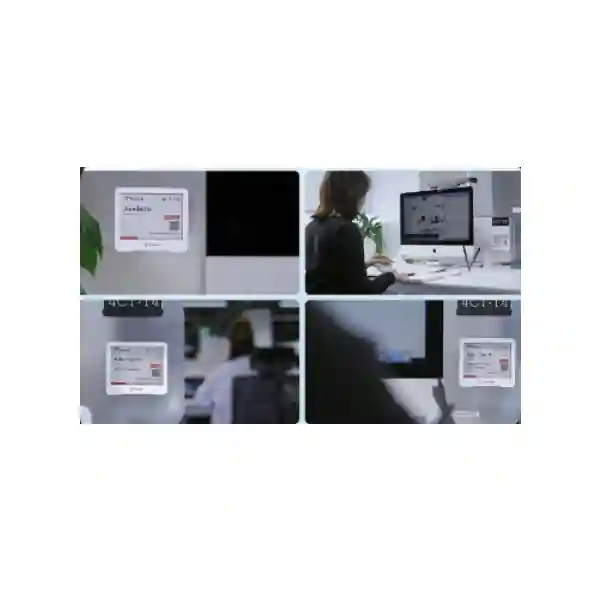
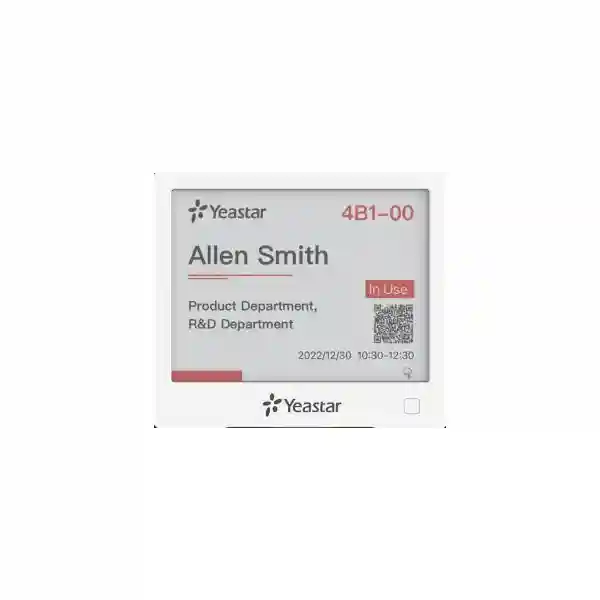
The Yeastar E-Ink Desk Screen DS3504 is designed for organizations that want a visible, low-power desk-booking experience without turning every workstation into a wired digital-signage project. Installed at or on a desk, the unit presents desk information and current availability on a 4.2-inch black, white and red e-ink screen. Employees can scan the displayed QR code to make or manage a reservation, while the device synchronizes with Yeastar Workplace so desk status is consistent with the central booking environment. For hybrid offices, shared workspaces, corporate headquarters, branch offices and flexible seating programs, the DS3504 gives employees a simple answer to a common question: is this desk available, and can I reserve it now?
FourTeck Tanzania can help buyers evaluate the DS3504 as part of a complete Yeastar Workplace deployment rather than as an isolated screen. The surrounding design may include desk resources in Yeastar Workplace, a supported LoRaWAN communication path, booking rules, floor maps, desk check-in processes and optional occupancy sensing. This approach helps procurement and IT teams understand licensing, infrastructure, placement and management requirements before equipment is ordered. Explore the FourTeck Tanzania technology shop for related workplace, networking and business technology, or review FourTeck Tanzania services when the project also needs planning, integration, deployment or lifecycle support.
4.2-inch E-Ink Screen
The DS3504 uses a 400 × 300 pixel tri-color e-ink display with a 180-degree viewing angle, giving employees a clear desk-status reference while consuming very little power between screen updates.
QR Desk Booking
Users can scan the on-screen QR code to make or manage desk reservations on site, reducing the friction of searching manually for a free workspace after arriving at the office.
LoRaWAN Connectivity
The desk screen communicates over LoRaWAN and is designed to operate as part of the Yeastar Workplace device ecosystem, helping reduce the need to cable each workstation display.
Battery Powered
Power comes from three 590 mAh CR2450 lithium batteries. Yeastar publishes an indicative battery life of about 1.2 years, although operating conditions and update activity should be considered in maintenance planning.
What the Yeastar DS3504 solves
Hybrid work changes the relationship between people and desks. In a fixed-seat office, a workstation usually belongs to one employee and its status is obvious. In a shared-seat environment, the same desk may be available, reserved, in use or disabled at different points in the day. Without an easy visual cue, employees may walk around looking for space, occupy a desk that someone else booked, or avoid flexible seating because the process feels uncertain. The DS3504 places that information at the point of use.
The screen works with Yeastar Workplace desk booking. On a flexible desk it can show real-time availability, reservation details and the current state of the resource. On a permanent desk it can display the desk and owner information. Because the screen is synchronized with the Yeastar Workplace portal, it supports a single desk-management workflow rather than a separate local display database. Organizations can combine this with floor maps, booking in advance, recurring booking, team zones, coworker finding and utilization reporting available in Yeastar Workplace.
The result is not simply a nicer label. The business objective is to reduce ambiguity around shared seating, increase employee confidence in hot desking, and give facilities or workplace teams cleaner information about desk allocation. The DS3504 is most useful when it is planned together with the booking rules, desk naming convention, gateway coverage and workplace process that employees will follow.
Yeastar E-Ink Desk Screen DS3504 technical specifications
| Display | 4.2-inch black, white and red e-ink screen |
| Resolution | 400 × 300 pixels |
| Viewing angle | 180° |
| Wireless technology | LoRaWAN® |
| Frequency bands | CN470, IN865, EU868, RU864, US915, AU915, KR920 and AS923-1/2/3/4 variants are listed by Yeastar; the correct regional variant must be confirmed before ordering. |
| Power | 3 × 590 mAh CR2450 lithium batteries |
| Published battery life | Approximately 1.2 years |
| Ingress protection | IP30 |
| Material | ABS + PC |
| Dimensions | 99 × 87 × 10.5 mm |
| Operating temperature | 0°C to +40°C |
| Operating humidity | 0% to 95% non-condensing below 25°C |
Technical values above are based on Yeastar’s published DS3504 documentation. Always confirm current regional model, compatibility and licensing before procurement.
Deployment and licensing considerations
Yeastar’s setup documentation specifies Yeastar Workplace Standard or Pro for the E-Ink Desk Screen. The device must be associated with a desk resource and with a supported communication path. Yeastar documents the Milesight UG65 LoRaWAN gateway as one option and also documents certain Yeastar Room Display DS7510 hardware revisions as an associated gateway path for the desk screen. Before purchase, confirm how many screens will be deployed, which floor or zone they belong to, how the gateway will reach them, and whether the customer already has the required Yeastar Workplace subscription.
A sound rollout normally starts with a small pilot. Configure desk resources and naming, install the gateway, register a limited number of DS3504 devices, bind each screen to the correct desk, verify updates, test QR booking and check the employee workflow. After the pilot is stable, repeat the same pattern across the remaining desks. This reduces the chance of physical desk labels, system resource names and device registrations drifting out of sync.
Yeastar E-Ink Desk Screen DS3504 Tanzania
Organizations evaluating the Yeastar E-Ink Desk Screen DS3504 in Tanzania are typically trying to make flexible seating easier to understand and easier to operate. The product is relevant where employees do not have permanently assigned desks, where different teams attend the office on different days, or where management wants more visibility into how workspace is being used. Instead of relying only on an app or floor map, the e-ink screen brings desk status directly to the workstation. An employee arriving at the office can see whether a desk is available and use the displayed QR code as part of the booking process.
For a Tanzania deployment, procurement should treat the screen, platform and wireless infrastructure as one solution. The DS3504 uses LoRaWAN, so the correct regional radio variant and gateway design need to be confirmed. Yeastar also requires a compatible Yeastar Workplace plan for the screen workflow. If the office already uses Microsoft 365, Google Workspace or Microsoft Teams, Yeastar Workplace can form part of a broader reservation experience, but the exact integration scope should be checked against the current plan and tenant requirements.
The physical design also matters. Screens need consistent desk naming, predictable mounting positions and a device-to-desk registration process that facilities and IT teams can maintain. Battery replacement should be included in the maintenance plan rather than treated as an afterthought. Because the device is rated IP30 and Yeastar specifies an operating range from 0°C to 40°C, it should be installed in suitable indoor conditions and protected from environments outside those specifications.
FourTeck Tanzania can assist customers in translating desk count, floor layout, hybrid-work policy and booking rules into an equipment and deployment plan. Customers can review the broader FourTeck Tanzania technology portfolio, check the company and solution approach, and use the confirmed contact page for a project discussion. A useful quotation request should state the number of desks, office floors, target booking workflow, existing Yeastar Workplace status and whether gateway infrastructure already exists.
Yeastar E-Ink Desk Screen DS3504 Dar es Salaam
Dar es Salaam organizations often operate headquarters, customer-facing offices, project teams and regional functions from shared commercial space. In offices where headcount is larger than the number of people present every day, fixed desk allocation can leave large areas underused while teams on busy days struggle to find seats together. The Yeastar DS3504 gives each flexible workstation a clear local identity and visible status, helping employees understand which desks are free, reserved or in use through the Yeastar Workplace desk-booking workflow.
A Dar es Salaam project should start with the workplace policy rather than the hardware quantity. Decide which desks are permanent, which are flexible, which departments need team zones, how far in advance employees may book, and what should happen when a booked desk is not used. The DS3504 can then be placed on the desks where an at-a-glance status indicator adds value. The 4.2-inch e-ink display is particularly suited to this role because it does not need the continuous power draw or cabling associated with a conventional LCD signage device.
LoRaWAN planning is important across larger floors. The location of a compatible gateway, wall construction, floor geometry and desk density can influence communication reliability. Yeastar recommends suitable gateway placement and provides setup guidance for registering each screen and binding it to a desk resource. For multi-floor offices, keep a device inventory that links the physical workstation label, Yeastar desk resource name and DS3504 serial number. This makes expansion and support easier later.
When requesting a quotation for Dar es Salaam, include the desk count per floor, the number of locations, whether Yeastar Workplace is already licensed, and whether the project needs only hardware or a broader desk-booking rollout. A pilot area can be useful for validating employee behavior, QR booking, screen placement and gateway coverage before extending the system across the entire office. This approach gives facilities, HR and IT teams a shared view of how flexible seating will work operationally rather than treating the project as a simple display purchase.
Yeastar E-Ink Desk Screen DS3504 Mwanza
For businesses in Mwanza, the Yeastar E-Ink Desk Screen DS3504 can support offices that want to introduce shared desks without making the booking process dependent on memory, informal messaging or printed seat labels. The value is strongest in workplaces where staff rotate between office, field, branch and remote work, or where visiting colleagues regularly need temporary desks. A physical display at the workstation makes desk availability visible in the exact place where the employee needs the information.
The DS3504 should be deployed as part of a Yeastar Workplace design. Each screen is registered to the platform, associated with a gateway path and bound to a desk resource. For flexible desks, employees can use the displayed QR code to interact with the reservation process. For permanent desks, the screen can present desk and owner information. This allows a single hardware type to support mixed seating policies within the same office, provided the desk resources and user rules are configured accordingly.
Mwanza buyers should verify the regional LoRaWAN frequency variant before purchase and should include the gateway requirement in the bill of materials. The screen itself runs on replaceable lithium batteries, which simplifies physical installation, but battery lifecycle still needs operational ownership. Assign responsibility for checking device status, replacing batteries and keeping desk-to-device mappings current when teams move or floor plans change.
A practical procurement request should state whether the project is for a new office, a flexible-work conversion or an expansion of an existing Yeastar Workplace deployment. Include desk count, floor plan information, gateway status and the expected user booking method. If the office also needs network, IP telephony, conferencing or general IT infrastructure, a coordinated project can reduce duplicated site work and simplify handover. The objective is to create a desk-booking environment that employees can understand immediately, while giving administrators a system they can manage consistently as the Mwanza office grows.
Yeastar E-Ink Desk Screen DS3504 Arusha
Arusha offices with project teams, international visitors, consultants or hybrid staff can benefit from a clear shared-desk process. The Yeastar DS3504 adds a physical status layer to Yeastar Workplace so a person arriving at a desk can understand its availability without first finding a wall display or asking reception. This is useful in flexible offices where desks are shared across departments, where visitor seating changes frequently, or where the organization wants to make better use of limited workspace.
The e-ink design is well suited to desk identification because it provides a persistent visual without the constant power requirements of a conventional digital screen. Yeastar specifies a 4.2-inch black, white and red display with 400 × 300 resolution and a 180-degree viewing angle. The device uses LoRaWAN for data transmission and is powered by three CR2450 batteries. These characteristics reduce cabling at each desk, but they do not remove the need for careful system design. Gateway coverage, device registration, regional frequency compatibility and Yeastar Workplace licensing remain essential parts of the project.
For Arusha deployments, map the office by functional zones before assigning screens. A sales team may need a different booking rule from a project team. Some executives may keep permanent desks while other users share flexible spaces. Visitors or short-term staff may need access to a defined desk pool. Yeastar Workplace can accommodate mixed desk types, while the DS3504 gives each resource an on-site status point.
For quotation preparation, provide the number of flexible and permanent desks, floor count, whether a Yeastar Workplace tenant already exists, and any current meeting-room or workplace devices already in use. If the project will be rolled out in phases, specify the pilot quantity and expansion target. This helps separate the immediate hardware requirement from the eventual platform scale and makes it easier to plan gateway capacity, spare batteries, labeling, commissioning and user onboarding.
Yeastar E-Ink Desk Screen DS3504 Dodoma
In Dodoma, organizations planning administrative offices, project facilities or modern shared workplaces can use the Yeastar DS3504 to make desk allocation more transparent. The screen is designed for Yeastar Workplace and can show desk information and real-time availability. This is particularly useful where employees alternate between office and remote work, where different teams share the same seating area, or where an organization is moving away from a one-person-one-desk model.
A successful deployment requires clear governance. Facilities teams should decide how desks are named, which are reservable, how long bookings may be held and how employees check in. IT teams should confirm the Yeastar Workplace plan, gateway connectivity and registration process. Procurement should confirm the correct DS3504 regional variant, quantities, batteries, mounting materials and any gateway hardware. When these responsibilities are agreed before installation, the screens become part of a repeatable workplace process rather than a collection of independently mounted devices.
The DS3504 has an IP30 rating and published indoor operating range of 0°C to 40°C. That makes installation location important. It is intended for controlled indoor desk environments, not exposed outdoor areas. E-ink also means screen content remains easy to read without a bright backlight, which can help the device blend into professional office furniture while still communicating status.
Dodoma customers should include future growth in the initial design. If the organization expects additional departments, floors or branches, establish naming standards and device-registration documentation that can scale. Consider whether desk occupancy sensors or other Yeastar Workplace components may be added later, and make sure the wireless and administrative architecture leaves room for that expansion. A project quotation can be more accurate when the request includes desk numbers, office layout, required booking behavior and existing Yeastar infrastructure rather than only the quantity of e-ink screens.
Yeastar E-Ink Desk Screen DS3504 UAE
Organizations in the UAE often operate hybrid headquarters, regional hubs, free-zone offices and multi-site workplaces where employee attendance changes throughout the week. The Yeastar E-Ink Desk Screen DS3504 supports these environments by bringing desk status to the workstation and linking that status with Yeastar Workplace. Employees can identify available desks and use the QR workflow for on-the-spot reservation management instead of depending only on a separate app or reception process.
For UAE deployments, buyers should confirm the applicable LoRaWAN frequency variant and the selected Yeastar Workplace subscription before equipment is ordered. Gateway placement should be considered across floors and office zones, especially in large commercial buildings with dense partitions, meeting rooms and enclosed service areas. A pilot can establish whether one gateway placement provides the expected coverage or whether additional infrastructure is needed.
The DS3504 is most effective where the office has a clear desk-sharing policy. Configure permanent seats for users who require fixed workstations and flexible desks for staff who can reserve space as needed. Team zones can help departments sit together on selected days. When combined with floor maps and centralized booking, the physical screen becomes part of a broader employee experience from planning a visit to finding the exact desk on arrival.
FourTeck’s wider UAE technology ecosystem can also support connected requirements. Customers may review FourTeck UAE business technology solutions for regional procurement discussions and business IP phone solutions when a workplace refresh includes telephony as well as desk booking. Keep the DS3504 quotation focused on the actual desk count, Yeastar Workplace licensing status, required gateway architecture and rollout method so hardware and platform scope remain clear.
Yeastar E-Ink Desk Screen DS3504 Uganda
Uganda-based organizations that are adopting flexible seating can use the Yeastar DS3504 to make desk availability visible without placing powered tablets or LCD panels at every workstation. The device is designed for Yeastar Workplace and gives employees a physical reference for desk status while supporting QR-based booking actions. This can be helpful for companies with rotating project teams, regional staff, visiting employees or departments that attend the office on different schedules.
A Uganda rollout should begin by identifying the desk pools that genuinely need booking. Not every seat has to become flexible. Executives, specialist users or operational roles may still require permanent desks, while general office areas can be configured for shared use. Yeastar Workplace supports both patterns, and the DS3504 can display information appropriate to the associated desk type. This mixed approach can make adoption easier because the technology follows the organization’s real work model instead of forcing all departments into the same policy.
Technical planning should include LoRaWAN gateway coverage, regional frequency compatibility and battery maintenance. The screen’s low-power design helps avoid a power outlet at each desk, but device health still needs periodic review. Administrators should monitor connection status in Yeastar Workplace, maintain an inventory of serial numbers and desk locations, and update bindings when furniture layouts change.
For regional sourcing and support context, customers can review FourTeck Uganda technology solutions. A well-prepared request should include site count, desk quantities, whether the system will serve one floor or multiple floors, and whether the customer wants only the DS3504 hardware or a complete Yeastar Workplace implementation. This level of detail supports better decisions around gateway quantity, platform planning, commissioning and future expansion.
Yeastar E-Ink Desk Screen DS3504 Kampala
Kampala is a natural location for hybrid and regional-office models because many organizations coordinate staff, customers and projects across multiple sites. In that setting, desk availability can become inconsistent when some employees work remotely, some visit client locations and others share office days. The Yeastar DS3504 provides an at-desk visual layer for Yeastar Workplace so flexible seating feels organized rather than improvised.
The practical benefit is immediate visibility. A user can see desk information and availability and can scan the QR code to interact with the booking process. This reduces uncertainty for people who arrive without a permanently assigned seat. For workplace administrators, the same device is tied to the central Yeastar resource, helping keep the screen status and booking system aligned.
Kampala organizations should consider deployment density carefully. In a compact office with a small number of shared desks, a limited pilot may be sufficient. In a multi-floor headquarters, gateway coverage, desk naming, commissioning records and support ownership become more important. Yeastar’s documentation requires the E-Ink Desk Screen to be associated with suitable Yeastar Workplace and gateway infrastructure, so the project plan should include those dependencies from the beginning.
Procurement teams can improve quotation accuracy by separating hardware count from service scope. State how many screens are needed, how many flexible desks exist, whether desk resources are already configured, and whether installation, registration, testing and user onboarding are required. If occupancy sensing is also planned, include that requirement so the design considers how reservation status and actual occupancy will work together. The best result is a workplace where employees understand the process at first glance and administrators can manage changes without rebuilding the system each time seating plans evolve.
Yeastar E-Ink Desk Screen DS3504 Arua
For an office in Arua, the Yeastar DS3504 can provide a structured way to manage a smaller shared-desk environment without requiring the visual complexity of a large digital-signage installation. The screen sits at the desk and is designed to display status information from Yeastar Workplace. Employees can identify the desk and use the QR code to book or manage a reservation according to the organization’s configured workflow.
A smaller deployment still benefits from disciplined setup. Give every desk a clear resource name, register the DS3504 devices consistently and keep a simple inventory that records serial number, physical location and assigned desk. This documentation becomes useful when devices are moved, batteries are replaced or the workspace expands. It also reduces the risk of a screen showing information for the wrong workstation after furniture changes.
The product uses LoRaWAN, so a compatible gateway path is required. Do not assume that the screen is a standalone Wi-Fi endpoint. The gateway and Yeastar Workplace platform are part of the operating architecture. For organizations with limited internal IT resources, planning these dependencies in advance can prevent delays during installation and can simplify handover to the team that will administer the system.
When seeking a quotation for Arua, include whether the office already uses Yeastar Workplace, the number of desks that are genuinely shared and whether any permanent desks also need screens. Mention if the organization intends to add additional offices later, because naming conventions and administrative structure can be designed for expansion from the beginning. The goal is to make flexible seating straightforward for users while avoiding unnecessary hardware or complexity in a smaller site.
Yeastar E-Ink Desk Screen DS3504 Mbarara
Mbarara organizations introducing hybrid schedules or shared workspaces can use the Yeastar E-Ink Desk Screen DS3504 to give employees a simple physical indicator for desk availability. Shared-desk programs often fail when the process is not obvious: people arrive, see an empty chair and assume the desk is free even when another employee has reserved it. A desk screen reduces this ambiguity by presenting the resource status where the decision is made.
The DS3504 works with Yeastar Workplace and supports the broader desk-booking process rather than replacing it. The platform remains the central system for resources, reservations and administrative controls. The screen extends that system into the physical office. This distinction is important for buyers because the device depends on compatible licensing and gateway infrastructure, and those items should be included in the solution design when they are not already available.
A practical Mbarara rollout can begin with one department. Choose a group that already follows a predictable hybrid schedule, configure a small flexible-desk zone and observe how employees use the booking workflow. Check whether desk names are clear, QR actions are understood, and status changes appear consistently. Feedback from that pilot can guide the final mounting position, user communication and booking rules before scaling to more seats.
For procurement, specify desk quantity, target department, office layout and the expected expansion path. If the project involves other infrastructure changes such as Wi-Fi, IP telephony or meeting-room technology, note those requirements separately so each system can be scoped accurately while still being coordinated. The DS3504 itself is compact and low power, but a good workplace project is measured by how smoothly employees reserve and use space, not only by how many screens are installed.
Yeastar E-Ink Desk Screen DS3504 Gulu
In Gulu, the DS3504 can support organizations that need shared seating for mobile staff, project personnel, visiting managers or teams that split time between office and field locations. The screen gives each desk an electronic identity linked to Yeastar Workplace, reducing dependence on manually updated paper labels or informal seat assignment. Its e-ink display can show information without requiring a continuously powered bright screen at every workstation.
Because the unit communicates over LoRaWAN, deployment planning should focus on gateway connectivity as well as desk placement. Yeastar documents specific gateway requirements and registration procedures. The IT team should verify that devices connect reliably, are bound to the correct desk resources and remain visible in the Yeastar Workplace device list. This technical validation is especially useful before a large quantity is mounted permanently.
The screen can form part of a broader workplace-management approach. Employees may use advance booking and floor maps before coming to the office, then use the DS3504 to confirm the correct desk and manage the reservation on site. This sequence helps connect digital planning with the real physical workspace. Where desk occupancy sensors are also used, organizations can add another layer of insight around whether booked desks are actually occupied.
Gulu buyers should request a solution based on the complete use case. State the number of employees, typical daily attendance, desks available, floors or zones, and whether the organization needs permanent as well as flexible seating. This information helps determine whether the DS3504 quantity matches the actual shared-workspace requirement. It also gives the project team a basis for developing consistent labels, booking rules, gateway placement and support procedures from the first phase onward.
Yeastar E-Ink Desk Screen DS3504 Kenya
Kenyan enterprises with flexible, project-based or multi-location workforces can use the Yeastar DS3504 to add a clear physical status indicator to shared desks. The product is particularly relevant to organizations that already see desk booking as a workplace service rather than a simple calendar. Yeastar Workplace can provide floor maps, advance booking, recurring reservations, team-space features and utilization insights, while the DS3504 carries the resource status into the physical office.
For Kenya, confirm the correct radio variant and LoRaWAN design before purchase. E-ink helps reduce power consumption and removes the need for a mains connection at each desk, but the screens still require gateway communication and periodic battery replacement. A deployment plan should therefore include gateway coverage testing, battery stock, device inventory and procedures for desk moves. These operational details are easy to overlook during purchasing but strongly influence how manageable the installation will be after launch.
Large offices should organize shared desks into logical zones. Employees may need to sit close to teammates, equipment, meeting rooms or department resources. Desk names and floor-map labels should match what people see in the real office. The DS3504 can then reinforce that structure by showing the local desk identity and status. This is more effective than deploying screens without a clear resource taxonomy.
Customers sourcing for Kenya can also review FourTeck Kenya business technology solutions. For quotations, provide the expected number of reservable desks, number of office locations, existing Yeastar Workplace licensing and any required integration with collaboration platforms. If the project covers several sites, standardize resource names and commissioning records so administrators can support all locations consistently rather than creating a different process for each office.
Yeastar E-Ink Desk Screen DS3504 Kuwait
Kuwait organizations using hybrid attendance, consultancy teams or rotating project staff can use the DS3504 as a visible desk-booking endpoint within Yeastar Workplace. The screen helps remove uncertainty from shared seating by showing desk status where the employee is standing. The QR workflow provides a direct path to booking or reservation management and can reduce situations in which users occupy a desk without checking whether another person has reserved it.
A Kuwait deployment should verify the regional LoRaWAN frequency option, Yeastar Workplace plan and required gateway hardware. These are procurement-critical items. Ordering screens alone without confirming the communication architecture can result in incomplete deployment scope. For larger offices, use a floor-by-floor equipment list and assign each device to a named desk before installation. That creates a controlled mapping between physical furniture and the platform resource database.
The e-ink screen is also appropriate for workplaces that prefer a low-profile visual design. It provides persistent information without the bright appearance of a tablet, and the battery-powered format can simplify furniture installation. However, the published operating range and IP30 rating mean the unit should be treated as an indoor office device and positioned away from unsuitable environmental exposure.
For regional procurement context, see FourTeck Kuwait technology solutions. A useful request for quotation should include the number of desks, floor count, current booking method, existing Yeastar products and whether the customer requires configuration and commissioning. If the workplace is still defining its flexible-seating policy, that should be addressed before the final screen quantity is fixed so the hardware reflects the real desk model.
Yeastar E-Ink Desk Screen DS3504 Ghana
Businesses in Ghana can use the Yeastar DS3504 to support offices where desk allocation changes from day to day. The device is especially relevant to hybrid workplaces, shared project offices and environments with visiting staff. By presenting availability directly on the workstation, the screen helps employees understand where they can sit and provides a QR-based route to the Yeastar Workplace reservation flow.
The project should be scoped as a workplace-management deployment rather than a display-only purchase. Yeastar Workplace provides the central desk resource and booking logic, while the DS3504 presents information in the physical environment. A supported LoRaWAN gateway path connects the device to the platform. Buyers therefore need to confirm subscriptions, gateway hardware and radio-region compatibility along with the screen quantity.
For Ghana offices, an effective rollout can combine technology with simple employee communication. Explain how far in advance a desk may be booked, how users check in, when a booking is released and what the screen colors or status indicators mean. Clear policy prevents the system from becoming another tool that employees bypass. Administrators should also plan who owns device health, battery replacement and resource updates when furniture layouts change.
Regional buyers can review FourTeck Ghana technology solutions for local-market context. Include user count, desk count, building layout and existing Yeastar Workplace status in the quotation request. If the company operates several offices, identify whether the system must follow one standardized booking policy across all locations or whether each site needs different rules. That decision influences administration, training and long-term support as much as the hardware itself.
Yeastar E-Ink Desk Screen DS3504 Nigeria
Nigeria-based organizations with large teams, distributed offices or flexible attendance can use the Yeastar E-Ink Desk Screen DS3504 to make hot desking more predictable. A shared office may have enough desks in total but still create daily friction if employees cannot see which workstations are actually available. The DS3504 helps solve that last-meter problem by showing desk information at the desk itself and linking employees to a QR-based booking process.
For larger Nigerian offices, the implementation method is important. Divide the floor plan into manageable zones, define a consistent resource naming scheme, install the LoRaWAN gateway infrastructure and register screens in batches. Test each batch before moving to the next area. This reduces the risk of mismatched device-to-desk assignments and provides a clear commissioning record for support teams.
Because the DS3504 is battery powered, desk installation is less dependent on local power outlets. That can be useful in furniture layouts where bringing USB or mains power to every display would be inconvenient. Still, battery lifecycle must be managed. Keep replacement batteries available, monitor device status and incorporate screen checks into facilities or IT routines. The hardware becomes easier to support when ownership is assigned before deployment.
Organizations can also review FourTeck Nigeria business technology solutions when the desk-booking project is part of a broader office refresh. A request for quotation should state the number of offices, desks per site, Yeastar Workplace plan status and the desired deployment scope. If integration with Microsoft 365, Google Workspace or Microsoft Teams is important, include that requirement so the customer’s workplace workflow can be evaluated end to end rather than focusing only on the desk hardware.
Yeastar E-Ink Desk Screen DS3504 Seychelles
Seychelles organizations with corporate offices, hospitality administration teams, service operations or multi-role staff can use the Yeastar DS3504 to create a more organized flexible-seating experience. Space can be valuable, and a workplace may not need a permanently assigned desk for every employee if attendance varies by schedule or role. The desk screen supports that model by making current desk information visible and connecting users to the Yeastar Workplace booking flow.
The compact e-ink design is particularly suited to offices that want digital status without adding bright displays and power cables to every workstation. Yeastar publishes a 4.2-inch tri-color screen, LoRaWAN communications and battery operation. These features help simplify the physical installation, while the central Yeastar Workplace platform remains responsible for desk resources and reservations.
For Seychelles deployments, confirm environmental suitability and gateway coverage in the actual office layout. The DS3504 is an indoor IP30 device. It should not be positioned where moisture, direct weather exposure or unsuitable temperature conditions could exceed the published operating limits. Offices with separated rooms or multiple floors should validate LoRaWAN communication before completing the entire installation.
A quotation should include the number of shared desks, number of permanent desks if screens are required there as well, office zones and existing Yeastar Workplace status. If only a small number of desks are shared, keep the solution proportionate and avoid overcomplicating the architecture. If several departments or sites will use the platform, define naming and administration standards that can scale. The key outcome is a booking experience that employees understand quickly and a device environment that administrators can support with clear ownership and documentation.
Compatibility, integration and buying guidance
The DS3504 should not be purchased as a generic e-ink sign. Its value comes from integration with Yeastar Workplace. Confirm that the organization has or plans to use the required Yeastar Workplace plan and that desk resources will be created in the platform. Yeastar documentation specifies Standard or Pro for E-Ink Desk Screen deployment. Confirm the current subscription terms at the time of ordering because commercial plans can change over time.
Next, confirm the gateway architecture. Yeastar documents the Milesight UG65 LoRaWAN gateway and certain DS7510 room-display hardware revisions as supported communication options in its setup guidance. Coverage should be validated in the real office, especially across dense partitions or multiple floors. Do not decide gateway quantity only from desk count; the physical radio environment matters.
Finally, determine whether desk occupancy sensors are needed. A booking status and actual physical occupancy are not always the same thing. If the organization wants the system to identify unused booked desks and automate release behavior, occupancy sensing may be relevant. This should be designed as a separate requirement and checked against current Yeastar Workplace features and licensing.
For Tanzania-based project coordination, use the FourTeck Tanzania contact page to share quantities, office layout and required deployment scope. The strongest quotation is based on the full environment rather than only a model name.
Quotation checklist
Prepare desk quantity, flexible versus permanent desk count, number of floors, office locations, Yeastar Workplace plan status, gateway status, desired booking workflow, rollout phases, integration requirements, and whether installation or commissioning is required.
Decision recap
Choose the DS3504 when you need a low-power physical desk-status display that works with Yeastar Workplace. Confirm licensing, LoRaWAN regional compatibility, gateway coverage and desk-resource design before purchase. Use a pilot for larger deployments.
Frequently asked questions
What is the Yeastar E-Ink Desk Screen DS3504?
It is a Yeastar Workplace desk-booking device with a 4.2-inch black, white and red e-ink screen. It displays desk information and availability and provides a QR code that employees can use to make or manage desk reservations.
Does the DS3504 work by itself?
No. It is designed to work with Yeastar Workplace and requires appropriate platform licensing and a supported gateway communication path. Yeastar documents Standard or Pro plans for the E-Ink Desk Screen setup.
Does the Yeastar DS3504 use Wi-Fi?
The published DS3504 specifications identify LoRaWAN as its data-transmission technology. A compatible LoRaWAN gateway architecture should therefore be included in deployment planning.
How is the Yeastar E-Ink Desk Screen powered?
Yeastar specifies three 590 mAh CR2450 lithium batteries. The vendor publishes an approximate battery life of 1.2 years, although real operating conditions and update behavior can influence maintenance intervals.
Can it be used for permanent desks?
Yes. Yeastar documentation describes behavior for both permanent and flexible desks. A permanent desk can show the desk and owner information, while a flexible desk can show availability and reservation details and support booking actions.
What should I confirm before ordering in Tanzania?
Confirm the exact DS3504 regional frequency variant, quantity of screens, Yeastar Workplace licensing, required gateway hardware, desk types, physical layout and whether configuration or installation services are required. Do not assume that a screen ordered for another radio region will be appropriate for Tanzania.
Consult FourTeck on your Yeastar desk-booking project
A useful Yeastar E-Ink Desk Screen project starts with the number of desks and ends with a clear operating workflow. Share your floor count, flexible-seat policy, existing Yeastar Workplace environment and expected rollout size. FourTeck can then help structure the quotation around the hardware and deployment dependencies that actually matter.
If the project spans additional markets, FourTeck’s regional network can provide broader context through FourTeck Africa technology solutions alongside the Tanzania, Uganda, Kenya, Ghana, Nigeria, Kuwait and UAE resources referenced above.




Reviews
There are no reviews yet.