
CISCO CATALYST 1200 • BUSINESS ACCESS SWITCHING
Managed Gigabit connections for a focused office network
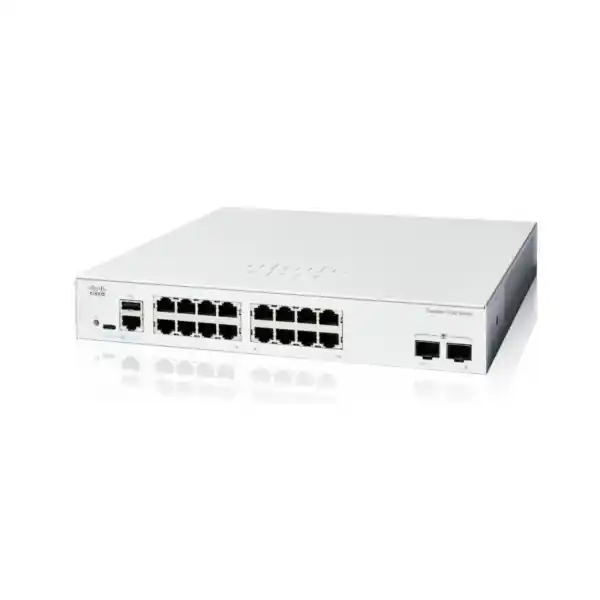
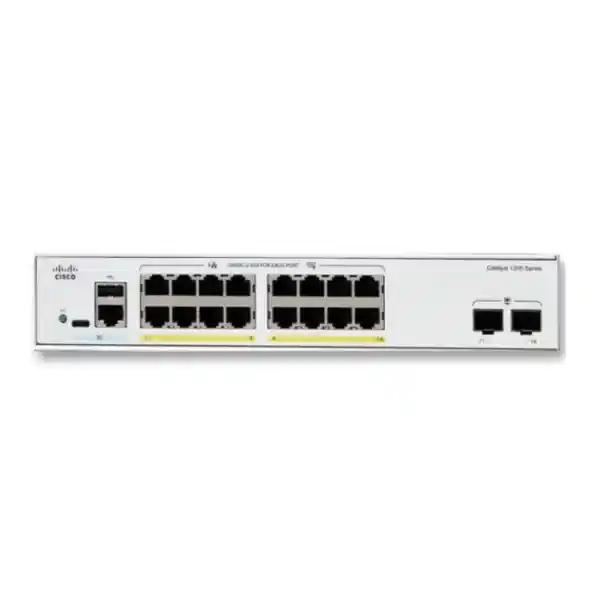
The Cisco Catalyst C1200-16T-2G Network Switch suits a small business access network where computers, printers, and other independently powered devices need managed Gigabit connectivity. It combines sixteen copper Ethernet connections with two separate Gigabit SFP uplink slots. For a Tanzania office or branch, the buying decision is straightforward: count the wired connections, decide how the switch will reach the upstream network, and establish whether any attached equipment needs power through its network cable.
This is a data-only model. Choose it when device power is already handled and the planned uplink capacity fits the workload. Request a quotation from FourTeck Tanzania with your device count, upstream equipment details, and any fiber requirements so the proposed supply can be checked against the intended installation.
Before committing to a particular port count, include connections that are easy to overlook: a meeting-room display, a network printer, a storage appliance, a service laptop connection, and spare wall outlets that may become active later. A clear connection schedule makes the difference between a switch that fits on installation day and one that accommodates normal changes afterward.
Share your connection schedule and uplink requirements with FourTeck Tanzania to clarify the equipment and project scope.
Verified hardware at a glance
| Specification | Exact model detail |
|---|---|
| Copper network ports | 16 × 10/100/1000 Mbps RJ-45 |
| Dedicated uplink slots | 2 × 1 Gigabit SFP |
| Power over Ethernet output | None; copper ports provide data connectivity |
| Switching capacity | 36 Gbps |
| Forwarding rate | 26.78 million packets per second with 64-byte packets |
| Cooling | Fanless |
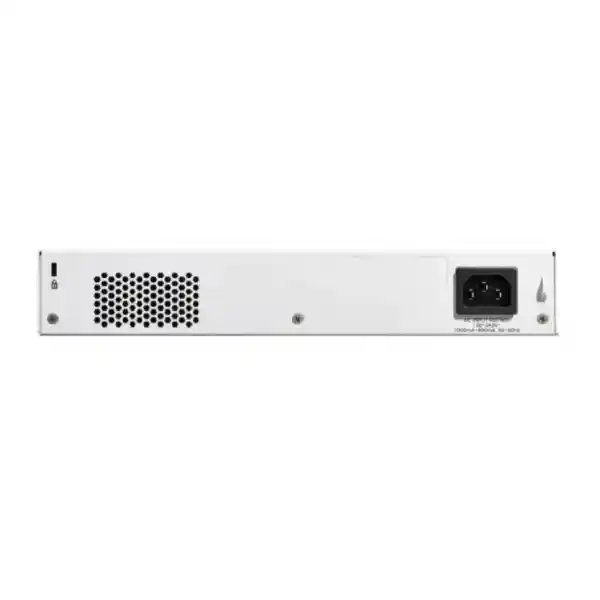
| Power input | Internal supply; 100–240V AC, 50–60 Hz |
| Chassis dimensions | 268 × 272 × 44 mm |
| Unit weight | 1.78 kg |
| Installation format | Rack-mountable |
| Copper cabling | Category 5e or better for Gigabit Ethernet |
Cisco identifies the exact model as C1200-16T-2G. The SFP slots add uplink flexibility without reducing the sixteen copper access connections. They are 1G interfaces; a requirement for 10G uplinks calls for a different model. Treat the capacity figures as switch specifications rather than a prediction of application throughput or internet speed.
The optical modules, patch leads, network design, and upstream equipment must be matched separately. Ask the quotation to identify each accessory and its intended connection rather than assuming that a fiber-ready switch arrives with every component needed to complete a fiber link.
Where this model fits best
A practical fit is an office with a defined group of wired workstations and shared resources, where administration staff need more control than a basic unmanaged switch provides. Another is a branch that needs its own access connections while passing traffic to an existing router or firewall. In both cases, the useful question is how devices communicate, rather than simply how many sockets appear on the front panel.
For example, an illustrative layout might allocate ten copper connections to desks, two to printers, one to a locally powered access point, and one to a storage device. That leaves two copper connections available before considering the separate uplink slots. This is a planning example, not a recommended design for every office; the actual mix depends on occupancy, cabling, equipment location, and future requirements.
The model deserves closer comparison when the office expects many new endpoints, relies heavily on centralized file transfers, or wants to power wireless and voice equipment directly from the switch. Those requirements can change the right choice even if sixteen connections appear sufficient today.
Build a port budget before choosing sixteen ports
Start with a list of active wall outlets and the equipment connected to each one. Separate physical network connections from user headcount: one employee can occupy several connections, while a shared printer can serve an entire department through one connection. Include infrastructure equipment, not just desks, and identify any connections already handled by another switch.
Next, mark which connections must be available immediately and which are planned for an expansion. Leave deliberate room for temporary troubleshooting, replacement equipment, and changes in room use. There is no universal spare-port percentage that fits every business. A stable small office and a growing project office should make different allowances.
Finally, identify the uplink medium. A copper connection to the upstream router normally consumes one of the RJ-45 ports, whereas an appropriate SFP uplink uses a dedicated slot. Record this distinction in the port schedule so procurement does not count the same capacity twice. If the planned copper connections already fill the switch, compare a larger access model before turning the design into a chain of additional small switches.
Understand the data-only power decision
Ethernet connectivity and electrical power are separate requirements. A device may exchange network traffic successfully through a data-only switch while receiving electricity from an approved adapter or another suitable power arrangement. The important check is the endpoint’s installation specification, including whether the intended placement has a practical power source.
For a few devices, separate power can be manageable. For many ceiling access points, wall phones, or distributed cameras, it can complicate cabling, backup power, and fault isolation. Record how each device will be powered, who supplies the required components, and how the arrangement will be supported after installation.
If centralized PoE is a requirement, compare a PoE-capable switch using the exact endpoint power standards and total demand. Do not assume another switch is equivalent merely because its name is similar. Power budget, supported port count, uplink capacity, and the actual device requirements all belong in the comparison. Establishing this early avoids selecting a data switch and discovering that the power design remains unresolved.
Plan the two SFP uplinks as complete links
The dedicated slots are useful when the access switch needs an optical connection to another part of the network. An SFP slot is a place for a compatible transceiver; it does not itself define the fiber distance, connector arrangement, or supported optical path. Those depend on the selected module and the installed cabling.
Collect the upstream switch model, its available interface, the cable route, and any existing transceiver part numbers. For a fiber path, record whether the plant is single-mode or multimode, the connector presentation, and the required link distance. Have the proposed optics checked at both ends rather than approving a module based only on its connector shape.
Include patch panels and patch leads in the plan. A suitable module can still be paired with an unsuitable cable path, and an existing fiber label may not describe every segment accurately. For a new run, specify installation and testing responsibilities in the project scope. For an existing run, request its test information where available and allow for inspection before treating the connection as ready for service.
Size the uplink for shared traffic
A fast access port serves one attached connection, while an uplink can carry traffic for many devices at once. This distinction matters when several users access centralized storage, move large design files, or run backups at the same time. List the busiest workflows and identify whether their traffic remains within the local switch or crosses its upstream connection.
Use measurements where possible. An office dominated by modest cloud application traffic may have a different pattern from a team that regularly transfers large datasets to a server elsewhere in the building. Internet subscription speed alone does not describe the local traffic demand, and a busy uplink cannot be assessed by counting users without considering what they do.
Multiple physical uplinks also need a deliberate configuration. Do not connect extra paths and assume the network will automatically gain capacity or resilience. The upstream equipment, loop-prevention design, and intended behavior must agree. Where a higher-speed connection is a firm requirement, compare equipment built for that speed instead of expecting an accessory to change this model’s interface capability.
Use VLANs to make the network easier to govern
The platform supports VLAN-based segmentation. In a small business, that can help organize groups such as office users, guest access, and equipment management around defined roles. Begin with a simple written policy: identify which groups need to communicate, which services they use, and where communication must be restricted.
Creating VLANs is only part of the design. The router, firewall, wireless configuration, address allocation, and switch uplinks must carry the intended groups consistently. A guest wireless network, for instance, needs more than a separate name if the requirement is to keep guests away from internal resources.
Keep the number of groups proportionate to the business. Each additional group adds configuration and troubleshooting work, so there should be a reason for it. Use clear names and record the relationship between wall outlets, access ports, and permitted traffic. Before handover, test both the access that should work and the access that should be denied. This turns segmentation from a configuration checklist into a verified business outcome.
Decide where routing and security policy belong
Cisco lists static routing among the series capabilities. That can be relevant to a planned network, but it should not become a reason to bypass the organization’s security design. Decide which device is responsible for communication between network groups and which device enforces the required rules.
A simple branch may deliberately keep routing and traffic inspection at its firewall. Another design may use selected switch routing functions for a defined purpose. Either way, the engineering decision should account for the complete traffic path, the required controls, the management team’s skills, and the supported capabilities of the exact software release.
Write down default gateways and return paths before changing an existing network. When more than one device participates in routing, a working outbound path does not guarantee that replies take the correct route. For procurement, describe the required behavior rather than asking only for a feature name. If the design depends on advanced routing or a particular enterprise integration, validate it explicitly before selecting this access switch.
Prioritize important applications with a complete traffic plan
Quality of service support provides a way to treat traffic differently when network resources are contested. Start with the applications whose experience matters most, such as business voice or interactive collaboration, and establish how their traffic is identified. Avoid assigning every application the highest priority; meaningful priorities require a genuine order of importance.
The switch is one point in a larger path. A policy can be undermined if upstream equipment handles traffic differently or if a congested internet connection sits outside the relevant controls. Map the path from the endpoint to the service and decide where the policy must remain consistent.
Also separate poor capacity planning from traffic prioritization. If routine workloads repeatedly exceed the available link capacity, investigate scheduling, application behavior, or a different network design. A useful acceptance exercise includes normal business activity alongside a controlled busy period, followed by a check of the applications that users depend on. The aim is predictable service under realistic conditions, with results understood by the people who will operate the network.
Match wireless, phones, and cameras individually
Compatibility planning should start with the exact endpoint model and its installation requirements. Check Ethernet speed, electrical power, VLAN behavior, and any management dependencies. A general statement that an access point or camera has an Ethernet connector is not enough to establish that the complete deployment will meet its requirements.
For wireless, decide whether the expected client demand fits the selected wired backhaul. For phones, establish how the handset receives power and how voice traffic reaches its services. For cameras, consider the recording path and simultaneous traffic from the installed group. These checks belong in the design even when each individual device has a modest connection requirement.
FourTeck’s Cisco wireless access point planning guidance provides related context for a broader wireless purchase. Keep the switch selection tied to the actual access point specification rather than treating wireless and switching as independent orders. If a device needs more capacity or a different power arrangement than this design provides, resolve that requirement before finalizing the equipment list.
Choose a management approach the team can maintain
Cisco provides an on-device interface alongside Cisco Business Dashboard and mobile app management options. Choose the approach around the people responsible for routine administration, the number of sites, and the organization’s management practices. A management tool is useful only when ownership, access, and ongoing maintenance are clear.
For a small standalone installation, document who can reach the device and who holds administrative responsibility. For a wider deployment, agree how inventory, configuration changes, and fault reports will be coordinated. Check any management platform requirements and applicable terms before including it in the operating plan.
Treat management access as a network requirement in its own right. The technician needs a dependable way to reach the equipment even when an ordinary user connection has a problem. Record the management address, its assignment method, and the permitted access path in the handover information. Keep administrative credentials in an appropriate organizational credential system, with access granted to the people who need them. A clear ownership record is more useful than an undocumented setup known only to the installer.
Set a sensible baseline for access control
Access-control capability should be translated into a small set of rules the business understands. Identify who is allowed to administer the equipment, which network segments can reach management services, and what unused physical connections should do. Begin with a manageable baseline before adding policies that create support work without addressing a clear requirement.
The platform includes ACL functions, but the presence of a feature does not mean a particular security policy has been implemented. Ask the network designer to state the intended traffic rules and show how they will be tested. Keep the policy readable so a future administrator can understand why a connection is allowed or restricted.
Consider the physical installation as well. A switch placed where anyone can reach its patch leads creates a different operating environment from one in a controlled cabinet. Use labels that help authorized troubleshooting without exposing unnecessary sensitive information. Review the baseline when new departments, guest services, or externally managed devices are added, since changes in use can alter the assumptions behind the original configuration.
Prevent loops and make extra paths intentional
The series supports Spanning Tree Protocol. In practical planning, the important task is to ensure that the topology has deliberate forwarding paths and a defined response to a failed link. Extra cables between switches can create problems if their role is not understood.
Make a simple connection diagram showing each switch, router, firewall, and inter-switch link. Mark which connections are expected to carry user traffic and which are part of an approved resilience design. Have the engineer review that diagram before adding another path or moving patch leads during office changes.
Test the intended failure behavior during commissioning where the business can accommodate it. The test should identify what users experience, how administrators detect the event, and whether the network returns to its expected state. Two uplinks by themselves do not establish a resilient service. Power, upstream equipment, configuration, and the failure being protected against all matter. Keep instructions for permitted cabling changes with the handover record so later desk moves do not accidentally change the network topology.
Allow for a suitable physical environment
The fanless design makes this model worth considering where the switch sits near people, but it still needs an appropriate installation space. Fanless cooling does not remove heat or eliminate the need for ventilation. Keep surrounding equipment, cabinet layout, and cable bundles from obstructing the intended airflow.
Cisco specifies an operating temperature range of minus five to fifty degrees Celsius for this model and noncondensing operating humidity of ten to ninety percent. Assess the environment at the equipment location rather than relying only on a room thermostat. A crowded cabinet can have conditions different from the wider office.
Confirm the mounting arrangement, cable access, and available cabinet depth before ordering. Leave room to reach power connections and disconnect individual leads without disturbing unrelated equipment. If the proposed location is exposed to weather, dust, moisture, or demanding industrial conditions, review the suitability of the entire installation with an appropriate specialist. A commercial office switch should be selected against the real environment in which it will operate, including conditions during an unattended period.
Plan power continuity across the whole service
The internal AC supply simplifies the switch’s own power arrangement, but network availability also depends on the equipment around it. Identify the router, firewall, internet termination equipment, and any separately powered endpoints that must remain active during an interruption. Protecting only the access switch can leave the service unavailable for another reason.
If backup power is required, size it using the actual connected equipment and the desired operating time. Include the relevant adapters and upstream devices in that assessment. An appropriate power professional should confirm the installation arrangement and protective measures for the site.
Ask the quotation to distinguish hardware supply from power-related project work. Establish who provides the required cords, cabinet distribution, and any backup equipment. Avoid treating a nominal input-voltage range as evidence that every aspect of a local installation has been assessed. After installation, verify the agreed restart behavior and document any actions needed when power returns. This helps the staff responsible for the site understand what to expect without promising uninterrupted operation.
Prepare existing cabling before the switch arrives
A switch upgrade can reveal issues in cabling that previously went unnoticed. Begin with a patching record that connects each switch port to the corresponding wall outlet or endpoint. Check cable labels at both ends and identify any undocumented extensions, intermediate couplers, or damaged leads.
Use cabling appropriate to the required connection speed and have questionable permanent links assessed. A network connection that operates at a lower speed than expected deserves investigation rather than an assumption that the new switch is responsible. Check the endpoint interface, patch cords, and permanent cable path as part of the same process.
For fiber, keep inspection and testing separate from the purchase of transceivers. Record connector types and the route through patch panels so the installer can establish the actual optical path. Include enough time for cabling work in the project schedule if the existing infrastructure is uncertain. Completing this preparation early makes commissioning more predictable and gives procurement a clearer view of the costs beyond the switch chassis.
Commission the device with a clear handover target
Cisco’s day-zero setup guidance includes creating new administrative credentials and setting the management address. Plan the address and permitted administrative access before connecting the switch into its permanent location. A short preparation session can prevent avoidable loss of access during the change.
Build the approved configuration in a controlled order. Establish management access first, then apply the required network groups, port assignments, and upstream connection settings. Verify an example connection for each distinct role before moving all equipment. Use the documentation for the installed software release rather than relying on a remembered menu path from another switch.
Save the completed configuration and keep a protected copy outside the device. Include a record of the installed software version and the date of acceptance. Handover should leave the operational team able to identify the switch, find the correct configuration record, and understand the expected behavior of each connection. Where installation services are required, have the quotation state the commissioning and documentation scope explicitly.
Replace an existing switch without losing the working design
Before removing existing equipment, capture its port assignments, management details, uplink arrangement, and any application dependencies. Photographs can help record patching, but they should support a written connection schedule. Label cables before moving them so a later investigation does not depend on remembering their original positions.
Compare the existing design with the proposed one feature by feature. A replacement can have the right number of connections while differing in power delivery, uplink speed, or management behavior. Confirm those differences with the people responsible for the network before approving the change window.
Keep a realistic recovery plan. Store the old configuration, identify who can authorize a return to the previous equipment, and preserve the information needed to reconnect it if necessary. Do not promise a disruption-free replacement: establish an agreed maintenance period and test sequence. After the move, ask representative users to check the services they actually need, including printing, shared resources, and application access, rather than accepting illuminated link indicators as the only evidence of success.
Use acceptance checks that reflect business use
Define the acceptance criteria before installation so the buyer and installer share the same target. Useful checks include expected connection speed, access to essential services, correct network-group assignment, and reliable management access. Record the results in a form that can be understood without reproducing the entire configuration.
Include a small number of realistic combined workloads. A file transfer performed while users access ordinary applications can reveal a different experience from an isolated connectivity test. Where voice, wireless, or recording services are involved, ask the responsible specialist to verify the complete path under the intended conditions.
Also check the documentation itself. A technically working network is harder to support when the port schedule is inaccurate or the management address is missing. Confirm that the buyer receives the agreed equipment list, configuration backup, connection record, and support contact process. If a requirement cannot be demonstrated on the day, record the open item and its owner clearly. This creates a practical handover standard without claiming that one test can guarantee future availability.
Maintain configuration and software deliberately
Assign ownership for checking the manufacturer’s release information and deciding when software maintenance is appropriate. A version number should be recorded alongside the device inventory so the team can assess a notice against the equipment actually installed. Avoid treating an upgrade as a routine click without considering operational impact.
Cisco’s firmware procedure calls for a configuration backup and a reboot to apply the update. Arrange an appropriate maintenance period, keep recovery access available, and review the relevant release instructions before proceeding. A remote site may need someone present or another agreed recovery arrangement if management access is interrupted.
After maintenance, check essential connections and confirm that the intended configuration remains in effect. Retain the updated inventory record and any revised backup. The same discipline applies to ordinary configuration changes: record the purpose, who made the change, and what was checked afterward. This makes later troubleshooting more efficient and reduces dependence on an individual’s memory, especially where a branch receives technical help from a team based elsewhere.
Compare alternatives by the requirement that changes
If the concern is endpoint power, compare a suitable PoE model and calculate the total power needed. If the concern is expansion, compare a larger port count. If the concern is upstream traffic, compare uplink speed and the equipment at the far end. Keeping these decisions separate makes a quotation easier to evaluate.
Likewise, a requirement for a particular enterprise management architecture, routing protocol, or resilience design should be checked directly. A familiar brand name is not sufficient evidence that two product families behave the same way. Ask for the supported design and the required accessories rather than a broad promise of compatibility.
Evaluate the total proposed solution, including cabling, optics, endpoint power arrangements, configuration, and the commercial support scope. The lowest chassis price can leave important project items unresolved, while a larger switch can add capabilities the business does not need. The appropriate choice is the one that meets documented requirements with a supportable operating plan. For this model, that assessment should keep a clear focus on modest access-port density and the intended Gigabit network design.
What to include in a Tanzania quotation request
Provide the exact model name, quantity, current device count, expected growth, and the location and type of the intended installation. Include the existing router or upstream switch model and explain whether the connection will use copper or fiber. For a fiber connection, supply available cable and optic details so compatibility can be reviewed.
List any endpoints that need network-delivered power, even if their final power arrangement has not been decided. State whether the request covers hardware only or also requires cabling review, configuration, migration, and handover. This allows the proposed scope to address the actual job rather than simply naming a switch.
Ask the written offer to confirm price and currency, availability, applicable warranty and support terms, included accessories, and any proposed delivery arrangements. These are order-specific details and should be confirmed for the exact supply. If the project needs a particular implementation date, communicate it as a requirement for review rather than assuming a lead time. A detailed request makes competing offers easier to compare and helps identify missing components before an order is placed.
Buyer questions answered
Does this model power phones or access points?
No. This is the data-only version. Check each endpoint’s approved power arrangement, or request a comparison with a suitable PoE switch if centralized power is required.
Are the two SFP slots additional to the copper ports?
Yes. The uplink slots are separate from the copper access connections. Specify the required modules and cable path as part of the equipment list.
Can an SFP+ module turn the uplinks into 10G connections?
No. Select a switch with the required uplink capability when the project needs that speed. Module selection cannot upgrade the switch interface beyond its supported capability.
Will it improve a slow internet service?
That depends on the cause of the problem. Check the internet connection, router, cabling, endpoint, and traffic demand before attributing a slow application to the access switch.
Can it connect equipment from other manufacturers?
Assess the exact interfaces and required behavior. Standard Ethernet connectivity is one part of the check; power, segmentation, software dependencies, and optical compatibility also need review where applicable.
Should every available port be used on day one?
It can be possible to fill the available connections, but that leaves little room for moves or additions. Build a port schedule and select enough capacity for the expected changes.
Are fiber modules and installation included?
Confirm the written quotation. Ask it to identify modules, patch leads, mounting items, configuration work, and any cabling services separately so the supply scope is clear.
What information makes a quotation easier to prepare?
Send the quantity, connection schedule, endpoint power needs, upstream equipment model, uplink medium, growth expectations, and requested project scope. Add any required purchase or implementation date for review.
Request your Cisco switch quotation
Send FourTeck Tanzania the exact model, quantity, device connections, and upstream equipment details. Include any fiber path, endpoint power requirements, and requested configuration or migration work so the proposed solution can be assessed as a complete installation.
Ask for written confirmation of the supply scope and commercial terms before ordering. A connection plan prepared now helps the business choose equipment that fits its daily work and expected growth.




Reviews
There are no reviews yet.