
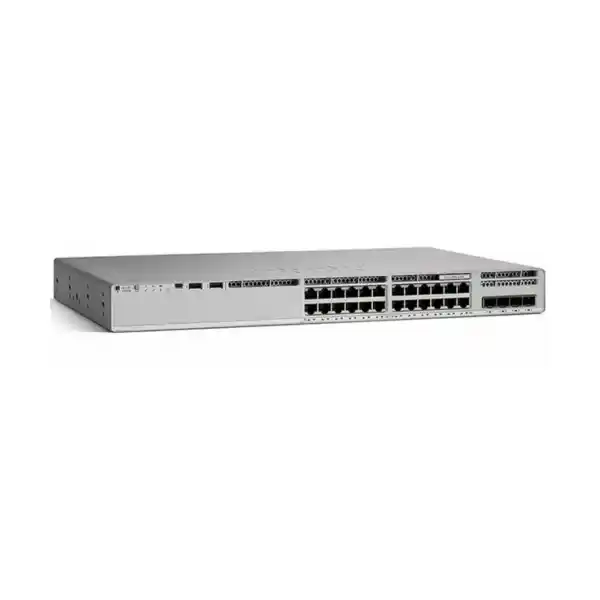
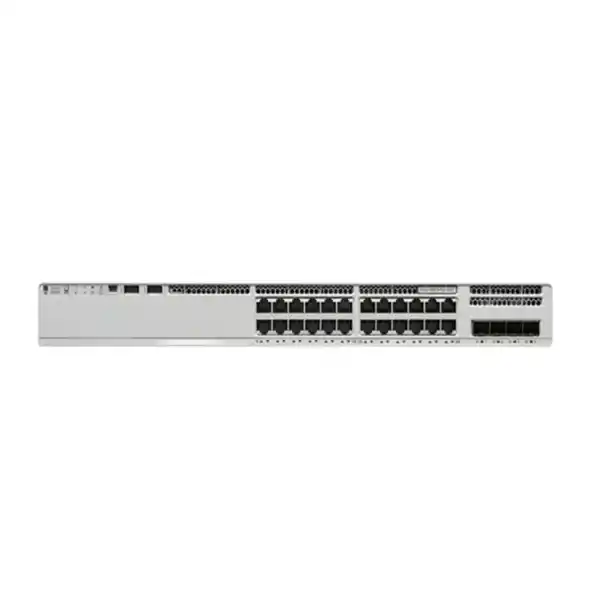
4 × 1G SFP uplinks
StackWise-80
Data-only / No PoE
Cisco Catalyst C9200L-24T-4G Network Switch
Build a dependable wired access layer for a branch, office, school, institution or distributed enterprise site with a compact 24-port Cisco Catalyst 9200L platform. The C9200L-24T-4G is designed for organisations that need managed Gigabit Ethernet access, fixed fibre uplinks, enterprise Cisco IOS XE capabilities and physical stacking, but do not need the switch to provide Power over Ethernet to connected devices.
A practical fit for non-PoE access networks
The Cisco Catalyst C9200L-24T-4G gives network teams 24 copper Gigabit Ethernet access ports for computers, printers, servers, security appliances, building systems and other devices that already have their own power source. Four fixed 1G SFP uplink ports provide fibre or compatible SFP-based connectivity toward distribution switches, core infrastructure or another network segment. This combination is especially useful where 24 access ports are enough for the local wiring cabinet and where 1G uplinks match the expected traffic profile.
The most important buying distinction is simple: this is a data-only model. It does not provide PoE or PoE+ power to IP phones, wireless access points, surveillance cameras or other powered devices. If your deployment depends on powering endpoints through Ethernet cabling, a C9200L PoE model such as a 24P or 48P variant is the more appropriate family member. If the main requirement is faster uplink capacity, compare the 4G model with a C9200L-24T-4X, which uses fixed 1/10G uplinks. Choosing the correct variant at the beginning avoids paying for features that are not needed or discovering after installation that power or uplink capacity is insufficient.
Key specifications at a glance
| Model | Cisco Catalyst C9200L-24T-4G |
|---|---|
| Access ports | 24 × 10/100/1000 Ethernet data ports |
| PoE | No — data-only model |
| Uplinks | 4 × fixed 1G SFP |
| Standalone switching capacity | 56 Gbps |
| Standalone forwarding rate | 41.67 Mpps |
| Stacking | StackWise-80, up to 8 compatible stacking-capable switches; stacking hardware required |
| Memory | 2 GB DRAM, 4 GB flash for C9200L platform |
| MAC address scale | Up to 16,000 for C9200L platform |
| Jumbo frames | Up to 9198 bytes |
| Default primary power supply | PWR-C5-125WAC |
| Power-supply slots | 2 |
| Fans | Fixed redundant fans |
| Dimensions, chassis | 4.4 × 44.5 × 28.8 cm (H × W × D) |
| Weight | Approximately 4.35 kg with one power supply installed |
24-port wired access
Use the switch as an access-layer platform for desktops, printers, local servers, controllers and other powered endpoints. Every copper access port supports 10/100/1000 Ethernet, making it suitable for mixed legacy and Gigabit devices while allowing a straightforward migration toward 1G at the edge.
Fixed fibre uplinks
Four fixed 1G SFP uplink interfaces provide dedicated paths toward upstream switching or fibre runs. Because these uplinks are fixed at the platform level, buyers should confirm that 1G per uplink is sufficient for expected aggregation traffic before standardising on this model.
StackWise-80 growth
Compatible C9200L switches can be physically stacked into one logical system using the appropriate StackWise hardware. This can simplify management, increase port density and provide a cleaner operational model than administering a group of independent access switches.
Where the C9200L-24T-4G fits in a Tanzania network
For many Tanzanian organisations, access switching decisions are less about buying the largest switch and more about matching port count, endpoint power, uplink capacity, resilience and management requirements to each site. A 24-port data-only switch can be a sensible building block for a branch where user devices have separate power, for a server or equipment room where PoE is unnecessary, or for a departmental cabinet where the connected endpoints are mostly PCs, printers and network appliances. The C9200L-24T-4G is designed for this type of enterprise access role rather than for power-heavy edge deployments.
The platform can also suit schools, training centres, professional offices, financial branches, hospitality back-office areas, warehouses and administrative sites when the switching requirement is conventional wired connectivity. In each case, the network designer should first count active endpoints, allow spare ports for growth, identify any devices that need PoE, and estimate the aggregate traffic that will travel through the four 1G uplinks. A small branch with twenty users and modest northbound traffic may be well matched to this switch; a wireless-dense floor with many high-throughput access points may instead need PoE and faster uplinks.
Power quality and continuity also matter in real deployments. The switch uses an AC power supply platform and is designed with two power-supply slots, but the exact installed power-supply configuration should be confirmed when ordering. Where the site experiences outages or unstable mains power, plan appropriate UPS capacity, surge protection, grounding and rack ventilation as part of the network design. These supporting decisions can be as important to uptime as the switch specification itself.
Important: this model does not provide PoE
The “T” in this model family identifies a data-only access configuration. Devices connected to the 24 copper ports must be powered independently. If you need to power IP phones, Wi-Fi access points, IP cameras, door controllers or similar devices directly through Ethernet, do not assume an external configuration change can add PoE later. Select a PoE-capable C9200L hardware model instead.
This distinction can also affect the total project budget. A non-PoE switch may cost less and draw less power in a suitable environment, but adding separate injectors or local power adapters for many endpoints can create additional hardware, cabling and support overhead. Compare the complete deployment rather than just the switch itself.
Performance for a 24-port access layer
Cisco specifies 56 Gbps of switching capacity and a forwarding rate of 41.67 million packets per second for the C9200L-24T-4G in standalone operation. These figures describe the platform’s ability to move traffic through the switch and should be interpreted alongside the physical port layout. Twenty-four Gigabit copper ports provide local access, while four fixed 1G SFP interfaces provide the uplink choices. For typical office access traffic, this architecture offers a balanced entry point into the Catalyst 9000 family, but it is not intended to replace higher-capacity aggregation or core switching platforms.
The C9200L platform supports up to 16,000 MAC addresses, 4094 VLAN IDs, 512 switched virtual interfaces, 6 MB packet buffers on Gigabit Ethernet models and jumbo frames up to 9198 bytes. It also supports routing and policy scale appropriate to an enterprise access switch, including IPv4 and IPv6 route entries, ACL entries, QoS entries and multicast routing scale defined by the platform. These capabilities make the switch useful where segmentation, inter-VLAN routing and policy enforcement are required at the edge, subject to the selected software license and design.
When sizing a deployment, do not rely on a single headline capacity number. Consider how many users will be active at the same time, the amount of traffic directed to servers or the internet, whether local east-west traffic remains within the switch, and how much oversubscription is acceptable on uplinks. If several high-volume devices will simultaneously send traffic upstream, the fixed 1G uplinks may become the design constraint before the access ports do. In that case, a 10G-uplink C9200L variant may provide a better long-term fit.
StackWise-80 for simpler expansion and operations
The C9200L family supports Cisco StackWise-80. With the required C9200L stacking hardware, up to eight compatible stacking-capable switches can operate together in a ring topology as a unified system. Cisco documents an 80 Gbps stacking bandwidth for C9200L models. A stack provides a single control and management plane, which can reduce the operational burden of configuring and monitoring several independent access switches.
Stacking can also provide a practical growth path. An organisation can begin with a single 24-port switch and later add compatible C9200L members as port requirements increase, provided the design follows Cisco’s compatibility and licensing requirements. Cisco states that members in a stack must use the same license level and compatible software. C9200L fixed-uplink models cannot be mixed in the same physical stack with modular C9200 models, so family selection should be considered before a site standard is established.
The stacking kit is not something to assume is automatically included with every base switch. Project planning should verify the required stack adapters, cables, cable length and rack layout. For two or more switches, place the stack design on the bill of materials rather than treating it as an afterthought. This helps ensure the equipment delivered to the site can be installed in the intended topology without waiting for missing accessories.
Cisco IOS XE, automation and visibility
Catalyst 9200 Series switches run Cisco IOS XE, giving administrators a familiar enterprise network operating environment with CLI-based management and support for model-driven programmability. Cisco documents automation capabilities such as NETCONF, RESTCONF, YANG and Plug and Play in the platform’s licensing feature sets. This is valuable for organisations that want to standardise switch configurations, integrate provisioning with network-management workflows, or move from manual device-by-device administration toward repeatable automation.
Telemetry and visibility capabilities can help operations teams understand what is happening at the access layer instead of treating the switch as a simple unmanaged port concentrator. Depending on license and management architecture, the Catalyst platform supports functions such as model-driven telemetry, sampled NetFlow, SPAN and RSPAN. Cisco also positions the Catalyst 9200 family for management through Cisco Catalyst Center and offers cloud monitoring or management options in the wider Catalyst portfolio. The exact management feature set should be checked against the ordered software subscription, software release and intended operating mode.
For a Tanzania deployment with multiple branches, these capabilities can matter more than raw port count. Centralised configuration standards, consistent VLANs, access policies and visibility can reduce troubleshooting effort across geographically separated sites. Before purchase, document whether the switch will be locally managed, centrally managed, integrated into an existing Cisco environment, or used as a standalone branch device. That choice influences license selection, onboarding work and the operational value you will receive from the platform.
Security and segmentation capabilities
A managed access switch sits at a critical trust boundary because it connects users and endpoint devices to the rest of the network. The Catalyst 9200 platform supports enterprise access-control and segmentation features such as 802.1X, access control lists, first-hop security capabilities, quality of service and MACsec features according to software support and licensing. Cisco’s current Network Essentials feature description includes switch fundamentals such as Layer 2 functions, static routing, routed access, private VLAN support, VRRP, QoS, first-hop security, 802.1X and 128-bit MACsec. Network Advantage adds more advanced routing and segmentation capabilities.
In practice, these capabilities allow the switch to participate in a broader security design rather than operating as an isolated box. For example, 802.1X can be used as part of a controlled network-access strategy; VLANs and ACLs can separate departments or device classes; and MACsec can provide link-layer encryption in supported designs. The security result still depends on correct architecture, identity services, endpoint capabilities, software versions and configuration. Buying a Catalyst switch does not by itself create a secure network.
Before deployment, define which users and devices should connect, how guest or unmanaged endpoints will be handled, which networks they should reach, how switch administration will be protected, and where logs and telemetry will be collected. Apply current Cisco software maintenance guidance, use secure management protocols, disable unused access where appropriate and maintain configuration backups. A well-designed access layer combines platform capabilities with disciplined operations.
Network Essentials or Network Advantage: confirm the exact orderable variant
The base model name C9200L-24T-4G describes the hardware platform, but Cisco lists distinct orderable product numbers for different network license levels. The C9200L-24T-4G-E is associated with Network Essentials, while the C9200L-24T-4G-A is associated with Network Advantage. Because a product title that omits the suffix does not identify the license tier, buyers should confirm the exact Cisco product number and subscription package on the quotation before placing an order.
Network Essentials covers the core capabilities needed in many access deployments, including Layer 2 switching, static routing, selected routed-access functions, access security, automation and telemetry. Network Advantage adds advanced switch capabilities and greater segmentation functionality, including features that may be required in more complex routed or policy-driven campus designs. Cisco’s licensing model also includes subscription licensing requirements for new orders, and the subscription tier must align with the network license tier according to Cisco’s current documentation.
Do not choose the higher tier simply because it appears more capable, and do not choose the lower tier solely on acquisition price. Start from the intended network features, routing protocols, segmentation model, management platform and expected lifecycle. If the switch will only provide conventional access switching with basic routing, Essentials may be sufficient. If the architecture depends on advanced routing or segmentation features, Advantage may be required. The exact feature requirement should be checked against the Cisco software release and current feature documentation before purchase.
Uplink planning: when four 1G SFP ports are enough
The four fixed 1G SFP uplinks are one of the defining characteristics of the C9200L-24T-4G. They can be a strong fit when the access layer serves moderate user traffic, branch applications and conventional internet-bound workloads. Multiple uplinks also give designers flexibility for redundant paths, link aggregation or separate upstream relationships, depending on the network architecture and supported configuration.
However, a modern access network can generate more traffic than its endpoint count suggests. Centralised file transfers, backups, virtual desktops, CCTV recording, large software distribution, cloud synchronisation and dense user activity can all increase northbound bandwidth. Before choosing a 4G model, estimate peak aggregate demand rather than average utilisation. If one or more 1G uplinks are likely to spend significant periods near saturation, moving to a 4X variant with 10G-capable fixed uplinks can provide more headroom.
Optics are another part of the design. The switch provides SFP interfaces, but the correct transceiver depends on fibre type, link distance, wavelength, connector plant and compatibility. Confirm the exact Cisco-supported optic or qualified design for each uplink. Do not assume that an SFP taken from another switch family, a third-party optic or an existing fibre run will automatically meet the new deployment’s requirements.
Power, cooling and rack considerations
Cisco lists the PWR-C5-125WAC as the default primary power supply for the C9200L-24T-4G. The chassis provides two power-supply slots, creating the option to design for power redundancy when the appropriate supported second supply is installed. The C9200L platform uses fixed redundant fans rather than the field-replaceable fan modules found on some other Catalyst models. That distinction should be understood by operations teams that maintain spare parts and service procedures.
The chassis is approximately 4.4 cm high, 44.5 cm wide and 28.8 cm deep before the installed power-supply depth is considered, and Cisco lists a weight of about 4.35 kg with one power supply. These dimensions suit standard rack deployment, but installers should allow additional rear clearance for power connections, stack hardware, cable bend radius and airflow. Good cable management is particularly important when several switches, patch panels and fibre uplinks share the same cabinet.
Cisco specifies an operating temperature range for the Catalyst 9200 hardware family of -5°C to 45°C, with a 0°C minimum for cold start, subject to altitude and power-supply conditions. In practice, equipment rooms should be kept well within supported limits and protected from dust, moisture and blocked airflow. For sites where cooling or mains supply is inconsistent, network resilience should include environmental monitoring, UPS planning and a realistic maintenance process.
A redundant-capable power design is not the same as a redundant power installation. Confirm what is included in the quoted unit, whether a second power supply is part of the bill of materials, and whether the site has independent power paths if true power-source redundancy is required. This prevents a common procurement mistake in which a chassis feature is mistaken for an installed configuration.
Deployment scenarios
Branch office access
Connect staff PCs, printers and locally powered devices in a branch that needs Cisco enterprise management, VLANs and secure access. Use the SFP uplinks for fibre to an upstream distribution switch or building backbone.
Departmental wiring closet
Deploy a 24-port access layer for one department or floor where endpoints do not need PoE. Add compatible C9200L stack members later if the cabinet grows beyond the initial port count.
Equipment and server rooms
Use the switch for management interfaces, appliances, storage-support devices or local servers with 1G interfaces when enterprise switching features are required but PoE is irrelevant.
Education and administration
Support computer labs, offices or administrative networks where devices have independent power and the network team wants central management, segmentation and predictable Cisco IOS XE operations.
When to choose another Catalyst 9200L model
The C9200L-24T-4G is intentionally specific: 24 data ports and four 1G uplinks. That makes it easy to rule in or rule out when the project requirements are clearly documented. Choose a PoE-capable variant when the switch must power access points, phones, cameras or IoT endpoints. Choose a 48-port variant when one rack location needs substantially more copper access ports and the cabling design supports that concentration.
Consider the C9200L-24T-4X instead when the same basic 24-port data-only access role needs faster uplinks. Cisco specifies four fixed 1/10G uplink interfaces on the 4X model compared with four fixed 1G uplinks on the 4G model. This difference can be important for branches with heavy server traffic, large numbers of cloud users, backup workloads or uplink aggregation requirements.
Also compare the standard C9200 family when modular uplink choices, StackWise-160 or other platform differences better fit the architecture. C9200 and C9200L should not be treated as interchangeable simply because both belong to the Catalyst 9200 Series. The fixed-uplink C9200L design is optimised for cost-effective access deployments, while modular C9200 models offer a different hardware flexibility profile. Matching the switch family to the network plan is more important than selecting by product name alone.
Buying checklist for Tanzanian organisations
List every planned device that needs PoE. If any significant group requires switch-delivered power, reassess the data-only model.
Verify whether the quoted PID is C9200L-24T-4G-E or C9200L-24T-4G-A and make sure the subscription tier matches the required features.
Estimate aggregate traffic and decide whether four 1G SFP uplinks provide enough headroom or whether a 10G-uplink model is preferable.
Specify compatible SFP modules based on fibre type, distance and upstream equipment instead of assuming optics are included.
If switches will be stacked, include the correct C9200L stack kit and cables, and verify software and license compatibility across members.
Confirm the installed power supplies, UPS requirements, rack power feeds, grounding and environmental conditions for the site.
Installation and migration planning
A successful switch replacement starts before the new hardware reaches the rack. Record the existing port assignments, VLANs, trunks, spanning-tree settings, link aggregation, routing, access policies, management addressing, monitoring configuration and dependencies. Identify which ports are actually active and which legacy configurations should not be copied forward. If the C9200L-24T-4G is replacing an older Catalyst access switch, use the migration as an opportunity to standardise naming, templates and security rather than reproducing years of accumulated configuration without review.
Plan the software version and licensing workflow before the maintenance window. Stack members should run compatible software, and the final software choice should be validated against the organisation’s support policy and feature requirements. Back up the existing configuration, confirm console or out-of-band access, stage management settings where appropriate and test the expected uplink optics. For a remote branch, having a rollback procedure and local hands available can significantly reduce risk.
Physical preparation matters as well. Confirm rack space, mounting hardware, patch-lead lengths, fibre routing and available power outlets. Label access and uplink cables before disconnecting the old switch. If stacking will be deployed, ensure the stack cable length matches the rack layout and that adapters are installed correctly. After cutover, verify link state, VLAN membership, spanning-tree topology, routing neighbours, authentication, monitoring and application reachability rather than relying only on ping tests.
For new sites, document an as-built configuration after commissioning. Record the exact product ID, serial information, software release, license tier, management address, stack member numbers, uplink optic types, rack position and support details. This information becomes valuable during future troubleshooting, expansion and hardware replacement.
Operational resilience and lifecycle considerations
Cisco positions the Catalyst 9200 family as an enterprise access platform with resilience features that go beyond an unmanaged or basic smart switch. For the C9200L hardware, two power-supply slots allow redundant power design, fixed redundant fans provide cooling redundancy at the system level, and StackWise can provide a unified multi-switch architecture. These features support resilient design, but only when the full system is implemented correctly. A single power supply connected to a single UPS is still a single power path, and a stack with both uplinks terminating on one upstream device still has an upstream dependency.
Build resilience from the service requirement backward. If a branch can tolerate a short outage, a standalone switch with a UPS may be appropriate. If the site is operationally critical, consider redundant uplinks, diverse upstream devices, redundant power, stacking strategy and spare-hardware procedures. The right design depends on the cost of downtime, not simply on the maximum feature set available.
Software lifecycle is equally important. Enterprise switching platforms receive software updates that can include fixes, security changes and feature support. Establish a process for monitoring Cisco advisories, testing supported releases, scheduling upgrades and keeping configuration backups. Where the network uses automation or centralised management, verify compatibility before upgrading multiple sites. Avoid leaving access switches unmanaged for years simply because they continue to forward traffic.
Cisco’s published Catalyst 9200 documentation also describes an Enhanced Limited Lifetime hardware warranty for the series, with terms and service details defined by Cisco. Warranty coverage is not the same as a full support contract, and delivery timing or support availability can vary by location and entitlement. For a Tanzanian deployment, confirm the actual support arrangement, replacement process and commercial terms on the quotation rather than assuming global service wording applies identically to every order.
Why this switch can be a strong choice
The main strength of the C9200L-24T-4G is that it brings Catalyst 9000 enterprise access capabilities into a straightforward fixed-uplink 24-port form factor. It is suitable for organisations that want more than basic Ethernet connectivity: managed segmentation, routing options, access security, automation, telemetry and physical stacking can all contribute to a network that is easier to operate consistently across multiple locations.
The data-only design can also be an advantage when PoE is genuinely unnecessary. There is no value in buying a high-power PoE platform for a cabinet filled with PCs, printers and independently powered appliances. The 125W-class default power-supply platform reflects the non-PoE role, while the two power-supply slots still allow a resilient power design. For organisations standardising on Cisco IOS XE, the switch can fit operational processes already used elsewhere in the Catalyst estate.
Its limitations are equally clear. It does not power endpoints, its uplinks are fixed rather than modular, and the 4G version provides 1G rather than 10G uplinks. These are not hidden drawbacks; they are selection criteria. When those boundaries align with the site requirement, the C9200L-24T-4G offers a focused access-switching platform without adding unused PoE or higher-speed uplink hardware.
Frequently asked questions
Does the Cisco C9200L-24T-4G support PoE?
No. It is a 24-port data-only switch. Connected devices must have their own power source. For IP phones, wireless access points, cameras or other PoE endpoints, choose a PoE-capable C9200L model.
How many uplink ports does it have?
It has four fixed 1G SFP uplink ports. If your design needs 10G uplinks, compare the C9200L-24T-4X rather than assuming the 4G uplinks can operate at 10G.
Can C9200L switches be stacked?
Yes. C9200L models support StackWise-80 and Cisco documents support for up to eight compatible stacking-capable members. The correct C9200L stacking hardware is required, and stack members must meet Cisco software and license compatibility requirements.
Can a C9200L be stacked with a standard C9200?
No. Cisco states that fixed C9200L models and modular C9200 models cannot be mixed in the same physical stack. Plan the switch family consistently for any site where stacking is expected.
What is the switching capacity?
Cisco specifies 56 Gbps switching capacity and 41.67 Mpps forwarding for the C9200L-24T-4G in standalone operation. Cisco also publishes higher aggregate figures when stacking is considered.
What is the difference between -A and -E versions?
The suffix identifies the network license tier. Cisco lists C9200L-24T-4G-A with Network Advantage and C9200L-24T-4G-E with Network Essentials. Confirm the exact PID and required subscription on your quotation.
Are SFP transceivers included?
Do not assume so. The switch provides SFP uplink slots, while optics should be specified according to the fibre type, distance and upstream equipment for the project. Confirm the bill of materials before ordering.
Is this switch suitable for a small branch?
It can be an excellent fit when the branch needs up to 24 data ports, does not require PoE from the switch, and can operate within the available 1G uplink capacity. Branches with many powered endpoints or heavy uplink demand should compare other variants.
Request a Cisco Catalyst C9200L-24T-4G quote for Tanzania
Before ordering, confirm the exact Network Essentials or Network Advantage PID, required subscription, SFP optics, stacking accessories, secondary power supply requirements and support coverage. A complete bill of materials is the best way to ensure the switch arrives ready for the intended rack, uplink and management design.
Ask FourTeck Tanzania for a configuration review and quotation based on your port count, uplink speed, PoE needs, stacking plan and deployment environment.




Reviews
There are no reviews yet.