
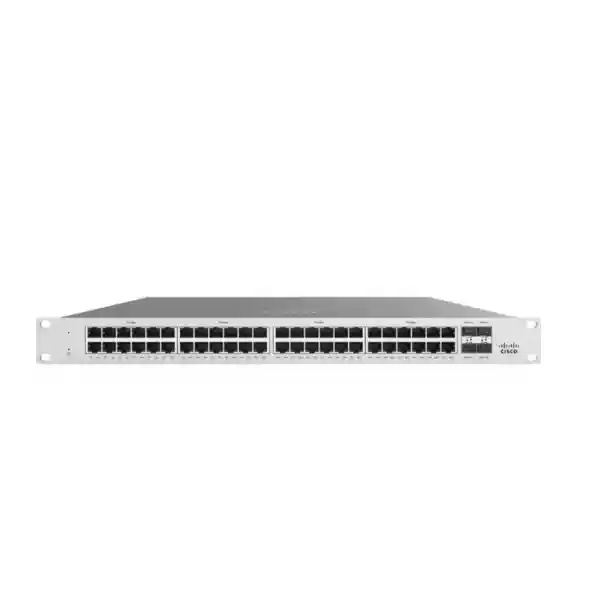
Enterprise access switching for high-bandwidth edge networks
Cisco Catalyst C9300L-48UXG-2Q Network Switch
The Cisco Catalyst C9300L-48UXG-2Q is designed for organisations that need more than ordinary 1 Gigabit access switching. It combines forty-eight Cisco UPOE access ports, twelve multigigabit copper ports capable of speeds up to 10G, and two fixed 40G QSFP+ uplinks in a stackable Catalyst 9300L platform. That mix makes it particularly relevant when newer wireless access points, high-performance workstations, video systems, IP phones and other powered devices must share an access layer without creating an immediate uplink bottleneck.
For a Tanzania deployment, the practical buying question is not simply whether this switch has enough ports. Buyers should confirm the expected PoE load, how many endpoints genuinely need multigigabit speeds, whether two 40G uplinks fit the aggregation design, which Cisco software license level is required, and whether rack power, cooling, optics and cabling are ready for the intended configuration. This page focuses on those decisions so the model can be evaluated as part of a complete network design rather than as an isolated specification.
- 48 Cisco UPOE access ports
- 12 multigigabit ports up to 10G
- 36 standard 10/100/1000 Mbps ports
- 2 × fixed 40G QSFP+ uplinks
- 675W available PoE power with the default 1100W AC PSU
- StackWise-320 capable
- Network Essentials and Network Advantage orderable variants
Who should consider the C9300L-48UXG-2Q?
This switch is most compelling where the access layer has a mixed endpoint population and the network team wants enough headroom for faster edge devices without making every copper port a 10G port. Thirty-six ports are conventional 10/100/1000 Mbps copper interfaces, while twelve ports support 100 Mbps, 1G, 2.5G, 5G and 10G multigigabit operation. That lets a designer reserve the higher-speed copper interfaces for devices that benefit from them and use the remaining ports for ordinary users, phones, printers, controllers and other 1G endpoints.
The model is also aimed at environments where powered devices are part of the access strategy. Cisco identifies the platform as UPOE rather than a data-only switch. This matters when a project includes wireless access points, cameras, phones, signage or other devices that can receive power through Ethernet. PoE planning still needs to be deliberate: a switch may have forty-eight powered ports, but the total available PoE budget and the actual draw of the connected devices determine how many high-power endpoints can be supported at the same time.
The two fixed 40G QSFP+ uplinks make the -2Q variant especially useful when the access layer must feed a higher-capacity aggregation layer. If the design instead calls for multiple 10G SFP+ uplinks, Cisco also lists the C9300L-48UXG-4X, which uses four fixed 10G/1G uplinks. The correct choice depends on the existing aggregation hardware, optics, redundancy method and expected northbound traffic pattern.
Verified hardware profile
| Area | C9300L-48UXG-2Q detail | Why it matters |
|---|---|---|
| Access ports | 48 Cisco UPOE copper ports | Consolidates data and power for compatible edge devices. |
| Multigigabit ports | 12 ports: 100M / 1G / 2.5G / 5G / 10G | Provides faster copper connectivity where endpoint demand exceeds 1G. |
| Standard copper ports | 36 ports: 10M / 100M / 1G | Keeps common wired endpoints on cost-effective Gigabit access. |
| Uplinks | 2 × fixed 40G QSFP+ | Supports high-capacity aggregation and resilient northbound design. |
| Primary PSU | 1100W AC | Sized for the UPOE and multigigabit hardware profile. |
| Available PoE power | 675W with the default 1100W AC PSU | Defines the practical starting power budget for attached devices. |
| Switching capacity | 472 Gbps standalone; 792 Gbps with stacking | Provides substantial internal bandwidth for access-layer traffic. |
| Forwarding rate | 351.19 Mpps standalone; 589.28 Mpps with stacking | Indicates packet-forwarding capability under Cisco’s stated test basis. |
| Stacking | StackWise-320, optional kit, up to eight compatible switches | Supports a unified stack where compatible models and licensing are used. |
| Weight | 16.86 lb / 7.65 kg with default power supply | Useful for rack and installation planning. |
Multigigabit access: where the twelve faster copper ports add value
A conventional Gigabit access switch can become a constraint when an endpoint has a radio, storage subsystem or local workload capable of moving more than 1 Gbps. The C9300L-48UXG-2Q addresses that problem selectively. Its twelve multigigabit ports can negotiate 2.5G, 5G or 10G as well as lower rates, while the rest of the switch continues to provide standard Gigabit access. This hybrid design can reduce the need to over-provision every port for the performance requirements of a smaller set of high-bandwidth endpoints.
For wireless deployments, the multigigabit ports can be important when access points have aggregate wireless capacity that would otherwise exceed a 1G wired connection. The wired port is only one part of wireless performance, so buyers should also confirm the access point’s supported Ethernet rate, power requirement, cabling grade, controller or management design, RF plan and expected client density. A faster switch port does not by itself guarantee faster Wi-Fi, but it removes one potential bottleneck when the rest of the wireless design can use the bandwidth.
The same logic applies to high-performance workstations, local servers, media devices and specialised edge equipment. Before assigning a 10G-capable switch port, check the endpoint NIC, copper distance, cable condition and actual application demand. In existing buildings, this assessment can be especially valuable because moving from 1G to 2.5G or 5G may be a more practical intermediate step than assuming every run should immediately operate at 10G.
Cisco UPOE and the real PoE budget
Cisco classifies the C9300L-48UXG-2Q as a UPOE switch. UPOE can support higher-powered Ethernet devices than basic PoE designs, but procurement should be based on the total switch power budget rather than only on the maximum capability of an individual port. With the default 1100W AC power supply, Cisco lists 675W of available PoE power for this model. That figure is the starting point for power allocation across attached devices.
A useful design exercise is to inventory every powered device by maximum or expected draw, add reasonable headroom, and compare the result with the switch’s available budget. High-power access points, PTZ cameras, displays or specialised endpoints can consume substantially more than an ordinary IP phone. If the project needs a larger total PoE budget, Cisco documents higher available power when supported secondary power supplies are added. The exact power-supply combination, redundancy policy and supported PoE output should be confirmed against the intended bill of materials before purchase.
Power planning should also include the upstream electrical environment. The 1100W AC supply is specified for 115V to 240VAC at 47 to 63 Hz. In a production deployment, size UPS capacity for the actual switch and PoE load, desired runtime and any redundant power-supply configuration. Do not size a UPS from switch nameplate information alone; account for connected PoE devices, growth and the behaviour required during a utility interruption.
Two fixed 40G uplinks: design the aggregation layer before ordering
The defining uplink feature of the -2Q model is its pair of fixed 40G QSFP+ interfaces. They are intended to move traffic from the access layer toward aggregation or core infrastructure at much higher capacity than ordinary 1G or 10G uplinks. In a busy access switch, this can be useful when several multigigabit endpoints and many Gigabit endpoints are active at the same time.
The word fixed matters. Unlike modular-uplink Catalyst 9300 models, the C9300L family does not let the buyer replace the uplink module with a different network module. The uplink type should therefore be selected as part of the architecture. If the upstream switch is built around 40G QSFP+ connectivity, the C9300L-48UXG-2Q can be a natural fit. If the upstream design expects four separate 10G SFP+ links, the C9300L-48UXG-4X may align better.
Optics and cabling are separate procurement items that must match the distance, fibre type, connector plan and supported Cisco compatibility matrix. This product page does not assume that transceivers, fibre jumpers or breakout components are included. Confirm those items explicitly in the quote and confirm that both ends of each uplink support the intended optic and speed.
StackWise-320 for a unified access stack
Cisco Catalyst 9300L fixed-uplink models support StackWise-320. Cisco documents 320 Gbps of stack bandwidth and support for up to eight switches in a compatible stack when the required stack kit and cabling are used. For the C9300L family, stacking can simplify operations by allowing multiple physical access switches to be administered as a logical system, while also supporting designs that distribute links and users across stack members.
Compatibility still needs attention. Cisco states that fixed-uplink C9300L switches cannot be stacked with modular-uplink C9300 switches. Current documentation also identifies C9300L and C9300LM compatibility under StackWise-320 subject to the stated model and license-level rules. A mixed hardware purchase should therefore be validated as a complete stack, not assumed compatible because the product names all begin with Catalyst 9300.
The stack hardware is optional. When stacking is part of the design, include the correct adapters and cable lengths in the bill of materials, verify rack placement so the selected cables reach cleanly, and decide how uplinks and power will be distributed across members. If stacking is not required, the switch can be deployed standalone.
Performance and scale for enterprise access
Cisco lists 472 Gbps of switching capacity and 351.19 million packets per second of forwarding performance for the C9300L-48UXG-2Q in standalone operation. With stacking, the data sheet lists 792 Gbps of switching capacity and 589.28 Mpps. Cisco notes that the forwarding-rate figures are measured using 64-byte IPv4 packets and describes the models as wire-speed nonblocking for IPv4 and IPv6 under the documented conditions.
For scale, the Catalyst 9300L/LM fixed-uplink family is documented with up to 32,000 MAC addresses, 32,000 IPv4 routes in the listed scale profile, 16,000 IPv6 routing entries, 8,000 multicast routing entries, 4,094 VLAN IDs and 1,000 switched virtual interfaces. These numbers are useful when evaluating the switch for a larger routed access or campus design, but feature availability, practical scale and configuration limits can depend on software release, license level and enabled features.
Most branch and office buyers will not size a switch from MAC or route table limits alone. More immediate considerations are endpoint count, failure domains, uplink oversubscription, VLAN design, routing requirements, wireless density, PoE consumption and how the access layer integrates with the organisation’s monitoring and security tools. The scale figures should be treated as validated platform limits within the documented context, not as a substitute for network design.
Network Essentials or Network Advantage?
The base name C9300L-48UXG-2Q does not specify the software package. Cisco lists separate orderable versions: C9300L-48UXG-2Q-E with Network Essentials and C9300L-48UXG-2Q-A with Network Advantage. Buyers should therefore select the exact suffix according to the required routing, segmentation, automation and high-availability features rather than treating the two as interchangeable product codes.
| Decision area | Network Essentials | Network Advantage |
|---|---|---|
| Core switching fundamentals | Included | Included |
| 802.1X, QoS, first-hop security, MACsec-128 | Included in Cisco’s package table | Included |
| Advanced routing such as BGP and full EIGRP | Not in the listed Essentials feature set | Included in the listed Advantage feature set |
| Advanced segmentation such as VRF, VXLAN, LISP and TrustSec capabilities | Not in the listed Essentials feature set | Included in the listed Advantage feature set |
| Automation interfaces listed by Cisco, including NETCONF, RESTCONF, gRPC and YANG | Not in the listed Essentials feature set | Included in the listed Advantage feature set |
Cisco also documents Catalyst and Cisco DNA subscription combinations that accompany Network Essentials or Network Advantage ordering. Licensing rules can change across software generations, and subscription choices should be verified at the time of quotation. The hardware can continue to operate with base license capabilities after an add-on subscription expires under Cisco’s stated licensing model, but the exact entitled functions and renewal plan should be confirmed for the order and software version being deployed.
For a straightforward access-layer deployment, Network Essentials may be sufficient when the required features stay within its documented scope. Network Advantage should be evaluated when advanced routing, segmentation, automation or resiliency features are part of the architecture. A network design review before ordering is usually more reliable than choosing the higher or lower package by name alone.
Practical Tanzania deployment planning
For organisations deploying enterprise switching in Tanzania, the switch specification should be matched with the physical and operational environment. Stable electrical power, appropriate UPS protection, adequate rack ventilation, correct earthing, planned fibre paths and structured cabling quality all influence the reliability of the finished installation. These are project considerations rather than claims about a particular site, so each deployment should be surveyed before finalising the bill of materials.
Cisco lists normal operating temperature ranges that vary with altitude, including up to 45°C at lower elevations within the documented limits, and 5% to 90% non-condensing relative humidity. Those specifications describe the equipment envelope, not a recommendation to run a communications room at the upper limit. In practice, network rooms should be designed to maintain controlled conditions, unobstructed airflow and service clearance around the switch, especially when the PoE load is high.
Power design deserves particular attention on a 1100W-class UPOE switch because the network may be supporting many endpoints that also go offline if the switch loses power. When business continuity matters, decide whether one or two power supplies are required, what UPS runtime is needed, how generator or alternate power is handled, and whether the connected endpoints are considered critical. The final power budget should use the actual configuration, not a generic estimate.
WAN or Internet provider choice is separate from the LAN switch decision. The C9300L-48UXG-2Q can form part of a campus or enterprise LAN, but the performance users experience across cloud applications also depends on the firewall, router, upstream bandwidth, provider path, DNS, application design and end-user device. Treat the access switch as one component in the end-to-end architecture.
Common deployment scenarios
High-density office access
Use the forty-eight copper ports for a mix of desks, phones, access points and other building endpoints, reserving the multigigabit ports for devices that can exceed 1G.
Wi-Fi access layer
Connect compatible high-throughput wireless access points to multigigabit UPOE ports while using the remaining ports for conventional wired users and services.
Video and security edge
Support powered cameras and other Ethernet devices, provided their total power consumption is designed within the available PoE budget and network bandwidth.
Campus access stack
Deploy multiple compatible Catalyst 9300L or supported 9300LM switches using StackWise-320 where a logical stack suits the operational and resiliency design.
Aggregation-ready edge
Use the two 40G QSFP+ uplinks when the upstream network is designed for 40G connectivity and the access layer needs substantial northbound capacity.
Mixed-speed migration
Keep most endpoints on 1G while introducing selected 2.5G, 5G or 10G copper connections as equipment and cabling requirements evolve.
C9300L-48UXG-2Q versus nearby Catalyst 9300L choices
The Cisco Catalyst 9300L range contains several models that can look similar in a product list but serve different design priorities. Comparing the C9300L-48UXG-2Q with adjacent models helps prevent paying for the wrong uplink or port mix.
| Model family choice | Access profile | Fixed uplinks | Best fit question |
|---|---|---|---|
| C9300L-48UXG-2Q | 48 UPOE; 12 multigigabit + 36 Gigabit | 2 × 40G QSFP+ | Need 48 powered ports, selected 10G copper and 40G aggregation? |
| C9300L-48UXG-4X | 48 UPOE; 12 multigigabit + 36 Gigabit | 4 × 10G/1G SFP+ | Same access mix, but upstream design is based on multiple 10G links? |
| C9300L-24UXG-2Q | 24 UPOE; 8 multigigabit + 16 Gigabit | 2 × 40G QSFP+ | Need the 40G uplink design but fewer access ports? |
| C9300L-48P-4X | 48 PoE+ Gigabit ports | 4 × 10G/1G SFP+ | No multigigabit requirement and lower per-port power needs? |
The right model is the one that matches the physical network already planned. Uplink type, PoE class, endpoint speed and software package should all be confirmed before the purchase order is raised. Changing any one of those assumptions can point to a different Catalyst SKU.
Rack, power and installation checklist
- Confirm the exact orderable license suffix. Choose Network Essentials (-E) or Network Advantage (-A) according to required features and the current Cisco software entitlement structure.
- Inventory endpoints. Count total copper devices, devices requiring PoE, and devices that need 2.5G, 5G or 10G access.
- Calculate PoE demand. Add the expected or maximum device loads and compare them with the 675W default available PoE budget, including growth and desired headroom.
- Validate the 40G uplink architecture. Confirm upstream interfaces, optics, fibre type, distances, redundancy and whether two fixed 40G links are the right topology.
- Check copper cabling. Verify existing cable categories, lengths and termination quality against the speeds expected on the twelve multigigabit ports.
- Plan power protection. Size UPS and distribution for the actual switch configuration, PoE load, redundant supplies if used, and required outage runtime.
- Plan rack airflow. Allow the switch and power supplies to operate within Cisco environmental requirements and avoid blocked intake or exhaust paths.
- Add stack hardware if required. Include the compatible StackWise-320 kit and cable lengths; do not assume stack components are part of the base switch.
- Confirm software release compatibility. Align the planned IOS XE release with required features, lifecycle policy and the rest of the network estate.
- Review the final bill of materials. Treat optics, cables, licenses, power supplies, stacking accessories and support as distinct items that must be explicitly confirmed.
Physical and environmental considerations
Cisco lists the C9300L-48UXG-2Q chassis at approximately 4.4 × 44.5 × 40.9 cm in one documented chassis-depth configuration and a weight of 7.65 kg with the default power supply. Installation planning should consider the complete rack depth once power supplies, cables, strain relief and service clearance are included. A measurement on paper should not be treated as permission to fit the switch into an unusually shallow enclosure without checking the actual rack and cable bend radius.
The product family is designed for controlled equipment environments. Cisco documents 5% to 90% non-condensing relative humidity and operating-temperature limits that vary with altitude. For normal operation the documented range includes -5°C to +45°C up to 1,500 metres, reducing at higher elevations. These limits help with equipment-room design, but maintaining a stable temperature comfortably inside the maximum range is preferable for operational resilience.
Noise, heat output and power consumption increase in importance when several high-power switches share a small room. If the access layer will be installed near occupied office space, in a cabinet with limited ventilation or alongside other PoE equipment, review the thermal and acoustic implications during the site survey. A dense PoE edge is an infrastructure project, not only a switch purchase.
Security, segmentation and operations
Catalyst 9300L is part of Cisco’s enterprise switching platform, and the licensing package determines which advanced capabilities are available. Cisco’s current feature tables show common switching fundamentals, QoS, 802.1X, first-hop security, MACsec-128, telemetry and visibility functions in both Network Essentials and Network Advantage, while advanced routing, broader segmentation technologies and several automation interfaces are listed under Network Advantage.
For buyers, the important point is to map requirements to entitlements before ordering. If the switch will simply provide secure Layer 2 access with standard routed-access needs, the lower package may fit. If the design depends on technologies such as VRF, VXLAN, LISP, Cisco TrustSec functions, BGP, advanced OSPF scale, NETCONF or RESTCONF, the feature table should be reviewed carefully against the current software release and Advantage licensing.
Operational tooling should also be considered. Decide how configuration backups, software upgrades, monitoring, authentication, logging and change control will be handled. The switch can be technically capable while still being difficult to operate if management processes are not designed around it. A successful deployment includes both the network feature set and the day-to-day operating model.
What this product page does not assume
No local price, stock position, delivery time, warranty term, optics bundle, Cisco support contract or installation service is stated here because those commercial details need to be verified for the exact Tanzania quotation. The model name also does not tell us whether the required order is Network Essentials or Network Advantage, so that selection remains a buyer decision until the network requirements are confirmed.
The switch supports Cisco UPOE, but a statement such as “all forty-eight ports can each deliver their maximum power simultaneously” would be misleading without the correct power-supply configuration. The documented default available PoE budget is 675W. If more powered capacity is required, the power design must be calculated against supported secondary supply combinations and the actual endpoint load.
Likewise, two 40G uplink ports do not mean that a complete 40G fibre connection is automatically included. The upstream switch interface, transceivers, fibre type and patching must all be compatible. Those details belong in the final bill of materials.
Software release and lifecycle planning
Enterprise switching is normally kept in service for years, so procurement should include a software and lifecycle plan from the beginning. Cisco’s current Catalyst 9300 IOS XE release documentation continues to list the C9300L-48UXG-2Q orderable variants, while individual IOS XE trains have their own maintenance and end-of-life schedules. This means the relevant lifecycle decision is not simply the age of the hardware family: the organisation also needs a supported software train, an upgrade process, configuration backups, a testing method and a policy for responding to security advisories.
Before deployment, choose an IOS XE release that supports the required features and fits the organisation’s maintenance policy. Where the network has multiple Catalyst switches, standardising on an approved release can simplify troubleshooting and change control. New software should be evaluated against existing authentication, routing, monitoring and automation dependencies before broad rollout. If the switch will join a StackWise-320 stack, software compatibility across all members is especially important because the stack operates as a coordinated system.
Support planning should be handled as a commercial item in the final quotation. This page does not assume a particular Cisco support contract, replacement entitlement or service response time. Buyers should decide what level of vendor or integrator support is appropriate for the business criticality of the network, then make sure the selected support coverage matches the exact product and deployment. Keeping the hardware, software, licensing and support records together also makes future renewals and upgrades easier to manage.
Frequently asked questions
How many ports does the C9300L-48UXG-2Q have?
It has forty-eight copper UPOE access ports. Twelve are multigigabit ports supporting 100M, 1G, 2.5G, 5G and 10G, while thirty-six support 10M, 100M and 1G. It also includes two fixed 40G QSFP+ uplink interfaces.
Is every access port 10 Gigabit capable?
No. Twelve access ports are multigigabit and can operate up to 10G. The remaining thirty-six copper access ports operate up to 1G. This mixed-speed design is useful when only selected endpoints need more than Gigabit performance.
Does the switch provide PoE?
Yes. Cisco specifies UPOE on the forty-eight access ports. The total power available to attached devices depends on the power-supply configuration. With the default 1100W AC supply, Cisco lists 675W of available PoE power for this model.
Are the 40G uplinks modular?
No. The C9300L line uses fixed uplinks. The C9300L-48UXG-2Q has two fixed 40G QSFP+ uplinks. Buyers who need four fixed 10G/1G SFP+ uplinks should compare the C9300L-48UXG-4X.
Can the C9300L-48UXG-2Q be stacked?
Yes. Cisco supports StackWise-320 on Catalyst 9300L fixed-uplink models. The stack kit is optional, and Cisco documents stacks of up to eight compatible switches subject to the applicable model and license rules.
Can it stack with a modular-uplink C9300?
No. Cisco states that fixed-uplink C9300L switches cannot be stacked with modular-uplink C9300 switches. Stack composition should be checked before ordering any mixed Catalyst 9300 family hardware.
What is the difference between C9300L-48UXG-2Q-E and C9300L-48UXG-2Q-A?
The hardware profile is the same, but the software package differs. The -E variant is ordered with Network Essentials and the -A variant with Network Advantage. Advantage includes additional routing, segmentation, automation and resiliency functions in Cisco’s current feature tables.
Do I need Cisco DNA or Cisco Catalyst subscription licensing?
Cisco’s current ordering model documents subscription combinations alongside the perpetual Network Essentials or Network Advantage license. The required subscription term and package should be confirmed for the exact order at quotation time because licensing structures and entitlements can evolve.
Is this switch suitable for high-performance Wi-Fi access points?
It can be a strong fit when the selected access points support multigigabit Ethernet and need PoE. Twelve ports can operate above 1G, but the complete wireless design still depends on the access point model, cabling, RF plan, management architecture and total PoE demand.
Are 40G transceivers included?
This page does not claim that any transceiver is included. Optics should be selected separately according to the upstream equipment, distance, fibre type and Cisco compatibility requirements, then confirmed on the quotation.
What should I provide when requesting a quotation?
Provide the required quantity, whether Network Essentials or Network Advantage is needed, the expected PoE load, whether stacking is required, the uplink distance and fibre type, the upstream switch model, desired power redundancy and any support or installation requirements. If those details are not yet known, a network design review should come before the final bill of materials.
Request a configuration and quotation review
Choose the Cisco Catalyst C9300L-48UXG-2Q when your design specifically needs forty-eight UPOE access ports, twelve multigigabit copper connections and two 40G QSFP+ uplinks. Before ordering, confirm the Network Essentials or Network Advantage variant, PoE budget, optics, power redundancy, stacking accessories and software requirements as one complete configuration.
For a Tanzania deployment, request a quote that lists every required component rather than relying on the base switch name alone. A complete review helps avoid mismatched uplinks, insufficient PoE headroom, missing stack hardware or the wrong software entitlement.




Reviews
There are no reviews yet.