

Cisco Wi‑Fi 7 for compact enterprise deployments
Cisco Meraki CW9171I Tanzania
Plan, procure and deploy the Cisco Meraki CW9171I as a modern indoor wireless access point for branch offices, hospitality, education, healthcare, retail and distributed business sites. The CW9171I uses Cisco’s unified Wi‑Fi 7 platform and can be operated with Meraki cloud management or supported Catalyst infrastructure, giving IT teams a practical migration path while retaining centralized visibility and enterprise controls.
CW9171I is an indoor 2×2:2 Wi‑Fi 7 access point with fixed 2.4 GHz plus configurable 5 GHz or 6 GHz service, 2.5GbE uplink, integrated BLE/IoT and a dedicated scanning radio. Cisco lists the 9171 Series as orderable and requires a Cisco Networking Subscription.
Cisco Meraki CW9171I overview
Cisco positions the Wireless 9171 Series as a compact entry point into Wi‑Fi 7 for lower to moderate device-density environments. The CW9171I is the internal-antenna indoor model. It supports 2×2:2 operation on 2.4 GHz and on either 5 GHz or 6 GHz, with Wi‑Fi 7 features including 4096-QAM, Multi-Link Operation, preamble puncturing, OFDMA and channel widths up to 320 MHz in 6 GHz where permitted. The platform also supports WPA3 and retains compatibility features for earlier Wi‑Fi generations, making it suitable for phased client refreshes rather than only greenfield Wi‑Fi 7 deployments.
For organizations evaluating Meraki, the important architectural point is management flexibility. Cisco documentation describes the 9171 hardware as a converged platform that can serve Meraki cloud-native deployments or Catalyst controller-based environments. That allows procurement teams to evaluate the access point together with the desired operational model instead of treating the hardware and management strategy as unrelated decisions. A Meraki deployment can emphasize cloud-based configuration and monitoring, while Catalyst environments can integrate with supported Cisco wireless controllers and broader Cisco infrastructure.
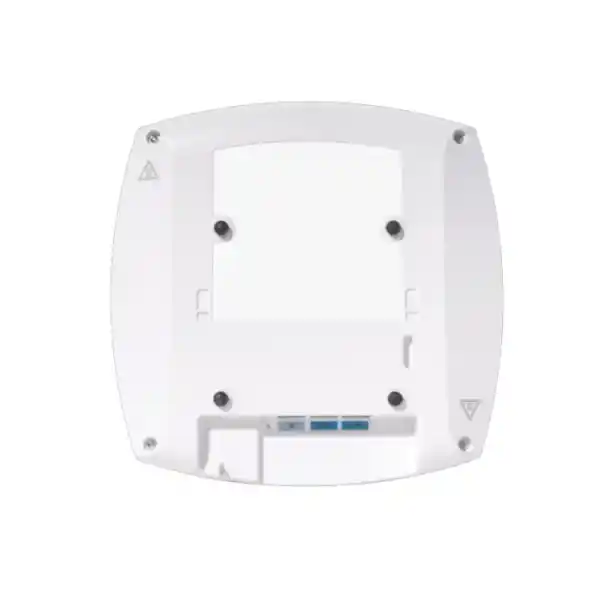
The access point has one 100M/1G/2.5G multigigabit Ethernet uplink, an RJ-45 management console port, USB 2.0, a DC power input and Power over Ethernet support. Cisco’s current datasheet shows full dual-radio capability with 802.3at PoE+; operation on 802.3af PoE is reduced. This makes switch PoE budgeting an essential part of the quotation. A Wi‑Fi 7 access point can only deliver its intended experience when the wired uplink, switch power, VLAN design, internet service, client capabilities and RF plan are aligned.
2×2:2 on 2.4 GHz plus 5 GHz or 6 GHz, with integrated omnidirectional antennas and a dedicated scanning radio.
One RJ‑45 uplink supporting 100 Mbps, 1 Gbps and 2.5 Gbps to reduce wired-backhaul bottlenecks.
Designed for Meraki cloud management or supported Cisco Catalyst controller-based operation.
Integrated Bluetooth Low Energy and IoT radio capability supports smart-space and device-integration use cases.
Verified technical specifications
| Model | CW9171I, indoor access point with integrated omnidirectional antennas |
| Wireless standard | IEEE 802.11be Wi‑Fi 7, with backward-generation support documented by Cisco |
| Serving radios | 2.4 GHz + 5 GHz or 6 GHz, 2×2:2 |
| Aggregate frame rate | Up to 6120 Mbps as published for the 9171 Series configuration |
| Ethernet | 1 x 100M/1G/2.5G multigigabit RJ‑45 uplink |
| Power | PoE/DC; full dual-radio operation is associated with 802.3at PoE+ in Cisco’s power table |
| Dimensions | 20 x 20 x 5.3 cm without mounting brackets |
| Weight | 874 g |
| Licensing | Cisco Networking Subscription: Wireless Essentials or Wireless Advantage, subject to current Cisco ordering rules |
Deployment and buying guidance
Do not select the CW9171I only because it carries the Wi‑Fi 7 label. The best-fit environment is one where the access point’s 2×2:2 radio design, compact form factor and lower-density positioning match the real coverage and capacity requirement. Before ordering, map the number of users, device types, floor plan, wall materials, applications, expected roaming, guest access, IoT needs and whether 6 GHz operation is legally and practically available in the intended country. Regulatory approval and permitted spectrum can differ by market, so the operational band plan must be checked for the country of deployment rather than assumed from a global specification sheet.
The wired network should also be reviewed. For full functionality, plan appropriate PoE+ availability and confirm the total PoE budget across all access points. If the wireless design expects more than 1 Gbps of real aggregate traffic, a 2.5GbE-capable switch port and suitable cabling help preserve headroom. VLANs should be planned for corporate, guest and IoT traffic where separation is required. The firewall and internet connection must also be able to handle the users and applications being delivered through the WLAN; replacing an access point does not remove bottlenecks elsewhere in the network.
Licensing should be quoted with the hardware. Cisco states that Wi‑Fi 7 access points including the 9171 Series require a Cisco Networking Subscription. Procurement teams should therefore confirm license tier, term, support expectations, dashboard ownership, renewal responsibility and any controller or cloud dependencies before issuing a purchase order. This avoids comparing a hardware-only quote with a complete operational quote and discovering subscription requirements after installation.
Related FourTeck Tanzania resources
Cisco Meraki CW9171I Tanzania
For Tanzania organizations, the CW9171I is most useful when wireless modernization is connected to a clear LAN design. Offices, clinics, schools, retail locations, hotels, branch networks and professional-services firms increasingly depend on SaaS, collaboration, cloud storage, mobile devices and real-time business applications. Wi‑Fi performance therefore affects much more than web browsing. A Tanzania deployment should begin with a floor plan, user and device count, critical applications, available Ethernet cabling and switch capabilities. The access point’s 2.5GbE interface can provide wired headroom, but only when the access switch supports multigigabit connectivity and has an adequate PoE budget. If the existing LAN is 1GbE, the CW9171I can still be deployed, but the design should acknowledge where the wired layer limits future wireless throughput.
The CW9171I’s lower-density positioning makes it attractive for distributed branch and office areas where extreme high-density hardware would add cost without solving the actual problem. A proper survey or predictive design should decide the number and placement of access points. Concrete walls, glass, shelving, room geometry and neighboring radio activity can all affect signal behavior. For Tanzanian offices with guest Wi‑Fi, staff devices and operational equipment, separate SSIDs and VLANs can create cleaner security boundaries. Meraki cloud management can then centralize visibility across sites, while organizations already standardized on Catalyst can evaluate the supported controller path.
Procurement should include hardware, mounting, switch ports, PoE, subscription licensing and implementation scope. Cisco requires a Networking Subscription for the 9171 Series, so buyers should specify the intended term and license level rather than requesting a hardware-only price. Country-specific radio approvals also need confirmation before final ordering and activation. FourTeck can help align the access point with switching, firewalling and structured cabling requirements. The Tanzania technology shop provides broader product-selection context, while deployment and lifecycle services can be reviewed when the project includes installation, configuration or future support.
Cisco Meraki CW9171I Dar es Salaam
Dar es Salaam deployments often combine corporate offices, customer-facing spaces, warehouses, hospitality properties and multi-floor commercial buildings. In these environments, the CW9171I can be a good fit for areas with low to moderate device density that need modern Wi‑Fi 7 capabilities without moving to a larger high-density access-point class. The design should distinguish coverage from capacity. A signal that reaches every room does not guarantee acceptable performance when many users share a radio. Meeting rooms, reception spaces and open offices can create short periods of concentrated demand, while corridors and storage spaces may mainly need dependable coverage.
For a Dar es Salaam office, begin by documenting the floor layout, wall materials, expected concurrent clients and primary applications. Video conferencing and cloud collaboration place different demands on the network from casual browsing. If the site is upgrading from older Wi‑Fi, also review client capabilities. Wi‑Fi 7 features provide the greatest benefit when compatible endpoints are present, while legacy devices will continue to operate according to their own standards. The access layer should offer 802.3at PoE+ for full CW9171I functionality and ideally 2.5GbE where traffic levels justify multigigabit backhaul. Cable quality and distance should be verified before assuming that an existing drop can support the desired link rate.
Meraki cloud management can be particularly useful for organizations that have multiple Dar es Salaam branches or a head office managing remote locations, because administrators can maintain a common operational view. Guest networks, staff WLANs and IoT devices should be segmented according to policy, and the firewall must be sized for the combined internet and security workload. Before requesting a quotation, specify AP quantity estimates, floor plans, switching platform, PoE budget, license term and whether installation and survey work are required. This creates a quote that can be evaluated as a working solution rather than simply as a list of access-point hardware.
Cisco Meraki CW9171I Mwanza
Organizations in Mwanza can use the CW9171I for branch offices, education sites, healthcare spaces, hospitality areas and business premises that need centrally manageable wireless with a path to Wi‑Fi 7. A common requirement outside a main headquarters is reducing the amount of specialist intervention required at each site. Meraki management can support that operating model by giving a central IT team remote visibility and configuration capability, while the physical deployment still needs sound local planning for cabling, power and RF placement.
A Mwanza project should assess internet quality and LAN architecture together. Upgrading the WLAN does not resolve a weak WAN service, overloaded firewall or underpowered switch. If cloud applications are business critical, monitor both wireless performance and upstream connectivity. For sites using voice over IP, video meetings or cloud ERP, latency and packet loss are often more visible to users than maximum link speed. The CW9171I’s 2.5GbE uplink is useful when the switch and cabling support it, but procurement should not force a multigigabit refresh where application demand does not justify the cost. Instead, identify where higher-capacity uplinks provide measurable benefit.
Physical conditions also matter. Thick walls, metal shelving and irregular layouts can create attenuation or reflections that make simple square-meter estimates unreliable. A survey or predictive plan is therefore preferable to buying a fixed number of APs based only on building area. For branch standardization, document SSID names, VLANs, IP addressing, dashboard ownership and alerting conventions so new sites follow the same operational model. When asking for a Mwanza quotation, include the number of users, approximate floor plan, existing switch model, available PoE, current internet service and whether guest access or IoT segmentation is required. These details help determine whether CW9171I is the right fit or whether another Cisco wireless model better matches the density and radio requirement.
Cisco Meraki CW9171I Arusha
Arusha organizations in tourism, hospitality, education, offices and service businesses often need Wi‑Fi that serves both employees and visitors. That makes policy separation as important as coverage. The CW9171I can support a modern branch wireless design where staff traffic, guest access and connected devices are mapped to appropriate SSIDs and VLANs. The access point’s integrated BLE/IoT capability can also be relevant to smart-space projects, although the actual IoT application and platform compatibility should be defined before procurement rather than assumed from the presence of the radio.
Hospitality and guest environments should be planned for variable demand. A quiet property at midday can experience very different usage in the evening when many guests stream video, make calls or synchronize devices. The CW9171I is positioned by Cisco for lower-density environments, so high-density public areas should be assessed carefully rather than simply filled with more of the same AP. Where capacity is concentrated, a higher-class Cisco access point may be more appropriate. Where rooms and small common areas have moderate demand, CW9171I can provide a compact path to Wi‑Fi 7 with cloud-based management.
For an Arusha rollout, survey mounting positions, Ethernet availability and power. Full dual-radio operation should be designed around PoE+, and 2.5GbE switching should be considered where backhaul demand justifies it. Guest traffic should be isolated from internal systems, and bandwidth policy can prevent public usage from degrading reservation systems, staff communications or cloud applications. Before ordering, confirm subscription licensing, regulatory suitability for the intended radio configuration and the management model. Buyers with regional operations can also review FourTeck Kenya or FourTeck Uganda when standardizing related network requirements across East African sites.
Cisco Meraki CW9171I Dodoma
Dodoma offices, institutions and distributed organizations can evaluate CW9171I when they need a compact indoor Wi‑Fi 7 access point that can be centrally operated and integrated with a managed LAN. The main design benefit is not simply faster radio technology; it is the opportunity to standardize wireless policy, monitoring and lifecycle management across sites. A central team can define common SSIDs, segmentation and configuration standards, while each building receives the number and placement of access points appropriate to its floor plan and device density.
A good Dodoma design begins with critical services. If users depend on cloud applications, video meetings, online portals or remote access, the wireless layer needs consistent coverage and sufficient capacity in the areas where those services are used. Meeting rooms, training spaces and shared work areas can require more capacity than private offices. The access point’s 2×2:2 architecture is appropriate for lower-density use cases, but a site with lecture halls or very dense public areas should be assessed against higher-capacity Cisco options. One model should not be forced across every space simply for procurement simplicity.
Infrastructure readiness should be checked before delivery. Confirm PoE+ on the intended switch ports, total switch power budget, cabling condition and whether 2.5GbE uplinks are supported. Define VLANs for staff, guests and operational devices as required and ensure the firewall has corresponding policies. Subscription licensing should be included in the commercial comparison, because Cisco Networking Subscription is part of the operating requirement for the 9171 Series. For a quotation, provide floor plans, expected client count, existing network equipment, preferred management model and desired license term. That information allows the wireless proposal to include the dependencies that often determine whether an installation works smoothly on the first deployment.
Cisco Meraki CW9171I UAE
UAE organizations can deploy CW9171I in branch offices, retail stores, clinics, boutique hospitality environments and distributed business locations where the requirement is modern Wi‑Fi 7 in a compact, manageable form factor. In regional companies operating between the UAE and Tanzania, a common Cisco or Meraki operating model can simplify administration, especially when SSIDs, VLANs, naming, alerts and dashboard permissions follow shared standards. Standardization should still preserve local differences in spectrum regulation, building construction, WAN services and client density.
The UAE market often provides high-speed internet and modern switching infrastructure, which can make the 2.5GbE uplink particularly relevant. However, actual user experience depends on the full path from client to application. A fast AP connected to a 1GbE switch, undersized firewall or congested WAN cannot deliver end-to-end multigigabit performance. For new deployments, review PoE+ capacity, multigigabit switching and Cat6/Cat6A cabling where appropriate. Also check local approval and permitted use of 6 GHz channels for the chosen regulatory configuration rather than assuming all Wi‑Fi 7 channel widths are available everywhere.
Meraki cloud operation can be attractive to companies with many UAE branches because central IT teams can administer wireless networks without separate local management appliances. Subscription terms should be aligned with procurement cycles and renewal governance. If a regional organization is standardizing security as well, the FourTeck UAE technology portfolio and FourTeck IT services provide related regional context. Quotations should specify hardware quantity, license tier and term, mounting, PoE switching, cabling and implementation separately so the business can compare total deployment scope rather than hardware price alone.
Cisco Meraki CW9171I Uganda
Uganda organizations with offices and branches can use the CW9171I as part of a centrally managed Wi‑Fi modernization strategy. The strongest fit is usually a business that wants modern wireless capabilities at moderate-density sites while reducing operational variation between locations. Meraki cloud management can provide a common interface for policy and monitoring, but each branch still needs local design work for AP placement, switching, PoE, VLANs and WAN reliability. A repeatable template should standardize configuration, not ignore the physical differences between buildings.
For Uganda deployments, assess the primary applications and the quality of upstream connectivity. Branch users may depend on cloud productivity, VoIP, ERP, VPN access or video conferencing, all of which can expose latency and packet-loss problems even when Wi‑Fi signal strength is good. Separate staff, guest and IoT traffic where policy requires it. The CW9171I’s integrated scanning and IoT radios can support richer operational visibility and smart-space use cases, while the primary serving radios remain focused on 2.4 GHz and either 5 or 6 GHz operation.
Before procurement, identify existing switch models and whether they provide 802.3at PoE+ and 2.5GbE. If only 1GbE is available, decide whether the access switch refresh belongs in the same project or a later phase. Cisco’s subscription requirement should be included in lifecycle budgeting, and regulatory approval for the specific country must be confirmed at deployment time. Regional organizations can reference FourTeck Uganda for adjacent market requirements while using the Tanzania page for Tanzania-specific planning. A complete quotation request should include number of sites, approximate client counts, floor plans, guest-network requirements, license term and whether survey, installation and configuration are expected.
Cisco Meraki CW9171I Kampala
Kampala often serves as the headquarters location for organizations with several Ugandan branches. In that model, CW9171I can be deployed across lower-density office zones while Meraki cloud management provides centralized operational visibility. The headquarters should not automatically use the same AP class as every branch. If Kampala includes large training rooms, event spaces or high-density floors, those areas may require a higher-capacity Cisco model. CW9171I is better aligned to compact enterprise areas where its 2×2:2 radio architecture matches client density and application load.
A Kampala WLAN refresh should include a switching review. Wi‑Fi 7 can increase potential wireless capacity, so backhaul and power should be evaluated at the same time. 802.3at PoE+ supports the intended dual-radio functionality, and 2.5GbE switching provides room for traffic above conventional gigabit Ethernet when conditions and clients can use it. Cabling should be tested, especially in older buildings where the existing cable plant may have been installed for earlier network generations. Firewall capacity should also be checked because more capable wireless can expose limitations in internet security or WAN throughput.
Operationally, define who owns the Meraki organization, administrator roles, MFA practices, firmware windows, SSID templates and alert handling. A cloud platform becomes more valuable when governance is clear. For guest access, keep public traffic isolated from business resources and consider acceptable-use and bandwidth policies. For procurement, request AP hardware, licenses, mounting, switching dependencies and implementation as clear line items. If the organization operates both Kampala and Tanzania sites, a unified naming and VLAN strategy can reduce support complexity while still allowing different AP quantities and WAN designs at each location.
Cisco Meraki CW9171I Arua
Arua branch environments can benefit from centrally managed wireless when local technical resources are limited and the main IT team operates from another city or country. CW9171I offers a compact enterprise Wi‑Fi 7 platform that can be configured within a broader Meraki deployment, but remote manageability does not remove the need for physical readiness. The branch should have stable Ethernet cabling, suitable PoE, secure mounting and a WAN service capable of supporting the applications staff use every day.
Because branch internet capacity may be more constrained than headquarters, bandwidth policy deserves attention. Staff SaaS, voice, VPN and business applications should retain priority during busy periods. Guest usage can be isolated and rate-managed where appropriate. The access point should not be judged solely by its maximum PHY rate; the practical objective is consistent application performance. If the branch only has a moderate number of users, the CW9171I’s lower-density positioning can offer an efficient balance of modern wireless features and compact hardware.
Remote support planning should include dashboard alerts, configuration standards and documented local contacts who can help with physical checks if required. UPS protection for the switch and internet edge can also be valuable where short power interruptions would otherwise take the WLAN offline. Before ordering for Arua, provide the site layout, client estimate, critical applications, current switch and firewall models, available PoE, internet speed and license preference. If a wider Uganda rollout is planned, standardize logical settings such as SSIDs and VLAN naming while allowing AP count and placement to follow each site’s actual RF requirements. This avoids a one-size-fits-all rollout while preserving consistent management.
Cisco Meraki CW9171I Mbarara
Mbarara organizations evaluating wireless upgrades can use CW9171I in offices, education spaces, healthcare facilities, hospitality properties and branch locations where moderate device density and centralized administration are priorities. The model’s integrated antennas simplify a clean indoor installation, while the 2.5GbE uplink and Wi‑Fi 7 features provide room for newer client devices. The deciding factor should be fit, not specification novelty. High-density halls or public venues may need a different Cisco access-point class, whereas offices and smaller shared spaces can align well with CW9171I.
Planning should start with an application and coverage map. Identify where employees make video calls, use cloud applications or handle large files, and where guest users are likely to gather. Then place APs for both signal quality and capacity. If the site already has access points, a survey can help identify interference and dead zones rather than simply replacing devices one-for-one. New hardware may have different radio behavior, and the number of required APs can change when the design targets a different band or capacity level.
The LAN should deliver PoE+ and suitable uplink capacity. Where 2.5GbE switching is not present, procurement can decide whether to accept a 1GbE backhaul initially or refresh selected switches. Subscription licensing, dashboard ownership and renewal responsibility should be documented before deployment. For organizations with multiple sites, consistent templates and monitoring can reduce support effort, but each site should retain its own floor plan and RF design. A Mbarara quotation should therefore include more than AP quantity: add expected clients, building layout, network-switch details, internet service, guest or IoT requirements, license term and installation scope.
Cisco Meraki CW9171I Gulu
Gulu businesses and institutions can consider the CW9171I for branch connectivity when they want a modern Wi‑Fi platform that can be monitored centrally. The model is especially relevant to lower-density indoor areas where integrated antennas, moderate power requirements and cloud or controller management simplify standardization. A branch rollout should focus on dependable coverage and operational consistency rather than headline wireless speed. Staff should be able to roam through work areas without repeated drops, access critical cloud services reliably and connect devices to the correct security segment.
The internet connection and firewall can become the limiting factors in a branch. If the WAN is modest, application prioritization and guest bandwidth policy can have more impact on user experience than a faster radio. The CW9171I’s Wi‑Fi 7 capabilities still provide useful investment protection for newer endpoints, but older clients operate according to their own capabilities. A mixed-client environment should therefore be tested with the applications people actually use. If 6 GHz is part of the design, verify local regulatory availability and client support before making it a dependency.
For physical deployment, check ceiling construction, cable routes, PoE+ availability and UPS strategy for the network rack. The integrated antennas reduce external antenna complexity, while appropriate mounting remains important for coverage. Central IT should define dashboard roles and maintenance procedures so firmware updates and alerts are handled consistently. When requesting a Gulu quote, share the building layout, estimated concurrent users, current switch model, PoE budget, internet speed, license preference and whether guest access is required. This makes it easier to determine whether CW9171I is suitable or whether the radio density calls for a different Cisco model.
Cisco Meraki CW9171I Kenya
Kenya organizations can deploy CW9171I in distributed offices, retail, hospitality, clinics and smaller enterprise spaces that need Wi‑Fi 7 with centralized management. For businesses with both Kenya and Tanzania operations, the converged Cisco platform can support a consistent technology standard while allowing each country’s regulatory settings and site conditions to be handled correctly. Centralized Meraki management can reduce configuration variation between branches, especially when administrators maintain shared templates, naming conventions and alerting practices.
A Kenyan deployment should compare the access point with the site’s expected client density and application profile. CW9171I is designed for lower-density environments; large lecture halls, stadium-like spaces or very busy public venues are better evaluated against higher-density models. In office areas, the 2×2:2 design can provide a practical balance of performance and cost. Where modern laptops and phones support Wi‑Fi 7, features such as 4K-QAM, MLO and wider channels can improve potential performance under suitable conditions, while legacy devices continue to coexist.
Switching and cabling should be planned alongside the APs. Use PoE+ for intended full functionality and consider 2.5GbE access ports where the traffic profile warrants it. Network segmentation should separate guests and operational devices from internal business systems. Subscription licensing is part of the procurement requirement, so quotes should show term and tier clearly. Organizations planning Kenya projects can consult FourTeck Kenya for regional context while retaining a common architecture with Tanzania. A useful RF and procurement brief includes floor plans, user counts, expected device mix, switch capabilities, WAN bandwidth and the required support or installation scope.
Cisco Meraki CW9171I Kuwait
Kuwait businesses evaluating a compact Wi‑Fi 7 access point can consider CW9171I for offices, retail branches, clinics, hospitality areas and other indoor environments with low to moderate device density. High-speed internet availability can make wireless performance expectations high, so the design should ensure that the wired network does not become an avoidable bottleneck. A 2.5GbE-capable switch port and adequate PoE+ can allow the access point to operate closer to its intended capability, subject to client devices, spectrum availability and application demand.
The 6 GHz option can be valuable for modern clients because it offers additional spectrum, but channel use must follow Kuwait’s applicable regulations and Cisco’s country activation process. Do not assume that a global Wi‑Fi 7 specification means every band and channel width can be used identically in every market. During design, separate business requirements from technical possibilities. If most endpoints are older, the immediate benefit may come from improved management, radio design and cleaner segmentation rather than from Wi‑Fi 7 peak-rate features.
Meraki cloud management can help companies with multiple Kuwait branches apply common policy and monitor sites from a central IT team. Guest Wi‑Fi, IoT and staff access should be separated where required, with firewall policy aligned to the VLAN design. Cisco Networking Subscription terms should be included in total cost planning. For related regional technology requirements, buyers can reference FourTeck Kuwait. A complete quotation request should include AP quantity estimates, floor plans, switch model and PoE budget, license term, guest-network needs, mounting requirements and whether a survey or implementation service is expected.
Cisco Meraki CW9171I Ghana
Ghana organizations can use CW9171I for modern business WLANs where remote administration and standardized branch operation are important. Offices, education sites, healthcare facilities, hospitality properties and service businesses can benefit from a common wireless platform, particularly when a central IT team supports several locations. The AP’s integrated antennas and compact design simplify indoor installation, while the Meraki management option provides a consistent interface for configuration, health monitoring and troubleshooting.
For a Ghana deployment, the design process should start with people and applications rather than with a fixed AP count. Determine how many devices are active concurrently, where users gather, which applications are sensitive to latency and whether guest access is required. Then assess wall materials, floor layout and existing Ethernet. A site with many small rooms may need more APs for coverage, while an open workspace may need fewer but should still be checked for capacity. CW9171I’s lower-density positioning should guide where it is deployed and where higher-capacity models should be considered.
The access switch should provide suitable PoE+ and, where beneficial, 2.5GbE. Structured cabling should be tested before relying on multigigabit speeds. Subscription licensing needs to be included in procurement and renewal planning. Organizations operating in West Africa can also review FourTeck Ghana for regional requirements. When requesting a quote, provide floor plans, estimated client counts, switch details, internet capacity, preferred license duration and whether installation, configuration, guest-network setup or post-deployment support is required. This information helps convert a product request into an implementable wireless plan.
Cisco Meraki CW9171I Nigeria
Nigeria organizations with distributed offices and branches can benefit from a wireless platform that reduces local configuration complexity. CW9171I can serve lower-density indoor areas while Meraki cloud management centralizes policy and monitoring. For multi-site organizations, the main advantage is operational consistency: SSID templates, security settings, VLAN mappings, alerts and firmware practices can be standardized instead of rebuilt independently at each branch. That consistency should be combined with site-specific RF planning because office size, building materials and local interference vary substantially.
A Nigeria rollout should include resilience planning for the full network. Wireless availability depends on access switches, power and internet connectivity. Where short power interruptions are common, UPS protection for switches, firewalls and WAN equipment can help keep the WLAN usable. For cloud-heavy branches, secondary internet connectivity may also be relevant. The AP’s 2.5GbE uplink gives wired headroom, but the switching layer must support it and provide appropriate PoE+. If the site currently uses 1GbE, evaluate whether the application load actually requires a switch refresh or whether a phased migration is more economical.
Guest traffic should be isolated from corporate systems, and IoT devices should have only the access they require. Cisco subscription licensing should be part of lifecycle budgeting, not treated as an afterthought. Organizations planning Nigerian projects can refer to FourTeck Nigeria for regional technology context. A useful quotation brief includes number of sites, AP quantity estimate, floor plans, client counts, internet links, existing switches, PoE budget, license term and required implementation scope. With those inputs, the project can determine where CW9171I fits and where a different Cisco AP class may be more appropriate.
Cisco Meraki CW9171I Seychelles
Seychelles deployments often include hospitality, professional services, government, education and distributed business environments where dependable wireless is visible directly to staff or guests. CW9171I can be a suitable option for lower-density indoor areas such as offices, small hotel zones, administrative spaces and branch locations that need a compact Wi‑Fi 7 access point with centralized management. Hospitality projects should pay close attention to room layout and wall construction because coverage can vary sharply between corridors, rooms and common areas.
Guest experience should be designed separately from staff and operational networks. A guest SSID can be isolated from internal resources, while business devices use protected VLANs and policies. Bandwidth management may be useful where internet capacity is shared across many guests. The wireless platform cannot create additional WAN bandwidth, so performance targets should consider the internet service and firewall together with the APs. If 6 GHz is planned, confirm current Seychelles regulatory approval and client compatibility before making it central to the design.
Because island logistics can make unplanned site visits expensive, installation preparation and documentation are especially important. Verify mounting, cable condition, switch PoE+, UPS protection and spare-port capacity before equipment arrives. Centralized Meraki monitoring can reduce routine troubleshooting trips, but local physical support procedures should still be documented. Cisco Networking Subscription should be included in the commercial scope with a clear term and renewal owner. A Seychelles quotation request should include the property layout, number of rooms or business areas, expected devices, WAN bandwidth, current network hardware and whether guest access, survey work, installation and configuration are required. These details make the purchase decision more reliable than comparing access-point hardware prices alone.
Compatibility, licensing and integration checklist
Management: decide whether the deployment will use Meraki cloud management or a supported Catalyst controller-based architecture. Confirm software and platform versions against current Cisco documentation.
Power: verify 802.3at PoE+ where full dual-radio operation is required, and calculate total switch PoE budget for all connected APs and other powered devices.
Backhaul: confirm whether 1GbE is adequate or whether the project should use the CW9171I’s 2.5GbE capability. Check cabling before assuming multigigabit performance.
Licensing: select the appropriate Cisco Networking Subscription tier and term and document renewal ownership.
RF and regulation: verify country approvals, available bands and channel rules. Conduct predictive design or survey where coverage and capacity are important.
Security: map staff, guest and IoT WLANs to suitable VLANs and firewall policies, and define administrator roles for the wireless management platform.
Frequently asked questions
Is the Cisco Meraki CW9171I a Wi‑Fi 7 access point?
Yes. Cisco identifies CW9171I as an indoor Wi‑Fi 7 access point supporting IEEE 802.11be, with 2×2:2 serving radios on 2.4 GHz and either 5 GHz or 6 GHz.
Can CW9171I be managed in Meraki Dashboard?
Yes. Cisco describes the platform as converged hardware that can operate with the Meraki cloud-based stack or supported Catalyst infrastructure. The intended management mode and software requirements should be confirmed before deployment.
Does CW9171I need a license?
Cisco states that Wi‑Fi 7 access points including the 9171 Series require a Cisco Networking Subscription. Current options include Wireless Essentials and Wireless Advantage, subject to Cisco’s current ordering rules.
Does CW9171I support 2.5GbE?
Yes. The published interface specification includes one 100M/1G/2.5G multigigabit Ethernet uplink. Actual end-to-end performance still depends on switch capability, cabling, clients and application traffic.
What PoE does CW9171I require?
Cisco’s power table shows full dual-radio functionality with 802.3at PoE+. 802.3af PoE operates with reduced radio capability, so PoE+ should be planned for a normal full-feature deployment.
How many CW9171I access points do I need?
There is no reliable fixed square-meter rule. The correct quantity depends on floor plan, construction materials, client density, application demand, target bands, interference and roaming requirements. A survey or predictive wireless design is more dependable than buying APs by area alone.
Quotation checklist
For a useful Cisco Meraki CW9171I quotation, provide the deployment country and city, number of sites, floor plans where available, expected user and device count, current switch models, PoE availability, internet bandwidth, existing Cisco or Meraki infrastructure, guest and IoT requirements, preferred management model, desired subscription term, installation scope and any target completion date. If replacing existing access points, include their model numbers and current problem areas. These details help avoid quoting hardware that later requires unplanned switching, cabling or license changes.
Decision recap
Choose CW9171I when the requirement is a compact indoor Wi‑Fi 7 access point for lower-density enterprise spaces, with 2×2:2 operation, multigigabit Ethernet and a choice of Meraki cloud or supported Catalyst management. Confirm country regulation, PoE+, wired backhaul, subscription licensing and RF design before ordering. For very high-density areas or sites that require different radio capabilities, compare other Cisco Wi‑Fi 7 access points rather than forcing CW9171I into every zone.
FourTeck can help connect the access point decision with the rest of the network. Review Cisco Meraki MX security and SD‑WAN for cloud-managed edge security, the FourTeck Tanzania shop for related network categories, or FourTeck Tanzania services for implementation planning. Regional technology programs can also use FourTeck Africa as a broader reference point.
Plan your Cisco Meraki CW9171I deployment
Share your site layout, user count, current switches and preferred management model. FourTeck can use those inputs to prepare a more complete CW9171I quotation covering access points, licenses, PoE, mounting, switching dependencies and implementation requirements without making unsupported assumptions about your site.




Reviews
There are no reviews yet.