
Branch security • Integrated PoE • Tanzania procurement
Cisco Secure Firewall 1210CP
Evaluate the compact Cisco firewall with integrated endpoint power. Match the software, port plan and shared power budget to your branch before requesting a quote.
A compact firewall for a branch with powered endpoints
The Cisco Secure Firewall 1210CP is a compact security appliance for organisations that need a branch firewall and a small number of directly powered Ethernet connections. For a Tanzania procurement project, its distinctive buying consideration is the combination of copper network interfaces and integrated Power over Ethernet. Start by confirming the software variant, the endpoint power requirements and the traffic that needs inspection. Then request a quotation that separates the appliance, software subscriptions, management and implementation.
This model is worth evaluating when a smaller office needs controlled internet access and has compatible powered devices close to the gateway. A wireless access point, telephone or other endpoint may be a candidate for direct connection, subject to its Ethernet speed, power standard and deployment requirements. Treat the power function and the security function as separate design decisions: supplying electricity to an endpoint does not determine which networks that endpoint should be allowed to reach.
The right purchase depends on the whole branch design. If the project needs optical uplinks, many powered ports or extensive local distribution, compare a separate switching layer and alternative firewall hardware before selecting the appliance. Ask FourTeck Tanzania to assess the proposed bill of materials against your actual requirements. Price, supply status, subscription terms and implementation scope should be confirmed in the quotation for your organisation.
Model essentials at a glance
| Requirement | 1210CP consideration |
|---|---|
| Copper connectivity | Eight Gigabit Ethernet data interfaces |
| Endpoint power | Four ports sharing 120 W; verify software-dependent per-port support |
| Optical uplinks | No SFP/SFP+ slots |
| Software order | Specify ASA or Threat Defense |
| Commercial terms | Confirm licenses, accessories and services in the quote |
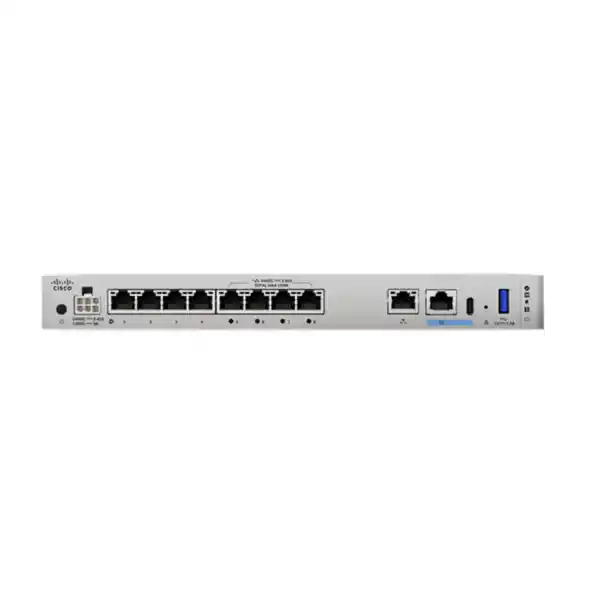
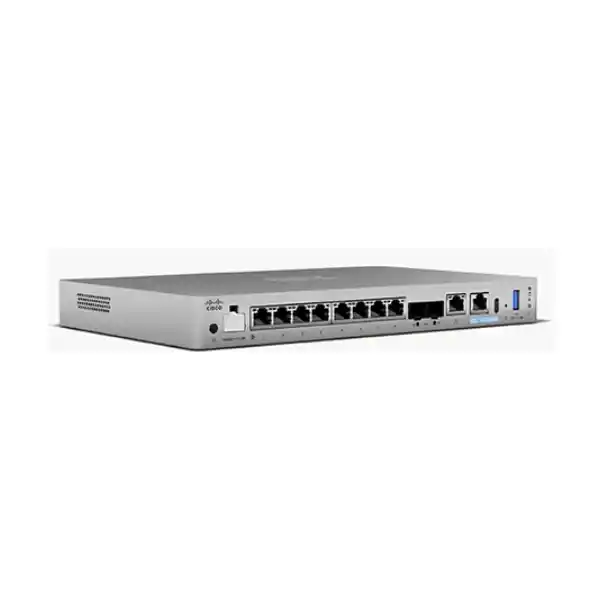
Cisco specifies eight 10/100/1000BASE-T data interfaces for the 1210CP. Four, Ethernet 1/5 through 1/8, provide PoE. The platform has a separate Gigabit Ethernet management connection, an integrated 480 GB SSD and active cooling. It is a desktop appliance with optional mounting accessories. It has no SFP or SFP+ slots.
The manufacturer’s ordering table identifies CSF1210CP-TD-K9 for Threat Defense software and CSF1210CP-ASA-K9 for ASA software. These are Cisco product identifiers, and the quotation should state which one is being offered. A request containing only the model name leaves the software choice unresolved.
Use those essentials to establish a physical fit before discussing advanced security functions. Count the connections required at installation and the likely additions during the purchasing lifecycle. Include the ISP handoff, downstream switching, management connection and powered endpoints in the drawing. A compact appliance can simplify a small installation, but only when its interfaces match the network rather than forcing awkward workarounds.
Understand the PoE budget before connecting devices
The four powered ports share a 120 W total budget. Cisco’s original hardware guidance describes IEEE 802.3at operation at up to 30 W per port. Later Threat Defense 7.7 documentation adds IEEE 802.3bt support, including up to 90 W on an individual port. That higher per-port figure does not increase the combined 120 W budget. Confirm the exact software and management release before designing around the newer capability.
As a planning example, a device allocated 90 W would leave only 30 W of the total budget for the other powered ports. This arithmetic illustrates the shared limit; it is not a guarantee that a particular combination of endpoints will negotiate or operate as expected. Use each endpoint manufacturer’s power requirements and check the negotiated allocation during commissioning. Allow room for startup behaviour and future changes rather than treating a low observed idle draw as the equipment’s full requirement.
Make a power schedule with one row per endpoint. Record the model, required PoE standard, maximum requested power, cable route and intended network role. Ask whether a reduced power mode disables radios, ports or other functions on that endpoint. Where several power-hungry devices are planned, a dedicated PoE switch may give a more suitable expansion path. Include the supported PoE power supply in the procurement checks; do not substitute a non-PoE adapter simply because a connector appears compatible.
Choose the software variant deliberately
ASA and Threat Defense are separate software choices in Cisco’s ordering information. Decide which operational model the organisation needs before approving a purchase. An existing Cisco environment may have established configuration practices, management tools and support skills that favour a particular approach. A new deployment may instead prioritise the inspection and management requirements specified by its security team. Neither situation should be resolved by assuming every 1210CP quotation contains an identical software bundle.
For a Threat Defense proposal, ask the supplier to map requested security functions to the current software release, management platform and subscriptions. Put the required outcomes in writing: for example, application-aware policy, intrusion inspection, web controls or encrypted-traffic analysis where supported. Have the supplier identify what is included and what depends on additional entitlements. A feature appearing in a family overview is not evidence that every commercial package includes its use.
If the organisation is retaining an ASA-based design, review the existing configuration with the proposed software version before ordering. Identify routing, NAT, VPN, management and operational dependencies that need validation. Migration should include policy review and acceptance tests, rather than relying on a familiar software name alone. Record responsibility for licensing, account ownership, renewals and future updates so the appliance remains manageable after the original installation team has finished.
Read performance figures in the context of your traffic
For the 1210 platform running Threat Defense, Cisco lists 6.0 Gbps for firewall plus application visibility and control, and 6.0 Gbps for firewall plus application visibility and IPS under its stated 1024-byte tests. The listed TLS decryption result is 1.0 Gbps under a different defined test profile. These are laboratory measurements, not a promise of the same rate for every application mix or software configuration.
A single data interface is Gigabit Ethernet. An aggregate appliance performance result should therefore never be read as the speed available from one copper connection. The useful sizing question is how traffic will move between the interfaces, which controls will apply and where bottlenecks already exist. A branch with a modest internet circuit can still have demanding local traffic flows, while a fast circuit can expose a limitation elsewhere in the design.
Prepare a workload summary before choosing a sizing margin. Include peak traffic periods, expected encrypted traffic, business applications, remote connections, logging requirements and growth. Identify which flows must cross the firewall and which remain within the switching layer. Ask for sizing against the actual inspection policy, with realistic room for change. If decryption is important, assess it separately from basic forwarding and consider the administrative work required to maintain exceptions and certificates.
Map the ports and security boundaries together
Draw a simple interface plan before ordering accessories or scheduling installation. Mark the external connection, internal network links, management path and any directly powered endpoints. Label each intended connection with its speed and purpose. This prevents an apparently convenient free port from being assigned without considering how it fits the wider security design.
Decide where departmental, guest, voice and device networks should be separated. Segmentation is useful only when the routing and policy actually enforce the intended boundary. If a downstream switch performs routing between two networks, traffic may not follow the firewall path assumed by a policy designer. Have the implementation team trace representative flows from source to destination and identify the enforcement point for each one.
A powered port deserves the same access planning as any other interface. A phone should reach the services it needs; an access point may carry multiple kinds of users; a camera may need a restricted recording destination. Document those requirements using the endpoint’s real deployment mode. Avoid treating all powered devices as one trusted group. Where VLANs or trunking are proposed, validate the exact configuration against the selected software and connected equipment before cutover.
Plan management before the appliance becomes a remote dependency
Cisco lists local, centralised and cloud management options for the family, including Device Manager, Firewall Management Center and Security Cloud Control. The appropriate choice depends on the software and supported deployment. Request an explicit management design rather than assuming an appliance order includes every management platform, capacity entitlement or cloud service needed by the organisation.
For one office, consider who will make changes, who will approve them and where operational knowledge will reside. For several branches, compare the work involved in maintaining consistent policy and reviewing events across sites. Central management should be evaluated for its practical operational value, including administration, backups and change visibility. Include its deployment and ongoing ownership in the cost discussion rather than treating it as an incidental setup task.
Restrict administrative reachability and define an emergency access method. Keep console access available to authorised personnel, and record how a technician can recover connectivity if a remote policy change disrupts management. Decide where credentials, backups and recovery notes will be kept. An organisation should be able to identify its appliance and management owners without depending on a single individual’s memory or an undocumented installer account.
Prepare the site for power, cooling and physical access
Installation planning should account for the appliance, its external power supply and the equipment that provides upstream and downstream connectivity. Cisco describes an actively cooled compact chassis; it should not be treated as a silent or fanless device. Choose a position that permits airflow, protects the connections and allows authorised maintenance without disturbing unrelated equipment.
Evaluate backup power for the complete service path. Keeping a firewall on a UPS is useful only if the relevant ISP equipment, switching and essential endpoints also remain operational for the required period. When powered endpoints depend directly on the appliance, their consumption becomes part of the power-continuity discussion. Ask for a load assessment and runtime objective instead of selecting backup power solely from a count of boxes.
Confirm the mounting method and installation environment in the quotation. A desk installation, wall installation and rack installation have different accessory and cable-management needs. Avoid enclosed spaces that trap heat or locations where power supplies can be unplugged accidentally. For a Tanzania site, document the actual room conditions, power arrangement and access constraints. These observations are more useful than assuming that a country or city name defines the environment at every premises.
Use the 1210CP where its integrated power adds value
A small professional office may evaluate this model when it needs a security gateway and only a few nearby powered endpoints. The buying exercise should establish which devices will connect directly and which belong on a switch. If most desks and wireless devices already depend on a distribution switch, integrated firewall PoE may provide less value than it would in a deliberately compact new installation.
A branch connected to a larger organisation may focus on consistent policy, inter-site access and manageable remote operations. For that scenario, include headquarters requirements early: address ranges, routing expectations, authentication dependencies and change-control processes. The appliance should fit the organisation’s network standard. A branch team should not discover after installation that its chosen software or management approach creates an exception the central team cannot support.
A small customer-facing premises may need separate business and visitor access. Begin with the allowed applications and permitted destinations for each group, then choose the network design. An integrated powered connection may be convenient for a compatible access point, but wireless coverage and client capacity still require their own assessment. The firewall’s PoE capability does not establish that one access point can serve the entire building or that its uplink suits every wireless workload.
Know when to compare another design
Compare other hardware when the requirement includes direct fibre connectivity or 10 Gigabit uplinks. The 1210CP has copper Gigabit data interfaces and no optical transceiver slots. Cisco’s 1220CX provides SFP+ connectivity, while the 1210CE omits integrated PoE. These alternatives illustrate distinct hardware priorities; choose according to the complete interface and security requirement rather than assuming the neighbouring model is an automatic replacement.
A site requiring many powered devices should examine a dedicated PoE switching design. This can make port growth and local distribution easier to plan, although it introduces its own equipment, management and power requirements. Compare the overall arrangement, including cabling, failure dependencies, support and expansion. The lowest appliance price is not necessarily the lowest cost for a network that must be reworked shortly after installation.
If availability is a major requirement, describe the outage tolerance before selecting hardware quantities. Ask the design team to validate the supported redundancy approach for the exact software and architecture. Consider internet connections, switching, power and endpoint dependencies alongside the firewall. Do not assume that buying a second appliance by itself provides seamless continuity, or that a powered endpoint attached to one unit automatically retains power during every failure scenario.
Specify VPN and external connectivity requirements
For a proposed branch tunnel, collect the peer details, local and remote networks, addressing constraints and business applications that need to traverse it. Identify who controls the far end and who can approve coordinated changes. A VPN project can stall even when both appliances are suitable if the teams have inconsistent assumptions about routes, translations or permitted networks.
Remote-access requirements should be listed separately from site-to-site connectivity. Record the expected users, devices, authentication process and access boundaries, then ask for confirmation of current platform support and licensing. A supplier should distinguish appliance capacity from the licenses and endpoint components needed by the selected solution. Avoid using a general VPN reference as proof that every remote-user requirement is included in the hardware order.
For internet connectivity, obtain the actual ISP handoff information. Confirm addressing, gateway requirements and any equipment that must remain in place. If more than one connection is planned, specify the intended behaviour during an outage and ask the implementation team to validate the design. Acceptance should cover application recovery and management access, not merely whether an interface shows a link after a circuit is disconnected.
Build an inspection policy around business needs
List the systems and information the branch must protect, then define how different groups use the network. A useful starting point is a short register of business applications, their owners and the access each requires. This gives the security team a reason for each policy decision and a way to review exceptions later. It also helps procurement explain why particular inspection capabilities or subscriptions have been requested.
Treat encrypted-traffic inspection as an explicit project requirement. Decide which traffic can be examined, which applications need exceptions and how certificates and user devices will be managed. The design should account for organisational privacy requirements and application behaviour. A published TLS performance figure does not resolve those operational questions, and enabling inspection without preparation can create avoidable disruption.
Ask for a documented baseline and a controlled tuning period. New inspection settings may need adjustment to reflect legitimate business traffic, but changes should be justified and reviewed. Define who receives alerts and what they should do with them. A security feature has limited operational value if nobody owns its notifications or if staff cannot distinguish a blocked business transaction from an unrelated application problem.
Prepare a controlled migration
Before replacing an existing gateway, collect the current configuration, interface map and known application dependencies. Review the rules for a clear business purpose. An old appliance may contain access that was added for a temporary project and never removed. A migration is an opportunity to ask the owner whether that access remains necessary, while protecting the records needed to reverse an unsuccessful change.
Agree a cutover window, test sequence and rollback decision with the business. Define what would cause the team to pause or restore the previous arrangement. Ensure someone can access both the old and new equipment locally if remote access becomes unavailable. Keep the necessary cable labels and addressing notes ready so recovery does not depend on interpreting a hurried photograph during an outage.
Test representative activities immediately after the change. Include internet browsing, critical cloud applications, internal systems, name resolution and any approved inter-site or remote connections. Where the firewall powers endpoints, include their restart and reconnection behaviour in the plan. Ask application owners to confirm real transactions, since a successful network test alone may not demonstrate that a business process is working end to end.
Make acceptance measurable
Create a short acceptance matrix before implementation starts. Each row should describe a business requirement, the expected result, the person who will validate it and the evidence to retain. Include both allowed and prohibited access. Testing that an employee can reach a server is useful; testing that a guest cannot reach the same server establishes a different and equally important part of the design.
For powered connections, check the actual endpoint model, negotiated power, operating mode and behaviour after a restart. Confirm that the combined allocation remains within the platform budget. If a higher-power feature depends on a software release, record that version in the handover. This makes later troubleshooting more precise when an endpoint is replaced or an administrator changes the software.
Record the final interface mapping, relevant routes, policy intent, management path and backup procedure. Include outstanding exceptions and who accepted them. A clear handover should let a new authorised engineer understand why the branch works as it does, rather than merely proving that an appliance was installed. Keep sensitive credentials and private configuration data in approved secure systems, separate from general purchasing documents.
Compare quotations using the complete bill of materials
Request a line-by-line proposal that names the software variant and separates hardware from subscriptions, management, accessories and services. Ask which license terms apply, when they begin and who owns renewal responsibility. Include any required mounting items and the supported PoE power supply. If a supplier describes a bundle, request its components so that two offers can be compared on equivalent assumptions.
Have the proposal state whether configuration, migration, testing and documentation are included. Identify work that depends on third parties, such as ISP changes, far-end tunnel configuration or application-owner availability. This helps avoid a quotation that appears complete but excludes a critical dependency. The organisation can then assign each responsibility before committing to a cutover date.
Confirm current price, taxes where applicable, availability, delivery terms, support coverage and warranty conditions for the exact offer. This page does not establish a stock position or a Tanzania selling price. Ask for written commercial terms tied to the proposed equipment and service scope. A precise quotation protects both the buyer and the implementation team from assumptions that are difficult to resolve once installation has begun.
Plan ownership beyond the first installation
Name the people responsible for security policy, device administration, licensing and business approval. In a smaller organisation one person may hold several roles, but the responsibilities should still be explicit. Decide how requests for access are submitted, reviewed and recorded. This keeps emergency changes from becoming permanent, unexplained exceptions and gives future administrators a practical basis for policy review.
Establish an update process that includes release review, backup, testing and an agreed maintenance window. The appropriate software choice should reflect the features needed, the connected environment and support guidance for that deployment. Do not upgrade purely to obtain a headline PoE capability without reviewing the rest of the branch’s requirements. Likewise, do not assume an original shipping version remains the right operational choice indefinitely.
Schedule review of endpoint power demand, interface usage and traffic growth. A branch can change significantly as staff, applications and wireless equipment are added. Retaining a simple capacity record helps identify when the original integrated design is approaching a limit. Procurement can then plan a switching addition, different uplink arrangement or appliance reassessment before a business expansion becomes an urgent network problem.
Work through an endpoint and port planning example
Consider a proposed office with an ISP Ethernet handoff, a connection to an existing LAN switch and several directly powered endpoints. Begin by listing the physical connections without assigning them to ports. Then mark which devices need power from the firewall and which already have another approved source. This creates a useful distinction between the total connection count and the smaller set that must use the powered interfaces.
Next, record the maximum power requirement of each candidate endpoint and compare the sum with the shared budget. If an endpoint requires a higher power level, have the team verify the relevant software support and power negotiation before treating it as an approved combination. Do not substitute a similar-looking model in this exercise: two access points or phones from the same family can have different power expectations or reduced-function operating modes.
Finally, trace the intended traffic for each connection. The LAN switch may carry staff and guest networks, while a directly connected endpoint may serve only one function. Document where those networks are separated and how the policy will be tested. The result should be a port plan, a power plan and an access plan that agree with one another. If the exercise reveals too many connections or insufficient power margin, revise the design before ordering equipment rather than relying on later improvisation.
Set a realistic expansion and replacement strategy
Ask how the branch may change over the intended equipment lifecycle. New meeting-room devices, a second access point, additional cameras or a different internet handoff can change the original balance of power and connectivity. Record likely changes as planning assumptions, with an owner who can revisit them. Avoid reserving every spare interface on paper while leaving no practical path for a foreseeable addition.
Keep the replacement strategy separate from the initial purchase decision. Identify the acceptable outage, the information needed to rebuild the branch configuration and the arrangements available under the chosen support terms. If the firewall is also the power source for essential endpoints, include those devices in the recovery discussion. Their dependency on the gateway should be visible to the business owner when evaluating resilience options.
A useful procurement handover includes the approved bill of materials, the quoted software and license terms, the network drawing, the power schedule and the acceptance record. These documents answer different questions and should remain consistent after changes. Review them when a powered device is replaced, a new circuit is introduced or the management approach changes. Maintaining this small set of records is a practical way to preserve the value of a carefully selected compact branch design.
Questions buyers ask before ordering
Does this model provide Wi-Fi? Plan wireless coverage through a separate access point rather than treating this wired firewall as a wireless router. If the access point will be powered directly, check its power standard and required operating power, and confirm that a Gigabit connection is appropriate for the intended workload. Wireless coverage, radio planning and client capacity remain separate design tasks.
Can every data port power a device? No. PoE is provided on Ethernet 1/5 through 1/8. Allocate these ports deliberately and distinguish them in the cable schedule. A connection on another data port may carry Ethernet traffic without supplying endpoint power. Before replacing an existing injector or switch connection, confirm the planned powered port and endpoint compatibility.
Is 90 W available on all four ports at the same time? No. The shared budget is 120 W. Higher individual port power requires supported software and an appropriate powered device; it does not create four independent 90 W allowances. Ask for a power allocation review covering all endpoints rather than multiplying the largest per-port figure.
Does the hardware name identify the complete security package? No. The software variant, licenses, management and service scope must be specified separately. Ask for a proposal that maps the required functions to the selected offer. This is especially important when comparing an ASA proposal with a Threat Defense proposal or comparing different subscription terms.
Can I connect fibre directly? The 1210CP has no SFP or SFP+ slots. If the service is delivered as fibre, confirm what equipment presents the Ethernet handoff and whether another model better fits the architecture. Include the actual handoff details in the request so the supplier can evaluate a complete connection path.
How many users is it suitable for? Avoid a fixed user-count promise. Provide application mix, peak traffic, inspection requirements, endpoint numbers and growth expectations for sizing. Two offices with similar headcounts may place very different demands on a firewall because their applications, encrypted traffic, internal routing and remote-access requirements differ.
Is installation included? That must be confirmed in the quotation. Ask for the scope of design, configuration, migration, testing, documentation and handover to be stated explicitly. If installation is handled by your own team, request the exact appliance and software details needed to prepare the deployment before delivery.
What should I send for an accurate quote? Share the site count, internet handoff, traffic estimates, required software approach, powered endpoint models and management preference. Include any existing Cisco environment and migration deadline. Keep passwords, private keys and other sensitive credentials out of an initial commercial enquiry.
Request a 1210CP quotation for your Tanzania project
Ask FourTeck Tanzania for a Cisco Secure Firewall 1210CP proposal based on your branch requirements. Include the number of sites, required software variant, ISP connection, inspection needs and expected growth. For integrated PoE, list the exact powered endpoint models and their maximum power requirements. This gives the quotation a clear technical basis and helps identify whether a separate switch or another appliance should be considered.
If configuration or migration is required, describe the existing gateway and the business services that must remain available. Request a defined acceptance plan, documentation and handover alongside the equipment. Review the final offer for current pricing, availability, subscription terms and implementation responsibilities before approval.
Review Cisco firewall installation and configuration services




Reviews
There are no reviews yet.