
Hanwha Vision • Hybrid CCTV Recording • Tanzania Buying Guide
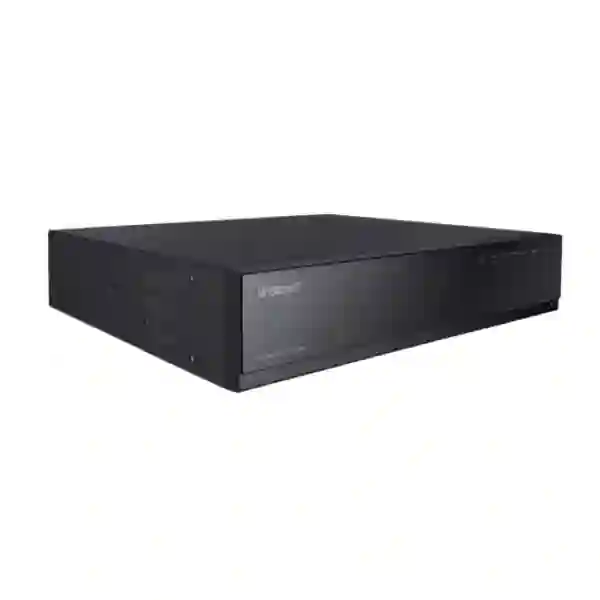
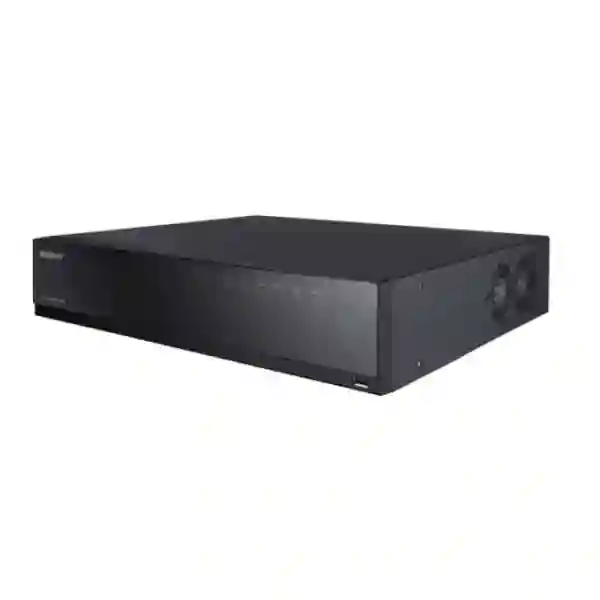
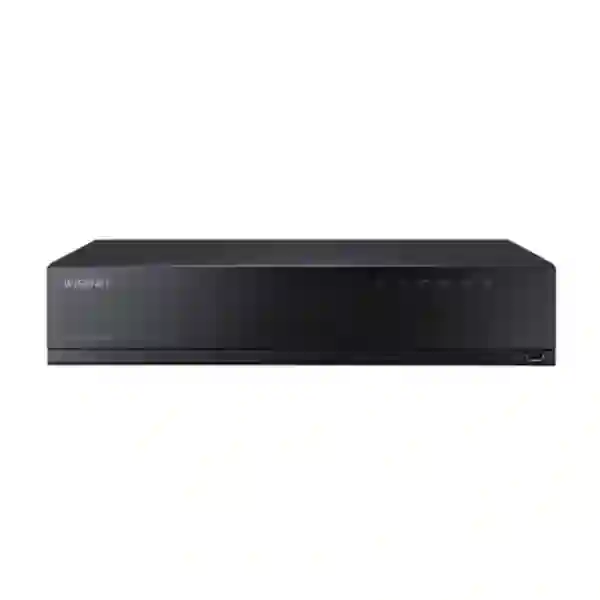
Hanwha Vision HRX-1635 16-Channel Pentabrid DVR
Upgrade or extend a coaxial surveillance system without assuming that every camera must be replaced. The Hanwha HRX-1635 16-channel DVR accepts four common analogue CCTV signal families, supports additional IP-camera inputs, and gives security teams local recording, event handling and managed remote viewing in one recorder.
It is a practical candidate for sites with existing BNC camera wiring and a requirement to document activity across entrances, corridors, operational areas and shared spaces. Before selecting the recorder, match your exact cameras, required recording frame rates and footage-retention policy to its limits. Request a configuration review and quotation from FourTeck Tanzania for the specific project.
At a glance: the answer buyers usually need
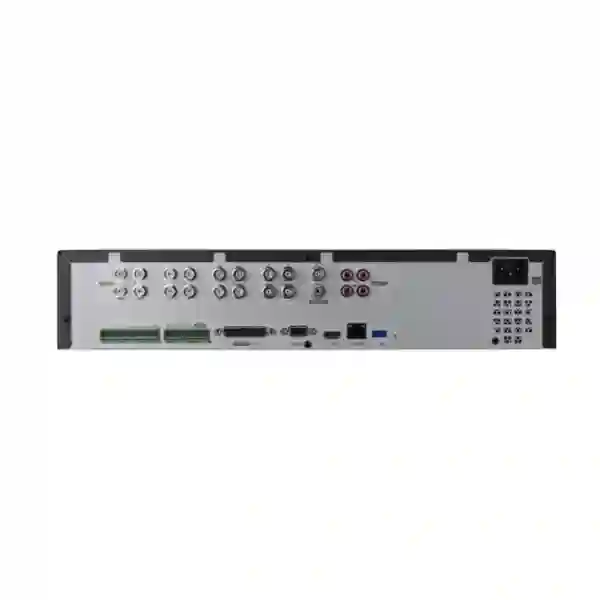
The HRX-1635 is a five-in-one pentabrid DVR, not a conventional IP-only network video recorder. It has 16 physical BNC inputs for supported coaxial cameras and can add two network cameras, reaching 18 total channels when all 16 analogue connections are occupied. Hanwha specifies an 8 MP class of analogue camera signal support, but the recorder’s recording frame rate changes with resolution; do not read an 8 MP claim as a promise of full-motion 8 MP recording.
Choose it when you want to retain a compatible coaxial estate, combine limited IP expansion with analogue coverage, and plan storage in multiple drive bays. If you are moving toward a largely IP-camera deployment, need much higher IP channel counts, or require higher frame rates at 8 MP, compare a suitable network recorder before committing.
Verified technical highlights
These are manufacturer-listed capabilities for the exact HRX-1635 model. Camera-level interoperability, firmware, drive selection and software versions still require project verification.
| Analogue camera inputs | 16 × BNC, 1 Vp-p / 75 Ω |
|---|---|
| Supported analogue types | AHD, HDTVI, HDCVI, CVBS |
| IP-camera provision | 2 additional channels when 16 analogue channels are used; up to 18 total |
| Recording codecs | H.265, H.264 and MJPEG |
| Recording bandwidth | Up to 128 Mbps |
| Playback bandwidth | Up to 32 Mbps |
| Storage bays | 8 × SATA; up to 6 TB per supported drive (48 TB raw maximum) |
| Display outputs | HDMI, VGA and a BNC spot output |
| Audio and alarms | 4 line audio inputs, 1 audio output, 16 alarm inputs, 4 relay outputs |
| Power / environment | 100–240 V AC, 50/60 Hz; 0°C to +40°C operating temperature |
Why a pentabrid recorder matters for a CCTV upgrade
A security upgrade often begins with a useful asset that should not be discarded: existing coaxial cable. If that cable is in good condition and the installed cameras produce signals the recorder accepts, a hybrid platform may allow a staged improvement rather than an immediate replacement of every camera and cable run. The HRX-1635 is described as pentabrid because it accepts five video input families: AHD, HDTVI, HDCVI, CVBS and IP. This broad signal approach can be useful when a building contains cameras installed in different phases or supplied under more than one analogue technology.
Pentabrid does not mean universal compatibility. Signal type, camera resolution, frame rate, output mode, coaxial condition and any control requirements all matter. Some cameras provide several selectable output modes; others provide only one. Identify the exact camera models before ordering and avoid depending on a general brand-to-brand assumption. A short compatibility check is more valuable than purchasing a recorder solely because both devices carry an “8 MP” label.
The main buying question is therefore not whether the DVR sounds versatile; it is whether your existing cameras and expected next additions fall inside its actual input and recording envelope. For a Tanzania property with functioning legacy cameras, this makes an inventory of installed equipment the first step in a sensible procurement process.
Understanding 16 analogue channels and the 18-channel ceiling
The recorder has 16 physical BNC video inputs. Those are the connections a technician uses for the supported coaxial camera signals. In addition, Hanwha lists network-camera support that can raise the installation to a maximum of 18 total channels. In a fully populated 16-camera analogue configuration, two extra network cameras are the straightforward planning example. The manufacturer's channel wording also allows network allocations to vary with the number of analogue channels in use; it is not a claim that 16 additional network cameras can always be connected on top of 16 analogue ones.
For example, a property retaining 14 compatible analogue cameras could assess whether a small IP addition suits its deployment. A property that needs 30 cameras or plans to replace most of its analogue estate should not assume the HRX-1635 will cover the whole requirement. A dedicated IP NVR or a different recorder architecture may be the more scalable choice. Also distinguish a channel from a physical network port: a camera channel is a licensed or supported video stream position, while the IP cameras use the network infrastructure rather than the BNC analogue inputs.
Prepare a channel schedule showing each camera location, signal family, resolution, intended frame rate and whether it will be recorded continuously or on events. This simple document exposes over-capacity plans early and lets an installer check the final live and recording configuration against published limits.
Supported analogue camera standards: what to check
AHD, HDTVI and HDCVI are different high-definition video-over-coax families, while CVBS describes conventional composite analogue video. The HRX-1635 lists support for these families across defined resolutions. That gives buyers options when retaining camera runs, but it does not automatically make every vendor-specific feature available. Confirm each camera's output is set to a compatible signal mode, especially when the camera is a multi-mode model with a menu or physical switch.
A useful pre-installation check examines the BNC connector, coaxial continuity, signs of water ingress, available camera power, cable quality and the distance between camera and recorder. Even if the DVR accepts a signal format, a poor cable run or unreliable power supply can create visible faults or video loss. Camera power is a separate design decision; the presence of a BNC video input does not remove the need to provide the camera with its specified power.
Do not promise coaxial control for every third-party PTZ camera. Hanwha documents coaxial control across supported CVBS, AHD, CVI and TVI modes, but command interoperability depends on the camera and protocol. Demonstrate a representative camera's picture and controls before changing an entire site from its existing DVR.
8 MP support versus actual recording frame rate
Camera resolution and recording speed are different specifications. The HRX-1635 accepts compatible analogue formats up to 8 MP, but the manufacturer lists main-stream recording at about 8 frames per second per analogue channel at 8 MP. At 5 MP it lists 12 frames per second, at 4 MP 15/12 frames per second in NTSC/PAL mode, and at 2 MP 30/25 frames per second. The camera's own output may impose a lower practical ceiling. These figures are important in entrances, vehicle lanes or other locations with fast-moving subjects.
A recorder may show a higher live-display frame rate than it commits to stored footage. For that reason, compare recorded clips, not only the live monitor, when testing a candidate system. A higher-resolution still frame may help with detail, while additional frames can help follow movement. Neither is universally better; the result depends on camera positioning, lighting, lens selection, compression and the operational objective.
When preparing a specification, write the desired recorded resolution and minimum frame rate for each camera rather than stating only “8 MP CCTV.” If a customer requires high-frame-rate 8 MP recording across many channels, the HRX-1635 may be a poor fit despite its ability to accept an 8 MP analogue input. This distinction reduces costly surprises after installation.
H.265, H.264 and MJPEG: useful flexibility, not a fixed storage promise
The HRX-1635 lists H.265, H.264 and MJPEG compression. H.265 can be more efficient than H.264 under suitable encoding conditions, potentially reducing required storage or transmission bandwidth for a comparable picture. That benefit is not a universal percentage and depends on the camera and recorded material. File size varies with the selected codec, frame rate, image resolution, scene movement, image quality settings and whether recordings are continuous or event-based.
Older cameras, remote viewers and export workflows may have narrower codec support than the recorder itself. A sensible rollout therefore tests ordinary playback, evidence export and authorised remote viewing with the selected codec. If a client needs clips in a common playback format, include that need in the acceptance test; a technically successful local recording is not enough if the footage cannot be provided to the people who must review it.
Avoid using the claimed maximum storage capacity as a substitute for a retention calculation. A high-capacity drive array can still fill quickly when many cameras run continuously at high bitrates. Conversely, well-designed schedules and event-based policies can reduce unnecessary footage. The right configuration is determined by the security requirement, not by a single compression label.
Eight SATA bays and realistic footage retention
The manufacturer's specification lists eight internal SATA drive slots, with support for up to 6 TB per drive and a maximum of 48 TB of raw installed disk capacity. That headline is useful for planning, but it does not state what disks are installed in a particular quoted unit. It also should not be mistaken for a guarantee of a particular number of recording days, or for a claim about redundancy, mirroring or usable space after any specific file-system overhead.
Start with a retention target agreed by the site owner. Document how many cameras record continuously, their actual average and peak bitrates, any event-only channels, and the need to preserve footage during incident investigations. As a simple planning illustration, footage written at an average combined rate of 32 Mbps consumes about 346 GB per day before practical overheads: 32 megabits per second divided by eight gives roughly 4 megabytes per second, multiplied across 86,400 seconds. This is an illustration, not a verified HRX-1635 site result or a guarantee of duration.
Specify compatible surveillance-grade hard drives through the purchasing process and verify whether the requested quote includes drives at all. Plan how the organisation will monitor disk health, respond to disk errors and export important incidents before ordinary footage is overwritten. More disk slots are most valuable when supported by a clear retention and maintenance policy.
Network-camera integration, ONVIF and SUNAPI
Hanwha lists ONVIF and SUNAPI support for network-camera connectivity. Those are important interoperability terms, but buyers should treat them as a starting point for compatibility review rather than a universal guarantee. Different cameras may expose different streaming profiles, event types, controls and firmware behaviours. Confirm the exact IP-camera model, firmware, codec, resolution, network settings and desired events against the recorder configuration before including it in a final bill of materials.
The available additional IP channel capacity is limited relative to a purpose-built NVR. If a site expects only one or two network-camera additions while retaining 16 BNC cameras, the hybrid structure may be attractive. If the future design centres on numerous PoE IP cameras, a scalable IP recording platform deserves comparison. The HRX-1635's Ethernet connection does not by itself answer how remote network cameras will be powered; include suitable switching and camera power in the network design.
Network cameras also introduce dependencies that analogue cameras on coaxial runs may not share. Camera IP addressing, switch operation, congestion, authentication, time synchronisation and LAN segmentation can affect availability. Make these explicit on the installation plan and test both live viewing and saved playback for the IP channels before the system is accepted.
Remote viewing with Wisenet software
Hanwha identifies Wisenet Viewer, Wisenet Mobile and other supported viewing software for live video, playback and system management. It also describes a QR-code-based P2P connection option. For a manager who needs authorised visibility away from the recorder, these tools may be relevant, but remote access should be configured deliberately and verified under the site's real network conditions. App support, firmware and available functions can change; confirm the versions selected for your deployment.
A reliable remote experience depends on more than the DVR's feature list. The recorder needs a functioning network path, suitable upstream bandwidth and correct security settings. The user's phone, mobile-data connection and permitted viewing permissions affect what can be seen and how promptly it appears. If a project requires mobile access for several supervisors, specify which people need live pictures, playback, export or administrative control rather than granting everyone the same account rights.
Remote access must also be balanced against security. Prefer named accounts, strong unique credentials, controlled permissions and current supported firmware. Avoid casually exposing management interfaces to the internet. The best remote-monitoring setup is one that the site owner understands, can audit and can disable when a staff role changes.
Video loss, motion and alarm-driven response
The recorder can respond to alarm inputs, analogue camera video loss, motion and tampering events, as well as supported network-camera events. Event actions listed by Hanwha include e-mail, push notification, buzzer, alarm outputs, PTZ presets and other system actions. This opens useful possibilities for a control room, but an event must be connected to an operational response plan. An alert that nobody owns is not a security procedure.
For example, a video-loss alert may prompt an operator to inspect a disconnected camera, check power or investigate tampering. A door-contact alarm could be paired with footage from the relevant entrance, depending on compatible wiring and configuration. False alerts are costly in time and attention, so establish alert sensitivity, escalation rules, notification destinations and an audit process before relying on automated notifications.
Check each alarm input and relay output against the connected device's electrical requirements and the installation design. An interface count alone does not show that any particular alarm panel, sounder or access-control device is compatible. Demonstrate the complete event path—from trigger to notification to retrievable recording—in an acceptance test.
Recording searches, playback and evidence export
Video has value only when staff can find a meaningful segment and provide it in a usable form. The HRX-1635 includes date/time searches, playback functions and file backup options. Hanwha lists recorder, SEC and AVI export options, with AVI also mentioned for the web viewer. The actual workflow should be demonstrated on the selected firmware so that the people responsible for incident reviews know which format to use.
A strong evidence procedure records who requested footage, the camera, the relevant time window, who approved access, where the exported file was stored and whether it was shared. Time synchronisation matters: a recorder with incorrect time can make an otherwise useful clip difficult to reconcile with access logs or incident reports. Establish the time zone and time-source configuration as part of commissioning, and periodically check that timestamps remain accurate.
For an important incident, copy the relevant footage before automatic overwrite. Verify the exported file opens on an authorised workstation and preserve the original file where the organisation's procedures require it. Review permissions so general monitoring users cannot delete or export recordings without the appropriate authority. These practices turn the DVR from a passive appliance into a dependable component of the security operation.
Cybersecurity and access control checklist
The recorder's published network security features include user access logs, IP filtering, encrypted functions and network authentication provisions. These are useful controls, but deployment choices determine whether they help. Change default or temporary credentials during commissioning, use unique passwords, restrict administrator access and maintain an accurate list of active users. For a multi-user site, individual accountability is preferable to a shared administrator login.
Place the DVR and compatible IP cameras on a network designed for security equipment. Restrict unnecessary traffic, review remote-access methods with the site's IT team and keep relevant firmware under an approved maintenance process. Where internet or mobile viewing is required, validate the connection method and the implications for data handling before enabling it. An exposed recorder should never be treated as secure solely because it carries a recognisable manufacturer name.
Define who can see live video, replay recordings, export files, change settings and manage users. Review those privileges when responsibilities change. Network access logs, documented passwords custody and a repeatable update process can help an organisation maintain control long after the initial installer has finished the job.
Power continuity and operating conditions for Tanzania sites
Hanwha specifies 100–240 V AC, 50/60 Hz input and an operating temperature range of 0°C to +40°C, with 20–85% relative humidity. The maximum listed power consumption is 200 W in a configuration populated with eight 6 TB drives. Actual operating power depends on the installed components. A site power assessment should include the recorder, cameras, switches, monitors, network equipment and any equipment required for notifications or remote access.
Power interruptions can stop recording at the precise time continuity matters. An appropriately selected uninterruptible power supply may be useful, but its capacity and runtime should be calculated from the actual load and the desired backup duration. A UPS for the DVR alone will not keep IP cameras recording if their switch loses power; nor will it preserve analogue views if camera power supplies fail. Map the complete recording chain when planning backup power.
Ventilation is equally important. Place the recorder in a secure, dry, accessible location where its operating temperature can be maintained and where vents are not obstructed. Check environmental conditions at the intended cabinet or rack, not just at the room doorway. A warm enclosure with poor airflow can be a problem even when the surrounding office appears comfortable.
Example deployment: retail premises and customer entrances
Consider a retail property that already has compatible coaxial cameras covering the entrance, checkout approach, stock movement routes and perimeter. Rather than replacing every functioning cable, the owner may evaluate the HRX-1635 as a central recorder. A 16-channel BNC arrangement can preserve existing views, while limited IP additions may be considered for specific future needs if compatibility and the channel plan permit them.
The most important design decisions are rarely the number of channels alone. Entrance footage may require a different camera angle or frame rate from an empty storage aisle. Customer areas may produce more scene movement and therefore more storage demand than a quiet corridor. The security team needs to agree on which views must be continuously recorded, how long footage should remain available and who can export it after an incident.
For a Tanzania retail project, ask for a site-specific camera and retention review rather than assuming the same recorder configuration fits every shop. Confirm the installed cameras' signal modes, the available electrical supply, footage access policy and the intended viewing station. The result should be a justified recorder selection rather than a generic package built around a channel number.
Example deployment: warehouse, workshop or operational yard
A warehouse or workshop may need video coverage of goods receipt, loading positions, controlled doors and internal movement routes. In such an environment, camera placement and lighting often matter more than chasing the highest stated resolution. If the property already has compatible analogue cameras, the HRX-1635 could be assessed as an upgrade path that retains those inputs while adding recording and event features.
Moving vehicles and forklifts raise an important tradeoff: at the recorder's highest analogue resolutions, the available recorded frame rate is lower. Teams that need to follow quick movements may prefer a different balance of resolution and recording speed on selected cameras, or may need a different recorder. A test clip of the actual loading area is more persuasive than a specification sheet alone. Verify after-dark performance if the site operates outside daylight hours.
Operational yards can also expose equipment to dust, temperature variation and long camera runs. Position the DVR in a protected environment within its published operating limits, and inspect the installation's power, cable condition and network path. Decide whether alarms should alert a guard, a supervisor or both, and test the notification workflow during acceptance.
When this DVR is a strong fit—and when it is not
The HRX-1635 is most compelling when the central requirement is retaining a significant compatible analogue camera estate and adding only modest IP capacity. It also suits buyers who value multiple HDD bays, manufacturer-documented event features, local display outputs and a clear path for remote viewing. In those situations, the hybrid design may reduce the immediate disruption associated with an all-IP migration.
It is less suitable when the project requires more than its supported total channel count, large-scale IP expansion, guaranteed high-frame-rate 8 MP recording, an unsupported legacy signal format or a different class of storage architecture. A buyer requiring advanced analytics should verify what the specific camera and DVR combination actually supports. Do not assume that an event received from a network camera means the recorder creates that analytic result itself.
Choosing between this DVR and an IP-only NVR is not a contest between old and new technology. It is a decision about wiring, camera compatibility, growth, storage, operations and budget. Ask what must work on day one, what may change in two years and which requirements would be expensive to retrofit. Use those answers to select an architecture that fits the site's lifecycle.
What to include in a procurement and quotation request
A useful quote request begins with a list of the installed or proposed camera models, their signal output modes, recorded resolution and frame-rate targets, and a simple site plan. It should identify how many cameras will use BNC inputs and how many will use IP connections. Include the footage retention period, whether recording should be continuous or event-driven, and how many people need local or remote access.
Ask for an explicit drive configuration rather than treating the 48 TB upper limit as included storage. Specify whether drives, monitor, UPS, networking, required cabling, control accessories and installation work are part of the requested supply. Request confirmation of a representative camera interoperability test if the installation includes third-party or older equipment. If a security policy requires a particular evidence-export format, mention that before purchase.
The commercial response should separately confirm current product availability, price, applicable terms and any support or warranty offered for the exact configuration. Those details are not established by the technical datasheet and should not be inferred from this product guide. A detailed request allows a more meaningful assessment than simply asking for “one 16-channel DVR.”
A commissioning checklist that protects the project
Before acceptance, verify that every physical camera is correctly labelled and visible, that the recorded frame rate matches the agreed specification, and that time settings are accurate. Confirm storage drives are recognised and recording schedules are operating as intended. Review the live display and recover a recorded clip from each representative camera technology. Test the selected export format on a workstation used by the client's team.
For event-driven sites, deliberately create a safe test condition for video loss, selected alarm inputs or motion triggers and check the defined response. Where PTZ control is required, test actual camera movement and presets. Check user roles, remove temporary credentials, confirm any authorised remote access and record which staff were trained. Verify the system's response to a planned power loss if the project includes a backup-power design.
Finally, hand over an accurate device and channel list, the retention policy, authorised-user procedure, maintenance plan and incident-export instructions. A recorder can pass a video-picture test and still fail the customer if nobody knows how to find evidence, restore normal service or recognise a storage fault. Treat operator readiness as part of product success.
Frequently asked questions
These answers focus on practical decisions for buyers evaluating the exact Hanwha Vision HRX-1635 model, not general claims about every DVR.
What is the Hanwha HRX-1635?
It is a 16-BNC-channel pentabrid digital video recorder from Hanwha Vision. It supports AHD, HDTVI, HDCVI and CVBS cameras and can accommodate additional IP channels within the manufacturer’s overall channel limits. It is designed for sites that need local CCTV recording and a practical way to combine supported analogue and network cameras.
Can the HRX-1635 record 18 cameras at the same time?
Hanwha describes up to 18 total channels, including up to 16 analogue inputs and two additional network channels when all 16 BNC inputs are used. The result still depends on supported cameras, recording workload and configuration. Confirm the complete channel schedule and aggregate bitrate before purchase; “18 channels” is not a promise that every possible camera setting is simultaneously supported.
Does it support 8 MP cameras?
The recorder lists support for compatible analogue camera signals up to 8 MP. Its published main-stream analogue recording rate at 8 MP is 8 frames per second per channel, which is different from the live-display capability. Buyers who need a specific higher recording frame rate at high resolution must verify a suitable alternative rather than assume it from the resolution label.
How many hard drives can it hold?
Hanwha lists eight SATA slots and support for drives up to 6 TB each, giving a maximum listed raw installed capacity of 48 TB. That does not mean drives are included in every quotation or that all 48 TB is a guaranteed number of usable days. Ask for the exact drives and a retention estimate based on the chosen streams and recording schedule.
Will my existing AHD, TVI or CVI cameras work?
The HRX-1635 supports AHD, HDTVI and HDCVI families, as well as CVBS. Compatibility still depends on the camera’s exact output mode, resolution and behaviour. Provide the camera model list and test at least one representative unit, particularly when mixing brands or attempting PTZ control over coaxial connections.
Can I add IP cameras to this DVR?
Yes, within the published network-camera channel capacity and supported protocol and stream settings. Hanwha lists ONVIF and SUNAPI, but those terms do not guarantee every model or advanced feature will work. Check the exact camera and firmware and plan its network connection and power separately.
Does it support mobile phone viewing?
Hanwha lists Wisenet Mobile and other viewing software, as well as a QR-code P2P connection option. Availability and functions should be tested with the supported firmware, network setup and intended phone. Remote viewing also requires appropriate security, authorised users and sufficient connectivity; it should not be enabled without an access policy.
Does H.265 guarantee a particular retention period?
No. H.265 can make encoding more efficient under suitable conditions, but recorded size depends on resolution, movement, bitrate, image quality and selected schedules. Retention must be calculated from the actual proposed configuration and checked after the recorder begins recording normal site activity.
Is this a better choice than an NVR?
It may be the stronger fit when most cameras are compatible coaxial models that the customer wants to keep. An IP-focused NVR may be more appropriate when the project involves many new network cameras or requires broader IP expansion. Compare the desired camera counts, recording rates, storage and maintenance workflow rather than deciding from the recorder category alone.
Can I obtain a Tanzania price or confirm availability from this page?
This guide does not confirm current Tanzania stock, selling price, delivery terms, warranty or installation coverage. These are specific commercial details that must be verified for the proposed configuration. Provide the camera schedule and desired storage package when requesting a quotation from FourTeck Tanzania.
What should I check before placing an order?
Confirm the signal formats and exact camera models, analogue and IP channel counts, required recorded frame rates, storage capacity, footage retention, display needs, alarms, mobile access, power backup, equipment location and who will administer the system. Ask that the final offer identify which accessories and services are included.
What if my site needs more than 18 channels?
Evaluate a different recording architecture or multiple appropriately designed recorders. Avoid designing a site around a nominal 18-channel device if camera additions are already planned beyond that ceiling. Growth capacity, evidence searches, viewing permissions and operating cost should be considered at the planning stage.
Request a configuration review for your Tanzania CCTV project
The fastest way to evaluate the Hanwha HRX-1635 16-channel DVR is to share what the system must record. Prepare your existing camera list, intended IP additions, required recording quality, retention period and power or viewing constraints. That information makes it possible to assess whether this pentabrid recorder is the right architecture and which drives and accessories a complete proposal should consider.
Contact FourTeck Tanzania to request confirmation of the product configuration, quotation, current commercial terms and suitability for your requirements. Availability, supply conditions, service coverage and any warranty must be confirmed separately; this page does not promise them.




Reviews
There are no reviews yet.