
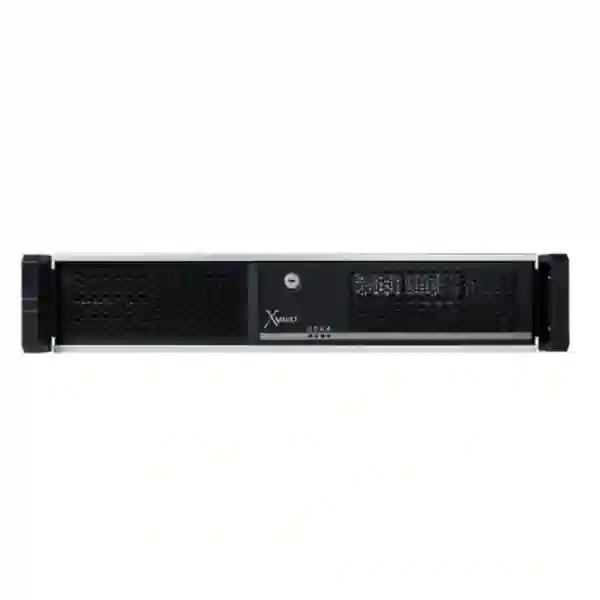
Hanwha SRN-16SEN 16-Channel Video Storage Appliance
A 2U rackmount recording platform originally associated with Samsung Techwin. Learn the verified hardware profile, licensing questions, storage calculations, compatibility checks, and risks to consider before choosing it over a supported modern recorder.
What is the Hanwha SRN-16SEN?
The Hanwha SRN-16SEN is a legacy sixteen-channel video storage appliance intended for recording and client viewing. Its published design includes a 2U rackmount chassis, fourth-generation Intel Core i3 processor, independent 120GB system SSD, and up to 4TB of raw storage in the manufacturer’s current model summary. The exact installed drives and licensed recording software are not established by the basic model name.
Hanwha Vision identifies the model as discontinued. This matters when a buyer needs a reliable new installation rather than a temporary extension of a compatible legacy system. An existing unit might have value after careful inspection and testing, but its age and historical Windows operating-system environment require a serious cybersecurity and recovery review. New equipment should be selected against current camera and support requirements.
The most useful next step is to provide the full variant code, existing camera models, retention target, network and power conditions, and current recording-software information. FourTeck Tanzania can then be asked for an itemized suitability assessment or a supported replacement proposal, with actual product availability and service terms explicitly confirmed.
Specification reference
| Brand | Hanwha Vision; historic Samsung Techwin product |
|---|---|
| Model | SRN-16SEN |
| Product type | 16-channel video storage appliance |
| Form factor | 2U rackmount |
| CPU | Fourth-generation Intel Core i3 |
| System drive | 120GB independent SSD |
| Raw storage summary | Up to 4TB according to current manufacturer model page |
| Historical software environment | Samsung SSM-RS; license may be separate |
| Historical operating system | Windows 7 Professional for Embedded Systems |
| Product status | Discontinued |
| Target listing SKU | Not supplied; left unspecified |
Specifications describe the original product family. Verify the exact unit and software. Archived sources conflict on some expansion details, so maximum capacity and drive bays should not be extrapolated.
Buyer, installer, and maintenance decision guide
Understand the discontinued product
The SRN-16SEN was a sixteen-channel storage appliance for recording and client viewing, originally sold in the Samsung Techwin era. It is now marked discontinued by Hanwha Vision. That distinction changes the risk profile for any buyer; an archived catalogue is not a promise of current manufacturing or support.
Verify the exact machine being offered, the complete model suffix, actual hardware, installed software, and recording functions. Establish whether the project concerns a legacy repair, an old-system transition, or a new CCTV installation before choosing equipment.
For a new project, compare supported recorders first. Retain a discontinued platform only when its real compatibility, software rights, security controls, and exit plan can be demonstrated.
Identify the complete hardware variant
The SRN-16SEN name covers historical storage configurations, and surviving documentation does not always agree on drive-bay counts or upper storage limits. A photograph of a generic catalogue model cannot establish how a specific server is configured today.
Request label photographs, part suffix, serial number, drive inventory, chassis images, and the controller configuration. Have a technician identify which specifications apply to this physical revision rather than applying numbers from another model.
Do not quote a drive capacity or expansion promise for an unidentified used machine. Treat uncertain differences as explicit technical questions until physically verified.
Check the manufacturer’s key specifications
Hanwha Vision’s current model summary identifies a 2U rackmount chassis, a fourth-generation Intel Core i3 processor, an independent 120GB SSD, and up to 4TB of raw storage. These describe the historic platform, not the condition of an individual available unit.
Compare those published characteristics with the actual chassis, processor, SSD, data disks, and software configuration. Review any original documentation accompanying the appliance and note differences introduced by repair or refurbishment.
Use the current published 4TB raw storage summary conservatively; older sheets showing larger or different arrangements require exact-unit validation before inclusion in a quotation.
Distinguish system and video drives
The dedicated 120GB SSD was intended for the system environment, whereas separate storage handles recordings. Counting every drive’s nominal capacity as available video space can materially overstate the expected footage retention, especially when application overhead is ignored.
Identify system partitions, recording volumes, actual usable space, storage warnings, and any configured disk protection. Check whether the SSD is healthy and whether authorized recovery media or configuration backups exist.
Describe raw capacity, usable recording space, and required retention separately. Do not advertise the system SSD as an extra guaranteed footage drive.
Verify hard-disk health
A server may power on while one or more disks are degraded, missing, or unsuitable for continuous surveillance workloads. A used appliance could retain fewer disks than its original variant designation implies.
Obtain a real drive list, health diagnostics where supported, error history, and a sustained recording demonstration. Check for unexplained restarts, lost archives, and discrepancies between the filesystem and VMS storage display.
Budget for replacement media only after compatibility is established. A refurbished unit without verified disks should not be represented as recording-ready.
Calculate daily recording demand
A channel count is not a storage calculator. Resolution, codec, frame rate, scene movement, audio, schedules, and compression settings change the bytes written each day. Two sites with sixteen cameras can have radically different retention needs.
Collect average and maximum bitrates for each real camera. Multiply the average aggregate bitrate by recording hours and days, then allow space for application overhead and operational margin. Validate the estimate through measured use.
For illustration, sixteen streams averaging 2Mb/s continuously generate about 345.6GB per day before overhead. This is an arithmetic example, not an SRN-16SEN performance guarantee.
Set a realistic retention objective
Buying drives without a defined number of recording days can create either unnecessary expense or an evidentiary shortfall. The correct retention period depends on the business’s own risk, operating processes, and applicable requirements.
Identify critical cameras, the time between incidents and their discovery, who retrieves evidence, and whether recording is continuous or event-based. Match the retention target to verified usable capacity and measured stream demand.
Document the target in days and test it. Avoid claiming a fixed number of retention days merely from a 1TB, 2TB, or 4TB historical variant name.
Assess sixteen-channel workload
The appliance was designed for a sixteen-channel class of recording, but historical camera resolutions and performance assumptions differ from today’s high-resolution systems. The number sixteen alone does not establish bitrate, codec, or concurrent playback capacity.
Prepare a schedule of exact camera models, firmware, resolution, frame rate, average and peak bitrate, and recording mode. Run a complete load test including simultaneous operator viewing and export activities.
Do not assume full-rate 4K, H.265, advanced metadata, or sixteen arbitrary modern streams work without explicit validated support on this exact setup.
Check the recording software
Historical product materials associate the appliance with Samsung Security Manager recording-server software, commonly referred to as SSM-RS. Some original offers excluded the VMS license, so hardware ownership does not confirm recording entitlement.
Inspect the installed edition, version, activation method, number of licensed channels, configuration files, and permission to reinstall or transfer. Verify a working login and footage recording demonstration rather than accepting a software icon as proof.
If valid application software cannot be provided or maintained, compare a current supported recorder rather than promising the old chassis will function as a turnkey NVR.
Confirm license recovery rights
An older recording-server application may depend on activation services, account ownership, or license files that are unavailable to a new owner. A disk or motherboard failure could therefore interrupt service even when replacement hardware is obtainable.
Request written identification of the license holder, eligible camera channels, permitted transfers, activation credentials where appropriate, and any available recovery procedure. Do not disclose license keys in public listing text or support conversations.
Treat missing software rights as a major procurement risk. The total offer must identify what is legally and technically included, not only which computer components ship.
Test exact camera compatibility
A camera can be present on the network without functioning in the recorder application. Authentication, codec, resolution, firmware, stream profile, and protocol support may prevent recording or useful playback.
Test each intended camera family on the actual VMS. Verify live view, continuous recording, event actions, stable reconnect, timeline search, audio if needed, and export after restart. Record the tested firmware and stream settings.
Matching the Hanwha brand does not guarantee compatibility across generations. Approve a camera replacement only after meaningful end-to-end testing.
Review newer camera features
Modern IP cameras may offer higher resolution, H.265 compression, on-device analytics, encrypted connections, and searchable metadata. A legacy VMS may receive a basic stream without providing those modern features.
List the functions the project genuinely needs, then test them against exact firmware and software versions. If a workaround reduces image quality or removes alarms, obtain the security owner’s explicit acceptance.
For a new analytics or high-resolution project, prioritize a maintained recorder designed for the required features rather than forcing new cameras into an old platform.
Plan PoE independently
The SRN-16SEN is described as a video storage appliance rather than a plug-and-play sixteen-port camera switch. Historical descriptions of its Ethernet networking do not establish sixteen powered camera connectors.
Inspect physical interfaces and calculate the number of PoE ports and watts required by the actual cameras. Choose appropriate switches or injectors, with uplink capacity and environmental protection suited to the site.
Never infer integrated PoE from the sixteen-channel rating. Budget camera networking and power as explicit parts of the surveillance design.
Size network traffic
Surveillance video uses sustained traffic, and playback or export creates additional network load. Poor uplink capacity, unstable switches, or congested paths can cause recording gaps despite an apparently healthy server.
Map cameras, switches, uplinks, viewing clients, IP addresses, and the recording server. Measure aggregate streams and test busy periods; review packet loss and time synchronization across the network.
Document the accepted network topology and headroom. A reliable camera signal is essential to useful stored evidence regardless of the recorder’s advertised capacity.
Avoid unsafe remote access
Newer Hanwha recorder guides may describe mobile applications or cloud services, but those functions must not be assumed for an old SRN-16SEN application. Legacy services can create significant risk if directly exposed.
Identify the exact supported client, its version, authentication method, and who needs off-site viewing. Have the organization approve a secure network access route and restrict old administrative services.
Do not promise current phone viewing or simple public-internet connectivity without a tested, security-reviewed solution for this specific installation.
Review the operating-system lifecycle
Archived technical information identifies Windows 7 Professional for Embedded Systems. Microsoft’s ordinary Windows 7 support ended in January 2020, and available extended security update periods are now past.
Verify the installed OS and its status. Assess exposure to other networks, credentials, backups, incident response, application dependencies, and whether updates can be installed without disrupting the legacy VMS.
If security policy requires a maintained OS, select a supported replacement. Isolation measures may reduce risk but do not transform an unsupported system into a current one.
Use appropriate network segmentation
An ageing recorder should not automatically share unrestricted access with employee devices, guest networks, or public-facing services. The recording network deserves its own access rules and monitoring approach.
Identify trusted management devices, authorized operators, camera subnets, remote connections, and the minimum traffic needed between them. Apply restrictions through supported network equipment and keep an up-to-date diagram.
Document who can administer the server and how exceptions are approved. This makes legacy operation easier to audit and simplifies a later cutover.
Validate time and evidence integrity
Footage is more difficult to interpret when cameras and the recording server disagree on time. A video clip with an inaccurate timestamp or incompatible playback format can complicate incident review.
Configure an approved time source, verify time zone and camera synchronization, then export and replay sample footage. Document who has access to searches and exports and how evidence is preserved.
The ability to retrieve clear, correctly dated recordings is a more important acceptance criterion than simply seeing a live image on screen.
Inspect the rack environment
The 2U chassis needs compatible rails, sufficient rack depth, airflow, cable clearance, and service access. A used unit may lack accessories that were present when originally supplied.
Check actual dimensions, ventilation, fan condition, dust, access to drive trays, and rack security. Historical technical data for some configurations refers to an operating range around 0°C to 35°C.
Avoid warm, enclosed cupboards without cooling. Measure conditions in the actual installation rather than relying on assumptions about a location or building type.
Provide suitable power continuity
A recording appliance cannot protect footage during an outage if its cameras, switches, or network links have already lost power. A UPS should be planned for the entire essential recording chain.
Calculate the real electrical load, required runtime, UPS capacity, battery maintenance, and safe restoration procedure. Test a controlled interruption and confirm that recording resumes as intended.
Include power resilience and surge protection in the system design. Do not advertise uninterrupted recording without a tested site-specific backup arrangement.
Evaluate used equipment condition
A refurbished appearance does not prove healthy disks, licensed software, stable temperatures, or successful recording under full load. Ageing components can create unpredictable costs after purchase.
Request photos of the exact chassis, drive diagnostics, cooling checks, the supplied parts list, and evidence of continuous recording plus playback after a restart. Document any visible faults and missing accessories.
Compare verified total cost with a supported alternative. A low hardware quote can be misleading when repairs, reconfiguration, and downtime are excluded.
Define a commissioning procedure
Installing a rack appliance and seeing a login screen is not sufficient acceptance. The project needs controlled tests showing that the recording workflow meets the organization’s practical evidence requirements.
Inspect hardware, secure credentials, configure storage, add representative cameras, validate recording and export, then test the full planned workload. Repeat important checks after restart or a safely simulated interruption.
Capture test results, configuration backups, equipment labels, and unresolved limitations. Obtain explicit acceptance from the responsible system owner.
Maintain recording health
A surveillance system can show live camera feeds while failing to save footage. Routine maintenance must therefore look beyond the operator’s viewing screen.
Check last recording times, available retention, disk errors, server temperature, time accuracy, failed logins, and restart events. Assign a responsible person to review warnings and act on them.
Document an escalation path and replacement procedure. Discontinued systems should never rely on a single unavailable technician or undocumented knowledge.
Plan an incident-export workflow
Recorded video has little practical value if staff cannot locate and export a usable clip when needed. Search permissions, timestamps, file formats, and secure storage all matter.
Train designated operators to find relevant cameras and time ranges, export clips, test playback, and document evidence transfers. Preserve original recordings when required under the organization’s process.
Use the organization’s evidence-handling policy. Avoid making unverified claims about regulatory suitability or chain-of-custody features the old software may not provide.
Assess Tanzania-specific site needs
A Tanzania project may involve a shop, office, clinic, warehouse, school, or other premises with different power, connectivity, ventilation, and retention requirements. None can be inferred from the country name alone.
Survey the actual building and ask who monitors cameras, how footage is accessed, what downtime is tolerable, and which areas are critical. Verify local commercial terms by quotation.
Do not invent FourTeck stock, city coverage, pricing in TZS, installation availability, delivery times, or warranty. Confirm the exact offer independently.
Compare current replacement options
A supported NVR or server may provide clearer software lifecycle, current camera support, stronger security practices, and more predictable expansion, but not every new product fits every old installation.
Compare the same camera schedule, retention target, operator count, network design, licensing, export method, and maintenance requirement. Test representative cameras before replacing a live system.
Choose evidence reliability and total supportability over the mere presence of sixteen channels in a model description.
Protect historical recordings during migration
Moving to a new recorder can make old footage harder to search or replay if exports, credentials, and formats have not been addressed. A rushed cutover may also leave temporary camera gaps.
Identify footage that must be preserved, confirm how it can be accessed later, save relevant settings, and stage the replacement before switching camera feeds. Record the final acceptance test.
Assign responsibility for the old unit, archive access, secure disposal, and ongoing maintenance of the replacement. Plan the process rather than treating migration as a hardware swap.
Request an itemized quotation
A useful quote for a discontinued appliance should not hide differences between bare hardware, installed disks, software entitlements, accessories, testing, and support. Those distinctions can materially change total cost.
Provide the exact variant, camera list, software details, required retention, site power and networking, and whether the goal is repair or migration. Ask suppliers to state all inclusions and exclusions.
Confirm current Tanzania price, availability, delivery, condition, return rights, and any warranty in writing. No historic catalogue term should be assumed to apply automatically.
Frequently asked questions
Is Hanwha SRN-16SEN a current model?
No. Hanwha Vision labels the model discontinued. Existing systems or individual used units may remain in service, but that does not confirm current manufacturing, new stock, software licensing, or vendor support. A buyer should request exact-unit verification and compare the security and maintenance risks against a supported replacement.
What does sixteen-channel mean?
The model was intended for a sixteen-channel class of video recording and client viewing. The label does not establish a universal capacity for sixteen modern 4K or H.265 camera streams. Historical system configuration assumptions were different, so recording performance must be tested with the actual camera profiles and software.
Does the appliance include disks?
Historical variants were offered with different storage configurations, including 1TB, 2TB, and 4TB. The base model name does not prove what disks are currently installed. Ask for a full variant code, drive inventory, disk-health records, and a demonstration of actual usable video capacity before ordering.
Why is the 120GB SSD mentioned?
Hanwha’s product summary identifies an independent 120GB system SSD. Its purpose is associated with the operating environment, not an automatic increase in camera footage storage. Check the installed SSD, operating-system recovery process, and available recording volumes separately when calculating retention or preparing a refurbishment plan.
What is its maximum raw storage?
The current manufacturer summary describes support for up to 4TB of raw storage. Some circulated historical specifications give different drive-bay or expansion figures. A safe quote uses the verified configuration of the exact unit and does not adopt the largest unconfirmed historic number as a guaranteed capacity.
Is Samsung SSM software included?
Not necessarily. Historical material ties the hardware to SSM recording software, and original configurations could exclude the VMS license. Require explicit confirmation of the installed application, channel entitlements, activation status, ownership, and reinstallation rights. A working server alone is not proof of a complete licensed recording solution.
Will it work with newer Hanwha cameras?
Only exact model-level testing can answer that. Camera firmware, codecs, authentication, recording streams, and the VMS version can affect the outcome. Verify live view, continuous recording, playback, reconnect behavior, and required events. Shared branding is not evidence that every newer camera feature is supported.
Can I use third-party IP cameras?
Compatibility with any selected third-party camera should be tested, not assumed from generic references to network video. Verify the exact stream and protocol support of the installed software. A basic video image may not include event handling, PTZ control, audio, or reliable playback in the required configuration.
Does the SRN-16SEN have PoE ports?
Do not presume integrated sixteen-port PoE capability. It is described as a rackmount storage appliance, and older technical material refers to Ethernet network connectivity. Plan separate PoE switches or injectors where appropriate, and check port count, wattage, cables, and uplink capacity against the camera list.
Can this recorder handle 4K cameras?
The reviewed exact-model manufacturer summary does not establish blanket sixteen-channel 4K recording capability. Historic configuration figures describe a much older generation of camera workloads. If a project requires high-resolution streams, calculate bitrates and select a currently supported recording platform qualified for those exact camera models.
Can I view footage remotely on a phone?
No phone-viewing capability has been verified for the exact installed legacy application. Instructions for current Hanwha NVR mobile apps or P2P features may not apply. Determine the actual supported client and use a security-approved access method rather than exposing old server services directly to the public internet.
Is Windows 7 still supported?
Microsoft ended ordinary support for Windows 7 in January 2020, and its extended update programs are also past. Historic SRN-16SEN documents describe Windows 7 Professional for Embedded Systems. Verify the installed OS and consider network isolation, access restrictions, and a supported-platform replacement as part of the risk review.
How many days will 4TB record?
There is no universal number of days. Actual capacity is affected by formatting and overhead, while consumption depends on bitrate, codec, scene movement, and schedule. Calculate the load for each camera, identify usable disk space, and verify the result through actual monitoring. A raw-capacity figure is not a recording-duration guarantee.
Can storage be increased with larger HDDs?
Only after checking the exact hardware revision, controller, drive-bay count, firmware, disk compatibility, and recording software. Old documentation disagrees on certain configurations. Protect existing recordings before making changes, and consider a supported recorder if the real requirement is significantly greater storage or longer retention.
Is it suitable for a new Tanzania CCTV installation?
For most new projects, a supported current NVR or server is the safer starting point. The SRN-16SEN may have a limited role in a validated existing-system repair or planned transition. Base the choice on security, camera compatibility, evidence needs, maintenance, and verified local commercial terms.
What should I test before buying a used unit?
Inspect labels, chassis, drives, SSD, fans, power, accessories, and installed licensed software. Demonstrate sustained recording from actual cameras, playback after restart, video export, and storage-health reporting. Confirm any return terms and support in writing. A unit that powers on is not necessarily ready to protect business footage.
What if a hard disk fails?
The consequence depends on actual storage arrangement, available copies, and the software’s fault handling. Do not assume RAID, automatic recovery, or available spare parts. Create a monitoring and incident response plan with responsibility for preserving evidence, restoring recording, and replacing the appliance if necessary.
Does a used unit carry the original warranty?
No active warranty should be assumed from a historical datasheet. A present-day buyer must obtain written confirmation for the exact offered item, including duration, exclusions, repair route, and return conditions. Model discontinuation may complicate replacement parts or original vendor assistance.
How is a modern sixteen-channel recorder different?
A current model may offer newer camera codecs, better security practices, modern software, and clearer support terms. However, identical channel counts do not imply identical camera compatibility, storage, PoE, licensing, or export capability. Compare real deployment requirements and test cameras before making a final selection.
What is needed for a quote in Tanzania?
Provide the full product variant, camera makes and models, desired recording days, installed VMS details, network setup, site power conditions, and whether the need is repair, refurbished replacement, or migration. Ask for an itemized quote covering actual condition, inclusions, support, and local pricing and delivery.
Practical application scenarios
Incident response scenario
Imagine that an operator needs footage from a particular entrance after an incident. The responsible user must know the correct camera label, recording time, playback client, permission level, and clip-export process. The system should be tested to confirm that evidence can be retrieved in a readable format without altering the original archive. A successful live-view display alone does not demonstrate this capability. Plan a short practice exercise, record the steps, and verify that another authorized employee can repeat the procedure while maintaining the organization’s evidence-handling rules.
Storage planning scenario
Consider a business whose cameras record continuously through busy daytime periods and quiet nights. Average bitrate can be much lower than peak bitrate, while nighttime sensor noise or heavy motion may increase demand. Use measured stream data where possible and maintain headroom for changes. Document the desired retention in days, the usable capacity reported by the VMS, and the threshold at which storage alerts should prompt action. Do not promise that an old factory 4TB configuration will always deliver a particular number of recording days under changed camera settings.
Legacy replacement scenario
A team replacing a failed recorder may assume that a similar model will preserve every existing feature. The replacement might instead have different disks, firmware, licensing, or network settings. Before moving production cameras, identify the old user accounts, recording schedules, camera credentials, archive access, and software activation state. Prepare a rollback plan if the swap fails. Test a representative camera on the proposed unit first, and ensure that historical footage stays available under an approved process. If the old server cannot meet security requirements, treat a supported migration as the preferred long-term solution.
Tanzania project planning scenario
A site that experiences power interruptions may need backup not only for the recorder but also for every essential camera power supply, switch, and network uplink. Another site may have adequate electricity but limited rack ventilation or unreliable remote connectivity. Survey the actual premises rather than treating all locations alike. Confirm who needs local playback, who must receive fault reports, and how quickly recording must be restored. Request local prices and service terms only after the required design is clear, avoiding assumptions about availability or coverage.
Procurement evaluation scenario
A seller may offer a bare SRN-16SEN chassis, a refurbished unit with disks, or a supposedly complete system. Those offers are not equivalent. Compare photographs of the actual machine, installed capacity, disk condition, licensing evidence, software recovery options, tested camera workload, return terms, and practical support. Ask the supplier to list every accessory and service rather than presenting a vague package. A higher-priced supported recorder can be less costly overall if the legacy alternative needs uncertain activation, replacement disks, specialized maintenance, or a second migration soon after purchase.
Commissioning acceptance scenario
A technician should demonstrate that the installation records the required cameras while an operator watches and exports footage. Verify that timestamps match a trusted clock, that events are searchable, and that storage warnings appear when expected. Record operation after a controlled restart and confirm that a brief network interruption does not leave an unnoticed permanent gap. Archive the final configuration and document who maintains it. Acceptance should be based on the organization’s stated requirements, not on the fact that the equipment powered up and displayed a few live streams.
Security governance scenario
An unsupported Windows-based recorder needs deliberate ownership. Assign an administrator, document allowed network paths, restrict remote management, and provide a route to report suspicious access or failed recording. Review whether the organization can tolerate an unpatched host handling important video archives. If not, isolate it during an orderly migration and choose a supported replacement. Do not rely on vague assurances that an old appliance is secure because it is installed behind a router. Review actual controls and preserve the ability to restore critical recordings after a fault.
Request an exact-unit technical review or supported replacement quote
Ask FourTeck Tanzania to evaluate whether a particular Hanwha SRN-16SEN is suitable for maintaining a legacy installation or whether a supported modern recorder is the better choice. Share model variant, camera models, actual video settings, retention days, existing licenses, network access and site power conditions. Request an itemized description of hardware, drives, software, testing, support, and any warranty or delivery terms.
Next step: Request a verified quotation. Tanzania stock, price, delivery, installation coverage, compatibility, and warranty are not assumed.




Reviews
There are no reviews yet.