
Legacy SSM Virtual Matrix • Tanzania buyer guidance
Hanwha SSM-VM10: Plan, Maintain or Replace Your Surveillance Video Wall
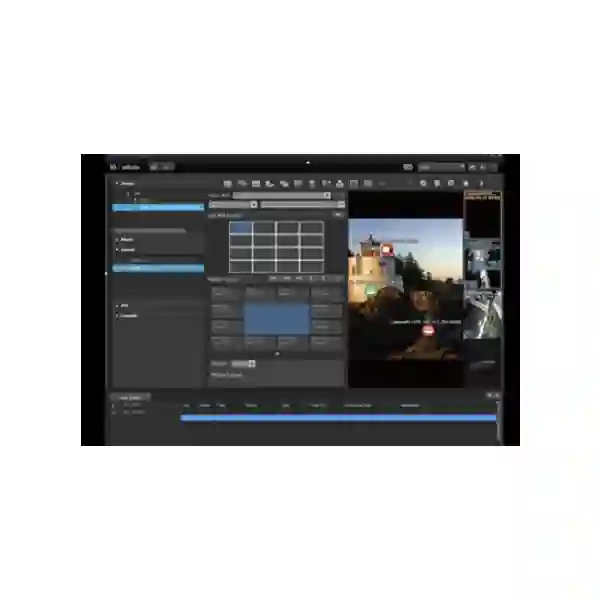
The Hanwha SSM-VM10 is a Virtual Matrix add-on built to organise live video on a Smart Security Manager control-room wall. The manufacturer identifies support for up to 16 monitors, layout control, event-triggered switching, map viewing and software or selected hardware decoding.
Important: Hanwha Vision marks this exact model as discontinued. If you already operate SSM-VM10, request a documented compatibility and maintenance review. If you are building a new surveillance room, ask for a supported current approach instead of assuming this older software can be newly supplied.
At a glance: verified product details
| Manufacturer | Hanwha Vision |
|---|---|
| Model | SSM-VM10 |
| Purpose | Legacy SSM Virtual Matrix add-on |
| Headline display capacity | Up to 16 monitors (manufacturer product listing) |
| Control interfaces | VM Manager and SSM console |
| Decoding | Software VM Decoder and supported legacy hardware paths |
| Event views | Wall spot, monitor spot and tile spot |
| Lifecycle | Discontinued in manufacturer catalogue |
| Local price or stock | Not verified; request confirmation |
These are product-family descriptions, not a guarantee that any particular legacy installation or licence will operate with a newer SSM release.
What the SSM-VM10 does
A surveillance video wall is valuable only when the people using it can decide what appears, where it appears and how quickly it changes when something needs attention. Hanwha SSM-VM10 was designed to add this control layer to an existing Smart Security Manager environment. Rather than asking an operator to manipulate every display computer independently, the Virtual Matrix arrangement lets authorised staff select views and direct configured video to wall positions through a management interface. That is particularly useful when monitoring workstations and display screens are physically separate. The result is a structured way to organise the presentation of camera feeds, not a replacement for camera recording, alarm policy or an overall security operating procedure.
The model belongs to an older SSM product family. Its manufacturer listing describes up to 16 monitors and names Virtual Matrix Manager, the SSM console, software decoding and support for the legacy SPD-400 hardware decoder. Layout rules and event-responsive switching are core functions. Those descriptions explain the intended capability, but they do not establish that a specific existing network, software version or decoder can deliver a proposed wall. A competent evaluation must start with the deployed system as it exists today and distinguish a functioning legacy installation from a new project seeking current technology.
Who should assess this product
The strongest reason to investigate the SSM-VM10 is the presence of a known legacy SSM estate that already uses, or was designed around, the Virtual Matrix function. A facilities security team may be rebuilding an operator room after a display failure. A systems integrator may need to document old licensing before replacing a machine. A maintenance contractor might be asked why a set of screens is no longer showing its assigned cameras. These are practical, bounded questions for which the SSM-VM10 documentation remains useful. The product name can help identify the installed architecture and the correct history of the solution.
It is a less suitable starting point for an entirely new command centre. The manufacturer marks the specific model as discontinued, and later Wisenet SSM releases have separate documentation and virtual-matrix software. This does not automatically mean every older installation has stopped functioning, or that every licence is invalid. It means new procurement, operating-system security, patches, upgrade paths and manufacturer support require independent confirmation. Buyers should describe the problem they need to solve before insisting on an old part number. A contemporary VMS or video-wall design may be a better answer even when the original requirement is expressed as SSM-VM10.
A clear understanding of its lifecycle
The discontinued designation is commercially important. A web catalogue can preserve documentation for an older product long after the original ordering route changes. Discontinued is not proof that a particular licence cannot run, and a third-party listing is not proof of manufacturer-backed availability. For this reason, neither a new licence, transferable entitlement, warranty, technical support nor a replacement product should be promised without an exact, current confirmation. Ask the proposed supplier to state whether the offer is a supported new solution, verified maintenance of a legacy installation, or a transition service. These are different purchasing decisions with different operational risks.
For an organisation that already owns SSM-VM10, capture documentary evidence before any change: licence records, installed version numbers, decoder assignments, device lists, operating-system versions, wall layouts and the people who administer the system. Back up authorised settings using the process appropriate to that release. Record the last successful operation and the actual failure symptoms. If an upgrade is planned, establish a rollback method and a test window. The objective is to preserve security visibility while moving to equipment and software that the organisation can maintain.
How the legacy components fit together
A Virtual Matrix project is a system, not a single application icon. In the older Hanwha architecture, SSM handles the wider surveillance management environment while the Virtual Matrix components coordinate what the display wall shows. The manufacturer manual identifies VM Manager, VM Gateway and VM Decoder roles. VM Manager is the configuration interface for layouts, walls and device assignment. VM Gateway coordinates the virtual-matrix operation and checks the applicable licence in the documented legacy implementation. VM Decoder receives the relevant streams and renders them to attached screens. The SSM console provides an operator-facing route for choosing or pushing views.
The distinction matters when diagnosing a blank monitor. The cause might be a stream that is unavailable from SSM, a changed decoder address, a lost display connection, an unassigned wall position, a user-rights issue or a failed desktop computer. Replacing a monitor will not remedy a gateway or licensing issue. Likewise, installing Virtual Matrix without the SSM infrastructure does not provide a self-sufficient CCTV management system. Before purchasing or designing around an old component, obtain a diagram that shows cameras and recorders, SSM services, network switches, gateways, decoding endpoints, management workstations and each physical display connection.
What up to 16 monitors actually means
Hanwha Vision’s SSM-VM10 product page states support for up to 16 monitors. This is a model-specific headline, not permission to assume that a single decoder computer can drive sixteen separate screens. The older Virtual Matrix manual describes a software-decoder arrangement with up to four monitors per decoding computer under its documented conditions. It also discusses system-wide wall management and related VM product variants. Numbers from different levels of an architecture should never be added together or presented as an unconditional capacity guarantee. Monitors, decoder outputs, layout tiles, simultaneously decoded streams and software licences are separate planning quantities.
A useful design starts with a physical wall drawing: the number and dimensions of screens, resolution, connections, viewing distance, content priorities and operator desk locations. Next map each display to an actual output and decoder. Then identify the SSM licence and product variant that govern this wall. A display with sixteen tiles is still one physical monitor; a wall of sixteen physical panels is a different engineering problem. For existing installations, record both the intended layout and the live hardware assignment. Confirm expansion limits against the exact installed release and the manufacturer guidance that applies to it.
Using layouts to reduce visual clutter
A control room can have many cameras but only a limited amount of operator attention. Virtual Matrix layouts provide a way to decide which cameras appear together and how much screen space each receives. A gate camera may deserve a larger view during deliveries, while internal corridors can occupy smaller tiles during quiet periods. A wide situational view may be more useful than showing every available camera at once. The original software supports wall configuration, monitor layouts and manual camera assignment using its management interface. The actual split modes available depend on the decoder type and configuration.
Start by defining a few named operational views rather than dozens of nearly identical patterns. A site might need an entry-and-exit view, a loading-area view, a perimeter view and a response view. Label the cameras in language operators recognise. Keep the location of critical images consistent so that staff do not have to hunt across the wall. Agree who can change a layout, whether any image must always remain visible and what should happen during a shift handover. The best display arrangement is the one that makes an incident easier to recognise and investigate, not necessarily the arrangement with the largest number of tiles.
Sequences and deliberate screen changes
Legacy Virtual Matrix documentation describes wall-layout sequencing: the system can move among predefined arrangements on a configured cycle. In some environments, this helps a small number of displays cover several areas over time. Yet a changing screen is useful only if the operator knows which view is current and what might disappear next. Continuous cycling can make an event harder to follow when a camera changes just as a person enters the scene. Critical entrances, safety-sensitive zones and active incident views may be better displayed continuously.
When evaluating a sequence, ask which cameras must remain permanent, how often the screen changes and who can pause it. Check whether operators need a manual override and how a previously selected view is restored. Test the sequence under realistic conditions instead of relying on a demonstration with only a few streams. If an alarm occurs while a layout is rotating, decide in advance whether the event should interrupt the cycle. These rules belong in the control-room operating procedure. They also influence decoder demand and make testing more valuable than relying on a feature list alone.
Event-driven wall, monitor and tile spots
One distinguishing feature of Hanwha SSM-VM10 is event-driven virtual salvo switching. A predefined event can change what the operator sees, directing relevant images to a whole wall, a designated monitor or a specific tile. The manufacturer refers to these as wall spot, monitor spot and tile spot. In practice, the value lies in showing an important event in a predictable location without requiring an operator to find the source manually. The trigger still depends on suitable event generation and the configuration of the wider surveillance system.
An alerting design needs safeguards. Decide which events deserve the entire wall and which should use a smaller reserved area. Clarify priorities when two alerts arrive together. Identify the cameras that should accompany each event and whether the previous view is restored automatically or manually after acknowledgement. Test for false positives, missing camera feeds and lost network connectivity. Document what the operators must do next: visually verify, log the event, follow the site’s escalation policy and preserve relevant evidence using the approved recording system. Display automation helps direct attention; it does not independently confirm that an alarm represents a genuine incident or replace a human response process.
Live video alongside map information
Hanwha’s legacy product description includes simultaneous live monitoring and map display. For an operator responsible for a large building or dispersed facility, a site map can help turn an unfamiliar camera name into a physical location. The older manual discusses map-based views and camera or alarm symbols, subject to system configuration. This is especially valuable when the team includes staff who are new to the premises, or when several cameras cover similar-looking corridors and gates.
A map is only as reliable as its maintenance. Keep camera labels, room names, floor references and orientations aligned with the real installation. Update the map when a camera is moved or a new building section is added. Test that an event points to the intended location. Avoid drawing architectural conclusions from a map that has not been checked after renovations. Map functionality also should not be confused with a verified external geographical information system or a guarantee that every third-party sensor can be integrated. Buyers should ask for a demonstration using the camera and event data actually present in their SSM environment.
Software decoding and legacy hardware choices
The manufacturer describes software decoding through the VM Decoder function and legacy hardware decoding support involving the SPD-400. These are implementation alternatives, not identical devices with interchangeable capacity. A software-decoder computer must render incoming streams and deliver them through compatible graphics outputs. The number of simultaneous images it can process depends on factors such as resolution, frame rate, compression, graphics capability, screen arrangement and the constraints of the installed release. A hardware decoder has its own input, output and split-screen limits. Mixing historical capacities from different decoder types produces an unreliable specification.
Before reusing equipment, confirm exact computer models, GPU drivers, ports, video output adapters and operating-system support. A computer that once met a minimum requirement may no longer be acceptable for secure modern deployment. Equally, a physically connected screen is not evidence that the decoder software has the appropriate entitlement or output assignment. For new equipment, request a current manufacturer-approved configuration for the target SSM software rather than purchasing an old graphics card simply because it appears in an archived installation manual. Every decoding path should be tested with the intended camera streams and wall layouts at realistic load.
Permissions and operator accountability
The SSM-VM10 feature list includes multi-level user access and authority control. In a shared control room, not every person needs the same ability to alter a wall. Routine operators may need to select an approved view, while supervisors might manage event layouts and administrators maintain the gateway and decoder configuration. The specific permission hierarchy must be verified in the installed SSM release; the generic feature description alone does not define a security policy. A practical design separates everyday observation from system changes that could interrupt monitoring.
Document individual responsibilities, avoid sharing administrative credentials and remove access when roles change. Test the permissions with representative operator accounts, not only a privileged installation account. Consider what happens if someone drags the wrong camera into a reserved incident view or accidentally changes a sequence. Use named procedures for restoring a standard layout. Where audit records are required, verify which events the actual software logs and how those logs are retained rather than promising audit capabilities without evidence. Clear authority boundaries are as important to reliable surveillance operations as the video-wall hardware itself.
Compatibility with SSM releases
The most important technical question for a buyer is the exact SSM release on which the Virtual Matrix arrangement must operate. The older SSM-VM10 manual documents the architecture in the context of historical SSM versions, while Hanwha Vision now publishes separate documentation and software for newer Wisenet SSM releases. A reference to Virtual Matrix in a current SSM download catalogue does not, by itself, prove that a discontinued SSM-VM10 licence can be installed or activated there. Product families evolve, and module names can persist even when their licensing and deployment methods change.
Ask the project owner to provide the installed SSM version, any relevant activation or licence documentation, the current Virtual Matrix build and the operating-system environment. Then request confirmation of a supported path for the specific model and target release. Do not assume that the newest server software is a drop-in replacement for a legacy gateway. Check whether camera integrations, event rules and user permissions must be recreated or migrated. If the manufacturer or an authorised support route cannot verify a migration, the project should allow for redesign instead of building a schedule around an unproven upgrade.
Workstations, networks and performance planning
Virtual Matrix video is sensitive to the path between the source stream, SSM services, the decoder and the physical display. Large walls can bring many streams into a small number of computers. The amount of traffic depends on camera bitrate, codec, frame rate, chosen substreams, the number of simultaneous live views and whether multiple decoders independently request the same footage. A monitor count on its own says very little about required bandwidth. Ask a designer to model the actual streams and to inspect network utilisation under representative busy conditions.
The historic SSM-VM manual includes example computer requirements from an earlier generation of Windows and GPU hardware. These are evidence about the old release, not recommended specifications for a new security workstation today. Modern endpoint-hardening requirements, operating-system support, display drivers and vendor support must guide a current proposal. Consider redundancy for the network switches and power supply where loss of video would create unacceptable operational risk. Test that a restarted decoder recovers its assigned views and that temporary stream failure is visible to the operator. A wall that looks impressive when all systems are healthy still needs a sensible failure mode.
Planning a surveillance room in Tanzania
For Tanzanian facilities considering a control-room refresh, the local environment shapes the installation as much as the software feature list. Identify the intended building, the number of shifts, lighting conditions, screen viewing distance, available equipment space and the physical security of the operator room. Ensure that display mounting, cooling, cable management and access for maintenance are included in the design. A visible CCTV feed is not useful if an operator cannot read the details from the normal working position or if an overheated decoder becomes unreliable.
Power continuity deserves an explicit engineering discussion. Specify the required operating duration for the cameras, switching infrastructure, SSM servers, decoding computers and wall displays instead of discussing a backup power unit in isolation. Identify what should remain active during a power interruption and how the system returns to normal afterwards. For sites that use remote camera connections, evaluate link stability and the bandwidth available at the real installation. Avoid assuming that a local internet provider, integrator, stockholding, service-response commitment or licence distribution channel is available without direct verification. The objective is a supportable Tanzania deployment, not a generic global specification with a city name added.
Selecting views for different operational scenarios
Different organisations place different demands on a surveillance wall. A commercial building may prioritise reception, parking access, service doors and common circulation areas. A factory may want vehicle entries, loading points and defined safety-related zones. A transport or logistics site may organise views around its gates, yards and vehicle movement routes. These are examples of planning questions, not a promise that a particular camera model or third-party system is supported. For each site, identify the decisions operators need to make and the footage needed to support those decisions.
Start with a daily operating view and then design exceptional conditions. What should the wall show when a gate alarm occurs? Can a supervisor temporarily enlarge the relevant view without losing the overview? Is there a clear procedure for restoring the standard layout after an incident? Do shift leaders know which cameras correspond to each zone? If the answer depends on integration to an access-control platform or another alarm source, document that requirement separately and confirm compatibility. A good use-case review can reveal when a simple workstation is sufficient and when the additional complexity of a video wall is justified.
A procurement checklist before requesting a quote
A quote for a discontinued software model should begin with evidence, not only a quantity. Give the supplier the exact name Hanwha Vision SSM-VM10 and explain whether the request concerns an installed legacy estate or a new surveillance room. State the SSM version, the number of physical displays, the approximate camera stream count, the proposed layouts and whether any decoder computers already exist. Include the present graphics outputs and any hardware decoders. Explain which event-driven switching features are needed and whether map views or operator permissions form part of the acceptance criteria.
Ask for a written response separating what is verified from what remains conditional. Specifically request the lifecycle position, entitlement and licence transfer rules, supported operating systems, compatible SSM software, proposed decoder hardware, configuration services, warranty or support conditions if any, and the plan for testing. Price, stock, lead time, installation coverage and a Tanzania-specific commercial offer should appear only in a supplier’s confirmed quotation. If a supplier proposes a replacement, request an explanation of which SSM-VM10 functions are retained, changed or unavailable. This makes competing approaches easier to evaluate without assuming that all products described as a virtual matrix are equivalent.
A sensible installation and migration sequence
An existing video wall should not be changed without understanding its current state. Begin with an inventory of cameras, recorders, SSM components, physical screens, decoder machines, licence documents and network addresses. Capture the currently approved layouts and the event rules that control them. Record known problems separately from the upgrade objectives. At the design stage, map those requirements to an architecture that is supported for the intended software version. Verify the proposal before buying hardware or scheduling an outage.
Build and test the replacement or repaired environment with a limited set of representative streams. Confirm sign-in rights, normal layouts, scheduled sequences, manual view selection and event-driven changes. Then increase the load and include failure tests such as a lost camera stream, restarted decoder and interrupted connection. Train the actual operators on restoring a standard wall view and recognising a frozen image. Plan the cutover around the security team rather than treating the wall as ordinary office signage. Document the accepted result and hand over configuration, support contacts and recovery procedures. For a legacy SSM-VM10 system, a parallel transition may be safer than an undocumented in-place software upgrade.
Maintenance, security and business continuity
Video-wall software needs ongoing care even after the original project is commissioned. Maintain an asset list that ties each screen to a decoder output and each decoder to a responsible support owner. Preserve copies of approved configuration records in accordance with the organisation’s information-security policies. Keep user access aligned with current staff roles, protect administrative credentials and review which network services the older components require. Where a legacy operating system is involved, assess the exposure rather than assuming that a camera network is inherently isolated or safe.
Establish a practical daily health check: are the expected views present, are timestamps sensible, are cameras live rather than frozen, and do the important alarm-triggered views still work? Include the gateway, servers and decoding computers in planned maintenance. Agree how security monitoring will continue if the main wall is unavailable, perhaps through an independently functioning approved console where the system supports it. Review the supportability of discontinued elements regularly and define the point at which replacement becomes necessary. The best long-term outcome is not simply an operational wall today, but a clear plan for sustaining trustworthy monitoring throughout the system’s life.
Choosing between repair, retention and replacement
There are three distinct paths for an SSM-VM10 enquiry. Retention may make sense when a documented existing installation remains fit for purpose, has a defensible security posture and can be supported under verified conditions. Repair may be appropriate when a specific failed computer, display connection or configuration can be corrected without making unsupported compatibility assumptions. Replacement becomes more attractive when unsupported operating systems, uncertain licence rights, unavailable parts or an expanding monitoring requirement make continued maintenance difficult. The decision should be driven by risk and operational need rather than by the familiarity of an old model number.
A replacement evaluation should compare practical functions: number of physical outputs, layout management, event prioritisation, map context, roles, video-stream handling, resilience and serviceability. Ask for a demonstration with representative video and actual operator workflows. If the organisation wants to retain SSM recording services, identify that as a separate integration condition. If it is willing to move to a different video-management platform, plan the change in recordings, training and operational procedures as well as the visible wall. The procurement goal is dependable monitoring, not a literal recreation of every legacy software screen.
Frequently asked questions about Hanwha SSM-VM10
Is the Hanwha SSM-VM10 still a current product?
Hanwha Vision’s product catalogue marks the SSM-VM10 as discontinued. This is a lifecycle statement about the specific model and should be treated seriously when planning a purchase. It does not necessarily establish the status of every older licence already in use, nor does it identify a guaranteed direct replacement. A buyer should ask for written confirmation of any new offer, activation eligibility, available support and a suitable current alternative before committing funds or scheduling implementation.
Can SSM-VM10 work without Smart Security Manager?
No standalone operation should be assumed. The manufacturer’s original documentation describes the Virtual Matrix as an add-on that connects to Smart Security Manager. SSM provides the wider management environment from which video is made available to the display system. A computer running a decoder component is not equivalent to a full recording or management platform. Confirm the base SSM installation, its version, its licence position and its connectivity before assessing the Virtual Matrix layer.
Does the model support sixteen separate monitors?
Hanwha’s product description states support for up to 16 monitors. This is the product-level limit cited by the manufacturer, not a guarantee that one ordinary PC can drive all sixteen outputs. The legacy manual has separate constraints for software-decoder computers and for the broader wall architecture. Design the physical screens, decoder endpoints and applicable licence together. If a proposed project requires a different number of monitors, request a supported design for the exact software and hardware generation.
Is SSM-VM10 the same as a network video recorder?
No. A network video recorder stores surveillance footage, while Virtual Matrix is primarily concerned with presenting and controlling selected streams on a wall. The surrounding SSM solution may include recording and management functions, but those are not created merely by deploying the SSM-VM10 add-on. A control-room purchase may require cameras, recorders or servers, networking, displays, decoders and management software. Determine which components are already owned and which remain in scope before requesting a price.
What are wall spot, monitor spot and tile spot?
These are historical Virtual Matrix functions for directing an event-related view to different display scopes. A wall spot can change a larger wall presentation, a monitor spot targets a designated display, and a tile spot focuses a particular region within a layout. The precise behaviour must be checked against the installed release and event configuration. Decide how alerts are prioritised, how operators acknowledge them, and how the original surveillance overview is restored after a response.
Can I use a modern Windows computer as a decoder?
A recent computer may have powerful graphics hardware, but that alone does not establish support for a discontinued software release. The original manual lists operating systems and components that reflect its generation, while current cybersecurity and driver expectations are different. Verify the intended SSM and Virtual Matrix versions with the vendor, obtain supported system requirements and test the actual graphics outputs and camera loads. Do not rely on a historic minimum-specification table for a new deployment.
Does this software support hardware video decoders?
Hanwha lists software decoding and legacy hardware-decoder support, including the SPD-400, among the SSM-VM10 features. Decoder generations can have different output counts, split-screen modes and integration requirements. Confirm the exact model and firmware of any existing unit, the SSM software version and the intended monitor layouts. The presence of a video connector or a decoder on a parts list is not proof that the complete wall configuration is supported.
Can one licence manage several walls?
The old manufacturer manual describes licensing and gateway requirements at the wall level and also discusses multi-wall management at the system level. Those statements must not be simplified into a promise that one SSM-VM10 entitlement covers several independent walls. Request the original licence documentation and a current entitlement interpretation for the installed environment. Count walls, decoders, outputs and licences separately so that an expansion project is not priced using an incorrect assumption.
Will the video wall show alarms automatically?
The Virtual Matrix feature set includes event-driven switching, but automatic displays depend on configured triggers, available streams, working decoders and permitted operator actions. A deployment team must map each required event to a camera or layout and test the result. A sensor alert does not guarantee that a useful image exists or that the event is genuine. The wall should support an established response procedure that includes acknowledgement, visual verification and escalation.
Does it support maps as well as live cameras?
The manufacturer identifies simultaneous live monitoring and map display as a feature, and the older documentation illustrates map-based monitoring. Exact available map functions, devices and display behaviour depend on the SSM release and its configuration. Make sure the site’s floor plans and camera labels reflect the physical environment. Ask for a demonstration using real layouts and event sources before relying on map functions for an operational procedure.
How many camera feeds can each decoder display?
There is no responsible single figure without specifying the decoder type, stream format, resolution, frame rate, hardware and layout. The historical manual gives capacities under particular assumptions that may not apply to modern cameras or other software versions. A design should count concurrent streams and the processing work required to render them, not simply total connected cameras. Request a load test with representative footage and allow margin for changing conditions during incidents.
Can SSM-VM10 integrate with our existing CCTV cameras?
Compatibility is mediated through the wider SSM deployment and the particular devices and streams it supports. The SSM-VM10 name by itself is not evidence that every camera brand, protocol or alarm source can be used. Compile the exact models, firmware versions, recorders and event sources in the existing estate. Have the integrator confirm support at each layer and demonstrate the intended viewing and switching functions before treating an integration as approved.
Can FourTeck confirm stock or a local Tanzania price?
A Tanzania price, stock position or delivery commitment has not been independently established for this legacy model. Its discontinued status makes confirmation particularly important. Submit the exact model and the details of your existing installation for a technical review and a verified commercial response. If the item cannot be supplied or supported appropriately, request a current alternative with a comparison of functional coverage and integration requirements rather than accepting an unverified equivalent.
What information should I provide for an assessment?
Provide the exact Hanwha SSM-VM10 model reference, installed SSM version, available licence records, wall size, number of displays, existing decoder hardware, current operating systems and a simple system diagram. Explain whether the task is fault repair, extension, licence clarification or complete replacement. Include examples of required layouts and event-triggered views. The more clearly the team can distinguish existing capability from desired functionality, the more useful the compatibility review and quotation will be.
What should we ask when migrating to current Wisenet SSM?
Ask whether the target release offers a supported Virtual Matrix workflow for your architecture, which installation components change, whether legacy entitlements carry forward, and how camera mappings, layouts, event rules and user roles are recreated. Current Wisenet SSM documentation should be used for the new target; historic SSM-VM10 materials should be used only to understand the old installation. Require a tested cutover plan, operator training, resilience checks and a documented rollback or recovery method.
When is a simpler monitoring arrangement better?
A video wall is not automatically the best choice for every surveillance site. If the monitoring team needs only a small set of concurrent views and limited event handling, a supported VMS workstation with suitable displays may be easier to operate and maintain. Evaluate the number of operators, required visibility, incident workflows, duty hours and available support. A more complex Virtual Matrix installation should be justified by a demonstrable operational benefit, not merely by the number of cameras on site.
Request an SSM-VM10 compatibility or replacement assessment
Tell FourTeck Tanzania whether you need to maintain an existing Hanwha Virtual Matrix installation, troubleshoot a failed wall or plan a supported replacement. Include your SSM software version, monitor count, current decoders, licence documentation and the views your operators need. A supplier can then clarify the applicable product lifecycle and discuss a technically appropriate quotation.
Ask for verification first. No local price, stock, licence eligibility or service commitment is implied on this page.




Reviews
There are no reviews yet.