
HANWHA VISION · SMART PARKING RECORDING
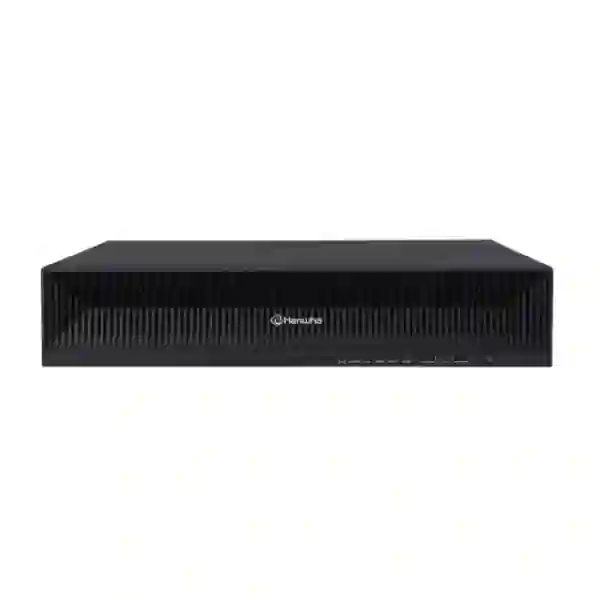
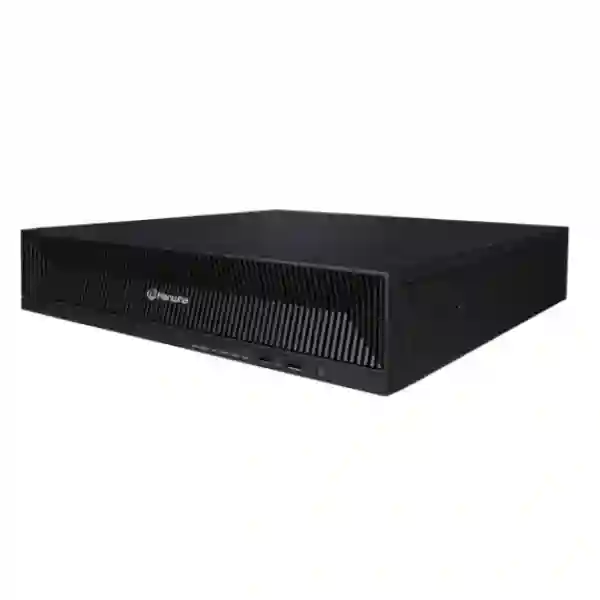
Hanwha XRN-1627B2-12 Smart Parking NVR
A 16-channel parking-focused network video recorder, identified in the published product catalogue with 12TB of included HDD storage.
For teams planning vehicle surveillance at entrances, exits, residential parking, offices or commercial facilities in Tanzania. Request a model-specific compatibility, storage and deployment assessment before ordering.
At a glance
Verify the total recording load and camera choices.
Confirm usable capacity and delivered disks in the quote.
Plan cameras, search and integration as a complete solution.
Published catalogue information also describes high-resolution recording and AI-based object search with compatible AI cameras. Exact throughput, interfaces, power and integration details should be checked against the manufacturer’s model-specific documentation before a purchase decision.
What this parking recorder is designed to do
The Hanwha XRN-1627B2-12 is identified by Hanwha Vision as a sixteen-channel recorder in its smart-parking range. The purpose of this class of device is to preserve camera video that can help operators understand vehicle movements, review activity around access points and retain evidence from a parking environment. A published product catalogue identifies the configuration with 12TB of included hard-disk storage. It is therefore more accurately presented as a parking-oriented network video recorder than as a general-purpose standalone entry-control machine. That distinction matters when buyers compare a recorder against a complete parking-management solution.
A working installation usually combines cameras, a correctly designed network, continuous electrical power, a storage policy and a process for reviewing incidents. Depending on the system design, recognition cameras, access controllers, barriers, intercoms and operational software may also be involved. The recorder occupies one part of that architecture. It records and helps operators retrieve evidence; it should not be described as automatically opening a barrier, charging parking fees or recognising every number plate without other verified components. Buyers can start by identifying the exact vehicle and security events they need to record, then verify how this model fits the intended architecture.
Who should consider a 16-channel smart-parking NVR
A sixteen-channel platform is relevant when a site has several camera positions but does not require a much larger central recorder. A building with an entry lane, an exit lane, visitor parking, a loading area and a number of overview views could be a candidate. A commercial compound with separate staff and visitor gates might also want vehicle-focused evidence in one recording environment. The headline channel count sets a ceiling on camera inputs, not an assurance that every conceivable high-resolution stream or analytic feature will work simultaneously. Final sizing should use the exact camera profiles and Hanwha’s current model-specific specifications.
This product is worth discussing with a system designer when the site wants recorded evidence linked to practical parking operations. It may be less suitable when an organisation expects the recorder by itself to provide billing, occupancy analytics, ticketing or a fully managed visitor-registration platform. Those capabilities may depend on separate applications and licensed components. A multi-site customer might also need centralised monitoring tools beyond a single recorder. The buyer should document whether the project is primarily security video, parking-access operations or both; that choice influences camera selection, software integration, retention requirements and the commercial scope of a quotation.
Start with the site’s actual parking questions
A successful deployment begins with questions rather than a shopping list. Do staff need to confirm when a particular vehicle entered? Is the priority resolving a complaint after an incident, checking a delivery, supervising visitor access or determining whether a barrier was left open? Does the organisation need a searchable visual timeline, a usable plate image or only a general overview? Each question implies a different camera angle, illumination plan and way of finding events after they occur. Recording every lane from one wide overview camera rarely answers all of these questions well.
Map the parking journey from approach to exit. Identify where vehicles slow down, where they stop, where pedestrians cross and which parts of a scene become obscured by gates, pillars or other cars. Mark the views required for security and those required for reading a plate or examining a vehicle. Avoid assuming that one camera can deliver both aims under every lighting condition. During planning, allocate channels to defined views and reserve room for reasonable changes. This makes it easier to evaluate whether a sixteen-channel device is right-sized and whether the included storage supports the organisation’s actual investigation needs.
Camera channels: plan for useful coverage, not just a number
A camera channel represents a recording input, but buyers should plan around usable coverage instead of simply filling all available positions. A lane may require an overview view to show the surrounding activity and a separate targeted camera to capture a vehicle or registration plate reliably. A large parking floor could call for additional views at pedestrian routes, payment points, lifts or vulnerable corners. Add the required cameras one location at a time, taking account of entrances, exits, blind spots and the likely direction of travel. This prevents late discoveries that important events happen outside the frame.
Keep a channel schedule that records each camera’s purpose, expected resolution, frame rate, codec, bitrate, mounting height and distance to the subject. Distinguish essential coverage from optional future cameras. Then confirm the aggregate recording bandwidth and display requirements against the exact model documentation; do not infer either from the channel count alone. For a parking site likely to expand, discuss whether the future number of cameras will exceed sixteen. Where a network already contains third-party cameras, test their required video and metadata functions individually rather than assuming that basic streaming compatibility also delivers advanced event search.
Entrance and exit camera positioning
Entrance and exit lanes are natural priorities because they connect recorded video to the flow of vehicles. Camera placement should account for the direction of approaching cars, distance to the stopping point, lighting transitions and the physical width of the lane. An overview camera may show a vehicle entering the property while a dedicated plate-capture camera is aimed more tightly at the registration area. Where vehicles can change lanes, turn sharply or queue behind one another, the design should account for those movements. A view that looks sharp during an empty daytime test may not remain adequate during busy evening traffic.
In Tanzania, a site may experience strong daylight, reflective number plates, glare, rain and dark approaches, depending on its location and shelter. These are design considerations, not claims about the NVR’s own weather resistance. The camera and illumination plan must solve them. Review actual recorded samples under daylight, nighttime and headlight conditions before commissioning. Establish whether the expected task is simply to document a vehicle’s presence or to capture a readable registration. Those outcomes are not interchangeable. The recorder can retain footage only as useful as the video that reaches it from the installed cameras.
Number-plate recognition needs a verified end-to-end design
The model belongs to a smart-parking family, and the catalogue describes vehicle-registration and video-storage use cases. However, automatic number-plate recognition, often abbreviated ANPR or LPR, should be treated as a system-level requirement rather than an automatic promise from the recorder alone. The selected capture camera must produce suitable images, the recognition function must be supported, and any needed software, licensing or integration must be confirmed. A device that stores video does not necessarily perform plate recognition internally; similarly, a camera that recognises plates may expose metadata in a way that another system cannot use.
For a project specifying searchable plate events, request a live demonstration using the proposed camera and current firmware with the exact NVR model. Ask which elements create the plate reading, which elements store the event and where the operator searches it. Check how the system handles unreadable plates, two vehicles close together, unusual angles and temporary obstructions. Verify that the expected local plate formats and capture conditions are covered by the selected recognition solution. Do not make contractual acceptance depend on an untested compatibility claim. Successful parking evidence depends on a clear chain from camera capture to recorded event, authorised search and reliable export.
AI-assisted search: understand the dependencies
Hanwha’s published catalogue describes AI-based object searching when the recorder is linked with a compatible AI camera. This is potentially useful where a security operator needs to reduce the time spent examining recordings after a reported incident. Instead of scrubbing hours of video with no starting point, an operator may be able to use searchable metadata supplied by the camera and supported by the recording environment. What can actually be searched depends on the camera model, its analytics, the available metadata, firmware and the recorder’s supported search functions. Not every network camera produces the same information.
Before buying for AI search, define a test case such as locating a vehicle movement within a date range or finding a relevant event at a particular entry camera. Verify the supported search categories for this exact combination and whether historical footage without metadata can be searched in the same way. Ask how metadata is retained and whether it remains available after an export. Avoid interpreting AI support as guaranteed identification accuracy or automated enforcement. Strong lighting, appropriate framing, correct camera settings and trained operators remain essential. AI-assisted retrieval should make investigations more practical without replacing review of the underlying video.
Included 12TB storage: what the figure does and does not mean
The 12TB configuration is identified in the published catalogue for this exact model. That is a hardware-capacity description, not a guarantee of a fixed number of recording days. Actual footage retention depends on how many channels are active, what each camera sends, the recording schedule, compression efficiency, frame rate, scene complexity and any space reserved for system functions. Storage advertised in decimal terabytes is also not the same number displayed by every operating system or recording interface. An installer should therefore make a retention estimate using the proposed camera configuration rather than assuming that all sixteen channels will record for a particular period.
Ask the supplier to specify the disk arrangement delivered with the quoted unit and the usable recording capacity under the proposed configuration. The total number and size of drives, any redundancy option and supported expansion limits should be verified using the exact manufacturer’s technical documents. Do not assume that the model offers a specific RAID mode or maximum drive count merely because a related Hanwha model does. Also ask what happens when capacity is reached: whether older recordings are overwritten under the chosen policy, whether important incidents can be protected and who is responsible for archiving material needed for longer investigations.
How to estimate retention before committing
A practical retention calculation starts with the total expected recording bitrate, not only the camera resolution. Resolution determines the amount of image detail available, but two cameras at the same resolution may produce different bitrates because of codec settings, motion and scene content. Record a representative sample on site where possible, including busy arrival periods, nights and quieter hours. Estimate the daily data created by the proposed cameras and compare it with the recorder’s usable storage. Build in an allowance for unexpected activity, changed profiles and the organisation’s real evidence-retention needs.
Decide whether cameras must record continuously or whether supported schedules or event-driven modes are appropriate. Continuous coverage may make sense for critical gates, while other views can be assessed individually. Event-only recording can reduce footage volume but risks missing context if triggers are not configured correctly. Keep the retention worksheet with the project handover so operations staff know what to expect and can revisit settings if extra cameras are installed. A quoted 12TB recorder should never be sold with an unexplained blanket claim of thirty, sixty or ninety days. Request a documented estimate that names its assumptions and confirms the resulting capacity on the configured system.
Video quality, compression and bandwidth
The quality of stored evidence depends on a balance between detail and data consumption. A sharper image may help identify a vehicle, but an unnecessarily high recording profile can shorten storage retention or overload a network path. Conversely, lowering bitrate too aggressively can damage the very details an investigation depends on. Camera-specific H.265 or H.264 capabilities, intelligent compression and multiple stream profiles can be relevant to system planning, but the supported codecs and performance limits should be checked for this exact recorder and selected cameras before a design is approved.
For each lane, define what must remain recognisable in the recorded frame. Test a moving vehicle, a stopped vehicle and a scene with several objects or headlights. Check the archived playback rather than judging only the live preview; the two may use different streams or settings. Confirm that the summed recording data rate stays within the manufacturer’s specified limit for the chosen model. Also consider how much network bandwidth is available for remote viewing and exports without disrupting normal recording. A useful specification is one the design can meet during the busiest real operating conditions, not only during a quiet laboratory demonstration.
Playback, monitoring and incident review
A recorder is valuable only when staff can retrieve the right footage quickly and interpret it correctly. Plan the operator experience around common incidents: a driver disputing an entry time, a vehicle damaging a barrier, an unauthorised entry or a security report involving a visitor. Operators need reliable camera naming, correct timestamps and a documented method for moving between views. A single camera recording may be insufficient where a vehicle passes through several points, so consistent time synchronisation across cameras and related systems matters from the outset.
Before acceptance, ask the installer to demonstrate live viewing, searching by time, moving through a recorded incident, saving an appropriate clip and playing the export on an authorised workstation. Verify what information appears with the video and which file formats the chosen firmware supports. Where a reception team or security room relies on a local monitor, confirm the required display arrangement with the exact model’s interfaces. Where users work remotely, test the approved method and permissions rather than assuming unrestricted internet access. Clear procedures turn footage from a stored file into evidence staff can find, protect and use responsibly.
Network design for a dependable parking deployment
The NVR is part of an IP-video network. Its reliability therefore depends on correct addressing, cable quality, switch capacity, network segmentation and a path that can carry expected traffic. Draw a simple network diagram showing camera groups, uplinks, recorder connections, operator workstations and any systems that exchange parking metadata. Note whether the recorder and cameras share a production office network or operate on a dedicated security segment. A dedicated or carefully segmented design can reduce accidental interference and makes troubleshooting more manageable.
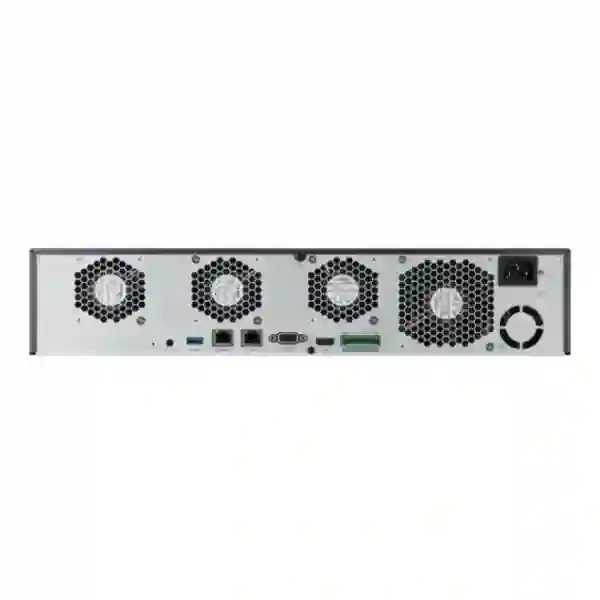
For each switch and uplink, assess the cumulative camera traffic along with expected viewing and management activity. Use network devices and cabling appropriate to the distance, electrical environment and number of cameras. Confirm whether the site has fibre links between buildings, outdoor runs exposed to lightning or long distances that require specialist design. Avoid making assumptions about the number or speed of ports integrated into this model until the exact data sheet is checked. If events must reach a separate parking application, record which system initiates communication and how connectivity will be tested after network maintenance.
Camera power and the PoE distinction
Not all sixteen-channel recording products power cameras directly. Hanwha lists separate parking-recorder variants with integrated Power over Ethernet features, and this distinction must not be lost when preparing a quotation for the XRN-1627B2-12. The presence of network camera channels alone does not prove that the chassis contains a sixteen-port PoE switch. A project using this model should explicitly specify how each camera will receive power, whether from a separate PoE switch, injector or suitable local supply. The correct approach depends on camera power requirements, cable lengths and the final network topology.
PoE budgeting is especially important for cameras with infrared illumination, heaters or other accessories that draw additional power. A switch that can communicate with a camera may still be unable to provide its peak electrical requirement. Ask the designer to provide a simple power budget by camera and port, including reserve capacity. Confirm any surge protection, grounding and outdoor cable measures appropriate to the site. If a buyer wants an integrated PoE recorder to minimise separate hardware, compare the exact alternative model’s published ports and budget instead of assuming the requested model includes them. This avoids an expensive installation surprise.
Electrical continuity and equipment-room conditions
Parking surveillance frequently covers critical entry points, so recorder power interruptions can leave gaps at exactly the wrong time. Plan a suitable uninterrupted power supply for the recorder, relevant switches, upstream links and any other component required to deliver video. Decide how long the site needs the system to remain active during an outage and size backup power for the complete load, not only the recording unit. A UPS is also useful for orderly shutdown where supported, but it does not replace a broader operational resilience plan.
Locate equipment in a secure, ventilated environment protected from dust, water ingress, accidental unplugging and unauthorised access. Ambient temperatures, airflow and electrical conditions should remain within the manufacturer’s exact published limits. For Tanzania projects, assess the real installation environment rather than assuming that the same enclosure suits every region or season. If cameras are spread across several structures, protection and power planning should extend to the field equipment. Commissioning should include a controlled test of what happens when mains power fails and returns, whether recording resumes correctly and whether staff can recognise a missing-camera condition promptly.
Cybersecurity and controlled remote access
A parking NVR may hold images of people, vehicles and identifiable movements. Treat it as a security-sensitive system, not simply a network appliance. Assign unique administrator credentials, limit privileged users and keep an inventory of devices and firmware versions. Protect management interfaces from casual exposure to the public internet. Where remote access is necessary, agree on a secure, supported connection method and an access policy with the organisation’s IT team. The exact device firmware and security guidance should be reviewed as part of deployment and later maintenance.
Separate daily monitoring from administrative configuration wherever the system permits appropriate user roles. Remove or disable accounts no longer needed, track who is authorised to export clips and review access after personnel changes. Set up secure time synchronisation and reliable event logs where supported. Before enabling integrations with third-party software, understand what credentials and data that connection requires. No recorder should be advertised as immune to cyber threats. A sensible purchasing decision includes ownership of patching, password management, backups of configuration where supported and a clear escalation process when a device behaves unexpectedly.
Working with parking software and access controls
A complete parking workflow may include a registration database, visitor approvals, an access-control controller, a barrier, a help-point intercom and administrative reports. The recorder’s video can be important in that workflow, but operational functions must be assigned to the correct products. For example, the fact that an NVR belongs to a smart-parking range does not by itself mean it supports a particular third-party billing platform or that every vehicle event can be passed to an external system. Integration requirements must be written in terms that can be demonstrated.
For any proposed linkage, identify the camera or device producing the event, the data fields being exchanged, the transport or API method, the receiving application and the action expected after receipt. Confirm exact firmware and software versions and any licensing. Test normal behaviour as well as failures: what happens if the network goes offline, a plate is not read or the barrier controller rejects a request? The design should continue to allow appropriate security review even when a separate business application has a problem. Integration success is measured by correct end-to-end outcomes, not merely whether two devices appear on the same network.
Use cases: residential compounds and shared parking
Residential developments may need evidence around resident gates, visitor entrances, delivery spaces and pedestrian crossings. The operating goal is often to investigate an event with enough context to tell which vehicle was involved and what happened nearby. A sixteen-channel design can be considered where the camera schedule fits within that ceiling and the required bitrate and retention are validated. Camera views should address shared entrances as well as any higher-risk area where vehicles and pedestrians interact. Avoid using recognition footage as a substitute for a documented visitor-access policy.
Privacy and daily usability matter in a residential setting. Decide who can look up incidents, how a resident requests a review and how unrelated people are protected from unnecessary disclosure. A caretaker may need basic live monitoring while a designated administrator handles exports. Parking operators should not need to search dozens of unnamed streams to locate an event. Use meaningful camera labels such as entry overview and visitor lane, along with a plan of the site. Clarify who maintains the cameras and recorder after installation so a failed disk or obscured camera does not go unnoticed for weeks.
Use cases: offices, hotels and commercial buildings
Office and hospitality facilities can have different traffic patterns from residential premises. Staff arrive in concentrated periods, delivery vehicles may use service entrances, and visitors may be unfamiliar with the layout. Video requirements can include confirming an arrival time, checking a loading incident or documenting contact between a vehicle and property. The recorder should be sized for views that make those activities understandable, with separate capture positions where plate-focused detail is required. If several entrances are used, the operator workflow should make it easy to follow a vehicle from one view to another.
A hotel may also need to distinguish guest drop-off activity from longer-stay parking, while a commercial office might prioritise contractor access. Those are operational policies; the NVR is not automatically a booking system or payment terminal. The project’s management team should decide what information needs to be searchable, who needs it and how quickly it must be retrieved. When specifying a quote, include training for security personnel, a tested export method and procedures for reporting camera faults. These practical requirements can matter more than an impressive headline specification without a matched operating plan.
Use cases: warehouses, yards and industrial premises
Warehouses and industrial compounds often combine vehicle security with operational checks. A goods vehicle may enter through a gate, stop at a checkpoint, move towards a loading bay and depart through a different lane. Recording this journey can help teams establish an incident timeline or verify a disputed movement. The camera schedule needs to reflect long vehicles, turning paths, queues, loading activity and blind spots caused by containers or structures. A number-plate camera alone may not show the condition of a trailer or the interaction around a loading gate.
These sites can also have longer cable routes, dusty areas and equipment spread between buildings. Network architecture, outdoor-rated camera selection and resilient power become important considerations independent of the recorder itself. If the site requires analytics tied to vehicle type or licence plate data, test the proposed specialist cameras and software rather than inferring capabilities from the NVR’s model name. Define exactly which record is important to the operations team and keep a coherent timestamp across the security system. This supports investigations without claiming that the recorder alone manages warehouse dispatch or logistics.
Tanzania project planning without unsupported assumptions
For a Tanzanian deployment, begin with the physical location, available power, network structure and the organisation’s operating policies. Record whether the site has a staffed control room, whether off-site managers require access and whether the installation is indoors or extends across exposed external areas. Consider rain protection for cameras and cable routes, heat management around equipment and the practical availability of maintenance personnel. The technical design should reflect the customer’s exact conditions. References to specific cities, local stock or delivery windows should appear in a quotation only when they have been independently confirmed.
A procurement discussion should also clarify which services are included: supply of the recorder, hard-disk configuration, compatible cameras, network equipment, installation, commissioning, training and later support. Imported equipment costs, taxes, warranty terms and lead times depend on a current commercial offer and must not be guessed from product literature for another market. Request a Tanzania-specific written quote for the actual scope. Where the project handles personal data, have the responsible organisation review applicable privacy, notice and retention obligations. Hardware selection and lawful, proportionate data handling are separate responsibilities that need to work together.
Commissioning tests to request before acceptance
A sound installation handover should demonstrate real recorded footage from every commissioned camera, not simply an online-device list. Confirm date and time, camera naming, focus, exposure, night performance and reliable recording over a representative period. Test the entry and exit scenes while actual vehicles move through them. A plate-capture requirement should be evaluated on saved footage using the vehicles and conditions specified for the project. If AI or event search was sold as part of the solution, show a search using data produced by the exact cameras installed at the site.
Next, confirm that the operator can retrieve a clip, preserve it appropriately and export it with the intended viewer. Check authorised access from the security workstation and any approved remote location. Simulate the loss of one camera connection and verify how staff notice the problem. Test the backup power sequence within safe limits and record the outcome. Finally, obtain the configuration record, camera schedule, firmware information, administrator handover and maintenance contacts. This evidence-based handover prevents misunderstandings about the delivered functions and establishes a baseline for diagnosing later changes.
Operations, maintenance and long-term usability
Recording systems are not set-and-forget purchases. Dust on a lens, a shifted camera angle, incorrect time settings, changed passwords or a failed network connection can reduce the value of footage without an obvious visible warning. Assign responsibility for routine health checks and document how often the team confirms that every essential view is recording. Check the storage status, review any reported faults and inspect at least one recent recording from the most important camera positions. Maintenance should include a way for operators to report a problem and know who is authorised to change settings.
When adding cameras or adjusting profiles, revisit both aggregate recording capacity and the expected days of retention. A system that originally met its requirements may fall short after several configuration changes. Firmware changes should follow official model-specific instructions and an approved maintenance process, with configuration information protected in accordance with organisational policy. Train replacement staff to locate and export footage; do not depend on knowledge held by a single installer. A modest routine of checks, records and rehearsals often makes a greater difference to day-to-day security than features that are never tested or understood.
How to compare this model with another parking recorder
Compare the XRN-1627B2-12 against alternatives using the requirements of the site rather than an assumption that every Hanwha sixteen-channel model is identical. This unit is specifically described as a smart-parking recorder with a twelve-terabyte supplied storage configuration. The similarly named XRN-1620B2-12 is a different product, and specifications from that model should not be copied into this listing. Hanwha also has parking-related variants identified with PoE features; those should be evaluated when the design calls for camera power directly from the chassis. An eight-channel option may be relevant only where the required camera count and future growth remain lower.
A comparison worksheet should cover the exact number of supported camera streams, recording data rate, storage configuration, expansion method, playback needs, monitor outputs, ports, camera-power arrangement and supported search functions. Include compatibility with the proposed AI or plate-capture cameras, current firmware and any operational software. Check physical dimensions and rack requirements directly from the selected data sheet. Most importantly, ask for a demonstrated workflow that corresponds to the actual parking use case. This prevents a buying decision driven by a headline channel count while overlooking an essential integration or power requirement.
What to include in a request for quotation
A useful request for quotation names the exact model and describes the project rather than asking only for a unit price. State the number of entry and exit lanes, total proposed cameras, expected operating hours, desired recording retention and whether AI-assisted search or plate-recognition events are mandatory. Specify if the project needs a control-room display, remote operator access, additional network switches, camera power supplies, a UPS or integration with an existing parking platform. Provide a simple site drawing if one is available; exact cable distances and equipment locations affect the design.
Ask the supplier to confirm the contents of the quoted XRN-1627B2-12 package and whether the advertised twelve-terabyte storage configuration applies to the delivered unit. Request the current model-specific datasheet, compatibility confirmation, supported firmware and any licence requirements. Seek a separate schedule for installation, testing, training, support, taxes and other commercial terms. Do not accept a substitute model without an updated comparison showing the effect on scope. A clear written specification makes quotations easier to compare and reduces the risk that a parking project ends with missing pieces or functions.
Decision guide: when to proceed and when to reassess
Proceed to detailed evaluation when the site needs a parking-oriented sixteen-channel recording platform, the proposed cameras fit the channel ceiling and a documented storage and network calculation supports the operating requirements. The twelve-terabyte supplied configuration makes this product a concrete starting point for a storage discussion, not an answer to every retention question. The most persuasive proof is a tested recording and retrieval workflow using the selected cameras. If that workflow meets the site’s security goals and the complete system is priced transparently, the recorder may be a practical component of the project.
Reassess the selection when more than sixteen channels are required, very high combined camera bitrates cannot be accommodated, a site demands unverified built-in PoE, or the intended parking application needs integration that has not been demonstrated. Similarly, choose a wider solution design if payment collection, barrier automation or occupancy reporting are the primary business outcomes. Confirm the exact manufacturer’s specifications before making any performance or compatibility commitment. The next step is to share the site camera schedule and retention objective with FourTeck for an exact configuration review and Tanzania-specific quotation rather than relying on assumptions about a closely named product.
Specification and buying-status checklist
| Manufacturer and model | Hanwha Vision XRN-1627B2-12 | Model identified by manufacturer |
|---|---|---|
| Category | Smart Parking Network Video Recorder | Manufacturer product classification |
| Camera inputs | 16 channels | Manufacturer identification |
| HDD configuration | 12TB included | Published catalogue; verify exact supplied unit |
| AI-assisted object search | Described with compatible AI camera | Camera and firmware dependent |
| Recording throughput / interfaces | Confirm with current exact-model datasheet | Not assumed from adjacent XRN models |
| PoE ports / power budget | Confirm exact interface configuration | Do not assume built-in PoE |
| Days of recording retention | Calculate for proposed camera streams | No fixed retention claim |
| Local price, stock and warranty | Request current Tanzania-specific quote | Not independently verified |
Questions buyers ask before choosing this NVR
Is the XRN-1627B2-12 a 16-channel NVR?
Yes. Hanwha Vision identifies this exact model as a sixteen-channel recording device for smart-parking applications. The channel count describes the supported camera-input class. It does not mean every high-resolution combination has been verified for a proposed project. Check the aggregate throughput and camera profiles before finalising the design.
Does the model include 12TB?
A published Hanwha product catalogue identifies the XRN-1627B2-12 configuration with 12TB of hard-disk storage. Buyers should still ask the seller to verify the actual disk configuration supplied with the quoted unit, its usable capacity and any supported expansion or redundancy mode. Storage capacity alone does not specify retention days.
Can this recorder recognise number plates by itself?
Do not assume so. The product is associated with parking and vehicle-recording solutions, but a reliable number-plate recognition workflow may require dedicated cameras, metadata support and compatible software. Request a demonstration of the exact camera, firmware and recorder combination before including recognition accuracy or searchable plate events in an acceptance requirement.
Does this model have built-in PoE camera ports?
That detail was not independently confirmed for the exact XRN-1627B2-12 configuration from accessible model-specific specifications. It should not be treated as a built-in feature by default. Plan camera power separately until the official specification or a verified quotation confirms the hardware interfaces. Other Hanwha parking NVR variants have different PoE configurations.
How many days will 12TB record?
There is no trustworthy universal answer. Retention changes with active channels, bitrate, resolution, compression, scene motion and recording schedule. Ask the installer for a written calculation based on sample footage and usable storage, including spare capacity and any operational reserve. Recalculate after changing cameras or recording profiles.
Will it work with existing third-party IP cameras?
The answer depends on the exact camera models, protocols, firmware and functions required. Receiving basic video is not the same as receiving vehicle-recognition metadata, analytics or all control features. Request a compatibility assessment for every essential function and test a representative camera before committing to a mixed-vendor installation.
Is AI object searching supported?
The published product catalogue describes AI-based object search in conjunction with compatible AI cameras. The actual searchable attributes and workflows depend on the chosen camera and recorder software. Treat the requirement as a specific end-to-end demonstration, not a guarantee that any connected camera creates searchable AI metadata.
Can it control a parking barrier or take payments?
A network video recorder should not be assumed to perform access-control, billing or payment tasks independently. These functions can require separate controllers and parking-management applications. If barrier operation or paid parking is part of the project, define the integration, licence needs and behaviour during connectivity failures in the solution quotation.
Is the recorder suitable for residential parking?
It may be worth evaluating for residential entrances and common parking areas where the number of necessary views fits the device. Suitability depends on scene coverage, lighting, retention, network design and who is authorised to use the recorded data. A site survey and camera schedule provide a more reliable answer than the building type alone.
What must be tested before handover?
Test recorded video from every camera, day and night capture, timestamps, playback, evidence export, any promised AI search, operator permissions and recovery from a power or network interruption. Keep the results with the camera schedule and system configuration. For number-plate requirements, validate saved images under representative local conditions.
Can a buyer get a Tanzania price and delivery estimate?
A current Tanzania-specific commercial quotation is required. Manufacturer catalogue prices from another country do not establish local sale price, tax, shipping, stock or lead time. Request written confirmation of the exact package, available support, warranty conditions and project services rather than relying on a converted foreign currency figure.
What information should I send to request an exact proposal?
Provide the site type, number of lanes, proposed camera count, priority views, desired days of video retention, existing equipment, preferred monitoring location and any required recognition or access-control integration. A simple drawing and the expected operating conditions help a supplier check fit and produce a meaningful design and quote.
Request a configuration review and quotation
Share your parking layout, planned number of cameras, retention target and any required plate-recognition or access-control workflow. Ask FourTeck for confirmation of the exact Hanwha XRN-1627B2-12 hardware package, compatible equipment and project scope for Tanzania.
Next step: request a written model-specific proposal. No unverified local price, stock status, delivery date or support commitment is implied.




Reviews
There are no reviews yet.