
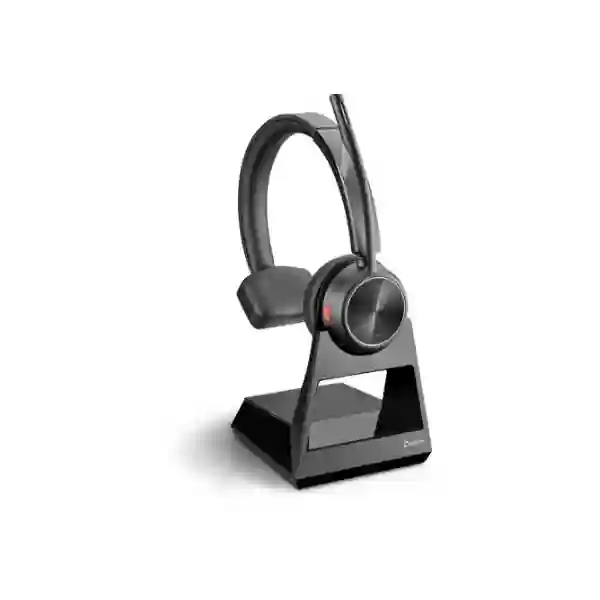
HP Poly Savi 7210 Office Monaural DECT Headset
Keep calls comfortable and hands free with a single-ear office headset built for desk-phone conversations, clear speech and movement away from the telephone.
Designed for reception teams, customer-service desks and office administrators. Check your exact phone model and call-control requirements before ordering.
Key specifications at a glance
Manufacturer reference specifications. Actual compatibility, reach and runtime depend on configuration and conditions.
Designed for desk-phone conversations that keep work moving
The Savi 7210 Office serves people whose working day revolves around a physical business telephone rather than a laptop meeting app. A receptionist transferring callers, a customer service representative confirming details, or an administrator coordinating appointments can keep both hands free while talking. The single-ear format leaves the other ear available for a colleague, visitor, or office announcement. This is a practical fit for organisations that need telephone communication to remain part of a shared workplace, even when employees move a short distance from their desks.
The most important buying question is not simply whether the headset is wireless. It is whether the office base can be connected correctly to the exact desk phone in use. The headset communicates with its charging base over DECT, while the base connects to the desk phone through a telephone interface cable. This approach is different from pairing a Bluetooth headset directly with a mobile phone. Before ordering for a team in Tanzania, establish the telephone make and model, its headset or handset port arrangement, and whether remote call answering is required.
Why the monaural wearing style matters
Monaural means that one cushioned earpiece covers one ear, leaving the other uncovered. Staff can follow the caller’s voice through the headset while remaining aware of sounds around the work area. That balance is useful at front desks and in offices where people need to speak briefly with nearby colleagues without removing the headset each time. The adjustable over-the-head design offers a familiar fit, and the flexible microphone boom can be positioned close to the mouth for consistent speech pickup.
A single-ear headset is not always the best choice. A busy open-plan area with sustained noise may make it difficult to concentrate when one ear remains exposed; a two-ear option can provide more passive separation from nearby activity. Conversely, a two-ear headset may reduce awareness of conversations at reception. Choose based on the actual environment, how often colleagues need to interact, and whether the user wants to hear surrounding sounds. For comfort, encourage short fit adjustments and sensible listening volumes rather than assuming one configuration suits every employee.
What DECT wireless actually does
DECT is the wireless link between the Savi headset and its office base. It allows a user to step away from the telephone during a conversation without carrying the handset or remaining physically attached by a cord. HP specifies wireless range of up to 120 metres from the base. This is a maximum product specification, not a promise of the same reach inside every office. Walls, building layout, metal fixtures and other local conditions can reduce the usable distance.
Think of the advertised range as a reason to test the working area, not a guarantee that a headset will cover an entire floor or compound. A sensible pilot checks the reception counter, nearby corridor, filing area and other places where staff actually walk during calls. The headset still depends on its base and the attached desk-phone service. It does not become a stand-alone cellular device merely because it can roam. The correct wireless-frequency version for the destination market should be confirmed with the supplier before procurement.
Compatibility starts with the desk-phone model
The HP Poly Savi 7210 Office Monaural DECT Headset is designed principally for desk phones. HP lists compatibility through the telephone interface connection and the Savi office base. Both analogue and IP desk-phone environments may be candidates, but real-world compatibility varies by phone model, port wiring and optional call-control accessories. A familiar phone brand alone is not enough evidence that every handset in that brand’s range will work identically.
Ask the person ordering to provide the complete telephone model number and, where possible, a photograph or description of the available headset connection. Confirm whether the phone has a dedicated headset socket or only a standard handset port. Record any existing phone-system requirements, such as a desk-phone headset button or separate electronic hook-switch interface. This simple check avoids a common purchasing mistake: assuming the headset itself pairs directly with the office phone over DECT. In a standard setup, the included base is the intermediary.
Not a general-purpose Bluetooth or USB headset
Some headsets can move between a computer, a smartphone and a desk phone. That is not the core design of this model. HP identifies the Savi 7210 Office as a desk-phone headset, with DECT communication to the office base and a wired telephone connection from that base. Buyers should not assume native Bluetooth pairing with a mobile phone, a USB connection for laptop calls, or built-in Microsoft Teams and Zoom softphone operation from the product name alone.
If the employee mainly works in browser calling software or video meetings, start by selecting a model explicitly supported for that computer workflow. If the work involves alternating between a desk phone and a smartphone throughout the day, compare multi-device products instead. For an office purchasing many units, this distinction can matter more than range or battery life. Confirm the primary calling device first; then evaluate microphone, wearing style and features. The appropriate headset is the one designed for the actual communications setup.
Clearer speech in a working office
The noise-cancelling boom microphone is designed to focus on the speaker’s voice and reduce some surrounding sound transmitted to the far end of a call. This can make telephone conversations easier when keyboards, nearby conversations and ordinary office movement are part of the background. The microphone is adjustable, making placement as important as the feature label itself. HP’s quick-start guidance recommends placing the microphone about two finger-widths from the corner of the mouth.
Noise cancellation should not be described as a silent-room guarantee or confused with active noise cancellation for the listener’s ear. The first refers to the microphone’s pickup of unwanted sound; the second concerns what a wearer hears. For a reception team, arrange a short test call from the normal work position and ask the person on the other end whether the voice remains intelligible during typical office activity. Encourage the wearer to speak naturally and reposition the boom if the level sounds distant or uneven.
Battery life and charging rhythm
HP specifies up to 12 hours of talk time on the rechargeable lithium-ion polymer battery, with a charging time under three hours. These figures describe product capabilities under applicable test conditions; actual usage can vary with settings, age of the battery and daily calling patterns. The included office base serves as the charging station, creating a predictable place to return the headset between shifts or after extended conversations.
For an all-day reception duty, build the charging habit into the workflow. Dock the headset when no longer needed, check the base’s battery indicator and avoid starting a long calling period with an almost empty battery. A short top-up may help between calls, but it is not the same as a full charge. In a shared workplace, assign responsibility for returning equipment to the correct base. This is particularly helpful when several employees use similar-looking headsets and managers want to reduce misplaced devices or missed calls caused by low batteries.
Range, movement and realistic office testing
A maximum range of up to 120 metres is attractive for staff who need to retrieve documents, check a printer, or consult a colleague while still listening to a caller. It is less useful to treat the number as an indoor coverage measurement because every building is different. A corridor with clear line of sight may behave very differently from a storage room behind several thick walls. Walking tests are therefore a necessary part of the rollout, especially where a single office contains multiple rooms.
Begin near the charging base and make a test call. Walk the usual route at a natural pace and listen for changes in sound, warning tones or dropouts. Repeat the test at busy times if the office has several wireless systems. Keep critical conversations within an area where the call remains stable, and do not claim a tested service area until staff have verified it. A wireless headset improves mobility, but users still need a sensible process for transferring callers, consulting other staff and protecting customer information when walking through public areas.
Simple controls for frequent callers
The headset includes controls for answering and ending calls, mute, volume adjustment and power. Those functions reduce the need to reach for the phone during parts of a conversation. Mute is particularly useful when the user needs a quick confidential discussion with a colleague without sending that side conversation to the caller. Volume controls let the wearer adjust what they hear without changing the telephone’s broader settings.
Call handling is nevertheless dependent on how the desk phone is connected. In basic configurations, the wearer may need to press the telephone’s headset button or lift the handset as well as using the headset call button. The ability to answer and end calls fully remotely may require a compatible electronic hook-switch cable or a mechanical handset lifter. Explain this distinction in staff training, because a user who expects every incoming call to be answered with one headset tap may otherwise think the equipment is faulty. Check both audio and call-control behaviour before deployment.
What an EHS cable changes
An electronic hook switch, usually shortened to EHS, connects a compatible desk phone and headset system so certain call-control actions can be performed remotely. With the correct phone-specific accessory, a user may be able to answer or end a desk-phone call while away from the telephone. That can be valuable for a reception worker who must walk to a nearby cabinet or service point without abandoning a caller. HP’s setup information treats the EHS cable as a separate accessory rather than an item automatically included in every standard package.
Not every desk phone uses the same EHS interface. Before purchasing an accessory, confirm the phone’s make, exact model, applicable compatibility guidance and whether the office base supports the required wiring. Another option on certain phone setups is an HL10 handset lifter, which physically raises a telephone handset; this is also an optional accessory. Do not choose between these arrangements by appearance alone. Test the ring alert, incoming answer, outgoing call, and end-call sequence with the actual telephone so that the user understands exactly what works.
How the office base fits into installation
The office base is more than a charging cradle. It is the connection point between the wireless headset and the desk phone, contains setup controls, and provides status indicators. HP’s quick-start instructions describe connecting the base to the dedicated headset port when the desk phone has one, or using an alternative connection through the handset port when it does not. The correct choice depends on the available sockets and the telephone’s configuration.
Plan a stable location for the base near a suitable power connection and within cable reach of the phone. Avoid stretching cables across walkways, and ensure the headset can be docked without being knocked off a crowded desk. After connecting power and the telephone cable, let the headset charge and check the indicators. Then carry out actual incoming and outgoing calls. If the user’s telephone needs an accessory for remote hook-switch operation, complete that installation according to the phone-specific instructions rather than relying on a generic cable.
A practical first-time setup sequence
Start by recording the phone model and inspecting its headset or handset connection. Position the base beside the phone, connect the supplied telephone interface cable through the appropriate port and connect the base’s power adapter. Place the headset in its charging cradle, confirm the charging indication and give it the initial charge specified in HP’s quick-start instructions. Turn on the headset and position the microphone boom near the mouth.
Next, follow the desk phone’s normal procedure to obtain a dial tone. If the phone does not provide automatic remote call control, use the phone’s headset key or lift its handset before using the headset call button. Place a test call to a colleague. Check speech in both directions, adjust the volume, test mute and confirm what must be done to end a call. Finally, test an incoming call. If audio is missing, check cable routing and the base’s telephone configuration before deciding that the headset is defective. Document the final working settings for other staff.
Sound settings and intelligibility
The system supports narrowband and wideband audio modes, and HP lists different speaker-bandwidth figures for these modes. Wideband can support a fuller speech frequency range when the telephone environment permits it. However, the actual sound heard during a call also depends on the handset, voice network and the far-end device. Switching modes cannot compensate for a weak telephone connection or make an incompatible desk phone work.
HP’s quick-start material describes controls for the base’s wideband or narrowband setting and suggests narrowband when the headset appears to lose charge too quickly. Organisations should treat this as a setting to test, not a compulsory performance improvement. Begin with clear, intelligible speech on a working telephone connection, then review sound quality and battery performance together. Keep listening levels comfortable, and avoid increasing volume simply to overcome constant office noise. If a team is having persistent sound problems, assess the environment and phone configuration as well as the headset.
Security and privacy in telephone work
HP’s regional product specifications describe DECT security features including encryption. These features are part of the wireless headset system, but they do not replace the organisation’s normal confidentiality practices. A user can still disclose sensitive information by speaking in an open reception area, leaving the desk phone accessible, or reading personal details aloud where visitors can hear them. Treat the headset as one component in a broader safe-calling process.
Create a sensible rule for where customer and employee information may be discussed, especially in shared workspaces. Teach staff to recognise the headset’s mute state rather than assuming silence, and to end calls deliberately before entering public areas. For organisations operating under specific data-security or telecommunications obligations in Tanzania, verify the applicable requirements for their own business and the exact equipment variant. The product’s communication-security features should not be presented as proof of universal legal or regulatory compliance.
Shared offices and multi-headset working
HP lists pairing support for up to four devices in the product specifications, and product literature discusses the possibility of multi-headset conferencing from one Savi office base. This can support controlled participation in a conversation, subject to the relevant subscription and conference procedure. The feature is different from plugging four desk phones into one base, and it should not be interpreted as a replacement for the calling platform’s queue or conference service.
For routine operations, each regular wearer may still benefit from a consistent, labelled headset and charging location. If supervisors occasionally need to join a live training call, confirm the supported conference workflow in the exact user guide before building a process around it. Decide who may join a call, how the customer will be informed when appropriate, and how the team ends the shared session. These details matter particularly in support and service environments where customer confidentiality and clear responsibilities are more important than adding another piece of equipment.
Customer service, reception and administration scenarios
At reception, an employee may need to answer a caller, confirm an appointment and look up a record at a nearby workstation. The monaural earpiece lets that employee remain aware of arriving visitors while the hands-free headset keeps the telephone conversation active. In an administrative office, the user may need to refer to paper files or check a printer while explaining information over the phone. In both cases, test the actual roaming route and ensure the caller is not left without an explanation during a long pause.
For helpdesks that already use supported desk phones, hands-free audio may make it easier to type ticket notes while talking. For order processing, users can check reference numbers and product details without holding a handset against the shoulder. In a small clinic or professional practice, staff may appreciate hearing the front-counter environment with one ear uncovered, but privacy procedures remain essential. These are examples of how the headset can fit a workflow, not a claim that a particular business sector or facility has approved or purchased the product.
Choosing between a mono and two-ear headset
Select the Savi 7210 when the wearer needs one ear free to remain attentive to nearby work. The alternative Savi 7220 belongs to the same office-headset family and uses a two-ear wearing style, making it worth evaluating where environmental sound is distracting. Neither format is universally better. One encourages awareness and conversation with neighbours; the other can create a more focused listening experience for callers working in a consistently busy room.
Base the decision on a trial with representative staff rather than the job title alone. Ask whether the employee repeatedly removes the headset, struggles to hear caller details, or prefers hearing colleagues without interruption. Check whether the microphone captures their voice clearly in the actual office. Consider desk-phone compatibility before comparing wearing styles, because a comfortable headset that cannot interface with the office telephone still fails the buying requirement. For large teams, standardise only after evaluating the most demanding day-to-day call scenarios.
Comparing DECT desk-phone equipment with corded options
A corded headset can be a straightforward fit when the user remains at the same workstation for every call and a compatible phone connection is available. It also avoids managing a headset battery. The Savi 7210 makes more sense when staff benefit from moving a limited distance while staying connected, and when having a consistent base station suits the desk layout. Neither choice automatically improves telephone-system call quality; that depends on the complete communications chain.
When comparing costs, consider the full deployment rather than the headset alone. A wireless desk-phone unit may need a compatible EHS lead for the remote-control experience the user expects. A corded alternative may require its own connection adapter depending on the phone. Training, maintenance, spare cushions and replacement units can also matter for an organisation outfitting several desks. Request a configuration-based quotation so that optional accessories are visible before approval, not discovered only after boxes have been opened.
Purchase checklist for Tanzanian business buyers
Before requesting a quote, provide the product name, number of headsets required, and the make and model of each desk phone. State whether employees will use the headset only at their desks, walk to nearby rooms, or need to answer calls remotely. Confirm whether the office has a dedicated headset port and whether a phone-specific EHS cable or handset lifter is necessary. Ask for the regional headset version appropriate for the destination before finalising a purchase decision.
Commercial details should be confirmed for the exact quotation. Ask FourTeck Tanzania to verify the offered configuration, accessory inclusions, availability, applicable warranty arrangements, total price in the offered currency and delivery or collection options. Those details are not assumed here. If the organisation operates multiple offices, clarify whether every location uses the same telephone hardware, because one accessory choice may not suit the whole estate. A complete device list is usually more useful than a broad request for a wireless office headset.
What is included in the standard manufacturer package
HP’s product information lists a wireless headset, office base, AC power adapter, interchangeable AC plugs, telephone cable, safety guide, warranty card and quick-start guide. These are the reference contents for the manufacturer’s described package; the exact commercial bundle should still be checked for the supplied regional version. The office base is fundamental to this desk-phone system, so a listing described as ‘headset only’ should not be treated as equivalent to a complete new installation.
An EHS cable or HL10 lifter is not something to assume in the normal package. Such accessories are selected according to the telephone and desired call-control functionality. When checking a supplier’s offer, distinguish the complete system from a replacement headset top, an additional charging item or a phone-specific cable. Ask the salesperson to itemise any accessories, especially when several phone models are in service. This prevents the installation team from arriving with the headset but without the interface required for the customer’s chosen call-control behaviour.
Care, cleaning and day-to-day ownership
Make the headset easy to look after by providing a clear place for its base, encouraging docking when idle and assigning a sensible cleaning routine consistent with the manufacturer’s care instructions. Staff should handle the flexible microphone boom gently, avoid pulling the telephone cable to move the base, and keep liquids away from electrical connections. Check the fit of the earpiece periodically and replace worn consumable parts only with compatible items.
When multiple people share an office, agree whether headsets are assigned individually or shared and cleaned between users. A simple sign-out or desk-label process can help in a busy reception. Inspect cables and power adapters if the base is moved frequently. Do not attempt to open the battery housing or improvise a replacement power supply. If a headset shows physical damage, erratic charging or unexpected overheating, stop using that unit and arrange an appropriate support assessment rather than continuing to force it into operation.
Troubleshooting before replacing the headset
If a user cannot hear a dial tone, first check the desk phone’s own audio path and whether its headset or handset mode has been activated. Inspect both ends of the telephone interface cable and make sure the base is powered. HP’s setup guidance notes that some desk phones need a different base configuration; that setting should be checked against the telephone model. If the caller cannot hear the user, verify that mute is off and the microphone is positioned correctly.
If calls drop when someone walks away, repeat the test closer to the base and review the route rather than assuming the advertised maximum range applies across walls. If the battery runs down earlier than expected, check the docking contacts and charging indicator, review audio-mode settings, and note the unit’s age and calling pattern. For remote answering problems, identify whether an EHS accessory or lifter is installed and compatible. Recording the precise symptom, phone model and base setup makes later support considerably more efficient.
Rolling out a consistent setup across several desks
A small pilot can save considerable effort when installing headsets for a larger service team. Select a representative desk phone, connect one system with the correct cable and confirm outgoing audio, incoming audio, mute, volume and call ending. Then check an incoming call and any optional remote-control accessory. Ask a real user to wear the headset during an ordinary shift and report comfort, sound clarity, charging behaviour and coverage in places they normally visit.
Once the pilot is satisfactory, record the telephone model, connection method, base settings and accessory identifiers for that deployment. Make a concise staff guide showing which telephone button must be used when answering a call and where to return the headset for charging. Test new installations instead of assuming that all ports behave identically. This approach is particularly useful when an organisation has upgraded some of its desk phones but retained older models elsewhere. Clear records also make future equipment replacement easier.
How to make a confident buying decision
The strongest reason to choose this product is the combination of a single-ear office wearing style, hands-free movement over a DECT link, a dedicated desk-phone base and a microphone intended for everyday business speech. The reasons to pause are equally concrete: an unverified phone model, a requirement to connect to a laptop or smartphone instead, uncertain remote-answer needs, or an environment where the single exposed ear makes conversations difficult to follow.
Start with the work rather than a headline specification. Identify the main calling device, ask the user how far they need to walk, assess local noise and confirm whether colleagues must remain audible. Then check the interface and any additional accessory. If these conditions align, the Savi 7210 Office is a focused choice for desk-phone calls. If they do not, another headset configuration may be more appropriate. For a purchase in Tanzania, request a product-and-compatibility review rather than relying on a generic wireless-headset description.
Frequently asked questions
These answers address the purchase and installation details that matter when choosing a desk-phone headset for an office.
Does the Savi 7210 Office connect directly to a mobile phone?
This model is primarily a desk-phone headset. The wireless connection is between the headset and its dedicated DECT office base, while the base interfaces with the desk phone. Do not assume it can be discovered or paired as a normal Bluetooth headset by a mobile device. If staff need smartphone calls, ask for a product designed and verified for that requirement. List the devices each employee needs to answer before choosing between single-purpose desk-phone equipment and multi-device alternatives.
Can I use it for laptop meetings or a softphone?
HP describes the Savi 7210 Office around desk-phone use. It should not be sold as a plug-and-play USB laptop headset or as an automatically compatible accessory for every desktop calling application. If Microsoft Teams, Zoom or another computer-based service is the primary workflow, confirm an appropriate computer-compatible headset model instead. If users alternate between desk-phone and computer calls, ask the supplier to recommend a solution that explicitly supports both devices and its intended call controls.
Will it work with any IP desk phone?
No universal model-by-model compatibility should be assumed. An IP phone can still provide a headset interface suitable for a Savi office base, but wiring, port mode, handset behaviour and electronic hook-switch support vary. Share the exact desk-phone make and model before ordering, and clarify whether basic audio is sufficient or whether staff also need remote answering. A compatibility check should cover real incoming and outgoing calls, not merely whether the connection cable physically fits the socket.
How far can I walk away from the base?
HP specifies a wireless range of up to 120 metres from the office base. That is a maximum and should not be converted into a guaranteed indoor service radius. The working distance can change depending on walls, construction materials, layout and local wireless conditions. Test the actual path employees take while speaking to customers. A good test includes the places where a caller might remain on the line, such as a filing area, nearby office or printer station.
How long does the battery last?
The stated maximum talk time is up to 12 hours, and HP quotes charging in under three hours. These are reference specifications, not a promise that every unit will deliver exactly the same results throughout its service life. Usage patterns, settings and battery condition all matter. Return the headset to the charging base between duties where practical, monitor the battery indication and plan a full recharge before an extended shift. Check unusual drain with the correct troubleshooting procedure.
Can calls be answered while I am away from the telephone?
Remote answering and ending can depend on the particular desk phone and connection method. On a basic setup, you may need to press the phone’s headset key or physically lift its handset as well as operating the headset. For compatible phones, an optional EHS cable can provide improved remote call control; some configurations use an optional handset lifter. Verify the exact accessory and test incoming-call behaviour before promising single-button remote operation to a receptionist or busy support worker.
Does the headset remove surrounding noise for the person wearing it?
The product has a noise-cancelling boom microphone intended to reduce some background sound transmitted to the person at the other end of the call. That is not the same as guaranteed active noise cancellation for the ear wearing the headset. The monaural design deliberately leaves one ear uncovered. Employees in very noisy areas may prefer to compare two-ear headsets and test how clearly they can hear callers, rather than relying on the microphone feature to block room noise.
What is the advantage of a single-ear design?
A single-ear, or monaural, design lets the user hear the caller on one side while remaining aware of the office environment on the other. It can be particularly practical for reception staff who need to acknowledge visitors or respond to brief colleague questions. This comes with a tradeoff: surrounding noise remains noticeable. The most suitable arrangement depends on the workspace, level of distraction, frequency of face-to-face interaction and personal comfort. Trial fitting is useful before deploying many units.
Is the charging base included?
HP’s standard package description includes the wireless headset and an office base, as well as power and telephone connection components. However, confirm what the exact seller listing includes because a replacement headset-top product is not the same as a complete office system. The base provides the wireless link to the headset and serves as its charging station. Make sure the commercial quote identifies a complete kit if the organisation is installing the model for the first time.
Does the box contain an EHS cable?
Do not assume so. HP’s quick-start documentation identifies EHS cables and the HL10 handset lifter as optional arrangements. An EHS cable must be selected according to the desk phone, and it should be included in the quotation only when needed and properly matched. Give the supplier the phone’s full model number and describe how calls should be answered. This makes it easier to distinguish a basic audio connection from a configuration with compatible remote call control.
Can several headsets join a call?
The Savi office system supports specified multi-device pairing and conferencing arrangements, with product specifications referring to up to four paired devices. The correct procedure and limits should be checked against the model’s current user guidance. Do not mistake this for a four-line telephone system or assume it connects four different desk phones at once. If a supervisor needs to join customer calls for training, agree on a clear operating procedure and appropriate customer-privacy practices before using conferencing in production.
Which radio-frequency version is right for Tanzania?
Poly Savi 7210 Office products are marketed in regional variants, including variants with different DECT frequency bands. The headset name alone does not prove which variant a particular supplier will provide or whether it is appropriate for deployment in Tanzania. Request the precise manufacturer’s part number and check the offered regional configuration and any applicable local requirements. Avoid buying a foreign-market unit solely because a specification sheet for a similarly named model looks attractive.
How can I decide between Savi 7210 and Savi 7220?
The key wearing-style distinction is single-ear versus two-ear. Savi 7210 is monaural; Savi 7220 is the dual-ear member of this desk-phone family. Choose the single-ear version where hearing colleagues and visitors matters. Consider a two-ear arrangement where the employee needs more separation from surrounding conversations. The right choice still depends on headset comfort, desk-phone compatibility, the working environment and optional accessory needs. Compare those factors in a user trial rather than choosing by model number alone.
What should I provide when requesting a quotation?
State the full product name, the number of units required, the exact desk-phone makes and models and whether remote answering away from the desk is essential. Include any known phone accessory or port information. Ask for confirmation of the offered regional variant, contents, compatible EHS or lifter accessories where needed, applicable warranty terms, pricing and fulfilment details. For a multi-office deployment in Tanzania, identify which phone model is used at each site so the quotation can distinguish different connection requirements.
What if no sound is heard after setup?
Confirm that the desk phone works normally and that its headset or handset mode has been selected. Check base power, telephone cable connections, headset charge and mute status. Review the base’s phone-configuration setting for the telephone model, and try a basic call before assessing optional EHS functions. If the problem persists, record whether the failure affects incoming audio, outgoing audio or call control specifically. That distinction helps the support team identify the appropriate next check instead of replacing working equipment unnecessarily.
Is a local price or delivery date confirmed?
No Tanzania price, stock quantity or delivery time is stated on this page because the exact commercial offer has not been verified. A customer should request a current quotation for the required number of complete units and any phone-specific accessories. Confirm whether the requested model variant can be supplied, what is included, any applicable warranty arrangements and the proposed fulfilment options. This avoids treating pricing or availability in another country as evidence of what a Tanzania customer will receive.
Request a desk-phone compatibility check and quote
For the HP Poly Savi 7210 Office Monaural DECT Headset, share your desk-phone manufacturer and model, the quantity required and whether staff need remote call answering. Ask FourTeck Tanzania to confirm the suitable regional kit, any phone-specific optional accessories, and the current commercial offer. This is the most reliable way to match the wireless headset to an existing business telephone setup.




Reviews
There are no reviews yet.