
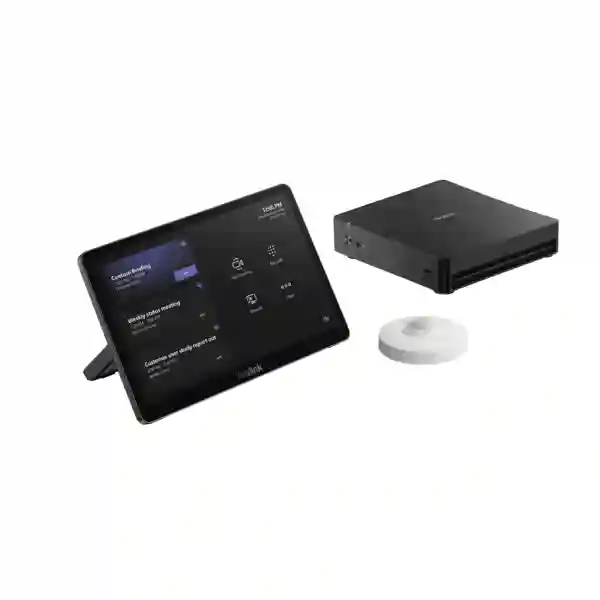
Yealink MCore Kit Tanzania
The Yealink MCore Kit is the computing and room-control foundation for a professional Microsoft Teams Rooms deployment. Yealink’s current generation pairs the MCore 4 conferencing PC with the MTouch Plus touch controller, creating a purpose-built platform that can be combined with appropriate cameras, microphones, speakers, displays and room accessories according to the size and layout of the meeting space. For Tanzanian organisations planning a new boardroom, upgrading an older room system or standardising meeting spaces across several sites, the value of the MCore Kit is its ability to turn a collection of AV components into a managed, room-oriented collaboration environment.
FourTeck Tanzania approaches the product as part of a complete room design rather than an isolated mini-PC. Before quotation, buyers should confirm the exact MCore Kit SKU, Microsoft Teams Rooms account and licensing plan, display count, camera choice, microphone coverage, speaker strategy, wired network readiness, internet capacity, cable routing, power protection and mounting method. This reduces the risk of ordering a capable core platform but discovering later that room acoustics, displays, cabling or compatible peripherals do not match the intended experience.
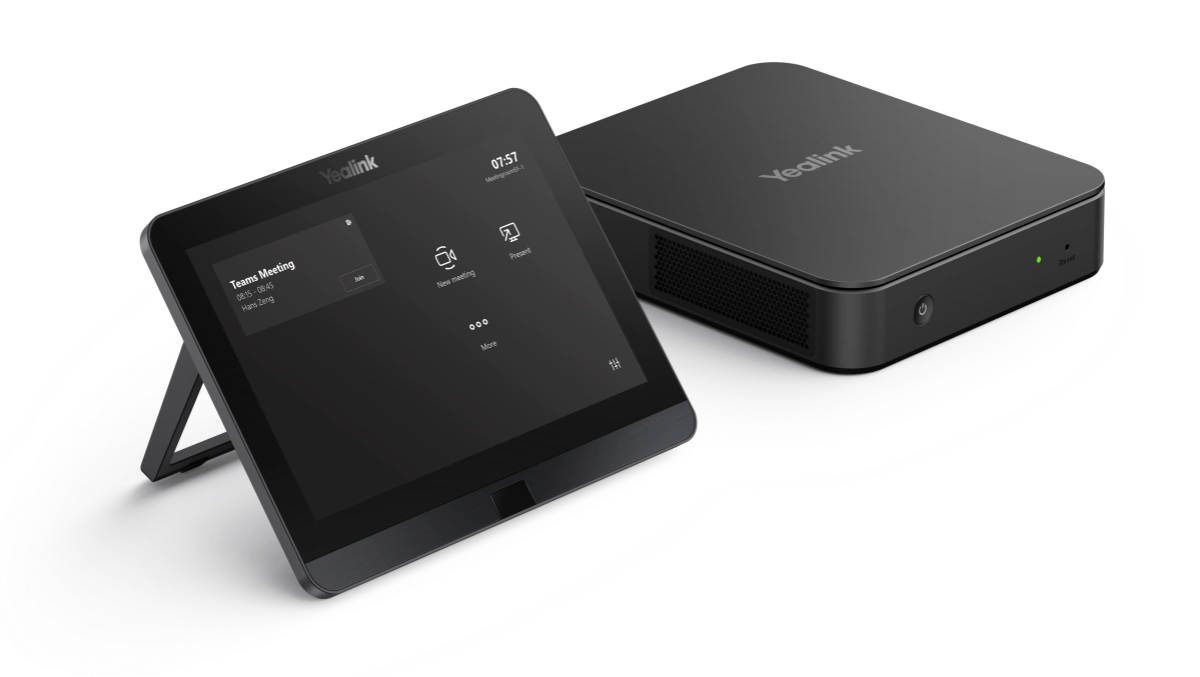
MCore 4 is designed as a conferencing computer rather than a general office PC, with interfaces and room-control features intended for installed meeting spaces.
MTouch Plus provides an 11.6-inch full-HD touch interface for meeting control and supports wired content input through HDMI or USB-C.
The platform can be paired with compatible Yealink video and audio components, letting the overall room design match space, seating and collaboration needs.
MCore 4 specifications include TPM 2.0, UEFI Secure Boot and kernel DMA support, with AV-LAN separation designed to help isolate room AV devices.
What is the Yealink MCore Kit?
The Yealink MCore Kit is the central computing and touch-control layer used in Yealink Microsoft Teams Rooms on Windows designs. Yealink describes the current platform around MCore 4, its fourth-generation conferencing PC, and MTouch Plus, an 11.6-inch room controller. The combination is intended for organisations that want a fixed meeting-room experience where the room itself is the Teams endpoint: users enter, see scheduled meetings, join from the controller and share content without depending on one employee’s laptop to run the entire meeting.
This distinction matters for IT and facilities teams. A dedicated room system can be managed, standardised and documented more predictably than a bring-your-own-device setup that changes with every user. The room can have a defined display arrangement, camera position, microphone coverage, speaker path, network connection and control interface. The MCore Kit does not by itself determine the entire quality of the room; it provides the core around which the camera, audio and display solution is built. That is why procurement should treat the kit and the AV environment as one design decision.
For organisations reviewing broader collaboration options, the FourTeck Tanzania technology portfolio explains how video conferencing, networks, displays and room infrastructure fit together. The FourTeck Tanzania business technology shop is useful when a project also requires displays, network hardware or supporting equipment rather than only the MCore Kit.
Verified current-generation MCore 4 platform highlights
| Area | Verified specification or capability | Why it matters in a room project |
|---|---|---|
| Processor | Intel Core Ultra 5 125H | Provides a modern compute platform with integrated NPU capability for current collaboration workloads. |
| Memory | 16 GB DDR5 | Supports the room application and conferencing workload on a dedicated appliance-style PC. |
| Storage | 256 GB SSD | Provides local system storage for the Windows-based room platform. |
| Display outputs | 1 × HDMI 2.1 output and 2 × HDMI 2.0 outputs | Supports multi-display room designs subject to the selected Teams Rooms configuration and room plan. |
| Content input | 1 × HDMI input | Supports wired auxiliary content input as part of a controlled room workflow. |
| USB | 4 × USB 3.0 Type-A | Provides connectivity for supported room peripherals and service requirements. |
| Network | Gigabit Ethernet plus a dedicated LAN port for AV network | Helps support a structured separation between room AV connectivity and the wider business network. |
| Wireless | Wi-Fi 802.11 a/b/g/n/ac/ax and Bluetooth 5.2 | Adds wireless capability, although a wired network is generally the stronger baseline for a fixed room system. |
| Security foundations | TPM 2.0, UEFI Secure Boot and kernel DMA support | Gives IT teams a more enterprise-oriented security foundation for a shared room device. |
Exact bundle contents vary by MCore Kit SKU and generation. A quotation should therefore identify the precise product code and included controller, sensor, cables, licences and accessories rather than relying only on the family name.
MTouch Plus room control and content sharing
MTouch Plus is the user-facing control surface associated with the current MCore Kit platform. Yealink specifies an 11.6-inch narrow-bezel IPS display with 1920 × 1080 resolution. It can be deployed on a table, fixed to a table or mounted on a wall, which gives room designers flexibility when the meeting table, cable route or user flow makes one position more practical than another. The screen angle and support frame can be adjusted, allowing the console to be positioned for comfortable visibility rather than treated as a flat accessory.
The controller supports wired sharing through HDMI and USB-C video input. Wireless sharing is available in supported designs with Yealink’s WPP30 accessory. For organisations deciding between wired and wireless presentation workflows, it is useful to consider guest access, security policy, laptop port availability and the number of people likely to share during a meeting. A room used mostly for internal scheduled Teams calls may prioritise a controlled wired path, while a customer-facing boardroom can benefit from a clearly documented guest-sharing method.
The controller is also where simplicity becomes visible. Users should not need to understand the underlying Windows computer, USB topology or display routing. Their task is to enter the room, identify the meeting, join, manage basic controls and present content. A successful MCore Kit project therefore combines technical integration with a deliberately simple operating experience.
Compatibility, cameras, audio and displays
The MCore Kit should be selected together with the video and audio design. Yealink’s MVC ecosystem includes options for different room sizes, from compact all-in-one camera systems to PTZ cameras, multi-camera processing and installed audio. The correct combination depends on the distance from participants to the camera, room width and depth, seating orientation, number of people, ceiling height, acoustic conditions and whether the meeting requires presenter tracking, speaker tracking or wide participant coverage.
Displays deserve equal attention. A single screen can be sufficient in some rooms, while dual displays may provide a better balance between remote participant video and shared content. Screen size should be related to viewing distance and the type of material presented. A spreadsheet-heavy meeting can need larger text legibility than a room mainly used for face-to-face discussion. Camera placement should also preserve a natural eye line; mounting a camera too high above a very large display can make remote conversations feel less direct.
Audio frequently determines whether a room feels professional. Small meeting rooms can work well with integrated or compact audio, but larger boardrooms may need expanded microphone coverage, ceiling or table microphones, DSP and installed speakers. Hard walls, glass surfaces, air-conditioning noise and long tables affect microphone pickup and echo behaviour. FourTeck’s technology services overview provides context for integrated planning when the project includes cabling, networks, displays and room installation as well as the conferencing equipment itself.
Deployment checklist before ordering
Do not assume every MCore Kit contains the same controller, sensor or generation of PC. Record the exact Yealink part number on the quotation.
Provide dimensions, seating count, table shape, display wall, camera position, ceiling height and any restrictions on drilling or cable routes.
A Microsoft Teams Rooms account is required for a Teams room. Licensing and tenant preparation should be confirmed with the organisation’s Microsoft administrator.
Use a reliable wired connection where practical, confirm VLAN and firewall policy, and verify that internet performance supports the expected meeting workload.
Select cameras and microphones for the actual participant positions. A powerful room core cannot compensate for poor framing or distant audio pickup.
Confirm sockets, UPS protection, display mounts, controller placement, PC mounting and cable containment before installation day.
Yealink MCore Kit Tanzania
For organisations searching for Yealink MCore Kit in Tanzania, the main buying decision is usually not whether the product can run a professional Microsoft Teams Room; it is how the exact kit will fit the organisation’s meeting spaces, network policy and collaboration standards. Tanzanian businesses may be planning one executive boardroom, several standard meeting rooms or a repeatable design for branches. Those three scenarios require different procurement thinking. A single boardroom can be optimised around one room’s layout, while a multi-room project benefits from standardisation of displays, camera families, microphone approach, cable routes, naming, documentation and support procedures.
A useful Tanzania quotation request should identify the number of rooms, room dimensions, approximate seating, preferred Teams workflow, existing displays and whether the site already has structured cabling to the meeting table and display wall. Network readiness is particularly important because a premium room system still depends on reliable access to Microsoft 365 services. Where the meeting room network is shared with office users, guest Wi-Fi, CCTV or other traffic, VLAN design and firewall policy may need review. Power stability also deserves planning; the room computer, displays and network path should be considered together when determining UPS protection.
For procurement teams, the phrase “Yealink MCore Kit Tanzania price” should lead to a scope discussion before a final comparison. One quotation may include only the core kit, while another may include the camera, audio, display mounting, cabling, Microsoft room licence, installation and configuration. Comparing only the headline amount can hide material differences. Ask every supplier to identify the exact Yealink SKU, included cables and accessories, whether RoomSensor is included, which camera and microphone model is proposed, and what deployment work is included.
The strongest outcome is a room that staff can use without an IT technician attending every call. That means clear controller placement, predictable meeting join, sensible content sharing, suitable camera framing, understandable audio behaviour and a documented support path. FourTeck Tanzania can help translate those operational requirements into a product and deployment checklist before quotation.
Yealink MCore Kit Dar es Salaam
Buyers looking for Yealink MCore Kit in Dar es Salaam are often solving a hybrid-meeting problem that extends beyond one device. Corporate offices, professional-services firms, project teams, training organisations and regional headquarters can have frequent meetings with colleagues outside the city or outside Tanzania. In these environments, a dedicated Microsoft Teams Room can reduce the variation that comes from asking different users to connect personal laptops, find USB cameras, change audio devices and reconnect display cables for every call. The MCore Kit provides a consistent computing and control layer around which the room can be standardised.
For a Dar es Salaam boardroom, start by measuring the room and identifying the participant positions that matter most. A long table may need different camera and microphone coverage from a classroom-style training room. Glass partitions and hard surfaces can increase reflections, while air-conditioning and traffic noise can affect audio capture. Camera selection should be based on distance and framing requirements, and microphone placement should be tested against the actual seating pattern rather than chosen only from a catalogue specification.
Network planning should cover the wired connection to the MCore system, firewall access required by Microsoft Teams, switch capacity, VLAN policy and any corporate security controls applied to room devices. If the office uses dual internet connections, SD-WAN or other resilience measures, the collaboration room should be included in failover testing because a room that loses cloud access becomes unusable even when the local AV devices are working. It is also sensible to plan UPS protection for the room computer, display electronics and upstream network equipment where business continuity is important.
When requesting a Dar es Salaam quotation, include the preferred installation location, number and size of displays, whether a camera is already owned, any existing microphones, the Microsoft 365 administrator contact and the target date for room handover. FourTeck Tanzania’s verified contact page lists Dar es Salaam among its office locations, and the project discussion can begin with exact room and platform requirements rather than an unqualified request for a generic “video conference system.”
Yealink MCore Kit Mwanza
A Yealink MCore Kit deployment in Mwanza can be useful for organisations that need a permanent, business-managed room for meetings with headquarters, branches, suppliers, customers or remote specialists. The procurement process should begin with the role of the room. An executive meeting room may prioritise clear participant framing and premium audio, while a training room may need wider camera coverage, easy laptop presentation and larger displays for shared material. A project office may value simple one-touch meetings and a repeatable configuration that can be supported remotely.
Connectivity is one of the most important design inputs. Microsoft Teams Rooms relies on cloud connectivity, so the WAN path should be evaluated for consistency as well as advertised speed. The room should ideally use a wired Ethernet connection from a managed switch, with appropriate firewall rules and segmentation. If a site has intermittent connectivity or relies on a link shared with large data transfers, cloud backups or CCTV uploads, those competing traffic patterns should be understood before commissioning. Quality-of-service policy and link monitoring may be appropriate depending on the wider network design.
Mwanza buyers should also consider the practical installation environment. Confirm where the MCore 4 will be mounted, how the controller cable reaches the table, where HDMI runs terminate, how display power is protected and whether the room can be serviced without dismantling furniture or wall finishes. Cable management is a major part of perceived quality. A system that looks clean, is labelled properly and provides accessible service loops is easier to maintain than one installed around loose adapters and temporary extension leads.
For quotation accuracy, provide room photographs or a floor plan, seating count, display requirements and whether wireless content sharing is required. If users regularly host guests, agree on the sharing workflow before deployment so visitors do not need administrative access or complex instructions. The MCore Kit is best treated as the stable heart of the room, with every supporting component selected around user behaviour and the site’s infrastructure.
Yealink MCore Kit Arusha
For organisations evaluating Yealink MCore Kit in Arusha, the most valuable question is how the meeting room will support real business communication. Hotels, tour and travel businesses, NGOs, educational organisations, offices and project teams can have very different conferencing patterns even when they all use Microsoft Teams. A management boardroom can require an executive experience with controlled camera framing, while a project coordination room can prioritise reliable screen sharing, clear speech and easy remote participation. The MCore Kit gives the room a dedicated Windows-based collaboration core, but the surrounding AV design should still be tailored to the intended use.
Room acoustics deserve early attention. Large windows, tiled floors and hard walls can create reverberation that reduces speech clarity for remote participants. The correct microphone strategy may involve an all-in-one device, table microphones or installed ceiling audio depending on room size and aesthetics. Camera placement should consider both the field of view and the eye line to the displays. If participants repeatedly look far away from the camera to see remote attendees, the call can feel less natural even when image quality is excellent.
Arusha projects should also document the IT prerequisites. A dedicated Teams Rooms resource account, appropriate Microsoft licensing, a reliable wired network, DNS and internet access, time synchronisation and approved security policy are all part of room readiness. Organisations with centralised IT outside Arusha can benefit from documenting admin access, device names, switch ports, VLANs and support contacts so troubleshooting does not depend on local memory. Remote management processes should be agreed before handover.
When asking for an Arusha quote, include the exact room location, display size, seating capacity, preferred camera behaviour, presentation requirements and any existing equipment that must be retained. FourTeck Tanzania’s current contact page lists an Arusha office location, but scope, availability, deployment timing and the exact Yealink configuration should still be confirmed for each individual project rather than assumed from location alone.
Yealink MCore Kit Dodoma
A Yealink MCore Kit project in Dodoma can suit organisations that need a controlled Microsoft Teams meeting-room environment for scheduled collaboration, policy discussions, project reviews, training or coordination with remote offices. Dedicated room systems are particularly useful where meetings are frequent and different groups use the same space. Instead of every user rebuilding the connection from a laptop, the room has a known controller, camera, microphone, speaker, display and account configuration that can be documented and supported consistently.
For meeting spaces used by senior teams or multiple departments, privacy and management policy can be as important as camera quality. IT administrators should define how the Teams Rooms account is provisioned, who can manage the Windows device, how updates are handled and how the room is segmented from other endpoints. MCore 4’s enterprise security foundations, including TPM 2.0, secure boot and kernel DMA support, give the device a suitable technical base, but security still depends on correct tenant, account, network and operational configuration.
Power and network continuity should be considered as a chain. Protecting only the display does not help if the access switch or router loses power. Conversely, a stable network does not help if the room computer restarts during an important session. Identify the critical components and decide what level of UPS runtime is appropriate for the site. The same approach applies to internet resilience: where meetings are operationally important, understand how the site behaves during provider outages and whether failover has been tested with real-time conferencing traffic.
A Dodoma quotation should state whether the request is for the MCore Kit alone or a full room solution. Include camera, audio, display, mounts, cabling, wireless presentation and installation expectations explicitly. FourTeck Tanzania’s contact page lists Dodoma among its office locations, and detailed room information can help turn the enquiry into a practical bill of materials instead of a generic hardware price.
Yealink MCore Kit UAE
Organisations sourcing Yealink MCore Kit for the UAE often have a strong need for standardised Microsoft Teams Rooms across headquarters, branches, customer meeting spaces and regional offices. In this type of environment, the procurement objective is frequently consistency rather than a one-off room. A repeatable room standard can define approved display sizes, camera families, touch-controller placement, cable routes, naming conventions, network segmentation and support procedures. The MCore Kit is well suited to this approach because the compute and control layer remains predictable while compatible cameras and audio can be sized to individual rooms.
For UAE projects, buyers should distinguish between a product-only request and an integrated AV deployment. The core hardware may represent only part of the total project. Mounting hardware, structured cabling, floor boxes, table connectivity, display brackets, microphones, speakers, camera mounts, room licences, commissioning and documentation can materially affect the scope. A quotation that appears higher may in fact include a more complete implementation, so compare line items and assumptions instead of only the total.
Enterprise projects can also benefit from standard change control. Agree who owns the Microsoft tenant configuration, who applies firmware and Windows updates, how meeting-room accounts are secured, and how issues are escalated. Where AV-LAN separation is used, coordinate network and AV teams so switch ports, VLANs and firewall rules are documented. For larger rollouts, pilot one representative room before ordering every location; user feedback on camera framing, audio pickup and controller placement can expose design improvements early.
The UAE can also be a procurement hub for broader regional deployments, but availability, warranties, shipment terms and installation scope should always be confirmed for the destination market. The same technical design may need different logistics and support arrangements by country, so keep hardware standardisation separate from assumptions about delivery or on-site service.
Yealink MCore Kit Uganda
For businesses evaluating Yealink MCore Kit in Uganda, a dedicated Teams Room can provide a consistent environment for collaboration between head offices, branches, field teams, customers and international partners. The design process should separate the core platform decision from the room-size decision. MCore 4 and MTouch Plus provide the central compute and control experience, while the camera and audio devices should be chosen according to the actual room. A six-person room does not need the same coverage as a twenty-person boardroom, even if both use the same Microsoft Teams tenant.
Network quality should be validated with real meeting traffic where possible. A speed test is only one indicator; stability, packet loss, latency and competing traffic also influence call quality. A fixed Teams Room should normally use wired Ethernet, with sensible switch and firewall configuration and an internet service suited to the meeting load. If the office supports other bandwidth-intensive systems, such as cloud backups or multiple surveillance streams, the collaboration traffic should be considered in the wider network design rather than assumed to have unlimited capacity.
Ugandan organisations planning several branches can gain value from a standard room template. Document the same naming pattern, mount position, cable labelling, controller location and support checklist for each site. This makes remote troubleshooting easier because the central team knows what is installed and how it is connected. Keep a record of serial numbers, exact kit SKUs, Microsoft resource accounts and approved peripherals. Standardisation also simplifies spares and future upgrades because fewer unique configurations need to be supported.
For local project context, the FourTeck Uganda technology site outlines the regional IT and communications portfolio. Exact Yealink stock, delivery, installation and support scope should still be confirmed in the quotation rather than inferred from a regional web presence.
Yealink MCore Kit Kampala
Kampala organisations searching for Yealink MCore Kit often need a professional room that can be used by different teams without repeated setup. The practical benefit of a Microsoft Teams Room is predictability: scheduled meetings appear on the room interface, users join from the touch controller, and the dedicated room hardware manages the camera, audio and displays. This can be especially useful for consulting, finance, education, healthcare administration, regional offices and project organisations where meetings with external stakeholders are routine.
A Kampala boardroom design should begin with the seating plan. The camera needs to capture participants at both the closest and farthest positions, while microphones need consistent voice pickup across the table. If one end of the room contains presentation screens, consider whether the camera is centred sufficiently to preserve natural eye contact. For dual-display rooms, decide which screen will carry remote participants and which will carry content, then verify the physical space and mounting height before ordering screens or brackets.
The MTouch Plus controller should be located where users naturally reach it without stretching across the table or blocking documents and laptops. Cable routes should be designed before furniture is finalised. Where floor boxes are available, confirm conduit capacity and bend radius; where they are not, table-to-wall cabling needs a safe and visually clean path. If wireless sharing is part of the plan, document the approved method for employee and guest laptops so the workflow is easy to explain.
When requesting a Kampala quotation, provide the expected number of rooms, dimensions, seat count, current display setup, network availability and preferred completion schedule. Also identify whether your Microsoft 365 administrator will prepare the room resource accounts or whether configuration assistance is required. A complete scope makes it easier to compare products, deployment services and lifecycle support without confusing the cost of the MCore Kit with the cost of an entire meeting-room build.
Yealink MCore Kit Arua
For a Yealink MCore Kit deployment in Arua, the business case can be strongest when the room reduces travel or improves access to remote specialists, partners and central teams. A dedicated collaboration room creates a predictable place for scheduled Teams meetings instead of relying on ad-hoc webcams and laptop speakers. The MCore Kit provides the room computer and control experience, but successful operation depends on the quality of the internet connection, the suitability of the camera and audio design, and a clear support plan for users who may not have local AV expertise.
Connectivity planning should be realistic. If the site’s primary link is shared across many users, determine how conferencing behaves during busy periods. If a backup link exists, test whether the Teams Room can continue to authenticate and call after failover. Where bandwidth is constrained, avoid assuming that adding more expensive room hardware will compensate for an unstable WAN. Monitoring and network discipline can provide greater improvement than changing the room endpoint.
Arua installations should also prioritise maintainability. Mount the MCore device where it is secure but accessible for authorised service, label power and HDMI connections, document the switch port and IP policy, and keep the controller cable protected from accidental movement. If the room is used for training or community-facing meetings, provide a simple one-page operating guide that covers joining, muting, presenting and ending a session. Good user guidance reduces avoidable support calls.
For quotation, specify whether the project requires only the core kit or a complete room package with camera, microphones, speakers, display, UPS, network work and installation. Also state if the room must interoperate with existing USB AV equipment. Compatibility should be confirmed against the exact models and firmware rather than assumed from generic USB connectivity. This careful preparation turns the purchase into an operational room solution rather than a box-delivery exercise.
Yealink MCore Kit Mbarara
Businesses considering Yealink MCore Kit in Mbarara can use a dedicated Teams Room to support management meetings, supplier coordination, training, branch communication and hybrid work. The key design decision is to match the system to the room’s daily usage. A small management room can prioritise ease of use and compact AV, while a larger meeting space may need a PTZ camera, broader microphone pickup and more powerful speakers. The MCore Kit remains the core compute and control layer, but its full value appears only when the peripherals are selected for the space.
When planning the room, note the longest distance between the camera and participant, the width of the seating area, the location of windows and strong backlighting, and any noisy mechanical equipment. These factors influence image exposure and audio clarity. If the room has movable tables, ceiling or wall-integrated solutions may be more practical than equipment that depends on one fixed table position. If the layout is permanent, table-based controls and microphones can be positioned precisely and protected through organised cable routing.
IT preparation should include a Teams Rooms account, a wired network connection, appropriate firewall access and a clear process for software updates. Organisations that manage Mbarara from another city should document administrator credentials securely and maintain an asset record showing serial numbers and physical connection details. Remote support is much easier when the central team can identify the exact room configuration without asking local staff to trace cables during a live incident.
A useful quotation request includes photographs of the front wall and meeting table, room dimensions, seat count, display preferences and any requirement for content sharing from guest laptops. Request separate line items for core hardware, camera, audio, displays, accessories, licences and installation. This creates a transparent comparison and helps procurement understand which items are essential for operation versus optional improvements for room experience.
Yealink MCore Kit Gulu
A Yealink MCore Kit installation in Gulu can support organisations that need dependable video collaboration with remote management teams, donors, suppliers, branches or specialists. A fixed room system is useful where meetings happen often enough that setting up laptops and USB peripherals becomes repetitive and unreliable. The room controller creates a consistent front end, while the dedicated MCore platform keeps conferencing functions separate from individual users’ personal computers.
The first technical assessment should review the network. Check whether the meeting room has a wired Ethernet point, which switch serves it, whether the switch is protected by UPS, and how the firewall handles Microsoft Teams traffic. Confirm that DNS, DHCP or static addressing policy, time services and internet access are dependable. If the organisation has a central IT team, agree whether the room device sits in a dedicated VLAN and who owns changes to that policy. These basic details often affect reliability more than a marginal difference between two camera specifications.
The room itself should be assessed for light, sound and mounting. Strong windows directly behind participants can make faces difficult to expose, while reflective surfaces can make speech sound distant. A camera with intelligent framing can improve composition, but it cannot eliminate every environmental limitation. Microphones should be placed where voices are naturally captured, and speakers should be positioned to avoid acoustic feedback. The touch controller should remain easy to reach while preserving clear table space.
For Gulu procurement, ask the supplier to confirm the exact Yealink MCore Kit generation and SKU, included MTouch model, whether a RoomSensor is part of the selected bundle, and which cables are supplied. If additional camera or audio devices are proposed, request their model numbers too. This makes compatibility review easier and creates a clear asset record for future maintenance or expansion.
Yealink MCore Kit Kenya
Kenyan organisations evaluating Yealink MCore Kit may be standardising meeting rooms across Nairobi and branch locations, replacing older PC-and-webcam setups or building new collaboration spaces around Microsoft Teams. The product is particularly relevant where IT wants a dedicated Windows-based room endpoint with a familiar touch controller and the ability to integrate cameras, audio and displays appropriate to each room. Standardisation can reduce support complexity because users encounter the same join and presentation workflow from one location to another.
For multi-room Kenyan projects, create room classes before selecting hardware. A practical model might include small room, medium room and boardroom profiles. Each class can define the number of displays, camera type, microphone approach, controller position and mounting standard. MCore Kit can form the common compute foundation while the AV components scale with room size. This approach is easier to procure and maintain than designing every room from scratch with unrelated devices.
Network design should be included in the room standard. Specify wired Ethernet, switch-port configuration, VLAN, firewall policy, DNS, internet failover expectations and monitoring. For offices with several simultaneous Teams Rooms, include aggregate conferencing demand in WAN planning. A site that works well with one room may experience congestion when four rooms, user laptops and cloud applications all operate at peak times. The best time to discover that limit is during design rather than during an executive meeting.
The FourTeck Kenya technology site provides regional context for video conferencing and related IT infrastructure. Buyers should still ask for exact local quotation terms, product availability, delivery scope and installation responsibilities. For cross-border organisations using the same room standard in Kenya and Tanzania, keep a master bill of materials and note any country-specific logistics separately.
Yealink MCore Kit Kuwait
For Yealink MCore Kit deployments in Kuwait, organisations can use the platform as the core of a dedicated Microsoft Teams Rooms strategy for boardrooms, management meeting rooms and customer-facing collaboration spaces. The operational goal should be fast, predictable meetings rather than simply installing high-specification hardware. A user should be able to enter the room, select the scheduled meeting, join, share content and control audio or video without interacting with the underlying Windows desktop.
Room engineering should account for display visibility, camera eye line and acoustic comfort. Large meeting rooms often need more than a wide-angle webcam because participants at the far end of the table can become too small in the image. PTZ or intelligent tracking cameras can help when selected appropriately. Audio needs similar sizing; microphone pickup patterns, table length and ceiling height should guide the choice. Where the room has substantial glass or stone surfaces, acoustic treatment may provide a larger benefit than adding more microphones.
IT teams should plan lifecycle management as part of the purchase. Define how Windows and Teams Rooms updates are applied, how Yealink firmware is maintained, how administrators access the room for service, and how resource-account credentials are protected. Keep an asset register that records serial numbers, room name, network port, display model and connected AV devices. This becomes valuable during support, audits and future refresh projects.
When requesting a Kuwait quotation, separate hardware supply from deployment services. Ask whether camera and audio equipment are included, whether displays and mounts are included, who provides cabling, and whether commissioning includes Teams sign-in, test calls and user handover. Also confirm the exact MCore Kit SKU because the family name can refer to different kit compositions across generations. Clear scope prevents procurement disputes and makes competing offers easier to compare.
Yealink MCore Kit Ghana
Ghanaian organisations searching for Yealink MCore Kit can use a dedicated Teams Room to create a reliable space for meetings between offices, customers and international teams. The central advantage is consistency: the room has a fixed computer, controller and AV environment instead of depending on whichever laptop enters the room. For organisations with frequent hybrid meetings, this can reduce setup time and make user support more predictable.
Before selecting the kit, define what the room must achieve. An executive room can prioritise premium participant framing, dual displays and discreet microphones. A standard meeting room may need a simpler single-display layout with an integrated camera and audio device. A training room can need wide coverage, easy content input and larger displays. The MCore Kit can be a common platform across these spaces, but the camera and audio package should not be copied blindly from one room class to another.
Network and power resilience should be reviewed according to the business importance of the room. A wired Ethernet connection is the normal baseline, and the upstream switch, firewall and internet link should be able to sustain real-time conferencing. If the site experiences power interruptions, consider protecting both room equipment and network infrastructure through an appropriate UPS design. If dual internet services are available, test actual Teams calls during failover rather than assuming all cloud sessions will recover gracefully.
Procurement teams should request the exact Yealink part number, confirm included components, identify the Microsoft Teams Rooms licensing responsibility and clarify installation scope. If an existing camera or microphone is intended for reuse, provide its model number so compatibility can be checked. A useful quote should also state whether cable work, wall mounting, table mounting, testing and user orientation are included. This creates a decision based on complete room readiness rather than only the unit price of the core kit.
Yealink MCore Kit Nigeria
For organisations planning Yealink MCore Kit in Nigeria, the platform can serve as the standard compute and control foundation for Microsoft Teams Rooms across head offices, regional offices and project locations. Larger organisations often benefit from defining a common room architecture because user experience and support procedures remain consistent even when room sizes differ. MCore Kit can provide that common baseline while cameras, microphones and displays are scaled by room class.
A Nigerian enterprise rollout should include a network-readiness review for every site. Real-time collaboration depends on stable internet, but the internal LAN is equally important. Check switch capacity, port configuration, VLAN design, firewall policy and the quality of structured cabling. If multiple rooms will operate at the same time, estimate combined traffic alongside normal business use. Sites with large file transfers, cloud backups or other bandwidth-intensive systems may need policy or capacity changes to keep meeting performance predictable.
Room standards should also define installation quality. Specify how the MCore device is mounted and secured, how cables are labelled, where the MTouch Plus is positioned, how displays are aligned and how cameras are mounted. A standard installation template reduces variations that make troubleshooting difficult. For multi-site projects, photographs of the final approved pilot room can become part of the rollout guide, helping installers reproduce the same result elsewhere.
When comparing Nigeria supplier quotations, review the bill of materials rather than a single “Teams Room” line item. Confirm the exact MCore Kit SKU, camera model, microphone or audio system, display count, mounting hardware, content-sharing accessories, licences and services. Ask which parts are optional and which are required for the proposed design. Product availability and logistics can change, so avoid making deployment commitments based on an assumed stock position until the supplier confirms the current order status in writing.
Yealink MCore Kit Seychelles
A Yealink MCore Kit deployment in Seychelles can be valuable for businesses, hospitality groups, professional offices and organisations that depend on remote collaboration across islands or with overseas partners. A permanent Microsoft Teams Room provides a consistent meeting space that avoids the uncertainty of rotating laptops, adapters and personal audio devices. The MCore Kit supplies the dedicated compute and touch-control foundation, while the video, audio and display components can be selected to suit the specific meeting room.
For island or distributed operations, maintainability should be given extra weight during design. Choose a layout that can be documented clearly, avoid unnecessary complexity and ensure authorised staff can access the room computer and cabling for service without dismantling custom furniture. Keep spare critical cables where practical, label all connections and record the exact product models. If a remote support team will assist the room, provide them with network diagrams and photographs so troubleshooting can begin with accurate information.
Internet quality is central to the user experience. Assess not only headline bandwidth but also stability and how the site performs during busy periods. If the business uses multiple internet services, confirm how conferencing traffic is routed and how sessions behave after failover. Wired Ethernet to the Teams Room should be preferred for predictable fixed-room operation, while Wi-Fi can remain available for participant devices and other use cases.
A Seychelles quotation request should include room dimensions, participant count, camera expectations, microphone preference, display quantity, mounting details and required content-sharing methods. For procurement clarity, ask the supplier to separate product, freight, installation, configuration and any recurring licence items. Cross-border delivery and on-site service should be confirmed explicitly because they are logistical matters, not automatic features of the product. This helps the organisation plan a realistic deployment schedule and support model.
Microsoft Teams Rooms licensing and tenant preparation
A Yealink MCore Kit is hardware, but the room also needs the appropriate Microsoft environment. For a Microsoft Teams Rooms deployment, organisations should create and configure a room resource account and assign a suitable Teams Rooms licence according to Microsoft’s current licensing rules. Yealink support materials identify Teams Rooms Basic and Teams Rooms Pro licence types, but licensing terms can change over time, so the Microsoft 365 administrator should verify the current plan before rollout.
Tenant preparation should be completed before installation day where possible. The room account, calendar, password policy, conditional-access considerations and network requirements need to be coordinated with the organisation’s security standards. A room that cannot authenticate because account policy was not prepared can delay commissioning even when every cable and AV device is correct. For larger rollouts, define a repeatable account naming convention and ownership process.
Licensing should be treated separately from hardware warranty and support. Ask quotations to identify which recurring services are included and which are the customer’s responsibility. This prevents a one-time capital purchase from being confused with ongoing Microsoft licensing or management subscriptions.
How to compare Yealink MCore Kit quotations
The lowest number is not necessarily the lowest complete project cost. A comparison should begin with the exact MCore Kit model and generation. Then verify whether the quotation includes MTouch Plus, RoomSensor where applicable, camera, microphones, speakers, displays, mounts, wireless presentation accessories, HDMI cables, network work, UPS, installation and commissioning. Two suppliers can use the same product-family name while quoting materially different bundles.
Next, compare assumptions. One supplier may expect the customer to provide a ready Ethernet point, Microsoft account, wall power and installed displays. Another may include those tasks. Clarify who performs firmware updates, Teams sign-in, test calls, camera setup and user handover. If the project is for several rooms, ask whether each room will receive documentation showing connected devices, serial numbers, cable routes and support contacts.
Finally, compare scalability. A room design should not become obsolete simply because the seating arrangement changes or a second display is added. Consider how the selected camera and audio ecosystem can grow, whether the cabling leaves room for upgrades and whether the support team can manage the same standard across future locations.
Quotation checklist for Yealink MCore Kit
Frequently asked questions
Is Yealink MCore Kit a complete video conferencing system?
It is the core computing and room-control platform. The exact bundle must be checked by SKU, and a complete room normally also requires suitable video, audio, displays, network connectivity and a Microsoft Teams Rooms account. Some Yealink MVC bundles combine the MCore Kit with additional cameras and audio components.
What processor is used in the current MCore 4?
Yealink specifies an Intel Core Ultra 5 125H processor, 16 GB DDR5 memory and a 256 GB SSD for MCore 4.
Does MTouch Plus support content sharing?
Yes. Yealink documents wired HDMI and USB-C video input on MTouch Plus. Supported configurations can also use WPP30 for wireless sharing.
Can MCore Kit support multiple displays?
MCore 4 provides three HDMI output interfaces: one HDMI 2.1 and two HDMI 2.0. The final display configuration should be designed around the selected Teams Rooms setup and Yealink solution guidance.
Do I need a Microsoft Teams Rooms licence?
A Teams Rooms deployment requires an appropriate room account and licence. Microsoft licensing should be verified at the time of deployment because plan conditions and entitlements can change.
Can I buy only the MCore Kit and reuse my existing camera or audio?
Potentially, but compatibility should be checked against the exact camera, audio device, firmware and room design. Do not assume every USB AV device will provide the same Teams Rooms features or management experience.
What should I send for a Tanzania quotation?
Send the number of rooms, dimensions, seating count, display plan, preferred camera and audio approach, Microsoft Teams requirement, content-sharing needs, existing network details and the desired project timeline. Room photos or a simple floor plan can improve accuracy.
Is a wired network recommended?
For a fixed meeting-room system, wired Ethernet is generally the more predictable baseline. MCore 4 also includes Wi-Fi capability, but the network design should prioritise reliable conferencing and follow the organisation’s IT policy.
Decision recap
Choose Yealink MCore Kit when the organisation wants a dedicated, Windows-based Microsoft Teams Rooms core rather than an ad-hoc laptop meeting setup. The current MCore 4 platform provides modern Intel Core Ultra processing, 16 GB DDR5 memory, 256 GB SSD storage, multiple HDMI outputs, HDMI input, USB connectivity, dedicated room-control connectivity and enterprise security foundations. MTouch Plus gives users an 11.6-inch touch interface for meeting control and content input.
Do not purchase it in isolation from the room plan. Camera framing, microphone coverage, speaker performance, display size, network quality, power protection, Microsoft licensing and physical installation all influence the final user experience. A technically powerful room computer cannot fix poor acoustics, unstable connectivity or a camera mounted in the wrong position.
For Tanzania projects, define the room first, confirm the exact Yealink SKU second, and build the quotation around the full operating environment. That produces a clearer comparison and a more supportable collaboration room.
Consultation panel: information that speeds up a correct recommendation
Prepare five items before discussing the room: room dimensions, seating layout, preferred Microsoft Teams workflow, existing display/network infrastructure and the expected number of rooms. If you already have cameras, microphones or displays that must be reused, include exact model numbers. This allows compatibility and deployment assumptions to be reviewed before the quotation becomes a purchase order.
For multi-site projects, also identify which room design should become the standard. A controlled pilot in one representative room can validate camera framing, audio coverage, controller placement and user experience before wider rollout.




Reviews
There are no reviews yet.