
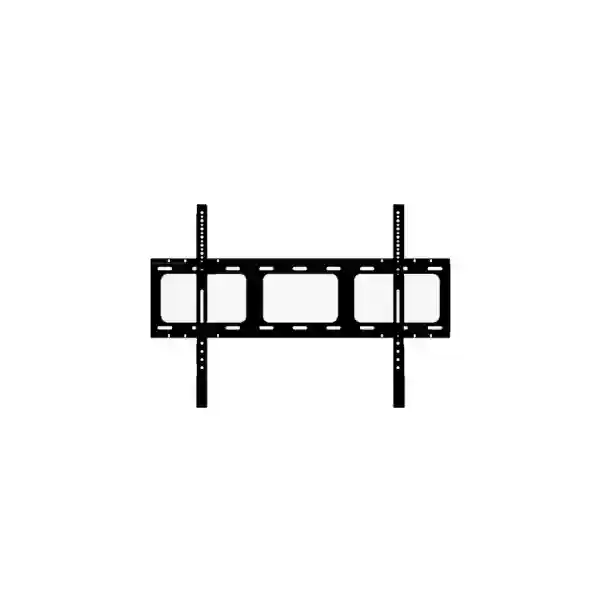
Yealink MD-WallMount Tanzania
The Yealink MD-WallMount is an official Yealink wall-mount bracket created for MeetingDisplay installations where organizations want a permanent, space-efficient and professionally presented display position. Yealink lists MD-WallMount as an optional accessory for MeetingDisplay 55, MeetingDisplay 65, MeetingDisplay 75 and MeetingDisplay 86. That makes it especially relevant to meeting rooms, boardrooms, executive collaboration spaces, customer presentation areas, education and training rooms, operations centers and other environments in Tanzania where a large professional display needs to be installed securely and cleanly on a suitable wall.
For buyers in Tanzania, the key purchasing question is not simply whether a bracket can hold a screen. The important issue is whether the mount is the correct accessory for the exact Yealink MeetingDisplay model, whether the wall and fixing method are suitable for the installation, and whether the broader room design leaves enough space for cabling, connected conferencing equipment and future service access. FourTeck can help customers evaluate these practical questions before quotation and deployment.
Designed as the dedicated wall-mount option for the Yealink MeetingDisplay family rather than as a generic third-party bracket.
Yealink identifies MD-WallMount as optional for MeetingDisplay 55, 65, 75 and 86, supporting model-aligned procurement.
A fixed wall installation can conserve floor space and help create a consistent viewing position in meeting and presentation environments.
What is the Yealink MD-WallMount?
The Yealink MD-WallMount is a wall-mount bracket for the Yealink MeetingDisplay range. According to Yealink’s current room accessory and compatibility information, it is an optional accessory for MeetingDisplay 55, 65, 75 and 86. It is intended for customers who want to place these displays on a wall rather than use a floor stand or mobile stand arrangement. The accessory fits into a wider Yealink ecosystem that also includes AV brackets for selected MeetingBar, camera and speaker combinations, which means room designers can build a cleaner integrated conferencing installation around the MeetingDisplay platform.
Yealink publishes VESA information for the corresponding displays: MeetingDisplay 55 and 65 use 400 mm × 400 mm VESA patterns, while MeetingDisplay 75 and 86 use 600 mm × 400 mm VESA patterns. These values describe the display mounting interface and are useful when planning the installation, but customers should still follow the manufacturer’s installation documentation and use mounting hardware appropriate to the wall construction and project conditions.
For procurement teams, specifying the official MD-WallMount can reduce uncertainty around accessory compatibility. For installers, it provides a defined Yealink mounting option around which room layout, cable paths and equipment positions can be planned. For end users, the practical result is a meeting space where the display is consistently positioned for viewing and collaboration without relying on a movable cart.
Verified Yealink MD-WallMount Compatibility
| Yealink display | MD-WallMount status | Published VESA pattern |
|---|---|---|
| MeetingDisplay 55 | Optional | 400 mm × 400 mm |
| MeetingDisplay 65 | Optional | 400 mm × 400 mm |
| MeetingDisplay 75 | Optional | 600 mm × 400 mm |
| MeetingDisplay 86 | Optional | 600 mm × 400 mm |
Compatibility should always be matched to the exact display model and to the room design. If a project also uses a Yealink MeetingBar, PTZ camera, speaker or MCore-based room system, additional Yealink brackets may be required. The MD-WallMount itself is the display wall-mount element, so complete room planning should consider every component separately.
Why choose a dedicated MeetingDisplay wall mount?
A fixed display position is useful when a room has a defined presentation wall and the organization wants a permanent layout. Compared with mobile floor stands, a wall-mounted display can reduce the amount of equipment occupying usable floor area, simplify the visual design of the room and create a consistent viewing point. In a boardroom, this can support a more formal layout. In a training room, it can keep the main screen away from circulation paths. In a customer-facing presentation room, it can contribute to a cleaner and more intentional installation.
Using the accessory published for the MeetingDisplay family also helps procurement teams avoid an avoidable compatibility risk. Generic mounting solutions may be suitable in some projects, but they place more responsibility on the buyer or installer to verify dimensional compatibility, hardware, alignment and integration. The MD-WallMount gives customers a manufacturer-listed option for the supported MeetingDisplay sizes.
The mount should still be treated as one part of a complete installation. Wall material, anchor selection, cable routing, power location, network access, viewing height, screen clearance and any attached conferencing equipment all influence the finished result. A professional deployment plan should account for these conditions before drilling or final positioning.
Deployment planning for Yealink MD-WallMount
Verify whether the project uses MeetingDisplay 55, 65, 75 or 86. The MD-WallMount is listed by Yealink as optional for these four models.
Confirm wall construction, structural suitability and the correct fixing method. These project-specific details should be assessed by a competent installer rather than assumed from the bracket model.
Map power, network, HDMI, USB and any conferencing-system connections before the display is fixed. Good planning reduces visible cable clutter and makes future service easier.
If the room includes MeetingBar, UVC camera, SmartVision, speaker or MCore hardware, verify the appropriate additional bracket and its relationship to the display position.
Buying the Yealink MD-WallMount in Tanzania
When requesting a quotation, provide the exact Yealink MeetingDisplay size, required quantity, installation city, expected project timeline and whether the bracket is for a new deployment or an upgrade to an existing room. If the display is being combined with a Yealink video conferencing system, also list the camera, MeetingBar, MCore, speaker and touch-panel models. This helps ensure that accessory planning is based on the actual room configuration rather than on the display alone.
FourTeck Tanzania can support customers who are evaluating meeting-room hardware together with related collaboration and network infrastructure. For broader technology requirements, customers can explore FourTeck Tanzania technology solutions, review regional procurement options through FourTeck Africa, compare East African support routes via FourTeck Kenya and FourTeck Uganda, or use FourTeck UAE for UAE-based requirements.
Yealink MD-WallMount Tanzania
For organizations across Tanzania, the Yealink MD-WallMount is relevant wherever a MeetingDisplay is being installed as a fixed part of a professional collaboration room. Buyers may be equipping a headquarters boardroom, an operations center, a university teaching room, a hotel conference facility, a training area, a customer briefing room or a hybrid-meeting environment. In each case, a wall-mounted display can help establish a consistent room layout while keeping valuable floor space clear. Because Yealink lists the MD-WallMount for MeetingDisplay 55, 65, 75 and 86, procurement teams can align the bracket with the exact display size rather than relying on a broadly described universal mount.
Tanzania projects can vary significantly in building structure, room dimensions, electrical layout and network readiness. A new office may provide concealed conduits and purpose-built meeting-room walls, while an existing building may require surface cable management or structural review before a large display is fixed. The correct approach is to confirm the room conditions before installation. The MD-WallMount solves the display mounting requirement, but it does not replace the need for appropriate wall fixings, safe installation practices and careful placement.
Business buyers should also decide whether the display will operate primarily for presentations, digital collaboration, Microsoft Teams or Zoom room workflows, signage-like information display, or a mix of meeting functions. If additional Yealink equipment is part of the room, the installer should verify any extra bracket requirements. Yealink publishes separate AV and PTZ bracket options for supported conferencing devices, allowing the display and video components to be planned as an integrated system.
For a quotation in Tanzania, provide the MeetingDisplay model, quantity, intended city and whether installation assistance or wider room-system sourcing is required. This information gives the sales team a clearer basis for confirming the correct accessory and preparing a practical proposal.
Yealink MD-WallMount Dar es Salaam
Dar es Salaam organizations often deploy collaboration technology in corporate offices, hospitality facilities, financial institutions, professional-services environments, educational facilities and multi-site business operations. In these settings, the Yealink MD-WallMount provides a manufacturer-listed method for fixing compatible MeetingDisplay 55, 65, 75 or 86 screens to a room wall. A fixed display can be particularly useful in meeting rooms where the furniture layout is stable and the presentation wall has been selected during office fit-out.
Before installation, project teams should confirm the proposed height, viewing distance and wall composition. A large display mounted too high or too low can reduce comfort during extended meetings, while poor cable planning can leave power and data connections exposed. If the office uses structured cabling, it is useful to coordinate the display location with network outlets and AV pathways. For newly fitted spaces, these details are ideally decided before final wall finishes are completed.
Dar es Salaam buyers integrating the MeetingDisplay with Yealink room video equipment should provide the complete device list when seeking a quotation. This is important because the MD-WallMount is for the MeetingDisplay itself, while MeetingBar, PTZ camera, speaker or computing elements can use additional accessories. A room bill of materials should therefore be developed around the complete meeting workflow rather than around one component.
For procurement, include the exact MeetingDisplay size, number of rooms, quantity of mounts and desired deployment schedule. If the organization is standardizing across multiple meeting spaces, grouping the rooms by display size and conferencing configuration can simplify quotation, accessory matching and installation planning.
Yealink MD-WallMount Mwanza
In Mwanza, the Yealink MD-WallMount can support fixed MeetingDisplay installations for branch offices, education environments, healthcare administration, regional business operations, hospitality meeting rooms and other professional spaces. The main advantage is not a special electronic feature but the ability to mount the supported Yealink display family in a defined wall position, creating a stable focal point for presentations and collaboration.
When a customer is sourcing equipment for Mwanza, it is sensible to confirm the whole room requirement at the same time. The project may need the display, mounting bracket, conferencing bar or camera, microphones, room PC or appliance, cabling and network connectivity. Procuring the wall mount with the display can help avoid a later accessory gap when installers arrive on site. Where equipment is already installed, the current model numbers should be checked carefully before ordering an additional bracket.
The mounting surface also deserves attention. Different building finishes and underlying wall structures call for different installation methods, so a qualified installer should determine appropriate anchors and assess structural suitability. The VESA pattern helps define the interface between display and mount, but it does not determine how the complete assembly should be attached to every possible wall type.
For a Mwanza quotation, buyers can provide photographs of the intended wall, room dimensions and a list of existing Yealink equipment where available. That information can make pre-installation discussion more efficient and helps the project team identify questions before delivery and deployment.
Yealink MD-WallMount Arusha
Arusha businesses, hotels, conference facilities, NGOs, education institutions and professional organizations may use Yealink MeetingDisplay systems in rooms where a clean permanent installation is preferable to a mobile stand. The MD-WallMount gives those projects an official Yealink accessory for mounting MeetingDisplay 55, 65, 75 or 86 on a suitable wall, subject to proper installation assessment.
Hospitality and conference environments can have different priorities from a standard office. A room may be reconfigured frequently for training, workshops and executive sessions even when the main display remains in one location. In that scenario, a fixed display can provide a consistent visual anchor while tables and chairs move around it. Corporate and NGO offices may instead prioritize a standardized meeting-room design that can be repeated across several spaces.
Cable planning is especially important when appearance matters. Power, network and AV cables should be considered before the final mounting height is selected. Where a camera or conferencing bar will sit above or below the display, the installer should check the associated Yealink bracket requirements and ensure that the combined arrangement has sufficient clearance. The MD-WallMount should not be assumed to serve as a mount for every other room-system component.
Arusha customers requesting pricing can specify whether the requirement is bracket-only or part of a complete Yealink meeting-room deployment. Supplying the display model and intended room use helps the sales team distinguish a simple accessory request from a project that needs wider design and compatibility guidance.
Yealink MD-WallMount Dodoma
Dodoma organizations planning professional meeting spaces can use the Yealink MD-WallMount where a compatible MeetingDisplay needs a fixed wall installation. This may include administrative offices, education facilities, training centers, enterprise branch locations and project rooms that need a dependable, consistent display position. Yealink currently lists the accessory for MeetingDisplay 55, 65, 75 and 86, allowing the bracket selection to follow the installed display model.
For rooms used by many departments, fixed installation can reduce the likelihood that a screen position changes between meetings. It can also keep the room floor clearer than a mobile cart arrangement. However, flexibility should be considered before choosing a wall mount: if the display must regularly move between rooms, a floor stand may be more appropriate. The best option depends on the operating model of the facility rather than on aesthetics alone.
Procurement teams in Dodoma should confirm the expected lifecycle of the room, future conferencing upgrades and any planned furniture changes. A display should ideally be positioned so that it remains practical even if the collaboration platform or camera arrangement changes later. Leaving sensible cable access and service clearance can simplify maintenance and reduce disruption.
For quotation preparation, list each room, its MeetingDisplay size and any attached conferencing equipment. This allows the wall mount quantity to be matched to the actual deployment and supports more accurate accessory planning.
Yealink MD-WallMount UAE
Organizations with offices in the UAE can apply the same Yealink MD-WallMount compatibility guidance when standardizing MeetingDisplay installations across regional locations. The bracket is listed for MeetingDisplay 55, 65, 75 and 86, making it useful for multinational companies that want similar meeting-room hardware across Tanzania and Gulf offices. A common room standard can simplify documentation, user experience and future replacement planning.
UAE projects often involve structured fit-out schedules in which AV, furniture, network and electrical work are coordinated together. In these circumstances, identifying the wall mount early helps contractors establish screen position, cable paths and power outlets before final finishes. The exact bracket should still be matched to the exact display, and the installation method should be selected for the actual wall construction.
When the MeetingDisplay forms part of a larger Teams or Zoom room, consider how conferencing hardware will be placed relative to the screen. Yealink publishes separate accessories for supported AV bars and cameras, so integrated room planning should verify each bracket independently. This prevents the common mistake of assuming one display mount automatically supports every attached room-system component.
Customers coordinating Tanzania and UAE procurement can consolidate model lists and room standards before requesting quotations. The FourTeck UAE website can be used for UAE-focused technology requirements, while FourTeck Tanzania remains the primary route for Tanzania enquiries.
Yealink MD-WallMount Uganda
Uganda-based enterprises, institutions and regional offices considering Yealink MeetingDisplay can use MD-WallMount as the manufacturer-listed wall mounting accessory for the 55, 65, 75 and 86 models. This can help organizations maintain a uniform meeting-room design across East African operations, particularly when the same display family is being deployed in multiple countries.
Cross-border standardization is most useful when the complete room specification is documented. Beyond the display and wall mount, buyers should record the video bar or camera, room computer, touch controller, microphone, speaker and cable requirements. A shared bill of materials helps procurement teams compare like with like and reduces last-minute accessory omissions during deployment.
The physical installation should be evaluated locally. Wall structure, electrical points and network access can differ from site to site even when the same hardware is used. As a result, a standard bracket does not mean a standard fixing method. Installers should select appropriate anchors and installation practices for the actual building.
For organizations with Tanzania and Uganda operations, FourTeck can be approached with a combined equipment schedule while country-specific fulfilment is discussed separately. Customers can also reference FourTeck Uganda for Uganda-oriented technology requirements.
Yealink MD-WallMount Kampala
Kampala offices and institutions frequently need conference-room displays that remain in a fixed position for daily meetings, executive presentations, remote collaboration and training. Where a Yealink MeetingDisplay 55, 65, 75 or 86 is selected, the MD-WallMount provides a dedicated accessory option for attaching the display to a suitable wall.
A wall-mounted design is especially effective in rooms where the seating arrangement is predictable and the screen should remain aligned with a central presentation wall. Buyers should verify sightlines from the rear and side seating positions before committing to the height. Large displays can appear different once mounted than they do during planning, so room dimensions and furniture position should form part of the decision.
If the project includes a camera or video bar around the display, coordinate its bracket at the same design stage. The MD-WallMount is not a substitute for dedicated camera or AV brackets. Power and cable routing should also leave sufficient access for commissioning and future servicing.
Kampala buyers can prepare a concise quotation request by listing MeetingDisplay size, mount quantity, room count and associated video conferencing hardware. This gives suppliers and installers the technical context needed to confirm the requested accessory and identify other required items.
Yealink MD-WallMount Arua
For professional spaces in Arua, the Yealink MD-WallMount can support a clean fixed installation when the room uses one of the compatible MeetingDisplay sizes. The most important first step is confirming the exact model. Yealink identifies the bracket as optional for MeetingDisplay 55, 65, 75 and 86, so the accessory decision should be tied directly to the display being purchased or already deployed.
Projects outside major metropolitan centers benefit from careful pre-installation planning because missing accessories or compatibility mistakes can create avoidable delays. Buyers can reduce this risk by checking the display model, bracket requirement, conferencing components, cable lengths and network connectivity before equipment is dispatched. Where installation will be handled by a local technical team, sharing manufacturer documentation and a full equipment list can also help preparation.
The wall itself must be assessed on site. Screen size, room use and wall material all influence the installation process. Appropriate structural fixing and safe working practice should be determined by a competent installer, not assumed from the product name. Cable routes should likewise be planned so that the finished installation remains serviceable.
Arua customers seeking a quote should provide the quantity and destination along with the MeetingDisplay model. Where a full meeting-room solution is required, include all Yealink components so the accessory list can be reviewed as one system.
Yealink MD-WallMount Mbarara
Mbarara businesses and institutions can use the MD-WallMount when a Yealink MeetingDisplay needs to become a permanent part of a meeting, classroom, training or presentation environment. The bracket is intended for the supported MeetingDisplay family and is particularly useful when the room has a clear front wall and the display does not need to move between spaces.
The procurement decision should consider future use as well as the immediate installation. If the organization expects to add a conferencing bar, PTZ camera, external speaker or room computer later, it is helpful to preserve suitable space and cable pathways around the display. Planning these items from the start can reduce the need to reopen wall finishes or reposition the display during an upgrade.
Yealink’s published compatibility information gives buyers confidence about which MeetingDisplay models can use the MD-WallMount, but room-specific structural conditions remain the installer’s responsibility. Confirm mounting height, wall construction and fixing method before work begins. The installation should allow for both safe support and practical access to connections.
For Mbarara quotations, state whether the requirement is accessory-only or part of a new MeetingDisplay deployment. Adding the display size, room count and related conferencing equipment enables more complete procurement guidance.
Yealink MD-WallMount Gulu
The Yealink MD-WallMount offers Gulu organizations a defined wall-mounting path for compatible MeetingDisplay models. It can suit administrative offices, education and training spaces, branch meeting rooms and other locations where a display is intended to remain in a consistent fixed position. Yealink lists compatibility with MeetingDisplay 55, 65, 75 and 86.
For sites where technical resources or replacement accessories may not be immediately available, careful bill-of-materials preparation is especially valuable. The bracket should be ordered together with any other required room accessories, and the installation team should receive the exact model information before arriving on site. This reduces the chance of discovering a compatibility or mounting issue only after the equipment has been delivered.
Room planning should address viewing position, power, data connectivity and the placement of conferencing peripherals. If the display will host or sit beside additional Yealink equipment, check whether separate Yealink brackets are specified for those devices. Good planning produces a cleaner installation and improves maintainability.
Gulu procurement teams can make quotation requests more actionable by including deployment location, display size, quantity, project deadline and whether the room is new or existing. Existing rooms may require extra attention to cable routes and wall suitability.
Yealink MD-WallMount Kenya
Kenya-based customers deploying Yealink MeetingDisplay can use the MD-WallMount as an official optional bracket for 55, 65, 75 and 86 models. Companies with offices in both Kenya and Tanzania may find value in standardizing display sizes and mounting approaches, particularly if IT teams want common meeting-room documentation and a consistent user experience across locations.
Standardization should include more than the mount. Record the display model, video platform, conferencing device, camera position, microphone strategy, control panel and cabling in a repeatable room template. The wall mount then becomes one verified element within a broader room standard. This approach is useful for organizations rolling out multiple small, medium or large meeting rooms.
Local installation conditions still need to be assessed independently at each site. Wall structures and room layouts vary, and the correct fixing method depends on the actual substrate. Buyers should avoid assuming that a successful installation in one office can be copied mechanically in another without inspection.
Kenya procurement requests can be routed through FourTeck Kenya, while Tanzania projects can be discussed through the Tanzania site. Multicountry buyers can provide a consolidated equipment schedule to simplify model matching and quotation review.
Yealink MD-WallMount Kuwait
Kuwait organizations using Yealink MeetingDisplay can specify MD-WallMount where the supported display needs a fixed wall position. For multinational customers, using the same Yealink accessory family across offices can make procurement documentation more consistent and can simplify IT standards when rooms follow similar designs.
During fit-out, coordinate the display mount with architectural, electrical and network plans. Determine screen centerline, power outlet position, network points and any cable containment before final wall finishes. If video conferencing equipment is included, confirm the relevant Yealink bracket for each device rather than assuming that the display bracket provides a universal mounting platform.
MeetingDisplay 55 and 65 use published 400 mm × 400 mm VESA patterns, while MeetingDisplay 75 and 86 use 600 mm × 400 mm patterns. These details support technical planning but should be used together with current Yealink installation documentation and competent on-site assessment.
Kuwait customers can include room quantities, display models and project schedule in their request. Organizations managing projects across Tanzania and Kuwait should keep country-specific logistics separate while maintaining one technical equipment standard wherever practical.
Yealink MD-WallMount Ghana
Ghana enterprises and institutions considering a wall-mounted Yealink MeetingDisplay can select MD-WallMount for the supported 55, 65, 75 and 86 models. It is suitable for projects where the display forms a permanent part of the room and where teams value a clear, repeatable installation approach rather than a movable display cart.
For organizations with multiple branches, the accessory can become part of a documented meeting-room bill of materials. A standard template might define one display size for small rooms and another for larger rooms, with matching conferencing equipment and mounting accessories. This makes procurement easier to review and reduces ambiguity for installers.
Each physical site should still be checked before installation. The wall material, cable routes, available power and network position influence how the display is mounted and commissioned. Where additional Yealink devices are planned, separate bracket requirements should be confirmed from current compatibility information.
Ghana buyers can prepare an efficient request by providing exact MeetingDisplay model, bracket quantity, destination and whether wider room-system hardware is required. This creates a stronger basis for quotation and compatibility review than a generic request for a screen wall bracket.
Yealink MD-WallMount Nigeria
In Nigeria, Yealink MD-WallMount can be specified for professional MeetingDisplay installations where a supported 55, 65, 75 or 86 display should be fixed to a suitable wall. Typical projects may include corporate headquarters, financial-services offices, education, training facilities, technology firms and distributed branch environments.
Large organizations should consider whether a common room design can be repeated across locations. Standardizing display size, mount, conferencing hardware and cable specification can make rollout governance easier. It also helps internal IT teams maintain clearer records of installed equipment. However, building-specific installation decisions such as wall anchors must still be made locally.
For integrated room systems, the display mount should be evaluated together with camera height and audio coverage. A visually clean installation is easier to achieve when every component has a planned position before work begins. The MD-WallMount addresses the screen, while other Yealink devices can require their own mounting accessories.
Nigeria customers can include room counts, MeetingDisplay models and deployment requirements when requesting pricing. Multicountry procurement teams should separate logistics and commercial terms by destination while retaining consistent technical specifications where appropriate.
Yealink MD-WallMount Seychelles
Seychelles customers using Yealink MeetingDisplay in offices, hospitality facilities, training rooms or conference environments can select the MD-WallMount when a fixed screen position is required. The accessory is listed as optional for MeetingDisplay 55, 65, 75 and 86 and can support a neat, floor-space-conscious room design.
Island procurement makes planning especially important because missing accessories can result in avoidable delays. Buyers should verify the full equipment list before shipment, including the display, mounting bracket, conferencing equipment, cables and any device-specific accessories. Confirming models in advance is preferable to solving compatibility questions after delivery.
The installation team should also assess wall condition and environmental factors relevant to the room. The bracket’s compatibility with the display does not remove the need to select suitable fixings or follow safe mounting practice. Cable entry points should be planned so connections remain accessible for service.
For a Seychelles quotation, provide MeetingDisplay size, bracket quantity, delivery destination and the complete room hardware list if the mount is part of a larger collaboration project. This helps the supplier verify that the requested accessory aligns with the intended deployment.
Yealink MD-WallMount quotation checklist
- Exact MeetingDisplay model: 55, 65, 75 or 86.
- Number of displays and number of MD-WallMount brackets required.
- Installation city and project location.
- New room, refurbishment or accessory-only requirement.
- Associated Yealink MeetingBar, camera, MCore, speaker or touch controller models.
- Preferred project schedule.
- Any need for broader meeting-room, network or collaboration-system support.
Frequently asked questions
Which displays work with Yealink MD-WallMount?
Yealink lists MD-WallMount as an optional accessory for MeetingDisplay 55, MeetingDisplay 65, MeetingDisplay 75 and MeetingDisplay 86.
Is the MD-WallMount included with MeetingDisplay?
Yealink’s MeetingDisplay documentation lists MD-WallMount as a separately purchased bracket. Confirm package contents and quotation details for the exact project before ordering.
What VESA patterns do Yealink MeetingDisplay models use?
Yealink publishes 400 mm × 400 mm for MeetingDisplay 55 and 65, and 600 mm × 400 mm for MeetingDisplay 75 and 86.
Can MD-WallMount also mount a MeetingBar or camera?
The MD-WallMount is the display wall-mount bracket. Yealink lists separate AV and PTZ brackets for supported conferencing products, so the complete room configuration should be checked before ordering.
What should I provide when requesting a quote?
Provide the MeetingDisplay model, quantity, location, project timeline and details of any additional Yealink conferencing equipment. This helps confirm the correct accessory and overall room requirements.
Decision recap
Choose Yealink MD-WallMount when the project uses a compatible MeetingDisplay 55, 65, 75 or 86 and the room requires a fixed wall installation. Verify the exact display model, wall suitability, viewing height, cable plan and any additional conferencing brackets before installation.
For procurement teams, the strongest approach is to request the mount as part of a documented room bill of materials. This makes compatibility review easier and helps avoid missing accessories during deployment.
Talk to FourTeck about your MeetingDisplay installation
Share your MeetingDisplay size, room count and intended deployment city. FourTeck can help you prepare a quotation request around the MD-WallMount and related meeting-room technology without making unsupported assumptions about compatibility, stock or installation conditions.




Reviews
There are no reviews yet.