
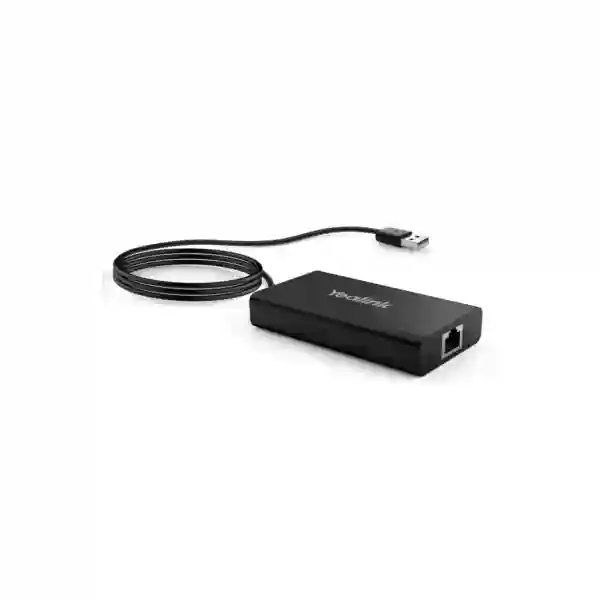
Yealink MVC-BYOD-Extender Tanzania
The Yealink MVC-BYOD-Extender is designed for organisations that already use compatible Yealink MVC room systems and want a practical wired BYOD path for meetings that originate from a user’s laptop. Instead of treating the room as locked to one meeting workflow, the extender allows a supported laptop session to make use of the room’s deployed Yealink camera, microphone and speaker environment. For Tanzanian businesses, universities, government teams, financial institutions, professional-services firms and regional organisations, that can simplify meeting-room use when guests, partners or internal teams need to join meetings on different conferencing applications.
What it does
In a compatible Yealink MVC deployment, the MVC-BYOD-Extender connects a user laptop to the room environment for wired BYOD meetings. The goal is straightforward: a visitor or employee can launch a supported conferencing application from the laptop while using the room’s professional audio and video resources rather than relying only on the laptop webcam, microphone and speakers.
Why buyers choose it
The accessory is useful where meeting rooms need to support multiple meeting workflows without replacing the installed room system. It is particularly relevant for companies that host customers, suppliers and remote teams who may use different UC platforms. A wired connection also gives administrators a predictable, easy-to-explain user path.
Compatibility matters
Yealink states that the extender requires a complete compatible MVC deployment and that supported devices and required firmware versions must be checked before installation. It is not a generic adapter for arbitrary third-party cameras and audio devices. FourTeck can help buyers validate the room architecture before a quotation is finalised.
Verified Yealink MVC-BYOD-Extender specifications
| Product | Yealink MVC-BYOD-Extender |
| Primary function | Wired BYOD connection for compatible, fully deployed Yealink MVC conference-room systems |
| Interface | 1 × VCH port (RJ45) |
| Laptop cable | 1.5 m USB 2.0 Type-A cable |
| Deployment distance | Up to 100 metres |
| Dimensions | 89 mm × 48 mm × 17 mm |
| Operating temperature | 0–40 °C |
| Operating humidity | 10–95% |
| Package items published by Yealink | MVC-BYOD-Extender box, 7.5 m CAT5e cable and Quick Start Guide |
Compatibility should be validated against Yealink’s current room-accessory compatibility list and current firmware requirements. Recent Yealink support documentation also notes that a complete MVC deployment, including the Yealink mini-PC, is required for effective BYOD operation and that some room configurations are excluded. This is why procurement should begin with the exact MVC bundle, camera, touch controller and room topology rather than with the extender model alone.
Deployment and integration guidance
Yealink documents several connection approaches, including connection through the VCH port of a supported Yealink camera, through a PoE switch, or through Yealink AVHub in appropriate room architectures. Depending on the deployment method, wired BYOD can be paired with content-sharing arrangements. Buyers should decide whether the room needs only laptop-based BYOD, BYOD plus wired content sharing, or a broader collaboration design before cabling is finalised.
The up-to-100-metre deployment capability is particularly valuable when the user connection point is separated from the main room-system components. In boardrooms, training rooms and divisible meeting spaces, this can reduce pressure to place every device on the same table. The included 7.5 m CAT5e cable may be sufficient for smaller layouts, while larger rooms can be designed around the supported distance after confirming cable quality, topology and the compatible Yealink endpoint.
For IT managers, the buying process should include a room inventory: existing MVC model, mini-PC presence, camera model, AVHub or switch topology, touch controller, software and firmware versions, laptop connector requirements and desired content-sharing behaviour. This avoids purchasing an extender for a room that uses an unsupported configuration.
Who benefits from the MVC-BYOD-Extender?
Corporate meeting rooms
Companies can keep a structured Teams Rooms environment while still accommodating a customer or partner who joins from another supported conferencing application on a laptop.
Training and education
Training teams and institutions often encounter presenters using different conferencing platforms. BYOD connectivity can make the room easier to reuse without redesigning the complete AV stack for every session.
Hybrid executive spaces
Boardrooms and executive rooms benefit when a laptop-based meeting can use the installed room camera and audio environment, giving users a more consistent experience than a standalone laptop setup.
Yealink MVC-BYOD-Extender Tanzania
Organisations searching for the Yealink MVC-BYOD-Extender in Tanzania are usually trying to solve a practical room-flexibility problem rather than buy a simple cable accessory. A typical meeting room may be deployed around Microsoft Teams Rooms for day-to-day internal collaboration, yet the same room must regularly host suppliers, international partners, customers or consultants who use another meeting application. In that situation, a wired BYOD option can reduce user confusion because the visitor connects a laptop and works from a familiar application while taking advantage of the room’s compatible Yealink audio and video devices.
For Tanzania procurement, the most important step is to confirm the existing Yealink MVC architecture before ordering. Buyers should record the exact MVC bundle, mini-PC, camera, touch controller and any AVHub or PoE-switch arrangement. Yealink’s current support guidance makes clear that the MVC-BYOD-Extender is intended for complete compatible MVC deployments and is not a universal bridge to arbitrary third-party AV devices. Firmware also matters. A quotation process that includes these details reduces the risk of receiving an accessory that cannot be used with the installed room.
Tanzanian enterprises with offices, branches or shared meeting facilities can also consider cable distance and room layout. Yealink publishes support for deployment up to 100 metres, which can be useful where the laptop connection point is not beside the core room equipment. The compact 89 × 48 × 17 mm form factor keeps the user-side component unobtrusive. For a well-planned rollout, combine compatibility confirmation, structured cabling review, user instructions and a test of the intended meeting applications before replicating the design to multiple rooms.
Yealink MVC-BYOD-Extender Dar es Salaam
Dar es Salaam organisations often operate busy meeting rooms that serve local staff, regional management, customers and visiting partners. The Yealink MVC-BYOD-Extender can be relevant in these mixed-use rooms because it creates a simple wired path for a laptop-based meeting to use a compatible Yealink MVC room’s professional peripherals. That helps reduce the common situation where a visitor sits in a fully equipped boardroom but still relies on a laptop webcam and speakers because the scheduled call is not running on the room’s default platform.
For procurement teams in Dar es Salaam, compatibility should come before price comparison. The correct questions are: Which MVC bundle is installed? Is the room a complete Yealink MVC deployment with the required mini-PC? Which camera and controller are present? Is AVHub used? What firmware versions are running? Does the meeting workflow also require content sharing? Yealink’s support documentation shows that deployment methods and supported hardware combinations matter, and some configurations do not support the extender.
In new boardroom and training-room projects, the accessory can be considered during cable planning rather than added as an afterthought. The stated up-to-100-metre deployment reach can support a user connection point at a conference table while core equipment remains elsewhere, subject to the supported Yealink topology. A clear room-user label, tested USB connection and documented BYOD procedure can make the solution much easier for reception teams, executive assistants and visiting presenters to use. FourTeck Tanzania can help structure the product request around the exact room configuration and prepare a quotation based on the intended deployment.
Yealink MVC-BYOD-Extender Mwanza
For organisations in Mwanza, the strongest use case for the Yealink MVC-BYOD-Extender is making an existing compatible MVC meeting room more adaptable without replacing its core room system. Businesses that collaborate with teams in Dar es Salaam, East Africa or international offices can encounter different video-conferencing platforms from one meeting to the next. A laptop-based BYOD workflow gives the meeting organiser a familiar application interface while using the room’s installed Yealink camera and audio devices where the configuration is supported.
Room assessment is especially important before a remote procurement or multi-site rollout. Ask the site team to photograph or record the model labels of the MVC bundle, camera, MTouch controller, AVHub if present and mini-PC. Record the current Yealink RoomConnect and device firmware versions. Yealink publishes version requirements in its support documentation and updates them over time, so an older checklist should not be treated as permanent compatibility proof. The BYOD-Extender itself provides a USB 2.0 Type-A lead and a VCH RJ45 port, while the package includes a 7.5 m CAT5e cable.
The compact extender can fit neatly into a managed boardroom cable plan. Where the meeting table is separated from the equipment location, Yealink’s up-to-100-metre deployment specification gives designers useful flexibility. For Mwanza buyers, a practical quotation request should state the number of rooms, exact Yealink system in each room, desired laptop connector type, intended conferencing applications, content-sharing needs and whether installation assistance is required. This information makes it easier to distinguish a straightforward accessory purchase from a room-upgrade project that needs additional components.
Yealink MVC-BYOD-Extender Arusha
Arusha has organisations that frequently host international meetings, conferences, development partners, tourism-sector stakeholders and distributed teams. A conference room may therefore need to handle more than one meeting platform. The Yealink MVC-BYOD-Extender is designed to extend compatible Yealink MVC rooms with wired BYOD functionality, allowing a user to connect a laptop and run a meeting application while taking advantage of the room’s supported Yealink audio and video equipment.
This is valuable when meeting organisers cannot control which collaboration platform an external party will use. Instead of asking every visitor to learn the room’s default workflow, IT can provide a simple laptop connection process. However, the product should not be positioned as universally compatible with any AV equipment. Yealink specifically requires a compatible, complete MVC deployment and publishes support and firmware requirements for individual devices. Some configurations are excluded, so validation is essential before a purchase order is issued.
For Arusha conference facilities and corporate rooms, the physical design is also attractive. The extender is small, its user-side USB cable is 1.5 metres, and Yealink states that supported deployment can reach up to 100 metres. That can help when the table and equipment rack are separated. A complete buying brief should include room drawings or cable-distance estimates, the current Yealink models, expected BYOD usage frequency and the desired content-sharing method. FourTeck can then help determine whether the MVC-BYOD-Extender is the correct accessory or whether the room needs a different Yealink BYOD approach.
Yealink MVC-BYOD-Extender Dodoma
In Dodoma, meeting-room technology is often evaluated not only for executive convenience but also for repeatability, manageability and clear user procedures. The Yealink MVC-BYOD-Extender can support those goals in compatible Yealink MVC rooms by providing a defined wired method for using a laptop-based conference with the room’s Yealink peripherals. This can be useful for government, public-sector, education and enterprise environments that regularly meet with external organisations using different conferencing platforms.
Procurement teams should treat the extender as part of a room ecosystem. The device is not a generic USB-to-Ethernet accessory and should not be ordered only because the room contains a Yealink camera. Yealink’s documentation indicates that a complete MVC deployment, including the mini-PC, is required for BYOD operation and that supported cameras, controllers, AVHub devices and firmware levels must be checked. A good specification therefore lists the whole room rather than only the accessory model.
For installations where the presenter position is some distance from the room hardware, the stated up-to-100-metre deployment capability can simplify structured cabling. The compact enclosure and 1.5 m USB Type-A lead provide a straightforward user touchpoint. Administrators should test the final configuration with the actual laptops, meeting applications and content-sharing workflow expected in daily use. For a Dodoma quotation, include room quantity, exact MVC model, present firmware, cable-distance requirement and whether users need BYOD only or BYOD plus screen sharing. This supports a more accurate bill of materials and cleaner commissioning plan.
Yealink MVC-BYOD-Extender UAE
UAE enterprises frequently operate standardised Microsoft Teams Rooms while still hosting customers and partners who use other collaboration applications. The Yealink MVC-BYOD-Extender addresses this mixed-platform requirement for compatible Yealink MVC deployments by letting a user connect a laptop for a wired BYOD meeting. The user can work from the chosen conferencing application while the room provides supported Yealink camera, microphone and speaker resources.
For UAE projects, where meeting rooms are often part of larger office fit-outs, the extender should be specified alongside room topology and structured cabling. Yealink supports deployment distances up to 100 metres, which can be helpful in boardrooms with floor boxes, equipment racks or control cabinets away from the main table. Connection options documented by Yealink include supported VCH-camera paths, PoE-switch arrangements and AVHub-based designs. The appropriate method depends on the room equipment.
IT teams should verify current firmware and supported-device lists before deployment, particularly when integrating the accessory into an existing room installed in an earlier project phase. The presence of Yealink branding alone does not guarantee compatibility. UAE buyers planning multiple rooms should define a repeatable baseline room configuration, validate one pilot room, document the BYOD user procedure and then replicate the approved design. For broader regional collaboration requirements, visit FourTeck UAE for related enterprise technology solutions.
Yealink MVC-BYOD-Extender Uganda
Ugandan organisations with compatible Yealink MVC rooms can use the MVC-BYOD-Extender to add a more flexible wired meeting workflow for laptops. This is useful when internal teams rely on a standard Teams Rooms experience but external stakeholders arrive with invitations on different conferencing applications. With the correct room configuration, the laptop can use the room’s installed Yealink audio and video resources, avoiding the reduced experience of a laptop-only call in a larger meeting space.
The accessory should be procured with a compatibility-first approach. Yealink requires a complete supported MVC setup and publishes firmware conditions for devices used in current room architectures. Buyers should therefore identify the MVC bundle, mini-PC, camera, touch controller, AVHub or PoE-switch arrangement and software versions before ordering. This is particularly important for organisations with rooms installed at different times, because two rooms that look similar may contain different generations of hardware.
The up-to-100-metre supported deployment reach can be helpful in larger Ugandan boardrooms, training spaces and institutional meeting rooms. Administrators can create a labelled laptop connection point while keeping core room equipment in a protected location. For regional procurement, the FourTeck Uganda site can support related technology enquiries. A strong quotation request should specify room count, existing models, target meeting applications, content-sharing requirements, cable distances and whether the project needs only hardware supply or broader room-integration assistance.
Yealink MVC-BYOD-Extender Kampala
Kampala is a strong fit for BYOD-capable meeting rooms because many organisations work with multinational partners, NGOs, regional headquarters, banks, consultants and technology vendors that may not share one conferencing platform. The Yealink MVC-BYOD-Extender gives a compatible MVC room a wired path for meetings started from a laptop, helping the user keep control of the application while benefiting from the room’s professional Yealink camera and audio environment.
Before purchasing, Kampala IT teams should inventory the complete room. Confirm the precise MVC package, verify that the Yealink mini-PC is part of the deployed solution, note the camera and touch controller models and check for AVHub or PoE-switch use. Then compare device and RoomConnect firmware to Yealink’s latest published requirements. This process is important because Yealink notes unsupported configurations and does not position the accessory as a universal connector for third-party audio-video devices.
For meeting-room designers, the small extender enclosure and up-to-100-metre deployment capability can simplify table connectivity. The included 7.5 m CAT5e cable may work for modest layouts, while structured cabling can support larger distances within Yealink’s stated design limits. When preparing a Kampala purchase request, add expected room occupancy, table-to-equipment distance, preferred laptop connector format, screen-sharing requirement and the number of rooms. This helps suppliers recommend the correct topology and reduces installation surprises.
Yealink MVC-BYOD-Extender Arua
Arua organisations that collaborate with national and international teams can benefit from a conference room that is not limited to one meeting application. In a supported Yealink MVC environment, the MVC-BYOD-Extender provides a wired BYOD connection so a presenter can use a laptop-based meeting while the room’s Yealink audio and video devices handle the larger-room experience. This can be particularly useful for training, project coordination and partner meetings where the host platform changes from session to session.
Because remote-site procurement can make returns and troubleshooting more complicated, compatibility validation is especially important. The buyer should provide the exact Yealink MVC bundle and component list before a quotation is approved. Yealink’s current support guidance requires a complete compatible MVC deployment and minimum firmware levels for supported devices. The extender itself includes a 1.5 m USB 2.0 Type-A cable and VCH RJ45 port, with a 7.5 m CAT5e cable in the published package contents.
Deployment planning should consider where the presenter will sit and how the extender connects back to the room system. Yealink states support for distances up to 100 metres, giving designers flexibility when equipment is wall-mounted or placed away from the table. For an Arua project, a pilot test with representative laptops and conferencing applications is a sensible step before rolling the design into several rooms. User instructions should be short and visible: connect the laptop, select the intended meeting mode where required, confirm camera and audio selection, and begin the session.
Yealink MVC-BYOD-Extender Mbarara
For Mbarara businesses and institutions, the Yealink MVC-BYOD-Extender can turn a compatible MVC meeting room into a more adaptable shared resource. Staff can continue to use the room’s normal Microsoft Teams Rooms workflow while retaining an option for laptop-based meetings when an external invitation arrives on another conferencing service. The value is less about adding another gadget and more about avoiding duplicate meeting-room equipment for different software platforms.
A successful deployment starts with detailed room information. Record the exact MVC model, the Yealink mini-PC, camera, controller and any AVHub component. Check the current firmware and software versions against Yealink’s latest support documentation. Some room combinations are explicitly unsupported, so a supplier should not promise operation based only on a generic statement that the accessory works with “Yealink systems.” The published hardware specifications—VCH RJ45 interface, 1.5 m USB Type-A cable, 89 × 48 × 17 mm dimensions and 0–40 °C operating range—are useful, but compatibility remains the decisive procurement factor.
For room layout, the up-to-100-metre deployment distance can help installers place the user connection where it is convenient without moving the rest of the room system. Mbarara buyers should also decide whether wired content sharing is required in addition to BYOD, because the selected Yealink connection method can affect that workflow. A quotation should capture these functional requirements so the delivered design is easier to commission and support.
Yealink MVC-BYOD-Extender Gulu
Gulu offices, institutions and project teams may need to join meetings organised by multiple external stakeholders. When a compatible Yealink MVC room is already installed, the MVC-BYOD-Extender offers a wired method for launching a meeting from a laptop while using the room’s supported Yealink camera, speakers and microphones. That can make hybrid meetings more practical for groups than crowding around a laptop or bringing separate USB peripherals into the room.
The key planning issue is system compatibility. Yealink states that the accessory depends on a complete MVC deployment and appropriate device versions. Administrators should therefore collect a current inventory and firmware record before ordering. If a room includes an unusual camera, old controller or a third-party AV path, it should be validated rather than assumed compatible. This protects the project budget and makes troubleshooting easier once the equipment reaches site.
Physical deployment is comparatively simple. The extender is compact, the user side includes a 1.5 m USB 2.0 Type-A cable, and the room link uses a VCH RJ45 interface. Yealink’s published deployment distance of up to 100 metres can support larger room layouts, subject to the supported topology. For Gulu users, a clear one-page operating instruction and a short commissioning session can be as important as the hardware itself. The final acceptance test should include camera selection, microphone and speaker operation, screen sharing where required and the main laptop operating systems used by staff.
Yealink MVC-BYOD-Extender Kenya
Kenyan organisations running standardised Yealink MVC rooms may still need flexibility for meetings hosted on multiple conferencing platforms. The MVC-BYOD-Extender supports a wired BYOD workflow in compatible deployments, allowing a laptop to serve as the meeting host while the room’s Yealink audio and video resources provide the professional in-room experience. This is useful for shared boardrooms, customer demo spaces, training centres and executive meeting rooms.
A multi-room Kenya rollout should begin with a compatibility matrix. List every room, MVC bundle, mini-PC, camera, touch controller, AVHub or PoE-switch arrangement and current firmware. Group rooms with identical configurations and validate a pilot for each group. Yealink’s support requirements evolve, so current documentation should be checked during project planning rather than relying only on an older installation record. The product’s published physical specifications—compact dimensions, USB Type-A lead, VCH RJ45 interface and up-to-100-metre deployment—make it flexible, but the room ecosystem determines whether it is appropriate.
For Kenya procurement and related solutions, visit FourTeck Kenya. Buyers should include meeting-platform requirements, screen-sharing workflow, cable distance and room quantity in the request for quotation. Where the room is being built from scratch, BYOD can be designed into the cable plan from the beginning; where it is an upgrade, the existing Yealink architecture should be inspected first to avoid unnecessary components or incompatible assumptions.
Yealink MVC-BYOD-Extender Kuwait
Kuwait enterprises often require premium boardrooms to support both a standard corporate collaboration platform and meetings initiated by guests. The Yealink MVC-BYOD-Extender is designed for compatible MVC environments where a wired laptop connection can temporarily turn the room into a BYOD meeting space. Users can operate their preferred supported conferencing application while benefiting from the installed Yealink room camera and audio devices.
For procurement managers, it is important to separate physical specification from system compatibility. The extender has a 1.5 m USB 2.0 Type-A cable, a VCH RJ45 interface and compact 89 × 48 × 17 mm dimensions. Yealink also publishes up-to-100-metre deployment. Yet none of these characteristics removes the requirement for a compatible, complete MVC deployment with supported firmware. Older rooms or customised AV systems should be checked individually.
Kuwait room projects can benefit from a documented design that covers BYOD activation, content sharing and cable routing. The installer should test the typical laptops and meeting applications used by staff and frequent visitors. For regional technology enquiries, FourTeck Kuwait provides a relevant contact path. When requesting a quote, include the number of rooms, existing MVC model, room size, distance between table and equipment, content-sharing needs and whether the deployment is new or an upgrade.
Yealink MVC-BYOD-Extender Ghana
For Ghanaian businesses using compatible Yealink MVC systems, the MVC-BYOD-Extender can reduce the friction created when different customers and partners bring different meeting platforms. The room can maintain its normal standardised workflow for day-to-day use while providing a wired laptop option for meetings that need a different application. This can make investments in professional room cameras and audio equipment more useful across a wider range of meeting scenarios.
Before procurement, administrators should verify that each target room is a complete supported MVC deployment. Yealink’s documentation highlights the need for the mini-PC and current supported device firmware, and it excludes some configurations. A buyer should therefore provide model and version information rather than requesting an extender in isolation. If the organisation has several rooms installed at different times, each room may need a separate compatibility check.
The hardware is compact and designed for simple wired deployment. Yealink specifies a VCH RJ45 interface, 1.5 m USB Type-A cable, 7.5 m CAT5e cable in the package and up-to-100-metre supported deployment. For larger Ghana deployments, standardising cable placement and user instructions can improve usability. Related regional enquiries can be directed through FourTeck Ghana. A good RFQ should include room equipment, cable distances, target applications, quantity and installation scope.
Yealink MVC-BYOD-Extender Nigeria
Nigerian enterprises with multiple offices and high meeting volumes often want rooms that are standardised but not rigid. The Yealink MVC-BYOD-Extender gives compatible MVC rooms a wired BYOD option, allowing a meeting organiser to connect a laptop and use supported room audio and video devices. This can be useful for customer calls, vendor workshops, interviews, project meetings and hybrid events where the invitation may arrive on a platform outside the organisation’s standard room workflow.
For a scalable Nigeria rollout, establish an approved room profile before buying in volume. Identify the MVC bundle, mini-PC, camera, touch controller, AVHub or network path and firmware versions. Test the extender in one representative room, document the procedure and only then deploy across matching rooms. Yealink’s current support pages are the right reference for version requirements because firmware minimums can change as room products evolve.
The accessory’s small size and up-to-100-metre deployment capability make it practical for rooms where the user connection point and equipment location are separated. Procurement teams should also confirm whether the desired workflow includes wired content sharing because Yealink documents different deployment methods for BYOD and content sharing. For Nigeria-focused technology requests, visit FourTeck Nigeria. Include room count, existing models, cable lengths, user-device types and expected applications in the request.
Yealink MVC-BYOD-Extender Seychelles
Seychelles organisations in hospitality, government, professional services and corporate operations may host international participants using a wide range of meeting applications. In a compatible Yealink MVC room, the MVC-BYOD-Extender provides a simple wired BYOD route: a user connects a laptop, launches the required meeting application and uses the room’s supported Yealink AV devices rather than depending on the laptop’s built-in hardware.
For island procurement, getting the compatibility decision right before shipment is particularly important. Buyers should provide the complete room inventory, including MVC model, mini-PC, camera, controller, AVHub if present and current firmware. Yealink does not describe this product as a universal adapter for third-party conference hardware; it is designed around supported Yealink MVC architectures. Checking the room against the latest compatibility documentation can prevent delays and unnecessary freight costs.
Installation planning should also consider room distance and cable routing. The published up-to-100-metre deployment capability can be useful in hotel conference rooms, executive spaces and training rooms where the equipment is not directly beside the presenter. A clear, labelled BYOD connection and a tested user guide can make the solution easy for occasional visitors. For a Seychelles quotation, provide the room layout, equipment list, target meeting applications, quantity and whether content sharing must be supported alongside BYOD.
Buying checklist for Yealink MVC-BYOD-Extender
- Confirm the exact Yealink MVC room bundle and whether a complete MVC deployment with mini-PC is present.
- Record camera, touch controller, AVHub and other relevant Yealink room devices.
- Check current firmware and Yealink RoomConnect versions against the latest official compatibility guidance.
- Measure the cable distance from the intended laptop connection point to the room-system connection point.
- State whether the room needs BYOD only or BYOD plus content sharing.
- List the laptop operating systems and conferencing applications most frequently used.
- Specify room quantity and whether all rooms have identical hardware.
- Request installation, commissioning or user-training support if the project is more than a simple accessory addition.
Frequently asked questions
What is the Yealink MVC-BYOD-Extender used for?
It is a wired BYOD accessory for compatible, fully deployed Yealink MVC room systems. It allows a laptop-based meeting to use the room’s supported Yealink audio and video resources, helping the room support meetings that are not limited to its normal Microsoft Teams Rooms workflow.
Can it work with any third-party camera or speakerphone?
No. Yealink’s current support guidance says the MVC-BYOD-Extender does not support compatibility with arbitrary third-party video and audio devices. The room must match Yealink’s supported MVC architecture and firmware requirements.
How far can the extender be deployed?
Yealink publishes support for deployment up to 100 metres. The final room design should still use an appropriate supported topology and cabling plan.
What connectors are on the MVC-BYOD-Extender?
Yealink specifies a 1.5 m USB 2.0 Type-A cable for the laptop side and one VCH port using an RJ45 connector.
Does the extender require firmware updates?
The accessory works as part of a compatible room ecosystem, and Yealink publishes minimum software and firmware requirements for supported room devices. Those requirements should be checked against current Yealink documentation before installation.
Can FourTeck help check compatibility before quotation?
Yes. Provide the exact MVC bundle, mini-PC, camera, controller, AVHub or switch arrangement, current firmware and desired BYOD/content-sharing workflow so the request can be assessed before a final bill of materials is prepared.
Decision recap
Choose the Yealink MVC-BYOD-Extender when you have a compatible, complete Yealink MVC room and need a reliable wired laptop-based BYOD option. Do not choose it solely because a room contains Yealink hardware; confirm the full architecture and firmware first. The best projects begin with a room inventory, compatibility check and tested user workflow.
Consultation panel
Send FourTeck Tanzania your room model, quantity, desired conferencing applications and cable-distance requirements. We can structure the enquiry around compatibility, deployment and procurement rather than treating the extender as an isolated accessory.




Reviews
There are no reviews yet.