
Yealink SIP-T54W Tanzania
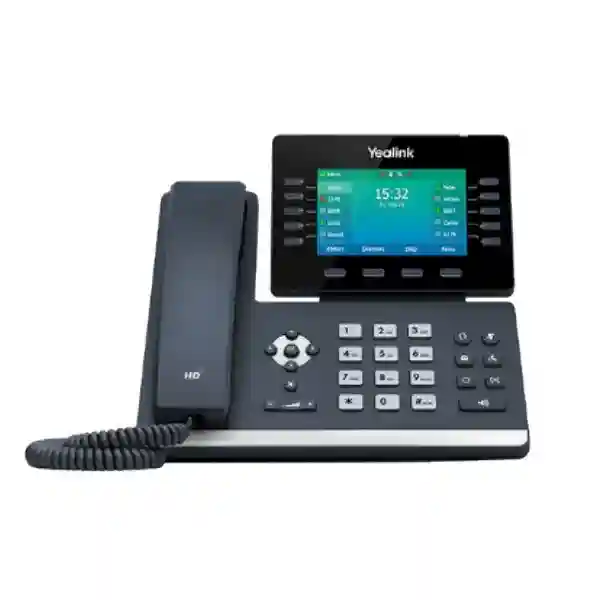
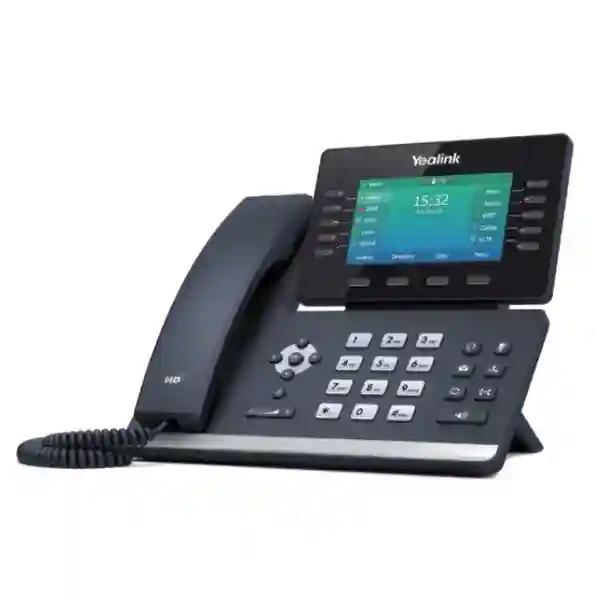
The Yealink SIP-T54W is a professional business IP phone designed for executives, managers and demanding desk users who need flexible SIP calling, modern wireless connectivity and straightforward everyday operation. Its adjustable 4.3-inch 480 × 272 colour display gives users a clear interface, while built-in Bluetooth 4.2 and dual-band Wi-Fi add useful deployment flexibility where headset mobility or wireless network access is required. The phone supports up to 16 VoIP accounts, dual-port Gigabit Ethernet, Power over Ethernet, USB 2.0 accessories and Yealink EXP50 expansion modules, making it suitable for offices that want more capability than an entry-level desk phone without moving into a large touchscreen endpoint.
A 480 × 272 colour LCD can be tilted to a comfortable viewing angle for different desks, seating positions and lighting conditions.
Built-in Bluetooth 4.2 supports compatible headsets and mobile contact synchronisation, while dual-band 2.4/5 GHz Wi-Fi offers additional network flexibility.
Up to 16 VoIP accounts, programmable line keys and optional EXP50 expansion modules suit users who manage multiple lines, teams or call flows.
Dual Gigabit Ethernet and IEEE 802.3af PoE simplify desk connectivity where a compatible PoE network is already available.
Yealink SIP-T54W Overview and Business Fit
For organisations modernising voice communication, the SIP-T54W can fill the role between basic extension phones and premium touchscreen devices. It provides a practical combination of visible line controls, a colour display, headset support and wireless connectivity. Yealink positions the model as a prime business phone for busy professionals, and its feature set supports that use case: ten line keys can be programmed across multiple pages, there are dedicated keys for common call functions, and the phone supports call hold, forwarding, waiting, transfer, voicemail, hot-desking, call park and pickup when those features are supported by the connected SIP platform or PBX.
Audio is a major purchasing consideration for any business handset. The SIP-T54W supports Yealink HD Voice, an HD handset and speaker, full-duplex hands-free operation, Acoustic Shield technology and Smart Noise Filtering. These capabilities are designed to improve intelligibility during everyday conversations, especially in active office environments. The device also supports commonly used codecs including G.722 and multiple G.7xx codecs, while security and network functions include SIP v1/v2, SRTP, TLS, HTTPS management, 802.1X, IPv6 and VLAN-related functions. Exact interoperability always depends on the PBX, hosted voice service, firmware and provisioning policy, so buyers should confirm their intended platform before ordering a large quantity.
Verified Yealink SIP-T54W Features
| Area | Verified capability | Why it matters |
|---|---|---|
| Display | 4.3-inch 480 × 272 colour LCD with backlight and adjustable angle | Clearer day-to-day navigation and flexible desk placement. |
| Accounts | Up to 16 VoIP accounts | Useful for managers, shared departments and multi-line workflows. |
| Network | Dual-port Gigabit Ethernet, IEEE 802.3af PoE | Supports fast wired pass-through and cleaner power planning with compatible switches. |
| Wireless | Bluetooth 4.2 and dual-band 2.4/5 GHz Wi-Fi | Adds headset freedom and wireless network deployment options. |
| USB | USB 2.0 for compatible headsets, USB recording and EXP50 | Allows a more adaptable desk setup for active users. |
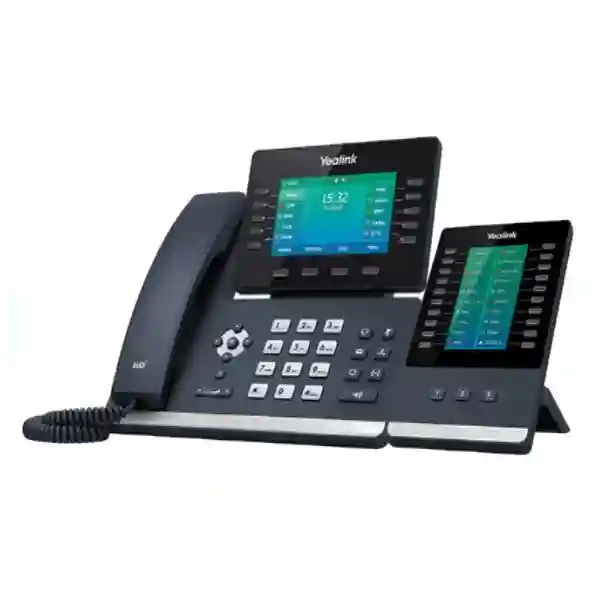
| Expansion | Up to three Yealink EXP50 modules | Useful for reception, assistants and users who monitor many extensions. |
Compatibility, PBX Planning and Deployment
The SIP-T54W is a standards-based SIP endpoint rather than a complete telephone system. Before procurement, IT teams should identify the voice platform, SIP account model, VLAN design, DHCP or static addressing requirements, PoE availability, firewall rules, time synchronisation and any auto-provisioning method. Yealink supports browser, phone and auto-provisioning methods including FTP, TFTP, HTTP and HTTPS. The model also supports Yealink Redirection and Provisioning Service workflows, but the exact deployment process depends on the reseller, service provider or system administrator managing the environment.
Accessory planning is equally important. A manager may only need the standard handset, while a receptionist could require an EXP50 expansion module and a compatible headset. USB call recording can be useful in selected workflows, but organisations must apply their own legal, privacy and policy requirements before recording conversations. The power adapter is optional in the standard package, so buyers using non-PoE networks should confirm that appropriate power supplies are included in the quotation. For offices planning larger voice systems, FourTeck can also help map desk phones into broader business calling architecture alongside IP phone deployment guidance, IP PBX solutions and regional infrastructure requirements.
Who Should Consider the Yealink SIP-T54W?
The strongest fit is a user who spends a significant part of the working day on calls and values easy access to multiple lines, contacts, transfer controls and headset connectivity. Managers and directors may prefer the adjustable display and Bluetooth headset support. Customer-service supervisors can benefit from programmable keys and visible line states. Reception or assistant roles may use an EXP50 expansion module when the number of monitored extensions exceeds what is comfortable on the phone alone. Professional services firms, hotels, schools, healthcare administration teams, logistics companies, finance offices and branch organisations can all use the model, provided their PBX or hosted SIP service is compatible.
It may be more phone than a low-call-volume desk needs. For large deployments, organisations can reduce total project cost by assigning the SIP-T54W only to roles that genuinely benefit from its wireless features, screen and expansion capability while using simpler models for ordinary extensions. Conversely, executives needing a larger touchscreen or video-oriented workflow may wish to compare another model family. A requirements-led selection process is usually more effective than choosing one handset for every employee.
Yealink SIP-T54W Tanzania
Businesses searching for the Yealink SIP-T54W in Tanzania commonly need a reliable professional desk phone for management offices, reception areas, administration teams, sales departments and branch operations. The first buying decision should be based on the existing voice environment. If your organisation already uses a SIP-based IP PBX, hosted PBX or unified communications platform, confirm that the platform supports the required Yealink firmware and provisioning method. For a new system, map the number of extensions, simultaneous calls, inbound call routing, receptionist requirements, headsets and network design before finalising handset quantities.
Tanzania deployments can vary from a small office using a few desk phones to a multi-floor corporate site with PoE switches and centralised provisioning. The SIP-T54W fits especially well where selected users need built-in Wi-Fi or Bluetooth without adding external adapters. Gigabit Ethernet can also support a PC pass-through arrangement at the desk, helping reduce extra cabling where the network design allows it. If Wi-Fi is used instead of wired Ethernet, the wireless environment should be assessed for coverage, congestion, security and voice quality rather than assuming that any available signal is sufficient for business calling.
Procurement teams should request a quotation that clearly separates the phone, optional power adapter, headset, EXP50 expansion module and any installation or configuration services. This prevents confusion when comparing offers. It is also wise to document whether phones will be manually configured, provisioned through the PBX, or enrolled through a central deployment service. Organisations with distributed branches should agree on a consistent naming, VLAN and firmware policy before rollout. For wider regional planning, the FourTeck Africa Yealink guide provides a broader view of Yealink product families that can complement a Tanzania project.
A useful Tanzania quotation request should include the total quantity, delivery city, current PBX or cloud voice platform, PoE availability, headset preference, need for Wi-Fi, number of users requiring expansion keys, and whether configuration support is expected. These details help determine whether the SIP-T54W is the correct model for every user or only for senior and high-call-volume roles. FourTeck’s Tanzania sales discussion can then focus on compatibility and project fit instead of simply offering a handset without context.
Yealink SIP-T54W Dar es Salaam
For organisations in Dar es Salaam, the SIP-T54W is particularly relevant to corporate offices, hospitality groups, professional services firms, logistics businesses, education providers and multi-branch companies that depend on structured voice communication. A busy office may have very different user profiles: executives need comfortable call control, reception teams monitor multiple extensions, finance teams need reliable inward and outward calling, and general users may only require a basic phone. Assigning the T54W selectively can create a balanced deployment that gives advanced features to roles that use them most.
Network readiness deserves careful attention. A PoE-enabled switching environment can power the phone through Ethernet, reducing the need for separate power adapters at every desk. Where PoE is not available, the optional external power adapter should be confirmed in the bill of materials. Dual Gigabit Ethernet can allow a workstation to share the desk network connection through the phone, although network administrators should ensure that voice and data policies are designed correctly. VLAN tagging, QoS and security controls should be planned at the switch and PBX level instead of relying only on the handset settings.
Dar es Salaam businesses also often have conference, headset and mobility requirements. The T54W supports compatible USB and Bluetooth headsets and can connect to Yealink EXP50 modules when an assistant or front-desk user needs more programmable keys. If users want cordless mobility inside the premises, confirm whether a dedicated Yealink DECT solution is more appropriate than trying to use one desk phone for every mobility use case. A proper needs assessment can prevent purchasing accessories that do not match the daily call pattern.
When requesting a Dar es Salaam quote, provide the exact quantity, user roles, intended PBX, whether phones are replacing existing endpoints, preferred power method, delivery requirements and any configuration expectations. If the project includes multiple offices, include each site separately so network and provisioning requirements can be evaluated. The objective is not merely to purchase Yealink SIP-T54W phones but to place them into a voice environment where users can reliably access the functions they need from the first day of deployment.
Yealink SIP-T54W Mwanza
Organisations evaluating the Yealink SIP-T54W in Mwanza may include regional offices, healthcare administration teams, educational institutions, trading businesses, hotels, financial service branches and companies coordinating operations across northern and western Tanzania. For these buyers, a professional IP phone should be evaluated as part of the wider network rather than as an isolated desk device. The T54W can serve managers and active call users who need multiple SIP accounts, programmable keys, a clear colour screen and flexible headset connectivity.
A Mwanza rollout should begin with PBX compatibility and network mapping. Confirm the voice server or hosted provider, supported firmware, SIP credentials, provisioning method and whether the LAN provides PoE. If phones will connect over Wi-Fi, test business voice performance in the actual office rather than assuming coverage based on web browsing. Voice traffic is sensitive to packet loss, latency and roaming behaviour, so a stable wired connection remains preferable where practical. Wi-Fi is valuable where cabling is difficult or flexible desk placement is required, but it should be used deliberately.
The SIP-T54W can also help organisations standardise phone features for branch managers. Built-in Bluetooth makes it possible to use compatible wireless headsets, while the adjustable display improves ergonomics for users who spend many hours at the desk. A USB port can support approved USB headsets, USB recording and EXP50 expansion modules. Recording functions should only be enabled under organisational policy and applicable legal requirements. Reception-style users may need one or more EXP50 modules, while ordinary branch staff may be better served by lower-cost Yealink models.
For procurement, prepare a site-by-site list showing quantity, accessories and intended user category. Include whether remote configuration or local installation is expected and whether existing network switches are PoE capable. If the project is part of a broader East African standardisation plan, compare related options through FourTeck Kenya and FourTeck Uganda so regional offices can align procurement while still accounting for local network conditions and operational needs.
Yealink SIP-T54W Arusha
Arusha businesses often combine office administration with hospitality, tourism, logistics, education, NGO, professional service and regional coordination activities. In these environments, the Yealink SIP-T54W can be a strong choice for managers, reservations teams, supervisors and staff who regularly transfer calls between departments. Its colour display, dedicated function keys and support for multiple VoIP accounts give users a more capable interface than basic desk phones, while built-in Wi-Fi and Bluetooth add flexibility for office layouts and compatible headsets.
Before purchasing, establish how calls enter and move through the organisation. A hotel or tour operator may need a receptionist to see many extensions and transfer calls quickly, which can make an EXP50 expansion module valuable. A smaller consultancy may only need the core phone with a Bluetooth headset. An NGO with multiple programmes may use separate lines or SIP accounts for different teams. These operational patterns should drive the number of T54W devices and accessories instead of buying every feature for every desk.
Arusha network planning should consider PoE power, switch capacity, internet resilience and any voice VLAN policy. The SIP-T54W supports dual Gigabit Ethernet and IEEE 802.3af PoE, allowing a tidy desk installation on compatible infrastructure. Built-in Wi-Fi can help when Ethernet cabling is unavailable, but wireless call quality depends on the office access-point design. Organisations with several floors, thick walls or busy guest Wi-Fi should separate business voice planning from general visitor connectivity. Security teams can also use supported mechanisms such as TLS, SRTP, HTTPS and 802.1X when these are properly configured across the system.
A useful quote request should specify the number of handsets, whether headsets are needed, the PBX or hosted calling provider, the requirement for expansion modules and the desired rollout schedule. Buyers should also ask whether power adapters are included where PoE is not used. FourTeck can then help structure a product discussion around practical compatibility, accessories and deployment rather than only presenting a headline price. This is especially important for Arusha organisations that may need consistent configuration across multiple branches or remote offices.
Yealink SIP-T54W Dodoma
The Yealink SIP-T54W can suit offices in Dodoma that require reliable SIP communication for management, administration, reception and departmental coordination. Government-related suppliers, professional firms, educational organisations, institutions and private enterprises often have structured calling requirements where users need quick transfer, hold, voicemail and multi-line functions. The T54W offers up to 16 VoIP accounts and programmable line keys, giving system administrators flexibility to map the phone to the user’s actual responsibilities.
For institutional deployments, consistent configuration is often more important than individual handset features. Yealink supports auto-provisioning methods that can help administrators deploy larger quantities with standardised settings. The project team should define firmware policy, SIP server details, extension naming, security settings, network VLAN, time server and directory requirements before phones are distributed. This reduces repeated manual work and helps maintain a consistent user experience across departments. If the connected PBX supports centralised management, administrators should use the platform’s recommended Yealink templates rather than relying on ad hoc configuration.
Hardware planning should account for the office network. A PoE switch can simplify desk power, but the available PoE budget should be checked when many phones are connected. Where a desk has only one Ethernet outlet, the phone’s dual Gigabit ports can support network pass-through to a PC, subject to the organisation’s VLAN and security design. Built-in Bluetooth and Wi-Fi provide additional flexibility, but they should not replace sound network engineering. Bluetooth is especially useful for compatible headsets used by staff who need to move around the desk while remaining on calls.
Dodoma buyers requesting a quotation should include quantity, destination, PBX platform, PoE availability, accessory requirements and whether configuration assistance is needed. For projects involving decision-makers and reception staff, separate the user groups so expansion modules or premium headsets are only assigned where useful. This approach helps control project cost while still giving high-call-volume users the features that improve daily productivity. FourTeck can also discuss related voice and network components where the phone deployment forms part of a broader office infrastructure project.
Yealink SIP-T54W UAE
UAE businesses considering the Yealink SIP-T54W typically compare it with other professional desk phones for executive offices, reception, sales teams and active administrative users. The T54W is attractive when built-in Wi-Fi and Bluetooth are required in addition to SIP calling, Gigabit Ethernet and PoE. The adjustable display and support for expansion modules can make it particularly useful for users who manage a larger number of contacts or extensions while still preferring a conventional button-driven desk phone rather than a touchscreen endpoint.
A UAE deployment should start with the voice platform. Organisations may use an on-premise IP PBX, hosted SIP service or cloud unified communications platform, and the exact firmware support and provisioning procedure can differ. Confirm compatibility before purchasing a bulk quantity. For multi-office deployments across Dubai, Abu Dhabi, Sharjah or other emirates, central provisioning can reduce configuration effort. The phone’s dual Gigabit Ethernet ports also support typical corporate desk layouts where a PC and phone share a network drop, provided the switch and VLAN design are configured correctly.
Accessories should be selected by role. Front-desk or assistant users may require EXP50 modules; sales and support users may benefit from compatible Bluetooth or USB headsets; executive users may prefer a wireless headset for longer calls. If phones will use PoE, the switching infrastructure should have sufficient power budget. If not, confirm the optional adapter. Buyers should also consider whether call recording is permitted and required before enabling USB recording, since legal and organisational policies vary.
FourTeck’s Yealink Phones Dubai guide can help UAE buyers compare the T54W with other Yealink business phone models. For a cross-border organisation, the same selection framework can be applied in Tanzania: classify users by call load, screen needs, wireless requirements, line-key requirements and headset preference. This produces a more rational bill of materials than purchasing one premium model for every desk without considering how each employee actually works.
Yealink SIP-T54W Uganda
Uganda organisations may choose the Yealink SIP-T54W for management offices, reception points, hotel administration, schools, healthcare teams, NGOs and growing companies that need a capable SIP endpoint. The phone’s combination of up to 16 VoIP accounts, Wi-Fi, Bluetooth, PoE and Gigabit Ethernet makes it flexible for mixed office environments. Its value is strongest when those features solve a real deployment requirement, such as reducing desk cabling, supporting a wireless headset or giving a supervisor access to several lines.
Before ordering, confirm the PBX or hosted calling platform and identify whether the service supports the desired call functions. SIP registration alone does not guarantee every feature will work, because BLF, shared lines, centralised directories, recording and hot-desking can depend on server-side support. Test a representative handset when possible before a large rollout. This is especially important where an organisation is migrating from an older PBX or combining new phones with existing endpoints.
Network preparation should include PoE capacity, VLAN design, QoS policy and internet resilience for cloud-hosted voice. The T54W can connect by Ethernet or built-in Wi-Fi, but a stable business network is essential regardless of medium. Where Wi-Fi is selected, check 2.4 GHz and 5 GHz coverage and keep voice performance separate from assumptions based on ordinary internet browsing. Security controls such as TLS, SRTP and HTTPS management should be enabled in a way that matches the PBX and organisation’s policy.
For regional purchasing guidance, FourTeck Uganda provides a country-focused route for communication and infrastructure discussions. A strong quotation request should specify quantity, city, user types, PBX platform, whether PoE is available, headset requirements and whether EXP50 modules are needed. Buyers coordinating Tanzania and Uganda branches can use the same standard device policy while keeping local delivery, installation and network conditions distinct.
Yealink SIP-T54W Kampala
In Kampala, the Yealink SIP-T54W can support corporate offices, hotels, schools, financial service operations, healthcare administration, contact teams and professional firms that rely on frequent desk-based calling. Managers and supervisors may value the adjustable colour display and ability to manage multiple SIP accounts, while reception users can extend call monitoring with Yealink EXP50 modules. Built-in Bluetooth is useful for compatible headsets, and dual-band Wi-Fi can offer an alternative when wired access is not practical.
Kampala buyers should avoid choosing an IP phone solely by display size or headline specifications. Start by documenting the business workflow: how many inbound lines are handled, which users transfer calls, whether there is a queue or receptionist, what PBX is installed, whether headsets are required and how users access voicemail or directories. The T54W is usually best for roles with higher call-handling demands, while simpler phones may be sufficient for employees who only make occasional calls.
Network quality directly affects user experience. Gigabit Ethernet and PoE simplify a wired deployment, but the switch must be correctly configured and have enough PoE capacity. For cloud-hosted voice, internet quality and resilience matter as much as the handset. If the office has multiple internet links, voice routing and failover should be designed intentionally so active calls and SIP registrations behave predictably during an outage. For Wi-Fi use, validate coverage at the exact desks where phones will operate rather than relying on general office coverage maps.
When preparing a Kampala quotation, separate core phones from optional accessories so commercial comparisons remain clear. State whether you need the power adapter, EXP50, wired or wireless headsets, installation, SIP account configuration or PBX integration. This helps avoid incomplete quotations and supports a smoother rollout. If the organisation has offices in Tanzania, Kenya or other East African markets, standardising on the T54W for comparable user roles can simplify training and support while still allowing lower-cost models for ordinary extensions.
Yealink SIP-T54W Arua
Arua organisations evaluating the Yealink SIP-T54W may be planning communications for branch offices, NGOs, healthcare administration, education, logistics, trading operations or customer-facing teams. In a branch environment, the main requirement is often dependable communication with headquarters and other locations rather than a long list of unused handset features. The T54W can work well for branch managers, coordinators and reception roles because it combines multiple SIP accounts, programmable keys, clear screen navigation and flexible connectivity.
For remote or regional offices, the network path to the PBX is critical. If the voice server is hosted in another city or country, the organisation should evaluate internet stability, firewall settings, VPN policy and fallback communications. The T54W supports common security and network features, but the complete system still depends on correct router, PBX and service-provider configuration. Where local wiring is limited, the phone’s built-in Wi-Fi can reduce the need for an additional adapter, although voice-quality testing should be completed at the actual desk positions.
Power planning is another practical factor. PoE can simplify installation by delivering network and power through a single Ethernet connection, while non-PoE environments may require the optional AC adapter. Procurement teams should confirm this before dispatching phones to a branch. Headset needs should also be planned at the same time. A branch coordinator who spends long periods on calls may benefit from a compatible Bluetooth or USB headset, while an occasional user may not need one.
Arua quote requests should state the exact quantity, PBX or cloud service, delivery destination, power method and whether the branch needs remote configuration support. For organisations with several Ugandan branches, standardising configuration templates can simplify extension naming and troubleshooting. The T54W’s auto-provisioning options can assist this process when used with a compatible deployment platform. A carefully planned deployment gives users the value of the phone’s feature set without creating support complexity in locations where technical staff may not be present every day.
Yealink SIP-T54W Mbarara
Businesses and institutions in Mbarara can consider the Yealink SIP-T54W for management desks, administration offices, hotel operations, education, healthcare and commercial teams that need a professional SIP handset. The model’s built-in Wi-Fi and Bluetooth are useful where flexible placement or headset connectivity is important, while dual Gigabit Ethernet and PoE support fit more structured corporate networks. Up to 16 VoIP accounts make it possible to configure multiple lines where the connected PBX supports the intended workflow.
The selection process should distinguish between users who need advanced call controls and those who do not. A receptionist or office administrator may benefit from programmable line keys and an EXP50 expansion module, while a standard extension user may be adequately served by a lower-tier phone. Role-based selection prevents unnecessary spending and makes training easier because users receive devices appropriate to their daily tasks. In larger deployments, keep a small number of spare units and standardise firmware to simplify replacement and support.
Network considerations include PoE power budget, Ethernet availability, VLAN configuration, DHCP and QoS. For cloud PBX deployments, WAN quality and backup connectivity should be reviewed as part of the voice design. Built-in Wi-Fi is convenient, but it should be treated as a planned business service rather than an emergency substitute for weak wired infrastructure. If phones will operate over wireless, make sure access points can maintain stable voice traffic and that security policies are suitable for corporate devices.
When requesting a Mbarara quote, specify whether the project is new installation, expansion or replacement. Include existing PBX information, the number of users, headset preferences, need for expansion modules and whether configuration or remote support is required. This allows a supplier to identify compatibility risks before shipment. For multi-site organisations, a common Yealink model policy can simplify user training, but each branch should still be assessed for local power, network and internet conditions before a rollout schedule is confirmed.
Yealink SIP-T54W Gulu
The Yealink SIP-T54W can be a practical business phone for Gulu organisations that require reliable SIP calling for branch management, service coordination, education, healthcare administration, NGOs and commercial operations. Its 4.3-inch adjustable display provides a clear interface, while dedicated function keys reduce the number of steps needed for common tasks such as transfer, hold, redial and speakerphone operation. The phone is particularly suitable for users whose work involves regular external and internal calls throughout the day.
In branch deployments, supportability should be treated as a design goal. Standardise extension names, firmware versions, provisioning templates and security settings so a central IT team can troubleshoot phones consistently. The T54W supports multiple auto-provisioning methods, but the organisation should select one supported by its PBX or management platform. Centralising configuration reduces the risk of different settings being applied manually across offices and helps new or replacement phones come online more predictably.
Gulu offices using PoE can simplify installation and avoid separate power bricks at each desk. However, the PoE switch capacity and UPS strategy should be checked so voice service remains stable during local power disturbances. Where internet-based calling is used, the router and WAN connection should also be protected by suitable power backup if uninterrupted communication is important. Built-in Wi-Fi can provide flexibility, but call quality should be tested under real office load. Headsets should be chosen from compatible wired, USB or Bluetooth options based on user preference and work pattern.
A complete procurement request should identify quantity, destination, PBX platform, network method, required accessories and installation expectations. For a reception or coordination desk, include the number of extensions that must be monitored to determine whether an EXP50 is appropriate. For general staff, consider whether a simpler handset is enough. This role-based approach makes the T54W part of a rational communications plan rather than a one-model-fits-all purchase and helps organisations achieve better value across a full branch rollout.
Yealink SIP-T54W Kenya
Kenya is an active market for professional IP telephony, and the Yealink SIP-T54W is commonly considered for managers, reception teams and business users who need wireless connectivity together with enterprise call handling. Its built-in Bluetooth 4.2 and dual-band Wi-Fi distinguish it from models that require separate dongles, while Gigabit Ethernet and PoE support make it suitable for structured office networks. The phone’s up-to-16-account capacity also helps when a user manages several lines, brands or departmental extensions.
For Nairobi, Mombasa, Kisumu and other business locations, procurement should start with platform compatibility rather than price alone. Confirm the installed IP PBX, hosted PBX or SIP service and check the recommended firmware and provisioning method. If the organisation already uses Yealink phones, the T54W can often fit into a common management approach, but configuration templates should still be tested before mass deployment. For mixed-vendor environments, verify feature-level interoperability for BLF, directories, voicemail and other PBX-dependent functions.
Accessories can materially change the final project cost. Front desks may require EXP50 modules, active call users may need headsets, and non-PoE installations may require power adapters. Request these as separate line items so quotations can be compared fairly. Organisations operating contact desks should also document whether USB recording is permitted and needed, since call recording requires appropriate policy and legal controls. The phone can support recording to USB storage, but that capability should only be enabled under the organisation’s governance rules.
For country-focused assistance, FourTeck Kenya can support regional buying discussions. Companies with Tanzania and Kenya branches can benefit from standardising similar user profiles on the same model, creating common training, spare units and configuration templates. Even so, every site should be assessed for local PoE, LAN design and internet quality before rollout. A complete quote request should state quantity, city, intended PBX, user roles, headset requirements and delivery expectations.
Yealink SIP-T54W Kuwait
Kuwait businesses evaluating the Yealink SIP-T54W often need a professional desk phone that combines SIP calling, a clear display, wireless connectivity and enterprise network features. The model is well suited to managers, administrators and reception users who handle more than basic extension traffic. Its built-in Bluetooth and Wi-Fi can simplify headset and network planning, while dual Gigabit Ethernet and PoE support standard corporate desk deployments. Expansion module support is useful for users who need to monitor larger numbers of lines or extensions.
Compatibility remains the most important pre-purchase check. Organisations should confirm the phone with their current IP PBX or cloud voice platform, including firmware recommendations and any licence requirements on the server side. The T54W itself is a SIP endpoint; capabilities such as shared lines, BLF, directory integration, central recording or hot-desking may depend on the connected platform. A pilot phone can be valuable for verifying these functions before a large purchase, especially when replacing an older handset estate.
Kuwait deployments also benefit from clear power and accessory planning. If PoE switches are available, the phone can be powered over Ethernet; otherwise, confirm the optional AC adapter. Determine whether each user needs a Bluetooth headset, USB headset or no headset at all. Reception users should be evaluated separately for EXP50 expansion requirements. For offices with strict information-security policies, confirm TLS, SRTP, HTTPS management and certificate handling with the PBX administrator so endpoint configuration aligns with corporate standards.
The FourTeck Kuwait Yealink guide provides broader country-focused context for Yealink business phone selection. Multi-country organisations can standardise the SIP-T54W for comparable executive or high-call-volume roles while keeping local procurement and deployment requirements distinct. A quotation request should include quantity, platform, user category, accessories, power method and site location so the commercial response covers a complete working desk setup rather than only the base handset.
Yealink SIP-T54W Ghana
Ghanaian businesses considering the Yealink SIP-T54W may be planning new IP telephony, replacing older desk phones or extending an existing PBX to new users. The T54W suits professional roles that benefit from a colour display, multiple SIP accounts, programmable keys and headset flexibility. Built-in Wi-Fi can assist in offices where network cabling is limited, while Bluetooth provides convenient support for compatible wireless headsets. For structured networks, dual Gigabit Ethernet and PoE support a conventional enterprise desk installation.
The phone should be matched to the communications platform before procurement. Confirm SIP compatibility, supported firmware, provisioning process and any server-side licensing. If an organisation relies on advanced PBX functions such as BLF, shared lines, corporate directories or centralised recording, verify those functions specifically rather than assuming all SIP systems implement them in the same way. A small pilot can reveal configuration requirements before the full quantity is ordered and can help IT teams build a standard template.
For Accra and other business centres, organisations should also evaluate network quality, PoE power, internet resilience and headset requirements. Cloud-hosted voice depends on stable WAN connectivity, while on-premise systems still require good LAN design and adequate switching. The T54W’s Wi-Fi support is useful, but offices should test wireless voice quality under typical traffic levels. Where power continuity is important, phones, switches, routers and PBX equipment should be included in the UPS strategy rather than protecting only the handset.
Procurement teams can use FourTeck Ghana for country-specific business technology discussions. A strong request for quotation should include phone quantity, location, PBX or cloud provider, PoE status, headset preferences, optional EXP50 requirements and whether configuration support is expected. For regional organisations with Tanzania operations, using consistent phone models for similar roles can reduce training effort and simplify spare-device planning across countries.
Yealink SIP-T54W Nigeria
Nigeria organisations may evaluate the Yealink SIP-T54W for corporate offices, customer-service teams, hotels, financial services, schools, healthcare administration, professional firms and branch networks. Its mix of Wi-Fi, Bluetooth, Gigabit Ethernet, PoE and up to 16 VoIP accounts gives IT teams flexibility when designing user-specific desk setups. Managers and supervisors can benefit from the adjustable colour display and programmable keys, while front-office users can add EXP50 modules for a larger set of monitored extensions.
The most important implementation decision is how the phone will connect to the organisation’s PBX and network. For a cloud PBX, check internet quality, firewall behaviour and failover strategy. For an on-premise IP PBX, confirm VLANs, PoE, DHCP and routing. If offices use multiple WAN links, voice failover should be designed carefully because changing public IP paths can affect SIP registrations and active calls. These are network architecture considerations rather than phone faults, and they should be addressed before a large rollout.
Power resilience may also influence design. PoE simplifies desk installation, but switches and upstream network devices need suitable backup power where continuity is required. Organisations should plan headset compatibility at the same time as phones, because a customer-service user’s comfort can depend more on the headset than the desk unit. The T54W supports compatible USB and Bluetooth headsets, while the USB port can also be used for recording or EXP50 modules. Recording should be controlled by organisational policy and applicable law.
For regional purchasing discussions, FourTeck Nigeria offers a country-focused route. Multi-site organisations should state quantities per location, the intended PBX, accessory needs and configuration scope. This helps identify whether the T54W should be deployed to all users or reserved for high-call-volume and management roles. Standardising the model where justified can simplify training, spares and support, while role-based purchasing keeps the overall project cost controlled.
Yealink SIP-T54W Seychelles
For Seychelles businesses, the Yealink SIP-T54W can fit hotel administration, tourism operations, professional offices, financial services, government-related suppliers and multi-site businesses that need a capable professional SIP phone. Its adjustable display, multiple account support and dedicated call-control keys suit users who handle regular internal and external calls. Built-in Bluetooth and Wi-Fi add flexibility, while dual Gigabit Ethernet and PoE make the model equally suitable for a structured wired network.
In island and hospitality environments, system resilience is often a key consideration. The phone should be evaluated together with the PBX, switches, routers, internet connectivity and power backup. If a hotel or business relies on cloud calling, WAN quality and failover should be tested. For on-premise systems, local network design and PBX maintenance become more important. The T54W supports secure SIP-related technologies, but organisations must configure the entire platform consistently for those protections to be meaningful.
The phone’s built-in Wi-Fi can be useful in locations where desk cabling is difficult, but business voice should not simply share a congested guest wireless network without planning. Separate SSIDs, VLANs or QoS policies may be appropriate depending on the infrastructure. Bluetooth and USB headset options are useful for reservations teams, reception and managers who need hands-free calling. EXP50 modules can also extend programmable keys for users who monitor a larger number of rooms, departments or extensions, subject to PBX feature support.
A Seychelles quotation request should include quantity, island or delivery destination, current PBX, user roles, power method, headset requirements and any expansion modules. For organisations operating alongside Tanzania, UAE or other regional offices, the T54W can be part of a common endpoint standard for comparable users. Standardising hardware can simplify training and support, while local network and deployment conditions should still be handled separately. FourTeck can use these details to guide a more complete procurement discussion rather than treating the phone as a standalone commodity.
Related FourTeck Resources
Buyers comparing business desk phones can use the FourTeck network to explore regional and solution-specific guidance. Yealink Product Africa provides a broad model-family overview for African organisations and is useful when the SIP-T54W must be compared with other Yealink desk, DECT or conferencing options. Yealink Phones Dubai helps UAE buyers compare professional Yealink endpoints. FourTeck IP Phone solutions are relevant when planning mixed desk-phone requirements, while IP PBX guidance can help buyers think beyond the handset and consider call routing, extensions and system architecture.
Buying Checklist for a Yealink SIP-T54W Quote
Provide the PBX, hosted SIP provider or unified communications platform and, where available, its current software version.
Separate executives, reception, managers, customer service and ordinary extension users so the T54W is deployed where its features add value.
State whether desks have PoE Ethernet, non-PoE Ethernet or require Wi-Fi, and whether a PC will share the phone’s second Gigabit port.
List power adapters, headsets, EXP50 modules and wall-mount requirements separately so the quote reflects a usable deployment.
Include city, quantity, desired deployment approach and whether you need configuration, provisioning or only hardware supply.
Frequently Asked Questions
Does the Yealink SIP-T54W support Wi-Fi?
Yes. Yealink specifies built-in dual-band 2.4 GHz and 5 GHz Wi-Fi. Wireless voice quality still depends on the local access-point design, coverage, congestion and network policy.
Does the SIP-T54W support Bluetooth headsets?
The phone includes built-in Bluetooth 4.2 and supports compatible Bluetooth headsets. Buyers should confirm the exact headset model they intend to use.
How many VoIP accounts does the SIP-T54W support?
Yealink lists support for up to 16 VoIP accounts. The practical use of multiple accounts depends on the PBX or SIP service configuration.
Can the SIP-T54W use Power over Ethernet?
Yes. The phone supports IEEE 802.3af PoE, class 3. The connected switch or PoE injector must provide compatible power.
Can I connect Yealink EXP50 expansion modules?
Yes. Yealink specifies support for up to three EXP50 expansion modules through the USB connection, allowing additional programmable DSS keys for reception or high-call-volume roles.
Is the power adapter included?
Yealink lists the external AC adapter as optional. If your network does not supply PoE, confirm that the required adapter is included in the quotation.
Can the phone record calls to USB?
Yealink specifies USB call recording through a USB flash drive. Organisations should only use call recording in accordance with applicable law, contracts and internal privacy policies.
Will the SIP-T54W work with my PBX?
The SIP-T54W is a standards-based SIP phone, but exact feature compatibility depends on your PBX, hosted service, firmware and provisioning template. Confirm interoperability before bulk purchase, especially for BLF, shared lines, directories and advanced server-side features.
Decision Recap
Choose the Yealink SIP-T54W when the target user needs a professional SIP phone with a comfortable colour display, built-in Wi-Fi, Bluetooth, PoE, Gigabit Ethernet, multiple VoIP accounts and expansion options. It is particularly well suited to managers, executives, supervisors, reception roles and high-call-volume office users. For a successful project, verify PBX compatibility, network readiness, power method, accessory needs and provisioning strategy before ordering. Avoid paying for advanced features on desks that do not need them; use a role-based device plan for the most efficient deployment.
Prepare Your Yealink SIP-T54W Consultation
For a more useful sales discussion, share your quantity, delivery city, PBX or cloud platform, current phone models, PoE availability, Wi-Fi requirement, headset preference, expansion-module requirement and whether the project is a new system, migration or branch expansion. This information helps FourTeck structure the quotation around real operational requirements and reduces the risk of missing accessories or compatibility checks.




Reviews
There are no reviews yet.