
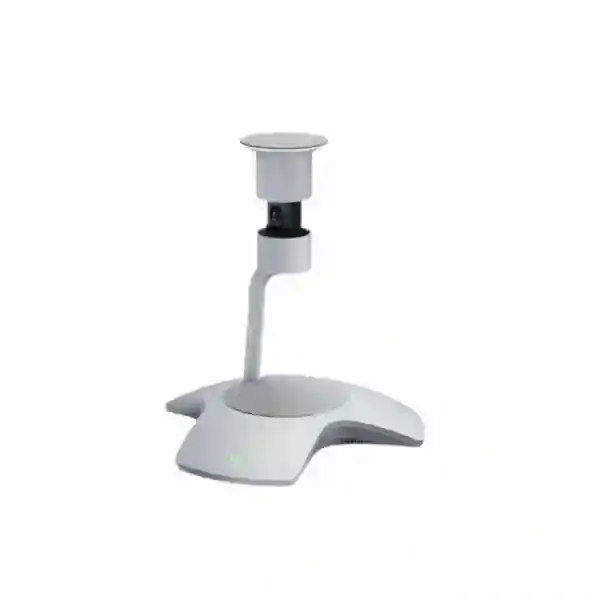
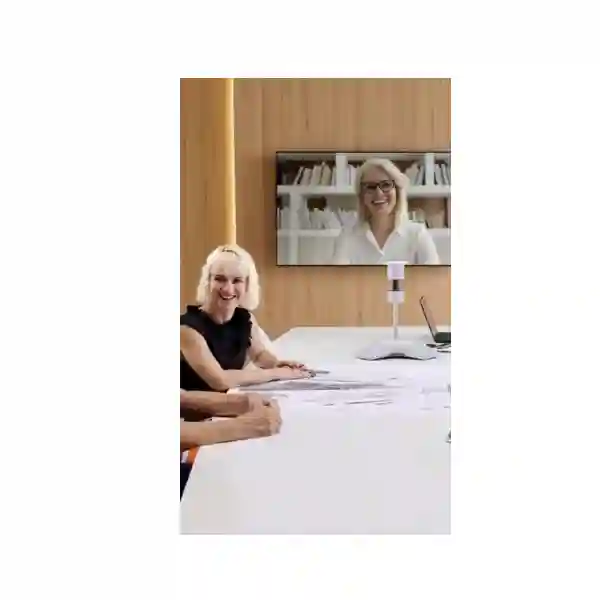
Yealink SmartVision 60 360-Degree Camera
Build a more inclusive small-to-medium Microsoft Teams meeting room with a centre-of-table device designed to capture the full room, hear participants from every direction and present in-room speakers more naturally to remote attendees. The Yealink SmartVision 60 combines a 10K panoramic camera, integrated microphone arrays, an integrated loudspeaker and Microsoft Teams intelligent collaboration functions in one compact room endpoint.
FourTeck Tanzania helps organisations evaluate the SmartVision 60 as part of a complete room design rather than treating it as an isolated webcam. Room dimensions, seating geometry, display position, Teams Rooms compute, touch controller, USB path, acoustic conditions, network quality and Microsoft licensing all affect the final user experience. Share those details when requesting a quotation so the proposed configuration can be checked for practical fit.
Quick product answer
SmartVision 60 is an intelligent 360° all-in-one camera, microphone and speaker device designed for small-to-medium Microsoft Teams Rooms. It is not by itself a complete Teams Room system.
360° HFOV
6 m audio pickup
USB Type-C 3.0
What the Yealink SmartVision 60 is designed to solve
Traditional front-of-room cameras can make hybrid meetings feel uneven because participants seated farther from the lens appear small, people can be hidden behind colleagues and remote attendees may struggle to understand who is speaking. The SmartVision 60 changes the viewpoint by placing the visual and audio capture point closer to the centre of the table. Its 360° horizontal field of view is intended to keep participants around the room visible, while the panoramic 10K imaging system preserves enough detail for intelligent cropping and individual participant presentation.
The device also integrates audio capture and playback. Yealink documents six MEMS microphones for meeting audio plus an additional 6+1 intelligent speech-recognition microphone array. The published voice pickup range is up to 6 metres, although real-world results still depend on room acoustics, noise level, participant distance and placement. This is important for procurement teams because the right question is not simply whether the product has a microphone; it is whether the intended boardroom layout keeps normal speaking positions inside a suitable pickup area.
For Microsoft Teams Rooms deployments, intelligent functions can include Multi-Stream IntelliFrame, participant identification and transcription-related experiences. Microsoft documents licensing and policy prerequisites for some intelligent-camera and people-recognition features, including Teams Rooms Pro for Multi-Stream IntelliFrame and people recognition. Buyers should therefore plan the camera together with the room platform, licensing and organisational Teams policies instead of assuming every advertised AI function will automatically appear after the hardware is connected.
360° room visibility
A 360° horizontal field of view allows centre-of-table placement to capture participants around the room instead of forcing everyone to face one front wall.
10K panoramic imaging
The high-resolution panoramic camera is designed to preserve detail for panoramic viewing and intelligent participant framing in supported Teams Room experiences.
Integrated meeting audio
Microphone arrays and the built-in speaker reduce the number of separate tabletop devices required for many small-to-medium room layouts.
Privacy by design
An electric camera privacy cover provides a clear physical privacy mechanism when video capture is not required.
Verified Yealink SmartVision 60 specifications
| Area | Documented detail |
|---|---|
| Camera | 10K panoramic camera; 360° horizontal field of view; 60° vertical field of view; adaptive digital zoom; electric privacy cover. |
| Meeting microphone array | 6 × MEMS microphone array; published meeting-audio pickup range up to 6 metres under suitable conditions. |
| Intelligent speech array | Additional 6+1 intelligent speech-recognition microphone array. |
| Speaker | Integrated upward-facing speaker; Yealink current support datasheet documents 5 W maximum power. |
| Interface | USB Type-C 3.0, 15V/2.4A DC power connection and reset control. |
| Controls | Two microphone mute/unmute buttons and one camera mute/unmute button. |
| Supported intelligence | Multi-Stream IntelliFrame, participant identification, transcription-related functions, automatic translation and voice-assistant capabilities where supported by the Teams Rooms environment, policy and licensing. |
| Operating environment | 0–40°C operating temperature; 10–95% operating humidity according to Yealink documentation. |
Specification note: Yealink has published different revisions of SmartVision 60 documentation. Procurement should confirm the current manufacturer datasheet and exact package contents for the unit being quoted rather than relying on an older cached specification sheet.
Microsoft Teams Rooms integration and licensing guidance
SmartVision 60 is particularly relevant to organisations standardising on Microsoft Teams Rooms because Microsoft lists the product among supported intelligent cameras for Multi-Stream IntelliFrame and people-recognition workflows. The camera itself does not replace the Teams Rooms compute, controller, display or room account. A complete design normally considers a compatible Windows-based Teams Rooms system, touch controller, one or more displays, the SmartVision 60, appropriate cabling, room account configuration and the Microsoft licensing required for the desired experience.
For Multi-Stream IntelliFrame and people recognition, Microsoft documentation states that Teams Rooms Pro is required and that end-user policy must allow voice and face enrollment. An organisation that uses Teams Rooms Basic should not purchase solely on the assumption that every intelligent framing or recognition feature will be available. IT teams should review identity, privacy, consent and policy requirements before enabling named participant recognition or transcription. This is especially important in regulated organisations, executive rooms and spaces that host customers or external visitors.
Physical integration matters as much as software licensing. Because the device works from a central table position, the USB path must reach the room compute cleanly without creating a trip hazard or unstable extension chain. Yealink promotes certified 15 m and 30 m USB 3.0 cable options for longer deployment paths. Floor boxes, under-table cable management, table grommets and power positioning should therefore be reviewed during room planning. The objective is a meeting room that looks intentional and remains easy to service, not a sophisticated camera connected by temporary cables across the floor.
Before requesting a quote
Send the room dimensions, seating capacity, table shape, preferred Microsoft Teams Rooms platform, number of displays, existing room PC/controller if any, approximate distance from the table to the compute location and required quantity. These details help distinguish a straightforward SmartVision 60 requirement from a complete Teams Rooms project.
For broader meeting-room planning in Tanzania, review FourTeck Tanzania’s business technology and video-conferencing overview, then use the verified FourTeck Tanzania contact page to describe the room and quotation requirement.
Yealink SmartVision 60 360-Degree Camera Tanzania
For organisations evaluating the Yealink SmartVision 60 in Tanzania, the most useful starting point is the room experience rather than the camera specification alone. Corporate offices, banks, professional-services firms, schools, universities, healthcare organisations, NGOs and public-sector teams increasingly run hybrid meetings in which some participants are seated around a table while others join through Microsoft Teams. A conventional front camera can make the far end of the room feel distant and can obscure participants seated behind colleagues. SmartVision 60 addresses that problem with a centre-of-room 360° viewpoint and panoramic imaging designed to make the in-room group easier for remote attendees to follow.
In Tanzania, procurement teams should provide room dimensions, seating count, table shape and the preferred meeting platform before requesting a quotation. These details help determine whether a centre-of-table design is suitable, where the device can be placed, whether the published 6 m pickup range aligns with normal seating positions and how the USB and power cables can be routed. If the room is still being fitted out, coordinate the SmartVision 60 with the display, floor box, table grommets and Teams Rooms compute location early. Doing this during fit-out is usually cleaner than trying to hide cables after furniture has been installed.
The product is especially relevant to Teams-first environments, but buyers should separate hardware capability from platform entitlement. Multi-Stream IntelliFrame and people-recognition functions depend on supported Microsoft Teams Rooms software, policy and licensing. Confirm the current Teams Rooms license and organisational privacy settings before making intelligent participant identification a mandatory project requirement. Network readiness is also important: stable internet, appropriate firewall policies and dependable LAN/Wi-Fi infrastructure affect call quality even when the camera itself is performing correctly.
FourTeck Tanzania can use the room and platform information to help prepare a practical product or solution quotation. If your requirement spans multiple African locations, the verified FourTeck Africa technology site provides a broader regional reference point. For a Tanzania-only deployment, keep the request focused on exact room count, expected users, existing displays and controllers, cabling constraints and whether installation/configuration support is required. That information creates a stronger basis for comparing a SmartVision 60 proposal with other room-camera approaches.
Yealink SmartVision 60 360-Degree Camera Dar es Salaam
Dar es Salaam organisations often need meeting rooms that connect local teams with regional offices, international suppliers, customers and remote specialists. In that environment, a 360° centre-of-room camera can be attractive for executive boardrooms, project rooms and medium meeting spaces where participants sit around a central table. The SmartVision 60’s panoramic perspective helps avoid the tunnel-like effect of a camera mounted only at the display wall. Remote participants can receive a clearer representation of the whole room, while supported Teams intelligence can present active in-room speakers in individual frames.
A Dar es Salaam deployment should be planned around the actual furniture and cable routes. Many boardrooms have large tables, under-table power, floor boxes or wall-mounted displays that determine where the room compute can be located. Check the distance between the SmartVision 60 and the Teams Rooms PC before ordering, because a standard short USB lead may not suit a polished boardroom installation. Yealink lists certified longer USB 3.0 cable options for deployments that require more reach. Power access at the table is equally important, and cable management should keep both power and USB protected from chair movement and routine cleaning.
Acoustics deserve attention. Glass partitions, hard tiled floors, high ceilings and strong air-conditioning noise can affect any microphone system. The SmartVision 60’s published 6 m voice pickup range is a useful planning reference, not a guarantee that every reflective room will sound identical. If the space is unusually large or acoustically difficult, assess whether a different installed-audio design would be more appropriate before locking the project to one device.
When asking FourTeck Tanzania for a Dar es Salaam quotation, include the number of rooms, room size, seating capacity, platform license, display configuration and whether the project is new-build or retrofit. The current FourTeck Tanzania contact page identifies Dar es Salaam among its office locations and specifically asks conferencing buyers to provide room dimensions, seating and preferred collaboration platform. Supplying those details from the first enquiry can reduce ambiguity and make the proposed bill of materials more useful.
Yealink SmartVision 60 360-Degree Camera Mwanza
Businesses and institutions in Mwanza considering the Yealink SmartVision 60 should start by identifying what hybrid-meeting problem they are trying to solve. A room that already has acceptable audio but poor participant visibility may benefit from the centre-of-table perspective, while a room with severe echo or unreliable connectivity may need infrastructure work before a premium camera can deliver its full value. The SmartVision 60 combines panoramic video and integrated audio, but overall meeting quality still depends on the complete room and network.
For branch offices, training spaces and management rooms in Mwanza, one practical benefit is the ability to standardise the user experience with other Teams Rooms across an organisation. Standardisation can simplify support because room naming, login method, meeting join workflow, controller layout and remote management follow the same pattern. Before ordering, verify whether the organisation already uses a supported Teams Rooms compute and touch panel or whether a complete room bundle is required. The SmartVision 60 on its own should not be mistaken for an autonomous video-conferencing appliance.
Plan the physical position around the seating geometry. A centre device works best when participants remain within the intended capture and microphone area and when the device does not block documents, laptops or shared table space. Check power availability, USB routing and whether the table can accept neat cable entry. For existing meeting rooms, a simple site survey or dimensioned sketch can expose practical issues before equipment is shipped or scheduled for installation.
Mwanza buyers requesting pricing should specify quantity and whether the requirement is product-only, configuration support or a full room project. Also state whether intelligent participant identification, transcription or Multi-Stream IntelliFrame is a must-have requirement, because Microsoft licensing and user-policy prerequisites should be confirmed during design. A procurement request that includes these operational details is easier to evaluate than a generic request for a “360 camera,” and it reduces the chance of receiving a quote that omits essential room components.
Yealink SmartVision 60 360-Degree Camera Arusha
Arusha has a wide mix of organisations that rely on meetings with external stakeholders, regional teams and international partners. For hotels with business meeting facilities, NGOs, education providers, tour and hospitality groups, professional offices and public-sector meeting spaces, the Yealink SmartVision 60 can support a more balanced hybrid-meeting layout when the room is centred around a conference table. The 360° panoramic perspective is particularly useful when conversation moves naturally around the table rather than being directed only toward a presentation screen.
The buying decision should account for both fixed meetings and the variety of people who may use the room. A shared room needs a simple join workflow, clear privacy controls and predictable behaviour. SmartVision 60 includes physical microphone mute controls and an electric camera privacy cover, which can help users understand when capture is disabled. However, room administrators still need to configure Microsoft Teams Rooms accounts, permissions and organisational policy correctly. If participant identification or transcription is enabled, communicate the organisation’s privacy and consent practices to users and visitors.
For Arusha installations, consider whether the room will also be used for presentations, training or hybrid events. A single camera does not determine the whole experience: display size, viewing distance, speaker placement, room lighting and broadband quality all matter. If the room regularly hosts larger groups than the tabletop layout suggests, verify that the SmartVision 60 remains the correct device class rather than stretching a small-to-medium room product beyond its intended use.
When preparing a quotation request, include photographs or a basic floor plan where possible, especially if furniture is fixed. FourTeck Tanzania’s contact information identifies Arusha as one of the listed office locations and recommends providing room dimensions, seating and collaboration-platform details for conferencing enquiries. That approach makes it easier to determine cable length, Teams Rooms components, display requirements and whether the installation needs additional network or acoustic work.
Yealink SmartVision 60 360-Degree Camera Dodoma
In Dodoma, the Yealink SmartVision 60 may be considered for government, corporate, education and institutional meeting rooms that need stronger participation between in-room teams and remote attendees. A central 360° capture point can be valuable where discussion happens around a boardroom table, because the camera does not depend on every participant facing a single lens at the front. The panoramic camera and intelligent framing capabilities are designed to make it easier for remote attendees to follow the conversation and identify who is contributing.
For structured organisations, governance and information policy can be just as important as picture quality. Teams intelligent functions such as participant identification and transcription should be reviewed against organisational policies before they are enabled. Microsoft requires specific licensing and policy conditions for some functions, so IT administrators should confirm that the room account, Teams Rooms edition and end-user enrollment settings match the intended feature set. This prevents a procurement document from promising functions that are not enabled by the customer’s Microsoft environment.
Room preparation should include display placement, table position, power, USB cable routing, internet quality and firewall readiness. If the room already contains a Teams Rooms system, document the existing compute and controller model so compatibility can be reviewed. If it is a new room, specify whether the quotation should include the complete room system rather than only the SmartVision 60. For multi-room projects, standardising component choices can simplify spares, support procedures and user training.
The FourTeck Tanzania contact page lists a Dodoma office location and invites organisations to describe the site, users and existing systems when requesting a technology quotation. For a SmartVision 60 requirement, include exact room count, seating capacity, display count, cabling distances, Microsoft Teams licensing status and any need for installation, configuration or handover documentation. These details enable a more meaningful commercial and technical response than an isolated model-and-price request.
Yealink SmartVision 60 360-Degree Camera UAE
For UAE businesses, the Yealink SmartVision 60 fits a common requirement: premium small-to-medium Microsoft Teams Rooms that need a cleaner and more inclusive participant view than a conventional front camera. Regional headquarters, consulting firms, financial organisations, technology companies and multi-national offices often connect meeting rooms across several countries. Using a standard Teams Rooms design with consistent camera, controller and compute components can make those rooms easier for employees to use and easier for IT teams to support.
The device’s 360° panorama is particularly useful for boardrooms where people sit around a central table and remote colleagues need to see reactions from all sides. Intelligent features can extract active speakers from the panoramic image and present them more prominently. Yet the deployment should still be engineered: check the table-to-PC distance, select a supported USB route, provide reliable power and make sure the room network has sufficient stability for sustained Teams video calls. In high-finish boardrooms, coordinating cable paths with furniture and interior fit-out prevents visible extensions and service problems later.
UAE procurement teams also frequently manage cross-border standards. If the SmartVision 60 will be used in Dubai, Abu Dhabi and African branch offices, define one approved room template and then adjust only what genuinely differs, such as display size, cable length or local installation conditions. Do not assume that a license purchased for one room automatically provides the same intelligent-feature entitlement everywhere; review Teams Rooms licensing per room and tenant.
FourTeck’s approved regional network includes FourTeck UAE, which can be relevant when a procurement programme spans UAE and Tanzania sites. When comparing quotations, ask vendors to separate the SmartVision 60 hardware from the room compute, controller, displays, certified USB cabling, installation and software/licensing responsibilities. That makes commercial comparison clearer and helps avoid apparently low hardware pricing that excludes required room components.
Yealink SmartVision 60 360-Degree Camera Uganda
Uganda-based organisations considering SmartVision 60 may be planning a new Teams boardroom, replacing a basic USB webcam or standardising collaboration rooms across multiple branches. The product is most compelling when the meeting layout is built around a table and remote participants need a more equal view of everyone in the space. By capturing the room in 360°, the camera reduces dependence on a single front-facing angle and gives supported Microsoft Teams functions more visual information for intelligent framing.
Before procurement, confirm whether the room already has Teams Rooms on Windows hardware. SmartVision 60 is a camera, microphone and speaker device rather than a complete standalone room system, so a compute platform, touch controller and display remain part of the overall design. If the organisation uses Teams Rooms Pro, Multi-Stream IntelliFrame and people-recognition capabilities may be available subject to Microsoft policy and configuration requirements. If the organisation uses Teams Rooms Basic, expectations should be adjusted to the feature set that license supports.
Physical planning should include the table centre position, power, USB route and the farthest seated participant. Although Yealink publishes up to 6 m pickup, hard room surfaces, high ambient noise and unusual seating layouts can influence perceived audio quality. A site assessment can identify whether the room is better served by the all-in-one table device or by separate installed microphones and loudspeakers.
For organisations coordinating sites in both Tanzania and Uganda, the verified FourTeck Uganda technology site provides a regional point of reference. A strong quotation request should list the exact room count, seating capacity, display arrangement, existing Teams Rooms equipment, network constraints and whether the organisation wants hardware supply only or a planned installation. These details reduce procurement uncertainty and help align the quoted components with the actual meeting environment.
Yealink SmartVision 60 360-Degree Camera Kampala
Kampala offices often serve as regional coordination points for finance, professional services, NGOs, education, telecom, technology and public-sector operations. In such environments, hybrid meetings can involve several participants seated around one table while colleagues join from other cities or countries. The Yealink SmartVision 60 is designed to improve that scenario by combining a 360° panoramic camera with integrated voice pickup and speaker playback, reducing the need for several separate tabletop AV devices in an appropriately sized room.
The central viewing position changes how a room should be planned. Users should not need to rotate the device or manually point a camera toward each speaker. Instead, the system captures the room and supported Teams intelligence determines how participants are presented. This approach can be especially useful for collaborative discussions, but it requires the device to sit in a practical central position with power and USB connectivity. If a table has no cable access, plan a floor box, cable channel or other protected route rather than leaving leads exposed.
For Kampala IT teams, the most important software question is whether the tenant and room license support the desired intelligent camera functions. Microsoft states that Teams Rooms Pro is required for Multi-Stream IntelliFrame and people recognition, with user policies also controlling voice and face enrollment. Review these prerequisites with the Microsoft 365 administrator before making participant identification a project acceptance criterion.
When requesting a Kampala quote, define whether the project is a single executive room, a batch of standard rooms or part of a regional rollout. Include room photos, measurements, table size, display count and existing controller/compute models. For multi-site organisations, naming one standard room configuration can simplify testing and support, while local variations can be captured separately. This procurement structure is usually more effective than ordering the camera first and discovering later that the room requires different cabling, compute or licensing.
Yealink SmartVision 60 360-Degree Camera Arua
For organisations in Arua, a meeting-room upgrade often needs to balance ease of use with remote supportability. The SmartVision 60 can suit a small-to-medium Teams Room where participants sit around a table and the organisation wants one integrated centre device for video capture, microphones and speaker playback. This design can reduce the number of separate components visible on the table, while the 360° panorama keeps participants in view from all directions.
A regional or branch-office deployment should emphasise repeatable configuration. Document the room account, Teams Rooms software version, cable layout, device placement and display connections so remote support teams can understand the room without being on site. If the organisation operates several locations, the same documentation template can be used in each room. SmartVision 60’s intelligent features may enhance the remote-participant experience, but they should be treated as part of a managed Teams Rooms environment rather than isolated camera functions.
Connectivity is another practical consideration. Video conferencing quality depends on stable upstream and downstream internet performance, low packet loss and sensible network policy. A high-resolution camera cannot compensate for a congested or unstable WAN link. Review the room’s wired network path, firewall rules and any QoS strategy as part of the deployment. If Wi-Fi is used for other room components, ensure coverage and interference are assessed rather than assumed.
Arua buyers should include their expected meeting style in the quotation request: number of participants, typical call duration, whether external guests frequently join, and whether transcription or participant identification is required. Also note whether the room is new or already operational. These details help determine whether the SmartVision 60 can be integrated cleanly into the existing environment or whether the project should include additional Teams Rooms hardware, network preparation and room-cabling work.
Yealink SmartVision 60 360-Degree Camera Mbarara
Mbarara organisations looking for a 360-degree conference camera should evaluate the SmartVision 60 against the actual seating pattern. Its design is strongest when users sit around a table and remote participants need a clear sense of the whole room. The 10K panoramic camera captures the 360° scene, while supported Teams intelligence can create more focused views of active in-room participants. That can make meetings feel less like watching a distant security-camera feed and more like a conversation between individuals.
For procurement, separate must-have outcomes from optional features. If the primary requirement is reliable panoramic video and integrated room audio, document that first. If participant identification, transcription or Multi-Stream IntelliFrame is mandatory, document the Microsoft licensing and user-enrollment prerequisites as part of the acceptance plan. This avoids confusion between what the hardware is capable of supporting and what the configured Teams tenant will expose to users.
The table location should be surveyed for power and data. Because SmartVision 60 uses USB Type-C 3.0 and external DC power, both services need to reach the central device. For longer runs, consider Yealink-certified extension options rather than unverified cable chains that may create intermittent camera or audio faults. The display, touch controller and compute should be placed so users can join meetings quickly without managing cables or switching inputs manually.
If Mbarara is one location in a broader Uganda rollout, use the same room-assessment template across sites: length and width, table size, maximum seats, display size/count, compute/controller model, cable distance, network method and license level. Consistent documentation makes it easier to compare rooms and decide where SmartVision 60 is an exact fit and where another room design is more appropriate. A project quote can then reflect real differences instead of forcing identical hardware into every room.
Yealink SmartVision 60 360-Degree Camera Gulu
In Gulu, the Yealink SmartVision 60 may be relevant to institutions and businesses that depend on regular coordination with teams outside the city. Hybrid meetings are most effective when remote colleagues can both hear and interpret the room naturally. A 360° centre-of-table camera supports that objective by showing the full meeting group from within the conversation rather than from the far end of the room. The integrated microphone arrays are designed to capture voices around the table, and the built-in speaker provides room playback for remote audio.
Before selecting the model, verify room size and noise conditions. Six metres of published pickup range does not mean every participant can sit six metres away in a reflective hall and obtain the same quality as a quiet boardroom. The SmartVision 60 is positioned for small-to-medium Teams Rooms, so unusually large training rooms or multipurpose halls may call for a different audio/video architecture. A simple room sketch showing the farthest seat from the intended device position is useful during product selection.
Another buying consideration is ongoing support. Meeting-room technology should be documented so users know how to join, mute audio, disable the camera and report problems. IT administrators should maintain the Teams Rooms software, device firmware, Microsoft policies and room account. Where people recognition is enabled, support documentation should also cover enrollment and privacy practices.
For a Gulu quotation, include whether the SmartVision 60 will be paired with an existing Teams Rooms PC and touch panel or whether the project requires a complete bundle. Confirm display count and cable path, and note whether installation is expected. If the organisation has Kampala or Tanzania offices using the same platform, identify that standard in the enquiry so component choices can be aligned where practical. A consistent regional design can reduce user training and simplify remote troubleshooting.
Yealink SmartVision 60 360-Degree Camera Kenya
Kenya is a strong regional hub for hybrid work, distributed professional teams and multi-country operations, making intelligent Microsoft Teams meeting rooms relevant to many organisations. The SmartVision 60 is suited to buyers who want a centre-of-table 360° viewpoint for small-to-medium rooms rather than a traditional camera looking outward from the display wall. This is useful when collaboration is conversational and participants frequently address one another around a table instead of facing a presentation screen throughout the meeting.
For Nairobi headquarters and branch offices elsewhere in Kenya, standardisation should be considered from the beginning. A repeatable room template can specify the SmartVision 60, approved Teams Rooms compute, touch controller, display configuration, cable lengths, network settings and license level. Standardisation makes it easier to train users and maintain spares, but it should not override room suitability. Measure each room and confirm seating geometry before applying the template.
Teams licensing remains central to feature planning. Multi-Stream IntelliFrame and people recognition depend on Teams Rooms Pro and relevant user policy. Organisations should also decide how they want to manage transcription, identification and user consent. If these features are not required, the purchasing decision can focus more on panoramic video, integrated audio and overall room usability.
For procurement that spans East Africa, the verified FourTeck Kenya site can support regional technology discussions alongside FourTeck Tanzania. Ask for quotations that clearly identify what is included: SmartVision 60 hardware, Teams Rooms compute, touch panel, displays, certified USB cabling, mounting or furniture work, installation, configuration and handover. This itemisation makes it easier to compare proposals fairly and prevents a camera-only quote from being mistaken for a complete operational meeting-room solution.
Yealink SmartVision 60 360-Degree Camera Kuwait
Kuwait-based enterprises evaluating Yealink SmartVision 60 often need meeting rooms that connect management teams, regional offices and international partners through Microsoft Teams. A centre-of-table 360° camera can improve the experience in compact and medium boardrooms where multiple speakers contribute from different sides of the table. Instead of continually relying on a wide front-of-room shot, supported intelligent framing can provide more personal views of active speakers while preserving the panoramic context.
High-quality room fit-out should include the AV technology from the design stage. SmartVision 60 needs central table placement, power and USB connectivity, so interior contractors should know where floor boxes, table grommets and service paths will be located. If the Teams Rooms compute is installed at the display wall or inside cabinetry, measure the cable distance early and select a supported extension approach. Yealink promotes certified 15 m and 30 m USB 3.0 cable options for longer deployments, which can help avoid uncertain third-party extension chains.
The meeting platform should be specified as carefully as the hardware. Confirm Teams Rooms on Windows compatibility, room account configuration and licensing. If intelligent participant recognition is part of the project scope, verify the tenant policy and Teams Rooms Pro entitlement. Security teams may also want to review how meeting transcripts, participant identity and cloud collaboration data are governed within the organisation.
A Kuwait quotation request should include room drawings when available, especially for premium boardrooms where cabling and aesthetics matter. State whether the requirement is a replacement camera for an existing room or a complete new Teams Rooms installation. If procurement is coordinated with Tanzania or other African sites, define the preferred standard configuration and identify any regional differences. This creates a clearer bill of materials and reduces the risk of inconsistent user experiences across locations.
Yealink SmartVision 60 360-Degree Camera Ghana
Ghanaian businesses adopting Microsoft Teams Rooms can use the SmartVision 60 to create a more inclusive small-to-medium meeting environment where the camera sits with participants rather than far away at the display. The 360° horizontal field of view is designed to capture people seated around the table, and the 10K panoramic imaging provides the visual detail used for intelligent cropping and participant framing. This can be valuable for executive discussions, project meetings, client consultations and regional collaboration.
A complete design should verify that the room supports the device physically and acoustically. Measure the distance between seats and the proposed centre point, check that the device will not interfere with laptop use, and ensure power and USB can be routed safely. In rooms with strong echo or mechanical noise, evaluate the acoustic environment before assuming that any integrated microphone array will solve the problem by itself. The published 6 m pickup range should be treated as a planning figure rather than a substitute for room assessment.
IT administrators should also determine which Teams intelligent features the organisation intends to enable. People recognition and Multi-Stream IntelliFrame have Microsoft licensing and policy requirements, while transcription and identification can introduce privacy and governance considerations. Agreeing on these settings before deployment makes user training and acceptance testing much clearer.
For Ghana projects connected with a wider African procurement programme, the verified FourTeck Ghana technology site can be used alongside the Tanzania team for regional context. Request an itemised quotation that distinguishes the SmartVision 60 from the compute, controller, display, cabling and implementation services. If several rooms are planned, provide a room schedule with dimensions and user capacity so the solution can be standardised where appropriate without forcing every space into the same design.
Yealink SmartVision 60 360-Degree Camera Nigeria
Nigeria-based organisations often operate across multiple offices and need collaboration rooms that remain simple for users while being manageable for central IT teams. The Yealink SmartVision 60 supports this objective in small-to-medium Microsoft Teams Rooms by combining panoramic video, room audio capture and speaker playback in a single centre-of-table unit. Its 360° viewpoint is designed to reduce hidden participants and make a round-table discussion easier for remote colleagues to follow.
For Lagos, Abuja and distributed branch deployments, define a standard room profile that can be replicated after a pilot. The profile should include the SmartVision 60 position, Teams Rooms compute, touch controller, display count, USB cable type, power arrangement, room account, network settings and licensing. After pilot users validate audio, video and meeting workflow, the same documented approach can be extended to similar rooms. Rooms that are larger, noisier or arranged differently should be assessed independently rather than copied mechanically.
Procurement should pay particular attention to what a vendor means by “complete system.” SmartVision 60 itself is not the Teams Rooms PC or touch console. Ask for a clear bill of materials showing every hardware and software responsibility. Intelligent features such as people recognition and Multi-Stream IntelliFrame also depend on Teams Rooms Pro and policy configuration, so license cost and Microsoft 365 administration should be included in project planning even if they are purchased through a separate channel.
For regional procurement, the verified FourTeck Nigeria site can complement Tanzania planning for organisations with West and East African operations. When requesting pricing, include project quantity, delivery destination, room schedule, existing infrastructure and whether installation or remote configuration guidance is required. A detailed request gives suppliers the information needed to avoid under-specifying cabling, displays or Teams Rooms components.
Yealink SmartVision 60 360-Degree Camera Seychelles
For organisations in Seychelles, meeting-room technology may need to support management teams, hospitality operations, government functions, professional services and regional coordination without requiring an AV specialist to be present for every call. The SmartVision 60 is designed around a straightforward concept: place an intelligent panoramic camera and integrated audio endpoint near the middle of the conversation so remote participants can see and hear the room more naturally.
The product can be a good fit for a well-defined small-to-medium Teams Room, but island procurement makes planning accuracy especially valuable because replacing an omitted cable or incompatible component can create unnecessary delay. Before ordering, document the room PC/controller, display, table dimensions, cable distance and power location. If this is a new room rather than a camera replacement, request a complete bill of materials and confirm package contents rather than assuming every accessory shown in a marketing image is included.
Support planning should also consider remote diagnostics and documentation. Keep serial numbers, firmware information, room-account details, network configuration and cable labels recorded. Users should have a simple operating guide that explains how to join meetings, mute microphones and use the camera privacy control. If Teams intelligent recognition and transcription features are enabled, include policy and privacy guidance in the room handover.
When requesting a Seychelles quotation, specify whether procurement is for one boardroom, multiple hotel or office meeting spaces, or a regional programme connected to Tanzania or another FourTeck market. Provide seating capacity and room photos where possible. The more accurately the room is described, the easier it is to determine whether SmartVision 60 is the correct device class and whether the quote needs longer certified USB cabling, additional displays, Teams Rooms compute, a touch controller or on-site installation support.
How to decide if SmartVision 60 is right for your room
Choose it when
The room is small-to-medium, participants sit around a central table, Microsoft Teams Rooms is the primary platform and inclusive participant visibility is a priority.
Review alternatives when
The room is very large, acoustically difficult, classroom-style, divisible, requires multiple camera angles or needs installed ceiling microphones and distributed loudspeakers.
Verify before purchase
Teams Rooms compute compatibility, touch controller, license level, display configuration, USB cable distance, power at the table and organisational policies for intelligent identification or transcription.
Related FourTeck Tanzania solution areas
A SmartVision 60 deployment sits inside a wider meeting-room environment. FourTeck Tanzania’s current website groups video conferencing with audio conferencing, business displays, network infrastructure, Wi-Fi, structured cabling and integrated IT services. These related areas matter because a successful Teams Room depends on more than camera resolution.
Video conferencing systems
Use the FourTeck Tanzania solutions overview to place SmartVision 60 within a complete Teams/meeting-room design that includes controllers, displays and room integration.
Audio conferencing
Room acoustics and voice pickup are central to meeting quality. The Tanzania solutions overview also covers conferencing audio, useful when an integrated tabletop device is not sufficient for a larger room.
Displays and room screens
A Teams Room needs appropriate viewing size and placement. FourTeck Tanzania lists commercial display solutions for meeting rooms and business environments.
Network and cabling
Stable conferencing depends on network quality and neat cable paths. The Tanzania portfolio includes managed switching, Wi-Fi, structured cabling, racks and related infrastructure planning.
Frequently asked questions
Is the Yealink SmartVision 60 a complete Microsoft Teams Room?
No. SmartVision 60 is the intelligent camera, microphone and speaker endpoint. A complete Teams Rooms deployment also requires the appropriate Teams Rooms compute, controller, display, room account, cabling and software/licensing configuration.
What field of view does SmartVision 60 provide?
Yealink specifies a 360° horizontal field of view and 60° vertical field of view, designed for panoramic capture from a centre-of-room position.
How far can the microphones pick up voices?
Yealink publishes a 6-metre voice pickup range. Real performance depends on room acoustics, noise, placement and participant speaking level, so the room should still be assessed before purchase.
Does Multi-Stream IntelliFrame require a particular Teams license?
Microsoft documents Teams Rooms Pro as a prerequisite for Multi-Stream IntelliFrame and people recognition. Relevant end-user policy and enrollment settings are also required for recognition features.
Can SmartVision 60 work in a large boardroom?
It is positioned for small-to-medium Teams Rooms. A large or acoustically challenging boardroom may be better served by separate cameras, installed microphones, DSP and distributed speakers. Room dimensions and seating should guide the decision.
What should I send when asking for a Tanzania quotation?
Provide quantity, room dimensions, seating capacity, table shape, display count, existing Teams Rooms compute/controller, license level, cable distance, deployment city and whether installation or configuration support is required.
Quotation checklist
Decision recap
Choose the Yealink SmartVision 60 when you need a small-to-medium Microsoft Teams Room that benefits from centre-of-table 360° video, integrated meeting audio and supported intelligent participant framing. Its strongest value is not simply the 10K specification; it is the ability to present a table-based conversation to remote participants in a more inclusive way.
Do not evaluate it as a standalone appliance. Confirm the Teams Rooms compute and controller, Microsoft license, display, USB path, power, room acoustics and seating layout. For large or complex rooms, compare alternative camera and installed-audio architectures before committing. A room-based selection process protects the project from compatibility gaps and helps ensure the purchased equipment matches how people actually meet.
Plan your Yealink SmartVision 60 deployment with FourTeck Tanzania
Send the product quantity together with room dimensions, seating capacity, display plan and current Teams Rooms environment. FourTeck can use that information to discuss product fit, related room components and quotation scope without assuming that every meeting room needs the same design.
For cross-border programmes, verified FourTeck network sites in Africa, Uganda, Kenya, Ghana and Nigeria can provide regional context while the Tanzania requirement remains anchored to the local project details. This is useful for organisations that want a consistent Teams Rooms standard across several offices but still need room-by-room validation.




Reviews
There are no reviews yet.