
Legacy CCTV to IP migration
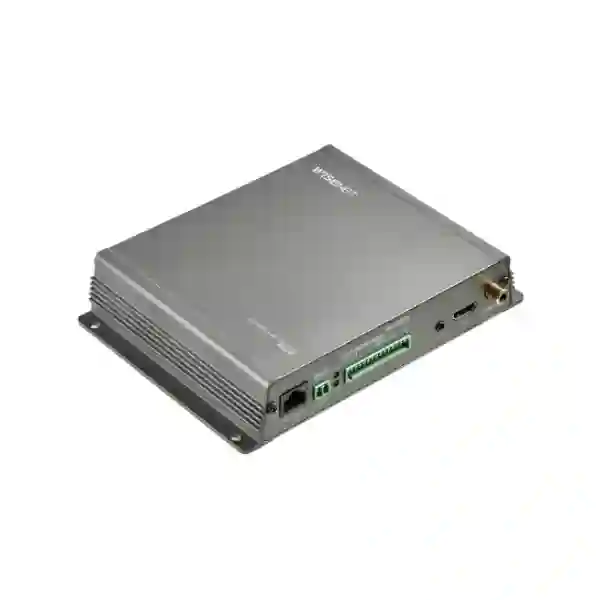
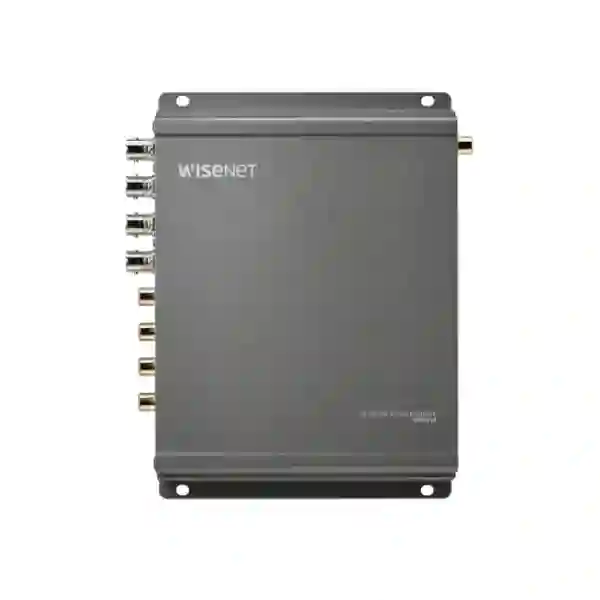
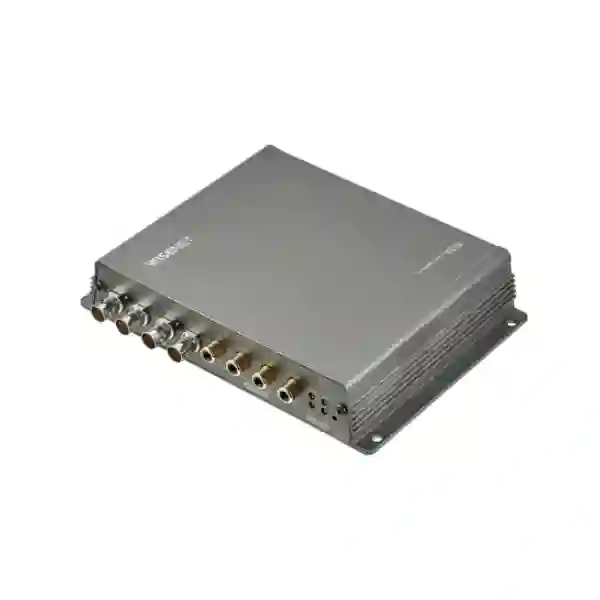
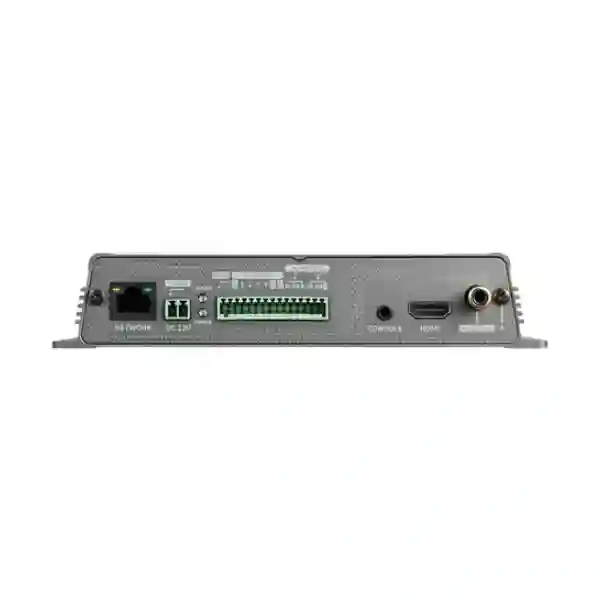
Hanwha SPE-410 4-Channel Network Video Encoder
Bridge up to four supported analog cameras into a compatible IP surveillance system. Evaluate signal formats, recorder integration and lifecycle needs before planning your Tanzania installation.
Discontinued by manufacturer — assess replacement options
4
Analog video channels
4MP
Maximum resolution
H.264 / MJPEG
Supported codecs
SPE-420
Named replacement model
Quick buying answer
Use the Hanwha SPE-410 video encoder to retain up to four working, compatible analog camera feeds while connecting them to an IP-based monitoring or recording workflow. It is a bridge, not a new camera or standalone NVR. As Hanwha has discontinued the model, buyers should verify supply and software compatibility and compare the specified successor before choosing it for a fresh installation.
Verified technical summary
| Product type | 4-channel analog-to-IP network video encoder |
|---|---|
| Lifecycle | Discontinued; Hanwha identifies SPE-420 as replacement |
| Analog input formats | AHD, CVI, TVI, CVBS |
| Maximum incoming channels | 4 |
| Maximum stated resolution | 4MP |
| Stated frame-rate limit | Up to 15fps at 4MP; up to 30fps at 1080p (NTSC) |
| Video codecs | H.264, MJPEG |
| Stream profiles | Up to 3 profiles per channel |
| Network interface | 10/100/1000 Base-T |
| Integration interfaces | ONVIF Profile S, SUNAPI |
| Local video output | HDMI |
| Audio interfaces | 4 inputs / 1 output |
| Alarm interfaces | 4 inputs / 2 outputs |
| PTZ interface | RS-485/422; relevant up-the-coax modes |
| Power | 12 V DC or PoE; maximum 9.6 W in published comparison |
| ECO Stream | Requires firmware v1.30 or later |
Capabilities depend on input signals, firmware, configuration and receiving software. Verify the exact installation before purchase.
What the Hanwha SPE-410 does
The Hanwha SPE-410 video encoder is a four-channel bridge between supported analog CCTV cameras and an IP surveillance network. Rather than replacing every existing camera and cable simply to make video available to an IP-based recorder, the encoder accepts analog video, converts it into network streams, and makes those streams available to compatible monitoring and recording software. It is relevant when an existing installation still provides useful views but the recording platform or control room is moving toward network video.
The device is an encoder, not a standalone recording system or a replacement for the camera itself. Each supported analog camera remains responsible for capturing the scene; the SPE-410 prepares that incoming signal for network distribution. A complete installation still needs suitable power, functioning cabling, network connectivity and a compatible video management system or network video recorder. Understanding that boundary prevents unrealistic expectations about image enhancement, storage or the ability to add capabilities that an older camera never possessed.
Who should consider this legacy encoder
The strongest use case is a planned transition in a building where four or fewer compatible analog cameras are to be retained. An installer may need to connect those cameras to an existing IP-oriented monitoring environment, preserve camera positions that are expensive to alter, or maintain an operational area during a wider modernization. In each case, the decision starts with a survey of the camera signals, the recorder and the network rather than with the model name alone.
The SPE-410 is a discontinued model, so it should not automatically be the first choice for a new project. Where the unit is already installed, documenting and maintaining it can be sensible while the wider surveillance system is evaluated. Where a replacement purchase is contemplated, consider current support expectations, spare-part availability and the manufacturer’s nominated successor, SPE-420. The practical objective is a reliable surveillance outcome, not preserving a particular legacy box at any cost.
Decide whether to retain, replace or redesign
Keeping a working encoder may reduce immediate changes to cabling and camera hardware. That can matter when an otherwise satisfactory camera is mounted in a hard-to-access location, or when a controlled migration is preferred over a full replacement. However, the saved installation work must be weighed against the age of the encoder, ongoing cybersecurity responsibilities, future recorder compatibility and the image quality of the original analog cameras. A successful bridge is not the same as a modernized imaging system.
If the project requires higher resolution than this model supports, native IP camera analytics, H.265 encoding or a fresh long-term product lifecycle, the SPE-410 may not meet the specification. An equipment review should compare a compatible contemporary encoder with direct IP camera replacement and continued use of existing recording hardware. Record the actual camera count, lens requirements, lighting conditions, monitoring workflows and evidence-retention objectives so the choice reflects the site rather than a catalogue feature list.
Supported analog video formats
Hanwha lists AHD, CVI, TVI and CVBS as supported input formats for the SPE-410. This breadth is useful in mixed or inherited CCTV environments where the installed cameras do not all belong to one newer IP product family. Nevertheless, a format name alone does not prove that every camera mode, output setting or firmware combination will function correctly. Confirm the actual signal produced at the camera and the resolution selected before connecting equipment to the encoder.
An analog camera may offer selectable video output modes, and an installer should verify which mode is active before diagnosing a missing picture as a network problem. Check whether the cable and connectors are sound, whether an existing distribution device changes the signal and whether the camera supplies a resolution the encoder can process. In retrofit work, label the cable at both ends and record the camera type for each channel. That small step makes future maintenance far easier.
Four channels and channel allocation
The SPE-410 accepts a maximum of four camera channels. Its four-input design fits small legacy clusters, a single building zone or a phase of a larger migration. The number of available encoder channels should be matched to the number of cameras that genuinely need conversion; unused channels do not create additional network-camera capacity on the recorder unless the recorder’s own licensing and channel rules allow it. Review how the destination platform counts individual encoded streams.
Channel planning is also an operational issue. Assign stable names such as a doorway or loading-area description, map each physical video input to its expected recorder channel, and document the correct view before the site is handed over. If there are more than four analog cameras, the design needs additional suitable encoding capacity or an alternative architecture. Avoid assuming that several streams generated from one input represent several independent cameras; they are different encodings of the same scene.
Resolution and frame-rate limits
Manufacturer information identifies a maximum video resolution of 4 megapixels, with up to 15 frames per second at 4MP. At 1080p the stated maximum is 30 frames per second for the NTSC setting; other supported lower-resolution or PAL modes follow their specified limits. These are upper operating capabilities, not guaranteed end-to-end recording results. The incoming camera mode, encoding profile, network conditions, recorder acceptance and any additional processing can affect the displayed or recorded result.
A project that requires very smooth motion and high pixel detail at the same time should compare its requirement with the 4MP and 15fps ceiling before deployment. For a static perimeter view, a lower frame rate may still suit the scene; for a fast-moving vehicle lane, it could be more limiting. Evaluate recorded clips with actual subject movement instead of relying on a frame-rate number in isolation. A better camera angle or exposure setting may sometimes matter more than increasing resolution.
Choosing a sensible stream profile
Each channel should be configured around what the footage needs to show. A main profile can prioritize recording detail, while an additional profile may suit lower-bandwidth monitoring or mobile access when the receiving system supports it. Hanwha documents multiple streaming with up to three profiles per channel for the SPE-410. The feature is valuable when two applications need different video sizes or transmission requirements without recabling the original analog camera.
Do not set every parameter to its maximum without considering the number of active channels, viewing users and available bandwidth. Review resolution, frames per second, H.264 quality or bitrate control, network load and the recorder’s supported settings. A live view that looks satisfactory on a local monitor may still be poorly optimized for an off-site link. Keep a configuration record showing the main stream, secondary profiles and the intended consumer of each profile.
H.264 and MJPEG compression
The SPE-410 supports H.264 and MJPEG video encoding. H.264 is generally the practical option for continuous video transport and recording where a compatible decoder is available, while MJPEG can be useful for workflows that require individual JPEG-based frames. These formats are not interchangeable with every recorder feature or compression setting. The destination application must accept the chosen codec, resolution, frame rate and stream transport method.
The SPE-410 is not advertised as an H.265 encoder. If a procurement specification insists on H.265 or a later compression architecture, do not describe this older model as equivalent. In a mixed-camera system, an NVR may support both legacy and newer codecs but still impose limitations on features or throughput per connected channel. Confirm compatibility against the actual software version and the number of simultaneous streams, then test the stored footage rather than only the login or live preview.
ECO Stream and firmware dependency
Hanwha specifies ECO Stream bandwidth-reduction technology on the SPE-410, with the important condition that firmware version 1.30 or later is required. The feature is associated with encoding profiles and can help manage the amount of traffic generated by suitable scenes. It should not be treated as a universal fixed percentage of savings because content, profile settings and software versions affect any real-world result.
Before describing a running unit as ECO Stream capable, record the installed firmware release and confirm the relevant settings are available. For a legacy device, firmware handling deserves particular care: preserve configuration details, obtain updates only through a trusted manufacturer support process and follow the exact installation guidance. Do not assume that a software update improves every compatibility scenario or guarantees continued security maintenance. Test recording and operator access after any approved change.
Network connection and traffic planning
The manufacturer lists a 10/100/1000 Base-T Ethernet interface for the SPE-410. That connection brings the encoded channels onto the local IP network, where an authorized recorder or viewer can access them. A gigabit-capable network port is not a promise that the video will need a gigabit of throughput. Aggregate load depends on the actual channel profiles, bitrate settings, event activity and how many streams are requested at the same time.
Plan the network path from encoder to recorder, including switches, uplinks, structured cabling and any shared backhaul. Consider whether one recorder receives all streams continuously while operators also request live views. Document addressing, gateway and DNS requirements only as appropriate to the site architecture. Avoid exposing a legacy encoder directly to the public internet merely for convenience; remote access should be controlled within the organization’s wider network-security design.
ONVIF Profile S and SUNAPI integration
Hanwha’s product documentation identifies ONVIF Profile S and SUNAPI as interfaces for the SPE-410. These provide routes for integrating network video with compatible recording or management platforms, although the existence of a common protocol does not ensure that every advanced function will be available. Third-party products may discover a video stream while handling events, audio, PTZ controls, authentication or camera settings differently.
For procurement, request a practical interoperability test using the actual intended recorder or video management software. Confirm channel discovery, stream selection, restart recovery, time synchronization, motion or alarm events where needed, and recording playback. Document which capabilities work through ONVIF and which require a manufacturer-specific method. An encoder that connects successfully in a short demonstration can still have shortcomings during a more demanding operational workflow.
Integrating with an NVR or VMS
An encoder does not automatically provide the playback interface, evidence retention or user permissions expected from a full recording system. Those functions normally depend on the network video recorder or video management software chosen for the project. Verify the recorder’s ability to add the encoder and handle four separate camera inputs, and check whether its channel licensing or bandwidth budgets need adjustment. The recorder’s list of supported devices should be reviewed for the deployed firmware and software versions.
During commissioning, watch for differences between live stream performance and actual stored clips. Test search, event retrieval and export as well as continuous recording. A project handover should demonstrate that footage can be found after a power interruption and that camera names remain meaningful to operators. If the broader solution requires analytics, searchable metadata or sophisticated alarm logic, confirm whether those are performed by another component instead of attributing them to this encoder.
Checking existing cameras before a migration
Start a retrofit with a camera-by-camera inventory rather than assuming every analog unit should be kept. Note the field of view, image clarity in daylight and darkness, signal format, output resolution, lens state, operating power and any existing PTZ mechanism. A camera that produces poor images will not gain true detail simply because its signal is carried over an IP network. The original sensor, optics and lighting still determine much of the useful evidence.
Review cable condition and the historical maintenance record alongside image quality. Intermittent analog noise, water-damaged connectors or unstable camera power may appear as encoder faults once the system is networked. Where a camera is beyond economical repair, a direct IP replacement might be a better investment than repeated troubleshooting. Keep the comparison grounded in operational need: a secure storage room and a vehicle entrance can have very different identification and motion requirements.
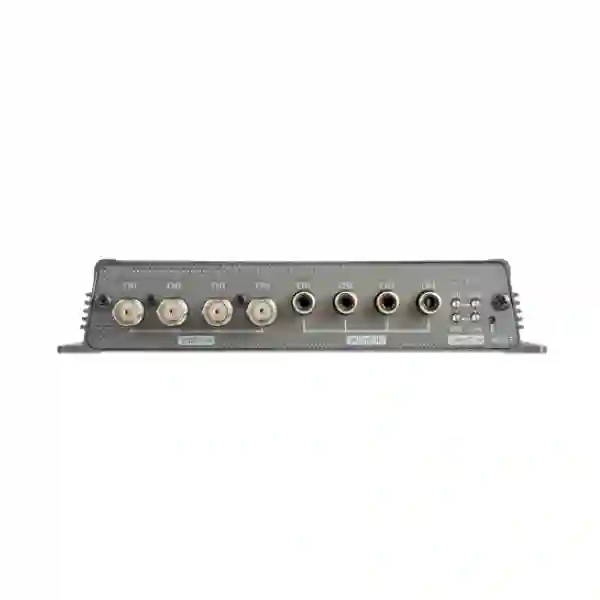
BNC inputs and existing coaxial wiring
Four analog video inputs use BNC connectivity, allowing compatible camera signals to be brought into the SPE-410. Reusing coaxial runs can be one of the principal reasons for selecting an analog-to-IP architecture. Reuse is conditional on cable quality, connector integrity, signal type and the installed camera settings. A visually intact cable is not proof that the signal remains clean at the encoder end.
During installation, inspect terminations and test the picture at the actual receiving point, not only near the camera. Check for ghosting, intermittent loss, interference and differences between channels. Label BNC connections consistently and provide strain relief so a service visit does not pull a connector loose. Where an existing system uses baluns, converters or intermediate distribution equipment, document their roles before changing the signal path. The safest retrofit is traceable and easy to reverse.
PTZ controls and older camera protocols
The manufacturer identifies RS-485/422 control interfaces and support for ACP or Pelco-C up-the-coax control in applicable configurations. These capabilities can be important where an older analog PTZ camera needs more than a basic picture. However, successful movement and preset control depend on the camera protocol, wiring, selected signal mode and receiving software. The names of supported interfaces are a starting point for testing, not a blanket promise for every PTZ camera.
Before commissioning, establish the camera address, baud rate or other relevant communication settings, and confirm the physical control path. Test pan, tilt, zoom and any essential preset under normal user permissions. A system might show video correctly while PTZ commands fail, so treat those as separate acceptance checks. Where camera control is a safety-critical operating requirement, document the exact verified combination of camera, encoder, firmware and monitoring application.
HDMI output for local viewing
The SPE-410 includes HDMI output, which may support local display requirements during setup or in a suitable installation layout. HDMI should not be mistaken for network recording capacity, and its presence does not mean the device functions as a full multi-day DVR. The purpose of the encoder is still to bridge camera signals to the IP environment, with recording and centralized management provided elsewhere as required.
Determine in advance whether staff need a local monitor, a central networked workstation, or both. Where a direct display is used, verify supported monitor modes, physical access and how it is secured from unauthorized changes. Avoid designing a control room around assumptions about layouts or playback features not confirmed for the exact model. If a project needs high-resolution multi-screen decoding, dedicated display infrastructure may be more appropriate.
Audio connectivity and practical limits
Product specifications identify four audio input connections and one audio output on the SPE-410. These interfaces can be useful where the installed surveillance design explicitly includes compatible audio sources, but the existence of an audio connector does not establish that every recorder, site policy or camera combination will capture or play sound. Audio also introduces privacy, consent and operational considerations that should be assessed before enabling it.
For a site using audio, confirm signal levels and connectors, associate each input with the correct camera channel and test both live listening and recorded playback. Establish who may access sound, whether it is appropriate in that space and what retention or notice requirements apply. When audio is unnecessary, leave it out of the design instead of switching it on by default. A straightforward, documented configuration is easier to audit and maintain.
Alarm inputs, outputs and event handling
The unit is specified with four alarm inputs and two alarm outputs. This can support an installation where simple external devices or compatible alarm workflows need to be considered alongside video. The detailed behavior depends on electrical design, configuration and integration with the recorder or monitoring platform. Do not assume that every event created at the encoder will be displayed or recorded automatically by a third-party system.
During design, define what each input represents, whether an event should trigger recording or operator notification, and how any output device should behave. Qualified personnel should verify wiring and electrical compatibility rather than connecting unfamiliar circuits directly. Testing should include normal state, triggered state, restored state and a power cycle. Clear input labels and a written event matrix reduce uncertainty when the equipment is serviced months later.
Motion detection, tampering and video-loss events
Hanwha lists motion detection, tampering detection and video-loss detection among the SPE-410 features. These events may help operators notice relevant changes, but they are not substitutes for a complete surveillance policy or for higher-level scene understanding. Traditional motion detection can respond to lighting changes, shadows, weather and background activity; tampering and video-loss signals also require meaningful configuration and proper integration.
Set thresholds and notification rules against the realities of each scene. A busy gate may need different event behavior from a seldom-used corridor. Test notifications with the intended recording system, and ensure the reaction to a disconnected camera is clear. Where operators must receive reliable alerts, review how outages of the encoder, network or recorder are detected as well. No single event feature should be treated as comprehensive health monitoring.
Power choices: PoE or 12 V DC
The SPE-410 supports both 12 V DC power and Power over Ethernet. Hanwha’s earlier published portfolio lists a maximum consumption of 9.6 W for the model, and a PoE-enabled switch can be useful where network and power infrastructure are planned together. Confirm the actual equipment labeling and correct power method before installation; do not improvise with an unverified adapter or assume that every PoE switch supplies appropriate power.
A stable power design matters as much as the nominal wattage. Check the available PoE budget across all devices on a switch, the impact of simultaneous camera and encoder loads, and the need for backup power during short outages. Analog cameras generally have their own power requirements, so energizing the encoder does not automatically power the connected cameras. Label supplies and test controlled recovery after power restoration, including recorder reconnection.
Bandwidth is a system calculation
Bandwidth planning should use configured bitrates and expected concurrent stream requests rather than only the camera count. Four channels each producing a main stream can be a modest load on a well-designed local network, but a remote connection, a busy shared link or several operators viewing profiles simultaneously can create practical constraints. Stream profiles should therefore be selected deliberately and verified under realistic viewing patterns.
Build a simple worksheet showing each channel, chosen codec, target bitrate, expected recording schedule and the clients that consume it. Where a bandwidth-reduction feature is enabled, measure the real difference under typical scene conditions rather than treating marketing language as a capacity guarantee. Include network headroom for management traffic and recovery. If the recorder is across a wide-area link, assess packet loss, latency and service reliability separately from raw throughput.
Recording storage and retention planning
The SPE-410 converts video into streams but does not, by itself, establish the capacity or retention of an attached recording solution. Storage is determined by the recorder or storage platform, selected encoding bitrates, recording schedule, retention period and operational events. Hanwha’s published product comparison does not list an SD-card slot for this model, so a design should not rely on local removable-card recording as a fallback.
Estimate storage from aggregate recorded bitrate over the required hours and days, then allow for overhead, variable scene complexity and changes to event activity. Confirm the recorder has enough usable capacity after any redundancy requirements. Retention decisions should be documented as a policy rather than an informal promise that footage will always be available. Test an actual export and restore workflow so authorized staff can obtain evidence when required.
Network security for a discontinued device
A discontinued video encoder deserves careful security assessment. Even where a product exposes familiar network services or supports encrypted management options, that alone does not prove ongoing vulnerability remediation. Minimize access, use strong unique credentials, apply network segmentation, and restrict management traffic to approved administrators. Consider a controlled remote-access architecture rather than exposing the device directly to the internet.
Keep an asset register containing model, serial number, firmware version, address, responsible owner and replacement plan. Review manufacturer guidance before making firmware changes and verify that an update has a trusted origin. Disable functions that are not required for the deployment when configuration permits. Plan how the site will respond if an unfixable vulnerability or integration failure emerges. For a new long-term project, lifecycle support can be a more important decision factor than an attractive legacy purchase price.
Time, authentication and evidence consistency
An encoder can appear to be functioning while operators later discover that timestamps, channel names or account permissions are inconsistent across the surveillance system. Set a clear time source and understand whether the recorder or encoder controls displayed and stored timestamps. Confirm time zone handling, especially when footage is reviewed from multiple locations or shared with external investigators. The goal is an understandable record of when and where activity occurred.
Manage accounts according to operational roles: routine viewing, configuration changes and evidence export should not necessarily share one password. Review failed login behavior and access logging where those functions are available. Document credentials securely outside the page or installation notes intended for general circulation. During acceptance testing, have an authorized user find a known event by time, play it back and export it with the expected context.
Practical Tanzania deployment considerations
For a CCTV modernization project in Tanzania, begin with the actual building environment: existing coaxial runs, camera power arrangements, equipment-room heat, electrical interruptions and the path from recording equipment to security staff. These considerations are relevant whether the site is a small office, a managed property or a larger operational facility. No assumption about FourTeck’s local inventory, installation reach or delivery timetable should be made without a separate commercial confirmation.
If remote monitoring is part of the design, confirm the available connection and the amount of upstream traffic the selected streams require. A dependable local recorder and secure remote access method may be preferable to designing around uninterrupted internet service. Consider ventilation and protected power in equipment cabinets, and examine any outdoor cable exposure before relying on inherited wiring. Local procurement decisions should also verify technical suitability, replacement availability and the exact scope of support offered.
Commissioning sequence for a retrofit
A controlled commissioning sequence reduces the chance of losing existing surveillance coverage during migration. First inventory the installed cameras and document the current recorder setup. Next verify camera formats and image quality at the cable end. Then prepare network addressing, power and recording capacity before installing the encoder. Add and label channels one at a time, preserving a known working path until the new video stream has been validated.
After the basic picture appears, test the chosen stream profiles, reconnect behavior and any audio, alarms or PTZ functions that the project actually uses. Review performance during both quiet and busy scene conditions, including the times when remote viewing is most likely. Complete a short acceptance log for every channel with the installer, operator and responsible owner. An organized migration should end with documented settings and demonstrated retrieval of recorded footage.
How to troubleshoot a missing picture
When a connected channel is blank, isolate the cause in stages. Check whether the camera has power and whether the analog image is present at the encoder input. Verify that the camera output format and resolution are among the supported settings and that the BNC path is sound. Only after the incoming video has been confirmed should the network stream configuration be treated as the primary suspect.
If the encoder’s local view is available but the NVR cannot display the camera, inspect addressing, reachability, credentials, stream profiles and the recorder’s connection method. Confirm that the correct channel has been added and that the VMS supports the configured codec. If the problem appears only after a restart, test boot order, network service recovery and recorder reconnection. Record the actual symptom and corrective action rather than repeatedly resetting the system without a diagnosis.
How to troubleshoot unstable recordings
Intermittent recording gaps do not always originate at the camera. A weak camera supply, damaged coaxial connector, congested switch, poorly sized uplink or overloaded recorder can each produce different forms of failure. Check whether every affected camera shares an encoder, switch, network path or recorder service. Time-correlated faults can reveal a common cause more quickly than changing settings independently on each channel.
Review logs and health indicators available from the actual system, then compare the configured bitrate with observed traffic and recorder resources. Test a simpler stream profile if compatibility is suspected, but avoid making permanent quality reductions without agreement. Where remote viewers report freezing yet local recordings remain intact, investigate the remote path separately. Maintain before-and-after evidence for configuration changes so the team can reverse an unsuccessful adjustment safely.
Understand the replacement: Hanwha SPE-420
Hanwha Vision identifies the SPE-420 as the replacement model for the discontinued SPE-410. That makes it a relevant model to investigate when the existing encoder fails or when a buyer needs a current alternative in the same broad four-channel product class. However, a replacement designation is not a guarantee that every legacy setting, accessory, third-party recorder or integration behavior is identical. Procurement should compare detailed interfaces and compatibility for the intended deployment.
Hanwha describes more recent encoding capabilities for the SPE-420, including H.265 support and a higher stated maximum resolution than the SPE-410. The difference may matter for a project targeting newer codecs or camera signals. An upgrade decision should still verify camera formats, required controls, audio, alarms, software support, power and physical installation needs. Do not order solely because both product names begin with the same letters or because both have four inputs.
Compare an encoder with direct IP camera replacement
An encoder preserves a path for analog video to join an IP system; a native IP camera creates network video at the camera itself. The first route may reduce disruption when the analog cameras and coax are serviceable. The second route can unlock the capabilities of newer sensors, on-camera software and modern network architectures, depending on the chosen camera. Neither approach is automatically cheaper across installation, operation and future maintenance.
Make a lifecycle comparison that includes cameras, encoder, NVR licenses, switching, storage, power, cabling repair, configuration and ongoing support. In a building with long usable coaxial runs, retaining a portion of the analog system can be rational. In a site needing significantly better identification detail or advanced analytics, camera replacement may solve problems that a video encoder cannot. The sensible answer often differs by location within the same property.
Verify compatibility before requesting a quote
A useful enquiry includes the exact encoder model, the number of analog cameras, camera output types, required recording resolution and the make and version of the intended NVR or VMS. State whether HDMI viewing, audio, alarm contacts or PTZ operation is essential. This helps distinguish a simple four-channel image-conversion requirement from a more complex migration where interface limitations could determine the result.
Because the SPE-410 is discontinued, ask for explicit confirmation of supply options and whether a supported replacement should be specified. Also confirm the proposed unit’s condition, included power accessories, firmware status and any warranty terms offered for the specific transaction; none of these should be assumed from the model designation. Where the destination system is already operating, request a verified interoperability plan and acceptance criteria before committing to installation work.
A commissioning checklist for the site owner
A commissioning review should cover practical evidence, not just a green online indicator. Verify a clear view on all expected channels, stable images at the chosen resolution, correct timestamps, acceptable live-view delay and recordings that can be searched and exported. Test camera loss and power recovery. Confirm the recorded channel names make sense to guards and supervisors who did not participate in the installation.
Where the design includes extra functions, separately demonstrate PTZ response, alarm mapping, audio capture and the approved remote-viewing method. Keep a configuration backup where supported and store network credentials securely. A signed acceptance record should describe any features intentionally left unused, remaining limitations and a maintenance contact process. Because legacy equipment is involved, also document the planned review date for retirement or upgrade rather than allowing the device to become an invisible dependency.
Operating and maintenance guidance
Operational care starts with periodic review of the camera image, not simply whether the encoder responds on the network. Dust, vibration, damaged connectors or camera movement can reduce surveillance usefulness without taking a channel completely offline. Inspect recording gaps, image quality and the difference between day and night scenes as appropriate to the location. Maintain an inventory of software and hardware versions so an urgent service visit does not begin from scratch.
Use a change-control process for network settings, firmware and recorder compatibility. Before replacing equipment, note how the four channels are named and mapped, what the receiving platform expects and which alarm or control paths are in use. For a discontinued model, a sensible maintenance program includes a realistic replacement strategy and procedures for restoring coverage if a unit is no longer repairable. Avoid promises about manufacturer spare parts or support duration unless separately confirmed.
What this specification does not promise
The published specification describes supported formats and maximum technical capabilities; it does not promise better images than the attached camera can produce. It does not establish that a particular third-party VMS will recognize every channel or feature, and it does not guarantee indefinite product support. Likewise, the presence of an HDMI connector does not mean integrated recording and the existence of motion detection does not mean AI-based object classification.
Commercial terms also require separate verification. A model designation cannot confirm Tanzania stock, price in Tanzanian shillings, lead time, shipment terms, installation service or warranty. Any listing that presents such facts should be backed by current transaction-specific information. This page deliberately avoids unsupported local claims and instead gives buyers the questions needed to evaluate a real offer. That approach is especially important with a discontinued surveillance component.
Make the final equipment decision
The most suitable path depends on whether the project is maintaining an existing analog estate, bridging cameras into a network recorder or designing a future-ready surveillance system. If four compatible analog signals must be kept and an SPE-410 is already working, the encoder may remain a practical interim component subject to security and support review. If new hardware must be sourced, the manufacturer’s named replacement deserves a detailed comparison rather than assuming the legacy part is available.
Before final approval, identify the camera formats, resolution and frame-rate requirements, recorder compatibility, alarm and PTZ needs, network design and service expectations. Request a model-specific compatibility review and a current commercial offer through the appropriate FourTeck enquiry process. The outcome should clearly state whether the project can safely retain an existing SPE-410, should move to a successor encoder or would benefit more from replacing the cameras themselves.
Frequently asked questions
Is the Hanwha SPE-410 still a current product?
Hanwha Vision labels the SPE-410 as discontinued and names SPE-420 as its replacement. Discontinued does not by itself prove that a particular seller has or lacks remaining stock, and it should not be interpreted as an assurance about current firmware support. For a new project, verify the commercial status and evaluate the replacement before choosing a legacy encoder.
How many analog cameras can one SPE-410 connect?
The model has four video channels and is intended for up to four compatible analog camera signals. If the site has more cameras, additional appropriate encoding hardware or an alternative surveillance architecture will be needed. Recorder licenses and channel limits should be checked separately, because a four-channel encoder does not override the receiving platform’s capacity rules.
Can I use it with AHD, CVI, TVI and standard CVBS cameras?
Those four video formats are listed by Hanwha for this model. Confirm the actual camera output mode, timing, resolution and physical connection before assuming that a particular legacy camera will operate. A bench test with the intended recorder is recommended where older equipment or a mixed-format installation creates uncertainty.
What is the highest resolution supported?
Hanwha states a maximum of 4MP for the SPE-410 and up to 15fps at that resolution. At 1080p, the stated maximum reaches 30fps in the relevant NTSC setting. The quality of the source camera and the recorder configuration still determine the usefulness of the final footage. The encoder cannot invent true detail missing from the analog input.
Does the SPE-410 support H.265?
No. The model’s published video codecs are H.264 and MJPEG. For a requirement centered on H.265, evaluate an appropriate newer encoder, including the Hanwha SPE-420, and verify all other required interfaces. Never assume that a destination recorder’s H.265 support means the older encoder can generate H.265 streams.
Does the encoder record directly to an SD card?
Hanwha’s published model comparison does not list an SD-card slot for the SPE-410. Plan recording and retention around a suitable NVR or VMS with adequate storage rather than relying on removable storage inside the encoder. Test how recording behaves if the network or recorder becomes unavailable.
Can the SPE-410 work with third-party NVR software?
It supports ONVIF Profile S and SUNAPI interfaces, which can help integration, but third-party operation remains dependent on the specific software, version, channel handling and feature requirements. Confirm live view, recording, playback, time, authentication and any events or PTZ controls in a real interoperability test before signing off.
Does it supply power to the analog cameras?
No such assumption should be made. The encoder itself supports 12 V DC or PoE power, while connected analog cameras generally require their own correctly specified power arrangements. Assess camera supplies separately and ensure the chosen switch or adapter meets the encoder’s electrical requirements.
Is an HDMI monitor required?
Not necessarily. The HDMI output is a listed hardware feature, but the main purpose of the device is to encode analog video for use across an IP network. If staff need local display, confirm the desired monitor behavior. If they primarily use an NVR workstation, verify that network viewing and recording satisfy the requirement.
Will motion detection work like modern AI analytics?
No. The listed motion, tampering and video-loss detection features should not be described as equivalent to modern AI-based people, vehicle or object recognition. Their usefulness depends on configuration and how the receiving system handles events. Test false alarms, missing-camera conditions and the operator notification process under realistic site conditions.
Can older PTZ cameras be controlled?
The SPE-410 lists RS-485/422 and applicable up-the-coax control options. Actual PTZ operation depends on protocol, wiring, camera settings and the monitoring software. Verify movement and any required presets with the exact camera model. Video appearing successfully does not guarantee that PTZ commands will work.
How much internet bandwidth will four cameras use?
That cannot be responsibly determined from the model name alone. It depends on the resolution, selected H.264 bitrate, frame rate, scene complexity, recording schedule and number of concurrent views. Measure or estimate the sum of the configured streams and include headroom. A local recorder can also change how much traffic must traverse a remote connection.
What should I check before using it in Tanzania?
Check the installed camera formats, cabling, power quality, equipment-room conditions, network path, video recorder compatibility and required remote access. Request current product and support terms rather than assuming local stock or installation availability. For a legacy model, include a future replacement plan and confirm who will maintain the system.
Is Hanwha SPE-420 a drop-in replacement?
Hanwha identifies SPE-420 as the replacement model, but that description does not prove identical dimensions, accessories, firmware behavior or third-party integration. Review the current SPE-420 specifications and test camera format, NVR discovery, power, PTZ, alarms and audio as applicable. A successful upgrade is determined by the whole deployed system.
What information helps with a suitable quote?
Provide the model and quantity, camera count, camera signal formats, desired resolution and frame rate, recorder make and software version, and whether PTZ, alarm or audio features are essential. Note if the project is replacing an existing unit or converting a new set of analog feeds. Ask for verified availability, compatibility and transaction-specific terms.
Request a compatibility and availability review
Share your camera formats, channel count, recording platform, required controls and current equipment details with FourTeck Tanzania. Ask for a checked recommendation covering legacy SPE-410 use, the named SPE-420 successor or suitable camera replacement, together with confirmed commercial terms for your project.
Enquire about the right CCTV migration solution




Reviews
There are no reviews yet.